parksense rear park assist CHRYSLER PACIFICA 2020 User Guide
[x] Cancel search | Manufacturer: CHRYSLER, Model Year: 2020, Model line: PACIFICA, Model: CHRYSLER PACIFICA 2020Pages: 516, PDF Size: 28.69 MB
Page 401 of 516
MULTIMEDIA399
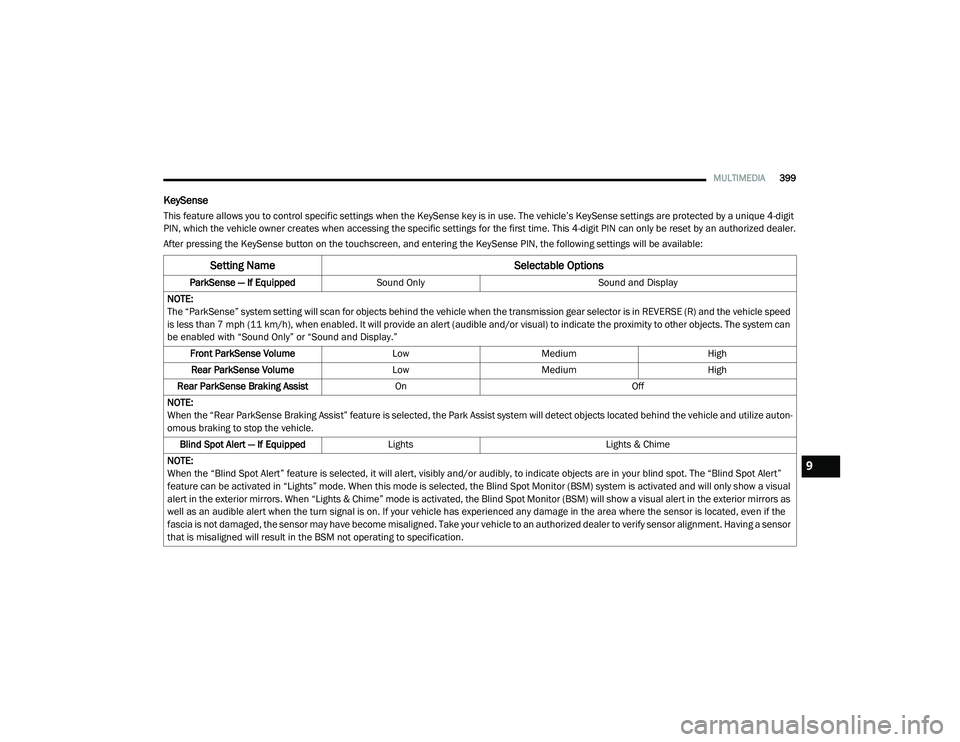
KeySense
This feature allows you to control specific settings when the KeySense key is in use. The vehicle’s KeySense settings are protected by a unique 4-digit
PIN, which the vehicle owner creates when accessing the specific settings for the first time. This 4-digit PIN can only be reset by an authorized dealer.
After pressing the KeySense button on the touchscreen, and entering the KeySense PIN, the following settings will be available:
Setting Name Selectable Options
ParkSense — If EquippedSound Only Sound and Display
NOTE:
The “ParkSense” system setting will scan for objects behind the vehicle when the transmission gear selector is in REVERSE (R) and the vehicle speed
is less than 7 mph (11 km/h), when enabled. It will provide an alert (audible and/or visual) to indicate the proximity to other objects. The system can be enabled with “Sound Only” or “Sound and Display.”
Front ParkSense Volume LowMedium High
Rear ParkSense Volume LowMedium High
Rear ParkSense Braking Assist On Off
NOTE:
When the “Rear ParkSense Braking Assist” feature is selected, the Park Assist system will detect objects located behind the vehicle and utilize auton -
omous braking to stop the vehicle.
Blind Spot Alert — If Equipped Lights Lights & Chime
NOTE:
When the “Blind Spot Alert” feature is selected, it will alert, visibly and/or audibly, to indicate objects are in your blind spot. The “Blind Spot Alert”
feature can be activated in “Lights” mode. When this mode is selected, the Blind Spot Monitor (BSM) system is activated and will only show a visual
alert in the exterior mirrors. When “Lights & Chime” mode is activated, the Blind Spot Monitor (BSM) will show a visual alert in the exterior mirrors as
well as an audible alert when the turn signal is on. If your vehicle has experienced any damage in the area where the sensor is located, even if the
fascia is not damaged, the sensor may have become misaligned. Take your vehicle to an authorized dealer to verify sensor alignment. Having a sensor
that is misaligned will result in the BSM not operating to specification.
9
20_RU_OM_EN_US_t.book Page 399
Page 406 of 516
404MULTIMEDIA
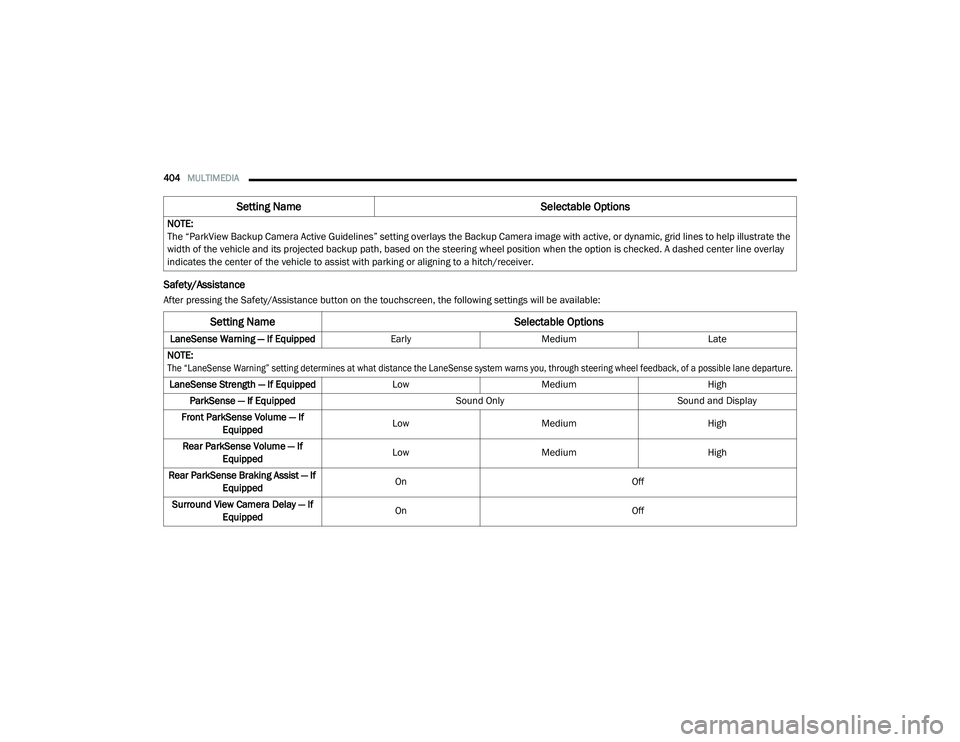
Safety/Assistance
After pressing the Safety/Assistance button on the touchscreen, the following settings will be available:NOTE:
The “ParkView Backup Camera Active Guidelines” setting overlays the Backup Camera image with active, or dynamic, grid lines to help illustrate the
width of the vehicle and its projected backup path, based on the steering wheel position when the option is checked. A dashed center line overlay
indicates the center of the vehicle to assist with parking or aligning to a hitch/receiver.
Setting Name
Selectable Options
Setting NameSelectable Options
LaneSense Warning — If EquippedEarlyMedium Late
NOTE:
The “LaneSense Warning” setting determines at what distance the LaneSense system warns you, through steering wheel feedback, of a possible lane departure.
LaneSense Strength — If Equipped LowMedium High
ParkSense — If Equipped Sound OnlySound and Display
Front ParkSense Volume — If Equipped Low
Medium High
Rear ParkSense Volume — If Equipped Low
Medium High
Rear ParkSense Braking Assist — If Equipped On
Off
Surround View Camera Delay — If Equipped On
Off
20_RU_OM_EN_US_t.book Page 404
Page 418 of 516
416MULTIMEDIA
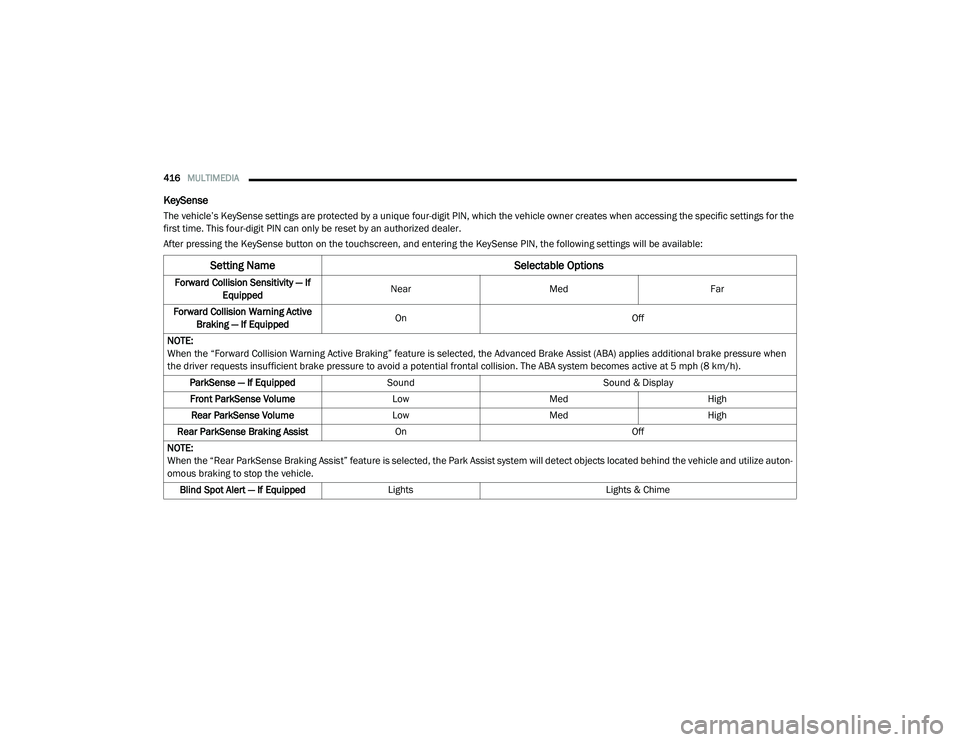
KeySense
The vehicle’s KeySense settings are protected by a unique four-digit PIN, which the vehicle owner creates when accessing the specific settings for the
first time. This four-digit PIN can only be reset by an authorized dealer.
After pressing the KeySense button on the touchscreen, and entering the KeySense PIN, the following settings will be available:
Setting Name Selectable Options
Forward Collision Sensitivity — If
Equipped Near
Med Far
Forward Collision Warning Active Braking — If Equipped On
Off
NOTE:
When the “Forward Collision Warning Active Braking” feature is selected, the Advanced Brake Assist (ABA) applies additional brake pressure when
the driver requests insufficient brake pressure to avoid a potential frontal collision. The ABA system becomes active at 5 mph (8 km/h). ParkSense — If Equipped Sound Sound & Display
Front ParkSense Volume LowMed High
Rear ParkSense Volume LowMed High
Rear ParkSense Braking Assist On Off
NOTE:
When the “Rear ParkSense Braking Assist” feature is selected, the Park Assist system will detect objects located behind the vehicle and utilize auton -
omous braking to stop the vehicle.
Blind Spot Alert — If Equipped Lights Lights & Chime
20_RU_OM_EN_US_t.book Page 416
Page 426 of 516
424MULTIMEDIA
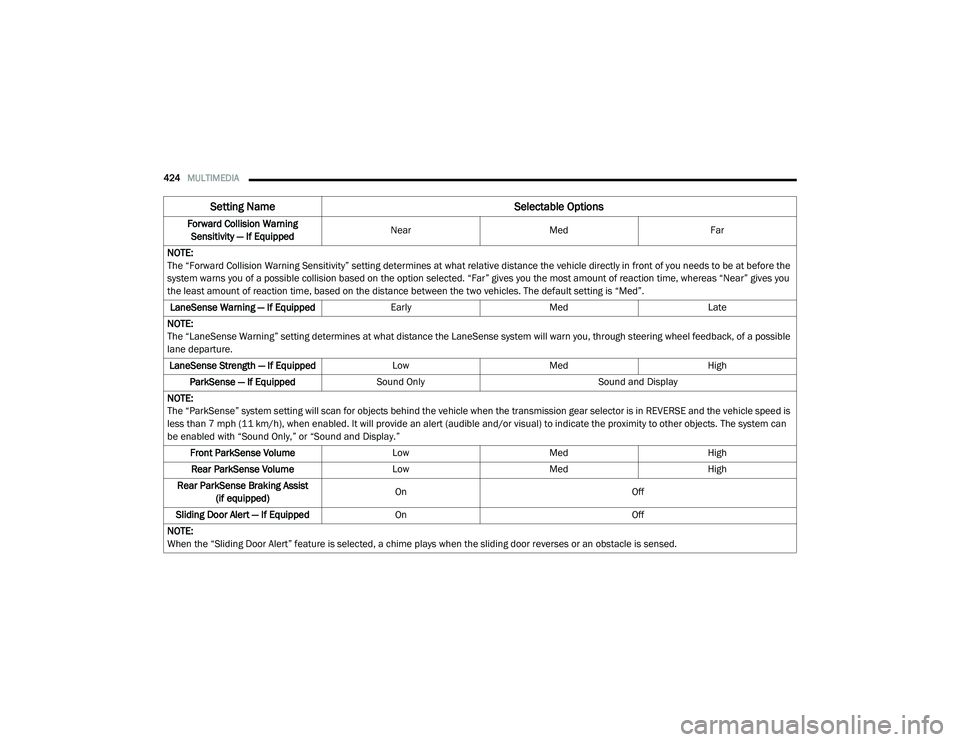
Forward Collision Warning
Sensitivity — If Equipped Near
Med Far
NOTE:
The “Forward Collision Warning Sensitivity” setting determines at what relative distance the vehicle directly in front of you needs to be at before the
system warns you of a possible collision based on the option selected. “Far” gives you the most amount of reaction time, whereas “Near” gives you
the least amount of reaction time, based on the distance between the two vehicles. The default setting is “Med”. LaneSense Warning — If Equipped EarlyMedLate
NOTE:
The “LaneSense Warning” setting determines at what distance the LaneSense system will warn you, through steering wheel feedback, of a possible
lane departure. LaneSense Strength — If Equipped LowMed High
ParkSense — If Equipped Sound Only Sound and Display
NOTE:
The “ParkSense” system setting will scan for objects behind the vehicle when the transmission gear selector is in REVERSE and the vehicle speed is
less than 7 mph (11 km/h), when enabled. It will provide an alert (audible and/or visual) to indicate the proximity to other objects. The system can
be enabled with “Sound Only,” or “Sound and Display.” Front ParkSense Volume LowMed High
Rear ParkSense Volume LowMed High
Rear ParkSense Braking Assist (if equipped) On
Off
Sliding Door Alert — If Equipped On Off
NOTE:
When the “Sliding Door Alert” feature is selected, a chime plays when the sliding door reverses or an obstacle is sensed.
Setting Name Selectable Options
20_RU_OM_EN_US_t.book Page 424