radio controls CHRYSLER PACIFICA 2020 User Guide
[x] Cancel search | Manufacturer: CHRYSLER, Model Year: 2020, Model line: PACIFICA, Model: CHRYSLER PACIFICA 2020Pages: 516, PDF Size: 28.69 MB
Page 477 of 516
MULTIMEDIA475
General Information
The following regulatory statement applies to all
Radio Frequency (RF) devices equipped in this
vehicle:
This device complies with Part 15 of the FCC
Rules and with Innovation, Science and
Economic Development Canada license-exempt
RSS standard(s). Operation is subject to the
following two conditions:
1. This device may not cause harmful
interference, and
2. This device must accept any interference received, including interference that may
cause undesired operation.
Brand: Delphi
Model: FCA REMOTE
Le présent appareil est conforme aux CNR
d`Innovation, Science and Economic
Development applicables aux appareils radio
exempts de licence. L'exploitation est autorisée
aux deux conditions suivantes:
1. l'appareil ne doit pas produire de
brouillage, et
2. l'utilisateur de l'appareil doit accepter tout brouillage radioélectrique subi, même si le
brouillage est susceptible d'en compro -
mettre le fonctionnement.
Marque: Delphi
Modèle: FCA REMOTE
La operación de este equipo está sujeta a las
siguientes dos condiciones:
1. es posible que este equipo o dispositivo no cause interferencia perjudicial y
2. este equipo o dispositivo debe aceptar cualquier interferencia, incluyendo la que
pueda causar su operación no deseada.
Marca: Delphi
Modelo: FCA REMOTE
NOTE:
Changes or modifications not expressly
approved by the party responsible for compli -
ance could void the user’s authority to operate
the equipment.
Play A DVD/Blu-ray™ Or USB Media File
From Uconnect System
1. Insert a Blu-ray™ Disc or DVD disc into the disc player with the label facing up, or
insert a USB drive into rear Video USB port.
NOTE:
The DVD/Blu-ray™ Disc player and Video USB
port are both located under the radio controls in
the instrument panel.
2. Press the Uconnect Theater button on the radio touchscreen.
Refer to “Accessing The System From The
Uconnect System” in this section for further
information.
3. Select Disc or USB from the source controls (i.e. select the desired source from the
“Select Input 1” or “Select Input 2” menu
for the respective screen).
9
20_RU_OM_EN_US_t.book Page 475
Page 478 of 516
476MULTIMEDIA
4. For DVD/Blu-ray™ disc — press the Press to
Enter feature in the Movie Snapshot on the
radio touchscreen, then press “OK” on the
following screen. The steps to start a DVD
are dependent on the steps required by that
specific DVD. For USB Media Files — Press
“Music”, “Movie”, or “Folders”, then select
media title from list(s).
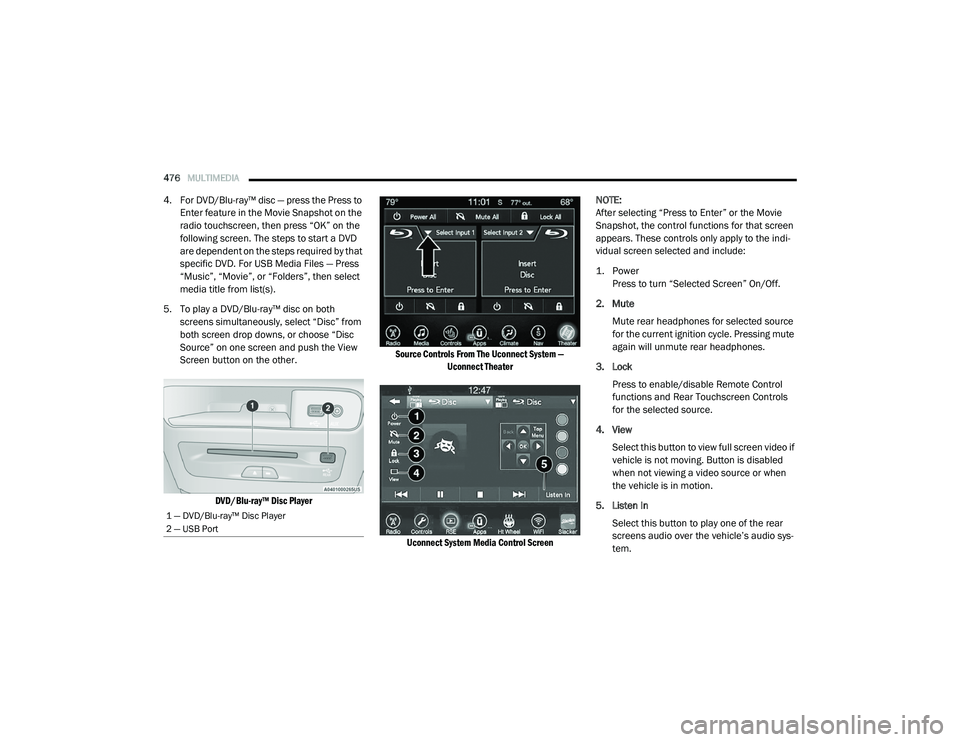
5. To play a DVD/Blu-ray™ disc on both screens simultaneously, select “Disc” from
both screen drop downs, or choose “Disc
Source” on one screen and push the View
Screen button on the other.
DVD/Blu-ray™ Disc Player Source Controls From The Uconnect System —
Uconnect Theater
Uconnect System Media Control Screen
NOTE:
After selecting “Press to Enter” or the Movie
Snapshot, the control functions for that screen
appears. These controls only apply to the indi
-
vidual screen selected and include:
1. Power
Press to turn “Selected Screen” On/Off.
2. Mute Mute rear headphones for selected source
for the current ignition cycle. Pressing mute
again will unmute rear headphones.
3. Lock Press to enable/disable Remote Control
functions and Rear Touchscreen Controls
for the selected source.
4. View Select this button to view full screen video if
vehicle is not moving. Button is disabled
when not viewing a video source or when
the vehicle is in motion.
5. Listen In Select this button to play one of the rear
screens audio over the vehicle’s audio sys -
tem.
1 — DVD/Blu-ray™ Disc Player
2 — USB Port
20_RU_OM_EN_US_t.book Page 476
Page 479 of 516
MULTIMEDIA477
NOTE:
To view video content on the radio screen, bring
the vehicle to a stop.
Disc Menu
When listening to a CD Audio disc, CD Data disc,
DVD, or Blu-ray™, pushing the remote control’s
Arrow buttons will navigate the cursor on the
rear touchscreen in the desired direction, on
whichever touchscreen is selected. The UP,
DOWN, LEFT, and RIGHT Arrow buttons, and the
OK and MENU buttons on the remote, along
with the corresponding buttons overlaid on the
radio touchscreen, can be used to navigate the
disc menu when it appears. This can be used to
select specific chapters in a movie, to navigate
special features, or to play the movie from the
menu.
NOTE:
Inserting a disc into the player will “auto play” the
disc if already in the “Disc" source menu on the
rear screens, and the disc supports “auto play.”
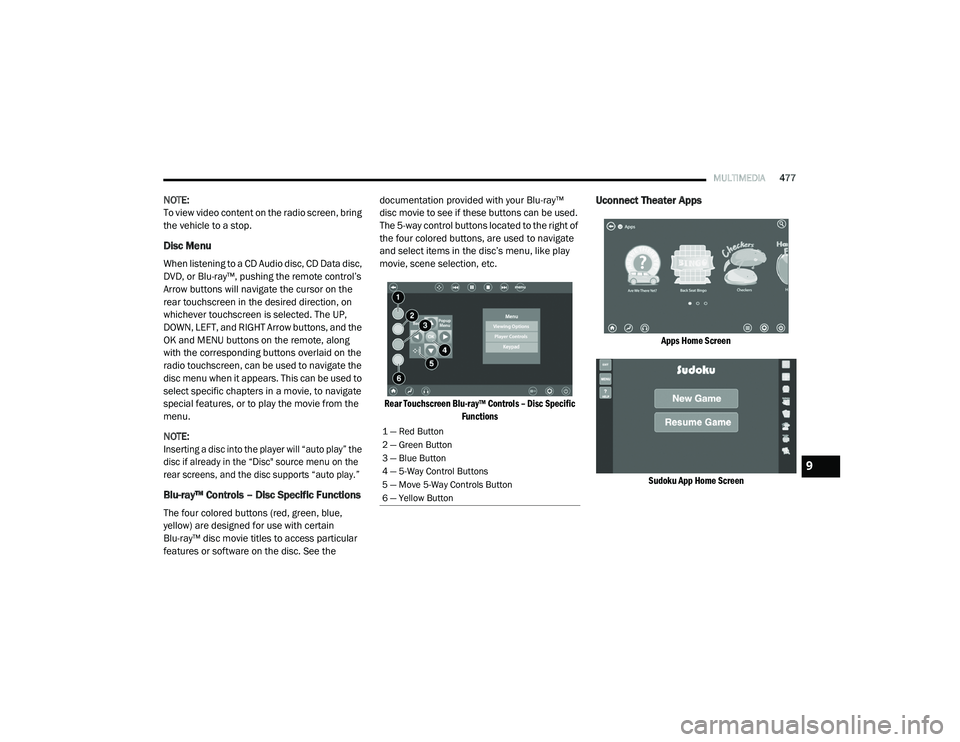
Blu-ray™ Controls – Disc Specific Functions
The four colored buttons (red, green, blue,
yellow) are designed for use with certain
Blu-ray™ disc movie titles to access particular
features or software on the disc. See the documentation provided with your Blu-ray™
disc movie to see if these buttons can be used.
The 5-way control buttons located to the right of
the four colored buttons, are used to navigate
and select items in the disc’s menu, like play
movie, scene selection, etc.
Rear Touchscreen Blu-ray™ Controls – Disc Specific Functions
Uconnect Theater Apps
Apps Home Screen
Sudoku App Home Screen
1 — Red Button
2 — Green Button
3 — Blue Button
4 — 5-Way Control Buttons
5 — Move 5-Way Controls Button
6 — Yellow Button
9
20_RU_OM_EN_US_t.book Page 477
Page 481 of 516
MULTIMEDIA479
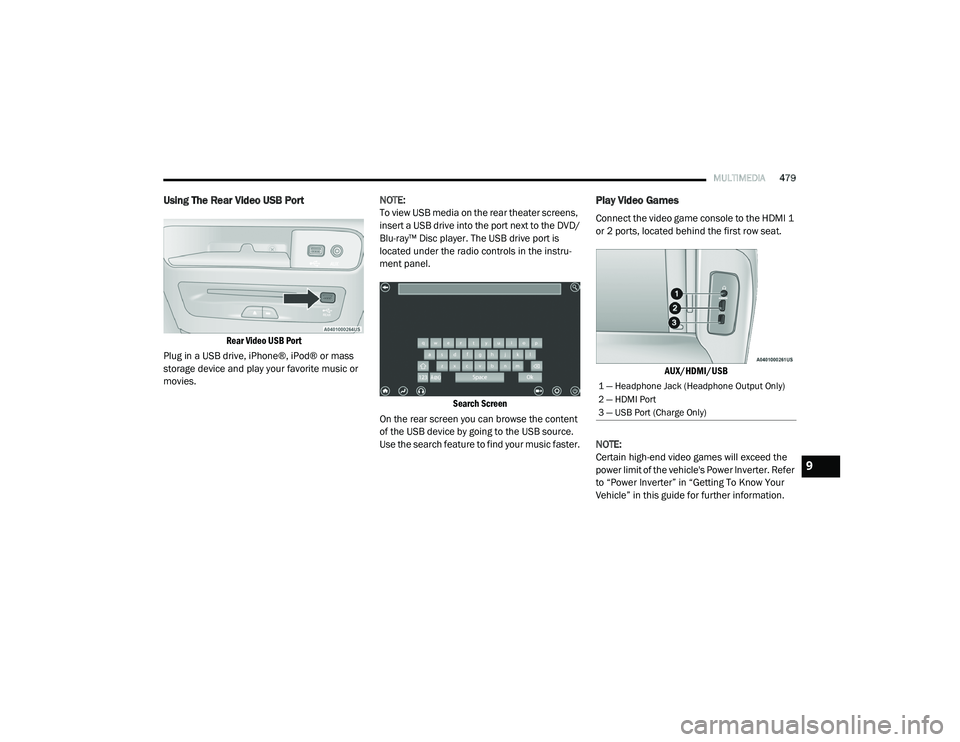
Using The Rear Video USB Port
Rear Video USB Port
Plug in a USB drive, iPhone®, iPod® or mass
storage device and play your favorite music or
movies. NOTE:
To view USB media on the rear theater screens,
insert a USB drive into the port next to the DVD/
Blu-ray™ Disc player. The USB drive port is
located under the radio controls in the instru
-
ment panel.
Search Screen
On the rear screen you can browse the content
of the USB device by going to the USB source.
Use the search feature to find your music faster.
Play Video Games
Connect the video game console to the HDMI 1
or 2 ports, located behind the first row seat.
AUX/HDMI/USB
NOTE:
Certain high-end video games will exceed the
power limit of the vehicle's Power Inverter. Refer
to “Power Inverter” in “Getting To Know Your
Vehicle” in this guide for further information.
1 — Headphone Jack (Headphone Output Only)
2 — HDMI Port
3 — USB Port (Charge Only)
9
20_RU_OM_EN_US_t.book Page 479
Page 491 of 516
MULTIMEDIA489
Cinavia
"Cinavia Notice This product uses Cinavia
technology to limit the use of unauthorized
copies of some commercially-produced film and
videos and their soundtracks. When a
prohibited use of an unauthorized copy is
detected, a message will be displayed and
playback or copying will be interrupted. More
information about Cinavia technology is
provided at the Cinavia Online Consumer
Information Center at http://www.cinavia.com/
. To request additional information about
Cinavia by mail, send a postcard with your
mailing address to: Cinavia Consumer
Information Center, P.O. Box 86851, San Diego,
CA, 92138, USA.” “This product incorporates
proprietary technology under license from
Verance Corporation and is protected by US
Patent 7,369,677 and other US and worldwide
patents issued and pending as well as copyright
and trade secret protection for certain aspects
of such technology. Cinavia is a trademark of
Verance Corporation. Copyright 2004-2012
Verance Corporation. All rights reserved by
Verance. Reverse engineering or disassembly is
prohibited.
General Information
The following regulatory statement applies to all
Radio Frequency (RF) devices equipped in this
vehicle:
This device complies with Part 15 of the FCC
Rules and with Innovation, Science and
Economic Development Canada license-exempt
RSS standard(s). Operation is subject to the
following two conditions:
1. This device may not cause harmful
interference, and
2. This device must accept any interference received, including interference that may
cause undesired operation.
Le présent appareil est conforme aux CNR
d`Innovation, Science and Economic
Development applicables aux appareils radio exempts de licence. L'exploitation est autorisée
aux deux conditions suivantes:
1. l'appareil ne doit pas produire de
brouillage, et
2. l'utilisateur de l'appareil doit accepter tout brouillage radioélectrique subi, même si le
brouillage est susceptible d'en compro -
mettre le fonctionnement.
La operación de este equipo está sujeta a las
siguientes dos condiciones:
1. es posible que este equipo o dispositivo no cause interferencia perjudicial y
2. este equipo o dispositivo debe aceptar cualquier interferencia, incluyendo la que
pueda causar su operación no deseada.
NOTE:
Changes or modifications not expressly
approved by the party responsible for compli -
ance could void the user’s authority to operate
the equipment.
WARNING!
Use of controls or adjustments or
performance of procedures other than those
specified herein may result in hazardous
radiation exposure.
9
20_RU_OM_EN_US_t.book Page 489
Page 511 of 516
509
Power Brakes
....................................................... 388Inverter...................................................... 119Mirrors......................................................... 61Outlet (Auxiliary Electrical Outlet).............. 118Seats.................................................... 48, 50Steering..................................................... 234Power SeatsDown........................................................... 49Forward....................................................... 49Rearward..................................................... 49Up................................................................ 49Power Sliding DoorOn / Off Switch................................... 30, 100Pregnant Women And Seat Belts...................180Preparation For Jacking................................. 321PretensionersSeat Belts.................................................. 181
R
Radial Ply Tires.............................................. 376Radiator Cap (Coolant Pressure Cap)............ 363RadioPresets...................................................... 440Radio Operation.................................. 438, 491Rear Air Conditioning................................ 78, 87Rear Camera................................................. 284Rear Cross Path............................................. 162Rear ParkSense System...................... 254, 259Rear Seat Removal.......................................... 37
Rear View......................................................... 59Reclining Front Seats....................................... 36Recreational Towing..................................... 298Reformulated Gasoline................................. 390Refrigerant.................................................... 354Release, Hood................................................. 97Reminder, Lights On........................................ 63Reminder, Seat Belt...................................... 173Remote ControlStarting System........................................... 19Remote Keyless EntryArm The Alarm............................................. 24Disarm The Alarm........................................ 24Programming Additional Key Fobs........ 16, 23Remote StartingExit Remote Start Mode.............................. 21Uconnect Customer Programmable Features.................................................. 21Uconnect Settings....................................... 21Remote Starting System.................................. 19Replacement Bulbs...................................... 306Replacement Keys........................................... 23Replacement Tires........................................ 377Reporting Safety Defects.............................. 501Restraints, Child........................................... 198Restraints, Head.............................................. 55Roof Luggage Rack....................................... 121Rotation, Tires.............................................. 382
S
Safety Checks Inside Vehicle........................ 217Safety Checks Outside Vehicle...................... 218Safety Defects, Reporting............................. 501Safety Information, Tire................................. 366Safety Tips.................................................... 216Safety, Exhaust Gas...................................... 216Schedule, Maintenance................................ 345Seat Belt Reminder....................................... 143Seat Belts............................................ 172, 217Adjustable Shoulder Belt.......................... 177Adjustable Upper Shoulder Anchorage..... 177Adjustable Upper Shoulder Belt Anchorage............................................ 177Automatic Locking Retractor (ALR)........... 181Child Restraints........................................ 198Energy Management Feature................... 181Extender................................................... 180Front Seat............................... 172, 174, 175Inspection................................................. 217Lap/Shoulder Belt Operation.................... 175Lap/Shoulder Belt Untwisting................... 176Lap/Shoulder Belts................................... 174Operating Instructions.............................. 175Pregnant Women...................................... 180Pretensioners........................................... 181Rear Seat.................................................. 174Reminder.................................................. 17311
20_RU_OM_EN_US_t.book Page 509
Page 512 of 516
510
Seat Belt Extender
.................................... 180Seat Belt Pretensioner.............................. 181Untwisting Procedure................................ 176Seat Belts Maintenance................................ 386Seats................................................. 35, 49, 53Adjustment............................. 35, 36, 37, 49Bench.......................................................... 37Heated........................................................ 53Memory....................................................... 34Power................................................... 48, 50Rear Folding................................................ 35Reclining..................................................... 36Seatback Release................................ 35, 37Stow ‘n Go (Fold in Floor)............................ 43Tilting................................................... 35, 37Security Alarm............................................... 144Arm The System.......................................... 24Disarm The System..................................... 24Selection Of Coolant (Antifreeze)...................394Sentry Key Key Programming........................................ 23Sentry Key (Immobilizer).................................. 22Sentry Key Replacement................................. 23Service Assistance......................................... 499Service Contract............................................ 500Service Manuals............................................ 502ShiftingAutomatic Transmission............................ 230Shoulder Belts............................................... 174Side View Mirror Adjustment........................... 59
Signals, Turn........................ 63, 149, 218, 309Siri................................................................ 496Sirius Satellite Radio..................................... 440Favorites................................................... 442Replay...................................................... 442SiriusXM Satellite RadioBrowse in SXM......................................... 443Favorites................................................... 442Replay...................................................... 442SmartBeams.................................................... 64Snow Chains (Tire Chains)............................ 382Snow Tires.................................................... 379Spare Tire Changing..................................... 320Spare Tire Stowage....................................... 330Spare Tires................................. 320, 379, 380Spark Plugs................................................... 394SpecificationsOil............................................................. 394Speed ControlAccel/Decel (ACC Only)............................. 243Cancel...................................................... 239Resume.................................................... 239Speed Control (Cruise Control)............ 237, 239Starting...................................................19, 219Button......................................................... 18Cold Weather............................................ 223Engine Fails To Start................................. 223Remote........................................................ 19Starting And Operating.................................. 219Starting Procedures...................................... 219
Steering........................................................ 234Tilt Column...................................................58Wheel, Heated.............................................58Wheel, Tilt....................................................58Steering Wheel Audio Controls...................... 467Steering Wheel Mounted Sound System
Controls........................................................ 467Storage, Vehicle...............................................91Store Radio Presets...................................... 440Stow ‘n Go (Fold In Floor) Seats.......................43Stow ‘n Vac................................................... 103Stuck, Freeing............................................... 341Sun Roof..........................................................95Sunglasses Storage...................................... 120Supplemental Restraint System – Air Bag.... 185Sway Control, Trailer..................................... 158Synthetic Engine Oil...................................... 352System, Remote Starting.................................19
T
Telescoping Steering Column...........................58Temperature Control, Automatic (ATC).............90Tie Down Hooks, Cargo................................. 103Tilt Steering Column.........................................58Time DelayHeadlight.....................................................63Tire And Loading Information Placard........... 371Tire Markings................................................ 366Tire Safety Information.................................. 366Tire Service Kit.............................................. 330
20_RU_OM_EN_US_t.book Page 510