automatic transmission CHRYSLER PACIFICA 2020 Owner's Manual
[x] Cancel search | Manufacturer: CHRYSLER, Model Year: 2020, Model line: PACIFICA, Model: CHRYSLER PACIFICA 2020Pages: 516, PDF Size: 28.69 MB
Page 238 of 516

236STARTING AND OPERATING
Other Factors Which Can Inhibit Autostop
Include:
Accelerator pedal input.
Engine temp too high.
5 mph (8 km/h) threshold not achieved from
previous AUTOSTOP.
Steering angle beyond threshold.
ACC is on and speed is set.
It may be possible for the vehicle to be driven
several times without the Stop/Start system
going into a Stop/Start READY state under more
extreme conditions of the items listed above.
To Start The Engine While In Auto Stop/Start
While in a forward gear, the engine will start
when the brake pedal is released or the throttle
pedal is depressed. The transmission will
automatically re-engage upon engine restart.
Conditions That Will Cause The Engine To Start
Automatically While In Auto Stop/Start:
The transmission selector is moved out of
DRIVE.
To maintain cabin temperature comfort.
HVAC is set to full defrost mode.
HVAC system temperature or fan speed is
manually adjusted.
Battery voltage drops too low. During this
time a message will display "Stop/Start Not
Ready Battery Charging".
Low brake vacuum (e.g. after several brake
pedal applications).
Stop/Start OFF switch is pushed.
A Stop/Start system error occurs.
To Manually Turn Off The Stop/Start System
Stop/Start OFF Button
1. Push the Stop/Start OFF switch (located on
the instrument panel). The light on the
switch will illuminate.
2. The “STOP/START OFF” message will appear in the instrument cluster display.
Refer to “Instrument Cluster Display” in
“Getting To Know Your Instrument Panel”
for further information.
3. At the next vehicle stop (after turning off the Stop/Start system) the engine will not be
stopped.
4. The Stop/Start system will reset itself back to an ON condition every time the ignition is
turned off and back on.
Automatic Shutdown
This vehicle is equipped with an automatic
shutdown feature. If the vehicle is left in READY
mode (vehicle running) with the gear selector in
PARK for one hour after the driver exits, this
feature will automatically turn the vehicle off.
Notifications have been added into this feature
to raise awareness of the timed event:In the interior of the vehicle, the instrument
cluster will display “Ready To Drive”, and will
be accompanied by three audible chimes
20_RU_OM_EN_US_t.book Page 236
Page 239 of 516
STARTING AND OPERATING237
while exiting. These interior warnings will
occur regardless of whether the key fob
remains in the vehicle or is removed.
For the exterior of the vehicle, the horn will
sound three times if the fob is removed from
the vehicle and the vehicle is in the “READY”
mode.
Please consider this feature when intentionally
running the vehicle for extended periods of time
over one hour. To restart the vehicle, follow the
normal vehicle starting process.
NOTE:
If the vehicle is left in the ACC or RUN (engine
not running) position and the transmission is in
PARK, the system will automatically time out
(shut down) after an initial 30 minutes of inac -
tivity, followed by the additional amount of time
for power accessory delay selected in the radio
settings menu. Once the vehicle times out, it will
switch to the OFF position.
To Manually Turn On The Stop/Start System
After turning off the Stop/Start system, push
the Stop/Start OFF switch again (located on the
instrument panel). The light on the switch will
turn off.
System Malfunction
If there is a malfunction in the Stop/Start
system, the system will not shut down the
engine. A “SERVICE STOP/START SYSTEM”
message will appear in the instrument cluster
display and the Stop/Start telltale will remain
yellow. Refer to “Instrument Cluster Display” in
“Getting To Know Your Instrument Panel” for
further information.
If the “SERVICE STOP/START SYSTEM”
message appears in the instrument cluster
display, have the system checked by an
authorized dealer.
SPEED CONTROL — IF EQUIPPED
When engaged, the Speed Control takes over
accelerator operations at speeds greater than
25 mph (40 km/h).
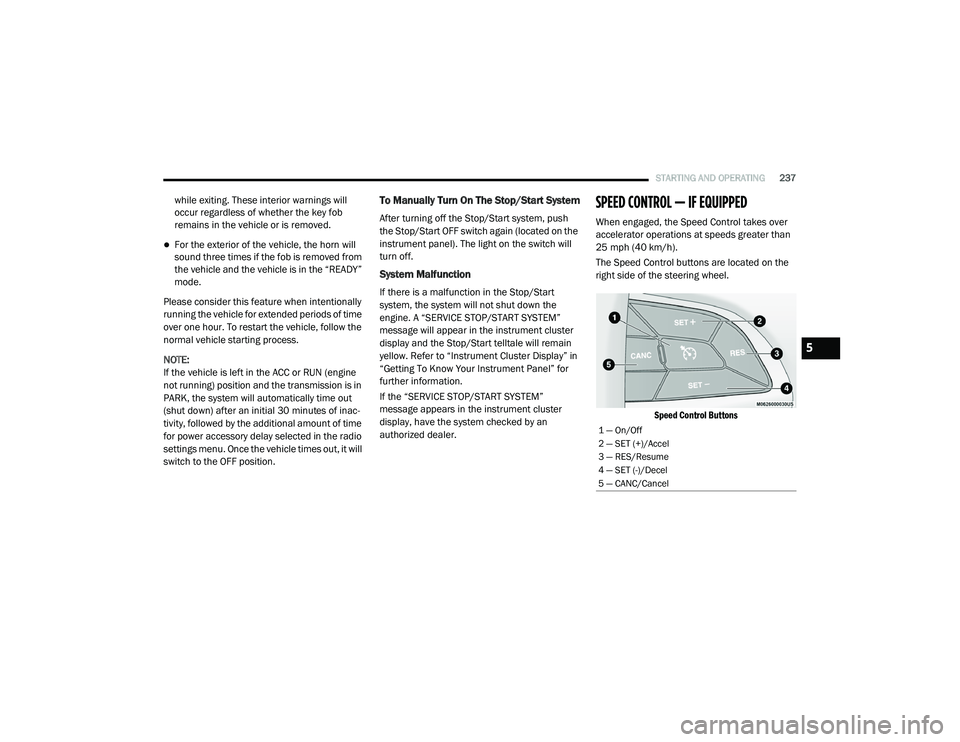
The Speed Control buttons are located on the
right side of the steering wheel.
Speed Control Buttons
1 — On/Off
2 — SET (+)/Accel
3 — RES/Resume
4 — SET (-)/Decel
5 — CANC/Cancel
5
20_RU_OM_EN_US_t.book Page 237
Page 243 of 516
STARTING AND OPERATING241
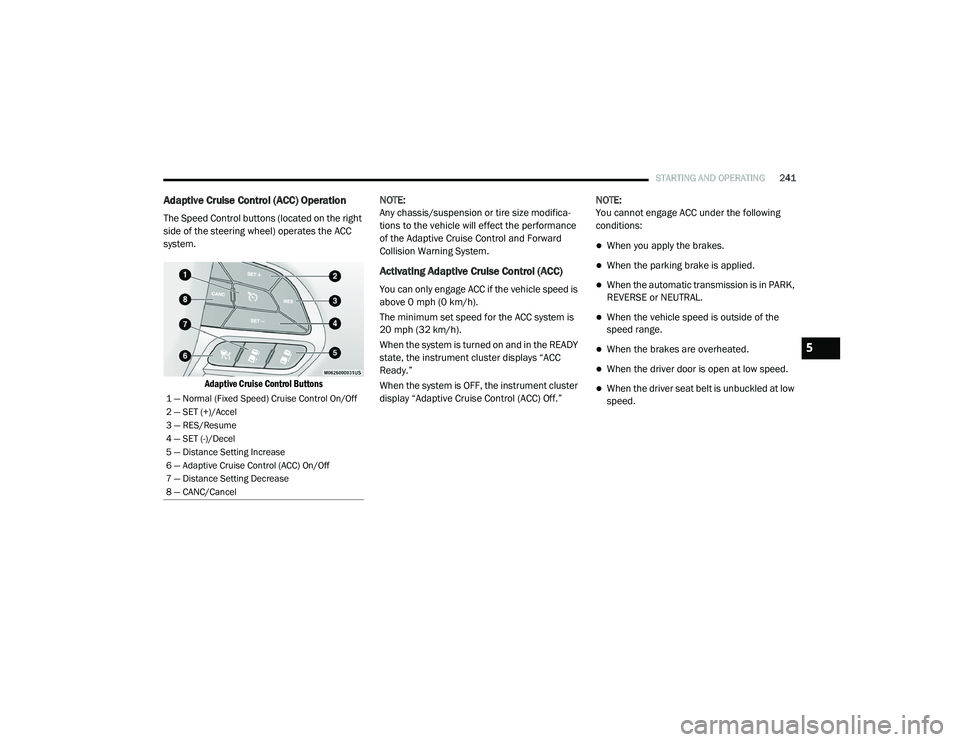
Adaptive Cruise Control (ACC) Operation
The Speed Control buttons (located on the right
side of the steering wheel) operates the ACC
system.
Adaptive Cruise Control Buttons
NOTE:
Any chassis/suspension or tire size modifica
-
tions to the vehicle will effect the performance
of the Adaptive Cruise Control and Forward
Collision Warning System.
Activating Adaptive Cruise Control (ACC)
You can only engage ACC if the vehicle speed is
above 0 mph (0 km/h).
The minimum set speed for the ACC system is
20 mph (32 km/h).
When the system is turned on and in the READY
state, the instrument cluster displays “ACC
Ready.”
When the system is OFF, the instrument cluster
display “Adaptive Cruise Control (ACC) Off.” NOTE:
You cannot engage ACC under the following
conditions:
When you apply the brakes.
When the parking brake is applied.
When the automatic transmission is in PARK,
REVERSE or NEUTRAL.
When the vehicle speed is outside of the
speed range.
When the brakes are overheated.
When the driver door is open at low speed.
When the driver seat belt is unbuckled at low
speed.1 — Normal (Fixed Speed) Cruise Control On/Off
2 — SET (+)/Accel
3 — RES/Resume
4 — SET (-)/Decel
5 — Distance Setting Increase
6 — Adaptive Cruise Control (ACC) On/Off
7 — Distance Setting Decrease
8 — CANC/Cancel
5
20_RU_OM_EN_US_t.book Page 241
Page 256 of 516
254STARTING AND OPERATING
PARKSENSE REAR PARK ASSIST — IF
EQUIPPED
The ParkSense Rear Park Assist system
provides visual and audible indications of the
distance between the rear fascia and a
detected obstacle when backing up (e.g. during
a parking maneuver). If your vehicle is equipped
with an Automatic Transmission, the vehicle
brakes may be automatically applied and
released when performing a reverse parking
maneuver if the system detects a possible
collision with an obstacle.
NOTE:
The driver can override the automatic
braking function by pressing the gas pedal,
turning ParkSense off via ParkSense switch,
or changing the gear while the automatic
brakes are being applied.
Automatic brakes will not be available if ESC
is not available.
Automatic brakes will not be available if there
is a faulted condition detected with the Park -
Sense Park Assist system or the Braking
System Module.
The automatic braking function may not provide
enough vehicle deceleration to avoid colliding
with a detected obstacle depending on vehicle
speed, road conditions, and brake capability.
The automatic braking function may not be
applied fast enough for moving obstacles that
approach the rear of the vehicle from the left
and/or right sides.
The automatic braking function can be
enabled/disabled from the Customer-Program -
mable Features section of the Uconnect
System.
ParkSense will retain its last known configura -
tion state for the automatic braking function
through ignition cycles.
The automatic braking function is intended to
assist the driver in avoiding possible collisions
with detected obstacles when backing up in
REVERSE gear.
NOTE:
The driver is always responsible for
controlling the vehicle.
The system is provided to assist the driver
and not to substitute the driver.
The driver must stay in full control of the
vehicle's acceleration and braking and is
responsible for the vehicle's movements.
Refer to “ParkSense System Usage
Precautions” for limitations of this system and
recommendations.
ParkSense will retain the last system state
(enabled or disabled) from the last ignition cycle
when the ignition is changed to the ON/RUN
position.
ParkSense can be active only when the gear
selector is in REVERSE. If ParkSense is enabled
at this gear selector position, the system will
remain active until the vehicle speed is
increased to approximately 7 mph (11 km/h) or
above. When in REVERSE and above the
system's operating speed, a warning will appear
within the instrument cluster display indicating
the vehicle speed is too fast. The system will
become active again if the vehicle speed is
decreased to speeds less than approximately
6 mph (9 km/h).
20_RU_OM_EN_US_t.book Page 254
Page 261 of 516
STARTING AND OPERATING259
(Continued)
(Continued)
ParkSense should be disabled when the lift
-
gate is in the open position.
Use the ParkSense switch to turn the Park -
Sense system off if objects such as bicycle
carriers, trailer hitches, etc. are placed within
12 inches (30 cm) from the rear fascia/
bumper. Failure to do so can result in the
system misinterpreting a close object as a
sensor problem, causing the “PARKSENSE
UNAVAILABLE SERVICE REQUIRED” message
to be displayed in the instrument cluster
display.
PARKSENSE FRONT AND REAR PARK ASSIST
— IF EQUIPPED
The ParkSense Park Assist system provides
visual and audible indications of the distance
between the rear and/or front fascia and a
detected obstacle when backing up or moving
forward (e.g. during a parking maneuver). If your
vehicle is equipped with an Automatic
Transmission, the vehicle brakes may be
automatically applied and released when
performing a reverse parking maneuver if the
system detects a possible collision with an
obstacle.
WARNING!
Drivers must be careful when backing up
even when using ParkSense. Always check
carefully behind your vehicle, look behind
you, and be sure to check for pedestrians,
animals, other vehicles, obstructions, and
blind spots before backing up. You are
responsible for safety and must continue to
pay attention to your surroundings. Failure to
do so can result in serious injury or death.
Before using ParkSense, it is strongly
recommended that the ball mount and
hitch ball assembly is disconnected from
the vehicle when the vehicle is not used for
towing. Failure to do so can result in injury
or damage to vehicles or obstacles
because the hitch ball will be much closer
to the obstacle than the rear fascia when
the loudspeaker sounds the continuous
tone. Also, the sensors could detect the ball
mount and hitch ball assembly, depending
on its size and shape, giving a false indica -
tion that an obstacle is behind the vehicle.
CAUTION!
ParkSense is only a parking aid and it is
unable to recognize every obstacle,
including small obstacles. Parking curbs
might be temporarily detected or not
detected at all. Obstacles located above or
below the sensors will not be detected
when they are in close proximity.
WARNING! (Continued)
The vehicle must be driven slowly when
using ParkSense in order to be able to stop
in time when an obstacle is detected. It is
recommended that the driver looks over
his/her shoulder when using ParkSense.
CAUTION! (Continued)
5
20_RU_OM_EN_US_t.book Page 259
Page 293 of 516
STARTING AND OPERATING291
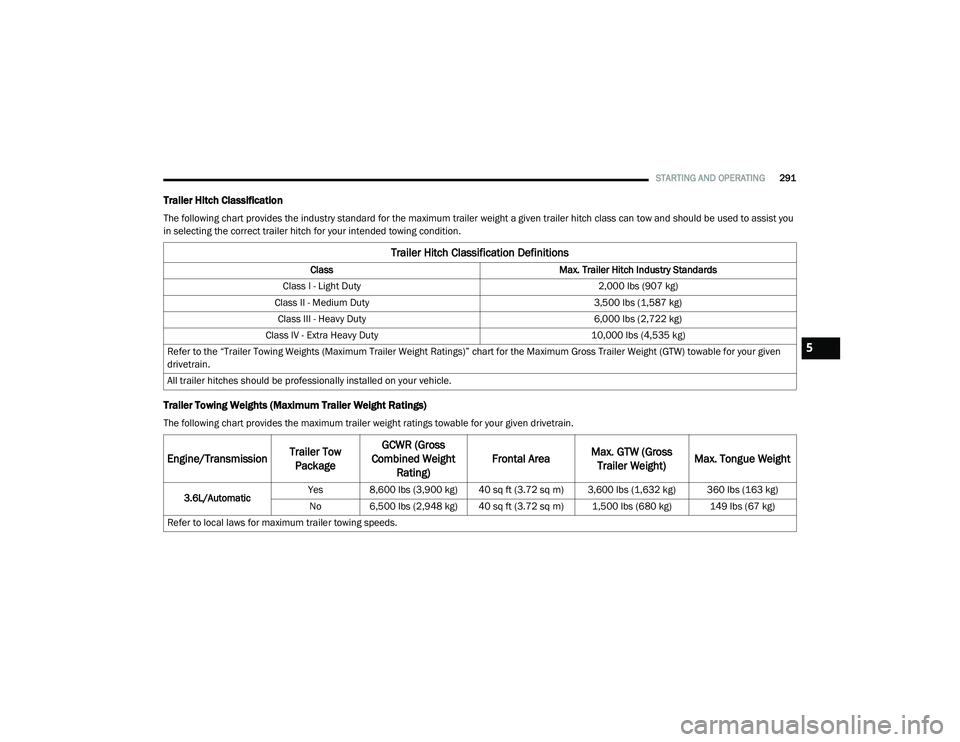
Trailer Hitch Classification
The following chart provides the industry standard for the maximum trailer weight a given trailer hitch class can tow and should be used to assist you
in selecting the correct trailer hitch for your intended towing condition.
Trailer Towing Weights (Maximum Trailer Weight Ratings)
The following chart provides the maximum trailer weight ratings towable for your given drivetrain.
Trailer Hitch Classification Definitions
Class Max. Trailer Hitch Industry Standards
Class I - Light Duty 2,000 lbs (907 kg)
Class II - Medium Duty 3,500 lbs (1,587 kg)
Class III - Heavy Duty 6,000 lbs (2,722 kg)
Class IV - Extra Heavy Duty 10,000 lbs (4,535 kg)
Refer to the “Trailer Towing Weights (Maximum Trailer Weight Ratings)” chart for the Maximum Gross Trailer Weight (GTW) towable for your given
drivetrain.
All trailer hitches should be professionally installed on your vehicle.
Engine/Transmission Trailer Tow
Package GCWR (Gross
Combined Weight Rating) Frontal Area
Max. GTW (Gross
Trailer Weight) Max. Tongue Weight
3.6L/Automatic Yes 8,600 lbs (3,900 kg) 40 sq ft (3.72 sq m) 3,600 lbs (1,632 kg) 360 lbs (163 kg)
No 6,500 lbs (2,948 kg) 40 sq ft (3.72 sq m) 1,500 lbs (680 kg) 149 lbs (67 kg)
Refer to local laws for maximum trailer towing speeds.
5
20_RU_OM_EN_US_t.book Page 291
Page 299 of 516
STARTING AND OPERATING297
Towing Tips
Before setting out on a trip, practice turning,
stopping, and backing up the trailer in an area
located away from heavy traffic.
Automatic Transmission
Select the DRIVE range when towing. The
transmission controls include a drive strategy to
avoid frequent shifting when towing. For
increased engine braking on steep downhill
grades, select the LOW range.
Speed Control — If Equipped
Do not use on hilly terrain or with heavy
loads.
When using the Speed Control, if you experi -
ence speed drops greater than 10 mph
(16 km/h), disengage until you can get back
to cruising speed.
Use Speed Control in flat terrain and with
light loads to maximize fuel efficiency.
Cooling System
To reduce potential for engine and transmission
overheating, take the following actions:
City Driving
In city traffic — while stopped, place the
transmission in NEUTRAL (N), but do not
increase engine idle speed.
Highway Driving
Reduce speed.
Temporarily turn off air conditioning.
5
20_RU_OM_EN_US_t.book Page 297
Page 339 of 516
IN CASE OF EMERGENCY337
JUMP STARTING
If your vehicle has a discharged battery it can be
jump started using a set of jumper cables and a
battery in another vehicle or by using a portable
battery booster pack. Jump starting can be
dangerous if done improperly so please follow
the procedures in this section carefully.
NOTE:
When using a portable battery booster pack
follow the manufacturer’s operating instruc -
tions and precautions.
Preparations For Jump Start
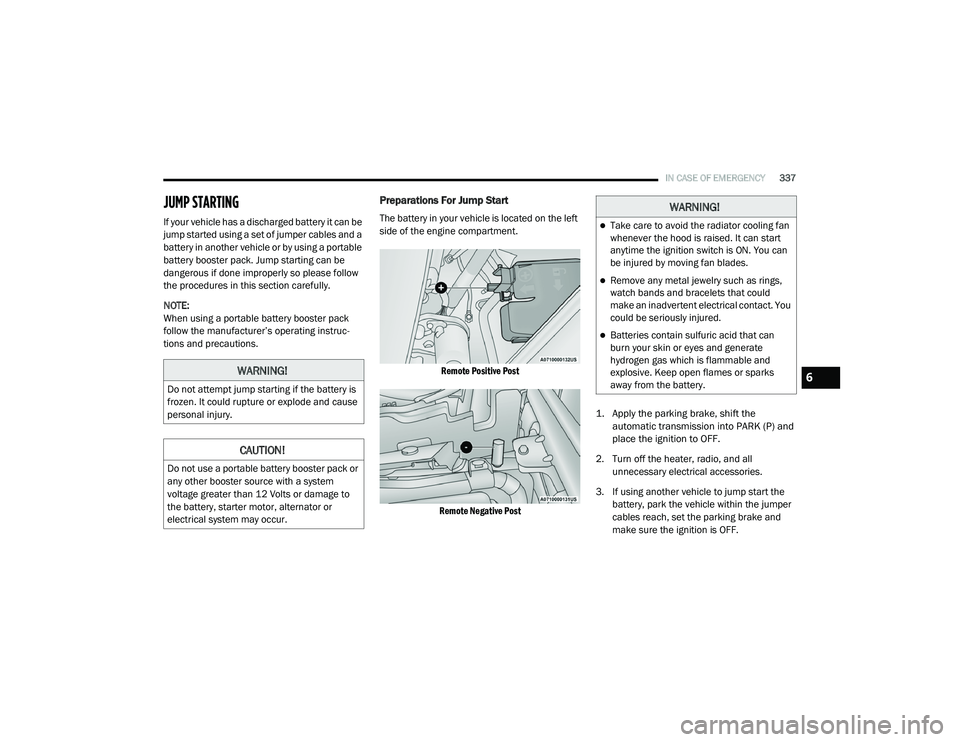
The battery in your vehicle is located on the left
side of the engine compartment.
Remote Positive Post
Remote Negative Post
1. Apply the parking brake, shift the
automatic transmission into PARK (P) and
place the ignition to OFF.
2. Turn off the heater, radio, and all unnecessary electrical accessories.
3. If using another vehicle to jump start the battery, park the vehicle within the jumper
cables reach, set the parking brake and
make sure the ignition is OFF.
WARNING!
Do not attempt jump starting if the battery is
frozen. It could rupture or explode and cause
personal injury.
CAUTION!
Do not use a portable battery booster pack or
any other booster source with a system
voltage greater than 12 Volts or damage to
the battery, starter motor, alternator or
electrical system may occur.
WARNING!
Take care to avoid the radiator cooling fan
whenever the hood is raised. It can start
anytime the ignition switch is ON. You can
be injured by moving fan blades.
Remove any metal jewelry such as rings,
watch bands and bracelets that could
make an inadvertent electrical contact. You
could be seriously injured.
Batteries contain sulfuric acid that can
burn your skin or eyes and generate
hydrogen gas which is flammable and
explosive. Keep open flames or sparks
away from the battery.
6
20_RU_OM_EN_US_t.book Page 337
Page 367 of 516
SERVICING AND MAINTENANCE365
Automatic Transmission
Selection Of Lubricant
It is important to use the proper transmission
fluid to ensure optimum transmission
performance and life. Use only the
manufacturer's specified transmission fluid.
Refer to “Fluids And Lubricants” in “Technical
Specifications” for fluid specifications. It is
important to maintain the transmission fluid at
the correct level using the recommended fluid. NOTE:
No chemical flushes should be used in any
transmission; only the approved lubricant
should be used.
Special Additives
The manufacturer strongly recommends
against using any special additives in the
transmission. Automatic Transmission Fluid
(ATF) is an engineered product and its
performance may be impaired by supplemental
additives. Therefore, do not add any fluid
additives to the transmission. Avoid using
transmission sealers as they may adversely
affect seals.
Fluid Level Check
The fluid level is preset at the factory and does
not require adjustment under normal operating
conditions. Routine fluid level checks are not
required; therefore the transmission has no
dipstick. An authorized dealer can check your
transmission fluid level using special service
tools. If you notice fluid leakage or transmission
malfunction, visit an authorized dealer
immediately to have the transmission fluid level
checked. Operating the vehicle with an
improper fluid level can cause severe
transmission damage.
Overfilling the brake fluid reservoir can
result in spilling brake fluid on hot engine
parts, causing the brake fluid to catch fire.
Brake fluid can also damage painted and
vinyl surfaces, care should be taken to
avoid its contact with these surfaces.
Do not allow petroleum based fluid to
contaminate the brake fluid. Brake seal
components could be damaged, causing
partial or complete brake failure. This could
result in a collision.
WARNING!
(Continued)
CAUTION!
Using a transmission fluid other than the
manufacturer’s recommended fluid may
cause deterioration in transmission shift
quality and/or torque converter shudder.
Refer to “Fluids And Lubricants” in “Technical
Specifications” for fluid specifications.
CAUTION!
Do not use chemical flushes in your
transmission as the chemicals can damage
your transmission components. Such damage
is not covered by the New Vehicle Limited
Warranty.
CAUTION!
If a transmission fluid leak occurs, visit an
authorized dealer immediately. Severe
transmission damage may occur. An
authorized dealer has the proper tools to
adjust the fluid level accurately.
7
20_RU_OM_EN_US_t.book Page 365
Page 398 of 516
396TECHNICAL SPECIFICATIONS
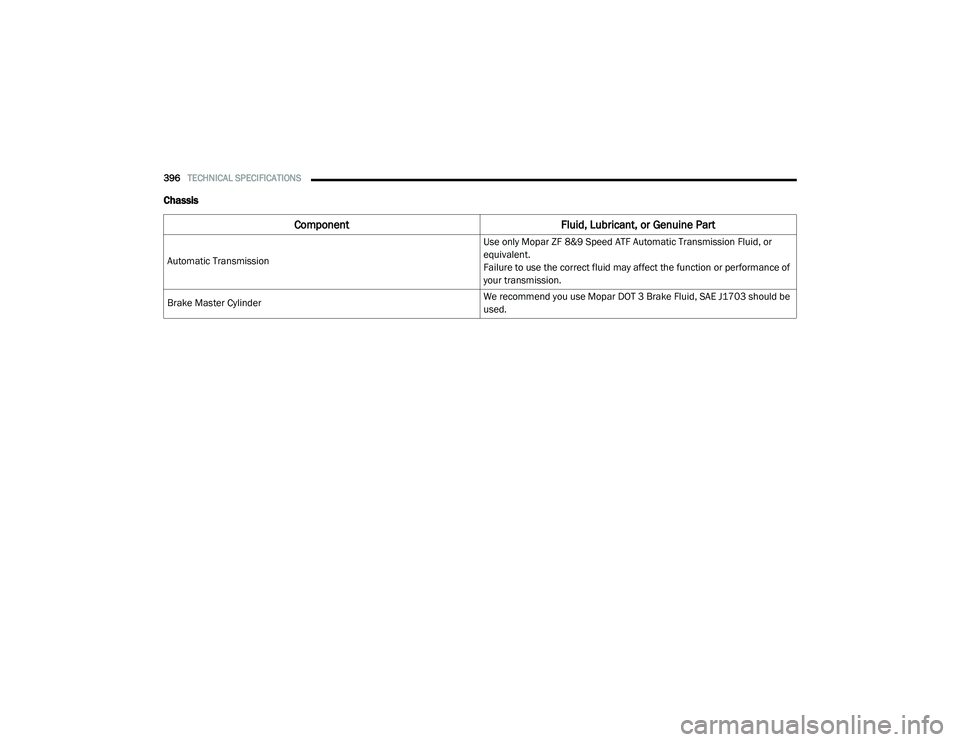
Chassis
Component Fluid, Lubricant, or Genuine Part
Automatic Transmission Use only Mopar ZF 8&9 Speed ATF Automatic Transmission Fluid, or
equivalent.
Failure to use the correct fluid may affect the function or performance of
your transmission.
Brake Master Cylinder We recommend you use Mopar DOT 3 Brake Fluid, SAE J1703 should be
used.
20_RU_OM_EN_US_t.book Page 396