lock CHRYSLER PACIFICA 2020 Owner's Manual
[x] Cancel search | Manufacturer: CHRYSLER, Model Year: 2020, Model line: PACIFICA, Model: CHRYSLER PACIFICA 2020Pages: 516, PDF Size: 28.69 MB
Page 34 of 516
32GETTING TO KNOW YOUR VEHICLE
Hands-Free Sliding Doors — If Equipped
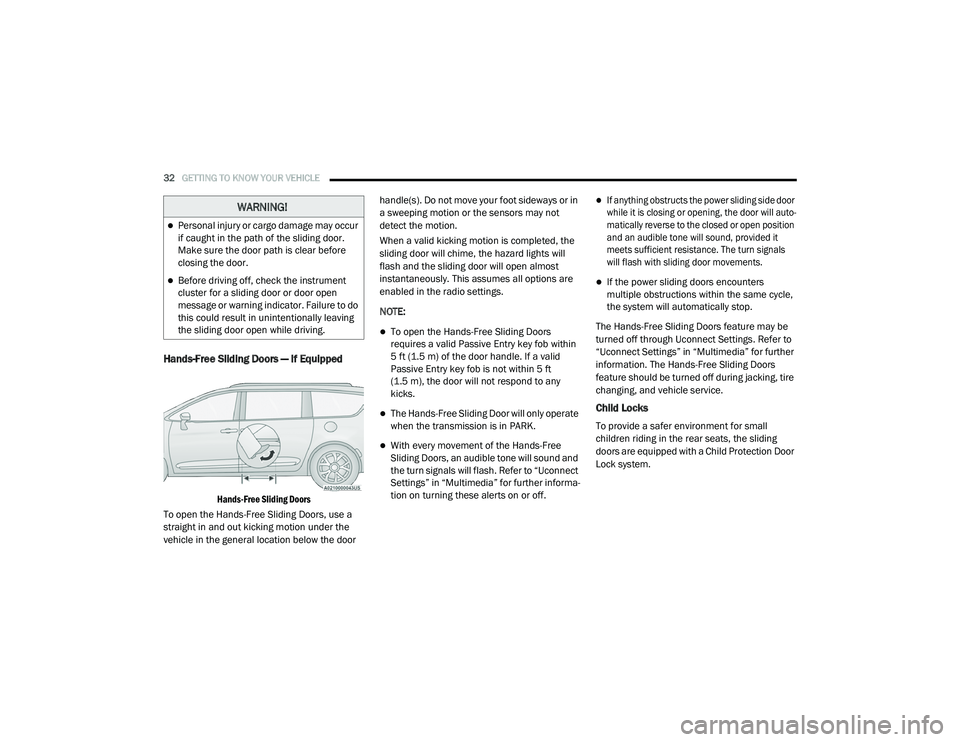
Hands-Free Sliding Doors
To open the Hands-Free Sliding Doors, use a
straight in and out kicking motion under the
vehicle in the general location below the door handle(s). Do not move your foot sideways or in
a sweeping motion or the sensors may not
detect the motion.
When a valid kicking motion is completed, the
sliding door will chime, the hazard lights will
flash and the sliding door will open almost
instantaneously. This assumes all options are
enabled in the radio settings.
NOTE:
To open the Hands-Free Sliding Doors
requires a valid Passive Entry key fob within
5 ft (1.5 m) of the door handle. If a valid
Passive Entry key fob is not within 5 ft
(1.5 m), the door will not respond to any
kicks.
The Hands-Free Sliding Door will only operate
when the transmission is in PARK.
With every movement of the Hands-Free
Sliding Doors, an audible tone will sound and
the turn signals will flash. Refer to “Uconnect
Settings” in “Multimedia” for further informa
-
tion on turning these alerts on or off.
If anything obstructs the power sliding side door
while it is closing or opening, the door will auto -
matically reverse to the closed or open position
and an audible tone will sound, provided it
meets sufficient resistance. The turn signals
will flash with sliding door movements.
If the power sliding doors encounters
multiple obstructions within the same cycle,
the system will automatically stop.
The Hands-Free Sliding Doors feature may be
turned off through Uconnect Settings. Refer to
“Uconnect Settings” in “Multimedia” for further
information. The Hands-Free Sliding Doors
feature should be turned off during jacking, tire
changing, and vehicle service.
Child Locks
To provide a safer environment for small
children riding in the rear seats, the sliding
doors are equipped with a Child Protection Door
Lock system.
WARNING!
Personal injury or cargo damage may occur
if caught in the path of the sliding door.
Make sure the door path is clear before
closing the door.
Before driving off, check the instrument
cluster for a sliding door or door open
message or warning indicator. Failure to do
this could result in unintentionally leaving
the sliding door open while driving.
20_RU_OM_EN_US_t.book Page 32
Page 35 of 516
GETTING TO KNOW YOUR VEHICLE33
To Engage The Child Protection Door Lock
1. Open the sliding side door.
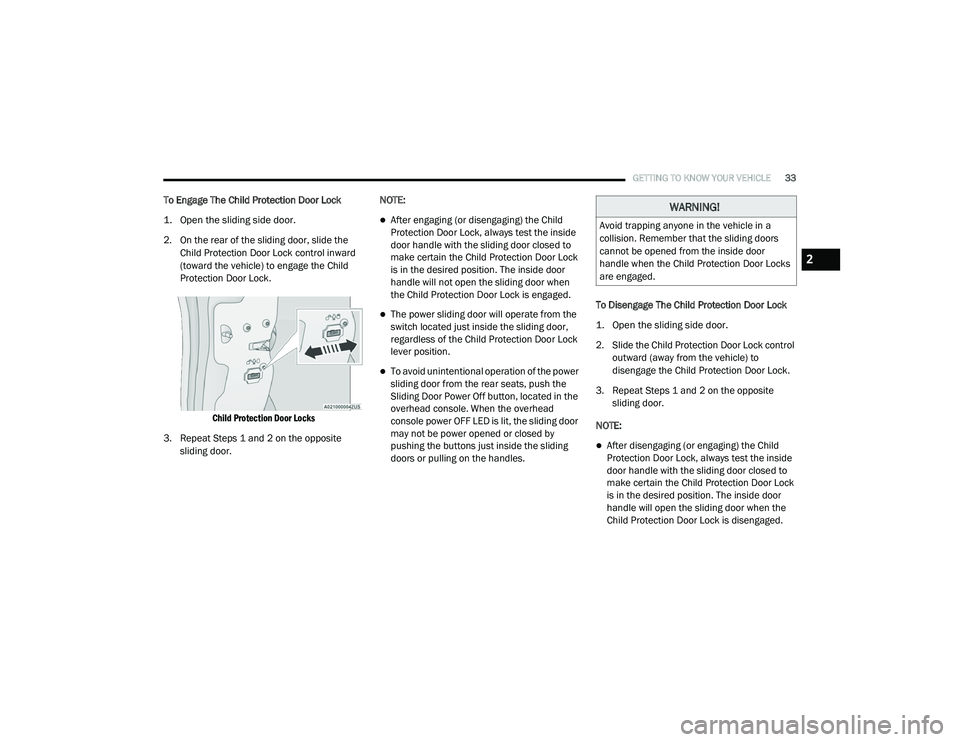
2. On the rear of the sliding door, slide the
Child Protection Door Lock control inward
(toward the vehicle) to engage the Child
Protection Door Lock.
Child Protection Door Locks
3. Repeat Steps 1 and 2 on the opposite sliding door. NOTE:
After engaging (or disengaging) the Child
Protection Door Lock, always test the inside
door handle with the sliding door closed to
make certain the Child Protection Door Lock
is in the desired position. The inside door
handle will not open the sliding door when
the Child Protection Door Lock is engaged.
The power sliding door will operate from the
switch located just inside the sliding door,
regardless of the Child Protection Door Lock
lever position.
To avoid unintentional operation of the power
sliding door from the rear seats, push the
Sliding Door Power Off button, located in the
overhead console. When the overhead
console power OFF LED is lit, the sliding door
may not be power opened or closed by
pushing the buttons just inside the sliding
doors or pulling on the handles.
To Disengage The Child Protection Door Lock
1. Open the sliding side door.
2. Slide the Child Protection Door Lock control
outward (away from the vehicle) to
disengage the Child Protection Door Lock.
3. Repeat Steps 1 and 2 on the opposite sliding door.
NOTE:
After disengaging (or engaging) the Child
Protection Door Lock, always test the inside
door handle with the sliding door closed to
make certain the Child Protection Door Lock
is in the desired position. The inside door
handle will open the sliding door when the
Child Protection Door Lock is disengaged.
WARNING!
Avoid trapping anyone in the vehicle in a
collision. Remember that the sliding doors
cannot be opened from the inside door
handle when the Child Protection Door Locks
are engaged.
2
20_RU_OM_EN_US_t.book Page 33
Page 36 of 516
34GETTING TO KNOW YOUR VEHICLE
DRIVER MEMORY SETTINGS — IF EQUIPPED
This feature allows the driver to save up to two
different memory profiles for easy recall
through a memory switch. Each memory profile
saves desired position settings for the following
features:
Driver’s seat
Easy Entry/Exit seat operation (on/off) (if
equipped)
Power steering wheel position (if equipped)
Side mirrors (if equipped)
A set of desired radio station presets
NOTE:
Your vehicle is equipped with two key fobs, each
can be linked to either memory position 1 or 2.
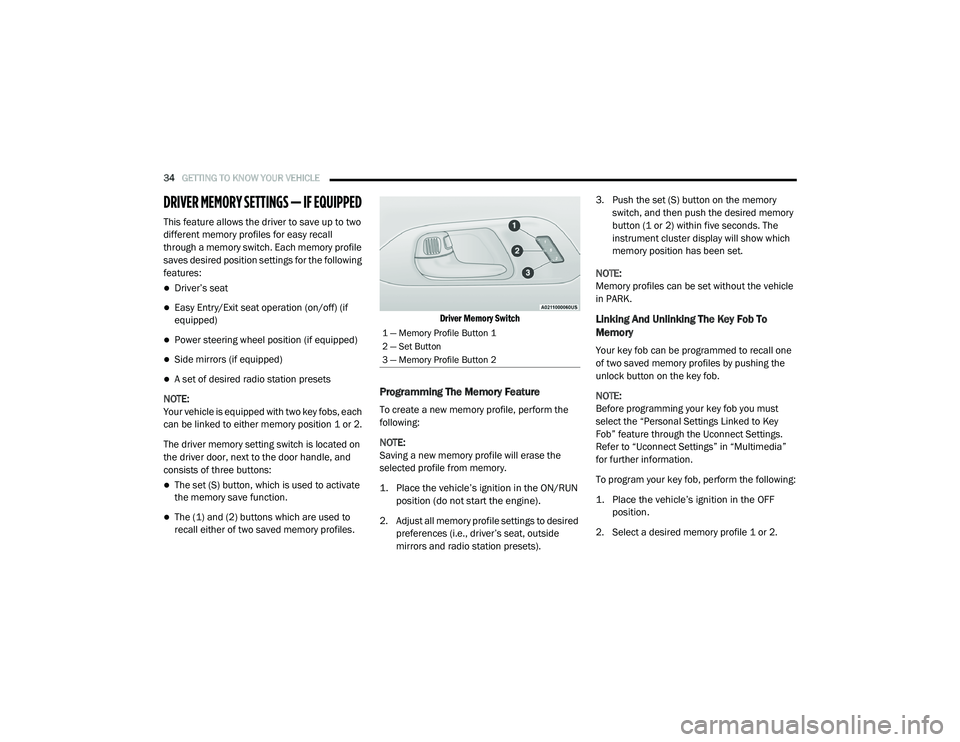
The driver memory setting switch is located on
the driver door, next to the door handle, and
consists of three buttons:
The set (S) button, which is used to activate
the memory save function.
The (1) and (2) buttons which are used to
recall either of two saved memory profiles.
Driver Memory Switch
Programming The Memory Feature
To create a new memory profile, perform the
following:
NOTE:
Saving a new memory profile will erase the
selected profile from memory.
1. Place the vehicle’s ignition in the ON/RUN
position (do not start the engine).
2. Adjust all memory profile settings to desired preferences (i.e., driver’s seat, outside
mirrors and radio station presets). 3. Push the set (S) button on the memory
switch, and then push the desired memory
button (1 or 2) within five seconds. The
instrument cluster display will show which
memory position has been set.
NOTE:
Memory profiles can be set without the vehicle
in PARK.
Linking And Unlinking The Key Fob To
Memory
Your key fob can be programmed to recall one
of two saved memory profiles by pushing the
unlock button on the key fob.
NOTE:
Before programming your key fob you must
select the “Personal Settings Linked to Key
Fob” feature through the Uconnect Settings.
Refer to “Uconnect Settings” in “Multimedia”
for further information.
To program your key fob, perform the following:
1. Place the vehicle’s ignition in the OFF position.
2. Select a desired memory profile 1 or 2.
1 — Memory Profile Button 1
2 — Set Button
3 — Memory Profile Button 2
20_RU_OM_EN_US_t.book Page 34
Page 37 of 516
GETTING TO KNOW YOUR VEHICLE35
(Continued)
3. Once the profile has been recalled, push and release the set (S) button on the
memory switch.
4. Push and release button (1) or (2) accordingly. “Memory Profile Set” (1 or 2)
will display in the instrument cluster.
5. Push and release the lock button on the key fob within 10 seconds.
NOTE:
Your key fob can be unlinked to your memory
settings by pushing the set (S) button, and then,
within 10 seconds, pushing the unlock button
on the key fob.
Memory Position Recall
NOTE:
The vehicle speed must be less than or equal to
5 mph (8 km/h) to recall memory positions. If a
recall is attempted when the vehicle speed is
greater than 5 mph (8 km/h), a message will be
displayed in the instrument cluster display. To recall the memory settings for driver one or
two, push the desired memory button (1 or 2) on
the driver's door or the unlock button on the key
fob linked to the desired memory position.
A recall can be cancelled by pushing any of the
memory buttons on the driver's door during a
recall (S, 1, or 2). When a recall is cancelled, the
driver's seat stops moving. A delay of one
second will occur before another recall can be
selected.
NOTE:
Pushing the mirror adjust switch will cancel the
memory mirror recall.
SEATS
Seats are a part of the Occupant Restraint
System of the vehicle.
Manual Adjustment (Front Seats) — If
Equipped
WARNING!
It is dangerous to ride in a cargo area,
inside or outside of a vehicle. In a collision,
people riding in these areas are more likely
to be seriously injured or killed.
Do not allow people to ride in any area of
your vehicle that is not equipped with seats
and seat belts. In a collision, people riding
in these areas are more likely to be seri
-
ously injured or killed.
Be sure everyone in your vehicle is in a seat
and using a seat belt properly.
WARNING!
Adjusting a seat while the vehicle is moving
is dangerous. The sudden movement of the
seat could cause you to lose control. The
seat belt might not be adjusted properly
and you could be injured. Adjust the seat
only while the vehicle is parked.
Do not ride with the seatback reclined so
that the shoulder belt is no longer resting
against your chest. In a collision you could
slide under the seat belt and be seriously or
even fatally injured. Use the recliner only
when the vehicle is parked.
WARNING! (Continued)
2
20_RU_OM_EN_US_t.book Page 35
Page 41 of 516
GETTING TO KNOW YOUR VEHICLE39
Reinstalling The Bench Seat
1. To reinstall the bench seat, align the seats
front attachments into the detent positions
on the floor.
2. Tilt seat rearward to lock the seatback into its original position.
NOTE:
Push downward to ensure the rear latches are
in the locked position.
3. Lift the recline handle and return the seatback to the seating position.Second Row Removable 8th Seat — If
Equipped
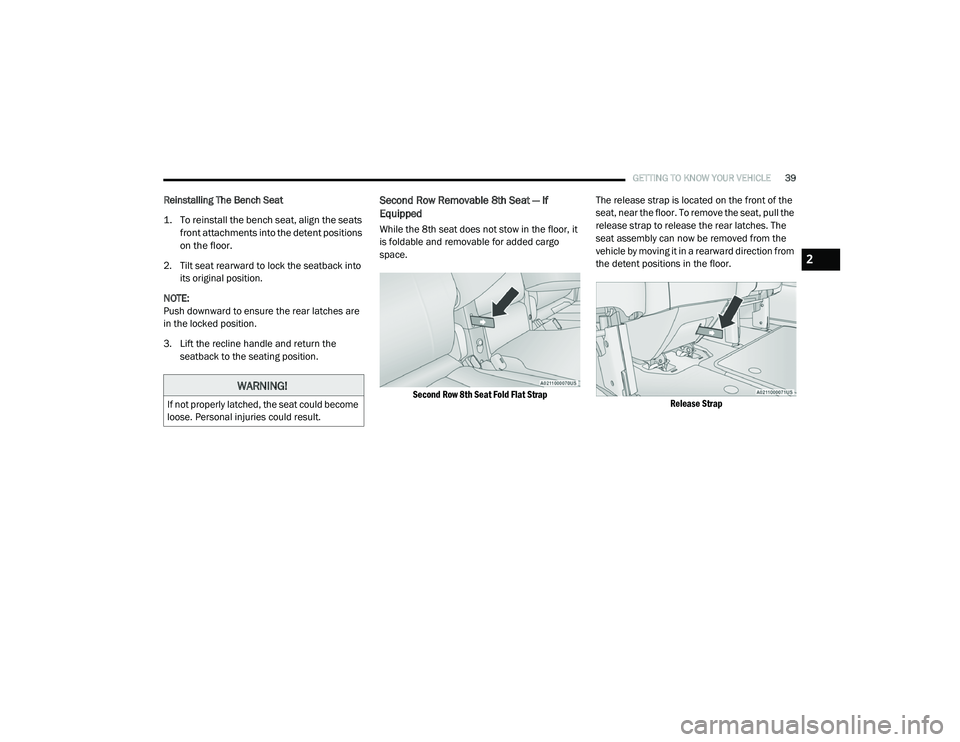
While the 8th seat does not stow in the floor, it
is foldable and removable for added cargo
space.
Second Row 8th Seat Fold Flat Strap
The release strap is located on the front of the
seat, near the floor. To remove the seat, pull the
release strap to release the rear latches. The
seat assembly can now be removed from the
vehicle by moving it in a rearward direction from
the detent positions in the floor.
Release Strap
WARNING!
If not properly latched, the seat could become
loose. Personal injuries could result.
2
20_RU_OM_EN_US_t.book Page 39
Page 42 of 516
40GETTING TO KNOW YOUR VEHICLE
NOTE:
Seat can be removed easier with one outboard
seat stowed in the load floor.
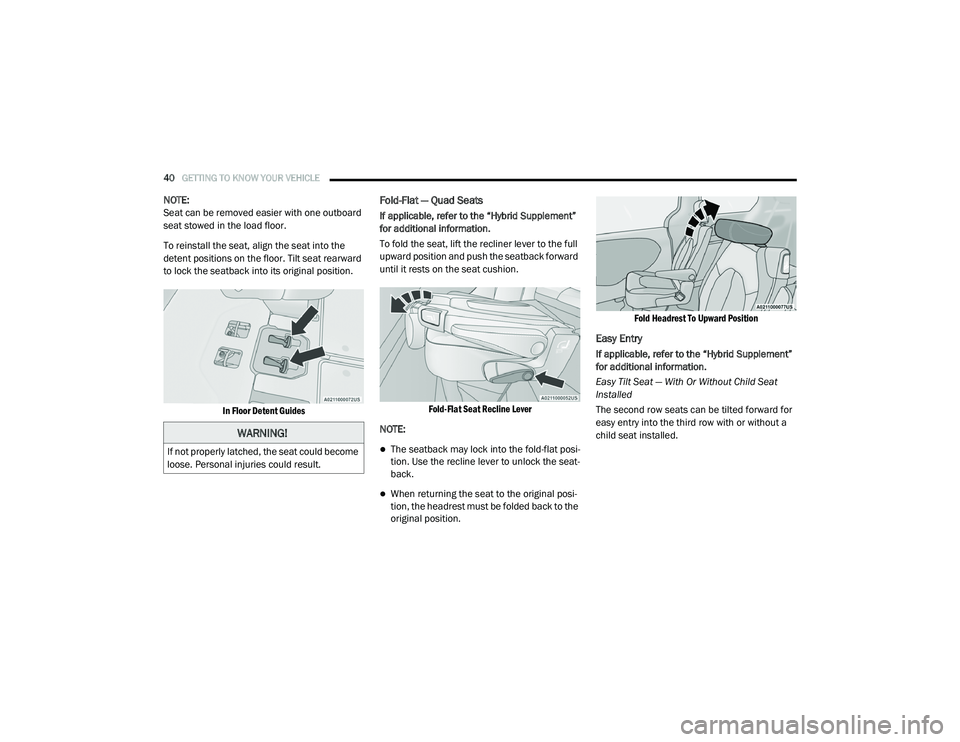
To reinstall the seat, align the seat into the
detent positions on the floor. Tilt seat rearward
to lock the seatback into its original position.
In Floor Detent Guides
Fold-Flat — Quad Seats
If applicable, refer to the “Hybrid Supplement”
for additional information.
To fold the seat, lift the recliner lever to the full
upward position and push the seatback forward
until it rests on the seat cushion.
Fold-Flat Seat Recline Lever
NOTE:
The seatback may lock into the fold-flat posi -
tion. Use the recline lever to unlock the seat -
back.
When returning the seat to the original posi -
tion, the headrest must be folded back to the
original position.
Fold Headrest To Upward Position
Easy Entry
If applicable, refer to the “Hybrid Supplement”
for additional information.
Easy Tilt Seat — With Or Without Child Seat
Installed
The second row seats can be tilted forward for
easy entry into the third row with or without a
child seat installed.
WARNING!
If not properly latched, the seat could become
loose. Personal injuries could result.
20_RU_OM_EN_US_t.book Page 40
Page 43 of 516
GETTING TO KNOW YOUR VEHICLE41
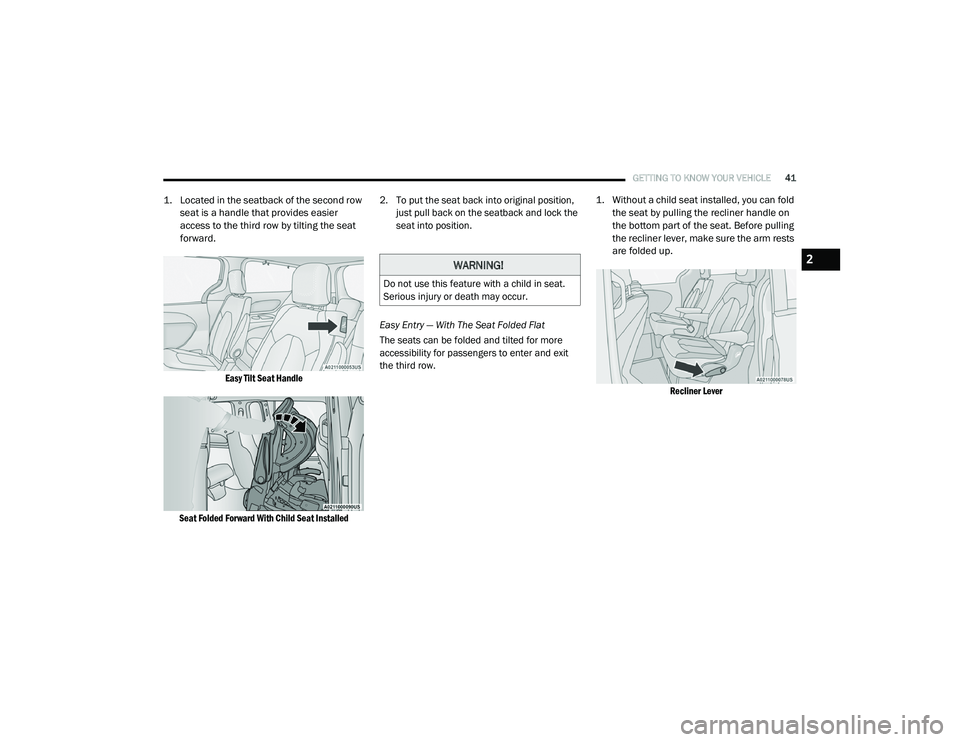
1. Located in the seatback of the second row
seat is a handle that provides easier
access to the third row by tilting the seat
forward.
Easy Tilt Seat Handle
Seat Folded Forward With Child Seat Installed
2. To put the seat back into original position,
just pull back on the seatback and lock the
seat into position.
Easy Entry — With The Seat Folded Flat
The seats can be folded and tilted for more
accessibility for passengers to enter and exit
the third row.
1. Without a child seat installed, you can fold
the seat by pulling the recliner handle on
the bottom part of the seat. Before pulling
the recliner lever, make sure the arm rests
are folded up.
Recliner Lever
WARNING!
Do not use this feature with a child in seat.
Serious injury or death may occur.
2
20_RU_OM_EN_US_t.book Page 41
Page 44 of 516
42GETTING TO KNOW YOUR VEHICLE
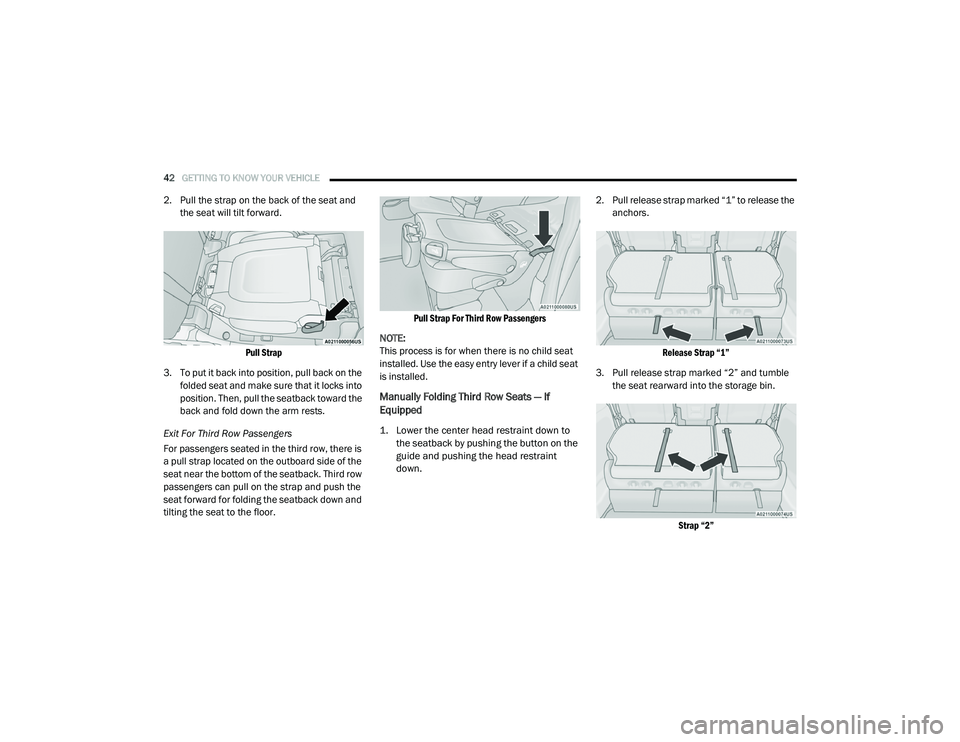
2. Pull the strap on the back of the seat and
the seat will tilt forward.
Pull Strap
3. To put it back into position, pull back on the folded seat and make sure that it locks into
position. Then, pull the seatback toward the
back and fold down the arm rests.
Exit For Third Row Passengers
For passengers seated in the third row, there is
a pull strap located on the outboard side of the
seat near the bottom of the seatback. Third row
passengers can pull on the strap and push the
seat forward for folding the seatback down and
tilting the seat to the floor.
Pull Strap For Third Row Passengers
NOTE:
This process is for when there is no child seat
installed. Use the easy entry lever if a child seat
is installed.
Manually Folding Third Row Seats — If
Equipped
1. Lower the center head restraint down to the seatback by pushing the button on the
guide and pushing the head restraint
down.
2. Pull release strap marked “1” to release the
anchors.
Release Strap “1”
3. Pull release strap marked “2” and tumble the seat rearward into the storage bin.
Strap “2”
20_RU_OM_EN_US_t.book Page 42
Page 47 of 516
GETTING TO KNOW YOUR VEHICLE45
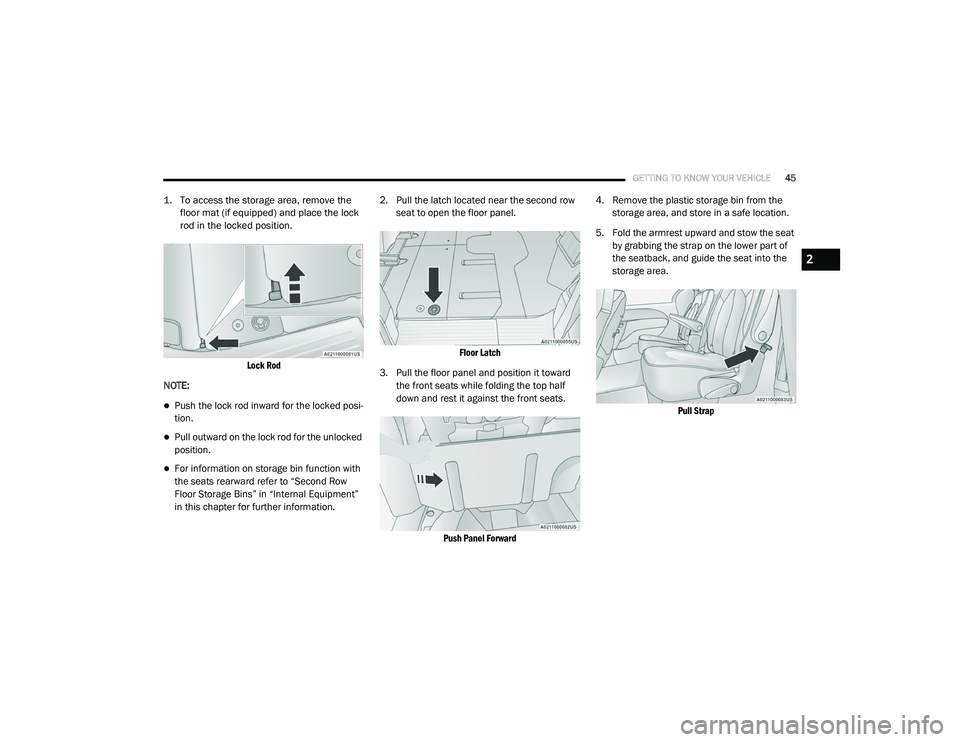
1. To access the storage area, remove the
floor mat (if equipped) and place the lock
rod in the locked position.
Lock Rod
NOTE:
Push the lock rod inward for the locked posi -
tion.
Pull outward on the lock rod for the unlocked
position.
For information on storage bin function with
the seats rearward refer to “Second Row
Floor Storage Bins” in “Internal Equipment”
in this chapter for further information. 2. Pull the latch located near the second row
seat to open the floor panel.
Floor Latch
3. Pull the floor panel and position it toward the front seats while folding the top half
down and rest it against the front seats.
Push Panel Forward
4. Remove the plastic storage bin from the
storage area, and store in a safe location.
5. Fold the armrest upward and stow the seat by grabbing the strap on the lower part of
the seatback, and guide the seat into the
storage area.
Pull Strap
2
20_RU_OM_EN_US_t.book Page 45
Page 48 of 516
46GETTING TO KNOW YOUR VEHICLE
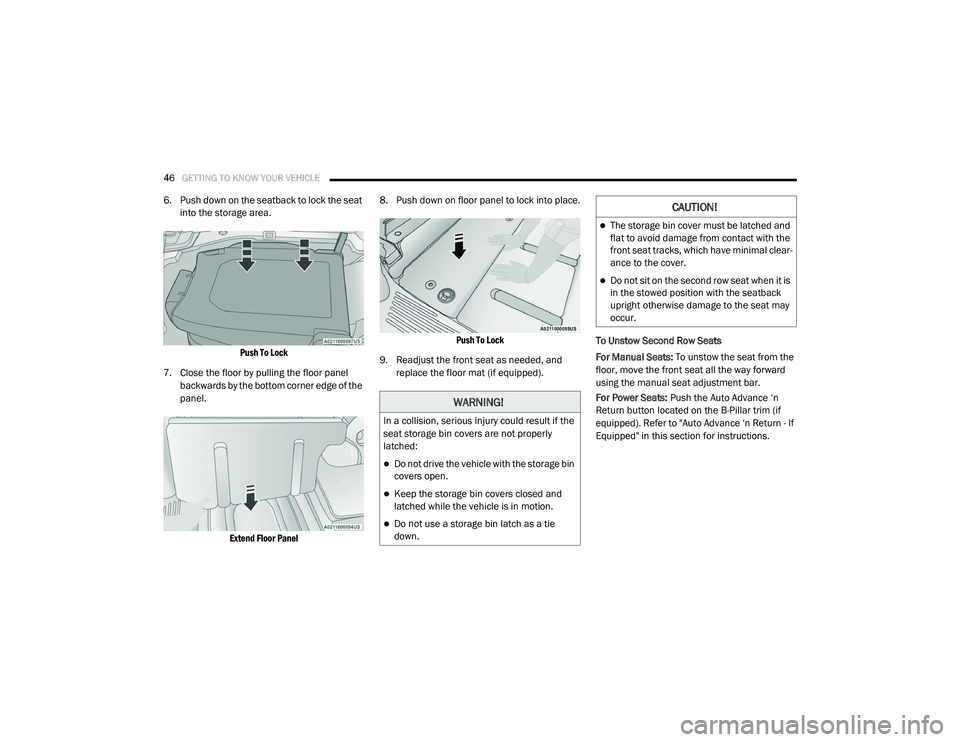
6. Push down on the seatback to lock the seat
into the storage area.
Push To Lock
7. Close the floor by pulling the floor panel backwards by the bottom corner edge of the
panel.
Extend Floor Panel
8. Push down on floor panel to lock into place.
Push To Lock
9. Readjust the front seat as needed, and replace the floor mat (if equipped). To Unstow Second Row Seats
For Manual Seats:
To unstow the seat from the
floor, move the front seat all the way forward
using the manual seat adjustment bar.
For Power Seats: Push the Auto Advance ‘n
Return button located on the B-Pillar trim (if
equipped). Refer to "Auto Advance ‘n Return - If
Equipped" in this section for instructions.
WARNING!
In a collision, serious injury could result if the
seat storage bin covers are not properly
latched:
Do not drive the vehicle with the storage bin
covers open.
Keep the storage bin covers closed and
latched while the vehicle is in motion.
Do not use a storage bin latch as a tie
down.
CAUTION!
The storage bin cover must be latched and
flat to avoid damage from contact with the
front seat tracks, which have minimal clear -
ance to the cover.
Do not sit on the second row seat when it is
in the stowed position with the seatback
upright otherwise damage to the seat may
occur.
20_RU_OM_EN_US_t.book Page 46