park assist CHRYSLER PACIFICA 2020 Owner's Manual
[x] Cancel search | Manufacturer: CHRYSLER, Model Year: 2020, Model line: PACIFICA, Model: CHRYSLER PACIFICA 2020Pages: 516, PDF Size: 28.69 MB
Page 270 of 516
268STARTING AND OPERATING
PARKSENSE ACTIVE PARK ASSIST SYSTEM
— IF EQUIPPED
The ParkSense Active Park Assist system is
intended to assist the driver during parallel and
perpendicular parking maneuvers by identifying
a proper parking space, providing audible/
visual instructions, and controlling the steering
wheel. The ParkSense Active Park Assist system
is defined as “semi-automatic” since the driver
maintains control of the accelerator, gear
selector and brakes. Depending on the driver's
parking maneuver selection, the ParkSense Active Park Assist system is capable of
maneuvering a vehicle into a parallel or a
perpendicular parking space on either side (i.e.,
driver side or passenger side).
NOTE:
The driver is always responsible for
controlling the vehicle, responsible for any
surrounding objects, and must intervene as
required.
The system is provided to assist the driver
and not to substitute the driver.
During a semi-automatic maneuver, if the
driver touches the steering wheel after being
instructed to remove their hands from the
steering wheel, the system will cancel, and
the driver will be required to manually
complete the parking maneuver.
The system may not work in all conditions
(e.g. environmental conditions such as heavy
rain, snow, etc., or if searching for a parking
space that has surfaces that will absorb the
ultrasonic sensor waves).
New vehicles from the dealership must have
at least 30 miles (48 km) accumulated
before the ParkSense Active Park Assist system is fully calibrated and performs accu
-
rately. This is due to the system’s dynamic
vehicle calibration to improve the perfor -
mance of the feature. The system will also
continuously perform the dynamic vehicle
calibration to account for differences such as
over or under inflated tires and new tires.
Enabling And Disabling The ParkSense
Active Park Assist System
The ParkSense Active Park Assist
system can be enabled and disabled
with the ParkSense Active Park Assist
switch, located on the switch panel
below the Uconnect display.
To enable the ParkSense Active Park Assist
system, push the ParkSense Active Park Assist
switch once (LED turns on).
To disable the ParkSense Active Park Assist
system, push the ParkSense Active Park Assist
switch again (LED turns off).
The ParkSense Active Park Assist system will
turn off automatically for any of the following
conditions:
The parking maneuver is completed.
Vehicle speed greater than 18 mph (30 km/h)
when searching for a parking space.
CAUTION!
ParkSense is only a parking aid and it is
unable to recognize every obstacle,
including small obstacles. Parking curbs
might be temporarily detected or not
detected at all. Obstacles located above or
below the sensors will not be detected
when they are in close proximity.
The vehicle must be driven slowly when
using ParkSense in order to be able to stop
in time when an obstacle is detected. It is
recommended that the driver looks over
his/her shoulder when using ParkSense.
20_RU_OM_EN_US_t.book Page 268
Page 271 of 516
STARTING AND OPERATING269
Vehicle speed greater than 5 mph (7 km/h)
during active steering guidance into the
parking space.
Touching the steering wheel during active
steering guidance into the parking space.
Pushing the ParkSense Front and Rear Park
Assist switch.
The driver’s door is opened.
The liftgate is opened.
Electronic Stability Control/Anti-Lock Braking
System intervention.
The ParkSense Active Park Assist system will
allow a maximum of eight shifts between
DRIVE and REVERSE. If the maneuver cannot
be completed within eight shifts, the system
will cancel and the instrument cluster display
will instruct the driver to complete the
maneuver manually. The ParkSense Active Park Assist system will
only operate and search for a parking space
when the following conditions are present:
The gear position is in DRIVE.
The ignition is in the RUN position.
The ParkSense Active Park Assist switch is
activated.
The driver’s door is closed.
The liftgate is closed.
Vehicle speed is less than 15 mph (25 km/h).
NOTE:
If the vehicle is driven above approximately
15 mph (25 km/h), the instrument cluster
display will instruct the driver to slow down. If the
vehicle is driven above approximately 18 mph
(30 km/h), the system will cancel. The driver
must then reactivate the system by pushing the
ParkSense Active Park Assist switch.
The outer surface and the underside of the
front and rear fascias/bumpers are clean
and clear of snow, ice, mud, dirt or other
obstruction.
When pushed, the LED on the ParkSense Active
Park Assist switch will blink momentarily, and
then the LED will turn off if any of the above
conditions are not present.
Parallel Parking Space Assistance
Operation/Display
When the ParkSense Active Park Assist system
is enabled the “Active ParkSense Searching -
Push OK for Perpendicular Park” message will
appear in the instrument cluster display. You
may switch to perpendicular parking if you
desire. Push the OK button on the left side
steering wheel switch to change your parking
space setting.5
20_RU_OM_EN_US_t.book Page 269
Page 272 of 516
270STARTING AND OPERATING
NOTE:
When searching for a parking space, use the
turn signal indicator to select which side of
the vehicle you want to perform the parking
maneuver. The ParkSense Active Park Assist
system will automatically search for a parking
space on the passenger's side of the vehicle
if the turn signal is not activated.
The driver needs to make sure that the
selected parking space for the maneuver
remains free and clear of any obstructions
(e.g. pedestrians, bicycles, etc.).
The driver is responsible to ensure that the
selected parking space is suitable for the
maneuver and free/clear of anything that
may be overhanging or protruding into the
parking space (e.g., ladders, tailgates, etc.
from surrounding objects/vehicles).
When seeking a parking space, the driver
should drive as parallel or perpendicular
(depending on the type of maneuver) to other
vehicles as possible.
The feature will only indicate the last
detected parking space (example: if passing
multiple available parking spaces, the
system will only indicate the last detected
parking space for the maneuver).
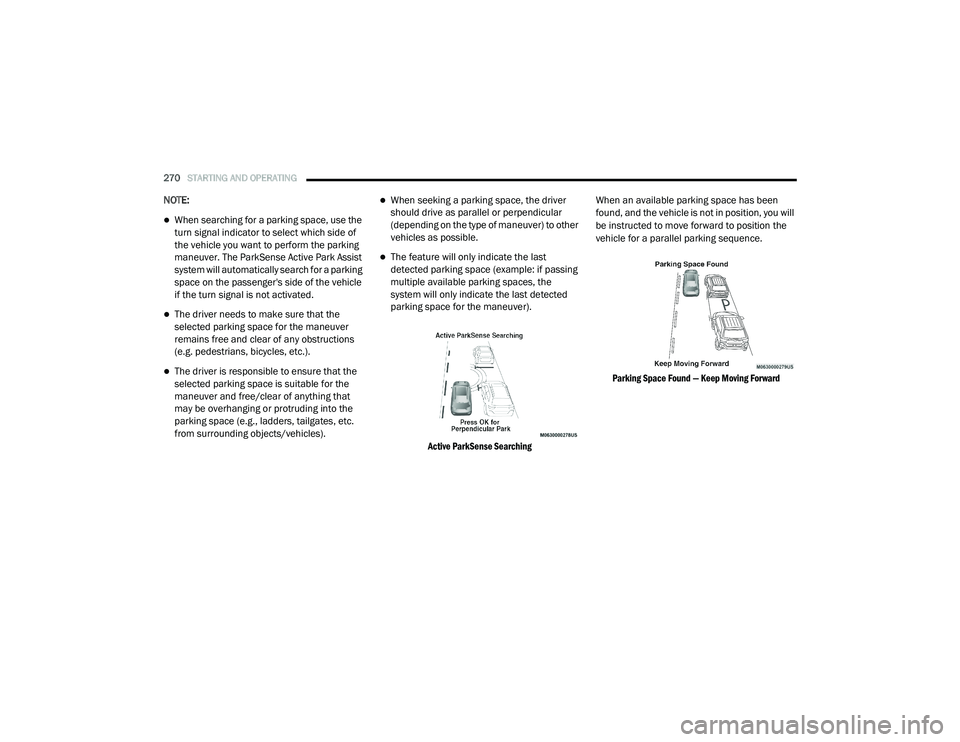
Active ParkSense Searching
When an available parking space has been
found, and the vehicle is not in position, you will
be instructed to move forward to position the
vehicle for a parallel parking sequence.
Parking Space Found — Keep Moving Forward
20_RU_OM_EN_US_t.book Page 270
Page 274 of 516
272STARTING AND OPERATING
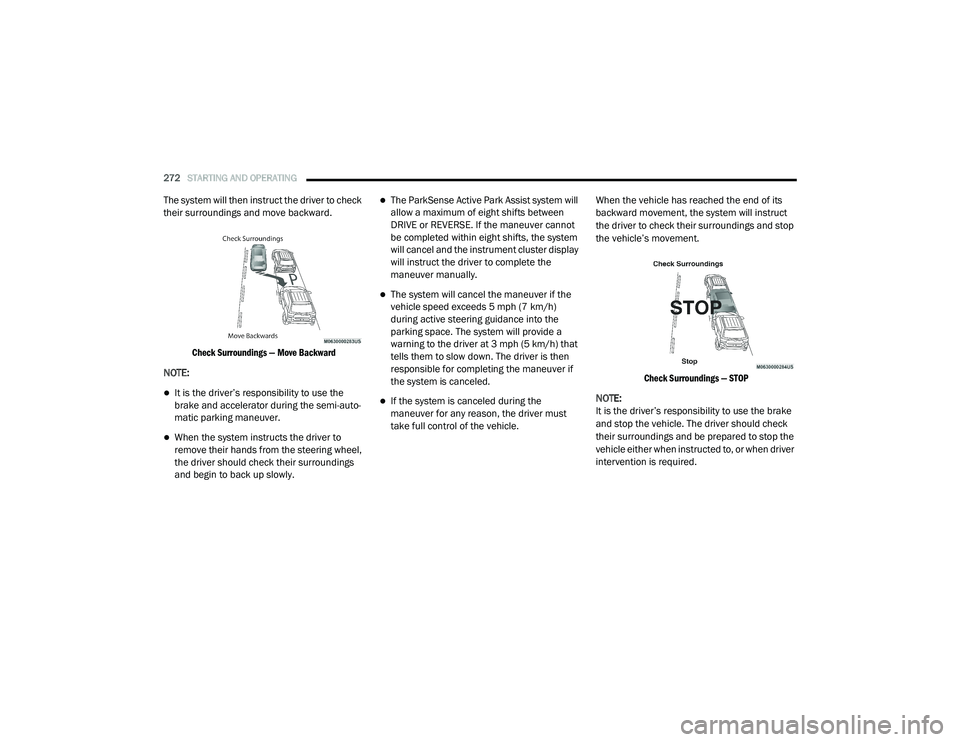
The system will then instruct the driver to check
their surroundings and move backward.
Check Surroundings — Move Backward
NOTE:
It is the driver’s responsibility to use the
brake and accelerator during the semi-auto -
matic parking maneuver.
When the system instructs the driver to
remove their hands from the steering wheel,
the driver should check their surroundings
and begin to back up slowly.
The ParkSense Active Park Assist system will
allow a maximum of eight shifts between
DRIVE or REVERSE. If the maneuver cannot
be completed within eight shifts, the system
will cancel and the instrument cluster display
will instruct the driver to complete the
maneuver manually.
The system will cancel the maneuver if the
vehicle speed exceeds 5 mph (7 km/h)
during active steering guidance into the
parking space. The system will provide a
warning to the driver at 3 mph (5 km/h) that
tells them to slow down. The driver is then
responsible for completing the maneuver if
the system is canceled.
If the system is canceled during the
maneuver for any reason, the driver must
take full control of the vehicle. When the vehicle has reached the end of its
backward movement, the system will instruct
the driver to check their surroundings and stop
the vehicle’s movement.
Check Surroundings — STOP
NOTE:
It is the driver’s responsibility to use the brake
and stop the vehicle. The driver should check
their surroundings and be prepared to stop the
vehicle either when instructed to, or when driver
intervention is required.
20_RU_OM_EN_US_t.book Page 272
Page 276 of 516
274STARTING AND OPERATING
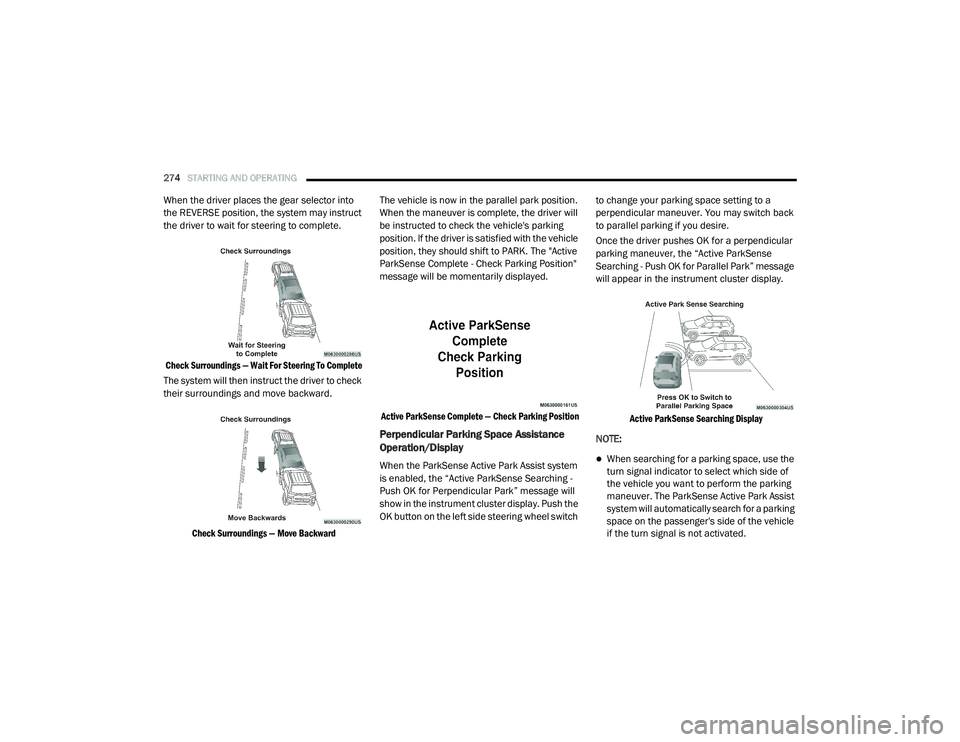
When the driver places the gear selector into
the REVERSE position, the system may instruct
the driver to wait for steering to complete.
Check Surroundings — Wait For Steering To Complete
The system will then instruct the driver to check
their surroundings and move backward.
Check Surroundings — Move Backward
The vehicle is now in the parallel park position.
When the maneuver is complete, the driver will
be instructed to check the vehicle's parking
position. If the driver is satisfied with the vehicle
position, they should shift to PARK. The "Active
ParkSense Complete - Check Parking Position"
message will be momentarily displayed.
Active ParkSense Complete — Check Parking Position
Perpendicular Parking Space Assistance
Operation/Display
When the ParkSense Active Park Assist system
is enabled, the “Active ParkSense Searching -
Push OK for Perpendicular Park” message will
show in the instrument cluster display. Push the
OK button on the left side steering wheel switch to change your parking space setting to a
perpendicular maneuver. You may switch back
to parallel parking if you desire.
Once the driver pushes OK for a perpendicular
parking maneuver, the “Active ParkSense
Searching - Push OK for Parallel Park” message
will appear in the instrument cluster display.
Active ParkSense Searching Display
NOTE:When searching for a parking space, use the
turn signal indicator to select which side of
the vehicle you want to perform the parking
maneuver. The ParkSense Active Park Assist
system will automatically search for a parking
space on the passenger's side of the vehicle
if the turn signal is not activated.
20_RU_OM_EN_US_t.book Page 274
Page 279 of 516
STARTING AND OPERATING277
The ParkSense Active Park Assist system will
allow a maximum of eight shifts between
DRIVE or REVERSE. If the maneuver cannot
be completed within eight shifts, the system
will cancel and the instrument cluster display
will instruct the driver to complete the
maneuver manually.
The system will cancel the maneuver if the
vehicle speed exceeds 5 mph (7 km/h)
during active steering guidance into the
parking space. The system will provide a
warning to the driver at 3 mph (5 km/h) that
tells them to slow down. The driver is then
responsible for completing the maneuver if
the system is canceled.
If the system is canceled during the
maneuver for any reason, the driver must
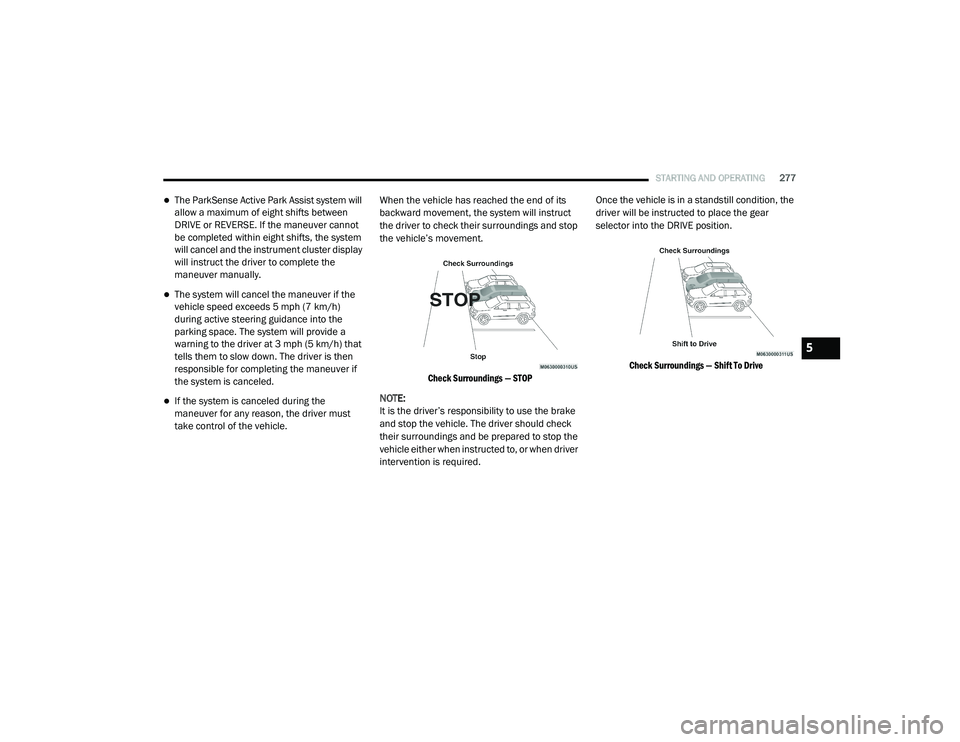
take control of the vehicle. When the vehicle has reached the end of its
backward movement, the system will instruct
the driver to check their surroundings and stop
the vehicle’s movement.
Check Surroundings — STOP
NOTE:
It is the driver’s responsibility to use the brake
and stop the vehicle. The driver should check
their surroundings and be prepared to stop the
vehicle either when instructed to, or when driver
intervention is required. Once the vehicle is in a standstill condition, the
driver will be instructed to place the gear
selector into the DRIVE position.
Check Surroundings — Shift To Drive
5
20_RU_OM_EN_US_t.book Page 277
Page 281 of 516

STARTING AND OPERATING279
The system will then instruct the driver to check
their surroundings and move backward.
Check Surroundings — Move Backwards
Your vehicle is now in the perpendicular park
position. When the maneuver is complete, the
driver will be instructed to check the vehicle's
parking position. If the driver is satisfied with
the vehicle position, they should shift to PARK.
The "Active ParkSense Complete - Check
Parking Position" message will be momentarily
displayed.
Active ParkSense Complete — Check Parking Position
WARNING!
Drivers must be careful when performing
parallel or perpendicular parking maneuvers
even when using the ParkSense Active Park
Assist system. Always check carefully behind
and in front of your vehicle, look behind and
in front of you, and be sure to check for
pedestrians, animals, other vehicles,
obstructions, and blind spots before backing
up and moving forward. You are responsible
for safety and must continue to pay attention
to your surroundings. Failure to do so can
result in serious injury or death.
CAUTION!
The ParkSense Active Park Assist system is
only a parking aid and it is unable to recog
-
nize every obstacle, including small obsta -
cles. Parking curbs might be temporarily
detected or not detected at all. Obstacles
located above or below the sensors will not
be detected when they are in close prox -
imity.
The vehicle must be driven slowly when
using the ParkSense Active Park Assist
system in order to be able to stop in time
when an obstacle is detected. It is recom -
mended that the driver looks over his/her
shoulder when using the ParkSense Active
Park Assist system.
5
20_RU_OM_EN_US_t.book Page 279
Page 318 of 516
316IN CASE OF EMERGENCY
F57 ––Not Used
F58 – 10 Amp Red
Drive Train Control Mod / Power
Transfer Unit — If Equipped
F59
30 Amp Pink –
Trailer Tow Receptacle — If Equipped
F60
–20 Amp Yellow Rear Cargo APO
F61 –20 Amp Yellow
Trailer Tow Right Stop/Turn —
If Equipped
F62––Not Used
F63 –20 Amp Yellow Trailer Tow Left Stop/Turn —
If Equipped
F64–15 Amp Blue RT HID Headlamp
F65 ––Not Used
F66 –15 Amp BlueInstrument Panel Cluster (IPC)/
SGW
F67 –10 Amp RedHaptic Lane Feedback Module
(HALF) / Parktronics System (PTS)/ Drivers Assist System Module (DASM)
F68 ––Not Used
F69 ––Not Used
F70 ––Not Used
F71 –20 Amp Yellow Horn
CavityCartridge Fuse Blade FuseDescription
20_RU_OM_EN_US_t.book Page 316
Page 346 of 516
344IN CASE OF EMERGENCY
ENHANCED ACCIDENT RESPONSE SYSTEM
(EARS)
This vehicle is equipped with an Enhanced
Accident Response System.
Please refer to “Occupant Restraint Systems” in
“Safety” for further information on the
Enhanced Accident Response System (EARS)
function.
EVENT DATA RECORDER (EDR)
This vehicle is equipped with an Event Data
Recorder (EDR). The main purpose of an EDR is
to record data that will assist in understanding
how a vehicle’s systems performed under
certain crash or near crash-like situations, such
as an air bag deployment or hitting a road
obstacle.
Please refer to “Occupant Restraint Systems” in
“Safety” for further information on the Event
Data Recorder (EDR).
CAUTION!
Do not use sling-type equipment when
towing. Vehicle damage may occur.
When securing the vehicle to a flatbed
truck, do not attach to front or rear suspen -
sion components. Damage to your vehicle
may result from improper towing.
Ensure that the Electric Park Brake is
released, and remains released, while
being towed.
20_RU_OM_EN_US_t.book Page 344
Page 393 of 516
TECHNICAL SPECIFICATIONS391
(Continued)
Do Not Use E-85 In Non-Flex Fuel Vehicles
Non-Flex Fuel Vehicles (FFV) are compatible
with gasoline containing up to 15% ethanol
(E-15). Use of gasoline with higher ethanol
content may void the New Vehicle Limited
Warranty.
If a Non-FFV vehicle is inadvertently fueled with
E-85 fuel, the engine will have some or all of
these symptoms:
Operate in a lean mode
OBD II Malfunction Indicator Light on
Poor engine performance
Poor cold start and cold drivability
Increased risk for fuel system component
corrosion
CNG And LP Fuel System Modifications
Modifications that allow the engine to run on
Compressed Natural Gas (CNG) or Liquid
Propane (LP) may result in damage to the
engine, emissions, and fuel system
components. Problems that result from running
CNG or LP are not the responsibility of the
manufacturer and may void or not be covered
under the New Vehicle Limited Warranty.
MMT In Gasoline
Methylcyclopentadienyl Manganese Tricarbonyl
(MMT) is a manganese-containing metallic
additive that is blended into some gasoline to
increase octane. Gasoline blended with MMT
provides no performance advantage beyond
gasoline of the same octane number without
MMT. Gasoline blended with MMT reduces
spark plug life and reduces emissions system
performance in some vehicles. The
manufacturer recommends that gasoline
without MMT be used in your vehicle. The MMT content of gasoline may not be indicated on the
gasoline pump; therefore, you should ask your
gasoline retailer whether the gasoline contains
MMT. MMT is prohibited in Federal and
California reformulated gasoline.
Fuel System Cautions
CAUTION!
Follow these guidelines to maintain your
vehicle’s performance:
The use of leaded gasoline is prohibited by
Federal law. Using leaded gasoline can
impair engine performance and damage
the emissions control system.
An out-of-tune engine or certain fuel or igni
-
tion malfunctions can cause the catalytic
converter to overheat. If you notice a
pungent burning odor or some light smoke,
your engine may be out of tune or malfunc -
tioning and may require immediate service.
Contact an authorized dealer for service
assistance.
8
20_RU_OM_EN_US_t.book Page 391