Rear CHRYSLER PACIFICA 2020 Workshop Manual
[x] Cancel search | Manufacturer: CHRYSLER, Model Year: 2020, Model line: PACIFICA, Model: CHRYSLER PACIFICA 2020Pages: 516, PDF Size: 28.69 MB
Page 105 of 516
GETTING TO KNOW YOUR VEHICLE103
(Continued)
(Continued)
Cargo Area Features
Cargo Area Storage
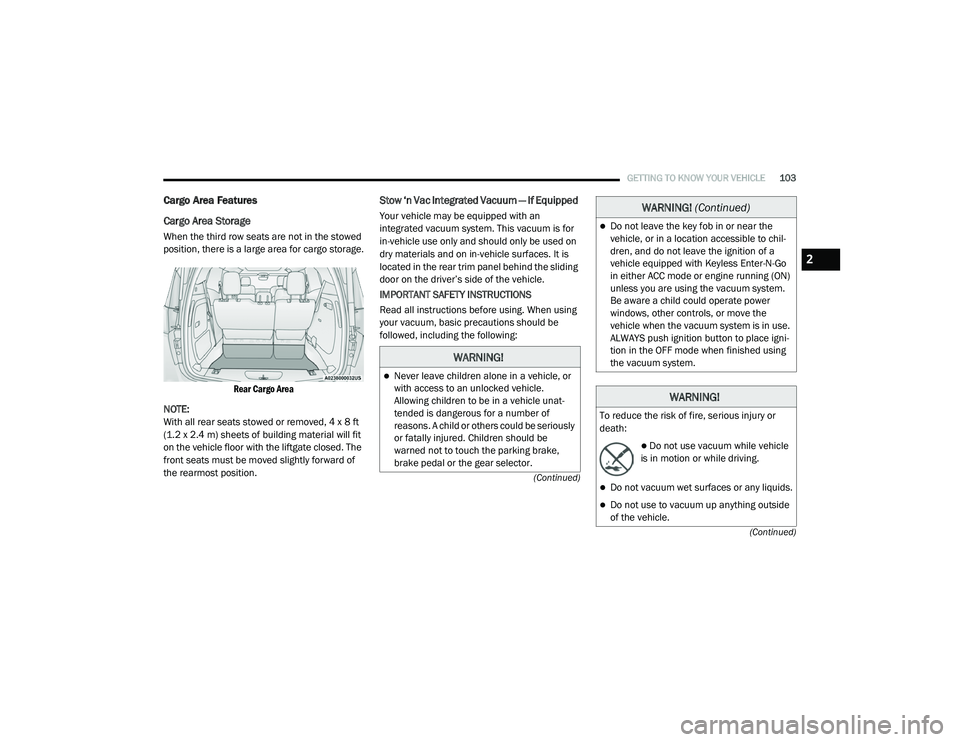
When the third row seats are not in the stowed
position, there is a large area for cargo storage.
Rear Cargo Area
NOTE:
With all rear seats stowed or removed, 4 x 8 ft
(1.2 x 2.4 m) sheets of building material will fit
on the vehicle floor with the liftgate closed. The
front seats must be moved slightly forward of
the rearmost position.
Stow ‘n Vac Integrated Vacuum — If Equipped
Your vehicle may be equipped with an
integrated vacuum system. This vacuum is for
in-vehicle use only and should only be used on
dry materials and on in-vehicle surfaces. It is
located in the rear trim panel behind the sliding
door on the driver’s side of the vehicle.
IMPORTANT SAFETY INSTRUCTIONS
Read all instructions before using. When using
your vacuum, basic precautions should be
followed, including the following:
WARNING!
Never leave children alone in a vehicle, or
with access to an unlocked vehicle.
Allowing children to be in a vehicle unat -
tended is dangerous for a number of
reasons. A child or others could be seriously
or fatally injured. Children should be
warned not to touch the parking brake,
brake pedal or the gear selector.
Do not leave the key fob in or near the
vehicle, or in a location accessible to chil -
dren, and do not leave the ignition of a
vehicle equipped with Keyless Enter-N-Go
in either ACC mode or engine running (ON)
unless you are using the vacuum system.
Be aware a child could operate power
windows, other controls, or move the
vehicle when the vacuum system is in use.
ALWAYS push ignition button to place igni -
tion in the OFF mode when finished using
the vacuum system.
WARNING!
To reduce the risk of fire, serious injury or
death:
Do not use vacuum while vehicle
is in motion or while driving.
Do not vacuum wet surfaces or any liquids.
Do not use to vacuum up anything outside
of the vehicle.
WARNING! (Continued)
2
20_RU_OM_EN_US_t.book Page 103
Page 110 of 516
108GETTING TO KNOW YOUR VEHICLE
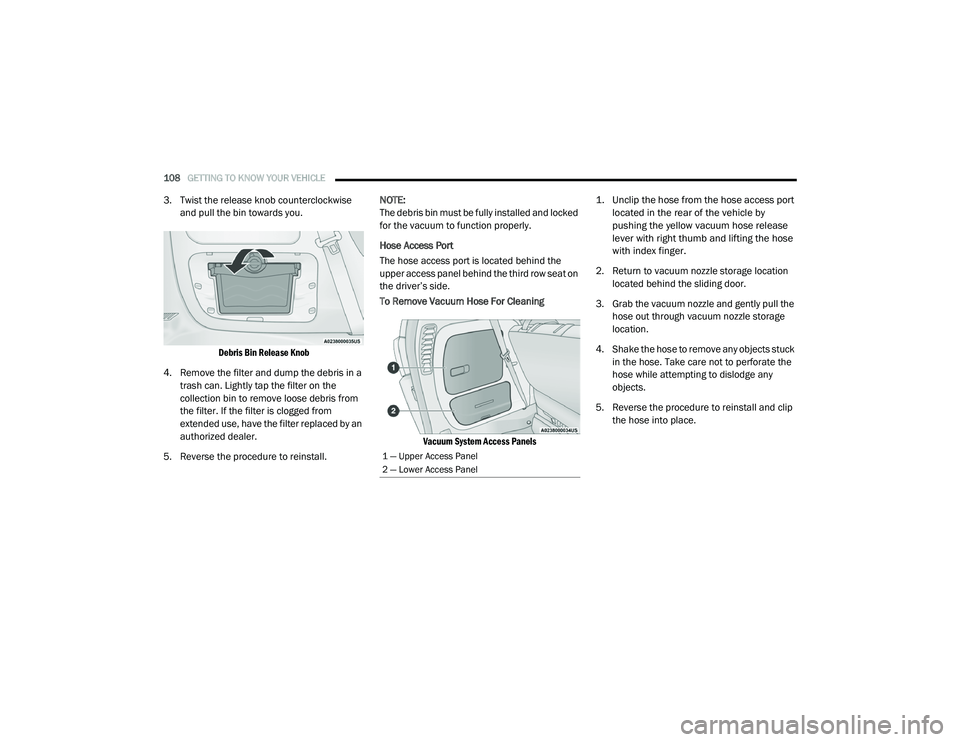
3. Twist the release knob counterclockwise
and pull the bin towards you.
Debris Bin Release Knob
4. Remove the filter and dump the debris in a trash can. Lightly tap the filter on the
collection bin to remove loose debris from
the filter. If the filter is clogged from
extended use, have the filter replaced by an
authorized dealer.
5. Reverse the procedure to reinstall. NOTE:
The debris bin must be fully installed and locked
for the vacuum to function properly.
Hose Access Port
The hose access port is located behind the
upper access panel behind the third row seat on
the driver’s side.
To Remove Vacuum Hose For Cleaning
Vacuum System Access Panels
1. Unclip the hose from the hose access port
located in the rear of the vehicle by
pushing the yellow vacuum hose release
lever with right thumb and lifting the hose
with index finger.
2. Return to vacuum nozzle storage location located behind the sliding door.
3. Grab the vacuum nozzle and gently pull the hose out through vacuum nozzle storage
location.
4. Shake the hose to remove any objects stuck in the hose. Take care not to perforate the
hose while attempting to dislodge any
objects.
5. Reverse the procedure to reinstall and clip the hose into place.
1 — Upper Access Panel
2 — Lower Access Panel
20_RU_OM_EN_US_t.book Page 108
Page 117 of 516
GETTING TO KNOW YOUR VEHICLE115
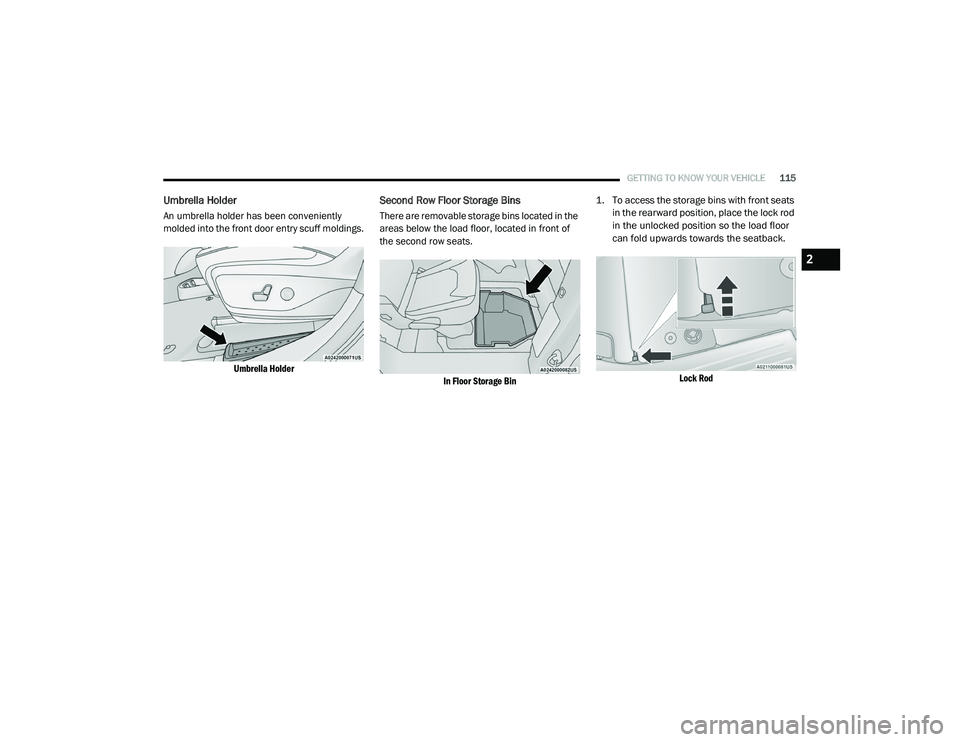
Umbrella Holder
An umbrella holder has been conveniently
molded into the front door entry scuff moldings.
Umbrella Holder
Second Row Floor Storage Bins
There are removable storage bins located in the
areas below the load floor, located in front of
the second row seats.
In Floor Storage Bin
1. To access the storage bins with front seats
in the rearward position, place the lock rod
in the unlocked position so the load floor
can fold upwards towards the seatback.
Lock Rod
2
20_RU_OM_EN_US_t.book Page 115
Page 120 of 516
118GETTING TO KNOW YOUR VEHICLE
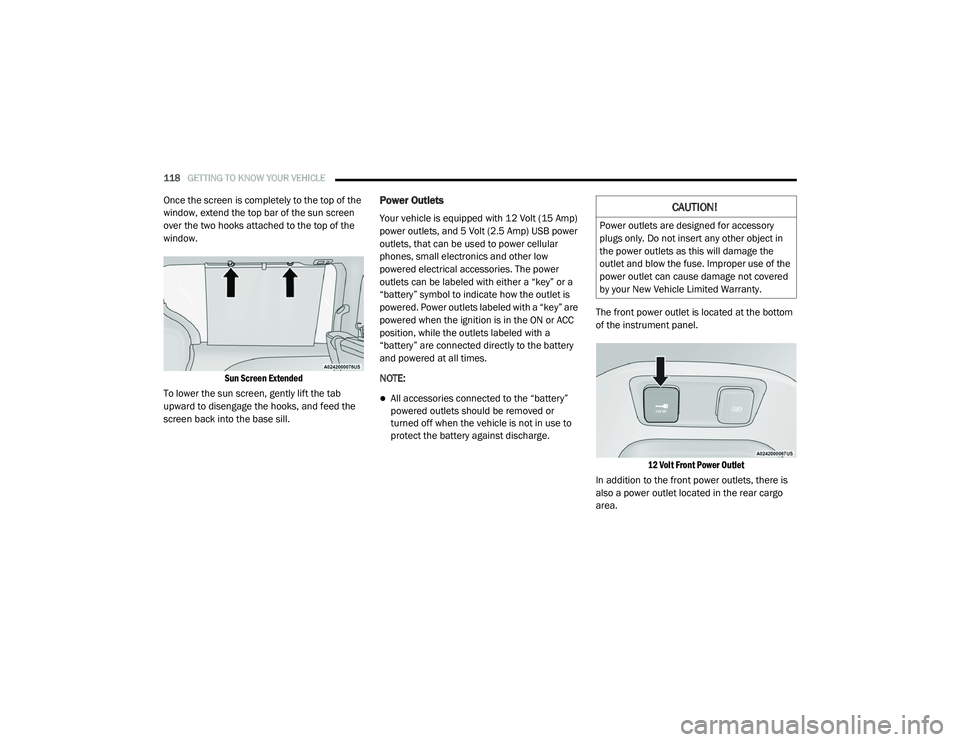
Once the screen is completely to the top of the
window, extend the top bar of the sun screen
over the two hooks attached to the top of the
window.
Sun Screen Extended
To lower the sun screen, gently lift the tab
upward to disengage the hooks, and feed the
screen back into the base sill.Power Outlets
Your vehicle is equipped with 12 Volt (15 Amp)
power outlets, and 5 Volt (2.5 Amp) USB power
outlets, that can be used to power cellular
phones, small electronics and other low
powered electrical accessories. The power
outlets can be labeled with either a “key” or a
“battery” symbol to indicate how the outlet is
powered. Power outlets labeled with a “key” are
powered when the ignition is in the ON or ACC
position, while the outlets labeled with a
“battery” are connected directly to the battery
and powered at all times.
NOTE:
All accessories connected to the “battery”
powered outlets should be removed or
turned off when the vehicle is not in use to
protect the battery against discharge. The front power outlet is located at the bottom
of the instrument panel.
12 Volt Front Power Outlet
In addition to the front power outlets, there is
also a power outlet located in the rear cargo
area.
CAUTION!
Power outlets are designed for accessory
plugs only. Do not insert any other object in
the power outlets as this will damage the
outlet and blow the fuse. Improper use of the
power outlet can cause damage not covered
by your New Vehicle Limited Warranty.
20_RU_OM_EN_US_t.book Page 118
Page 121 of 516
GETTING TO KNOW YOUR VEHICLE119
(Continued)
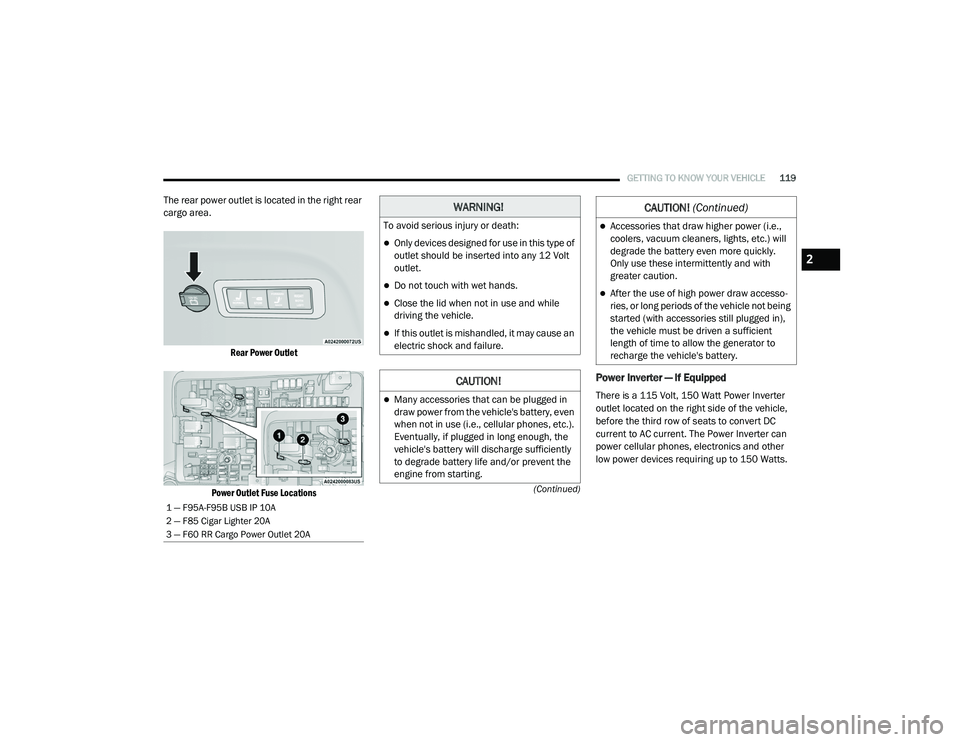
The rear power outlet is located in the right rear
cargo area.
Rear Power Outlet
Power Outlet Fuse Locations
Power Inverter — If Equipped
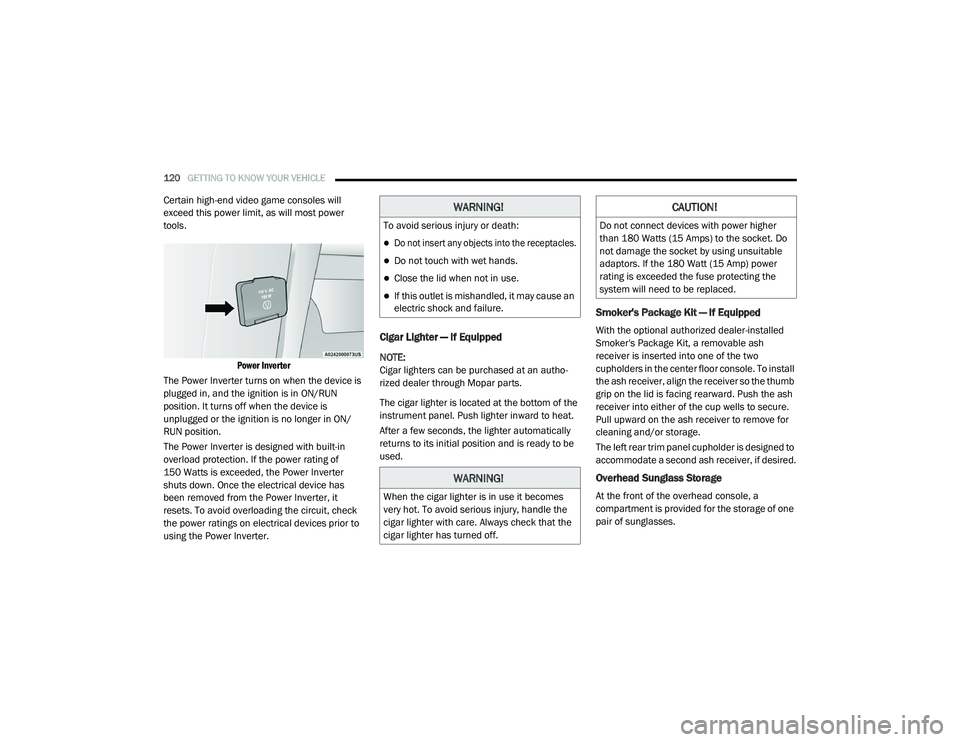
There is a 115 Volt, 150 Watt Power Inverter
outlet located on the right side of the vehicle,
before the third row of seats to convert DC
current to AC current. The Power Inverter can
power cellular phones, electronics and other
low power devices requiring up to 150 Watts.
1 — F95A-F95B USB IP 10A
2 — F85 Cigar Lighter 20A
3 — F60 RR Cargo Power Outlet 20A
WARNING!
To avoid serious injury or death:
Only devices designed for use in this type of
outlet should be inserted into any 12 Volt
outlet.
Do not touch with wet hands.
Close the lid when not in use and while
driving the vehicle.
If this outlet is mishandled, it may cause an
electric shock and failure.
CAUTION!
Many accessories that can be plugged in
draw power from the vehicle's battery, even
when not in use (i.e., cellular phones, etc.).
Eventually, if plugged in long enough, the
vehicle's battery will discharge sufficiently
to degrade battery life and/or prevent the
engine from starting.
Accessories that draw higher power (i.e.,
coolers, vacuum cleaners, lights, etc.) will
degrade the battery even more quickly.
Only use these intermittently and with
greater caution.
After the use of high power draw accesso -
ries, or long periods of the vehicle not being
started (with accessories still plugged in),
the vehicle must be driven a sufficient
length of time to allow the generator to
recharge the vehicle's battery.
CAUTION! (Continued)
2
20_RU_OM_EN_US_t.book Page 119
Page 122 of 516
120GETTING TO KNOW YOUR VEHICLE
Certain high-end video game consoles will
exceed this power limit, as will most power
tools.
Power Inverter
The Power Inverter turns on when the device is
plugged in, and the ignition is in ON/RUN
position. It turns off when the device is
unplugged or the ignition is no longer in ON/
RUN position.
The Power Inverter is designed with built-in
overload protection. If the power rating of
150 Watts is exceeded, the Power Inverter
shuts down. Once the electrical device has
been removed from the Power Inverter, it
resets. To avoid overloading the circuit, check
the power ratings on electrical devices prior to
using the Power Inverter.
Cigar Lighter — If Equipped
NOTE:
Cigar lighters can be purchased at an autho -
rized dealer through Mopar parts.
The cigar lighter is located at the bottom of the
instrument panel. Push lighter inward to heat.
After a few seconds, the lighter automatically
returns to its initial position and is ready to be
used.
Smoker's Package Kit — If Equipped
With the optional authorized dealer-installed
Smoker's Package Kit, a removable ash
receiver is inserted into one of the two
cupholders in the center floor console. To install
the ash receiver, align the receiver so the thumb
grip on the lid is facing rearward. Push the ash
receiver into either of the cup wells to secure.
Pull upward on the ash receiver to remove for
cleaning and/or storage.
The left rear trim panel cupholder is designed to
accommodate a second ash receiver, if desired.
Overhead Sunglass Storage
At the front of the overhead console, a
compartment is provided for the storage of one
pair of sunglasses.
WARNING!
To avoid serious injury or death:
Do not insert any objects into the receptacles.
Do not touch with wet hands.
Close the lid when not in use.
If this outlet is mishandled, it may cause an
electric shock and failure.
WARNING!
When the cigar lighter is in use it becomes
very hot. To avoid serious injury, handle the
cigar lighter with care. Always check that the
cigar lighter has turned off.
CAUTION!
Do not connect devices with power higher
than 180 Watts (15 Amps) to the socket. Do
not damage the socket by using unsuitable
adaptors. If the 180 Watt (15 Amp) power
rating is exceeded the fuse protecting the
system will need to be replaced.
20_RU_OM_EN_US_t.book Page 120
Page 125 of 516
GETTING TO KNOW YOUR VEHICLE123
5. Deploy and tighten the second crossbar to
complete the deployment of the crossbars.
NOTE:
The crossbars are not identical and have fixed
deployment positions. The rear crossbar can be
deployed in two different positions.
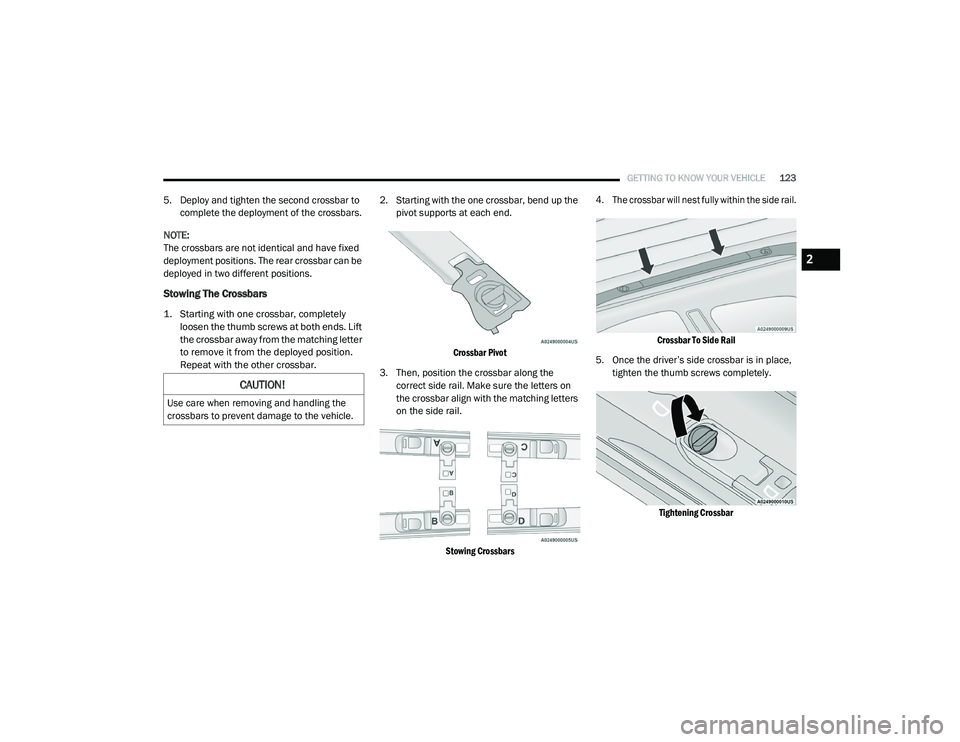
Stowing The Crossbars
1. Starting with one crossbar, completely loosen the thumb screws at both ends. Lift
the crossbar away from the matching letter
to remove it from the deployed position.
Repeat with the other crossbar.
2. Starting with the one crossbar, bend up the
pivot supports at each end.
Crossbar Pivot
3. Then, position the crossbar along the correct side rail. Make sure the letters on
the crossbar align with the matching letters
on the side rail.
Stowing Crossbars 4. The crossbar will nest fully within the side rail.
Crossbar To Side Rail
5. Once the driver’s side crossbar is in place, tighten the thumb screws completely.
Tightening Crossbar
CAUTION!
Use care when removing and handling the
crossbars to prevent damage to the vehicle.
2
20_RU_OM_EN_US_t.book Page 123
Page 126 of 516
124GETTING TO KNOW YOUR VEHICLE
(Continued)
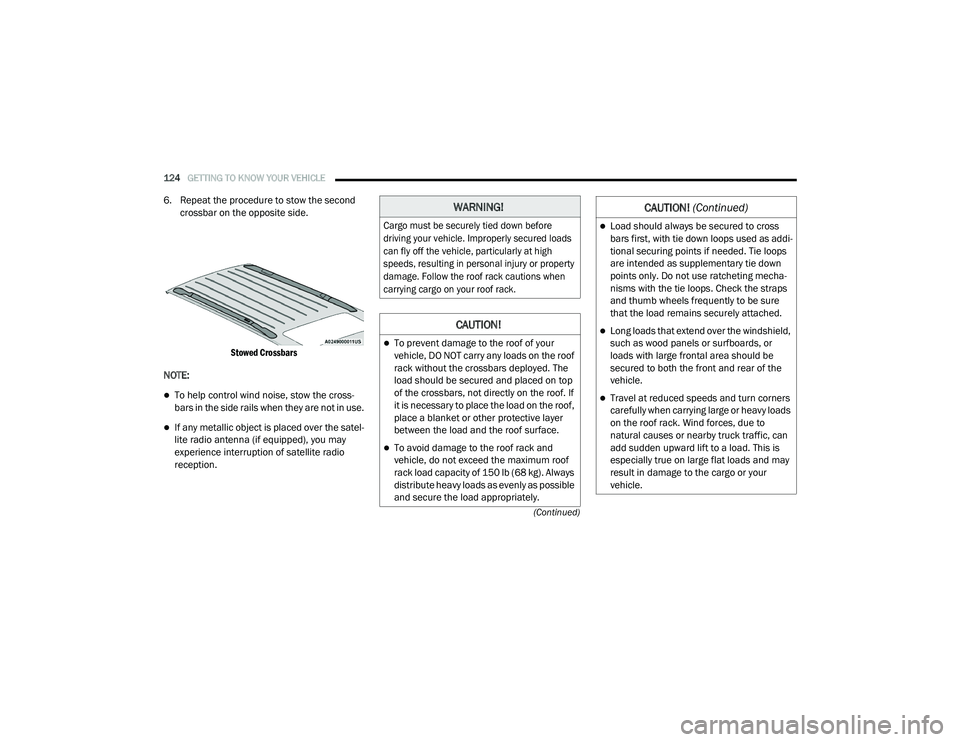
6. Repeat the procedure to stow the second crossbar on the opposite side.
Stowed Crossbars
NOTE:
To help control wind noise, stow the cross -
bars in the side rails when they are not in use.
If any metallic object is placed over the satel -
lite radio antenna (if equipped), you may
experience interruption of satellite radio
reception.
WARNING!
Cargo must be securely tied down before
driving your vehicle. Improperly secured loads
can fly off the vehicle, particularly at high
speeds, resulting in personal injury or property
damage. Follow the roof rack cautions when
carrying cargo on your roof rack.
CAUTION!
To prevent damage to the roof of your
vehicle, DO NOT carry any loads on the roof
rack without the crossbars deployed. The
load should be secured and placed on top
of the crossbars, not directly on the roof. If
it is necessary to place the load on the roof,
place a blanket or other protective layer
between the load and the roof surface.
To avoid damage to the roof rack and
vehicle, do not exceed the maximum roof
rack load capacity of 150 lb (68 kg). Always
distribute heavy loads as evenly as possible
and secure the load appropriately.
Load should always be secured to cross
bars first, with tie down loops used as addi -
tional securing points if needed. Tie loops
are intended as supplementary tie down
points only. Do not use ratcheting mecha -
nisms with the tie loops. Check the straps
and thumb wheels frequently to be sure
that the load remains securely attached.
Long loads that extend over the windshield,
such as wood panels or surfboards, or
loads with large frontal area should be
secured to both the front and rear of the
vehicle.
Travel at reduced speeds and turn corners
carefully when carrying large or heavy loads
on the roof rack. Wind forces, due to
natural causes or nearby truck traffic, can
add sudden upward lift to a load. This is
especially true on large flat loads and may
result in damage to the cargo or your
vehicle.
CAUTION! (Continued)
20_RU_OM_EN_US_t.book Page 124
Page 140 of 516
138GETTING TO KNOW YOUR INSTRUMENT PANEL
Speed Warning — If Equipped
Push and release the up or down arrow button
until Speed Warning is highlighted in the
instrument cluster display. Push and release the
OK button to enter speed warning. Use the up or
down arrow button to turn the speed warning ON
or OFF, then push and release the OK button to
confirm the selection. If the ON status is selected,
use the up or down arrow button to set the
desired speed, then push the OK button to set
the speed for the speed warning. A speed
warning telltale will illuminate in the instrument
cluster, with a number matching the set speed,
with a pop up message to inform the driver that
the speed warning has been set to the desired
speed. Each time the set speed is exceeded, a
single chime will sound and a pop up warning
message will display. If the set speed is exceeded
more than 2 mph (3 km/h), a continuous chime
will sound for up to 10 seconds, or until the speed
is no longer exceeded. The telltale in the
instrument cluster will also change from white to
yellow, and a pop up warning message will pop up
on the instrument cluster display.
NOTE:
Speed Warning is unavailable while KeySense
is in use.
Battery Saver On/Battery Saver Mode
Message — Electrical Load Reduction
Actions — If Equipped
This vehicle is equipped with an Intelligent
Battery Sensor (IBS) to perform additional
monitoring of the electrical system and status
of the vehicle battery.
In cases when the IBS detects charging system
failure, or the 12 Volt vehicle battery conditions
are deteriorating, electrical load reduction
actions will take place to extend the driving time
and distance of the vehicle. This is done by
reducing power to or turning off non-essential
12 Volt electrical loads. Load reduction will be
functional when the vehicle propulsion system
is active.
The vehicle may not be running depending on
the HV battery SOC or temperature. It will
display a message if there is a risk of battery
depletion to the point where the vehicle may
stall due to lack of electrical supply, or will not
restart after the current drive cycle.
When 12 Volt load reduction is activated, the
message “Battery Saver On” or “Battery Saver
Mode” will appear in the instrument cluster
display. These messages indicate the vehicle battery
has a low state of charge and continues to lose
electrical charge at a rate that the charging
system cannot sustain.
NOTE:
The charging system is independent from
load reduction. The charging system
performs a diagnostic on the charging
system continuously.
If the Battery Charge Warning Light is on it
may indicate a problem with the charging
system. Refer to “Battery Charge Warning
Light” in this chapter for further information.
The electrical loads that may be switched off (if
equipped), and vehicle functions which can be
effected by load reduction:
Heated Seat/Vented Seats/Heated Wheel
Heated/Cooled Cup Holders — If Equipped
Rear Defroster And Heated Mirrors
HVAC System
115 Volts AC Power Inverter System
Audio and Telematics System
20_RU_OM_EN_US_t.book Page 138
Page 151 of 516
GETTING TO KNOW YOUR INSTRUMENT PANEL149
Turn Signal Indicator Lights
When the left or right turn signal is
activated, the turn signal indicator will
flash independently and the
corresponding exterior turn signal
lamps will flash. Turn signals can be activated
when the multifunction lever is moved down
(left) or up (right).
NOTE:
A continuous chime will sound if the vehicle is
driven more than 1 mile (1.6 km) with either
turn signal on.
Check for an inoperative outside light bulb if
either indicator flashes at a rapid rate.
Blue Indicator Lights
High Beam Indicator Light
This indicator light will illuminate to
indicate that the high beam
headlights are on. With the low beams
activated, push the multifunction
lever forward (toward the front of the vehicle) to
turn on the high beams. Pull the multifunction
lever rearward (toward the rear of the vehicle) to
turn off the high beams. If the high beams are
off, pull the lever toward you for a temporary
high beam on, “flash to pass” scenario.
White Indicator Lights
Adaptive Cruise Control (ACC) Ready Light —
If Equipped
This indicator light will illuminate
when the vehicle equipped with
Adaptive Cruise Control (ACC) has
been turned on but not set.
Refer to “Adaptive Cruise Control (ACC) — If
Equipped” in “Starting And Operating” for
further information.
Cruise Control Ready Indicator
This indicator light will illuminate
when the cruise control is ready, but
not set. Refer to “Speed Control” in
“Starting And Operating” for further
information.
LaneSense Indicator Light — If Equipped
When the LaneSense system is ON,
but not armed, the LaneSense
indicator light illuminates solid white.
This occurs when only left, right, or
neither lane line has been detected. If a single
lane line is detected, the system is ready to
provide only visual warnings if an unintentional
lane departure occurs on the detected lane line.
Refer to “LaneSense — If Equipped" in “Starting
And Operating” for further information.
Set Speed Display
The Set Speed Display indicator light
indicates the set speed for the Speed
Control and Adaptive Cruise Control
(ACC) settings.
3
20_RU_OM_EN_US_t.book Page 149