hvac CHRYSLER PACIFICA 2020 Owners Manual
[x] Cancel search | Manufacturer: CHRYSLER, Model Year: 2020, Model line: PACIFICA, Model: CHRYSLER PACIFICA 2020Pages: 516, PDF Size: 28.69 MB
Page 140 of 516
138GETTING TO KNOW YOUR INSTRUMENT PANEL
Speed Warning — If Equipped
Push and release the up or down arrow button
until Speed Warning is highlighted in the
instrument cluster display. Push and release the
OK button to enter speed warning. Use the up or
down arrow button to turn the speed warning ON
or OFF, then push and release the OK button to
confirm the selection. If the ON status is selected,
use the up or down arrow button to set the
desired speed, then push the OK button to set
the speed for the speed warning. A speed
warning telltale will illuminate in the instrument
cluster, with a number matching the set speed,
with a pop up message to inform the driver that
the speed warning has been set to the desired
speed. Each time the set speed is exceeded, a
single chime will sound and a pop up warning
message will display. If the set speed is exceeded
more than 2 mph (3 km/h), a continuous chime
will sound for up to 10 seconds, or until the speed
is no longer exceeded. The telltale in the
instrument cluster will also change from white to
yellow, and a pop up warning message will pop up
on the instrument cluster display.
NOTE:
Speed Warning is unavailable while KeySense
is in use.
Battery Saver On/Battery Saver Mode
Message — Electrical Load Reduction
Actions — If Equipped
This vehicle is equipped with an Intelligent
Battery Sensor (IBS) to perform additional
monitoring of the electrical system and status
of the vehicle battery.
In cases when the IBS detects charging system
failure, or the 12 Volt vehicle battery conditions
are deteriorating, electrical load reduction
actions will take place to extend the driving time
and distance of the vehicle. This is done by
reducing power to or turning off non-essential
12 Volt electrical loads. Load reduction will be
functional when the vehicle propulsion system
is active.
The vehicle may not be running depending on
the HV battery SOC or temperature. It will
display a message if there is a risk of battery
depletion to the point where the vehicle may
stall due to lack of electrical supply, or will not
restart after the current drive cycle.
When 12 Volt load reduction is activated, the
message “Battery Saver On” or “Battery Saver
Mode” will appear in the instrument cluster
display. These messages indicate the vehicle battery
has a low state of charge and continues to lose
electrical charge at a rate that the charging
system cannot sustain.
NOTE:
The charging system is independent from
load reduction. The charging system
performs a diagnostic on the charging
system continuously.
If the Battery Charge Warning Light is on it
may indicate a problem with the charging
system. Refer to “Battery Charge Warning
Light” in this chapter for further information.
The electrical loads that may be switched off (if
equipped), and vehicle functions which can be
effected by load reduction:
Heated Seat/Vented Seats/Heated Wheel
Heated/Cooled Cup Holders — If Equipped
Rear Defroster And Heated Mirrors
HVAC System
115 Volts AC Power Inverter System
Audio and Telematics System
20_RU_OM_EN_US_t.book Page 138
Page 141 of 516
GETTING TO KNOW YOUR INSTRUMENT PANEL139
Loss of the battery charge may indicate one or
more of the following conditions:
The charging system cannot deliver enough
electrical power to the vehicle system
because the electrical loads are larger than
the capability of charging system. The
charging system is still functioning properly.
Turning on all possible vehicle electrical
loads (e.g. HVAC to max settings, exterior and
interior lights, overloaded power outlets +12
Volts, 150W, USB ports) during certain
driving conditions (city driving, towing,
frequent stopping).
Installing options like additional lights,
upfitter electrical accessories, audio
systems, alarms and similar devices.
Unusual driving cycles (short trips separated
by long parking periods).
The vehicle was parked for an extended
period of time (weeks, months).
The battery was recently replaced and was
not charged completely.
The battery was discharged by an electrical
load left on when the vehicle was parked.
The battery was used for an extended period
with the engine not running to supply radio,
lights, chargers, +12 Volt portable appli-
ances like vacuum cleaners, game consoles
and similar devices.
What to do when an electrical load reduction
action message is present (“Battery Saver On”
or “Battery Saver Mode”)
During a trip:
Reduce power to unnecessary loads if
possible:
Turn off redundant lights (interior or exte -
rior)
Check what may be plugged in to power
outlets +12 Volts, 150W, USB ports
Check HVAC settings (blower, tempera -
ture)
Check the audio settings (volume) After a trip:
Check if any aftermarket equipment was
installed (additional lights, upfitter electrical
accessories, audio systems, alarms) and
review specifications if any (load and Ignition
Off Draw currents).
Evaluate the latest driving cycles (distance,
driving time and parking time).
The vehicle should have service performed if
the message is still present during consecu
-
tive trips and the evaluation of the vehicle
and driving pattern did not help to identify the
cause.
Instrument Cluster Display Programmable
Features Screen Setup
Push the up or down arrow button to scroll
through the Menu Items until the Screen Setup
displays in the instrument cluster display. Push
the OK button to enter Screen Setup. The
Screen Setup feature allows you to change what
information is displayed in the instrument
cluster display as well as the location that
information is displayed.
3
20_RU_OM_EN_US_t.book Page 139
Page 198 of 516
196SAFETY
Enhanced Accident Response System
In the event of an impact, if the communication
network remains intact, and the power remains
intact, depending on the nature of the event,
the ORC will determine whether to have the
Enhanced Accident Response System perform
the following functions:
Cut off fuel to the engine (if equipped).
Cut off battery power to the electric motor (if
equipped).
Flash hazard lights as long as the battery has
power.
Turn on the interior lights, which remain on
as long as the battery has power or for
15 minutes from the intervention of the
Enhanced Accident Response System.
Unlock the power door locks. Your vehicle may also be designed to perform
any of these other functions in response to the
Enhanced Accident Response System:
Turn off the Fuel Filter Heater, Turn off the
HVAC Blower Motor, Close the HVAC Circula
-
tion Door
Cut off battery power to the:
Engine
Electric Motor (if equipped)
Electric power steering
Brake booster
Electric park brake
Automatic transmission gear selector
Horn
Front wiper
Headlamp washer pump NOTE:
After an accident, remember to cycle the ignition
to the STOP (OFF/LOCK) position and remove the
key from the ignition switch to avoid draining the
battery. Carefully check the vehicle for fuel leaks
in the engine compartment and on the ground
near the engine compartment and fuel tank
before resetting the system and starting the
engine. If there are no fuel leaks or damage to
the vehicle electrical devices (e.g. headlights)
after an accident, reset the system by following
the procedure described below. If you have any
doubt, contact an authorized dealer.
Enhanced Accident Response System Reset
Procedure
If applicable, refer to the “Hybrid Supplement”
for additional information.
In order to reset the Enhanced Accident
Response System functions after an event, the
ignition switch must be changed from ignition
START or ON/RUN to ignition OFF. Carefully
check the vehicle for fuel leaks in the engine
compartment and on the ground near the
engine compartment and fuel tank before
resetting the system and starting the engine.
20_RU_OM_EN_US_t.book Page 196
Page 237 of 516
STARTING AND OPERATING235
STOP/START SYSTEM — IF EQUIPPED
The Stop/Start function is developed to reduce
fuel consumption. The system will stop the
engine automatically during a vehicle stop if the
required conditions are met. Releasing the
brake pedal, pressing the accelerator pedal or
shifting out of DRIVE (D) will automatically
re-start the engine.
This vehicle has been upgraded with a heavy
duty starter, enhanced battery, and other
upgraded engine parts to handle the additional
engine starts.
Auto Stop/Start
The Stop/Start feature is enabled
after every normal customer engine
start. At that time, the system will go
into STOP/START READY and if all
other conditions are met, can go into a STOP/
START AUTOSTOP ACTIVE.
To Activate Auto STOP/START, The Following
Must Occur:
The system must be in STOP/START READY
state. A STOP/START READY message will be
displayed in the instrument cluster within the Stop/Start section. Refer to “Instrument
Cluster Display” in “Getting To Know Your
Instrument Panel” for further information.
The vehicle must be completely stopped.
The shifter must be in a forward gear and the
brake pedal depressed.
The engine will shut down, the tachometer will
move to the zero position and the Stop/Start
telltale will illuminate indicating you are in
Autostop. Customer settings will be maintained
throughout the Auto Stop/Start process.
Possible Reasons The Engine Does Not
Autostop
Prior to engine shut down, the system will check
many safety and comfort conditions for Stop/
Start and ensure they are fulfilled. Detailed
information about the operation of the Stop/
Start system may be viewed in the instrument
cluster display Stop/Start screen. In the
following situations the engine will not stop:
If Stop/Start is manually disabled by the
Stop/Start OFF button.
Driver’s seat belt is not buckled.
Driver’s door is not closed.
Battery temperature is too warm or cold.
Battery charge is low. During this time a
message will display "Stop/Start Not Ready
Battery Charging".
The vehicle is on a steep grade.
Cabin heating or cooling is in process and an
acceptable cabin temperature has not been
achieved.
HVAC is set to full defrost mode at a high
blower speed.
HVAC set to MAX A/C.
Engine has not reached normal operating
temperature.
The transmission is not in a forward gear.
Hood is open.
Brake pedal is not pressed with sufficient
pressure.
5
20_RU_OM_EN_US_t.book Page 235
Page 238 of 516

236STARTING AND OPERATING
Other Factors Which Can Inhibit Autostop
Include:
Accelerator pedal input.
Engine temp too high.
5 mph (8 km/h) threshold not achieved from
previous AUTOSTOP.
Steering angle beyond threshold.
ACC is on and speed is set.
It may be possible for the vehicle to be driven
several times without the Stop/Start system
going into a Stop/Start READY state under more
extreme conditions of the items listed above.
To Start The Engine While In Auto Stop/Start
While in a forward gear, the engine will start
when the brake pedal is released or the throttle
pedal is depressed. The transmission will
automatically re-engage upon engine restart.
Conditions That Will Cause The Engine To Start
Automatically While In Auto Stop/Start:
The transmission selector is moved out of
DRIVE.
To maintain cabin temperature comfort.
HVAC is set to full defrost mode.
HVAC system temperature or fan speed is
manually adjusted.
Battery voltage drops too low. During this
time a message will display "Stop/Start Not
Ready Battery Charging".
Low brake vacuum (e.g. after several brake
pedal applications).
Stop/Start OFF switch is pushed.
A Stop/Start system error occurs.
To Manually Turn Off The Stop/Start System
Stop/Start OFF Button
1. Push the Stop/Start OFF switch (located on
the instrument panel). The light on the
switch will illuminate.
2. The “STOP/START OFF” message will appear in the instrument cluster display.
Refer to “Instrument Cluster Display” in
“Getting To Know Your Instrument Panel”
for further information.
3. At the next vehicle stop (after turning off the Stop/Start system) the engine will not be
stopped.
4. The Stop/Start system will reset itself back to an ON condition every time the ignition is
turned off and back on.
Automatic Shutdown
This vehicle is equipped with an automatic
shutdown feature. If the vehicle is left in READY
mode (vehicle running) with the gear selector in
PARK for one hour after the driver exits, this
feature will automatically turn the vehicle off.
Notifications have been added into this feature
to raise awareness of the timed event:In the interior of the vehicle, the instrument
cluster will display “Ready To Drive”, and will
be accompanied by three audible chimes
20_RU_OM_EN_US_t.book Page 236
Page 316 of 516
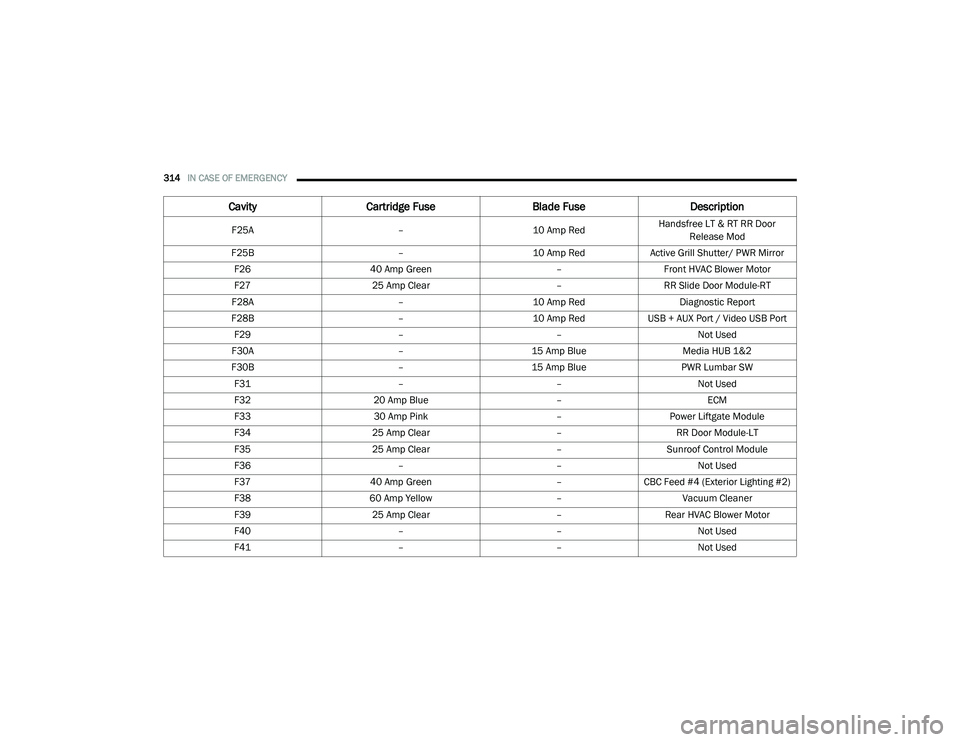
314IN CASE OF EMERGENCY
F25A –10 Amp RedHandsfree LT & RT RR Door
Release Mod
F25B –10 Amp RedActive Grill Shutter/ PWR Mirror
F26 40 Amp Green –Front HVAC Blower Motor
F27 25 Amp Clear –RR Slide Door Module-RT
F28A –10 Amp Red Diagnostic Report
F28B –10 Amp RedUSB + AUX Port / Video USB Port
F29 ––Not Used
F30A –15 Amp Blue Media HUB 1&2
F30B –15 Amp Blue PWR Lumbar SW
F31 ––Not Used
F32 20 Amp Blue –ECM
F33 30 Amp Pink –Power Liftgate Module
F34 25 Amp Clear –RR Door Module-LT
F35 25 Amp Clear –Sunroof Control Module
F36 ––Not Used
F37 40 Amp Green –CBC Feed #4 (Exterior Lighting #2)
F38 60 Amp Yellow –Vacuum Cleaner
F39 25 Amp Clear –Rear HVAC Blower Motor
F40 ––Not Used
F41 ––Not Used
CavityCartridge Fuse Blade FuseDescription
20_RU_OM_EN_US_t.book Page 314
Page 317 of 516
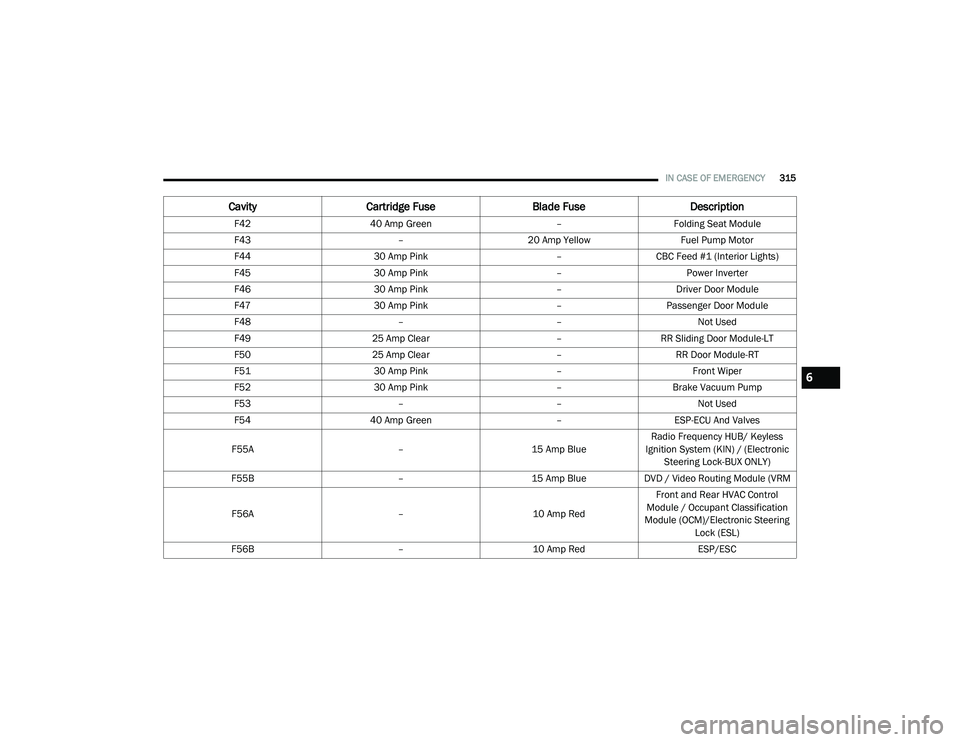
IN CASE OF EMERGENCY315
F42 40 Amp Green –Folding Seat Module
F43 –20 Amp Yellow Fuel Pump Motor
F44 30 Amp Pink –CBC Feed #1 (Interior Lights)
F45 30 Amp Pink –Power Inverter
F46 30 Amp Pink –Driver Door Module
F47 30 Amp Pink –Passenger Door Module
F48 ––Not Used
F49 25 Amp Clear –RR Sliding Door Module-LT
F50 25 Amp Clear –RR Door Module-RT
F51 30 Amp Pink –Front Wiper
F52 30 Amp Pink –Brake Vacuum Pump
F53 ––Not Used
F54 40 Amp Green –ESP-ECU And Valves
F55A –15 Amp BlueRadio Frequency HUB/ Keyless
Ignition System (KIN) / (Electronic Steering Lock-BUX ONLY)
F55B –15 Amp BlueDVD / Video Routing Module (VRM
F56A –10 Amp RedFront and Rear HVAC Control
Module / Occupant Classification
Module (OCM)/Electronic Steering Lock (ESL)
F56B –10 Amp Red ESP/ESC
CavityCartridge Fuse Blade FuseDescription
6
20_RU_OM_EN_US_t.book Page 315
Page 319 of 516
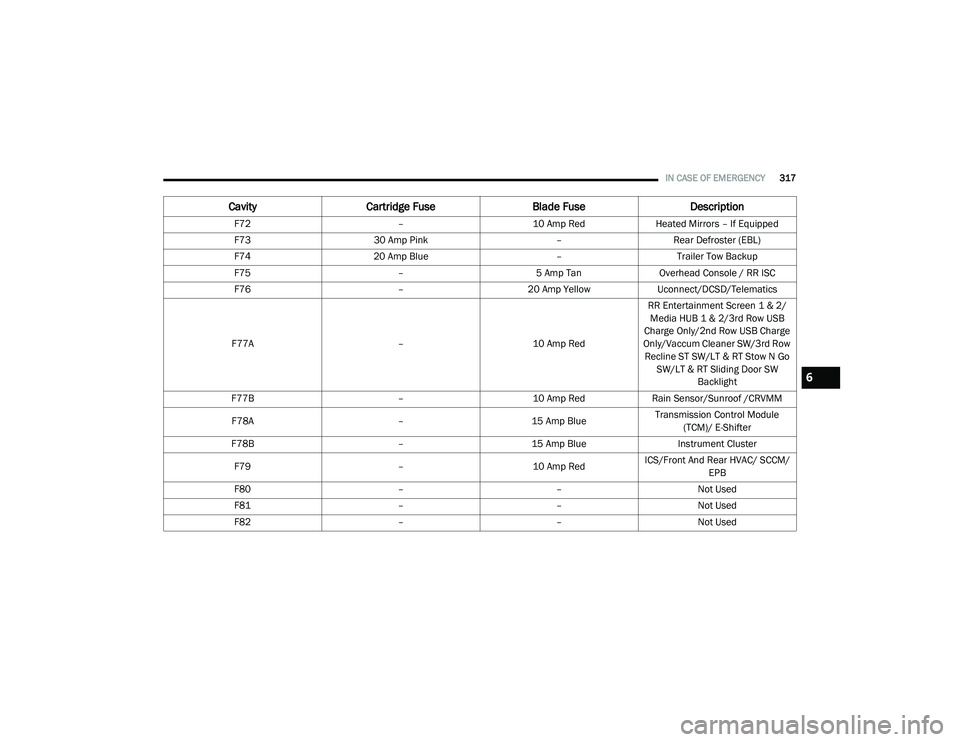
IN CASE OF EMERGENCY317
F72 –10 Amp RedHeated Mirrors – If Equipped
F73 30 Amp Pink –Rear Defroster (EBL)
F74 20 Amp Blue –Trailer Tow Backup
F75 –5 Amp TanOverhead Console / RR ISC
F76 –20 Amp YellowUconnect/DCSD/Telematics
F77A –10 Amp RedRR Entertainment Screen 1 & 2/
Media HUB 1 & 2/3rd Row USB
Charge Only/2nd Row USB Charge
Only/Vaccum Cleaner SW/3rd Row Recline ST SW/LT & RT Stow N Go SW/LT & RT Sliding Door SW Backlight
F77B –10 Amp RedRain Sensor/Sunroof /CRVMM
F78A –15 Amp BlueTransmission Control Module
(TCM)/ E-Shifter
F78B –15 Amp Blue Instrument Cluster
F79 –10 Amp RedICS/Front And Rear HVAC/ SCCM/
EPB
F80 ––Not Used
F81 ––Not Used
F82 ––Not Used
CavityCartridge Fuse Blade FuseDescription
6
20_RU_OM_EN_US_t.book Page 317