ECU CHRYSLER PACIFICA 2021 User Guide
[x] Cancel search | Manufacturer: CHRYSLER, Model Year: 2021, Model line: PACIFICA, Model: CHRYSLER PACIFICA 2021Pages: 401, PDF Size: 26.88 MB
Page 24 of 401
22GETTING TO KNOW YOUR VEHICLE
TO ARM THE SYSTEM
Follow these steps to arm the Vehicle Security
system:
1. Make sure the vehicle’s ignition is placed in
the OFF position
Ú
page 132.
For vehicles equipped with Keyless Enter ‘n
Go™— Passive Entry, make sure the vehicle
ignition system is OFF.
2. Perform one of the following methods to lock the vehicle:
Push lock on the interior power door lock
switch with the driver and/or passenger
door open.
Push the lock button on the exterior Passive
Entry door handle with a valid key fob avail -
able in the same exterior zone Ú page 24.
Push the lock button on the key fob.
3. If any doors are open, close them.
TO DISARM THE SYSTEM
The Vehicle Security system can be disarmed using
any of the following methods:
Push the unlock button on the key fob.
Grab the Passive Entry door handle (if equipped)
Ú page 24.
Hands-Free Liftgate Passive Entry activation
(if equipped).
Cycle the vehicle ignition system out of the OFF
position.
For vehicles equipped with Keyless Enter ‘n
Go™ — Passive Entry, push the keyless igni -
tion START/STOP ignition button (requires
at least one valid key fob in the vehicle).
NOTE:
The driver's door key cylinder and the liftgate
button on the key fob cannot arm or disarm the
Vehicle Security system.
The Vehicle Security system remains armed
during power liftgate entry. Pushing the liftgate
button will not disarm the Vehicle Security
system. If someone enters the vehicle through
the liftgate and opens any door, the alarm will
sound.
When the Vehicle Security system is armed, the
interior power door lock switches will not unlock
the doors. The Vehicle Security system is designed to protect
your vehicle. However, you can create conditions
where the system will give you a false alarm. If one
of the previously described arming sequences has
occurred, the Vehicle Security system will arm
regardless of whether you are in the vehicle or not.
If you remain in the vehicle and open a door, the
alarm will sound. If this occurs, disarm the Vehicle
Security system.
If the Vehicle Security system is armed and the
battery becomes disconnected, the Vehicle
Security system will remain armed when the
battery is reconnected; the exterior lights will flash,
and the horn will sound. If this occurs, disarm the
Vehicle Security system.
REARMING OF THE SYSTEM
If something triggers the alarm and no action is
taken to disarm it, the Vehicle Security system will
turn the horn off after a 29 second cycle (with 5
seconds between cycles and up to 8 cycles if the
trigger remains active) and then rearm itself.
21_RUP_OM_EN_USC_t.book Page 22
Page 25 of 401
GETTING TO KNOW YOUR VEHICLE23
(Continued)
DOORS
MANUAL DOOR LOCKS — IF EQUIPPED
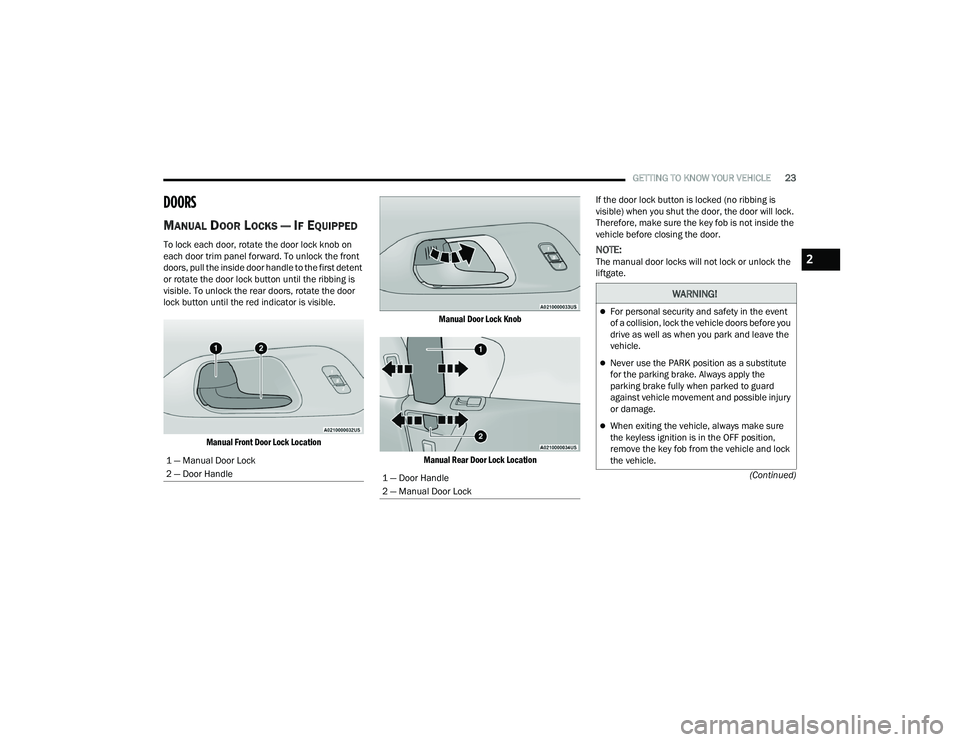
To lock each door, rotate the door lock knob on
each door trim panel forward. To unlock the front
doors, pull the inside door handle to the first detent
or rotate the door lock button until the ribbing is
visible. To unlock the rear doors, rotate the door
lock button until the red indicator is visible.
Manual Front Door Lock Location Manual Door Lock Knob
Manual Rear Door Lock Location
If the door lock button is locked (no ribbing is
visible) when you shut the door, the door will lock.
Therefore, make sure the key fob is not inside the
vehicle before closing the door.NOTE:The manual door locks will not lock or unlock the
liftgate.
1 — Manual Door Lock
2 — Door Handle
1 — Door Handle
2 — Manual Door Lock
WARNING!
For personal security and safety in the event
of a collision, lock the vehicle doors before you
drive as well as when you park and leave the
vehicle.
Never use the PARK position as a substitute
for the parking brake. Always apply the
parking brake fully when parked to guard
against vehicle movement and possible injury
or damage.
When exiting the vehicle, always make sure
the keyless ignition is in the OFF position,
remove the key fob from the vehicle and lock
the vehicle.
2
21_RUP_OM_EN_USC_t.book Page 23
Page 26 of 401
24GETTING TO KNOW YOUR VEHICLE
POWER DOOR LOCKS — IF EQUIPPED
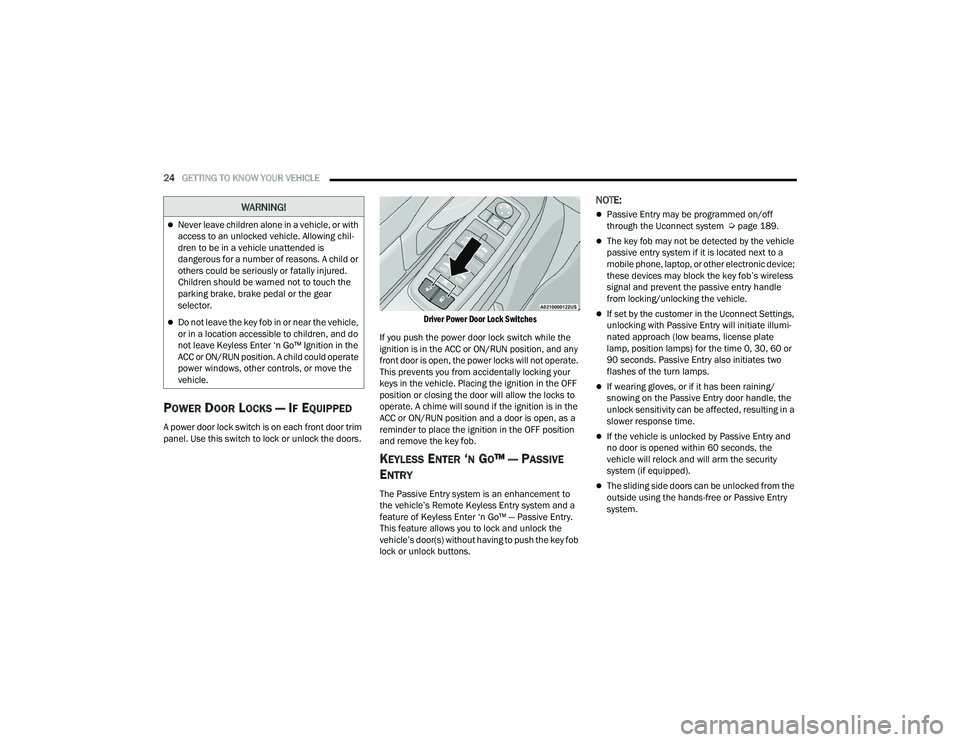
A power door lock switch is on each front door trim
panel. Use this switch to lock or unlock the doors.
Driver Power Door Lock Switches
If you push the power door lock switch while the
ignition is in the ACC or ON/RUN position, and any
front door is open, the power locks will not operate.
This prevents you from accidentally locking your
keys in the vehicle. Placing the ignition in the OFF
position or closing the door will allow the locks to
operate. A chime will sound if the ignition is in the
ACC or ON/RUN position and a door is open, as a
reminder to place the ignition in the OFF position
and remove the key fob.
KEYLESS ENTER ‘N GO™ — PASSIVE
E
NTRY
The Passive Entry system is an enhancement to
the vehicle’s Remote Keyless Entry system and a
feature of Keyless Enter ‘n Go™ — Passive Entry.
This feature allows you to lock and unlock the
vehicle’s door(s) without having to push the key fob
lock or unlock buttons.
NOTE:
Passive Entry may be programmed on/off
through the Uconnect system Ú page 189.
The key fob may not be detected by the vehicle
passive entry system if it is located next to a
mobile phone, laptop, or other electronic device;
these devices may block the key fob’s wireless
signal and prevent the passive entry handle
from locking/unlocking the vehicle.
If set by the customer in the Uconnect Settings,
unlocking with Passive Entry will initiate illumi -
nated approach (low beams, license plate
lamp, position lamps) for the time 0, 30, 60 or
90 seconds. Passive Entry also initiates two
flashes of the turn lamps.
If wearing gloves, or if it has been raining/
snowing on the Passive Entry door handle, the
unlock sensitivity can be affected, resulting in a
slower response time.
If the vehicle is unlocked by Passive Entry and
no door is opened within 60 seconds, the
vehicle will relock and will arm the security
system (if equipped).
The sliding side doors can be unlocked from the
outside using the hands-free or Passive Entry
system.
Never leave children alone in a vehicle, or with
access to an unlocked vehicle. Allowing chil -
dren to be in a vehicle unattended is
dangerous for a number of reasons. A child or
others could be seriously or fatally injured.
Children should be warned not to touch the
parking brake, brake pedal or the gear
selector.
Do not leave the key fob in or near the vehicle,
or in a location accessible to children, and do
not leave Keyless Enter ‘n Go™ Ignition in the
ACC or ON/RUN position. A child could operate
power windows, other controls, or move the
vehicle.
WARNING!
21_RUP_OM_EN_USC_t.book Page 24
Page 27 of 401
GETTING TO KNOW YOUR VEHICLE25
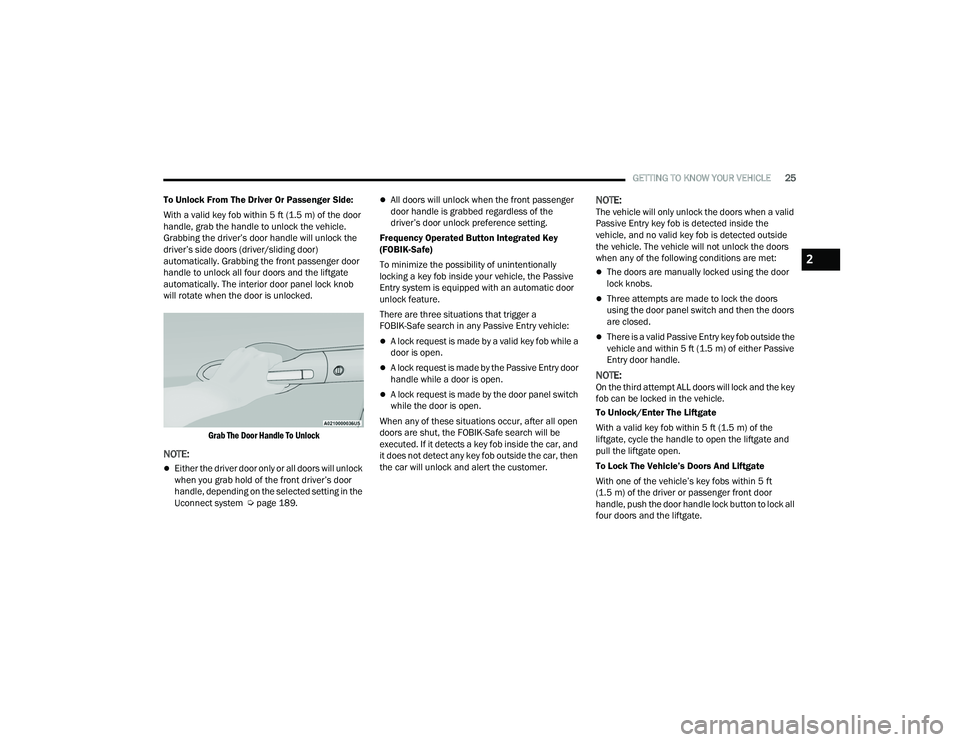
To Unlock From The Driver Or Passenger Side:
With a valid key fob within 5 ft (1.5 m) of the door
handle, grab the handle to unlock the vehicle.
Grabbing the driver’s door handle will unlock the
driver’s side doors (driver/sliding door)
automatically. Grabbing the front passenger door
handle to unlock all four doors and the liftgate
automatically. The interior door panel lock knob
will rotate when the door is unlocked.
Grab The Door Handle To Unlock
NOTE:
Either the driver door only or all doors will unlock
when you grab hold of the front driver’s door
handle, depending on the selected setting in the
Uconnect system Ú page 189.
All doors will unlock when the front passenger
door handle is grabbed regardless of the
driver’s door unlock preference setting.
Frequency Operated Button Integrated Key
(FOBIK-Safe)
To minimize the possibility of unintentionally
locking a key fob inside your vehicle, the Passive
Entry system is equipped with an automatic door
unlock feature.
There are three situations that trigger a
FOBIK-Safe search in any Passive Entry vehicle:
A lock request is made by a valid key fob while a
door is open.
A lock request is made by the Passive Entry door
handle while a door is open.
A lock request is made by the door panel switch
while the door is open.
When any of these situations occur, after all open
doors are shut, the FOBIK-Safe search will be
executed. If it detects a key fob inside the car, and
it does not detect any key fob outside the car, then
the car will unlock and alert the customer.
NOTE:The vehicle will only unlock the doors when a valid
Passive Entry key fob is detected inside the
vehicle, and no valid key fob is detected outside
the vehicle. The vehicle will not unlock the doors
when any of the following conditions are met:
The doors are manually locked using the door
lock knobs.
Three attempts are made to lock the doors
using the door panel switch and then the doors
are closed.
There is a valid Passive Entry key fob outside the
vehicle and within 5 ft (1.5 m) of either Passive
Entry door handle.
NOTE:On the third attempt ALL doors will lock and the key
fob can be locked in the vehicle.
To Unlock/Enter The Liftgate
With a valid key fob within 5 ft (1.5 m) of the
liftgate, cycle the handle to open the liftgate and
pull the liftgate open.
To Lock The Vehicle’s Doors And Liftgate
With one of the vehicle’s key fobs within 5 ft
(1.5 m) of the driver or passenger front door
handle, push the door handle lock button to lock all
four doors and the liftgate.
2
21_RUP_OM_EN_USC_t.book Page 25
Page 55 of 401
GETTING TO KNOW YOUR VEHICLE53
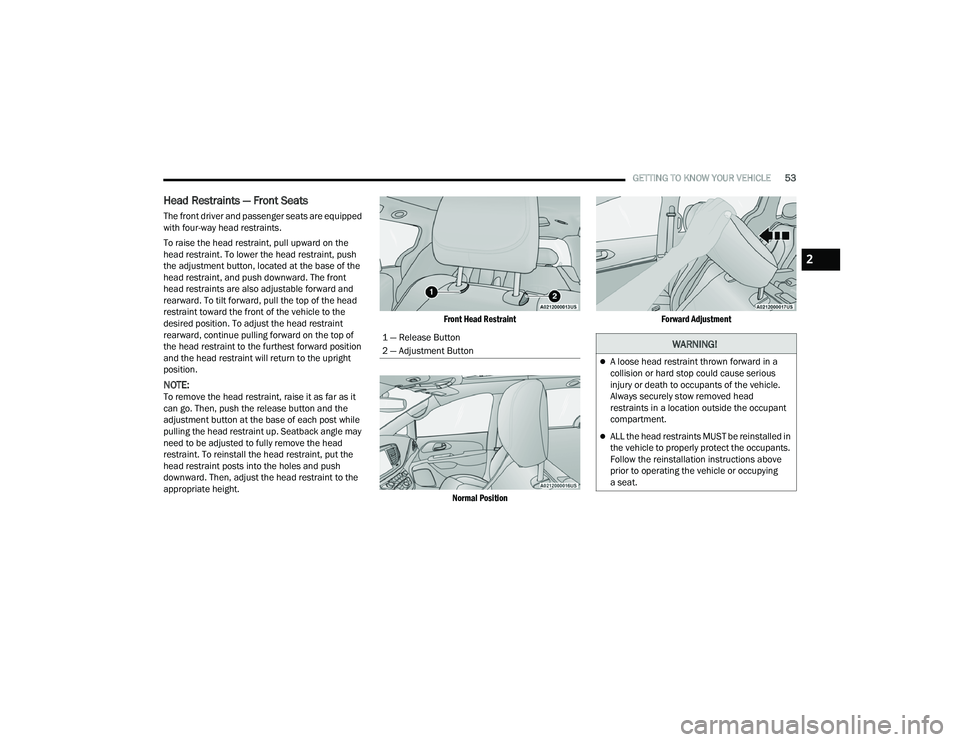
Head Restraints — Front Seats
The front driver and passenger seats are equipped
with four-way head restraints.
To raise the head restraint, pull upward on the
head restraint. To lower the head restraint, push
the adjustment button, located at the base of the
head restraint, and push downward. The front
head restraints are also adjustable forward and
rearward. To tilt forward, pull the top of the head
restraint toward the front of the vehicle to the
desired position. To adjust the head restraint
rearward, continue pulling forward on the top of
the head restraint to the furthest forward position
and the head restraint will return to the upright
position.
NOTE:To remove the head restraint, raise it as far as it
can go. Then, push the release button and the
adjustment button at the base of each post while
pulling the head restraint up. Seatback angle may
need to be adjusted to fully remove the head
restraint. To reinstall the head restraint, put the
head restraint posts into the holes and push
downward. Then, adjust the head restraint to the
appropriate height.
Front Head Restraint
Normal Position Forward Adjustment
1 — Release Button
2 — Adjustment Button
WARNING!
A loose head restraint thrown forward in a
collision or hard stop could cause serious
injury or death to occupants of the vehicle.
Always securely stow removed head
restraints in a location outside the occupant
compartment.
ALL the head restraints MUST be reinstalled in
the vehicle to properly protect the occupants.
Follow the reinstallation instructions above
prior to operating the vehicle or occupying
a seat.
2
21_RUP_OM_EN_USC_t.book Page 53
Page 56 of 401
54GETTING TO KNOW YOUR VEHICLE
Head Restraints — Second Row Quad
Seats
The second row outboard head restraints, as well
as the removable 8th passenger seat (if equipped),
may have adjustable head restraints.
NOTE:If equipped with Stow ‘n Go seating, the head
restraints are non-adjustable and non-removable.
Do not pull on non-adjustable head restraints
when folding the seat.
To raise the head restraint, pull upward on the
head restraint. To lower the head restraint, push
the adjustment button, located at the base of the
head restraint, and push downward.
To remove the head restraint, raise it as far as it
can go. Then, push the release button and the
adjustment button at the base of each post while
pulling the head restraint up. Seatback angle may
need to be adjusted to fully remove the head
restraint. To reinstall the head restraint, put the
head restraint posts into the holes and push
downward. Then, adjust the head restraint to the
appropriate height.
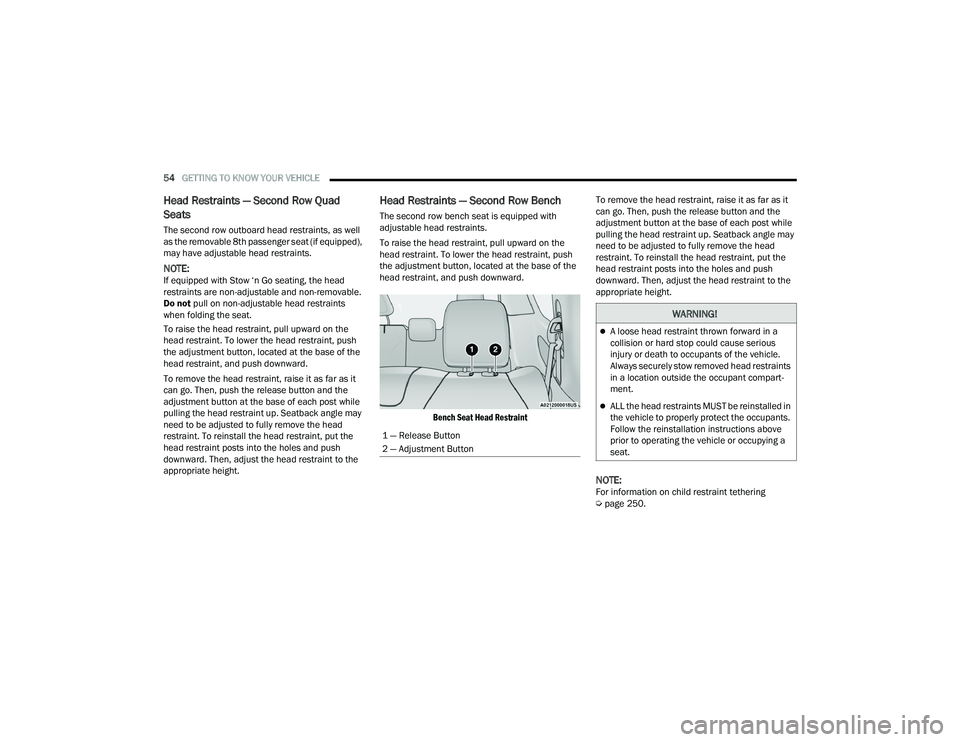
Head Restraints — Second Row Bench
The second row bench seat is equipped with
adjustable head restraints.
To raise the head restraint, pull upward on the
head restraint. To lower the head restraint, push
the adjustment button, located at the base of the
head restraint, and push downward.
Bench Seat Head Restraint
To remove the head restraint, raise it as far as it
can go. Then, push the release button and the
adjustment button at the base of each post while
pulling the head restraint up. Seatback angle may
need to be adjusted to fully remove the head
restraint. To reinstall the head restraint, put the
head restraint posts into the holes and push
downward. Then, adjust the head restraint to the
appropriate height.
NOTE:For information on child restraint tethering
Ú
page 250.
1 — Release Button
2 — Adjustment Button
WARNING!
A loose head restraint thrown forward in a
collision or hard stop could cause serious
injury or death to occupants of the vehicle.
Always securely stow removed head restraints
in a location outside the occupant compart
-
ment.
ALL the head restraints MUST be reinstalled in
the vehicle to properly protect the occupants.
Follow the reinstallation instructions above
prior to operating the vehicle or occupying a
seat.
21_RUP_OM_EN_USC_t.book Page 54
Page 62 of 401
60GETTING TO KNOW YOUR VEHICLE
If the exterior mirrors were folded automatically,
they will unfold when the ignition is placed in the
ON/RUN position.
NOTE:If the mirrors were folded manually, by using the
power folding mirror switch on the driver’s door
panel, they will not automatically unfold.
OUTSIDE MIRRORS FOLDING FEATURE
All outside mirrors are hinged and may be moved
either forward or rearward to resist damage. The
hinges have three detent positions:
Full forward position
Full rearward position
Normal position
HEATED MIRRORS — IF EQUIPPED
These mirrors are heated to melt frost or
ice. This feature will be activated
whenever you turn on the rear window
defroster (if equipped) Ú page 70.
TILT SIDE MIRRORS IN REVERSE —
I
F EQUIPPED
Tilt Side Mirrors In Reverse provides automatic
outside mirror positioning which will aid the
driver’s view of the ground rearward of the front
doors. The driver's outside mirror will move slightly
downward from the present position when the vehicle is shifted into REVERSE. The driver's
outside mirror will then return to the original
position when the vehicle is shifted out of the
REVERSE position. Each stored memory setting will
have an associated Tilt Side Mirrors In Reverse
position.
NOTE:The Tilt Side Mirrors In Reverse feature is not
enabled when delivered from the factory. The Tilt
Side Mirrors In Reverse feature can be enabled or
disabled through the Uconnect system
Ú
page 189.
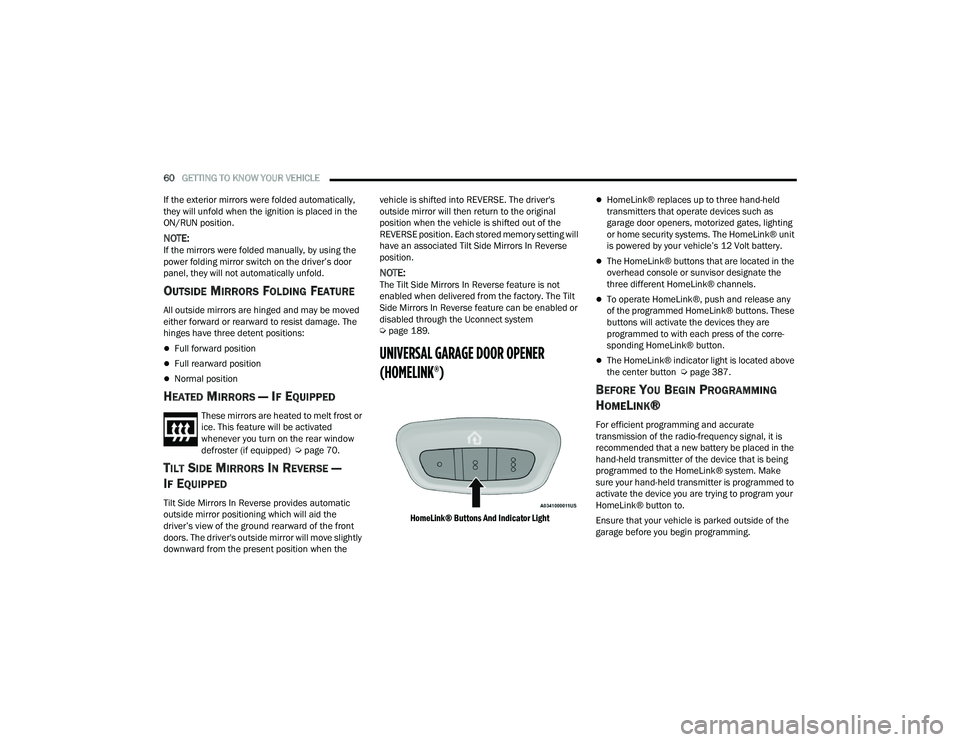
UNIVERSAL GARAGE DOOR OPENER
(HOMELINK®)
HomeLink® Buttons And Indicator Light
HomeLink® replaces up to three hand-held
transmitters that operate devices such as
garage door openers, motorized gates, lighting
or home security systems. The HomeLink® unit
is powered by your vehicle’s 12 Volt battery.
The HomeLink® buttons that are located in the
overhead console or sunvisor designate the
three different HomeLink® channels.
To operate HomeLink®, push and release any
of the programmed HomeLink® buttons. These
buttons will activate the devices they are
programmed to with each press of the corre -
sponding HomeLink® button.
The HomeLink® indicator light is located above
the center button Ú page 387.
BEFORE YOU BEGIN PROGRAMMING
H
OMELINK®
For efficient programming and accurate
transmission of the radio-frequency signal, it is
recommended that a new battery be placed in the
hand-held transmitter of the device that is being
programmed to the HomeLink® system. Make
sure your hand-held transmitter is programmed to
activate the device you are trying to program your
HomeLink® button to.
Ensure that your vehicle is parked outside of the
garage before you begin programming.
21_RUP_OM_EN_USC_t.book Page 60
Page 88 of 401
86GETTING TO KNOW YOUR VEHICLE
(Continued)
Storage Bin Safety Warning
Carefully follow these warnings to help prevent
personal injury or damage to your vehicle:
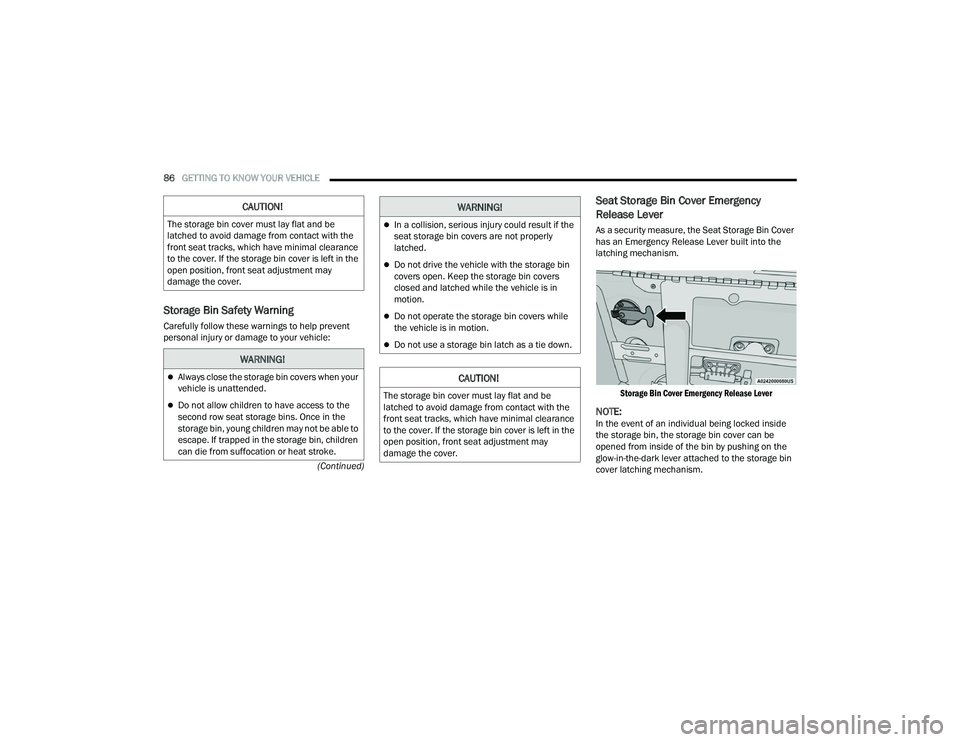
Seat Storage Bin Cover Emergency
Release Lever
As a security measure, the Seat Storage Bin Cover
has an Emergency Release Lever built into the
latching mechanism.
Storage Bin Cover Emergency Release Lever
NOTE:In the event of an individual being locked inside
the storage bin, the storage bin cover can be
opened from inside of the bin by pushing on the
glow-in-the-dark lever attached to the storage bin
cover latching mechanism.
CAUTION!
The storage bin cover must lay flat and be
latched to avoid damage from contact with the
front seat tracks, which have minimal clearance
to the cover. If the storage bin cover is left in the
open position, front seat adjustment may
damage the cover.
WARNING!
Always close the storage bin covers when your
vehicle is unattended.
Do not allow children to have access to the
second row seat storage bins. Once in the
storage bin, young children may not be able to
escape. If trapped in the storage bin, children
can die from suffocation or heat stroke.
In a collision, serious injury could result if the
seat storage bin covers are not properly
latched.
Do not drive the vehicle with the storage bin
covers open. Keep the storage bin covers
closed and latched while the vehicle is in
motion.
Do not operate the storage bin covers while
the vehicle is in motion.
Do not use a storage bin latch as a tie down.
CAUTION!
The storage bin cover must lay flat and be
latched to avoid damage from contact with the
front seat tracks, which have minimal clearance
to the cover. If the storage bin cover is left in the
open position, front seat adjustment may
damage the cover.
WARNING!
21_RUP_OM_EN_USC_t.book Page 86
Page 94 of 401
92GETTING TO KNOW YOUR VEHICLE
Your vehicle may be equipped with a 15W 3A Qi
wireless charging pad located inside of the storage
area below the climate controls. This charging pad
is designed to wirelessly charge your Qi enabled
mobile phone. Qi is a standard that allows wireless
charging of your mobile phone.
Your mobile phone must be designed for Qi
wireless charging. If the phone is not equipped
with Qi wireless charging functionality, an
aftermarket sleeve or a specialized back plate can
be purchased from your mobile phone provider or
a local electronics retailer. Please see your
phone’s Owner’s Manual for further information.
The wireless charging pad is equipped with an
anti-slip mat to hold your mobile phone in place,
and an LED indicator light.
LED Indicator Status:
No Light: Charging pad is idle or searching for a
device.
Blue Light: Device is detected and is charging.
Red Light/Flashing: Internal error or foreign
object is detected.
NOTE:
All vehicle doors must be closed for the wireless
charging pad to operate.
Using a phone case may interfere with wireless
charging.
CIGAR LIGHTER — IF EQUIPPED
NOTE:Cigar lighters can be purchased at an authorized
dealer through Mopar® parts.
The cigar lighter is located at the bottom of the
instrument panel. Push lighter inward to heat.
After a few seconds, the lighter automatically
returns to its initial position and is ready to be
used.
SMOKER'S PACKAGE KIT — IF EQUIPPED
With the optional authorized dealer-installed
Smoker's Package Kit, a removable ash receiver is
inserted into one of the two cupholders in the
center floor console. To install the ash receiver,
align the receiver so the thumb grip on the lid is
facing rearward. Push the ash receiver into either
of the cup wells to secure. Pull upward on the ash
receiver to remove for cleaning and/or storage.
The left rear trim panel cupholder is designed to
accommodate a second ash receiver, if desired.
CAUTION!
The key fob should not be placed on the
charging pad or within 6 in (15 cm) of it. Doing
so can cause excessive heat buildup and
damage to the fob. Placing the fob in close
proximity of the charging pad blocks the fob from
being detected by the vehicle and prevents the
vehicle from starting.
WARNING!
When the cigar lighter is in use it becomes very
hot. To avoid serious injury, handle the cigar
lighter with care. Always check that the cigar
lighter has turned off.
CAUTION!
Do not connect devices with power higher than
180 Watts (15 Amps) to the socket. Do not
damage the socket by using unsuitable
adaptors. If the 180 Watt (15 Amp) power rating
is exceeded the fuse protecting the system will
need to be replaced.
21_RUP_OM_EN_USC_t.book Page 92
Page 97 of 401
GETTING TO KNOW YOUR VEHICLE95
PANORAMIC SUNROOF — IF EQUIPPED
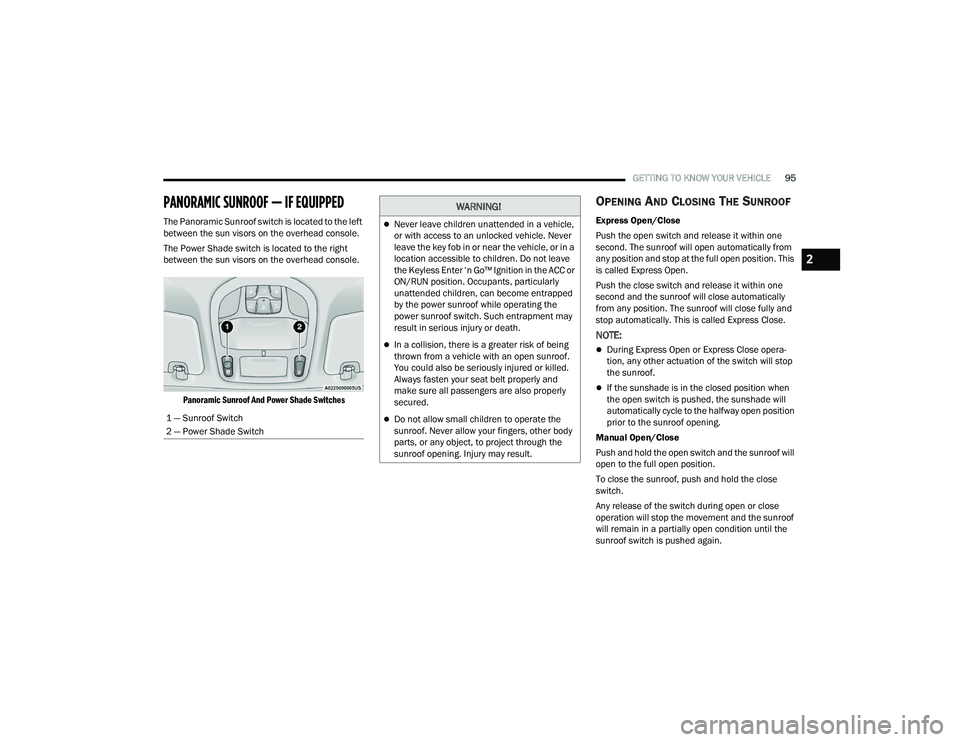
The Panoramic Sunroof switch is located to the left
between the sun visors on the overhead console.
The Power Shade switch is located to the right
between the sun visors on the overhead console.
Panoramic Sunroof And Power Shade Switches
OPENING AND CLOSING THE SUNROOF
Express Open/Close
Push the open switch and release it within one
second. The sunroof will open automatically from
any position and stop at the full open position. This
is called Express Open.
Push the close switch and release it within one
second and the sunroof will close automatically
from any position. The sunroof will close fully and
stop automatically. This is called Express Close.
NOTE:
During Express Open or Express Close opera -
tion, any other actuation of the switch will stop
the sunroof.
If the sunshade is in the closed position when
the open switch is pushed, the sunshade will
automatically cycle to the halfway open position
prior to the sunroof opening.
Manual Open/Close
Push and hold the open switch and the sunroof will
open to the full open position.
To close the sunroof, push and hold the close
switch.
Any release of the switch during open or close
operation will stop the movement and the sunroof
will remain in a partially open condition until the
sunroof switch is pushed again.
1 — Sunroof Switch
2 — Power Shade Switch
WARNING!
Never leave children unattended in a vehicle,
or with access to an unlocked vehicle. Never
leave the key fob in or near the vehicle, or in a
location accessible to children. Do not leave
the Keyless Enter ‘n Go™ Ignition in the ACC or
ON/RUN position. Occupants, particularly
unattended children, can become entrapped
by the power sunroof while operating the
power sunroof switch. Such entrapment may
result in serious injury or death.
In a collision, there is a greater risk of being
thrown from a vehicle with an open sunroof.
You could also be seriously injured or killed.
Always fasten your seat belt properly and
make sure all passengers are also properly
secured.
Do not allow small children to operate the
sunroof. Never allow your fingers, other body
parts, or any object, to project through the
sunroof opening. Injury may result.
2
21_RUP_OM_EN_USC_t.book Page 95