USB CHRYSLER PACIFICA 2021 User Guide
[x] Cancel search | Manufacturer: CHRYSLER, Model Year: 2021, Model line: PACIFICA, Model: CHRYSLER PACIFICA 2021Pages: 401, PDF Size: 26.88 MB
Page 219 of 401
MULTIMEDIA217
Users can select content for each screen from the
front radio touchscreen by choosing desired
content from the “Select Input” drop-down menu.
Options include “Blu-ray™ Disc”, “HDMI”, “USB”,
“Apps”, and “Viewing the other rear screen”.
NOTE:Use the “View Screen” function to pull content
from one screen to the other with a single press of
a button. Doing this however will disable and gray
out certain player controls on the screen viewing
the other screen's content.
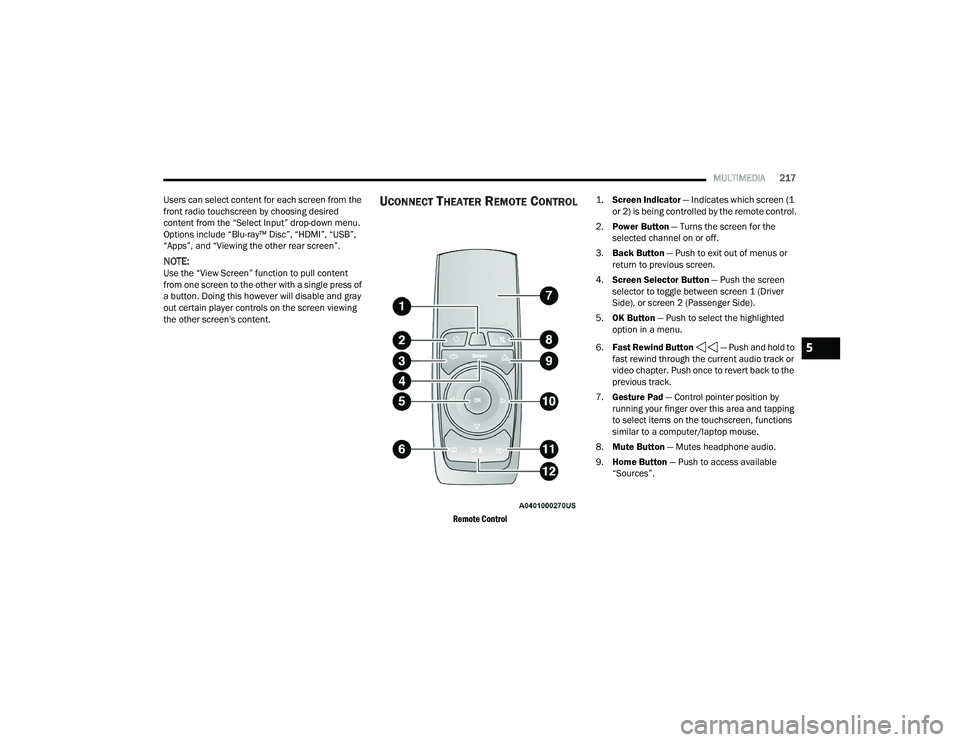
UCONNECT THEATER REMOTE CONTROL
Remote Control
1.
Screen Indicator
— Indicates which screen (1
or 2) is being controlled by the remote control.
2. Power Button — Turns the screen for the
selected channel on or off.
3. Back Button — Push to exit out of menus or
return to previous screen.
4. Screen Selector Button — Push the screen
selector to toggle between screen 1 (Driver
Side), or screen 2 (Passenger Side).
5. OK Button — Push to select the highlighted
option in a menu.
6. Fast Rewind Button — Push and hold to
fast rewind through the current audio track or
video chapter. Push once to revert back to the
previous track.
7. Gesture Pad — Control pointer position by
running your finger over this area and tapping
to select items on the touchscreen, functions
similar to a computer/laptop mouse.
8. Mute Button — Mutes headphone audio.
9. Home Button — Push to access available
“Sources”.
5
21_RUP_OM_EN_USC_t.book Page 217
Page 220 of 401
218MULTIMEDIA
10. Arrow Buttons — Push the Arrow
buttons to highlight an item or scroll through
menus.
11. Fast Forward Button — Push and hold
to fast forward through the current audio track
or video chapter. Push once to skip to the next
track.
12. Play/Pause Button — Begin/resume or pause
disc play.
Replacing The Remote Control Batteries
Each remote control requires two AAA batteries for
operation.
To replace the batteries:
1. Locate the battery compartment on the back of the remote, then slide the battery cover
downward.
2. Remove the old batteries and follow battery recycling procedures for your area.
3. Install new batteries, making sure to orient them according to the polarity diagram shown
inside the battery compartment.
4. Replace the battery compartment cover.
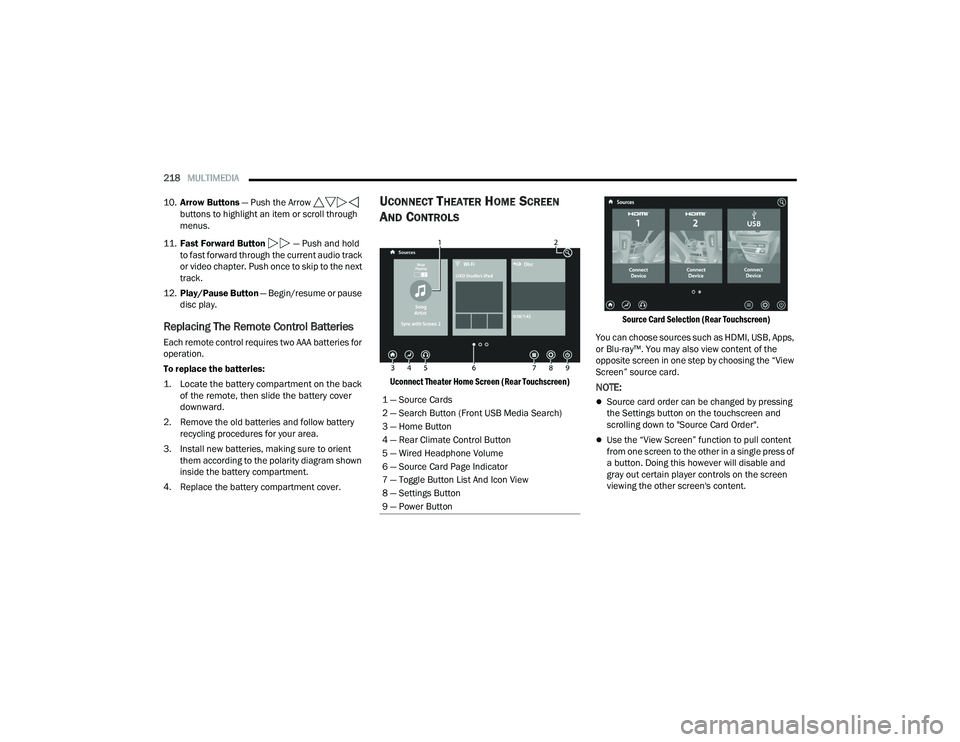
UCONNECT THEATER HOME SCREEN
A
ND CONTROLS
Uconnect Theater Home Screen (Rear Touchscreen) Source Card Selection (Rear Touchscreen)
You can choose sources such as HDMI, USB, Apps,
or Blu-ray™. You may also view content of the
opposite screen in one step by choosing the “View
Screen” source card.NOTE:
Source card order can be changed by pressing
the Settings button on the touchscreen and
scrolling down to "Source Card Order".
Use the “View Screen” function to pull content
from one screen to the other in a single press of
a button. Doing this however will disable and
gray out certain player controls on the screen
viewing the other screen's content.
1 — Source Cards
2 — Search Button (Front USB Media Search)
3 — Home Button
4 — Rear Climate Control Button
5 — Wired Headphone Volume
6 — Source Card Page Indicator
7 — Toggle Button List And Icon View
8 — Settings Button
9 — Power Button
21_RUP_OM_EN_USC_t.book Page 218
Page 221 of 401
MULTIMEDIA219
General Settings
To change source card order, select “Source Card
Reorder”, then press and hold source card on the
touchscreen, and drag and drop in desired order.
You can also adjust settings such as:
Brightness
Media port lighting on and off
Clock on and off
NOTE:System information can also be displayed under
General Settings.
Remote Settings
Under this setting, you can access the following:
Manage Remotes (this allows you to unpair
remotes)
Pair Remote
Remote sensitivity (this adjusts the speed and
sensitivity of cursor on screen when using
gesture pad) Ú page 387.
PLAY A DVD/BLU-RAY™ OR USB
M
EDIA FILE FROM UCONNECT SYSTEM
1. Insert a Blu-ray™ Disc or DVD disc into the
disc player with the label facing up, or insert a
USB drive into rear Video USB port.
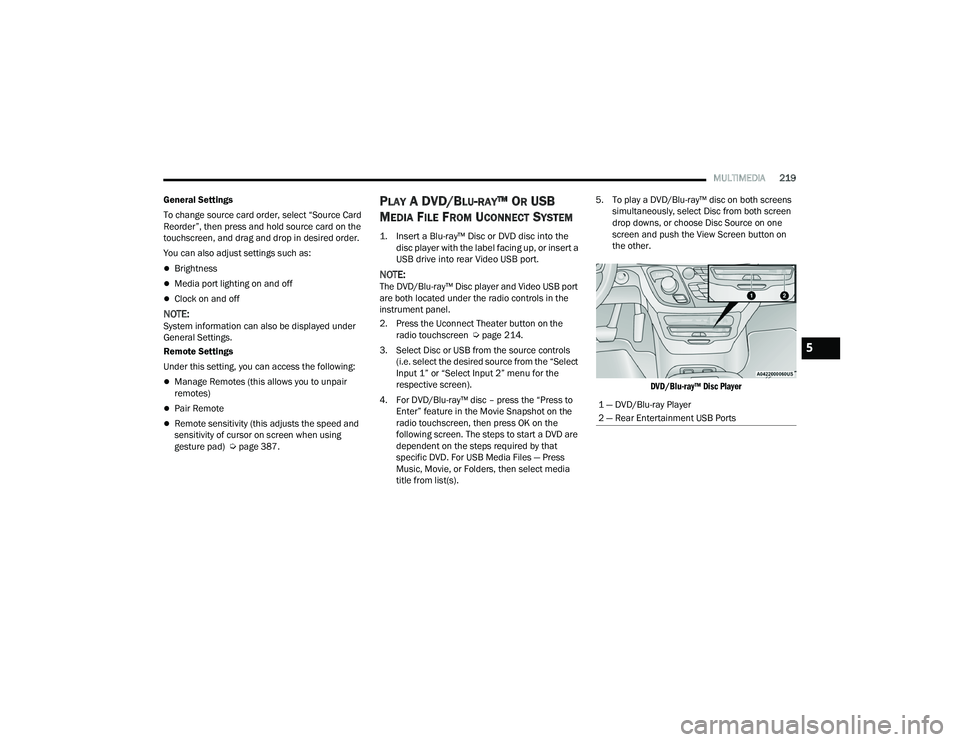
NOTE:The DVD/Blu-ray™ Disc player and Video USB port
are both located under the radio controls in the
instrument panel.
2. Press the Uconnect Theater button on the radio touchscreen Ú page 214.
3. Select Disc or USB from the source controls (i.e. select the desired source from the “Select
Input 1” or “Select Input 2” menu for the
respective screen).
4. For DVD/Blu-ray™ disc – press the “Press to Enter” feature in the Movie Snapshot on the
radio touchscreen, then press OK on the
following screen. The steps to start a DVD are
dependent on the steps required by that
specific DVD. For USB Media Files — Press
Music, Movie, or Folders, then select media
title from list(s). 5. To play a DVD/Blu-ray™ disc on both screens
simultaneously, select Disc from both screen
drop downs, or choose Disc Source on one
screen and push the View Screen button on
the other.
DVD/Blu-ray™ Disc Player
1 — DVD/Blu-ray Player
2 — Rear Entertainment USB Ports
5
21_RUP_OM_EN_USC_t.book Page 219
Page 225 of 401
MULTIMEDIA223
USING THE REAR VIDEO USB PORT
Plug in a USB drive or mass storage device and
play your favorite music or movies.
NOTE:To view USB media on the rear theater screens,
insert a USB drive into the port next to the DVD/
Blu-ray™ Disc player. The USB drive port is located
under the radio controls in the instrument panel.
Search Screen (Rear Touchscreen)
On the rear screen you can browse the content of
the USB device by going to the USB source. Use the
search feature to find your music faster.
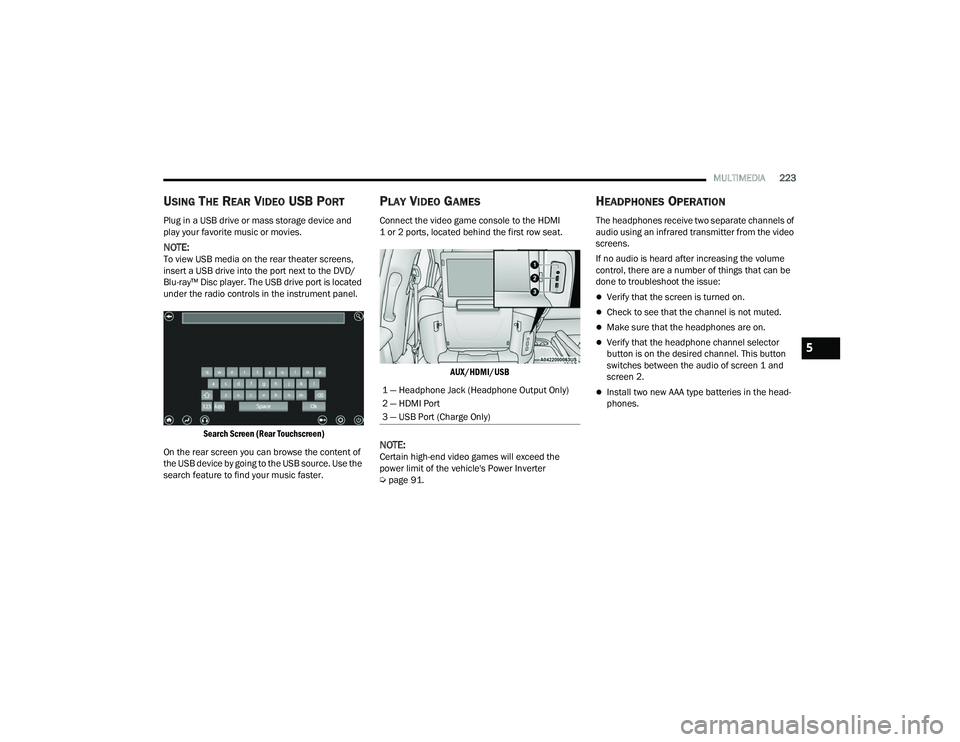
PLAY VIDEO GAMES
Connect the video game console to the HDMI
1 or 2 ports, located behind the first row seat.
AUX/HDMI/USB
NOTE:Certain high-end video games will exceed the
power limit of the vehicle's Power Inverter
Úpage 91.
HEADPHONES OPERATION
The headphones receive two separate channels of
audio using an infrared transmitter from the video
screens.
If no audio is heard after increasing the volume
control, there are a number of things that can be
done to troubleshoot the issue:
Verify that the screen is turned on.
Check to see that the channel is not muted.
Make sure that the headphones are on.
Verify that the headphone channel selector
button is on the desired channel. This button
switches between the audio of screen 1 and
screen 2.
Install two new AAA type batteries in the head -
phones.1 — Headphone Jack (Headphone Output Only)
2 — HDMI Port
3 — USB Port (Charge Only)
5
21_RUP_OM_EN_USC_t.book Page 223
Page 229 of 401
MULTIMEDIA227
ACCESSIBILITY — IF EQUIPPED
Accessibility is a feature of the DVD/Blu-ray™/USB
Video system that announces a function prior to
performing the action.
WIRELESS STREAMING — IF EQUIPPED
Your Uconnect Theater system may be equipped
with Wireless Streaming functionality that allows
you to project your smartphone or tablet onto your
rear Uconnect Theater touchscreens. This Source
Card will allow you to wirelessly link your
compatible Android™ devices to your Uconnect
Theater system and stream your device onto the
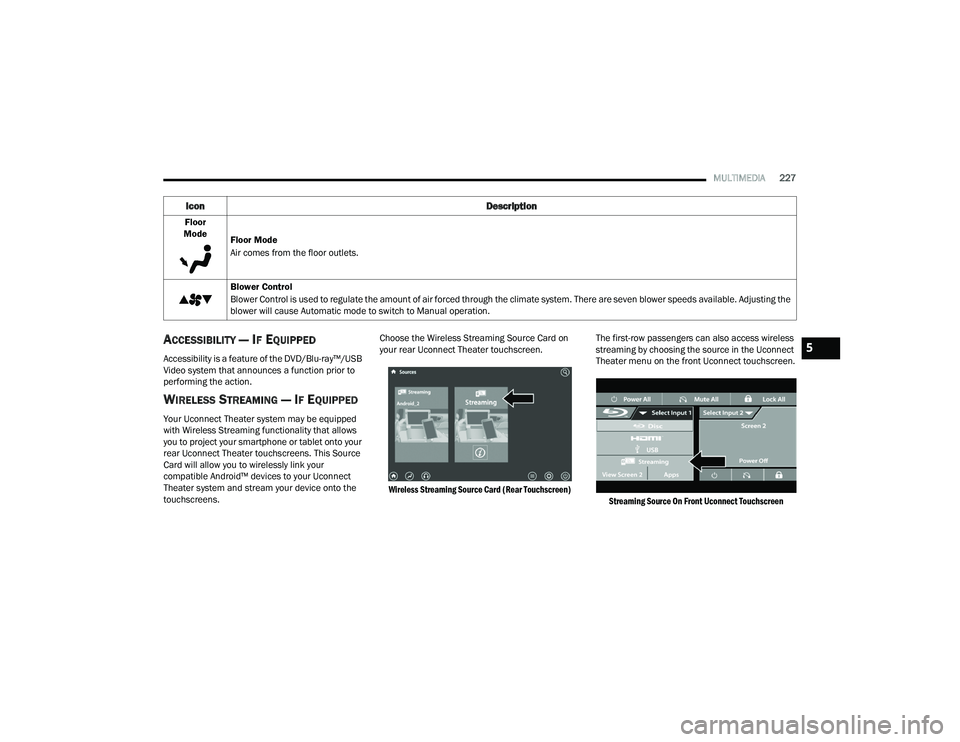
touchscreens. Choose the Wireless Streaming Source Card on
your rear Uconnect Theater touchscreen.
Wireless Streaming Source Card (Rear Touchscreen)
The first-row passengers can also access wireless
streaming by choosing the source in the Uconnect
Theater menu on the front Uconnect touchscreen.
Streaming Source On Front Uconnect Touchscreen
Floor
Mode Floor Mode
Air comes from the floor outlets.
Blower Control
Blower Control is used to regulate the amount of air forced through the climate system. There are seven blower speeds available. Adjusting the
blower will cause Automatic mode to switch to Manual operation.
Icon Description
5
21_RUP_OM_EN_USC_t.book Page 227
Page 351 of 401
SERVICING AND MAINTENANCE349
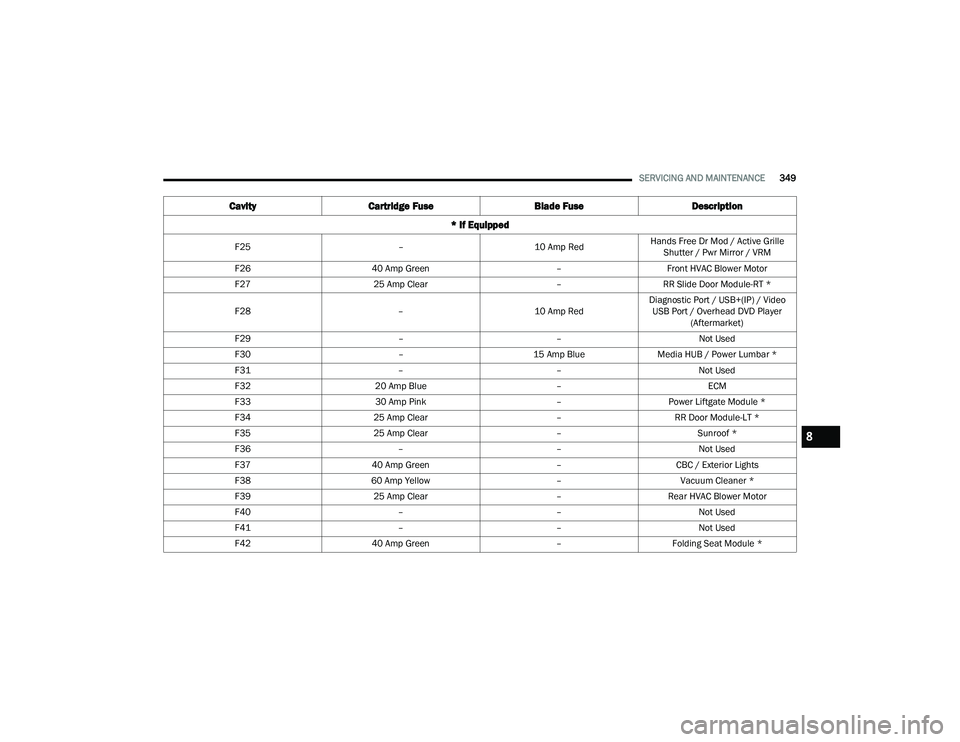
F25 –10 Amp RedHands Free Dr Mod / Active Grille
Shutter / Pwr Mirror / VRM
F26 40 Amp Green –Front HVAC Blower Motor
F27 25 Amp Clear –RR Slide Door Module-RT *
F28 –10 Amp RedDiagnostic Port / USB+(IP) / Video
USB Port / Overhead DVD Player (Aftermarket)
F29 ––Not Used
F30 –15 Amp BlueMedia HUB / Power Lumbar *
F31 ––Not Used
F32 20 Amp Blue –ECM
F33 30 Amp Pink –Power Liftgate Module *
F34 25 Amp Clear –RR Door Module-LT *
F35 25 Amp Clear –Sunroof *
F36 ––Not Used
F37 40 Amp Green –CBC / Exterior Lights
F38 60 Amp Yellow –Vacuum Cleaner *
F39 25 Amp Clear –Rear HVAC Blower Motor
F40 ––Not Used
F41 ––Not Used
F42 40 Amp Green –Folding Seat Module *
Cavity Cartridge Fuse Blade FuseDescription
* If Equipped
8
21_RUP_OM_EN_USC_t.book Page 349
Page 354 of 401
352SERVICING AND MAINTENANCE
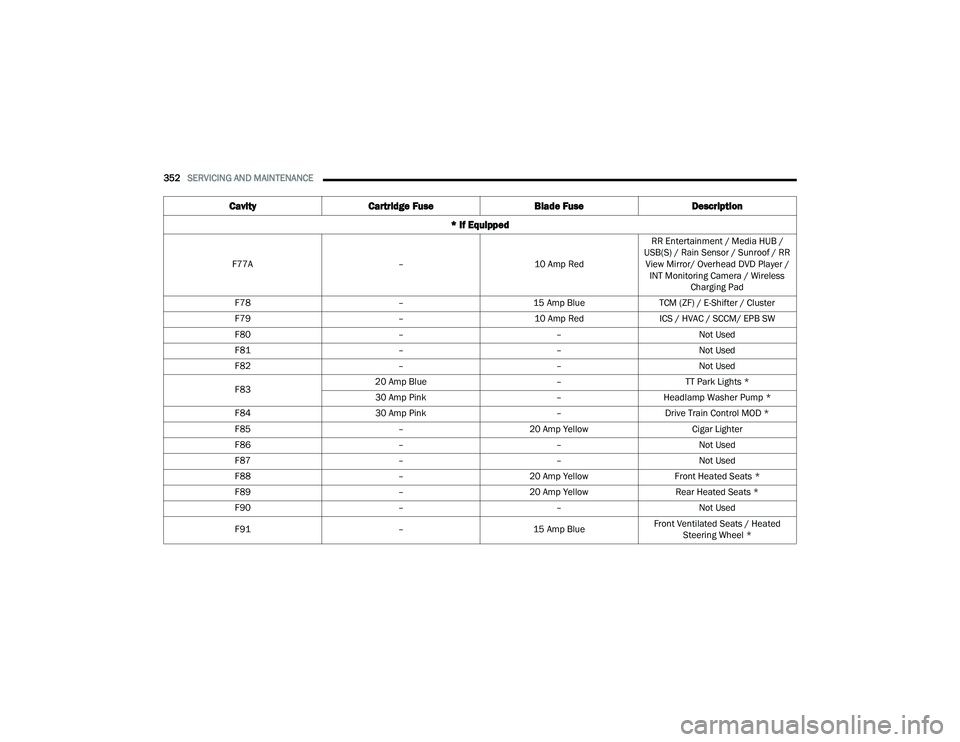
F77A –10 Amp RedRR Entertainment / Media HUB /
USB(S) / Rain Sensor / Sunroof / RR View Mirror/ Overhead DVD Player / INT Monitoring Camera / Wireless Charging Pad
F78 –15 Amp BlueTCM (ZF) / E-Shifter / Cluster
F79 –10 Amp RedICS / HVAC / SCCM/ EPB SW
F80 ––Not Used
F81 ––Not Used
F82 ––Not Used
F83 20 Amp Blue
–TT Park Lights *
30 Amp Pink –Headlamp Washer Pump *
F84 30 Amp Pink –Drive Train Control MOD *
F85 –20 Amp Yellow Cigar Lighter
F86 ––Not Used
F87 ––Not Used
F88 –20 Amp Yellow Front Heated Seats *
F89 –20 Amp Yellow Rear Heated Seats *
F90 ––Not Used
F91 –15 Amp BlueFront Ventilated Seats / Heated
Steering Wheel *
Cavity Cartridge Fuse Blade FuseDescription
* If Equipped
21_RUP_OM_EN_USC_t.book Page 352
Page 355 of 401
SERVICING AND MAINTENANCE353
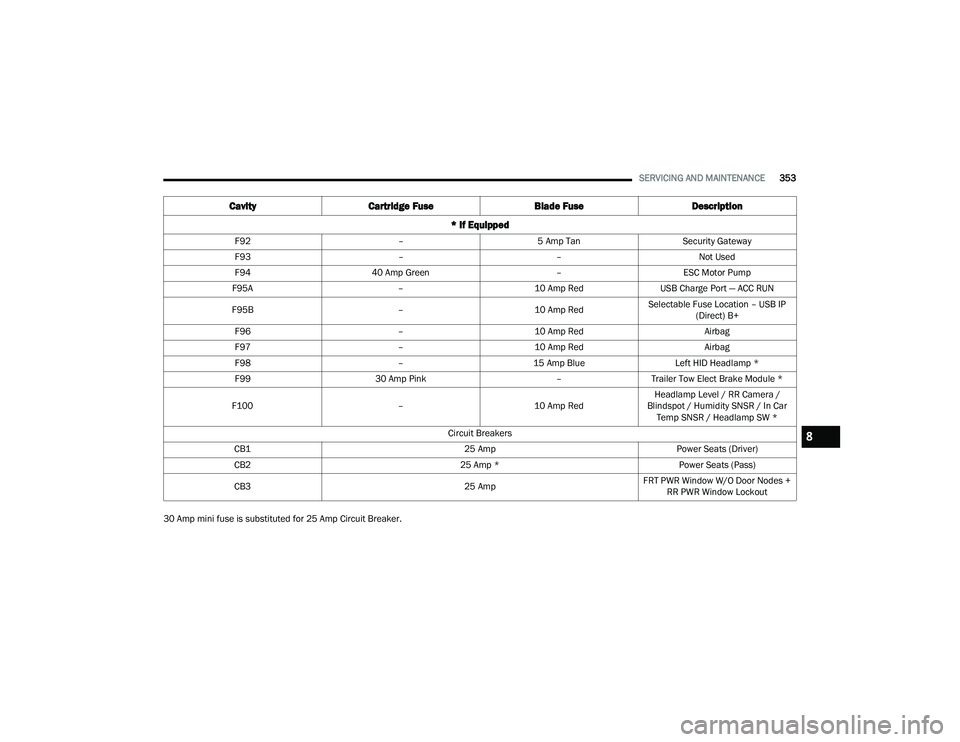
30 Amp mini fuse is substituted for 25 Amp Circuit Breaker. F92
–5 Amp Tan Security Gateway
F93 ––Not Used
F94 40 Amp Green –ESC Motor Pump
F95A –10 Amp RedUSB Charge Port — ACC RUN
F95B –10 Amp RedSelectable Fuse Location – USB IP
(Direct) B+
F96 –10 Amp Red Airbag
F97 –10 Amp Red Airbag
F98 –15 Amp Blue Left HID Headlamp *
F99 30 Amp Pink –Trailer Tow Elect Brake Module *
F100 –10 Amp RedHeadlamp Level / RR Camera /
Blindspot / Humidity SNSR / In Car Temp SNSR / Headlamp SW *
Circuit Breakers
CB1 25 AmpPower Seats (Driver)
CB2 25 Amp *Power Seats (Pass)
CB3 25 AmpFRT PWR Window W/O Door Nodes +
RR PWR Window Lockout
Cavity Cartridge Fuse Blade FuseDescription
* If Equipped
8
21_RUP_OM_EN_USC_t.book Page 353
Page 398 of 401
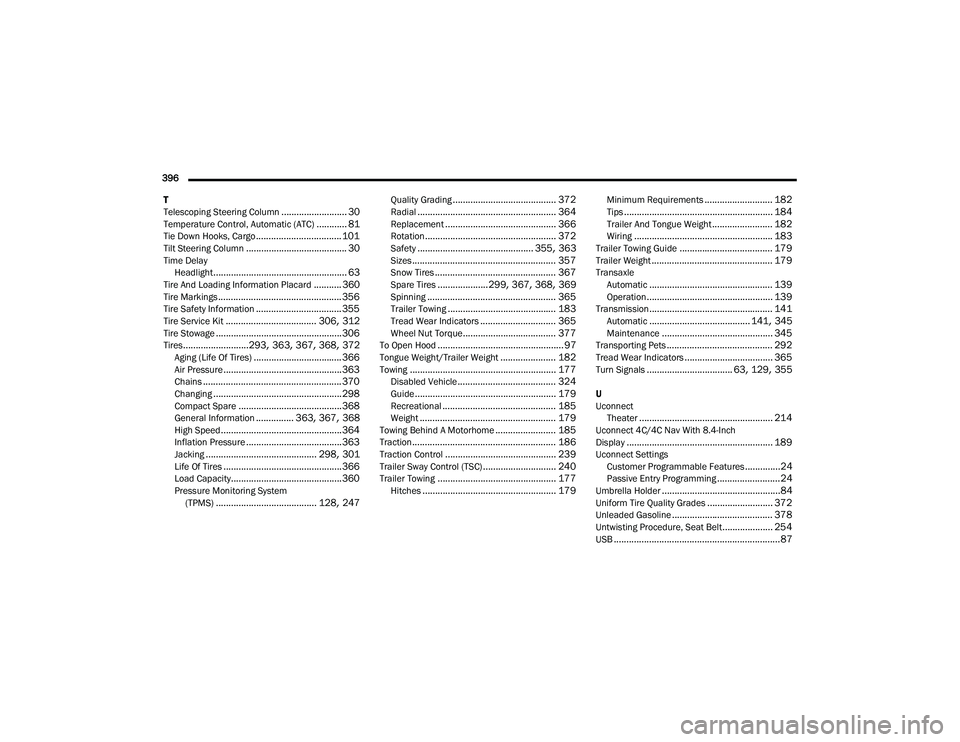
396 T
Telescoping Steering Column
.......................... 30Temperature Control, Automatic (ATC)............ 81Tie Down Hooks, Cargo.................................. 101Tilt Steering Column........................................ 30Time Delay Headlight..................................................... 63Tire And Loading Information Placard........... 360Tire Markings................................................. 356Tire Safety Information.................................. 355Tire Service Kit.................................... 306, 312Tire Stowage.................................................. 306Tires..........................293, 363, 367, 368, 372Aging (Life Of Tires)................................... 366Air Pressure............................................... 363Chains....................................................... 370Changing................................................... 298Compact Spare......................................... 368General Information............... 363, 367, 368High Speed................................................ 364Inflation Pressure...................................... 363Jacking............................................ 298, 301Life Of Tires............................................... 366Load Capacity............................................ 360Pressure Monitoring System(TPMS)........................................ 128, 247
Quality Grading......................................... 372Radial....................................................... 364Replacement............................................ 366Rotation.................................................... 372Safety.............................................. 355, 363Sizes......................................................... 357Snow Tires................................................ 367Spare Tires....................299, 367, 368, 369Spinning................................................... 365Trailer Towing........................................... 183Tread Wear Indicators.............................. 365Wheel Nut Torque..................................... 377To Open Hood.................................................. 97Tongue Weight/Trailer Weight...................... 182Towing.......................................................... 177Disabled Vehicle....................................... 324Guide........................................................ 179Recreational............................................. 185Weight...................................................... 179Towing Behind A Motorhome........................ 185Traction......................................................... 186Traction Control............................................ 239Trailer Sway Control (TSC)............................. 240Trailer Towing............................................... 177Hitches..................................................... 179
Minimum Requirements........................... 182Tips........................................................... 184Trailer And Tongue Weight........................ 182Wiring....................................................... 183Trailer Towing Guide..................................... 179Trailer Weight................................................ 179TransaxleAutomatic................................................. 139Operation.................................................. 139Transmission................................................. 141Automatic........................................ 141, 345Maintenance............................................ 345Transporting Pets.......................................... 292Tread Wear Indicators................................... 365Turn Signals.................................. 63, 129, 355
U
UconnectTheater
..................................................... 214Uconnect 4C/4C Nav With 8.4-Inch
Display.......................................................... 189Uconnect SettingsCustomer Programmable Features..............24Passive Entry Programming.........................24Umbrella Holder...............................................84Uniform Tire Quality Grades.......................... 372Unleaded Gasoline........................................ 378Untwisting Procedure, Seat Belt.................... 254USB..................................................................87
21_RUP_OM_EN_USC_t.book Page 396