key battery CHRYSLER PACIFICA 2021 User Guide
[x] Cancel search | Manufacturer: CHRYSLER, Model Year: 2021, Model line: PACIFICA, Model: CHRYSLER PACIFICA 2021Pages: 401, PDF Size: 26.88 MB
Page 91 of 401
GETTING TO KNOW YOUR VEHICLE89
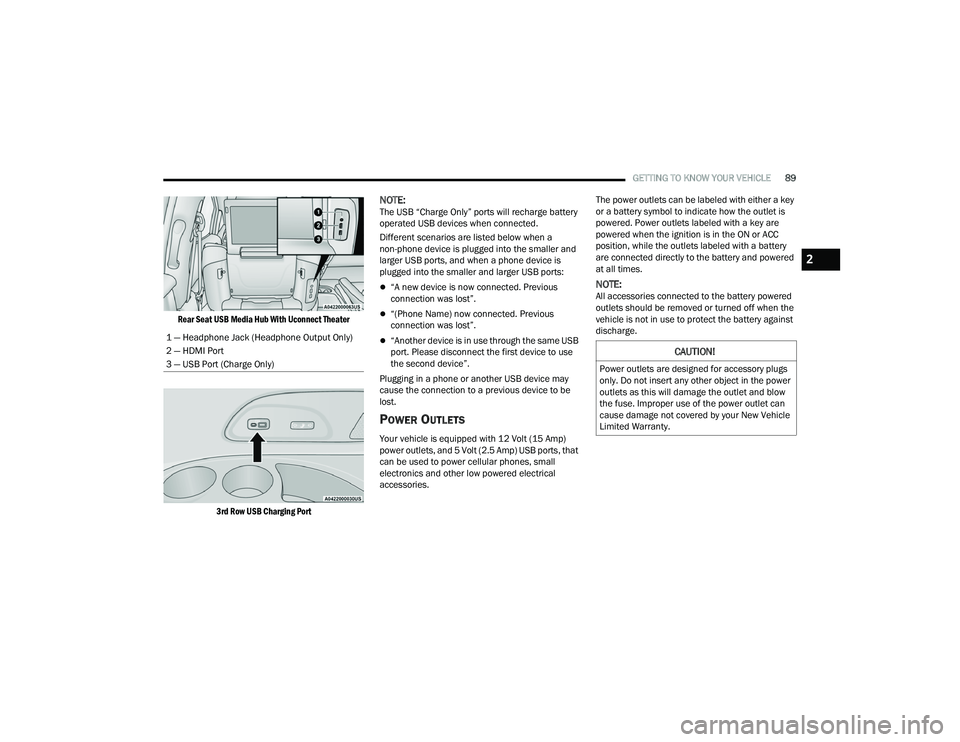
Rear Seat USB Media Hub With Uconnect Theater
3rd Row USB Charging Port
NOTE:The USB “Charge Only” ports will recharge battery
operated USB devices when connected.
Different scenarios are listed below when a
non-phone device is plugged into the smaller and
larger USB ports, and when a phone device is
plugged into the smaller and larger USB ports:
“A new device is now connected. Previous
connection was lost”.
“(Phone Name) now connected. Previous
connection was lost”.
“Another device is in use through the same USB
port. Please disconnect the first device to use
the second device”.
Plugging in a phone or another USB device may
cause the connection to a previous device to be
lost.
POWER OUTLETS
Your vehicle is equipped with 12 Volt (15 Amp)
power outlets, and 5 Volt (2.5 Amp) USB ports, that
can be used to power cellular phones, small
electronics and other low powered electrical
accessories. The power outlets can be labeled with either a key
or a battery symbol to indicate how the outlet is
powered. Power outlets labeled with a key are
powered when the ignition is in the ON or ACC
position, while the outlets labeled with a battery
are connected directly to the battery and powered
at all times.
NOTE:All accessories connected to the battery powered
outlets should be removed or turned off when the
vehicle is not in use to protect the battery against
discharge.
1 — Headphone Jack (Headphone Output Only)
2 — HDMI Port
3 — USB Port (Charge Only)
CAUTION!
Power outlets are designed for accessory plugs
only. Do not insert any other object in the power
outlets as this will damage the outlet and blow
the fuse. Improper use of the power outlet can
cause damage not covered by your New Vehicle
Limited Warranty.
2
21_RUP_OM_EN_USC_t.book Page 89
Page 105 of 401
GETTING TO KNOW YOUR VEHICLE103
1. Before Using Vacuum:
Accessory (ACC) Mode Operation - For up to
10 minutes of operation
Always apply the parking brake, shift the trans -
mission into PARK, and push ignition button to
place ignition in Accessory (ACC) mode. The
engine will not be running in this mode. Do not
leave the key fob in or near the vehicle, or in a
location accessible to children.
NOTE:The vacuum system will run for 10 minutes off
battery power and then the vacuum will shut down.
A low battery indication light (LOW PWR) located
below the vacuum nozzle storage location will
come on one minute before the vacuum shuts
down.
Engine Running (START) Operation - For
more than 10 minutes of operation
Position vehicle outdoors and fully open all
side windows.
Always apply the parking brake, shift the
transmission into PARK, and leave engine
running. 2. Unclip the vacuum nozzle and pull to extend
vacuum hose from the storage location.NOTE:The hose can reach every corner of the vehicle
floor.
3. Install desired attachment if needed.
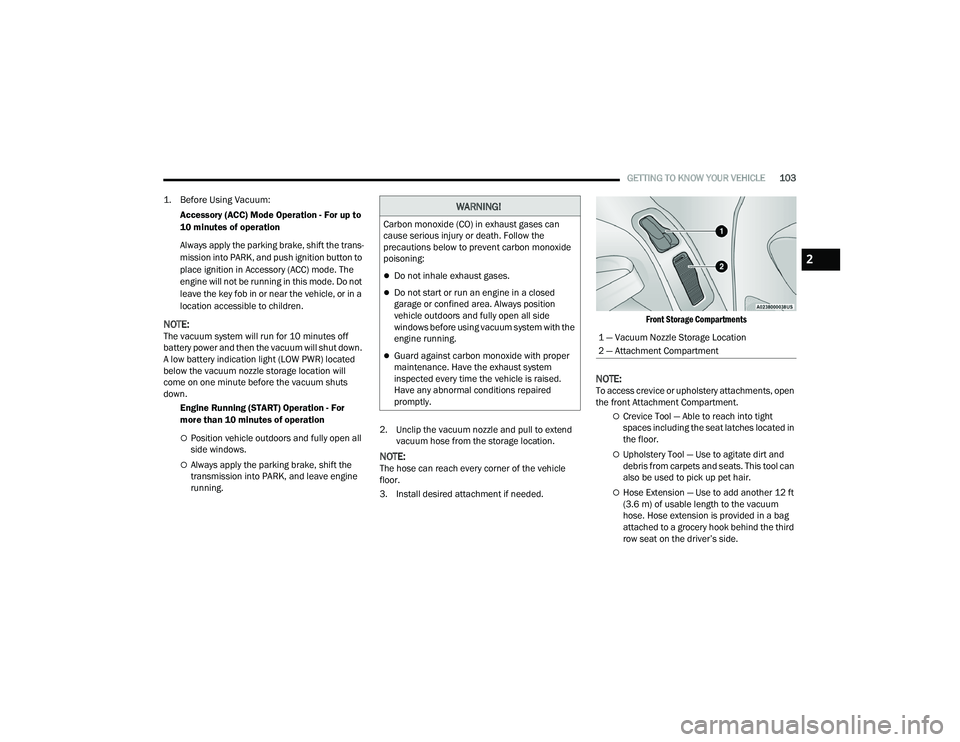
Front Storage Compartments
NOTE:To access crevice or upholstery attachments, open
the front Attachment Compartment.
Crevice Tool — Able to reach into tight
spaces including the seat latches located in
the floor.
Upholstery Tool — Use to agitate dirt and
debris from carpets and seats. This tool can
also be used to pick up pet hair.
Hose Extension — Use to add another 12 ft
(3.6 m) of usable length to the vacuum
hose. Hose extension is provided in a bag
attached to a grocery hook behind the third
row seat on the driver’s side.
WARNING!
Carbon monoxide (CO) in exhaust gases can
cause serious injury or death. Follow the
precautions below to prevent carbon monoxide
poisoning:
Do not inhale exhaust gases.
Do not start or run an engine in a closed
garage or confined area. Always position
vehicle outdoors and fully open all side
windows before using vacuum system with the
engine running.
Guard against carbon monoxide with proper
maintenance. Have the exhaust system
inspected every time the vehicle is raised.
Have any abnormal conditions repaired
promptly.
1 — Vacuum Nozzle Storage Location
2 — Attachment Compartment
2
21_RUP_OM_EN_USC_t.book Page 103
Page 123 of 401

GETTING TO KNOW YOUR INSTRUMENT PANEL121
Speed Warning — If Equipped
Push and release the up or down arrow
button until Speed Warning is highlighted in the
instrument cluster display. Push and release the
OK button to enter Speed Warning. Use the
up or down arrow button to turn the Speed
Warning ON or OFF, then push and release the OK
button to confirm the selection. If the ON status is
selected, use the up or down arrow button
to set the desired speed, then push the OK button
to set the speed for the Speed Warning. A Speed
Warning telltale will illuminate in the instrument
cluster, with a number matching the set speed,
with a pop-up message to inform the driver that the
Speed Warning has been set to the desired speed.
Each time the set speed is exceeded, a single
chime will sound and a pop-up warning message
will display. If the set speed is exceeded more than
2 mph (3 km/h), a continuous chime will sound for
up to 10 seconds, or until the speed is no longer
exceeded. The telltale in the instrument cluster will
also change from white to yellow, and a pop-up
warning message will pop-up on the instrument
cluster display.
NOTE:Speed Warning is unavailable while KeySense is
in use.
BATTERY SAVER ON/BATTERY SAVER
M
ODE MESSAGE — ELECTRICAL LOAD
R
EDUCTION ACTIONS — IF EQUIPPED
This vehicle is equipped with an Intelligent Battery
Sensor (IBS) to perform additional monitoring of
the electrical system and status of the vehicle
battery.
In cases when the IBS detects charging system
failure, or the 12 Volt vehicle battery conditions are
deteriorating, electrical load reduction actions will
take place to extend the driving time and distance
of the vehicle. This is done by reducing power to or
turning off non-essential 12 Volt electrical loads.
Load reduction will be functional when the vehicle
propulsion system is active.
The vehicle may not be running depending on the
High Voltage (HV) battery State Of Charge (SOC) or
temperature. It will display a message if there is a
risk of battery depletion to the point where the
vehicle may stall due to lack of electrical supply, or
will not restart after the current drive cycle.
When 12 Volt load reduction is activated, the
message “Battery Saver On” or “Battery Saver
Mode” will appear in the instrument cluster
display. These messages indicate the vehicle battery has a
low state of charge and continues to lose electrical
charge at a rate that the charging system cannot
sustain.NOTE:
The charging system is independent from load
reduction. The charging system performs a diag
-
nostic on the charging system continuously.
If the Battery Charge Warning Light is on it may
indicate a problem with the charging system
Ú page 123.
The electrical loads that may be switched off (if
equipped), and vehicle functions which can be
effected by load reduction:
Heated Seat/Vented Seats/Heated Wheel
Heated/Cooled Cup Holders — If Equipped
Rear Defroster And Heated Mirrors
HVAC System
115 Volts AC Power Inverter System
Audio and Telematics System
3
21_RUP_OM_EN_USC_t.book Page 121
Page 147 of 401
STARTING AND OPERATING145
If the Steering icon is displayed and the “POWER
STEERING SYSTEM OVER TEMP” message is
displayed on the instrument cluster screen, this
indicates an over temperature condition in the
power steering system. Once driving conditions are
safe, pull over and let the vehicle idle for a few
moments until the icon and message turn off
Ú page 123.
If the “SERVICE POWER STEERING" or
"POWER STEERING ASSIST OFF -
SERVICE SYSTEM” message and a
steering wheel icon are displayed on the
instrument cluster screen, it indicates that the
vehicle needs to be taken to the dealer for service.
It is likely the vehicle has lost power steering
assistance Ú page 123.
NOTE:
Even if the power steering assistance is no
longer operational, it is still possible to steer the
vehicle. Under these conditions there will be a
substantial increase in steering effort, espe -
cially at low speeds and during parking
maneuvers.
The power steering system is fully electric; it
requires no power steering fluid.
If the condition persists, see an authorized
dealer for service.
STOP/START SYSTEM — IF EQUIPPED
The Stop/Start function is developed to reduce
fuel consumption. The system will stop the engine
automatically during a vehicle stop if the required
conditions are met. Releasing the brake pedal,
pressing the accelerator pedal or shifting out of
DRIVE (D) will automatically re-start the engine.
This vehicle has been upgraded with a heavy duty
starter, enhanced battery, and other upgraded
engine parts to handle the additional engine starts.
AUTOSTOP MODE
The Stop/Start feature is enabled after every driver
key start. At that time, the system will go into
STOP/START READY and if all other conditions are
met, can go into a STOP/START AUTOSTOP ACTIVE.
To Activate Auto STOP/START, The Following
Must Occur:
The system must be in STOP/START READY
state. A STOP/START READY message will be
displayed in the instrument cluster within the
Stop/Start section Ú page 123.
The vehicle must be completely stopped.
The gear selector must be in a forward gear and
the brake pedal pressed. The engine will shut down, the tachometer will
move to the zero position and the Stop/Start
telltale will illuminate indicating you are in
Autostop. Customer settings will be maintained
throughout the Auto Stop/Start process.
POSSIBLE REASONS THE ENGINE DOES
N
OT AUTOSTOP
Prior to engine shut down, the system will check
many safety and comfort conditions for Stop/Start
and ensure they are fulfilled. Detailed information
about the operation of the Stop/Start system
may be viewed in the instrument cluster display
Stop/Start screen. Situations when the engine will
not stop include (but not limited to):
If Stop/Start is manually disabled by the
Stop/Start OFF button.
Driver’s seat belt is not buckled.
Driver’s door is not closed.
Battery temperature is too warm or cold.
Battery charge is low. During this time a
message will display “Stop/Start Not Ready
Battery Charging”.
The vehicle is on a steep grade.
Cabin heating or cooling is in process and an
acceptable cabin temperature has not been
achieved.
4
21_RUP_OM_EN_USC_t.book Page 145
Page 275 of 401
SAFETY273
Your vehicle may also be designed to perform any of
these other functions in response to the Enhanced
Accident Response System:
Turn off the Fuel Filter Heater, Turn off the HVAC
Blower Motor, Close the HVAC Circulation Door
Cut off battery power to the:
Engine
Electric Motor (if equipped)
Electric power steering
Brake booster
Electric park brake
Automatic transmission gear selector
Horn
Front wiper
Headlamp washer pump
NOTE:
After an accident, remember to cycle the ignition to
the STOP (OFF/LOCK) position and remove the key
from the ignition switch to avoid draining the battery.
Carefully check the vehicle for fuel leaks in the
engine compartment and on the ground near the
engine compartment and fuel tank before resetting
the system and starting the engine. If there are no
fuel leaks or damage to the vehicle electrical devices
(e.g. headlights) after an accident, reset the system
by following the procedure described below. If you
have any doubt, contact an authorized dealer.
Enhanced Accident Response System
Reset Procedure
If applicable, refer to the “Hybrid Supplement”
for additional information.
In order to reset the Enhanced Accident Response
System functions after an event, the ignition switch
must be changed from ignition START or ON/RUN
to ignition OFF. Carefully check the vehicle for fuel
leaks in the engine compartment and on the
ground near the engine compartment and fuel
tank before resetting the system and starting the
engine.
After an accident, if the vehicle will not start after
performing the reset procedure, the vehicle must
be towed to an authorized dealer to be inspected
and to have the Enhanced Accident Response
System reset.
6
21_RUP_OM_EN_USC_t.book Page 273
Page 328 of 401
326IN CASE OF EMERGENCY
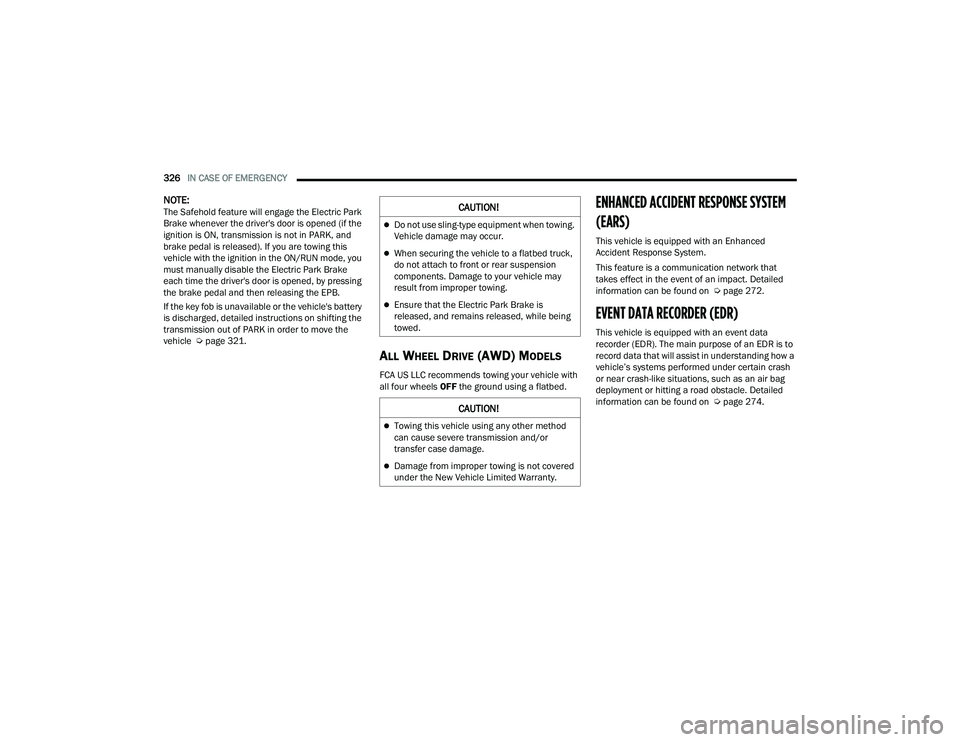
NOTE:The Safehold feature will engage the Electric Park
Brake whenever the driver's door is opened (if the
ignition is ON, transmission is not in PARK, and
brake pedal is released). If you are towing this
vehicle with the ignition in the ON/RUN mode, you
must manually disable the Electric Park Brake
each time the driver's door is opened, by pressing
the brake pedal and then releasing the EPB.
If the key fob is unavailable or the vehicle's battery
is discharged, detailed instructions on shifting the
transmission out of PARK in order to move the
vehicle Úpage 321.
ALL WHEEL DRIVE (AWD) MODELS
FCA US LLC recommends towing your vehicle with
all four wheels OFF the ground using a flatbed.
ENHANCED ACCIDENT RESPONSE SYSTEM
(EARS)
This vehicle is equipped with an Enhanced
Accident Response System.
This feature is a communication network that
takes effect in the event of an impact. Detailed
information can be found on Ú page 272.
EVENT DATA RECORDER (EDR)
This vehicle is equipped with an event data
recorder (EDR). The main purpose of an EDR is to
record data that will assist in understanding how a
vehicle’s systems performed under certain crash
or near crash-like situations, such as an air bag
deployment or hitting a road obstacle. Detailed
information can be found on Úpage 274.
CAUTION!
Do not use sling-type equipment when towing.
Vehicle damage may occur.
When securing the vehicle to a flatbed truck,
do not attach to front or rear suspension
components. Damage to your vehicle may
result from improper towing.
Ensure that the Electric Park Brake is
released, and remains released, while being
towed.
CAUTION!
Towing this vehicle using any other method
can cause severe transmission and/or
transfer case damage.
Damage from improper towing is not covered
under the New Vehicle Limited Warranty.
21_RUP_OM_EN_USC_t.book Page 326
Page 390 of 401
388
INDEX
A
About Your Brakes......................................... 377Adaptive Cruise Control (ACC)
(Cruise Control).................................... 147, 149Adding Engine Coolant (Antifreeze)............... 343Additives, Fuel............................................... 380AdjustDown........................................................... 47Forward....................................................... 47Rearward..................................................... 47Up................................................................ 47Air Bag........................................................... 262Air Bag Operation...................................... 264Air Bag Warning Light...................... 261, 264Driver Knee Air Bag................................... 269Enhanced Accident Response......... 272, 326Event Data Recorder (EDR)....................... 326Front Air Bag............................................. 264If Deployment Occurs................................ 272Knee Impact Bolsters................................ 269Maintaining Your Air Bag System.............. 274Maintenance............................................. 274Redundant Air Bag Warning Light.............262Side Air Bags............................................. 269Transporting Pets...................................... 292Air Bag Light............................... 123, 261, 292
Air Cleaner, Engine
(Engine Air Cleaner Filter)............................. 334Air Conditioner Maintenance........................ 335Air Conditioner Refrigerant.................. 335, 336Air Conditioner System................................. 335Air Conditioning Filter..............................82, 336Air Conditioning, Operating Tips....................... 82Air Filter........................................................ 334Air PressureTires......................................................... 363AlarmArm The System.......................................... 22Disarm The System..................................... 22Security Alarm.......................................... 126All Wheel DriveTowing...................................................... 326All Wheel Drive (AWD)................................... 144Alterations/ModificationsVehicle......................................................... 10Antifreeze (Engine Coolant)................. 342, 381Disposal................................................... 344Anti-Lock Brake System (ABS)...................... 234Anti-Lock Warning Light................................ 126Ashtray............................................................. 92Assist, Hill Start............................................. 238Audio Jack........................................................ 87
Audio Systems (Radio).................................. 188Auto Up Power Windows..................................94Automatic Dimming Mirror...............................57Automatic Headlights.......................................65Automatic Temperature Control (ATC)..............81Automatic Transaxle..................................... 139Automatic Transmission................................ 141Adding Fluid..................................... 346, 383Fluid And Filter Change............................. 346Fluid Change............................................. 346Fluid Level Check............................. 345, 346Fluid Type........................................ 346, 383Special Additives...................................... 345AutoPark....................................................... 133AUX Cord..........................................................87Auxiliary Electrical Outlet (Power Outlet)..........89AWDTowing...................................................... 326Axle Lubrication............................................ 383
B
Back-Up Camera........................................... 171Battery................................................. 123, 332Charging System Light.............................. 123Jump Starting........................................... 318Keyless Key Fob Replacement....................15
21_RUP_OM_EN_USC_t.book Page 388
Page 394 of 401
392 Screen Setup
............................................ 117Speedometer............................................ 116Stop Start.................................................. 117Trip............................................................ 117Vehicle Info............................................... 116Instrument Panel Lens Cleaning.................... 376Interior And Instrument Lights......................... 66Interior Appearance Care............................... 375Interior Lights.................................................. 66Intermittent Wipers (Delay Wipers).................. 68InverterPower.......................................................... 91
J
Jack Location................................................. 299Jack Operation............................................... 298Jump Starting................................................ 318
K
Key Fob........................................................... 14Arm The System.......................................... 22Disarm The Alarm........................................ 22Programming Additional Key Fobs.............. 16Key Fob Battery Service
(Remote Keyless Entry)................................... 15Key Fob Programming
(Remote Keyless Entry)................................... 16
Keyless Enter 'n Go™....................................... 24Passive Entry............................................... 24Keys................................................................. 14Keysense...................................................... 115
L
Lane Change And Turn Signals........................ 63Lane Change Assist.................................. 63, 66LaneSense.................................................... 168Lap/Shoulder Belts....................................... 252Latches......................................................... 293Hood............................................................ 97Lead Free Gasoline....................................... 378Leaks, Fluid.................................................. 293Life Of Tires................................................... 366Liftgate............................................................ 98Power.......................................................... 98Light Bulbs........................................... 293, 355LighterCigar............................................................ 92Lights............................................................ 293Air Bag.................................... 123, 261, 292Anti Lock Brake System............................ 126Automatic Emergency Braking OFF.......... 129Battery Saver............................................... 66Brake Assist Warning............................... 238Brake Warning.......................................... 123
Bulb Replacement........................... 354, 355Cruise.............................................. 129, 130Daytime Running.........................................63Dimmer Switch, Headlight...........................63Electric Power Steering Fault.................... 124Electronic Park Brake............................... 126Electronic Stability Control Active............. 126Electronic Throttle Control........................ 124Engine Coolant Temperature.................... 125Exterior............................................ 293, 355Fog..................................................... 66, 129Headlights............................................ 63, 65High Beam................................................ 130High Beam/Low Beam Select......................63Hood Open................................................ 125Instrument Cluster.......................................63Intensity Control..........................................67Interior.........................................................66KeySense.................................................. 129LaneSense.............................. 127, 129, 130Liftgate Open............................................ 125Lights On Reminder..............................63, 65Low Fuel................................................... 126Low Washer Fluid..................................... 127Malfunction Indicator (Check Engine)....... 127Oil Pressure.............................................. 125Oil Temperature........................................ 125
21_RUP_OM_EN_USC_t.book Page 392