liftgate CHRYSLER PACIFICA 2021 Owner's Manual
[x] Cancel search | Manufacturer: CHRYSLER, Model Year: 2021, Model line: PACIFICA, Model: CHRYSLER PACIFICA 2021Pages: 401, PDF Size: 26.88 MB
Page 167 of 401

STARTING AND OPERATING165
Depending on the driver's parking maneuver
selection, the ParkSense Active Park Assist system
is capable of maneuvering a vehicle into a parallel
or a perpendicular parking space on either side
(i.e., driver side or passenger side).
NOTE:
The driver is always responsible for controlling
the vehicle, responsible for any surrounding
objects, and must intervene as required.
The system is designed to assist the driver and
not to substitute the driver.
During a semi-automatic maneuver, if the driver
touches the steering wheel after being
instructed to remove their hands from the
steering wheel, the system will cancel, and the
driver will be required to manually complete the
parking maneuver.
The system may not work in all conditions (e.g.
environmental conditions such as heavy rain,
snow, etc., or if searching for a parking space
that has surfaces that will absorb the ultrasonic
sensor waves).
New vehicles from the dealership must have at
least 30 miles (48 km) accumulated before the
ParkSense Active Park Assist system is fully cali -
brated and performs accurately. This is due to
the system’s dynamic vehicle calibration to
improve the performance of the feature.
The use of wheels and tires that are different
size to the original equipment could affect the
operation of the system.
ENABLING AND DISABLING THE
P
ARKSENSE ACTIVE PARK ASSIST
S
YSTEM
The ParkSense Active Park Assist system can be
enabled and disabled with the ParkSense Active
Park Assist switch, located on the switch panel
below the Uconnect display.
To enable or disable the ParkSense
Active Park Assist system, push the
ParkSense Active Park Assist switch once
(LED turns on). Pushing the switch a
second time will disable the system (LED turns off).
The ParkSense Active Park Assist system will turn
off automatically for any of the following
conditions:
Parking maneuver is completed.
Vehicle speed is greater than 18 mph
(30 km/h) when searching for a parking space.
Vehicle speed is greater than 5 mph (7 km/h) during active steering guidance into the parking
space.
Steering wheel is touched during active steering
guidance into the parking space.
ParkSense switch is pushed.
The driver’s door is opened.
The liftgate is opened.
Electronic Stability Control/Anti-Lock Braking
System intervention.
The ParkSense Active Park Assist system will allow
a maximum of eight shifts between DRIVE and
REVERSE. If the maneuver cannot be completed
within eight shifts, the system will cancel and the
instrument cluster display will instruct the driver to
complete the maneuver manually.
The ParkSense Active Park Assist system will only
operate and search for a parking space when the
following conditions are present:
The gear selector is in DRIVE.
The ignition is in the RUN position.
The ParkSense Active Park Assist switch is
activated.
The driver’s door is closed.
The liftgate is closed.
Vehicle speed is less than 15 mph (25 km/h).
The outer surface and the underside of the front
and rear fascias/bumpers are clean and clear
of snow, ice, mud, dirt or other obstruction.
4
21_RUP_OM_EN_USC_t.book Page 165
Page 174 of 401
172STARTING AND OPERATING
SURROUND VIEW CAMERA SYSTEM —
IF EQUIPPED
Your vehicle may be equipped with the Surround
View Camera system that allows you to see an
on-screen image of the surroundings and Top View
of your vehicle whenever the gear selector is put
into REVERSE or a different view is selected
through the touchscreen soft buttons. The Top
View of the vehicle will show which doors are open.
The image will be displayed on the touchscreen
display along with a caution note “Check Entire
Surroundings” across the top of the screen. After
five seconds, this note will disappear. The
Surround View Camera system is comprised of four
sequential cameras located in the front grille, rear
liftgate and side mirrors.
NOTE:The Surround View Camera system has program -
mable settings that may be selected through the
Uconnect system Ú page 189.
When the vehicle is shifted into REVERSE, the Rear
View and Top View is the default view of the
system. When the vehicle is shifted out of REVERSE (with
camera delay turned on), the camera image will
continue to be displayed for up to 10 seconds
unless the vehicle speed exceeds 8 mph
(13 km/h), the vehicle is shifted into PARK, or the
ignition is placed in the OFF position. There is a
touchscreen button “X” to disable the display of
the camera image.
When the vehicle is shifted out of REVERSE (with
camera delay turned off), the Surround View
system is exited and the last known screen
appears again.
Whenever the Rear View Camera image is
activated through the "Back Up Camera" button in
the Controls menu, and the vehicle speed is
greater than, or equal to, 8 mph (13 km/h), a
display timer for the image is initiated. The image
will continue to be displayed until the display timer
exceeds 10 seconds.NOTE:
If the vehicle speed remains below 8 mph
(13 km/h), the Rear View Camera image will be
displayed continuously until deactivated via the
touchscreen button "X", the transmission is
shifted into PARK, or the ignition is placed in the
OFF position.
The touchscreen button "X" to disable display of
the camera image is made available ONLY when
the vehicle is not in REVERSE.
WARNING!
Drivers must be careful when backing up even
when using the ParkView Rear Back Up Camera.
Always check carefully behind your vehicle, and
be sure to check for pedestrians, animals, other
vehicles, obstructions, or blind spots before
backing up. You are responsible for the safety of
your surroundings and must continue to pay
attention while backing up. Failure to do so can
result in serious injury or death.
CAUTION!
To avoid vehicle damage, ParkView should
only be used as a parking aid. The ParkView
camera is unable to view every obstacle or
object in your drive path.
To avoid vehicle damage, the vehicle must be
driven slowly when using ParkView to be able
to stop in time when an obstacle is seen. It is
recommended that the driver look frequently
over his/her shoulder when using ParkView.
21_RUP_OM_EN_USC_t.book Page 172
Page 207 of 401
MULTIMEDIA205
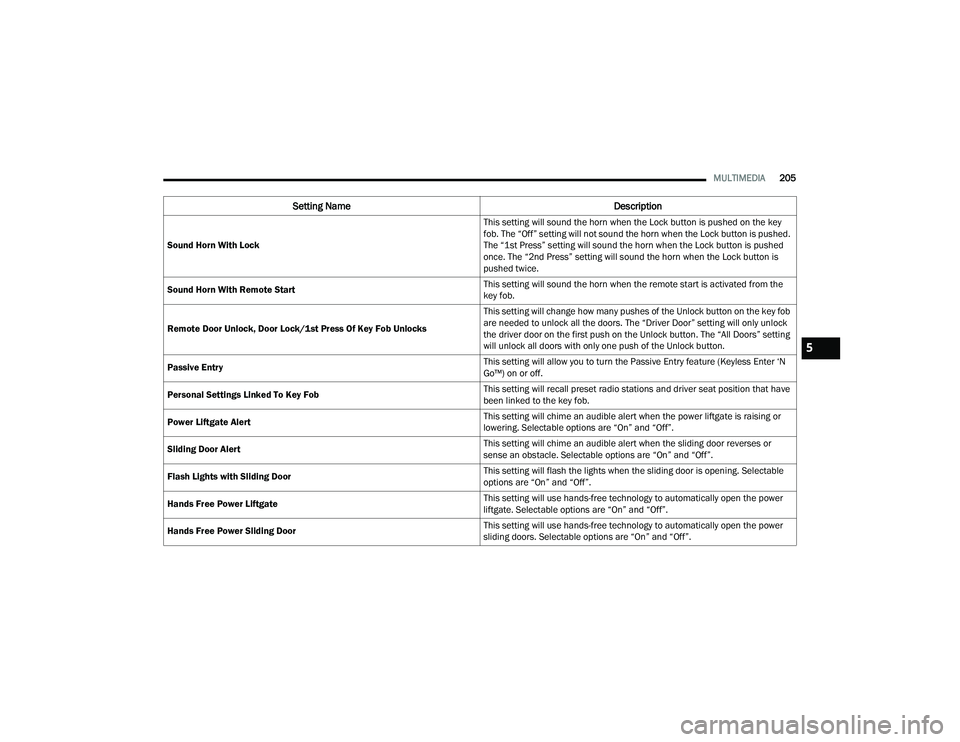
Sound Horn With Lock This setting will sound the horn when the Lock button is pushed on the key
fob. The “Off” setting will not sound the horn when the Lock button is pushed.
The “1st Press” setting will sound the horn when the Lock button is pushed
once. The “2nd Press” setting will sound the horn when the Lock button is
pushed twice.
Sound Horn With Remote Start This setting will sound the horn when the remote start is activated from the
key fob.
Remote Door Unlock, Door Lock/1st Press Of Key Fob Unlocks This setting will change how many pushes of the Unlock button on the key fob
are needed to unlock all the doors. The “Driver Door” setting will only unlock
the driver door on the first push on the Unlock button. The “All Doors” setting
will unlock all doors with only one push of the Unlock button.
Passive Entry This setting will allow you to turn the Passive Entry feature (Keyless Enter ‘N
Go™) on or off.
Personal Settings Linked To Key Fob This setting will recall preset radio stations and driver seat position that have
been linked to the key fob.
Power Liftgate Alert This setting will chime an audible alert when the power liftgate is raising or
lowering. Selectable options are “On” and “Off”.
Sliding Door Alert This setting will chime an audible alert when the sliding door reverses or
sense an obstacle. Selectable options are “On” and “Off”.
Flash Lights with Sliding Door This setting will flash the lights when the sliding door is opening. Selectable
options are “On” and “Off”.
Hands Free Power Liftgate This setting will use hands-free technology to automatically open the power
liftgate. Selectable options are “On” and “Off”.
Hands Free Power Sliding Door This setting will use hands-free technology to automatically open the power
sliding doors. Selectable options are “On” and “Off”.
Setting Name
Description
5
21_RUP_OM_EN_USC_t.book Page 205
Page 339 of 401
SERVICING AND MAINTENANCE337
5. Pry up the lid of each individual compartment snap, and detach it from the rest of the snap.
There is a small space on the side of each
snap to use for separating the lid from the
snap. Once detached, remove the rest of the
snap completely from the compartment cover.
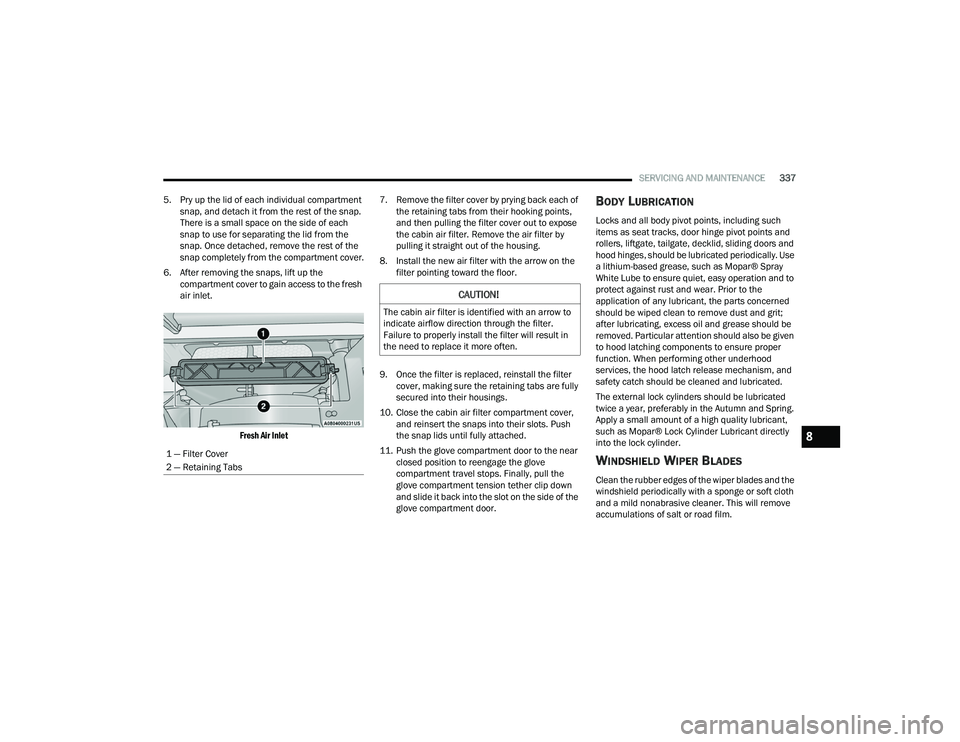
6. After removing the snaps, lift up the compartment cover to gain access to the fresh
air inlet.
Fresh Air Inlet
7. Remove the filter cover by prying back each of
the retaining tabs from their hooking points,
and then pulling the filter cover out to expose
the cabin air filter. Remove the air filter by
pulling it straight out of the housing.
8. Install the new air filter with the arrow on the filter pointing toward the floor.
9. Once the filter is replaced, reinstall the filter cover, making sure the retaining tabs are fully
secured into their housings.
10. Close the cabin air filter compartment cover, and reinsert the snaps into their slots. Push
the snap lids until fully attached.
11. Push the glove compartment door to the near closed position to reengage the glove
compartment travel stops. Finally, pull the
glove compartment tension tether clip down
and slide it back into the slot on the side of the
glove compartment door.
BODY LUBRICATION
Locks and all body pivot points, including such
items as seat tracks, door hinge pivot points and
rollers, liftgate, tailgate, decklid, sliding doors and
hood hinges, should be lubricated periodically. Use
a lithium-based grease, such as Mopar® Spray
White Lube to ensure quiet, easy operation and to
protect against rust and wear. Prior to the
application of any lubricant, the parts concerned
should be wiped clean to remove dust and grit;
after lubricating, excess oil and grease should be
removed. Particular attention should also be given
to hood latching components to ensure proper
function. When performing other underhood
services, the hood latch release mechanism, and
safety catch should be cleaned and lubricated.
The external lock cylinders should be lubricated
twice a year, preferably in the Autumn and Spring.
Apply a small amount of a high quality lubricant,
such as Mopar® Lock Cylinder Lubricant directly
into the lock cylinder.
WINDSHIELD WIPER BLADES
Clean the rubber edges of the wiper blades and the
windshield periodically with a sponge or soft cloth
and a mild nonabrasive cleaner. This will remove
accumulations of salt or road film.
1 — Filter Cover
2 — Retaining Tabs
CAUTION!
The cabin air filter is identified with an arrow to
indicate airflow direction through the filter.
Failure to properly install the filter will result in
the need to replace it more often.
8
21_RUP_OM_EN_USC_t.book Page 337
Page 351 of 401
SERVICING AND MAINTENANCE349
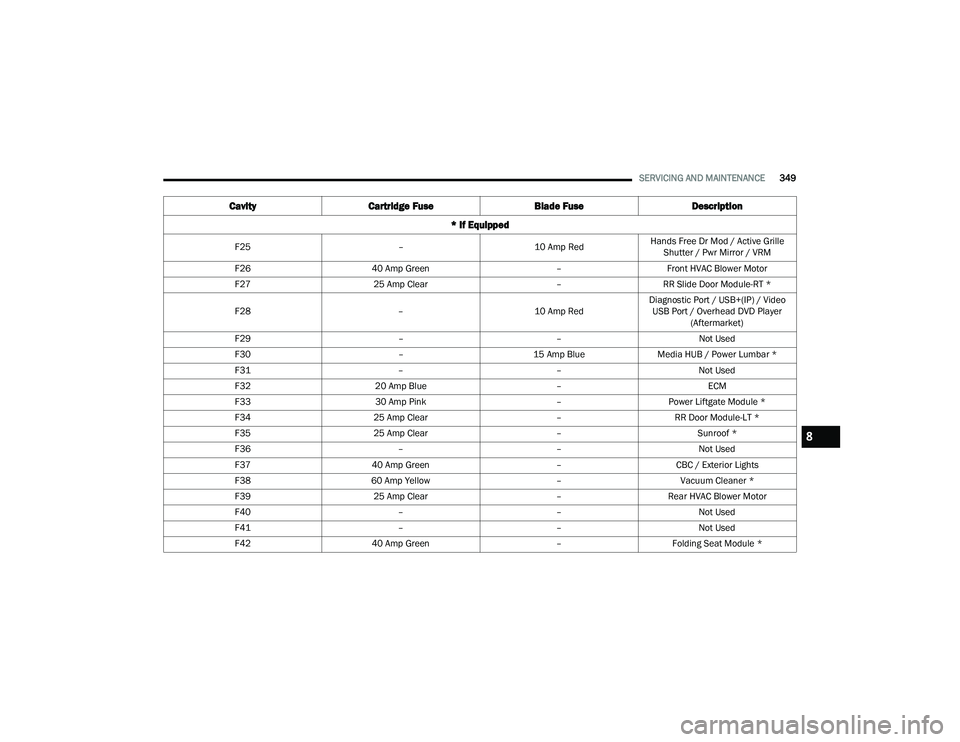
F25 –10 Amp RedHands Free Dr Mod / Active Grille
Shutter / Pwr Mirror / VRM
F26 40 Amp Green –Front HVAC Blower Motor
F27 25 Amp Clear –RR Slide Door Module-RT *
F28 –10 Amp RedDiagnostic Port / USB+(IP) / Video
USB Port / Overhead DVD Player (Aftermarket)
F29 ––Not Used
F30 –15 Amp BlueMedia HUB / Power Lumbar *
F31 ––Not Used
F32 20 Amp Blue –ECM
F33 30 Amp Pink –Power Liftgate Module *
F34 25 Amp Clear –RR Door Module-LT *
F35 25 Amp Clear –Sunroof *
F36 ––Not Used
F37 40 Amp Green –CBC / Exterior Lights
F38 60 Amp Yellow –Vacuum Cleaner *
F39 25 Amp Clear –Rear HVAC Blower Motor
F40 ––Not Used
F41 ––Not Used
F42 40 Amp Green –Folding Seat Module *
Cavity Cartridge Fuse Blade FuseDescription
* If Equipped
8
21_RUP_OM_EN_USC_t.book Page 349
Page 394 of 401
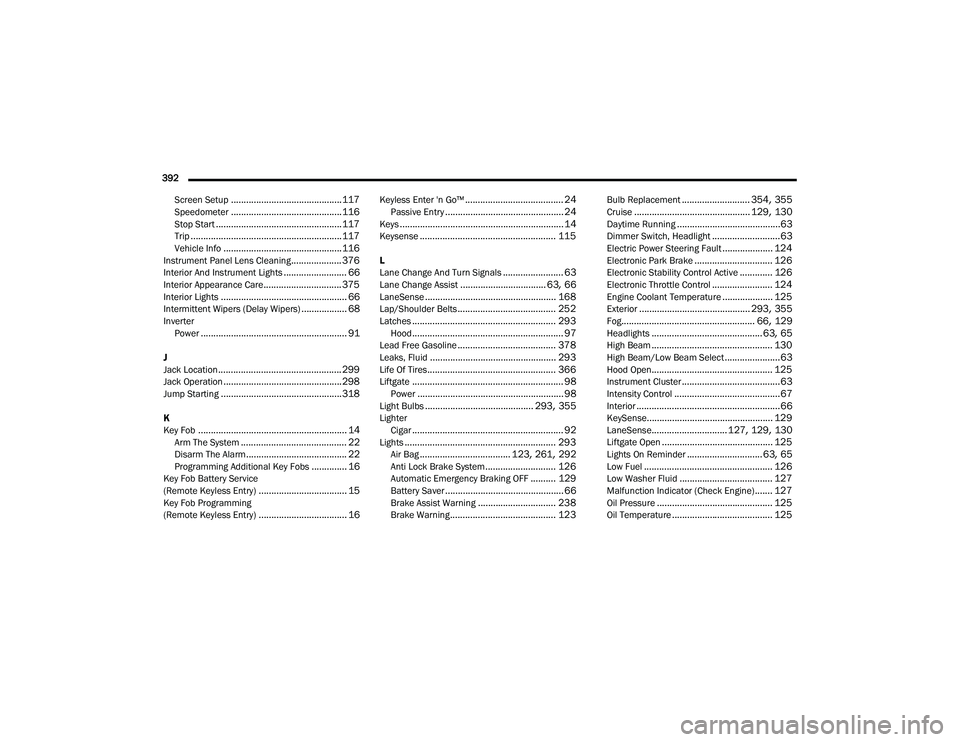
392 Screen Setup
............................................ 117Speedometer............................................ 116Stop Start.................................................. 117Trip............................................................ 117Vehicle Info............................................... 116Instrument Panel Lens Cleaning.................... 376Interior And Instrument Lights......................... 66Interior Appearance Care............................... 375Interior Lights.................................................. 66Intermittent Wipers (Delay Wipers).................. 68InverterPower.......................................................... 91
J
Jack Location................................................. 299Jack Operation............................................... 298Jump Starting................................................ 318
K
Key Fob........................................................... 14Arm The System.......................................... 22Disarm The Alarm........................................ 22Programming Additional Key Fobs.............. 16Key Fob Battery Service
(Remote Keyless Entry)................................... 15Key Fob Programming
(Remote Keyless Entry)................................... 16
Keyless Enter 'n Go™....................................... 24Passive Entry............................................... 24Keys................................................................. 14Keysense...................................................... 115
L
Lane Change And Turn Signals........................ 63Lane Change Assist.................................. 63, 66LaneSense.................................................... 168Lap/Shoulder Belts....................................... 252Latches......................................................... 293Hood............................................................ 97Lead Free Gasoline....................................... 378Leaks, Fluid.................................................. 293Life Of Tires................................................... 366Liftgate............................................................ 98Power.......................................................... 98Light Bulbs........................................... 293, 355LighterCigar............................................................ 92Lights............................................................ 293Air Bag.................................... 123, 261, 292Anti Lock Brake System............................ 126Automatic Emergency Braking OFF.......... 129Battery Saver............................................... 66Brake Assist Warning............................... 238Brake Warning.......................................... 123
Bulb Replacement........................... 354, 355Cruise.............................................. 129, 130Daytime Running.........................................63Dimmer Switch, Headlight...........................63Electric Power Steering Fault.................... 124Electronic Park Brake............................... 126Electronic Stability Control Active............. 126Electronic Throttle Control........................ 124Engine Coolant Temperature.................... 125Exterior............................................ 293, 355Fog..................................................... 66, 129Headlights............................................ 63, 65High Beam................................................ 130High Beam/Low Beam Select......................63Hood Open................................................ 125Instrument Cluster.......................................63Intensity Control..........................................67Interior.........................................................66KeySense.................................................. 129LaneSense.............................. 127, 129, 130Liftgate Open............................................ 125Lights On Reminder..............................63, 65Low Fuel................................................... 126Low Washer Fluid..................................... 127Malfunction Indicator (Check Engine)....... 127Oil Pressure.............................................. 125Oil Temperature........................................ 125
21_RUP_OM_EN_USC_t.book Page 392