FamCAM CHRYSLER PACIFICA 2021 Owners Manual
[x] Cancel search | Manufacturer: CHRYSLER, Model Year: 2021, Model line: PACIFICA, Model: CHRYSLER PACIFICA 2021Pages: 401, PDF Size: 26.88 MB
Page 7 of 401
5
CRUISE CONTROL SYSTEMS —
IF EQUIPPED ........................................................ 147 Cruise Control ................................................ 147
Adaptive Cruise Control (ACC) ..................... 149
PARKSENSE FRONT/REAR PARK ASSIST
SYSTEM — IF EQUIPPED ..................................... 158
ParkSense Sensors ....................................... 159
ParkSense Display ........................................ 159
ParkSense Warning Display.......................... 162
Enabling And Disabling ParkSense .............. 162
Service The ParkSense Park Assist
System ........................................................... 163Cleaning The ParkSense System ................. 163ParkSense System Usage Precautions ........ 163
PARKSENSE ACTIVE PARK ASSIST
SYSTEM — IF EQUIPPED ..................................... 164
Enabling And Disabling The ParkSense
Active Park Assist System ............................. 165
Parallel/Perpendicular Parking Space
Assistance Operation .................................... 166 LANESENSE — IF EQUIPPED .............................. 168
LaneSense Operation ................................... 168Turning LaneSense On Or Off ....................... 169
LaneSense Warning Message ...................... 169Changing LaneSense Status ........................ 171
PARKVIEW REAR BACK UP CAMERA............... 171
SURROUND VIEW CAMERA SYSTEM —
IF EQUIPPED ....................................................... 172
FAMCAM SYSTEM — IF EQUIPPED.................... 174
REFUELING THE VEHICLE ................................... 175
VEHICLE LOADING .............................................. 176 Certification Label ......................................... 176
TRAILER TOWING ............................................... 177
Common Towing Definitions......................... 177
Trailer Hitch Classification ............................ 179
Trailer Towing Weights
(Maximum Trailer Weight Ratings) ............ 179
Vehicle Loading Chart ................................... 180Trailer And Tongue Weight ........................... 182Towing Requirements .................................. 182
Towing Tips ................................................... 184 RECREATIONAL TOWING
(BEHIND MOTORHOME) ..................................... 185
Towing This Vehicle Behind Another
Vehicle ........................................................... 185
DRIVING TIPS ....................................................... 186
Driving On Slippery Surfaces ........................ 186Driving Through Water ................................. 187
MULTIMEDIA
UCONNECT SYSTEMS ......................................... 188
CYBERSECURITY ................................................. 188
UCONNECT SETTINGS ......................................... 189 Customer Programmable Features ............ 189
UCONNECT THEATER — UCONNECT 5/5
NAV WITH 10.1-INCH DISPLAY
(IF EQUIPPED) ..................................................... 214
Uconnect Theater Overview.......................... 214
Getting Started .............................................. 214
Accessing The System From The
Uconnect System .......................................... 214Uconnect Theater Controls ........................... 215
21_RUP_OM_EN_USC_t.book Page 5
Page 176 of 401
174STARTING AND OPERATING
(Continued)
When Zoom View is selected while the vehicle is in
REVERSE, then shifted to DRIVE, the camera delay
will display the standard Rear View. If the vehicle is
then returned to REVERSE gear from DRIVE, the
Zoom View selection will automatically resume.
Shifting to NEUTRAL from any gear will maintain
the selected view (Zoom or Standard) as long as
the vehicle is below 8 mph (13 km/h).
If the vehicle is in PARK, Zoom View is available
until the gear selector is placed in DRIVE or
REVERSE and speeds are at or above 8 mph
(13 km/h).
NOTE:
If the vehicle is in DRIVE, NEUTRAL, or REVERSE,
and speed is greater than or equal to 8 mph
(13 km/h), Zoom View is unavailable and the
icon will appear grey.
While in Zoom View, the guidelines will not be
visible.
Deactivation
The system can be deactivated under the following
conditions:
The speed of the vehicle is greater than 8 mph
(13 km/h).
The vehicle shifted into PARK.
The vehicle is in any gear other than REVERSE
and the “X” button is pressed.
The camera delay system is turned off manually
through the Uconnect Settings Ú page 189.
NOTE:
If snow, ice, mud, or any foreign substance
builds up on the camera lenses, clean the
lenses, rinse with water, and dry with a soft
cloth. Do not cover the lenses.
If a malfunction with the system has occurred,
see an authorized dealer.
FAMCAM SYSTEM — IF EQUIPPED
Your vehicle may be equipped with a FamCam
system that consists of an interior monitoring
camera mounted on the headliner that allows you
to view cargo/passengers in the rear interior of the
vehicle through the Uconnect screen.
To activate the feature, press the FamCam button
under “Controls” in the Vehicle Menu of the
Uconnect system Úpage 189. Alternatively, the
feature can be accessed through the App Drawer
or a shortcut for the feature can be added to the
"Favorites" bar at the top of the screen for quick
access.WARNING!
Drivers must be careful when backing up even
when using the Surround View Camera. Always
check carefully behind your vehicle, and be sure
to check for pedestrians, animals, other
vehicles, obstructions, or blind spots before
backing up. You are responsible for the safety of
your surroundings and must continue to pay
attention while backing up. Failure to do so can
result in serious injury or death.
CAUTION!
To avoid vehicle damage, Surround View
should only be used as a parking aid. The
Surround View camera is unable to view every
obstacle or object in your drive path.
To avoid vehicle damage, the vehicle must be
driven slowly when using Surround View to be
able to stop in time when an obstacle is seen.
It is recommended that the driver look
frequently over his/her shoulder when using
Surround View.
CAUTION!
21_RUP_OM_EN_USC_t.book Page 174
Page 177 of 401
STARTING AND OPERATING175
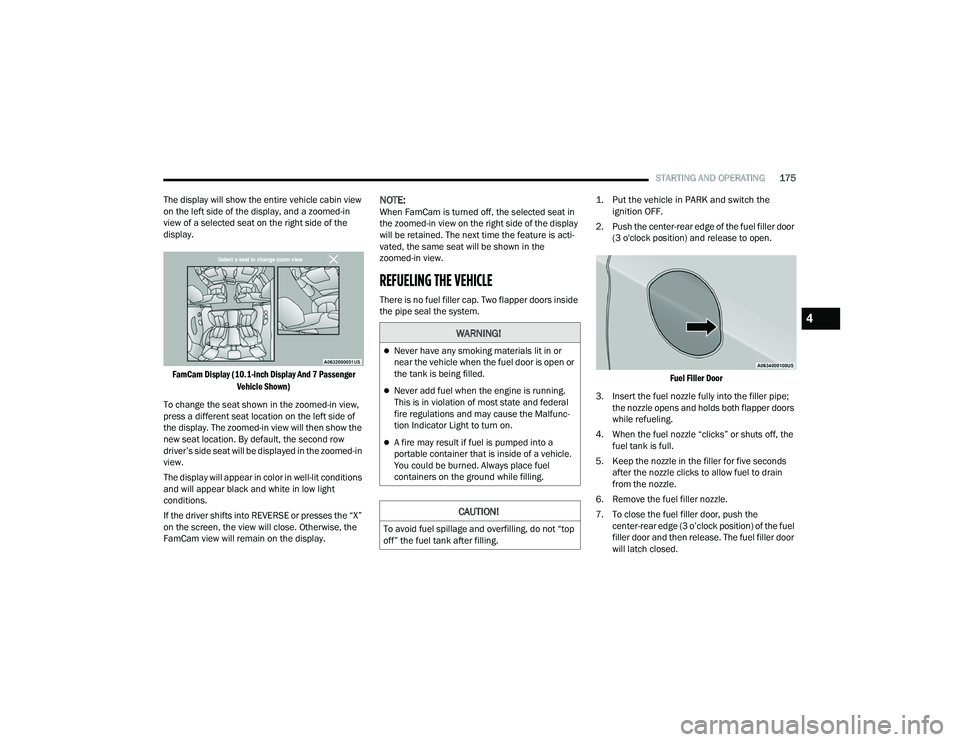
The display will show the entire vehicle cabin view
on the left side of the display, and a zoomed-in
view of a selected seat on the right side of the
display.
FamCam Display (10.1-inch Display And 7 Passenger Vehicle Shown)
To change the seat shown in the zoomed-in view,
press a different seat location on the left side of
the display. The zoomed-in view will then show the
new seat location. By default, the second row
driver’s side seat will be displayed in the zoomed-in
view.
The display will appear in color in well-lit conditions
and will appear black and white in low light
conditions.
If the driver shifts into REVERSE or presses the “X”
on the screen, the view will close. Otherwise, the
FamCam view will remain on the display.
NOTE:When FamCam is turned off, the selected seat in
the zoomed-in view on the right side of the display
will be retained. The next time the feature is acti -
vated, the same seat will be shown in the
zoomed-in view.
REFUELING THE VEHICLE
There is no fuel filler cap. Two flapper doors inside
the pipe seal the system.
1. Put the vehicle in PARK and switch the
ignition OFF.
2. Push the center-rear edge of the fuel filler door (3 o'clock position) and release to open.
Fuel Filler Door
3. Insert the fuel nozzle fully into the filler pipe; the nozzle opens and holds both flapper doors
while refueling.
4. When the fuel nozzle “clicks” or shuts off, the fuel tank is full.
5. Keep the nozzle in the filler for five seconds after the nozzle clicks to allow fuel to drain
from the nozzle.
6. Remove the fuel filler nozzle.
7. To close the fuel filler door, push the center-rear edge (3 o’clock position) of the fuel
filler door and then release. The fuel filler door
will latch closed.
WARNING!
Never have any smoking materials lit in or
near the vehicle when the fuel door is open or
the tank is being filled.
Never add fuel when the engine is running.
This is in violation of most state and federal
fire regulations and may cause the Malfunc -
tion Indicator Light to turn on.
A fire may result if fuel is pumped into a
portable container that is inside of a vehicle.
You could be burned. Always place fuel
containers on the ground while filling.
CAUTION!
To avoid fuel spillage and overfilling, do not “top
off” the fuel tank after filling.
4
21_RUP_OM_EN_USC_t.book Page 175