flat tire CHRYSLER PACIFICA 2023 User Guide
[x] Cancel search | Manufacturer: CHRYSLER, Model Year: 2023, Model line: PACIFICA, Model: CHRYSLER PACIFICA 2023Pages: 328, PDF Size: 16.37 MB
Page 201 of 328
SAFETY199
The TPMS consists of the following components:
Receiver module
Four Tire Pressure Monitoring System sensors
Various Tire Pressure Monitoring System messages,
which display in the instrument cluster
Tire Pressure Monitoring System Warning Light
SERVICE TPMS WARNING
When a system fault is detected, the Tire Pressure
Monitoring System (TPMS) Warning Light will flash on and
off for 75 seconds and then remain on solid. The system
fault will also sound a chime. In addition, the instrument
cluster will display a "SERVICE TPM SYSTEM" message for
a minimum of five seconds and then display dashes (--) in
place of the pressure value to indicate which sensor is not
being received.
If the ignition is cycled, this sequence will repeat, providing
the system fault still exists. If the system fault no longer
exists, the TPMS Warning Light will no longer flash, and
the “SERVICE TPM SYSTEM” message will no longer
display, and a pressure value will display in place of the
dashes. A system fault can occur due to any of the
following:
Jamming due to electronic devices or driving next to
facilities emitting the same radio frequencies as the
TPMS sensors
Installing some form of aftermarket window tinting that
affects radio wave signals
Lots of snow or ice around the wheels or wheel hous -
ings
Using tire chains on the vehicle
Using wheels/tires not equipped with TPMS sensors
Vehicles With Compact Spare — If Equipped
1. The compact spare tire does not have a Tire Pressure Monitoring System sensor. Therefore, the
TPMS will not monitor the pressure in the compact
spare tire.
2. If you install the compact spare tire in place of a road tire that has a pressure below the low-pressure
warning limit, upon the next ignition cycle, the TPMS
Warning Light will remain on and a chime will sound.
In addition, the graphic in the instrument cluster will
still display a different color pressure value.
3. After driving the vehicle for up to 20 minutes above 15 mph (24 km/h), the TPMS Warning Light will flash
on and off for 75 seconds and then remain on solid.
In addition, the instrument cluster will display a
“SERVICE TPM SYSTEM” message for five seconds
and then display dashes (--) in place of the pressure
value.
4. For each subsequent ignition cycle, a chime will sound, the TPMS Warning Light will flash on and off
for 75 seconds and then remain on solid, and the
instrument cluster will display a “SERVICE TPM
SYSTEM” message for five seconds and then display
dashes (- -) in place of the pressure value.
5. Once you repair or replace the original road tire and reinstall it on the vehicle in place of the compact
spare, the TPMS will update automatically. In
addition, the TPMS Warning Light will turn off and the
graphic in the instrument cluster will display a new
pressure value instead of dashes (--), as long as no tire pressure is below the low-pressure warning limit
in any of the four active road tires. The vehicle may
need to be driven for up to 20 minutes above 15 mph
(24 km/h) in order for the TPMS to receive this
information.
TIRE PRESSURE MONITORING SYSTEM LOW
PRESSURE WARNINGS
The TPMS Warning Light will illuminate in the
instrument cluster and a chime will sound
when tire pressure is low in one or more of the
four active road tires. In addition, the
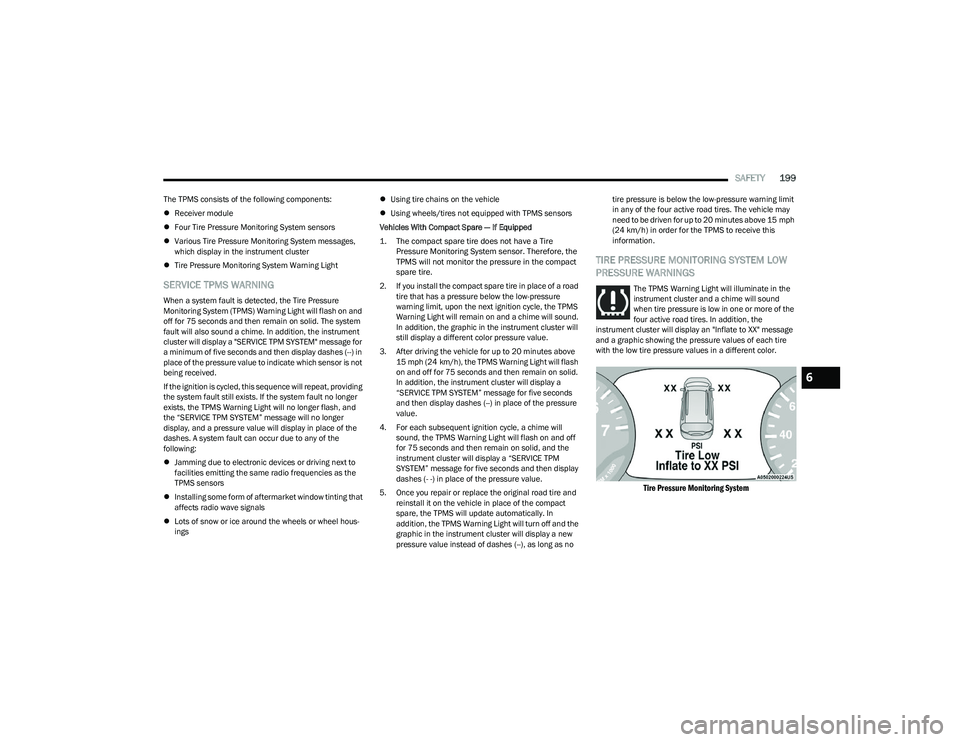
instrument cluster will display an "Inflate to XX" message
and a graphic showing the pressure values of each tire
with the low tire pressure values in a different color.
Tire Pressure Monitoring System
6
23_RUP_OM_EN_USC_t.book Page 199
Page 202 of 328
200SAFETY
Should this occur, you should stop as soon as possible
and inflate the tires with low pressure (those in a different
color in the instrument cluster graphic) to the vehicle’s
recommended cold placard pressure value as shown in
the "Inflate to XX" message. Once the system receives the
updated tire pressures, the system will automatically
update, the pressure values in the graphic display in the
instrument cluster will return to their original color, and
the TPMS Warning Light will turn off. The vehicle may need
to be driven for up to 20 minutes above 15 mph
(24 km/h) in order for the TPMS to receive this
information.
TPMS DEACTIVATION — IF EQUIPPED
The Tire Pressure Monitoring System (TPMS) can be
deactivated if replacing all four wheel and tire assemblies
(road tires) with wheel and tire assemblies that do not
have TPMS sensors, such as when installing winter wheel
and tire assemblies on your vehicle.
To deactivate the TPMS, first, replace all four wheel and
tire assemblies (road tires) with tires not equipped with
Tire Pressure Monitoring System (TPMS) sensors. Then,
drive the vehicle for 20 minutes above 15 mph (24 km/h).
The TPMS will chime, the TPMS Warning Light will flash on
and off for 75 seconds and then remain on. The
instrument cluster will display the “SERVICE TPM
SYSTEM” message and then display dashes (--) in place of
the pressure values.
Beginning with the next ignition cycle, the TPMS will no
longer chime or display the “SERVICE TPM SYSTEM” message in the instrument cluster but dashes (--) will
remain in place of the pressure values.
To reactivate the TPMS, replace all four wheel and tire
assemblies (road tires) with tires equipped with TPMS
sensors. Then, drive the vehicle for up to 20 minutes
above 15 mph (24 km/h). The TPMS will chime, the TPMS
Warning Light will flash on and off for 75 seconds and then
turn off. The instrument cluster will display the “SERVICE
TPM SYSTEM” message and then display pressure values
in place of the dashes. On the next ignition cycle the
"SERVICE TPM SYSTEM" message will no longer be
displayed as long as no system fault exists.OCCUPANT RESTRAINT SYSTEMS
Some of the most important safety features in your vehicle
are the restraint systems:
OCCUPANT RESTRAINT SYSTEMS
F
EATURES
Seat Belt Systems
Supplemental Restraint Systems (SRS) Air Bags
Child Restraints
Some of the safety features described in this section may
be standard equipment on some models, or may be
optional equipment on others. If you are not sure, ask an
authorized dealer.
IMPORTANT SAFETY PRECAUTIONS
Please pay close attention to the information in this
section. It tells you how to use your restraint system properly, to keep you and your passengers as safe as
possible.
Here are some simple steps you can take to minimize the
risk of harm from a deploying air bag:
1. Children 12 years old and under should always ride
buckled up in the rear seat of a vehicle with a rear
seat.
2. A child who is not big enough to wear the vehicle seat belt properly must be secured in the appropriate child
restraint or belt-positioning booster seat in a rear
seating position
Úpage 219.
3. If a child from 2 to 12 years old (not in a rear-facing child restraint) must ride in the front passenger seat,
move the seat as far back as possible and use the
proper child restraint
Úpage 219.
4. Never allow children to slide the shoulder belt behind them or under their arm.
5. You should read the instructions provided with your child restraint to make sure that you are using it
properly.
6. All occupants should always wear their lap and shoulder belts properly.
7. The driver and front passenger seats should be moved back as far as practical to allow the front air
bags room to inflate.
8. Do not lean against the door or window. If your vehicle has side air bags, and deployment occurs, the side air
bags will inflate forcefully into the space between
occupants and the door and occupants could be injured.
9. If the air bag system in this vehicle needs to be modified to accommodate a disabled person, see
23_RUP_OM_EN_USC_t.book Page 200
Page 236 of 328
234SAFETY
(Continued)
(Continued)
Defroster
Check operation by selecting the defrost mode and place
the blower control on high speed. You should be able to
feel the air directed against the windshield. See an
authorized dealer for service if your defroster is
inoperable.
Floor Mat Safety Information
Always use floor mats designed to fit your vehicle. Only use
a floor mat that does not interfere with the operation of the
accelerator, brake or clutch pedals. Only use a floor mat
that is securely attached using the floor mat fasteners so
it cannot slip out of position and interfere with the
accelerator, brake or clutch pedals or impair safe
operation of your vehicle in other ways.
PERIODIC SAFETY CHECKS YOU SHOULD
M
AKE OUTSIDE THE VEHICLE
Tires
Examine tires for excessive tread wear and uneven wear
patterns. Check for stones, nails, glass, or other objects
lodged in the tread or sidewall. Inspect the tread for cuts
and cracks. Inspect sidewalls for cuts, cracks, and bulges.
Check the lug nut/bolt torque for tightness. Check the
tires (including spare) for proper cold inflation pressure.
WARNING!
An improperly attached, damaged, folded, or stacked
floor mat, or damaged floor mat fasteners may cause
your floor mat to interfere with the accelerator, brake, or
clutch pedals and cause a loss of vehicle control. To
prevent SERIOUS INJURY or DEATH:
ALWAYS securely attach your floor mat
using the floor mat fasteners. DO NOT
install your floor mat upside down or turn
your floor mat over. Lightly pull to confirm
mat is secured using the floor mat
fasteners on a regular basis.
ALWAYS REMOVE THE EXISTING FLOOR
MAT FROM THE VEHICLE before installing
any other floor mat. NEVER install or stack
an additional floor mat on top of an existing
floor mat.
ONLY install floor mats designed to fit your vehicle.
NEVER install a floor mat that cannot be properly
attached and secured to your vehicle. If a floor mat
needs to be replaced, only use a FCA US LLC
approved floor mat for the specific make, model, and
year of your vehicle.
ONLY use the driver’s side floor mat on the driver’s
side floor area. To check for interference, with the
vehicle properly parked with the engine off, fully
depress the accelerator, the brake, and the clutch
pedal (if present) to check for interference. If your
floor mat interferes with the operation of any pedal,
or is not secure to the floor, remove the floor mat
from the vehicle and place the floor mat in your
trunk.
ONLY use the passenger’s side floor mat on the
passenger’s side floor area.
ALWAYS make sure objects cannot fall or slide into
the driver’s side floor area when the vehicle is
moving. Objects can become trapped under acceler -
ator, brake, or clutch pedals and could cause a loss
of vehicle control.
WARNING!
NEVER place any objects under the floor mat (e.g.,
towels, keys, etc.). These objects could change the
position of the floor mat and may cause interference
with the accelerator, brake, or clutch pedals.
If the vehicle carpet has been removed and
re-installed, always properly attach carpet to the floor
and check the floor mat fasteners are secure to the
vehicle carpet. Fully depress each pedal to check for
interference with the accelerator, brake, or clutch
pedals then re-install the floor mats.
It is recommended to only use mild soap and water
to clean your floor mats. After cleaning, always check
your floor mat has been properly installed and is
secured to your vehicle using the floor mat fasteners
by lightly pulling mat.
WARNING!
23_RUP_OM_EN_USC_t.book Page 234
Page 240 of 328
238IN CASE OF EMERGENCY
SOS Call System Limitations
Vehicles sold in Mexico DO NOT have SOS Call system
capabilities.
SOS or other emergency line operators in Mexico may not
answer or respond to SOS system calls.
If the SOS Call system detects a malfunction, any of the
following may occur at the time the malfunction is
detected, and at the beginning of each ignition cycle:
The Rearview Mirror light located between the SOS and
ASSIST buttons will continuously be illuminated red.
The Device Screen will display the following message
“Vehicle device requires service. Please contact an
authorized dealer.”
An In-Vehicle Audio message will state “Vehicle device
requires service. Please contact an authorized dealer.” Even if the SOS Call system is fully functional, factors
beyond FCA US LLC’s control may prevent or stop the SOS
Call system operation. These include, but are not limited
to, the following factors:
The ignition is in the OFF position
The vehicle’s electrical systems are not intact
The SOS Call system software and/or hardware are
damaged during a crash
The vehicle battery loses power or becomes discon -
nected during a vehicle crash
LTE (voice/data) or 4G (data) network and/or Global
Positioning Satellite signals are unavailable or
obstructed
Equipment malfunction at the SOS operator facility
Operator error by the SOS operator
LTE (voice/data) or 4G (data) network congestion
Weather
Buildings, structures, geographic terrain, or tunnelsNOTE:
Your vehicle may be transmitting data as authorized by
the subscriber.
Never place anything on or near the vehicle’s LTE
(voice/data) or 4G (data) and GPS antennas. You could
prevent LTE (voice/data) or 4G (data) and GPS signal
reception, which can prevent your vehicle from placing
an emergency call. An operable LTE (voice/data) or 4G
(data) network connection and a GPS signal is required
for the SOS Call system to function properly.
NOTE:Changes or modifications not expressly approved by the
party responsible for compliance could void the user's
authority to operate the equipment.
Automatic SOS — If Equipped
Automatic SOS is a hands-free safety service that can
immediately connect you with help in the event that your
vehicle’s airbags deploy. Please refer to your provided
radio supplement for complete information.
ASSIST Call
The ASSIST Button is used to automatically connect you to
any one of the following support centers:
Roadside Assistance – If you get a flat tire, or need a
tow, just push the ASSIST button and you will be
connected to a representative for assistance. Road -
side Assistance will know what vehicle is being driven
and its location. Additional fees may apply for roadside
assistance.
SiriusXM Guardian™ Customer Care – In-vehicle
support for SiriusXM Guardian™.
WARNING!
Ignoring the Rearview Mirror light could mean you
will not have SOS Call services. If the Rearview Mirror
light is illuminated, have an authorized dealer
service the SOS Call system immediately.
The Occupant Restraint Control module turns on the
air bag Warning Light on the instrument panel if a
malfunction in any part of the system is detected. If
the Air Bag Warning Light is illuminated, have an
authorized dealer service the Occupant Restraint
Control system immediately.
WARNING!
ALWAYS obey traffic laws and pay attention to the road.
ALWAYS drive safely with your hands on the steering
wheel. You have full responsibility and assume all risks
related to the use of the features and applications in
this vehicle. Only use the features and applications
when it is safe to do so. Failure to do so may result in an
accident involving serious injury or death.
23_RUP_OM_EN_USC_t.book Page 238
Page 242 of 328
240IN CASE OF EMERGENCY
(Continued)
JACK AND SPARE TIRE LOCATION
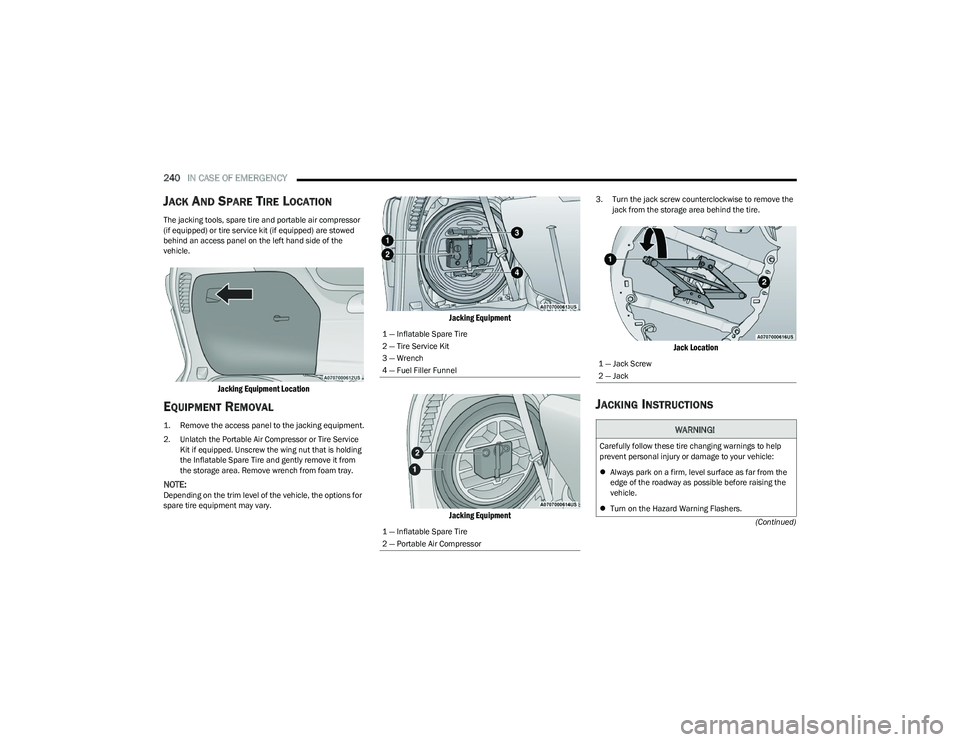
The jacking tools, spare tire and portable air compressor
(if equipped) or tire service kit (if equipped) are stowed
behind an access panel on the left hand side of the
vehicle.
Jacking Equipment Location
EQUIPMENT REMOVAL
1. Remove the access panel to the jacking equipment.
2. Unlatch the Portable Air Compressor or Tire Service
Kit if equipped. Unscrew the wing nut that is holding
the Inflatable Spare Tire and gently remove it from
the storage area. Remove wrench from foam tray.
NOTE:Depending on the trim level of the vehicle, the options for
spare tire equipment may vary.
Jacking Equipment
Jacking Equipment
3. Turn the jack screw counterclockwise to remove the jack from the storage area behind the tire.
Jack Location
JACKING INSTRUCTIONS
1 — Inflatable Spare Tire
2 — Tire Service Kit
3 — Wrench
4 — Fuel Filler Funnel
1 — Inflatable Spare Tire
2 — Portable Air Compressor
1 — Jack Screw
2 — Jack
WARNING!
Carefully follow these tire changing warnings to help
prevent personal injury or damage to your vehicle:
Always park on a firm, level surface as far from the
edge of the roadway as possible before raising the
vehicle.
Turn on the Hazard Warning Flashers.
23_RUP_OM_EN_USC_t.book Page 240
Page 243 of 328

IN CASE OF EMERGENCY241
Jack Warning Label
Detailed information about the inflatable spare tire, its
use, and operation Úpage 295.
Extending The Wrench
1. Loosen (but do not remove) the wheel lug nuts by
turning them to the left, one turn while the wheel is
still on the ground.
2. There are two jack engagement locations on each side of the vehicle body. These locations are on the
sill flange of the vehicle body.
NOTE:Placement for the front and rear jacking locations are
critical. See the following images for proper jacking loca -
tions.
Jacking Locations
Front Lifting Point
Apply the parking brake firmly and set the transmis -
sion in PARK.
Block the wheel diagonally opposite the wheel to be
raised.
Do not let any passenger sit in the vehicle when it is
on a jack.
Do not get under the vehicle when it is on a jack. If
you need to get under a raised vehicle, take it to a
service center where it can be raised on a lift.
Only use the jack in the positions indicated and for
lifting this vehicle during a tire change.
If working on or near a roadway, be extremely careful
of motor traffic.
WARNING!CAUTION!
Do not attempt to raise the vehicle by jacking on
locations other than those indicated in the Jacking
Instructions for this vehicle.
7
23_RUP_OM_EN_USC_t.book Page 241
Page 244 of 328

242IN CASE OF EMERGENCY
Front Jack Location
Rear Lifting Point Rear Jacking Location
3. Place the wrench on the jack screw and turn
clockwise until the jack head is properly engaged in
the described location. Do not raise the vehicle until
you are sure the jack is securely engaged.
4. Raise the vehicle by turning the jack screw clockwise using the swivel wrench. Raise the vehicle only until
the tire just clears the surface and enough clearance
is obtained to install the compact spare tire.
Minimum tire lift provides maximum stability.
5. Remove the wheel lug nuts. For vehicles with wheel covers, remove the cover from the wheel by hand. Do
not pry the wheel cover off. Then pull the wheel off the
hub.
6. Install the inflatable spare on the vehicle, located in the rear cargo area of the vehicle.
WARNING!
Being under a jacked-up vehicle is dangerous. The
vehicle could slip off the jack and fall on you. You could
be crushed. Never get any part of your body under a
vehicle that is on a jack. If you need to get under a
raised vehicle, take it to a service center where it can
be raised on a lift.
CAUTION!
Do not attempt to raise the vehicle by jacking on
locations other than those indicated.
WARNING!
Raising the vehicle higher than necessary can make the
vehicle less stable. It could slip off the jack and hurt
someone near it. Raise the vehicle only enough to
remove the tire.
WARNING!
To avoid the risk of forcing the vehicle off the jack, do
not tighten the wheel nuts fully until the vehicle has
been lowered. Failure to follow this warning may result
in serious injury.
23_RUP_OM_EN_USC_t.book Page 242
Page 245 of 328
IN CASE OF EMERGENCY243
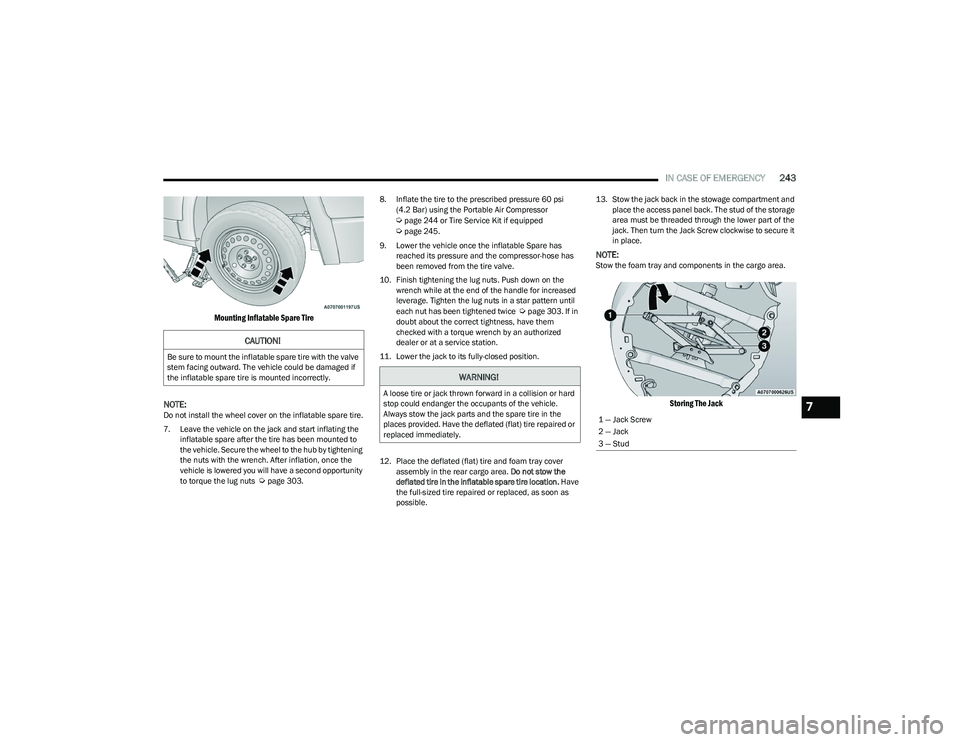
Mounting Inflatable Spare Tire
NOTE:
Do not install the wheel cover on the inflatable spare tire.
7. Leave the vehicle on the jack and start inflating the inflatable spare after the tire has been mounted to
the vehicle. Secure the wheel to the hub by tightening
the nuts with the wrench. After inflation, once the
vehicle is lowered you will have a second opportunity
to torque the lug nuts
Úpage 303. 8. Inflate the tire to the prescribed pressure 60 psi
(4.2 Bar) using the Portable Air Compressor
Úpage 244 or Tire Service Kit if equipped Úpage 245.
9. Lower the vehicle once the inflatable Spare has reached its pressure and the compressor-hose has
been removed from the tire valve.
10. Finish tightening the lug nuts. Push down on the wrench while at the end of the handle for increased
leverage. Tighten the lug nuts in a star pattern until
each nut has been tightened twice
Úpage 303. If in
doubt about the correct tightness, have them
checked with a torque wrench by an authorized
dealer or at a service station.
11. Lower the jack to its fully-closed position.
12. Place the deflated (flat) tire and foam tray cover assembly in the rear cargo area. Do not stow the
deflated tire in the inflatable spare tire location. Have
the full-sized tire repaired or replaced, as soon as
possible. 13. Stow the jack back in the stowage compartment and
place the access panel back. The stud of the storage
area must be threaded through the lower part of the
jack. Then turn the Jack Screw clockwise to secure it
in place.
NOTE:Stow the foam tray and components in the cargo area.
Storing The Jack
CAUTION!
Be sure to mount the inflatable spare tire with the valve
stem facing outward. The vehicle could be damaged if
the inflatable spare tire is mounted incorrectly.
WARNING!
A loose tire or jack thrown forward in a collision or hard
stop could endanger the occupants of the vehicle.
Always stow the jack parts and the spare tire in the
places provided. Have the deflated (flat) tire repaired or
replaced immediately.
1 — Jack Screw
2 — Jack
3 — Stud7
23_RUP_OM_EN_USC_t.book Page 243
Page 246 of 328

244IN CASE OF EMERGENCY
ROAD TIRE INSTALLATION
Vehicles Equipped With Wheel Covers
1. Mount the road tire on the axle.
2. To ease the installation process for steel wheels with
wheel covers, install two lug nuts on the mounting
studs which are on each side of the valve stem. Install
the lug nuts with the cone shaped end of the nut
toward the wheel. Lightly tighten the lug nuts.
Tire And Wheel Cover Or Center Cap
3. Align the valve notch in the wheel cover with the valve stem on the wheel. Install the cover by hand,
snapping the cover over the two lug nuts. Do not use
a hammer or excessive force to install the cover.
4. Install the remaining lug nuts with the cone shaped end of the nut toward the wheel. Lightly tighten all the
lug nuts until the wheel sits flush onto the hub and
there is no play. The nuts will have to be fully
tightened once the vehicle is lowered. Tightening an
improperly seated wheel under vehicle load can
damage the threads, cause vibration, and undermine
safety.
5. Lower the vehicle to the ground by turning the jack handle counterclockwise.
6. Finish tightening the lug nuts. Push down on the wrench while at the end of the handle for increased
leverage. Tighten the lug nuts in a star pattern until
each nut has been tightened twice
Úpage 303. If in
doubt about the correct tightness, have them
checked with a torque wrench by an authorized
dealer or at a service station.
7. After 25 miles (40 km) check the lug nut torque with a torque wrench to ensure that all lug nuts are
properly seated against the wheel.
PORTABLE AIR COMPRESSOR —
I
F EQUIPPED
Your vehicle may be equipped with a Portable Air
Compressor. Use the Portable Air Compressor located in
the side compartment of the cargo area to inflate the
inflatable tire to 60 psi (4.2 Bar).
Portable Air Compressor
1 — Valve Stem
2 — Valve Notch
3 — Road Tire
4 — Wheel Cover
5 — Wheel Lug Nut
WARNING!
To avoid the risk of forcing the vehicle off the jack, do
not tighten the wheel nuts fully until the vehicle has
been lowered. Failure to follow this warning may result
in serious injury.
1 — Power Plug
2 — Deflation Button
3 — Pressure Gauge
4 — Power Button
5 — Air Hose
23_RUP_OM_EN_USC_t.book Page 244
Page 247 of 328
IN CASE OF EMERGENCY245
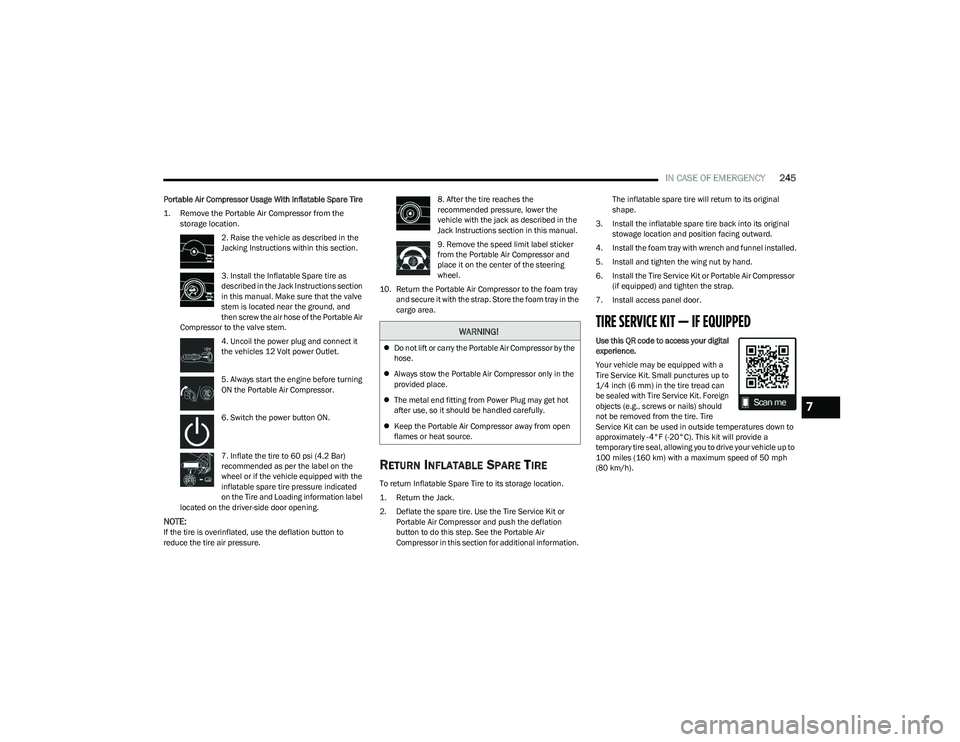
Portable Air Compressor Usage With Inflatable Spare Tire
1. Remove the Portable Air Compressor from the
storage location.
2. Raise the vehicle as described in the
Jacking Instructions within this section.
3. Install the Inflatable Spare tire as
described in the Jack Instructions section
in this manual. Make sure that the valve
stem is located near the ground, and
then screw the air hose of the Portable Air
Compressor to the valve stem.
4. Uncoil the power plug and connect it
the vehicles 12 Volt power Outlet.
5. Always start the engine before turning
ON the Portable Air Compressor.
6. Switch the power button ON.
7. Inflate the tire to 60 psi (4.2 Bar)
recommended as per the label on the
wheel or if the vehicle equipped with the
inflatable spare tire pressure indicated
on the Tire and Loading information label
located on the driver-side door opening.
NOTE:If the tire is overinflated, use the deflation button to
reduce the tire air pressure. 8. After the tire reaches the
recommended pressure, lower the
vehicle with the jack as described in the
Jack Instructions section in this manual.
9. Remove the speed limit label sticker
from the Portable Air Compressor and
place it on the center of the steering
wheel.
10. Return the Portable Air Compressor to the foam tray and secure it with the strap. Store the foam tray in the
cargo area.
RETURN INFLATABLE SPARE TIRE
To return Inflatable Spare Tire to its storage location.
1. Return the Jack.
2. Deflate the spare tire. Use the Tire Service Kit or Portable Air Compressor and push the deflation
button to do this step. See the Portable Air
Compressor in this section for additional information. The inflatable spare tire will return to its original
shape.
3. Install the inflatable spare tire back into its original stowage location and position facing outward.
4. Install the foam tray with wrench and funnel installed.
5. Install and tighten the wing nut by hand.
6. Install the Tire Service Kit or Portable Air Compressor (if equipped) and tighten the strap.
7. Install access panel door.
TIRE SERVICE KIT — IF EQUIPPED
Use this QR code to access your digital
experience.
Your vehicle may be equipped with a
Tire Service Kit. Small punctures up to
1/4 inch (6 mm) in the tire tread can
be sealed with Tire Service Kit. Foreign
objects (e.g., screws or nails) should
not be removed from the tire. Tire
Service Kit can be used in outside temperatures down to
approximately -4°F (-20°C). This kit will provide a
temporary tire seal, allowing you to drive your vehicle up to
100 miles (160 km) with a maximum speed of 50 mph
(80 km/h).WARNING!
Do not lift or carry the Portable Air Compressor by the
hose.
Always stow the Portable Air Compressor only in the
provided place.
The metal end fitting from Power Plug may get hot
after use, so it should be handled carefully.
Keep the Portable Air Compressor away from open
flames or heat source.
7
23_RUP_OM_EN_USC_t.book Page 245