keyless CHRYSLER PACIFICA 2023 User Guide
[x] Cancel search | Manufacturer: CHRYSLER, Model Year: 2023, Model line: PACIFICA, Model: CHRYSLER PACIFICA 2023Pages: 328, PDF Size: 16.37 MB
Page 23 of 328
GETTING TO KNOW YOUR VEHICLE21
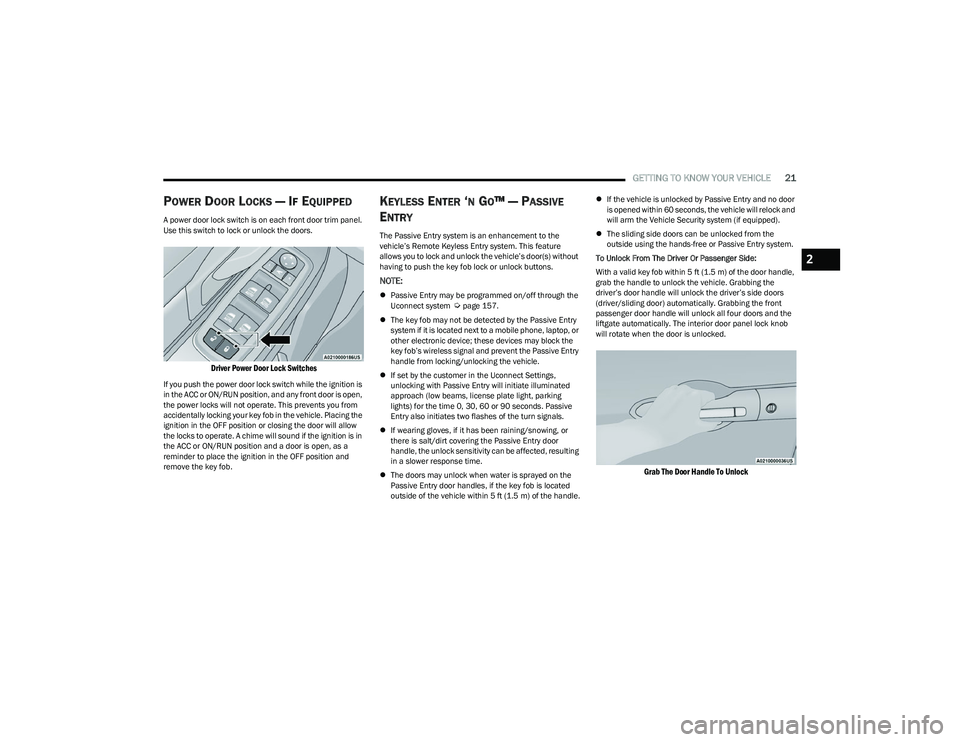
POWER DOOR LOCKS — IF EQUIPPED
A power door lock switch is on each front door trim panel.
Use this switch to lock or unlock the doors.
Driver Power Door Lock Switches
If you push the power door lock switch while the ignition is
in the ACC or ON/RUN position, and any front door is open,
the power locks will not operate. This prevents you from
accidentally locking your key fob in the vehicle. Placing the
ignition in the OFF position or closing the door will allow
the locks to operate. A chime will sound if the ignition is in
the ACC or ON/RUN position and a door is open, as a
reminder to place the ignition in the OFF position and
remove the key fob.
KEYLESS ENTER ‘N GO™ — PASSIVE
E
NTRY
The Passive Entry system is an enhancement to the
vehicle’s Remote Keyless Entry system. This feature
allows you to lock and unlock the vehicle’s door(s) without
having to push the key fob lock or unlock buttons.
NOTE:
Passive Entry may be programmed on/off through the
Uconnect system Úpage 157.
The key fob may not be detected by the Passive Entry
system if it is located next to a mobile phone, laptop, or
other electronic device; these devices may block the
key fob’s wireless signal and prevent the Passive Entry
handle from locking/unlocking the vehicle.
If set by the customer in the Uconnect Settings,
unlocking with Passive Entry will initiate illuminated
approach (low beams, license plate light, parking
lights) for the time 0, 30, 60 or 90 seconds. Passive
Entry also initiates two flashes of the turn signals.
If wearing gloves, if it has been raining/snowing, or
there is salt/dirt covering the Passive Entry door
handle, the unlock sensitivity can be affected, resulting
in a slower response time.
The doors may unlock when water is sprayed on the
Passive Entry door handles, if the key fob is located
outside of the vehicle within 5 ft (1.5 m) of the handle.
If the vehicle is unlocked by Passive Entry and no door
is opened within 60 seconds, the vehicle will relock and
will arm the Vehicle Security system (if equipped).
The sliding side doors can be unlocked from the
outside using the hands-free or Passive Entry system.
To Unlock From The Driver Or Passenger Side:
With a valid key fob within 5 ft (1.5 m) of the door handle,
grab the handle to unlock the vehicle. Grabbing the
driver’s door handle will unlock the driver’s side doors
(driver/sliding door) automatically. Grabbing the front
passenger door handle will unlock all four doors and the
liftgate automatically. The interior door panel lock knob
will rotate when the door is unlocked.
Grab The Door Handle To Unlock
2
23_RUP_OM_EN_USC_t.book Page 21
Page 55 of 328
GETTING TO KNOW YOUR VEHICLE53
PROGRAMMING HOMELINK® TO A
M
ISCELLANEOUS DEVICE
The procedure on how to program HomeLink® to a
miscellaneous device follows the same procedure as
programming to a garage door opener
Úpage 52. Be sure
to determine if the device has a rolling code, or non-rolling
code before beginning the programming process.
NOTE:Canadian Radio Frequency (RF) laws require transmitter
signals to time-out (or quit) after several seconds of trans -
mission, which may not be long enough for HomeLink® to
pick up the signal during programming. Similar to this
Canadian law, some U.S. gate operators are designed to
time-out in the same manner. The procedure may need to
be performed multiple times to successfully pair the
device to your HomeLink® buttons.
REPROGRAMMING A SINGLE
H
OMELINK® BUTTON
To reprogram a single HomeLink® button that has been
previously trained, without erasing all the channels,
proceed as follows. Be sure to determine whether the new
device you want to program the HomeLink® button to has
a rolling code, or non-rolling code.
1. Place the ignition in the ON/RUN position, without
starting the engine.
2. Push and hold the desired HomeLink® button until the HomeLink® indicator light begins to flash after
20 seconds. Do not release the button.
3. Without releasing the button , proceed with Step 2 in
“Programming HomeLink® To A Garage Door
Opener” and follow all remaining steps.
CANADIAN/GATE OPERATOR
P
ROGRAMMING
For programming transmitters in Canada/United States
that require the transmitter signals to “time-out” after
several seconds of transmission:
Canadian Radio Frequency (RF) laws require transmitter
signals to time-out (or quit) after several seconds of
transmission, which may not be long enough for
HomeLink® to pick up the signal during programming.
Similar to this Canadian law, some U.S. gate operators are
designed to time-out in the same manner. It may be helpful to unplug the device during the cycling
process to prevent possible overheating of the garage
door or gate motor.
1. Place the ignition in the ON/RUN position.
NOTE:For vehicles equipped with Keyless Enter ‘n Go™, place
the ignition in the RUN position. Make sure while
programming HomeLink® with the engine on that your
vehicle is outside of your garage, or that the garage door
remains open at all times.
2. Place the hand-held transmitter 1 to 3 inches
(3 to 8 cm) away from the HomeLink® button you
wish to program while keeping the HomeLink®
indicator light in view.
3. Continue to push and hold the HomeLink® button while you push and release (cycle) your hand-held
transmitter every two seconds until HomeLink® has
successfully accepted the frequency signal. The
indicator light will flash slowly and then rapidly when
fully trained.
4. Watch for the HomeLink® indicator to change flash rates. When it changes, it is programmed. It may take
up to 30 seconds or longer in rare cases. The garage
door may open and close while you are programming.
5. Push and hold the programmed HomeLink® button and observe the indicator light.
WARNING!
Your motorized door or gate will open and close while
you are programming the universal transmitter. Do
not program the transmitter if people or pets are in
the path of the door or gate.
Do not run your vehicle in a closed garage or
confined area while programming the transmitter.
Exhaust gas from your vehicle contains carbon
monoxide (CO) which is odorless and colorless.
Carbon monoxide is poisonous when inhaled and
can cause you and others to be severely injured or
killed.
2
23_RUP_OM_EN_USC_t.book Page 53
Page 60 of 328
58GETTING TO KNOW YOUR VEHICLE
INTERIOR LIGHTS
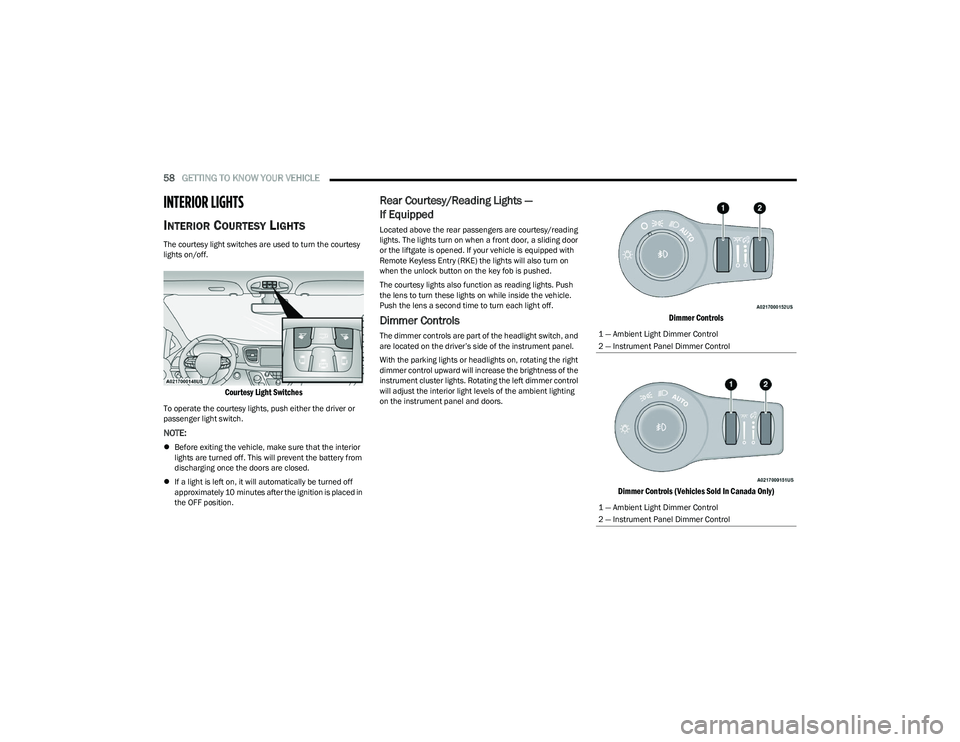
INTERIOR COURTESY LIGHTS
The courtesy light switches are used to turn the courtesy
lights on/off.
Courtesy Light Switches
To operate the courtesy lights, push either the driver or
passenger light switch.
NOTE:
Before exiting the vehicle, make sure that the interior
lights are turned off. This will prevent the battery from
discharging once the doors are closed.
If a light is left on, it will automatically be turned off
approximately 10 minutes after the ignition is placed in
the OFF position.
Rear Courtesy/Reading Lights —
If Equipped
Located above the rear passengers are courtesy/reading
lights. The lights turn on when a front door, a sliding door
or the liftgate is opened. If your vehicle is equipped with
Remote Keyless Entry (RKE) the lights will also turn on
when the unlock button on the key fob is pushed.
The courtesy lights also function as reading lights. Push
the lens to turn these lights on while inside the vehicle.
Push the lens a second time to turn each light off.
Dimmer Controls
The dimmer controls are part of the headlight switch, and
are located on the driver’s side of the instrument panel.
With the parking lights or headlights on, rotating the right
dimmer control upward will increase the brightness of the
instrument cluster lights. Rotating the left dimmer control
will adjust the interior light levels of the ambient lighting
on the instrument panel and doors.
Dimmer Controls
Dimmer Controls (Vehicles Sold In Canada Only)
1 — Ambient Light Dimmer Control
2 — Instrument Panel Dimmer Control
1 — Ambient Light Dimmer Control
2 — Instrument Panel Dimmer Control
23_RUP_OM_EN_USC_t.book Page 58
Page 82 of 328
80GETTING TO KNOW YOUR VEHICLE
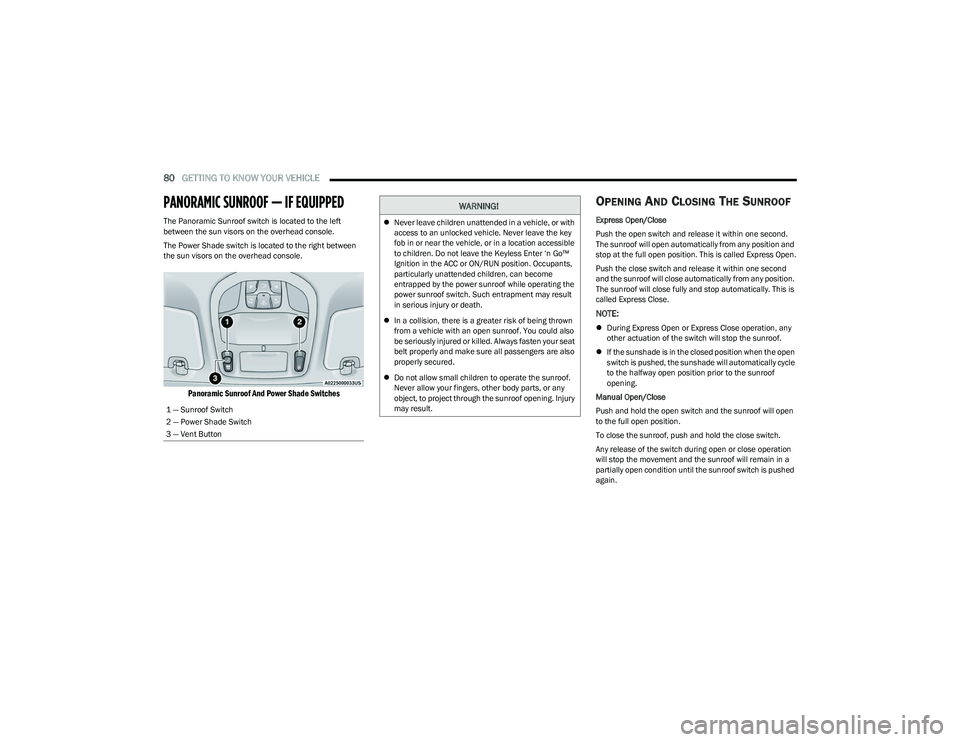
PANORAMIC SUNROOF — IF EQUIPPED
The Panoramic Sunroof switch is located to the left
between the sun visors on the overhead console.
The Power Shade switch is located to the right between
the sun visors on the overhead console.
Panoramic Sunroof And Power Shade Switches
OPENING AND CLOSING THE SUNROOF
Express Open/Close
Push the open switch and release it within one second.
The sunroof will open automatically from any position and
stop at the full open position. This is called Express Open.
Push the close switch and release it within one second
and the sunroof will close automatically from any position.
The sunroof will close fully and stop automatically. This is
called Express Close.
NOTE:
During Express Open or Express Close operation, any
other actuation of the switch will stop the sunroof.
If the sunshade is in the closed position when the open
switch is pushed, the sunshade will automatically cycle
to the halfway open position prior to the sunroof
opening.
Manual Open/Close
Push and hold the open switch and the sunroof will open
to the full open position.
To close the sunroof, push and hold the close switch.
Any release of the switch during open or close operation
will stop the movement and the sunroof will remain in a
partially open condition until the sunroof switch is pushed
again.
1 — Sunroof Switch
2 — Power Shade Switch
3 — Vent Button
WARNING!
Never leave children unattended in a vehicle, or with
access to an unlocked vehicle. Never leave the key
fob in or near the vehicle, or in a location accessible
to children. Do not leave the Keyless Enter ‘n Go™
Ignition in the ACC or ON/RUN position. Occupants,
particularly unattended children, can become
entrapped by the power sunroof while operating the
power sunroof switch. Such entrapment may result
in serious injury or death.
In a collision, there is a greater risk of being thrown
from a vehicle with an open sunroof. You could also
be seriously injured or killed. Always fasten your seat
belt properly and make sure all passengers are also
properly secured.
Do not allow small children to operate the sunroof.
Never allow your fingers, other body parts, or any
object, to project through the sunroof opening. Injury
may result.
23_RUP_OM_EN_USC_t.book Page 80
Page 88 of 328
86GETTING TO KNOW YOUR VEHICLE
(Continued)
CARGO AREA FEATURES
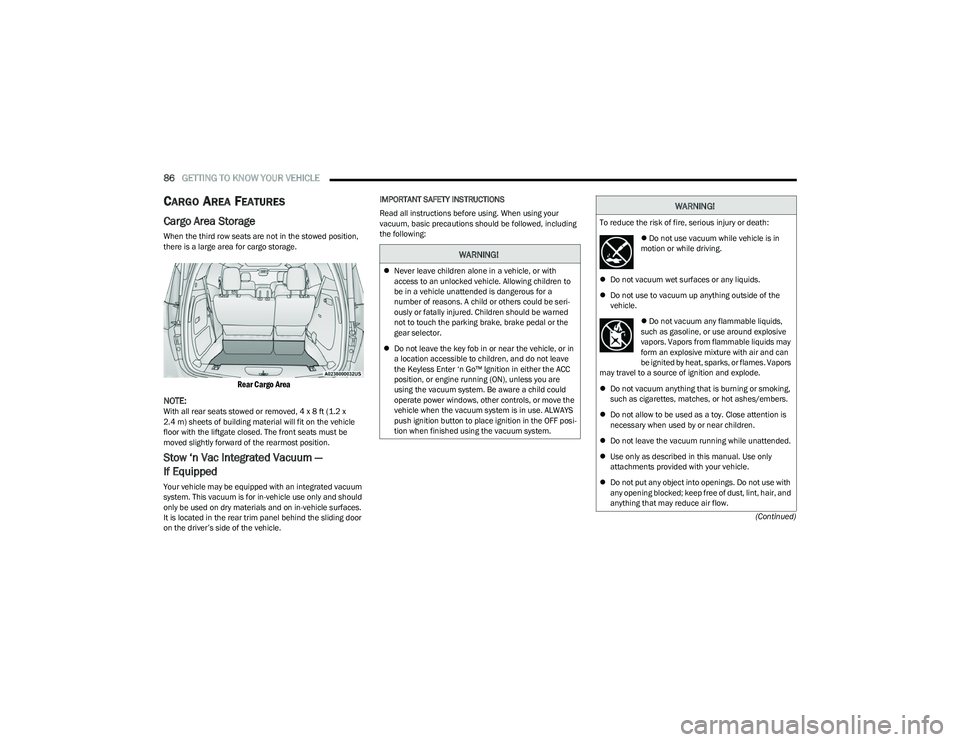
Cargo Area Storage
When the third row seats are not in the stowed position,
there is a large area for cargo storage.
Rear Cargo Area
NOTE:
With all rear seats stowed or removed, 4 x 8 ft (1.2 x
2.4 m) sheets of building material will fit on the vehicle
floor with the liftgate closed. The front seats must be
moved slightly forward of the rearmost position.
Stow ‘n Vac Integrated Vacuum —
If Equipped
Your vehicle may be equipped with an integrated vacuum
system. This vacuum is for in-vehicle use only and should
only be used on dry materials and on in-vehicle surfaces.
It is located in the rear trim panel behind the sliding door
on the driver’s side of the vehicle. IMPORTANT SAFETY INSTRUCTIONS
Read all instructions before using. When using your
vacuum, basic precautions should be followed, including
the following:
WARNING!
Never leave children alone in a vehicle, or with
access to an unlocked vehicle. Allowing children to
be in a vehicle unattended is dangerous for a
number of reasons. A child or others could be seri -
ously or fatally injured. Children should be warned
not to touch the parking brake, brake pedal or the
gear selector.
Do not leave the key fob in or near the vehicle, or in
a location accessible to children, and do not leave
the Keyless Enter ‘n Go™ Ignition in either the ACC
position, or engine running (ON), unless you are
using the vacuum system. Be aware a child could
operate power windows, other controls, or move the
vehicle when the vacuum system is in use. ALWAYS
push ignition button to place ignition in the OFF posi -
tion when finished using the vacuum system.
WARNING!
To reduce the risk of fire, serious injury or death:
Do not use vacuum while vehicle is in
motion or while driving.
Do not vacuum wet surfaces or any liquids.
Do not use to vacuum up anything outside of the
vehicle.
Do not vacuum any flammable liquids,
such as gasoline, or use around explosive
vapors. Vapors from flammable liquids may
form an explosive mixture with air and can
be ignited by heat, sparks, or flames. Vapors
may travel to a source of ignition and explode.
Do not vacuum anything that is burning or smoking,
such as cigarettes, matches, or hot ashes/embers.
Do not allow to be used as a toy. Close attention is
necessary when used by or near children.
Do not leave the vacuum running while unattended.
Use only as described in this manual. Use only
attachments provided with your vehicle.
Do not put any object into openings. Do not use with
any opening blocked; keep free of dust, lint, hair, and
anything that may reduce air flow.
23_RUP_OM_EN_USC_t.book Page 86
Page 113 of 328

111
STARTING AND OPERATING
STARTING THE ENGINE
Before starting your vehicle, adjust your seat, adjust both
inside and outside mirrors, and fasten your seat belts.Start the engine with the gear selector in the NEUTRAL (N)
or PARK (P) position. Apply the brake before shifting to any
driving range.
NORMAL STARTING
To Turn On The Engine Using the ENGINE START/STOP
Button
1. The transmission must be in PARK or NEUTRAL.
2. Press and hold the brake pedal while pushing the
ENGINE START/STOP button once.
3. The system starts the vehicle. If the vehicle fails to start, the starter will disengage automatically after 10
seconds.
4. If you wish to stop the cranking of the engine prior to the engine starting, push the button again.
ENGINE START/STOP Button Functions — With Driver’s
Foot Off The Brake Pedal (In PARK Or NEUTRAL Position)
The ENGINE START/STOP button operates similar to an
ignition switch. It has three positions; OFF, ACC, and ON/
RUN. To change the ignition positions without starting the
vehicle and to use the accessories, follow these steps:
Start with the ignition in the OFF position.
Push the ENGINE START/STOP button once to place
the ignition to the ACC position (instrument cluster will
display “ACC”).
Push the ENGINE START/STOP button a second time to
place the ignition to the ON/RUN position (instrument
cluster will display “ON/RUN”).
Push the ENGINE START/STOP button a third time to
return the ignition to the OFF position (instrument
cluster will display “OFF”).
NOTE:Only press one pedal at a time while driving the vehicle.
Torque performance of the vehicle could be reduced if
both pedals are pressed at the same time. If pressure is
detected on both pedals simultaneously, a warning
message will display in the instrument cluster
Úpage 97.
AUTOPARK
AutoPark is a supplemental feature to assist with placing
the vehicle in PARK under certain situations. It is a
back-up system and should not be relied upon as the
primary method by which the driver shifts the vehicle into
PARK.
The conditions under which AutoPark will engage are
outlined on the following pages.
WARNING!
When exiting the vehicle, always remove the key fob
from the vehicle and lock your vehicle.
Never leave children alone in a vehicle, or with
access to an unlocked vehicle.
Allowing children to be in a vehicle unattended is
dangerous for a number of reasons. A child or others
could be seriously or fatally injured. Children should
be warned not to touch the parking brake, brake
pedal or the transmission gear selector.
Do not leave the key fob in or near the vehicle, or in
a location accessible to children, and do not leave
the ignition of a vehicle equipped with Keyless
Enter ‘n Go™ in the ACC or ON/RUN position. A child
could operate power windows, other controls, or
move the vehicle.
Do not leave children or animals inside parked vehi -
cles in hot weather. Interior heat buildup may cause
serious injury or death.
4
23_RUP_OM_EN_USC_t.book Page 111
Page 172 of 328
170MULTIMEDIA
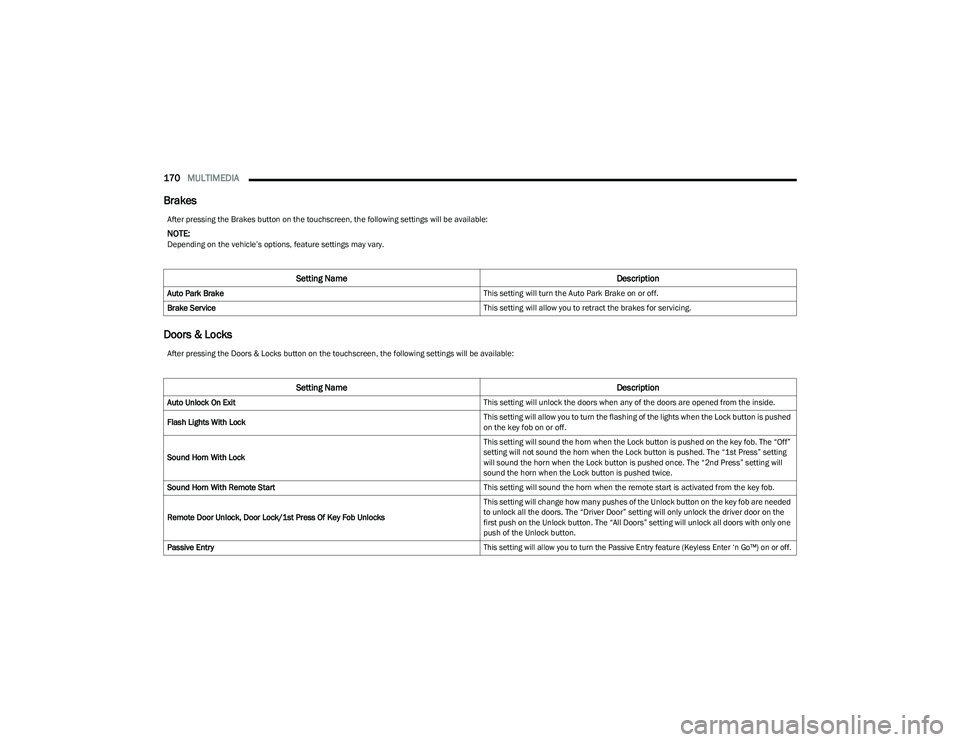
Brakes
Doors & Locks
After pressing the Brakes button on the touchscreen, the following settings will be available:
NOTE:Depending on the vehicle’s options, feature settings may vary.
Setting Name Description
Auto Park Brake This setting will turn the Auto Park Brake on or off.
Brake Service This setting will allow you to retract the brakes for servicing.
After pressing the Doors & Locks button on the touchscreen, the following settings will be available:
Setting NameDescription
Auto Unlock On Exit This setting will unlock the doors when any of the doors are opened from the inside.
Flash Lights With Lock This setting will allow you to turn the flashing of the lights when the Lock button is pushed
on the key fob on or off.
Sound Horn With Lock This setting will sound the horn when the Lock button is pushed on the key fob. The “Off”
setting will not sound the horn when the Lock button is pushed. The “1st Press” setting
will sound the horn when the Lock button is pushed once. The “2nd Press” setting will
sound the horn when the Lock button is pushed twice.
Sound Horn With Remote Start This setting will sound the horn when the remote start is activated from the key fob.
Remote Door Unlock, Door Lock/1st Press Of Key Fob Unlocks This setting will change how many pushes of the Unlock button on the key fob are needed
to unlock all the doors. The “Driver Door” setting will only unlock the driver door on the
first push on the Unlock button. The “All Doors” setting will unlock all doors with only one
push of the Unlock button.
Passive Entry
This setting will allow you to turn the Passive Entry feature (Keyless Enter ‘n Go™) on or off.
23_RUP_OM_EN_USC_t.book Page 170
Page 193 of 328
SAFETY191
(Continued)
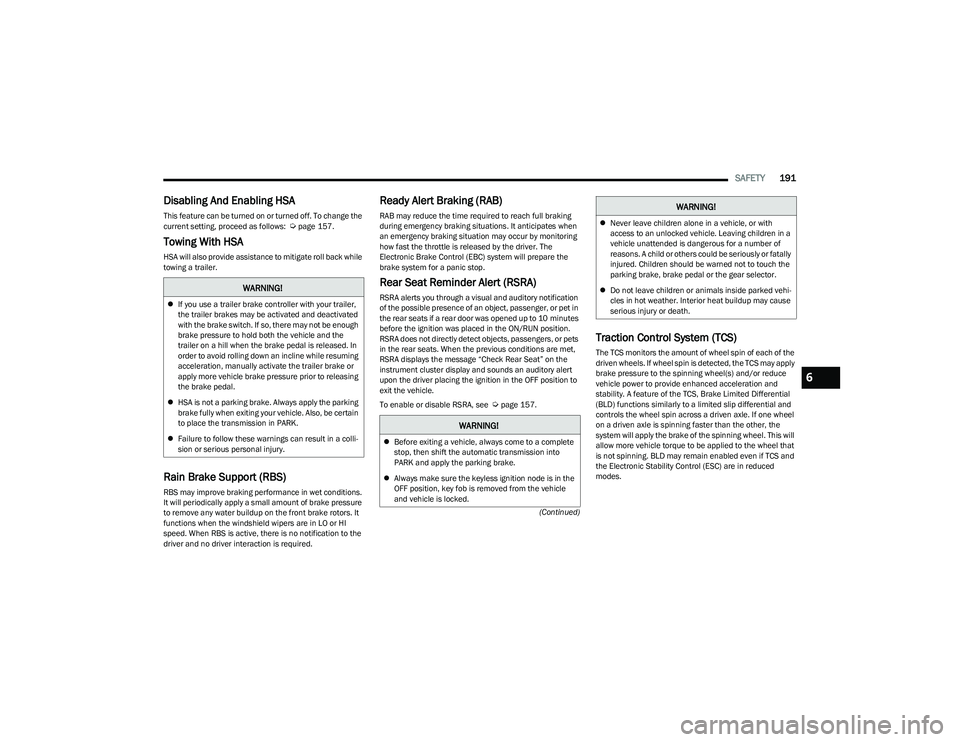
Disabling And Enabling HSA
This feature can be turned on or turned off. To change the
current setting, proceed as follows: Úpage 157.
Towing With HSA
HSA will also provide assistance to mitigate roll back while
towing a trailer.
Rain Brake Support (RBS)
RBS may improve braking performance in wet conditions.
It will periodically apply a small amount of brake pressure
to remove any water buildup on the front brake rotors. It
functions when the windshield wipers are in LO or HI
speed. When RBS is active, there is no notification to the
driver and no driver interaction is required.
Ready Alert Braking (RAB)
RAB may reduce the time required to reach full braking
during emergency braking situations. It anticipates when
an emergency braking situation may occur by monitoring
how fast the throttle is released by the driver. The
Electronic Brake Control (EBC) system will prepare the
brake system for a panic stop.
Rear Seat Reminder Alert (RSRA)
RSRA alerts you through a visual and auditory notification
of the possible presence of an object, passenger, or pet in
the rear seats if a rear door was opened up to 10 minutes
before the ignition was placed in the ON/RUN position.
RSRA does not directly detect objects, passengers, or pets
in the rear seats. When the previous conditions are met,
RSRA displays the message “Check Rear Seat” on the
instrument cluster display and sounds an auditory alert
upon the driver placing the ignition in the OFF position to
exit the vehicle.
To enable or disable RSRA, see
Úpage 157.
Traction Control System (TCS)
The TCS monitors the amount of wheel spin of each of the
driven wheels. If wheel spin is detected, the TCS may apply
brake pressure to the spinning wheel(s) and/or reduce
vehicle power to provide enhanced acceleration and
stability. A feature of the TCS, Brake Limited Differential
(BLD) functions similarly to a limited slip differential and
controls the wheel spin across a driven axle. If one wheel
on a driven axle is spinning faster than the other, the
system will apply the brake of the spinning wheel. This will
allow more vehicle torque to be applied to the wheel that
is not spinning. BLD may remain enabled even if TCS and
the Electronic Stability Control (ESC) are in reduced
modes.
WARNING!
If you use a trailer brake controller with your trailer,
the trailer brakes may be activated and deactivated
with the brake switch. If so, there may not be enough
brake pressure to hold both the vehicle and the
trailer on a hill when the brake pedal is released. In
order to avoid rolling down an incline while resuming
acceleration, manually activate the trailer brake or
apply more vehicle brake pressure prior to releasing
the brake pedal.
HSA is not a parking brake. Always apply the parking
brake fully when exiting your vehicle. Also, be certain
to place the transmission in PARK.
Failure to follow these warnings can result in a colli -
sion or serious personal injury.
WARNING!
Before exiting a vehicle, always come to a complete
stop, then shift the automatic transmission into
PARK and apply the parking brake.
Always make sure the keyless ignition node is in the
OFF position, key fob is removed from the vehicle
and vehicle is locked.
Never leave children alone in a vehicle, or with
access to an unlocked vehicle. Leaving children in a
vehicle unattended is dangerous for a number of
reasons. A child or others could be seriously or fatally
injured. Children should be warned not to touch the
parking brake, brake pedal or the gear selector.
Do not leave children or animals inside parked vehi -
cles in hot weather. Interior heat buildup may cause
serious injury or death.
WARNING!
6
23_RUP_OM_EN_USC_t.book Page 191
Page 281 of 328
SERVICING AND MAINTENANCE279
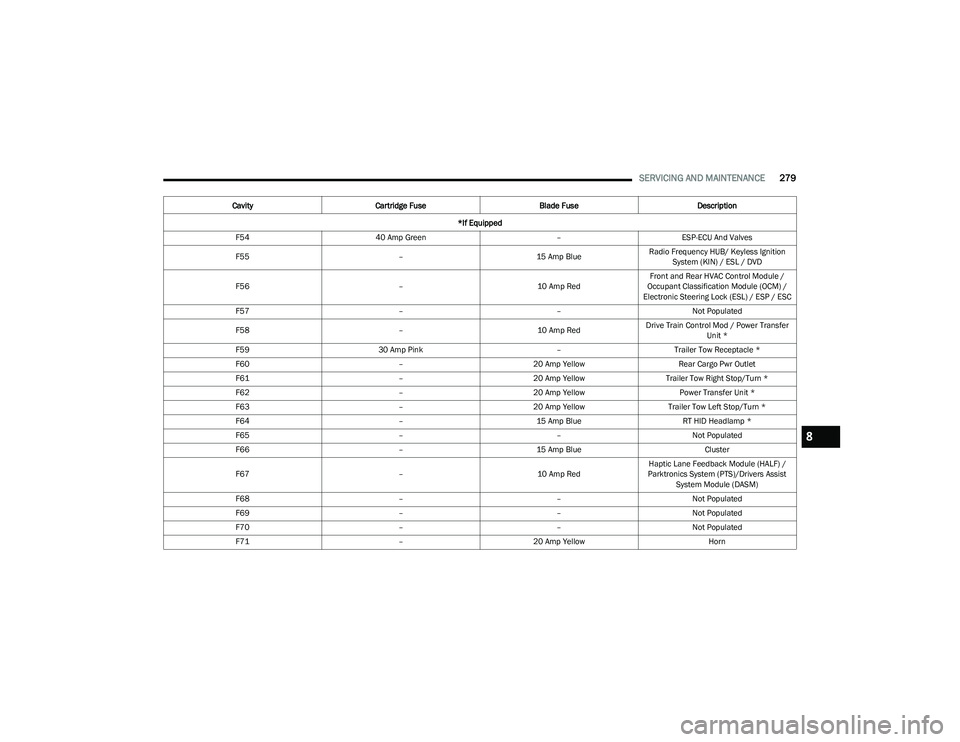
F54 40 Amp Green –ESP-ECU And Valves
F55 –15 Amp BlueRadio Frequency HUB/ Keyless Ignition
System (KIN) / ESL / DVD
F56 –10 Amp RedFront and Rear HVAC Control Module /
Occupant Classification Module (OCM) /
Electronic Steering Lock (ESL) / ESP / ESC
F57 ––Not Populated
F58 –10 Amp RedDrive Train Control Mod / Power Transfer
Unit *
F59 30 Amp Pink –Trailer Tow Receptacle *
F60 –20 Amp Yellow Rear Cargo Pwr Outlet
F61 –20 Amp YellowTrailer Tow Right Stop/Turn *
F62 –20 Amp Yellow Power Transfer Unit *
F63 –20 Amp Yellow Trailer Tow Left Stop/Turn *
F64 –15 Amp Blue RT HID Headlamp *
F65 ––Not Populated
F66 –15 Amp Blue Cluster
F67 –10 Amp RedHaptic Lane Feedback Module (HALF) /
Parktronics System (PTS)/Drivers Assist System Module (DASM)
F68 ––Not Populated
F69 ––Not Populated
F70 ––Not Populated
F71 –20 Amp Yellow Horn
Cavity
Cartridge Fuse Blade FuseDescription
*If Equipped
8
23_RUP_OM_EN_USC_t.book Page 279
Page 315 of 328
313
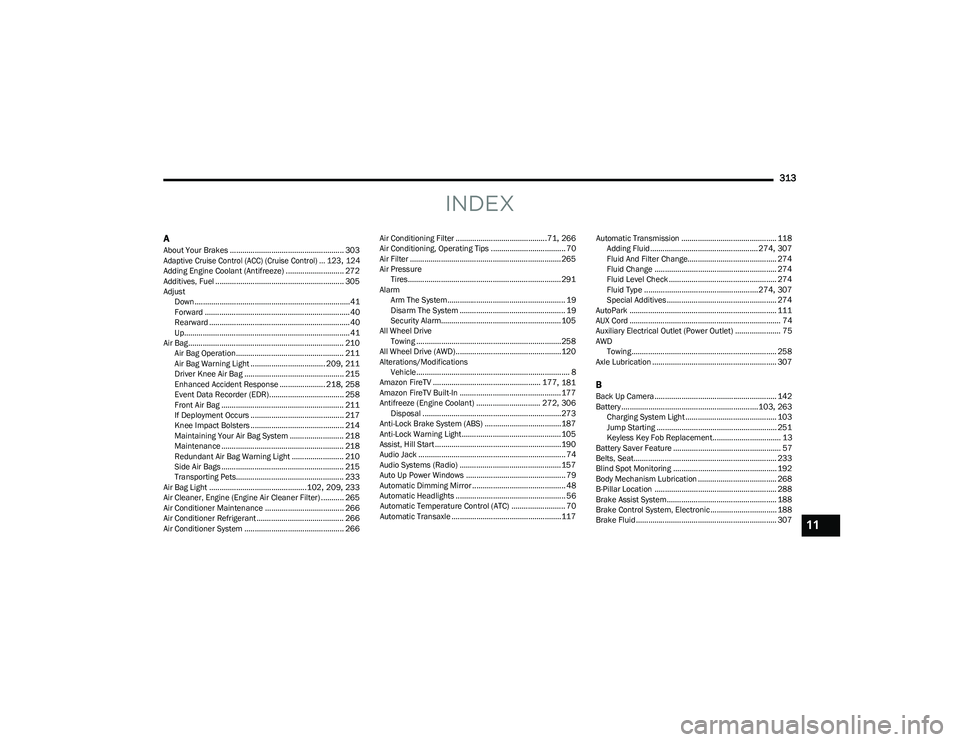
INDEX
AAbout Your Brakes ....................................................... 303
Adaptive Cruise Control (ACC) (Cruise Control) ... 123, 124
Adding Engine Coolant (Antifreeze) ............................ 272
Additives, Fuel .............................................................. 305
Adjust Down...........................................................................41
Forward ...................................................................... 40
Rearward ....................................................................40
Up................................................................................ 41
Air Bag........................................................................... 210 Air Bag Operation.................................................... 211
Air Bag Warning Light .................................... 209
, 211
Driver Knee Air Bag ................................................ 215
Enhanced Accident Response ...................... 218
, 258
Event Data Recorder (EDR).................................... 258 Front Air Bag ........................................................... 211
If Deployment Occurs ............................................. 217
Knee Impact Bolsters ............................................. 214
Maintaining Your Air Bag System .......................... 218
Maintenance ........................................................... 218
Redundant Air Bag Warning Light ......................... 210
Side Air Bags ........................................................... 215
Transporting Pets.................................................... 233
Air Bag Light ...............................................102
, 209, 233
Air Cleaner, Engine (Engine Air Cleaner Filter) ........... 265
Air Conditioner Maintenance ...................................... 266
Air Conditioner Refrigerant .......................................... 266
Air Conditioner System ................................................ 266 Air Conditioning Filter ............................................71
, 266
Air Conditioning, Operating Tips .................................... 70
Air Filter ......................................................................... 265
Air Pressure Tires.......................................................................... 291
Alarm Arm The System......................................................... 19
Disarm The System ................................................... 19
Security Alarm.......................................................... 105
All Wheel Drive Towing ...................................................................... 258
All Wheel Drive (AWD)...................................................120
Alterations/Modifications Vehicle.......................................................................... 8
Amazon FireTV .................................................... 177
, 181
Amazon FireTV Built-In ................................................. 177
Antifreeze (Engine Coolant) ............................... 272
, 306
Disposal ...................................................................273
Anti-Lock Brake System (ABS) ..................................... 187
Anti-Lock Warning Light................................................ 105
Assist, Hill Start ............................................................. 190
Audio Jack ....................................................................... 74
Audio Systems (Radio) ................................................. 157
Auto Up Power Windows ................................................ 79
Automatic Dimming Mirror ............................................. 48 Automatic Headlights ..................................................... 56Automatic Temperature Control (ATC) .......................... 70
Automatic Transaxle ..................................................... 117 Automatic Transmission .............................................. 118
Adding Fluid .................................................... 274
, 307
Fluid And Filter Change........................................... 274
Fluid Change ........................................................... 274
Fluid Level Check .................................................... 274
Fluid Type .......................................................274
, 307
Special Additives ..................................................... 274
AutoPark ....................................................................... 111
AUX Cord ......................................................................... 74
Auxiliary Electrical Outlet (Power Outlet) ...................... 75
AWD Towing...................................................................... 258
Axle Lubrication ............................................................ 307
BBack Up Camera........................................................... 142
Battery..................................................................103, 263
Charging System Light ............................................ 103
Jump Starting .......................................................... 251
Keyless Key Fob Replacement................................. 13
Battery Saver Feature .................................................... 57
Belts, Seat..................................................................... 233
Blind Spot Monitoring .................................................. 192
Body Mechanism Lubrication ...................................... 268
B-Pillar Location ........................................................... 288
Brake Assist System..................................................... 188
Brake Control System, Electronic................................ 188
Brake Fluid.................................................................... 307
11
23_RUP_OM_EN_USC_t.book Page 313