odometer CHRYSLER PACIFICA HYBRID 2017 2.G Owners Manual
[x] Cancel search | Manufacturer: CHRYSLER, Model Year: 2017, Model line: PACIFICA HYBRID, Model: CHRYSLER PACIFICA HYBRID 2017 2.GPages: 592, PDF Size: 6.73 MB
Page 102 of 592
Instrument Panel Dimmer Control
The instrument panel dimmer control is part of the head-
light switch and is located on the driver ’s side of the
instrument panel.
With the parking lights or headlights on, rotating the
instrument panel dimmer control upward will increase the
brightness of the instrument panel lights.
Ambient Light Control — If Equipped
Rotate the ambient dimmer control upward or downward
to increase or decrease the brightness of the ambient lightlocated in the overhead console, door handle lights, under
I/P lights, door map pocket lights, and cubby bin lights.
Interior Lighting Off
Rotate the right (instrument panel) dimmer control to the
off position (extreme bottom). The interior lights will
remain off when the doors or liftgate are open.
Parade Mode (Daytime Brightness Feature)
Rotate the instrument panel dimmer control upward to the
first detent. This feature brightens all text displays such as
the odometer, instrument cluster display, and radio when
the position lights or headlights are on.
Instrument Panel Dimmer
Ambient Light/Door Handle Light Dimmer
100 GETTING TO KNOW YOUR VEHICLE
Page 158 of 592
INSTRUMENT CLUSTER DISPLAY
Your vehicle is equipped with an Instrument Cluster
Display, which offers useful information to the driver. With
the ignition in the STOP/OFF position (and the key
removed, for vehicles with mechanical key), opening/
closing of a door will activate the display for viewing, and
display the total miles or kilometers in the odometer. Your
Instrument Cluster Display is designed to display impor-
tant information about your vehicle’s systems and features.
Using a driver interactive display located on the instru-
ment panel, your Instrument Cluster Display can show you
how systems are working and give you warnings when
they aren’t. The steering wheel mounted controls allow
you to scroll through and enter the main menus and
sub-menus. You can access the specific information you
want and make selections and adjustments.
Instrument Cluster Display Location and Controls
The Instrument Cluster Display is located in the center of
the instrument cluster.
The Main Menu items consists of the following:
•Speedometer
• Vehicle Info
• Driver Assist
• Hybrid Info
• Trip (Trip A/Trip B)
• Audio
• Navigation
• Messages
• Screen Setup
• Speed Warning — If Equipped
156 GETTING TO KNOW YOUR INSTRUMENT PANEL
Page 166 of 592
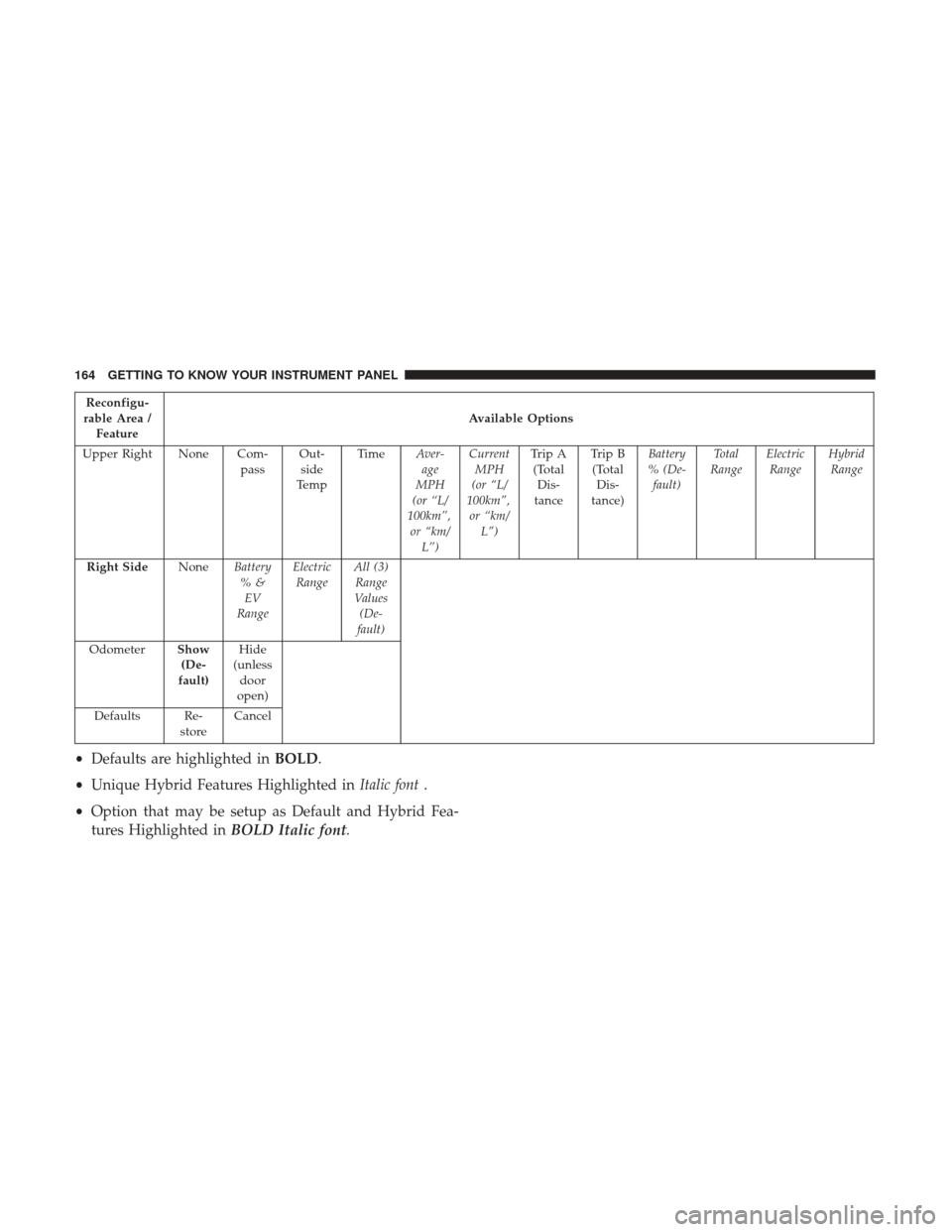
Reconfigu-
rable Area / Feature Available Options
Upper Right None Com- passOut-
side
Te m p Ti m e
Aver-
age
MPH
(or “L/
100km”, or “km/ L”) Current
MPH
(or “L/
100km”, or “km/ L”) Trip A
(Total Dis-
tance Trip B
(Total Dis-
tance) Battery
%(De- fault) Total
Range Electric
Range Hybrid
Range
Right Side NoneBattery
%&EV
Range Electric
Range All (3)
Range
Values (De-
fault)
Odometer Show
(De-
fault) Hide
(unless door
open)
Defaults Re- storeCancel
•
Defaults are highlighted in BOLD.
• Unique Hybrid Features Highlighted in Italic font.
• Option that may be setup as Default and Hybrid Fea-
tures Highlighted in BOLD Italic font.
164 GETTING TO KNOW YOUR INSTRUMENT PANEL
Page 471 of 592
WARNING!(Continued)
•Failure to equip your vehicle with tires having ad-
equate speed capability can result in sudden tire
failure and loss of vehicle control.
CAUTION!
Replacing original tires with tires of a different size
may result in false speedometer and odometer read-
ings.
Tire Types
All Season Tires — If Equipped
All Season tires provide traction for all seasons (Spring,
Summer, Fall, and Winter). Traction levels may vary be-
tween different all season tires. All season tires can be
identified by the M+S, M&S, M/S or MS designation on the
tire sidewall. Use all season tires only in sets of four; failure
to do so may adversely affect the safety and handling of
your vehicle.
Summer Or Three Season Tires — If Equipped
Summer tires provide traction in both wet and dry condi-
tions, and are not intended to be driven in snow or on ice.
If your vehicle is equipped with Summer tires, be aware
these tires are not designed for Winter or cold driving
conditions. Install Winter tires on your vehicle when am-
bient temperatures are less than 40°F (5°C) or if roads are
covered with ice or snow. For more information, contact an
authorized dealer.
Summer tires do not contain the all season designation or
mountain/snowflake symbol on the tire sidewall. Use
Summer tires only in sets of four; failure to do so may
adversely affect the safety and handling of your vehicle.
WARNING!
Do not use Summer tires in snow/ice conditions. You
could lose vehicle control, resulting in severe injury or
death. Driving too fast for conditions also creates the
possibility of loss of vehicle control.
8
SERVICING AND MAINTENANCE 469