change time CHRYSLER PACIFICA HYBRID 2018 User Guide
[x] Cancel search | Manufacturer: CHRYSLER, Model Year: 2018, Model line: PACIFICA HYBRID, Model: CHRYSLER PACIFICA HYBRID 2018Pages: 614, PDF Size: 7.08 MB
Page 138 of 614
1. Place the ignition in the ON/RUN position.
2. Place the hand-held transmitter 1 to 3 inches (3 to 8 cm)away from the HomeLink button you wish to program
while keeping the HomeLink indicator light in view.
3. Push and hold the HomeLink button you want to program while you push and hold the hand-held trans-
mitter button. 4. Continue to hold both buttons and observe the indicator
light. The HomeLink indicator will flash slowly and
then rapidly after HomeLink has received the frequency
signal from the hand-held transmitter. Release both
buttons after the indicator light changes from slow to
rapid.
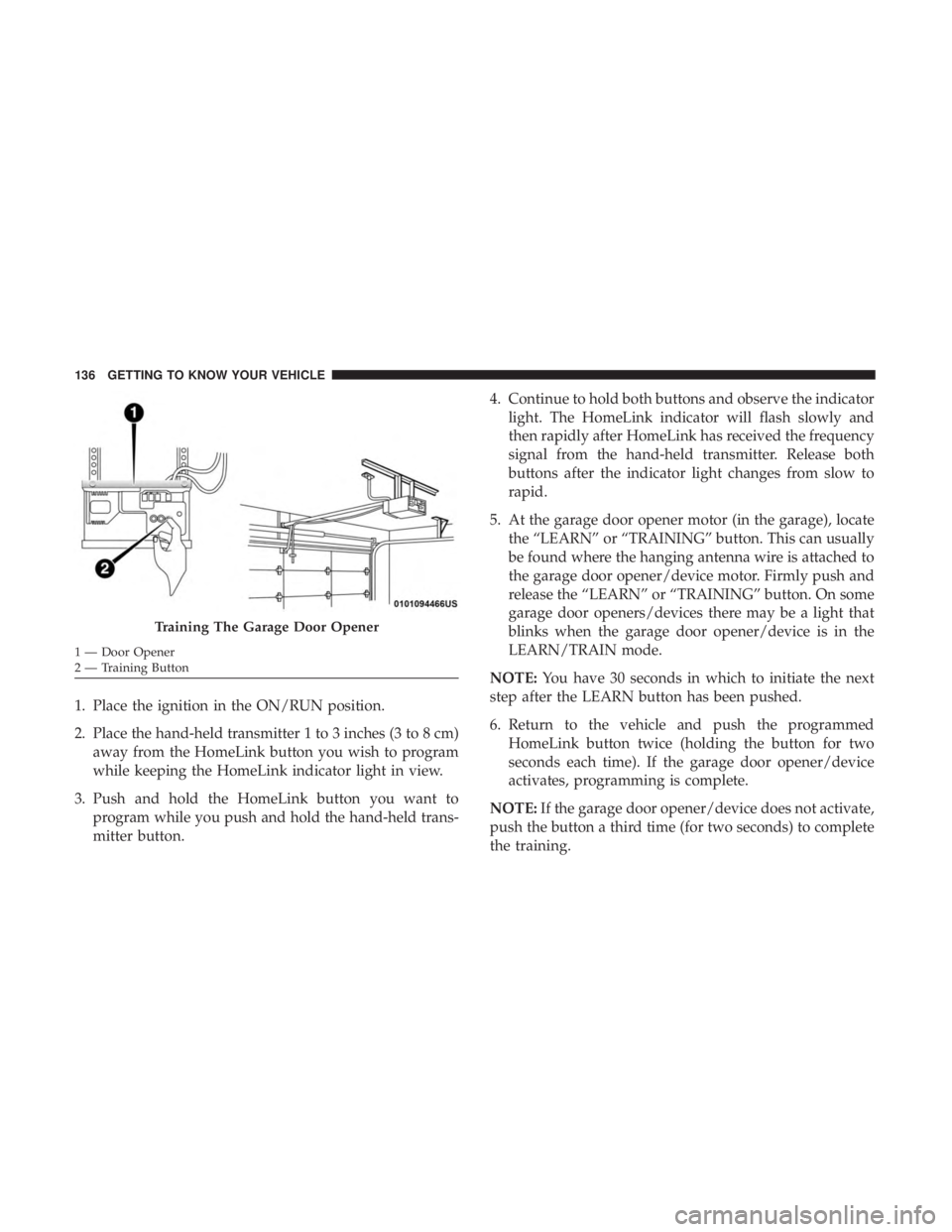
5. At the garage door opener motor (in the garage), locate the “LEARN” or “TRAINING” button. This can usually
be found where the hanging antenna wire is attached to
the garage door opener/device motor. Firmly push and
release the “LEARN” or “TRAINING” button. On some
garage door openers/devices there may be a light that
blinks when the garage door opener/device is in the
LEARN/TRAIN mode.
NOTE: You have 30 seconds in which to initiate the next
step after the LEARN button has been pushed.
6. Return to the vehicle and push the programmed HomeLink button twice (holding the button for two
seconds each time). If the garage door opener/device
activates, programming is complete.
NOTE: If the garage door opener/device does not activate,
push the button a third time (for two seconds) to complete
the training.
Training The Garage Door Opener
1 — Door Opener
2 — Training Button 136 GETTING TO KNOW YOUR VEHICLE
Page 140 of 614
2. Press and hold the desired HomeLink button until theindicator light begins to flash after 20 seconds. Do not
release the button.
3. Without releasing the button, proceed with “Program- ming A Non-Rolling Code” step 2 and follow all remain-
ing steps.
Canadian/Gate Operator Programming
For programming transmitters in Canada/United States
that require the transmitter signals to “time-out” after
several seconds of transmission.
Canadian radio frequency laws require transmitter signals
to time-out (or quit) after several seconds of transmission –
which may not be long enough for HomeLink to pick up
the signal during programming. Similar to this Canadian
law, some U.S. gate operators are designed to time-out in
the same manner.
It may be helpful to unplug the device during the cycling
process to prevent possible overheating of the garage door
or gate motor.
1. Cycle the ignition to the ON/RUN position. 2. Place the hand-held transmitter 1 to 3 inches (3 to 8 cm)
away from the HomeLink button you wish to program
while keeping the HomeLink indicator light in view.
3. Continue to press and hold the HomeLink button, while you press and release (“cycle”) your hand-held trans-
mitter every two seconds until HomeLink has success-
fully accepted the frequency signal. The indicator light
will flash slowly and then rapidly when fully trained.
4. Watch for the HomeLink indicator to change flash rates. When it changes, it is programmed. It may take up to 30
seconds or longer in rare cases. The garage door may
open and close while you are programming.
5. Press and hold the programmed HomeLink button and observe the indicator light.
NOTE: •If the indicator light stays on constantly, programming
is complete and the garage door/device should acti-
vate when the HomeLink button is pressed.
• To program the two remaining HomeLink buttons,
repeat each step for each remaining button. DO NOT
erase the channels.
138 GETTING TO KNOW YOUR VEHICLE
Page 164 of 614
•Unless reset, this message will continue to display each
time the ignition is cycled to the ON/RUN position.
• To reset the oil change indicator after performing the
scheduled maintenance, refer to the following proce-
dure.
Without pressing the brake pedal, push the ENGINE
START/STOP button and place the ignition in the ON/
RUN position (do not start the vehicle.)
1. Push the OKbutton to enter the instrument cluster
display menu screen.
2. Push and release the downarrow button to access the
”Oil Life” menu screen.
3. Push the leftarrow button or right arrow button to
access the “Vehicle Info” submenu.
4. Hold the OKbutton to reset the “Oil Life” to 100%.
5. Push the uparrow button to exit the instrument cluster
display menu screen.
NOTE: If the indicator message illuminates when you
start the vehicle, the oil change indicator system did not
reset. If necessary, repeat this procedure.Fuel And Oil Refresh Mode
Since it is possible to operate this vehicle for extended
periods of time without running the gas engine, the fuel
within the vehicle’s fuel tank can become stale. To prevent
engine and/or fuel system damage due to stale fuel, as
well as, maintaining internal engine lubrication, this ve-
hicle is equipped with a “Fuel and Oil Refresh Mode”.
The vehicle will automatically enter into the Fuel and Oil
Refresh Mode to minimize potential for stale fuel, and to
ensure lubrication of internal engine components. When
operating in this mode, the gas engine will run to provide
vehicle propulsion (electric only operation is inhibited). A
message will be displayed in the instrument cluster when-
ever Fuel and Oil Refresh Mode is active.
The vehicle will automatically exit the Fuel and Oil Refresh
Mode when conditions have been satisfied. If the vehicle
enters Fuel and Oil Refresh Mode, due to fuel which has
been in the fuel tank for a long period of time (becoming
stale fuel), the engine will run whenever the vehicle is
operational (no electric only operation) until the low fuel
level warning is activated. It is possible to exit the Fuel and
Oil Refresh Mode sooner by adding new fuel to the
vehicle’s fuel tank.
162 GETTING TO KNOW YOUR INSTRUMENT PANEL
Page 167 of 614
Oil Life (Hold OK Button To Reset)
The “Hold OK to Reset” instruction will be displayed at all
times, but the following conditions will need to be met in
order to reset Oil Life:
•The vehicle must be off
• The ignition must be in the ON/RUN position
If the conditions are met, holding the OKbutton will reset
the gauge and the numeric display will return to 100%.
If the conditions are not met, a popup message will display
for 5 seconds, describing the required conditions, and then
the Oil Life screen will reappear.
Driver Assist — If Equipped
Push and release the upordown arrow button until Driver
Assist is highlighted in the instrument cluster display.
Adaptive Cruise Control and LaneSense:
• Driver Assist Screen shows the current status of both the
ACC and the LaneSense systems
• Popup messages also indicate the status of the system
and/or the conditions that need to be met Adaptive Cruise Control (ACC) Feature
The instrument cluster display will show the current ACC
system settings. The information displayed depends on ACC
system status. Push the Adaptive Cruise Control (ACC)
on/off button (located on the steering wheel) until one of the
following displays in the instrument cluster display:
•
Adaptive Cruise Control Off: when ACC is deactivated,
the display will read “Adaptive Cruise Control Off.”
• Adaptive Cruise Control Ready: when ACC is activated
but the vehicle speed setting has not been selected, the
display will read “Adaptive Cruise Control Ready.”
Push the SET + or the SET- button (located on the
steering wheel).
ACC SET
When ACC is set, the set speed will display in the
instrument cluster.
The ACC screen may display once again if any ACC
activity occurs, which may include any of the following:
• Distance Setting Change
• System Cancel
• Driver Override
4
GETTING TO KNOW YOUR INSTRUMENT PANEL 165
Page 172 of 614
Speed Warning — If Equipped
Push and release theupordown arrow button until Speed
Warning is highlighted in the instrument cluster display.
Push and release the OKbutton to enter speed warning.
Use the upordown arrow button to turn the speed
warning ON or OFF, then push and release the OKbutton
to confirm the selection. If the ON status is selected, use the
up ordown arrow button to set the desired speed, then
push the OKbutton to set the speed for the speed warning.
A speed warning telltale will illuminate in the instrument
cluster, with a number matching the set speed, with a pop
up message to inform the driver that the speed warning
has been set to the desired speed. Each time the set speed
is exceeded, a single chime will sound and a pop up
warning message will display. If the set speed is exceeded
more than 2 mph (3 km/h), a continuous chime will sound
for up to 10 seconds, or until the speed is no longer
exceeded. The telltale in the instrument cluster will also
change from white to yellow, and a pop up warning
message will pop up on the instrument cluster display.
NOTE: Speed Warning is unavailable while KeySense is in
use.
Battery Saver On/Battery Saver Mode Message —
Electrical Load Reduction Actions — If Equipped
The vehicle is equipped with an Intelligent Battery Sensor
(IBS) to perform additional monitoring of the 12 volt
electrical system and status of the 12 volt vehicle battery.
In cases when the IBS detects charging system failure, or
the 12 volt vehicle battery conditions are deteriorating,
electrical load reduction actions will take place to extend
the driving time and distance of the vehicle. This is done by
reducing power to or turning off non-essential 12 volt
electrical loads. Load reduction will be functional when the
vehicle propulsion system is active.
The vehicle may not be running depending on the HV
battery SOC or temperature. It will display a message if
there is a risk of battery depletion to the point where the
vehicle may stall due to lack of electrical supply, or will not
restart after the current drive cycle.
When 12 volt load reduction is activated, the message
“Battery Saver On” or “Battery Saver Mode” will appear in
the Instrument Cluster Display.
These messages indicate the 12 volt vehicle battery has a
low state of charge and continues to lose electrical charge at
a rate that the charging system cannot sustain.
170 GETTING TO KNOW YOUR INSTRUMENT PANEL
Page 195 of 614
WARNING!(Continued)
the performance of the ESC system. Changes to the
steering system, suspension, braking system, tire
type and size or wheel size may adversely affect ESC
performance. Improperly inflated and unevenly
worn tires may also degrade ESC performance. Any
vehicle modification or poor vehicle maintenance
that reduces the effectiveness of the ESC system can
increase the risk of loss of vehicle control, vehicle
rollover, personal injury and death.
ESC Operating Modes
NOTE:Depending upon model and mode of operation, the
ESC system may have multiple operating modes.
ESC On
This is the normal operating mode for the ESC. Whenever
the vehicle is started, the ESC system will be in this mode.
This mode should be used for most driving conditions.
Alternate ESC modes should only be used for specific
reasons as noted in the following paragraphs. Partial Off
The “Partial Off” mode is intended for times when a more
spirited driving experience is desired. This mode may
modify TCS and ESC thresholds for activation, which
allows for more wheel spin than normally allowed. This
mode may be useful if the vehicle becomes stuck.
To enter the “Partial Off” mode, momentarily push the
“ESC Off” button and the “ESC Off Indicator Light” will
illuminate. To turn the ESC on again, momentarily push
the “ESC Off” button and the “ESC Off Indicator Light”
will turn off.
NOTE:
When driving with snow chains, or when starting
off in deep snow, sand, or gravel, it may be desirable to
allow more wheel spin. This can be accomplished by
momentarily pushing the “ESC Off” button to enter partial
mode “Partial Off” mode. Once the situation requiring
“Partial Off” mode is overcome, turn ESC back on by
momentarily pushing the “ESC Off” button. This may be
done while the vehicle is in motion.
5
SAFETY 193
Page 198 of 614
Disabling And Enabling HSA
This feature can be turned on or turned off. To change the
current setting, proceed as follows:
•If disabling HSA using Uconnect Settings, refer to
“Uconnect Settings” in “Multimedia” for further infor-
mation.
Rain Brake Support (RBS)
Rain Brake Support may improve braking performance in
wet conditions. It will periodically apply a small amount of
brake pressure to remove any water buildup on the front
brake rotors. It functions when the windshield wipers are
in LO or HI speed. When Rain Brake Support is active,
there is no notification to the driver and no driver interac-
tion is required.
Ready Alert Braking (RAB)
Ready Alert Braking may reduce the time required to reach
full braking during emergency braking situations. It antici-
pates when an emergency braking situation may occur by
monitoring how fast the throttle is released by the driver.
The EBC will prepare the brake system for a panic stop.
Regenerative Braking System (RBS) — Hybrid
Your vehicle has a Regenerative Braking System (RBS). The
RBS replenishes the vehicle’s high voltage battery during
deceleration, and is particularly useful in stop-and-go city
traffic. The electric motors which propel the vehicle for-
ward can operate as generators when braking. The RBS
recharges the high voltage battery under certain braking
conditions by recapturing energy that would otherwise be
lost while braking. The electric power that is generated
goes back into the high voltage battery for later use, for
example when acceleration is desired.
The RBS uses conventional hydraulic friction brakes, re-
generative braking, or a combination to slow the vehicle. If
the system detects slippery conditions while braking,
ONLY friction is used to slow the vehicle. The RBS can
result in extended life of the hydraulic service brakes;
however, all inspection, scheduled maintenance, and ser-
vice intervals for the vehicle service brakes must be fol-
lowed.
196 SAFETY
Page 206 of 614
General Information
The following regulatory statement applies to all Radio
Frequency (RF) devices equipped in this vehicle:
This device complies with Part 15 of the FCC Rules and
with Industry Canada license-exempt RSS standard(s).
Operation is subject to the following two conditions:
1. This device may not cause harmful interference.
2. This device must accept any interference received, in-cluding interference that may cause undesired opera-
tion.
NOTE: Changes or modifications not expressly approved
by the party responsible for compliance could void the
user ’s authority to operate the equipment.
Forward Collision Warning (FCW) With Mitigation
— If Equipped
The Forward Collision Warning (FCW) system with miti-
gation provides the driver with audible warnings, visual
warnings (within the instrument cluster display), and may
apply a brake jerk to warn the driver when it detects a
potential frontal collision. The warnings and limited brak-
ing are intended to provide the driver with enough time to
react, avoid or mitigate the potential collision. NOTE:
FCW monitors the information from the forward
looking sensors as well as the Electronic Brake Controller
(EBC), to calculate the probability of a forward collision.
When the system determines that a forward collision is
probable, the driver will be provided with audible and
visual warnings and may provide a brake jerk warning.
If the driver does not take action based upon these pro-
gressive warnings, then the system will provide a limited
level of active braking to help slow the vehicle and mitigate
the potential forward collision. If the driver reacts to the
warnings by braking and the system determines that the
driver intends to avoid the collision by braking but has not
applied sufficient brake force, the system will compensate
and provide additional brake force as required.
If a FCW with Mitigation event begins at a speed below
26 mph (42 km/h), the system may provide the maximum
braking possible to mitigate the potential forward collision.
If the Forward Collision Warning with Mitigation event
stops the vehicle completely, the system will hold the
vehicle at standstill for two seconds and then release the
brakes.
204 SAFETY
Page 274 of 614
WARNING!(Continued)
•If it is necessary to sit in a parked vehicle with the
engine running, adjust your heating or cooling con-
trols to force outside air into the vehicle. Set the
blower at high speed.
The best protection against carbon monoxide entry into the
vehicle body is a properly maintained engine exhaust
system.
Whenever a change is noticed in the sound of the exhaust
system, when exhaust fumes can be detected inside the
vehicle, or when the underside or rear of the vehicle is
damaged, have a competent mechanic inspect the complete
exhaust system and adjacent body areas for broken, dam-
aged, deteriorated, or mispositioned parts. Open seams or
loose connections could permit exhaust fumes to seep into
the passenger compartment. In addition, inspect the ex-
haust system each time the vehicle is raised for lubrication
or oil change. Replace as required.
Safety Checks You Should Make Inside The Vehicle
Seat Belts
Inspect the seat belt system periodically, checking for cuts,
frays, and loose parts. Damaged parts must be replaced
immediately. Do not disassemble or modify the system.
Front seat belt assemblies must be replaced after a collision.
Rear seat belt assemblies must be replaced after a collision
if they have been damaged (i.e., bent retractor, torn web-
bing, etc.). If there is any question regarding seat belt or
retractor condition, replace the seat belt.
Air Bag Warning Light
The Air Bag warning lightwill turn on for four to
eight seconds as a bulb check when the ignition switch
is first turned to ON/RUN. If the light is either not on
during starting, stays on, or turns on while driving,
have the system inspected at your authorized dealer as
soon as possible. After the bulb check, this light will
illuminate with a single chime when a fault with the Air
Bag System has been detected. It will stay on until the
fault is removed. If the light comes on intermittently or
remains on while driving, have your authorized dealer
service the vehicle immediately. Refer to “Occupant
Restraint Systems” in “Safety” for further information.
272 SAFETY
Page 281 of 614
include the start of the engine depending on conditions
such as battery state of charge and engine temperature.
4. If you wish to terminate Vehicle is Ready to Drive mode, push the button again.
ENGINE START/STOP Button Functions — With Driv-
er ’s Foot OFF The Brake Pedal (In PARK Or NEUTRAL
Position)
The ENGINE START/STOP button operates similar to an
ignition switch by providing three positions: OFF, ACC
and RUN. To change the ignition mode without starting
the vehicle (to power certain accessories), follow these
steps:
1. Starting with the ignition in the OFF mode.
2. Push the ENGINE START/STOP button once, without brake pedal being pressed, to place the ignition in the
ACC mode (instrument cluster will display “ACC”).
3. Push the ENGINE START/STOP button a second time, without brake pedal being pressed, to place the ignition
in the RUN mode (instrument cluster will display
“Ignition or Accessory On”). NOTE:
•The vehicle is not able to be driven in the “Ignition or
Accessory On” mode, see “Achieving Vehicle Is Ready
To Drive Mode Using the ENGINE START / STOP
Button” previously defined in this section for further
information.
• The rotary gear selector will turn but only PARK and
NEUTRAL are accessible in the “Ignition or Accessory
On” mode.
4. Push the ENGINE START/STOP button a third time, without brake pedal being pressed, to return the igni-
tion to the OFF mode (instrument cluster will display
“OFF”).
Cold Weather Operation
If the outside ambient temperature is 5°F (-15°C) or below,
the instrument cluster will request the vehicle to be
plugged in to provide conditioning of the vehicle high
voltage battery.
After Starting
To optimize energy efficiency, the vehicle will automati-
cally control engine operation.
6
STARTING AND OPERATING 279