reset CHRYSLER PACIFICA HYBRID 2018 User Guide
[x] Cancel search | Manufacturer: CHRYSLER, Model Year: 2018, Model line: PACIFICA HYBRID, Model: CHRYSLER PACIFICA HYBRID 2018Pages: 614, PDF Size: 7.08 MB
Page 164 of 614
•Unless reset, this message will continue to display each
time the ignition is cycled to the ON/RUN position.
• To reset the oil change indicator after performing the
scheduled maintenance, refer to the following proce-
dure.
Without pressing the brake pedal, push the ENGINE
START/STOP button and place the ignition in the ON/
RUN position (do not start the vehicle.)
1. Push the OKbutton to enter the instrument cluster
display menu screen.
2. Push and release the downarrow button to access the
”Oil Life” menu screen.
3. Push the leftarrow button or right arrow button to
access the “Vehicle Info” submenu.
4. Hold the OKbutton to reset the “Oil Life” to 100%.
5. Push the uparrow button to exit the instrument cluster
display menu screen.
NOTE: If the indicator message illuminates when you
start the vehicle, the oil change indicator system did not
reset. If necessary, repeat this procedure.Fuel And Oil Refresh Mode
Since it is possible to operate this vehicle for extended
periods of time without running the gas engine, the fuel
within the vehicle’s fuel tank can become stale. To prevent
engine and/or fuel system damage due to stale fuel, as
well as, maintaining internal engine lubrication, this ve-
hicle is equipped with a “Fuel and Oil Refresh Mode”.
The vehicle will automatically enter into the Fuel and Oil
Refresh Mode to minimize potential for stale fuel, and to
ensure lubrication of internal engine components. When
operating in this mode, the gas engine will run to provide
vehicle propulsion (electric only operation is inhibited). A
message will be displayed in the instrument cluster when-
ever Fuel and Oil Refresh Mode is active.
The vehicle will automatically exit the Fuel and Oil Refresh
Mode when conditions have been satisfied. If the vehicle
enters Fuel and Oil Refresh Mode, due to fuel which has
been in the fuel tank for a long period of time (becoming
stale fuel), the engine will run whenever the vehicle is
operational (no electric only operation) until the low fuel
level warning is activated. It is possible to exit the Fuel and
Oil Refresh Mode sooner by adding new fuel to the
vehicle’s fuel tank.
162 GETTING TO KNOW YOUR INSTRUMENT PANEL
Page 166 of 614
Instrument Cluster Display Menu Items
NOTE:The Instrument Cluster Display menu items dis-
play in the center of the instrument cluster. Menu items
may vary depending on your vehicle features.
Speedometer
Push and release the upordown arrow button until
Speedometer is highlighted in the instrument cluster dis-
play. Push and release the OKbutton to toggle between
MPH and km/h.
Vehicle Info
Push and release the upordown arrow button until
Vehicle Info is highlighted in the instrument cluster dis-
play. Push the leftorright arrow button to scroll through
the following information submenus:
• Tire Pressure
• If tire pressure is OKfor all tires, a vehicle ICON is
displayed with tire pressure values in each corner of the
ICON.
• If one or more tires have low pressure, “Inflate Tire To
XX” is displayed with the vehicle ICON, and the tire
pressure values in each corner of the ICON with the
pressure value of the low tire displayed in a different
color than the other tire pressure value. •
If the Tire Pressure system requires service, “Service Tire
Pressure System” is displayed.
• Tire PSI is an information only function and cannot be
reset.
• Refer to “Tire Pressure Monitoring System (TPMS)”
under “Safety” for further information.
• Coolant Temperature
Displays the actual coolant temperature.
• Oil Temperature
Displays the actual oil temperature.
• Oil Pressure
Displays the actual oil pressure.
• Battery Voltage
Displays the actual battery voltage.
• Engine Hours — If Equipped
Displays the number of hours of engine operation.
164 GETTING TO KNOW YOUR INSTRUMENT PANEL
Page 167 of 614
Oil Life (Hold OK Button To Reset)
The “Hold OK to Reset” instruction will be displayed at all
times, but the following conditions will need to be met in
order to reset Oil Life:
•The vehicle must be off
• The ignition must be in the ON/RUN position
If the conditions are met, holding the OKbutton will reset
the gauge and the numeric display will return to 100%.
If the conditions are not met, a popup message will display
for 5 seconds, describing the required conditions, and then
the Oil Life screen will reappear.
Driver Assist — If Equipped
Push and release the upordown arrow button until Driver
Assist is highlighted in the instrument cluster display.
Adaptive Cruise Control and LaneSense:
• Driver Assist Screen shows the current status of both the
ACC and the LaneSense systems
• Popup messages also indicate the status of the system
and/or the conditions that need to be met Adaptive Cruise Control (ACC) Feature
The instrument cluster display will show the current ACC
system settings. The information displayed depends on ACC
system status. Push the Adaptive Cruise Control (ACC)
on/off button (located on the steering wheel) until one of the
following displays in the instrument cluster display:
•
Adaptive Cruise Control Off: when ACC is deactivated,
the display will read “Adaptive Cruise Control Off.”
• Adaptive Cruise Control Ready: when ACC is activated
but the vehicle speed setting has not been selected, the
display will read “Adaptive Cruise Control Ready.”
Push the SET + or the SET- button (located on the
steering wheel).
ACC SET
When ACC is set, the set speed will display in the
instrument cluster.
The ACC screen may display once again if any ACC
activity occurs, which may include any of the following:
• Distance Setting Change
• System Cancel
• Driver Override
4
GETTING TO KNOW YOUR INSTRUMENT PANEL 165
Page 168 of 614
•System Off
• ACC Proximity Warning
• ACC Unavailable Warning
For further information, refer to “Adaptive Cruise Control
(ACC) — If Equipped” in “Starting And Operating.”
LaneSense — If Equipped
The instrument cluster display displays the current Lane-
Sense system settings. The information displayed depends
on LaneSense system status and the conditions that need to
be met. For further information, refer to “LaneSense — If
Equipped” in “Starting And Operating.”
Hybrid Info
Push and release the upordown arrow button until
Hybrid Info is highlighted in the instrument cluster dis-
play. Push the leftorright arrow button to scroll through
the following information submenus:
Energy Economy
•
Average Energy Economy gauge + value (hold OK to reset)
• Current Energy Economy gauge + value
• Total Range Range to Empty
•
Electric Range
• Hybrid Range
• Total Range
Efficiency Coach
• Refer to “Instrument Cluster Descriptions” in “Getting
To Know Your Instrument Panel” for gauge description.
Charge/Power
• Refer to “Instrument Cluster Descriptions” in “Getting
To Know Your Instrument Panel” for gauge description.
Trip Info
Push and release the upordown arrow button until Trip
Info is highlighted in the instrument cluster display. Push
the left orright arrow button to scroll through the Trip A
and Trip B submenus. The Trip information will display the
following:
Trip A
• Distance Electric
• Distance Hybrid
• Distance Total
166 GETTING TO KNOW YOUR INSTRUMENT PANEL
Page 169 of 614
•Average Energy Economy
• Elapsed Time
Hold the OKbutton to reset feature information.
Trip B
• Distance Electric
• Distance Hybrid
• Distance Total
• Average Energy Economy
• Elapsed Time
Hold the OKbutton to reset feature information.
Audio
Push and release the upordown arrow button until Audio
is highlighted in the instrument cluster display.
• Current Media Source
• Song title
• Artist (if available)
• Phone status
Messages
Push and release the upordown arrow button until
Messages is highlighted in the instrument cluster display.
This feature shows the number of stored warning mes-
sages. Pushing the rightarrow button will allow you to see
what the stored messages are.
NOTE: The popup messages indicate the status of the
system and/or the conditions that need to be met. Mes-
sages remain in the stored stack until condition is cleared.
4
GETTING TO KNOW YOUR INSTRUMENT PANEL 167
Page 200 of 614
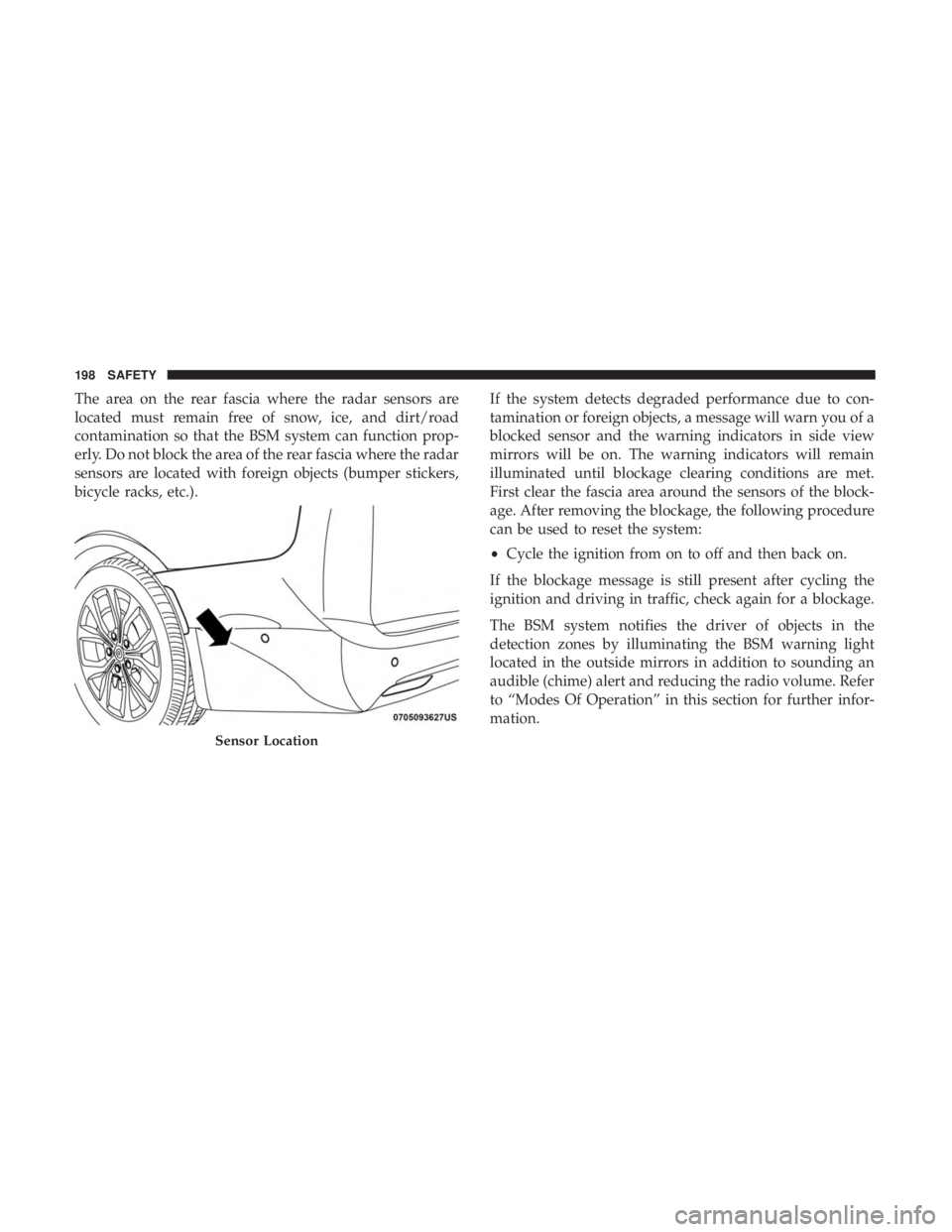
The area on the rear fascia where the radar sensors are
located must remain free of snow, ice, and dirt/road
contamination so that the BSM system can function prop-
erly. Do not block the area of the rear fascia where the radar
sensors are located with foreign objects (bumper stickers,
bicycle racks, etc.).If the system detects degraded performance due to con-
tamination or foreign objects, a message will warn you of a
blocked sensor and the warning indicators in side view
mirrors will be on. The warning indicators will remain
illuminated until blockage clearing conditions are met.
First clear the fascia area around the sensors of the block-
age. After removing the blockage, the following procedure
can be used to reset the system:
•
Cycle the ignition from on to off and then back on.
If the blockage message is still present after cycling the
ignition and driving in traffic, check again for a blockage.
The BSM system notifies the driver of objects in the
detection zones by illuminating the BSM warning light
located in the outside mirrors in addition to sounding an
audible (chime) alert and reducing the radio volume. Refer
to “Modes Of Operation” in this section for further infor-
mation.
Sensor Location
198 SAFETY
Page 248 of 614
NOTE:
•Air bag covers may not be obvious in the interior trim,
but they will open during air bag deployment.
• After any collision, the vehicle should be taken to an
authorized dealer immediately.
Enhanced Accident Response System
In the event of an impact, if the communication network
remains intact, and the power remains intact, depending
on the nature of the event, the ORC will determine whether
to have the Enhanced Accident Response System perform
the following functions:
• Cut off fuel to the engine (If Equipped)
• Cut off battery power to the electric motor (If Equipped)
• Flash hazard lights as long as the battery has power
•
Turn on the interior lights, which remain on as long as the
battery has power or for 15 minutes from the intervention
of the Enhanced Accident Response System.
• Unlock the power door locks.
Your vehicle may also be designed to perform any of these
other functions in response to the Enhanced Accident
Response System: •
Turn off the Fuel Filter Heater, Turn off the HVAC
Blower Motor, Close the HVAC Circulation Door
• Cut off battery power to the:
• Engine
• Electric Motor (if equipped)
• Electric power steering
• Brake booster
• Electric park brake
• Automatic transmission gear selector
• Horn
• Front wiper
• Headlamp washer pump
NOTE: After an accident, remember to cycle the ignition to
the STOP (OFF/LOCK) position and remove the key from
the ignition switch to avoid draining the battery. Carefully
check the vehicle for fuel leaks in the engine compartment
and on the ground near the engine compartment and fuel
tank before resetting the system and starting the engine. If
there are no fuel leaks or damage to the vehicle electrical
devices (e.g. headlights) after an accident, reset the system
by following the procedure described below.
246 SAFETY
Page 249 of 614
Enhanced Accident Response System Reset
Procedure
After an event occurs requiring activation of the Enhanced
Accident Response System, when the system is active, a “
Service Hybrid Electric Vehicle System” message will be
displayed on the instrument cluster. The vehicle is not
drivable in this state.
In order to reset the High Voltage Battery and Engine, the
vehicle must be towed to an authorized dealer immedi-
ately to be inspected and have the Enhanced Accident
Response System reset.
In order to immediately reset the Hazard Flashers, Interior
Lights, Power Door Locks, HVAC Blower Motor, the igni-
tion switch must be changed from START or ON/RUN to
ignition OFF.
Maintaining Your Air Bag System
WARNING!
•Modifications to any part of the air bag system could
cause it to fail when you need it. You could be
injured if the air bag system is not there to protect
(Continued)
WARNING! (Continued)
you. Do not modify the components or wiring, in-
cluding adding any kind of badges or stickers to the
steering wheel hub trim cover or the upper right side
of the instrument panel. Do not modify the front
bumper, vehicle body structure, or add aftermarket
side steps or running boards.
• It is dangerous to try to repair any part of the air bag
system yourself. Be sure to tell anyone who works on
your vehicle that it has an air bag system.
• Do not attempt to modify any part of your air bag
system. The air bag may inflate accidentally or may
not function properly if modifications are made.
Take your vehicle to an authorized dealer for any air
bag system service. If your seat, including your trim
cover and cushion, needs to be serviced in any way
(including removal or loosening/tightening of seat
attachment bolts), take the vehicle to your authorized
dealer. Only manufacturer approved seat accessories
may be used. If it is necessary to modify the air bag
system for persons with disabilities, contact your
authorized dealer.
5
SAFETY 247
Page 287 of 614
open, the vehicle is at a standstill, and there is no attempt
to depress the brake pedal or accelerator pedal, the park
brake will automatically engage to prevent the vehicle
from rolling.
SafeHold can be temporarily bypassed by pushing the
Electric Park Brake Switch while the driver door is open
and brake pedal is pressed. Once manually bypassed,
SafeHold will be enabled again once the vehicle reaches
12 mph (20 km/h) or the ignition is cycled to the OFF
position and back to ON again.
Brake Service Mode
We recommend having your brakes serviced by your
authorized dealer. You should only make repairs for which
you have the knowledge and the right equipment. You
should only enter Brake Service Mode during brake ser-
vice.
When servicing your rear brakes, it may be necessary for
you or your technician to push the rear piston into the rear
caliper bore. With the Electric Park Brake system, this can
only be done after retracting the Electric Park Brakeactuator. Fortunately, actuator retraction can be done easily
by entering the “Brake Service” through the “Uconnect
Settings” in your vehicle. This menu based system will
guide you through the steps necessary to retract the EPB
actuator in order to perform rear brake service.
Brake Service Mode has requirements that must be met in
order to be activated:
•
The vehicle must be at a standstill.
• The park brake must be unapplied.
• The transmission must be in PARK or NEUTRAL.
While in service mode, the Electric Park Brake fault lamp
will flash continuously while the ignition switch is ON.
When brake service work is complete, the following steps
must be followed to reset the parking brake system to
normal operation:
• Ensure the vehicle is at a standstill.
• Press the brake pedal with moderate force.
• Apply the Electric Park Brake Switch.
6
STARTING AND OPERATING 285
Page 294 of 614
LOW (L)
This range should be used when descending very steep
grades. The vehicle transmission can be operated continu-
ously in LOW without damaging the vehicle or causing
issues. Using the LOW position will increase the rate of
deceleration when the accelerator pedal is released in
comparison to the DRIVE position. To access the LOW
position, push down on the gear selector and rotate it fully
clockwise. Shifting between DRIVE and LOW can be done
at any speed.
Transmission Limp Home Mode
Transmission function is monitored electronically for ab-
normal conditions. If a condition is detected that could
result in transmission damage, Transmission Limp Home
Mode is activated. In this mode, vehicle speed is limited to
about 45 mph (72 km/h). In addition to the Malfunction
Indicator Light (MIL), the Service Hybrid System Telltale,
the Red Turtle indication, and a popup message indicating
that vehicle speed may be limited may all be illuminated.
Limp Home Mode allows the vehicle to be driven to an
authorized dealer for service without damaging the trans-
mission.In the event of a momentary problem, the transmission can
be reset to regain functionality by performing the following
steps:
1. Stop the vehicle.
2. Shift the transmission into PARK, if possible. If not, shift
the transmission to NEUTRAL.
3. Push and hold the ignition switch until the vehicle turns OFF.
4. Wait approximately 30 seconds.
5. Restart the vehicle.
6. Shift into the desired gear range. If the problem is no longer detected, the transmission will return to normal
operation.
NOTE: Even if the transmission can be reset, we recom-
mend that you visit an authorized dealer at your earliest
possible convenience. An authorized dealer has diagnostic
equipment to assess the condition of your transmission. If
the transmission cannot be reset, authorized dealer service
is required.
292 STARTING AND OPERATING