engine CHRYSLER PACIFICA HYBRID 2019 User Guide
[x] Cancel search | Manufacturer: CHRYSLER, Model Year: 2019, Model line: PACIFICA HYBRID, Model: CHRYSLER PACIFICA HYBRID 2019Pages: 620, PDF Size: 4.92 MB
Page 85 of 620
Your vehicle may have been delivered with two key fobs,
one key fob can be linked to each of the memory positions.
Programming The Memory Feature
To create a new memory profile, perform the following:
1. Cycle the vehicle’s ignition to the ON/RUN position (donot start the engine). 2. Adjust all memory profile settings to desired prefer-
ences (i.e., driver ’s seat, outside mirrors and radio
station presets).
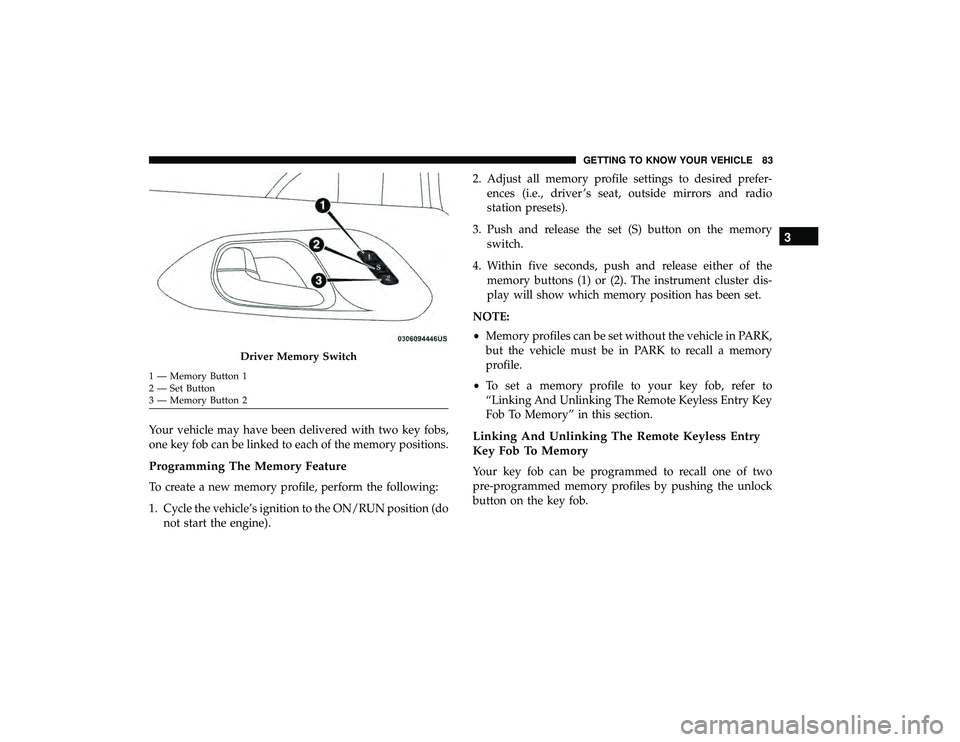
3. Push and release the set (S) button on the memory switch.
4. Within five seconds, push and release either of the memory buttons (1) or (2). The instrument cluster dis-
play will show which memory position has been set.
NOTE:
• Memory profiles can be set without the vehicle in PARK,
but the vehicle must be in PARK to recall a memory
profile.
• To set a memory profile to your key fob, refer to
“Linking And Unlinking The Remote Keyless Entry Key
Fob To Memory” in this section.
Linking And Unlinking The Remote Keyless Entry
Key Fob To Memory
Your key fob can be programmed to recall one of two
pre-programmed memory profiles by pushing the unlock
button on the key fob.
Driver Memory Switch
1 — Memory Button 1
2 — Set Button
3 — Memory Button 2
3
GETTING TO KNOW YOUR VEHICLE 83
Page 117 of 620
MAX A/C
MAX A/C sets the control for maximum cooling perfor-
mance.
Press and release to toggle between MAX A/C and the prior
settings. The button illuminates when MAX A/C is on.
In MAX A/C, the blower level and mode position can be
adjusted to desired user settings. Pressing other settings
will cause the MAX A/C operation to switch to the selected
setting and MAX A/C to exit.
Recirculation
In cold weather, use of Recirculation mode may lead to
excessive window fogging. The Recirculation feature may
be unavailable (button on the touchscreen greyed out) if
conditions exist that could create fogging on the inside of
the windshield.
Automatic Temperature Control (ATC) —
If Equipped
Automatic Operation
1. Push the AUTO button on the front ATC Panel and theword “AUTO” will illuminate in the front ATC display,
along with two temperatures for the driver and front passenger. The system will then automatically regulate
the amount of airflow.
2. Adjust the temperature you would like the system to maintain, by adjusting the driver, passenger, and rear
temperatures. Once the desired temperature is dis-
played, the system will achieve and automatically main-
tain that comfort level.
3. When the system is set up for your comfort level, it is not necessary to change the settings. You will experience
the greatest efficiency by simply allowing the system to
function automatically.
NOTE: It is not necessary to move the temperature set-
tings. The system automatically adjusts the temperature,
mode and fan speed to provide comfort as quickly as
possible.
To provide you with maximum comfort in the automatic
mode, during cold start-ups, the blower fan will remain on
low until the engine warms up. The fan will engage
immediately if the Defrost mode is selected, or by changing
the front blower knob setting.
3
GETTING TO KNOW YOUR VEHICLE 115
Page 124 of 620
Operating Tips
NOTE:Refer to the chart at the end of this section for
suggested control settings for various weather conditions.
Summer Operation
The engine cooling system must be protected with a
high-quality antifreeze coolant to provide proper corrosion
protection and to protect against engine overheating. OAT
coolant (conforming to MS.90032) with deionized, or dis-
tilled water for proper corrosion protection is recom-
mended.
Winter Operation
To ensure the best possible heater and defroster perfor-
mance, make sure the engine cooling system is functioning
properly and the proper amount, type, and concentration
of coolant is used. Use of the Air Recirculation mode
during Winter months is not recommended, because it may
cause window fogging.
Vacation/Storage
Before you store your vehicle, or keep it out of service (i.e.,
vacation) for two weeks or more, run the air conditioning
system at idle for about five minutes, in fresh air with the blower setting on high. This will ensure adequate system
lubrication to minimize the possibility of compressor dam-
age when the system is started again.
Window Fogging
Vehicle windows tend to fog on the inside in mild, rainy,
and/or humid weather. To clear the windows, select De-
frost or Mix mode and increase the front blower speed. Do
not use the Recirculation mode without A/C for long
periods, as fogging may occur.
CAUTION!
Failure to follow these cautions can cause damage to
the heating elements:
•
Use care when washing the inside of the rear win-
dow. Do not use abrasive window cleaners on the
interior surface of the window. Use a soft cloth and a
mild washing solution, wiping parallel to the heat-
ing elements. Labels can be peeled off after soaking
with warm water.
• Do not use scrapers, sharp instruments, or abrasive
window cleaners on the interior surface of the win-
dow.
• Keep all objects a safe distance from the window.
122 GETTING TO KNOW YOUR VEHICLE
Page 133 of 620
HOOD
Opening
WARNING!
Always cycle the ignition to OFF mode before opening
the hood. If the ignition is in ON mode and the
Propulsion System is active when the hood is opened,
the engine will automatically start, and persons not
clear of the vehicle could be injured by the engine’s
moving parts.
The hood release lever (to open the primary latch) and
safety latch (to open the secondary latch) must be released
to open the hood.
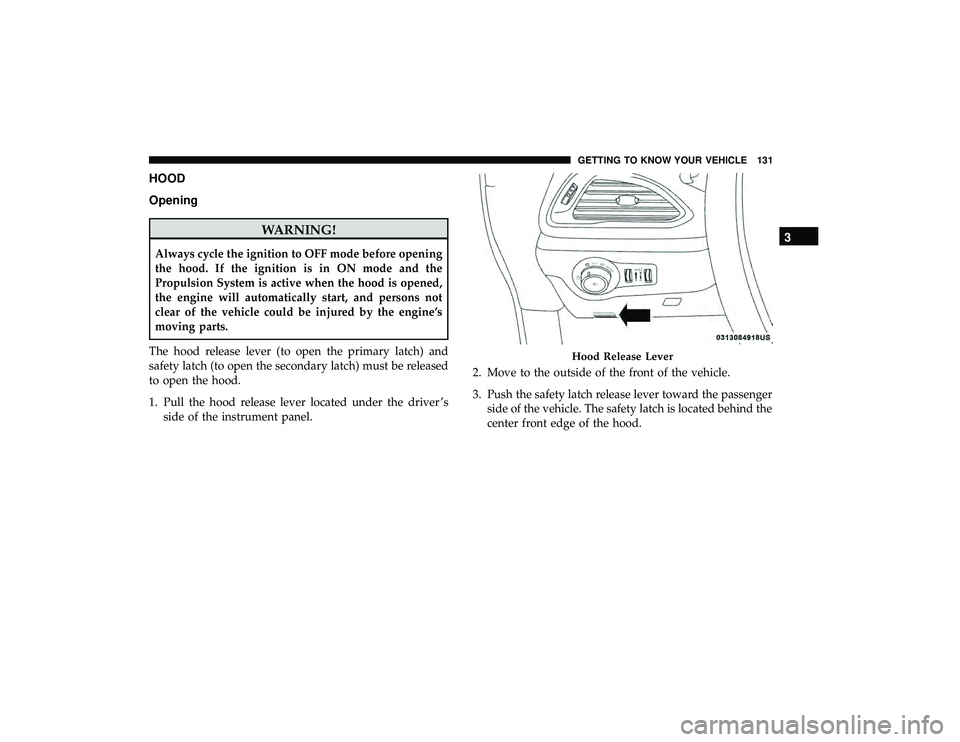
1. Pull the hood release lever located under the driver ’s side of the instrument panel. 2. Move to the outside of the front of the vehicle.
3. Push the safety latch release lever toward the passenger
side of the vehicle. The safety latch is located behind the
center front edge of the hood.
Hood Release Lever
3
GETTING TO KNOW YOUR VEHICLE 131
Page 134 of 620
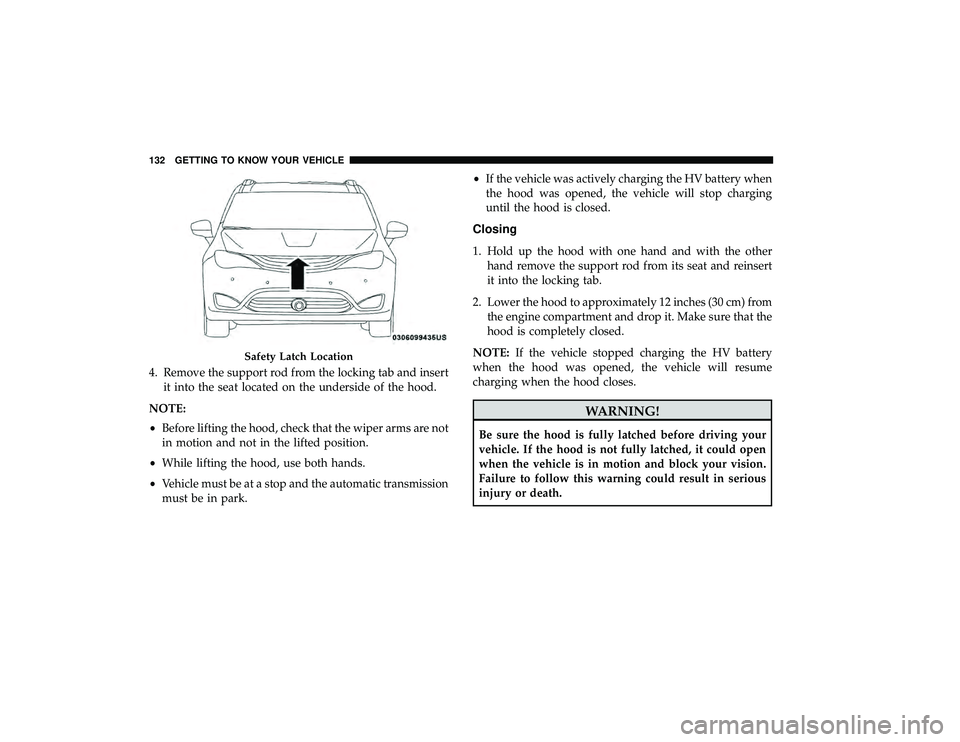
4. Remove the support rod from the locking tab and insertit into the seat located on the underside of the hood.
NOTE:
• Before lifting the hood, check that the wiper arms are not
in motion and not in the lifted position.
• While lifting the hood, use both hands.
• Vehicle must be at a stop and the automatic transmission
must be in park. •
If the vehicle was actively charging the HV battery when
the hood was opened, the vehicle will stop charging
until the hood is closed.
Closing
1. Hold up the hood with one hand and with the other hand remove the support rod from its seat and reinsert
it into the locking tab.
2. Lower the hood to approximately 12 inches (30 cm) from the engine compartment and drop it. Make sure that the
hood is completely closed.
NOTE: If the vehicle stopped charging the HV battery
when the hood was opened, the vehicle will resume
charging when the hood closes.
WARNING!
Be sure the hood is fully latched before driving your
vehicle. If the hood is not fully latched, it could open
when the vehicle is in motion and block your vision.
Failure to follow this warning could result in serious
injury or death.
Safety Latch Location
132 GETTING TO KNOW YOUR VEHICLE
Page 167 of 620
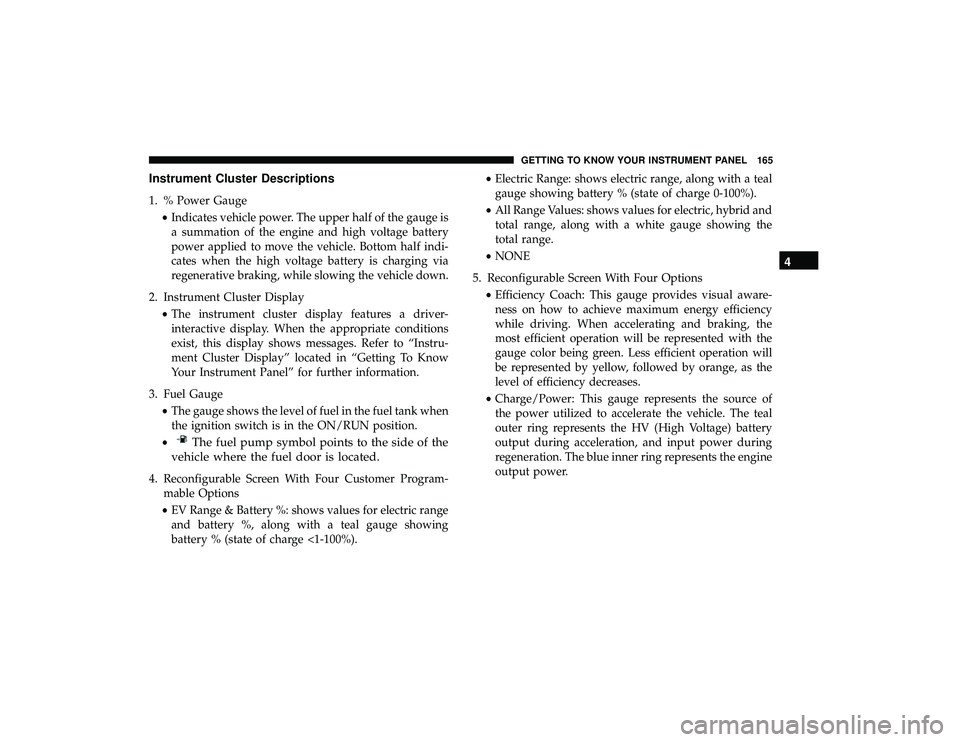
Instrument Cluster Descriptions
1. % Power Gauge•Indicates vehicle power. The upper half of the gauge is
a summation of the engine and high voltage battery
power applied to move the vehicle. Bottom half indi-
cates when the high voltage battery is charging via
regenerative braking, while slowing the vehicle down.
2. Instrument Cluster Display •The instrument cluster display features a driver-
interactive display. When the appropriate conditions
exist, this display shows messages. Refer to “Instru-
ment Cluster Display” located in “Getting To Know
Your Instrument Panel” for further information.
3. Fuel Gauge •The gauge shows the level of fuel in the fuel tank when
the ignition switch is in the ON/RUN position.
•
The fuel pump symbol points to the side of the
vehicle where the fuel door is located.
4. Reconfigurable Screen With Four Customer Program- mable Options
• EV Range & Battery %: shows values for electric range
and battery %, along with a teal gauge showing
battery % (state of charge <1-100%). •
Electric Range: shows electric range, along with a teal
gauge showing battery % (state of charge 0-100%).
• All Range Values: shows values for electric, hybrid and
total range, along with a white gauge showing the
total range.
• NONE
5. Reconfigurable Screen With Four Options •Efficiency Coach: This gauge provides visual aware-
ness on how to achieve maximum energy efficiency
while driving. When accelerating and braking, the
most efficient operation will be represented with the
gauge color being green. Less efficient operation will
be represented by yellow, followed by orange, as the
level of efficiency decreases.
• Charge/Power: This gauge represents the source of
the power utilized to accelerate the vehicle. The teal
outer ring represents the HV (High Voltage) battery
output during acceleration, and input power during
regeneration. The blue inner ring represents the engine
output power.
4
GETTING TO KNOW YOUR INSTRUMENT PANEL 165
Page 168 of 620
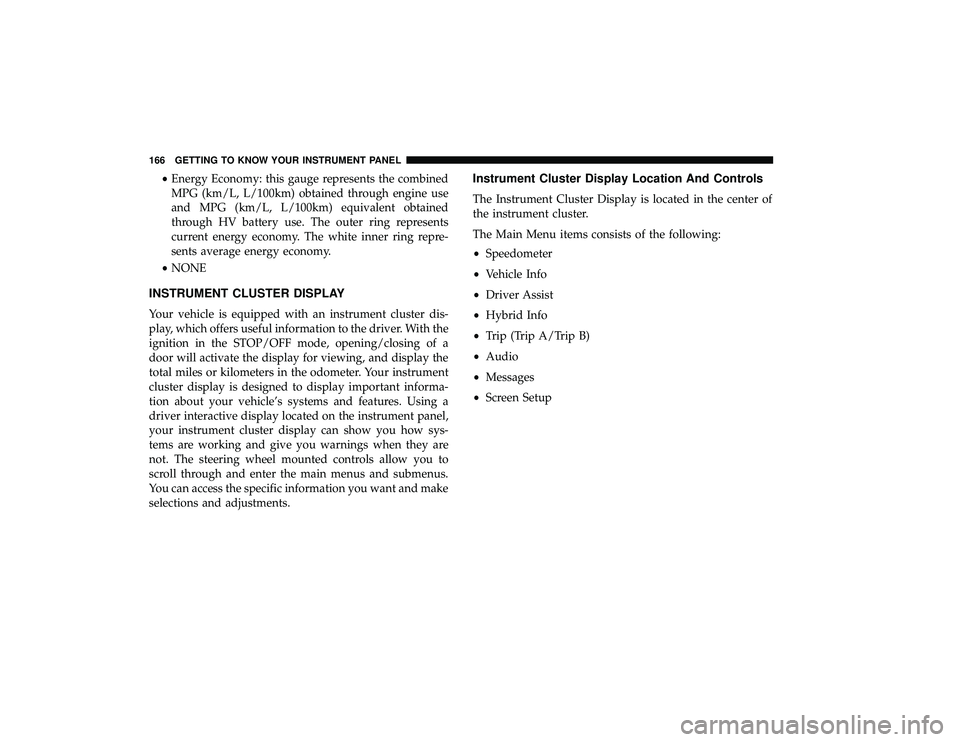
•Energy Economy: this gauge represents the combined
MPG (km/L, L/100km) obtained through engine use
and MPG (km/L, L/100km) equivalent obtained
through HV battery use. The outer ring represents
current energy economy. The white inner ring repre-
sents average energy economy.
• NONE
INSTRUMENT CLUSTER DISPLAY
Your vehicle is equipped with an instrument cluster dis-
play, which offers useful information to the driver. With the
ignition in the STOP/OFF mode, opening/closing of a
door will activate the display for viewing, and display the
total miles or kilometers in the odometer. Your instrument
cluster display is designed to display important informa-
tion about your vehicle’s systems and features. Using a
driver interactive display located on the instrument panel,
your instrument cluster display can show you how sys-
tems are working and give you warnings when they are
not. The steering wheel mounted controls allow you to
scroll through and enter the main menus and submenus.
You can access the specific information you want and make
selections and adjustments.
Instrument Cluster Display Location And Controls
The Instrument Cluster Display is located in the center of
the instrument cluster.
The Main Menu items consists of the following:
• Speedometer
• Vehicle Info
• Driver Assist
• Hybrid Info
• Trip (Trip A/Trip B)
• Audio
• Messages
• Screen Setup
166 GETTING TO KNOW YOUR INSTRUMENT PANEL
Page 169 of 620
The system allows the driver to select information by
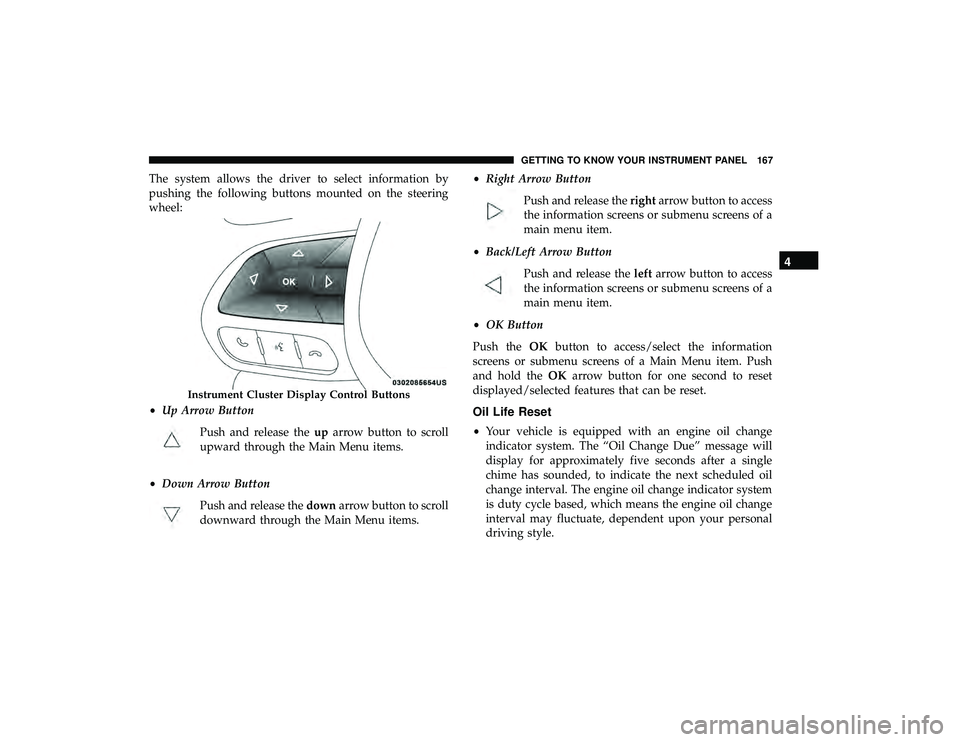
pushing the following buttons mounted on the steering
wheel:
•Up Arrow Button
Push and release the uparrow button to scroll
upward through the Main Menu items.
• Down Arrow Button
Push and release the downarrow button to scroll
downward through the Main Menu items. •
Right Arrow Button
Push and release the rightarrow button to access
the information screens or submenu screens of a
main menu item.
• Back/Left Arrow Button
Push and release the leftarrow button to access
the information screens or submenu screens of a
main menu item.
• OK Button
Push the OKbutton to access/select the information
screens or submenu screens of a Main Menu item. Push
and hold the OKarrow button for one second to reset
displayed/selected features that can be reset.
Oil Life Reset
• Your vehicle is equipped with an engine oil change
indicator system. The “Oil Change Due” message will
display for approximately five seconds after a single
chime has sounded, to indicate the next scheduled oil
change interval. The engine oil change indicator system
is duty cycle based, which means the engine oil change
interval may fluctuate, dependent upon your personal
driving style.
Instrument Cluster Display Control Buttons
4
GETTING TO KNOW YOUR INSTRUMENT PANEL 167
Page 170 of 620

•Unless reset, this message will continue to display each
time the ignition is cycled to the ON/RUN position.
• To reset the oil change indicator, refer to the following
procedure:
Without pressing the brake pedal, push the ENGINE
START/STOP button and place the ignition in the ON/
RUN position (do not start the vehicle.)
NOTE: This procedure should only be performed after
scheduled maintenance is completed. Resetting oil life
other than when associated with a scheduled maintenance
may result in severe engine damage.
1. Push the OKbutton to enter the instrument cluster
display menu screen.
2. Push and release the downarrow button to access the
”Oil Life” menu screen.
3. Push the leftarrow button or right arrow button to
access the “Vehicle Info” submenu.
4. Hold the OKbutton to reset the “Oil Life” to 100%.
5. Push the uparrow button to exit the instrument cluster
display menu screen. Secondary Method For Oil Life Reset Procedure
1. Without pushing the brake pedal, place the ignition in
the ON/RUN position (do not start the engine).
2. Fully press the accelerator pedal, slowly, three times within ten seconds.
3. Without pushing the brake pedal, place the ignition in the OFF/LOCK position.
NOTE: If the indicator message illuminates when you
start the vehicle, the oil change indicator system did not
reset. If necessary, repeat this procedure.
Fuel And Oil Refresh Mode
Since it is possible to operate this vehicle for extended
periods of time without running the gas engine, the fuel
within the vehicle’s fuel tank can become stale or the
engine oil’s lubricating properties can be reduced. To
prevent engine and/or fuel system damage due to stale
fuel, as well as, maintaining internal engine lubrication,
this vehicle is equipped with a “Fuel and Oil Refresh
Mode”.
168 GETTING TO KNOW YOUR INSTRUMENT PANEL
Page 171 of 620
The vehicle will automatically enter into the Fuel and Oil
Refresh Mode to minimize potential for stale fuel, and to
ensure lubrication of internal engine components. When
operating in this mode, the gas engine will run to provide
vehicle propulsion (electric only operation is inhibited). A
message will be displayed in the instrument cluster when-
ever Fuel and Oil Refresh Mode is active.
The vehicle will automatically exit the Fuel and Oil Refresh
Mode when conditions have been satisfied. If the vehicle
enters Fuel and Oil Refresh Mode, due to fuel which has
been in the fuel tank for a long period of time (becoming
stale fuel), the engine will run whenever the vehicle is
operational (no electric only operation) until the low fuel
level warning is activated. It is also possible to exit the Fuel
and Oil Refresh Mode sooner by adding a minimum of 4
gallons of new fuel to the vehicle’s fuel tank.
NOTE:If the vehicle enters Fuel and Oil Refresh Mode to
maintain engine lubrication, adding fuel will not exit the
mode sooner. If the vehicle enters Fuel and Oil Refresh Mode to maintain
engine lubrication properties, the engine may run for a
period of up to 20 minutes when fully warm whenever the
vehicle is operational (no electric only operation). If the
vehicle is shut down before conditions to exit the refresh
mode have been satisfied, the engine may run for addi-
tional time on subsequent trips.
NOTE:
Frequent short trips at low ambient temperature
conditions are more likely to trigger the lubrication based
mode.
KeySense Cluster Messages — If Equipped
When the KeySense key is in use there will be:
•Continuous, dedicated telltale
• Unique Display Splash Screen
4
GETTING TO KNOW YOUR INSTRUMENT PANEL 169