lock CHRYSLER PACIFICA HYBRID 2019 Owner's Manual
[x] Cancel search | Manufacturer: CHRYSLER, Model Year: 2019, Model line: PACIFICA HYBRID, Model: CHRYSLER PACIFICA HYBRID 2019Pages: 620, PDF Size: 4.92 MB
Page 63 of 620
•There is a valid key fob outside the vehicle and within
5 ft (1.5 m) of either Passive Entry door handle.
• Three attempts are made to lock the doors using the
door panel switch and then close the doors.
NOTE: On the third attempt ALL doors will lock and the
key fob can be locked in the vehicle.
To Enter The Liftgate
With a valid key fob within 5 ft (1.5 m) of the liftgate, cycle
the handle to open the liftgate and pull the liftgate open
with one fluid motion.
NOTE: If “Unlock Driver Door 1st Press” is programmed,
only the liftgate will unlock when the liftgate release
handle is pulled. If “Unlock All Doors 1st Press” is pro-
grammed, all doors and the liftgate will unlock when the
liftgate release handle is pulled. To select between “Unlock
Driver Door 1st Press” and “Unlock All Doors 1st Press,”
refer to “Uconnect Settings” in “Multimedia” for further
information. To Lock The Vehicle’s Doors
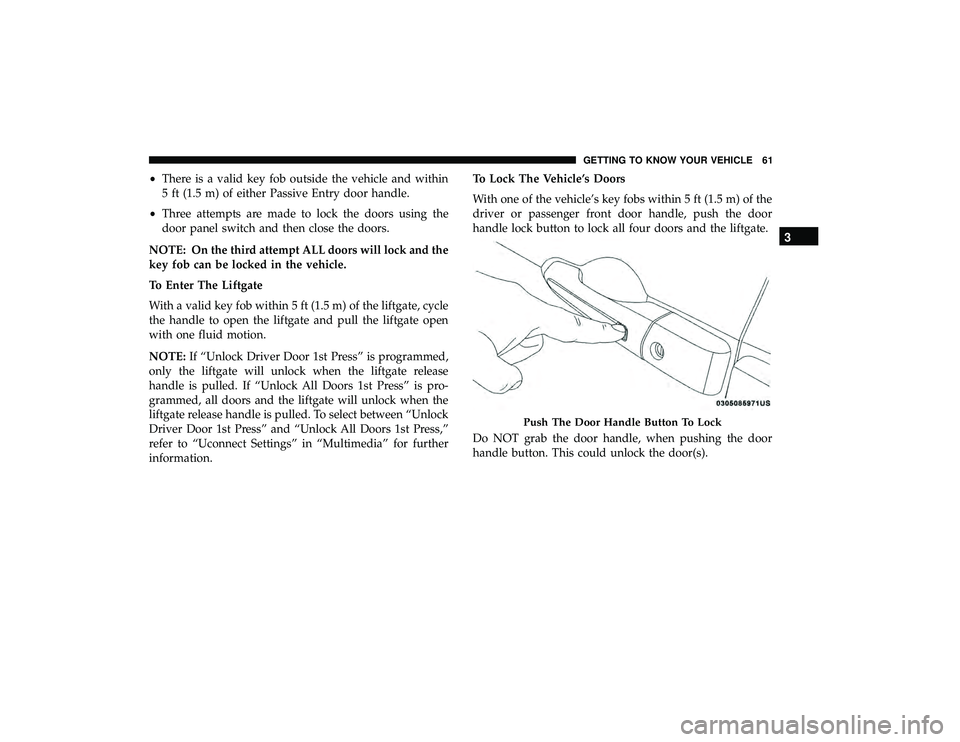
With one of the vehicle’s key fobs within 5 ft (1.5 m) of the
driver or passenger front door handle, push the door
handle lock button to lock all four doors and the liftgate.
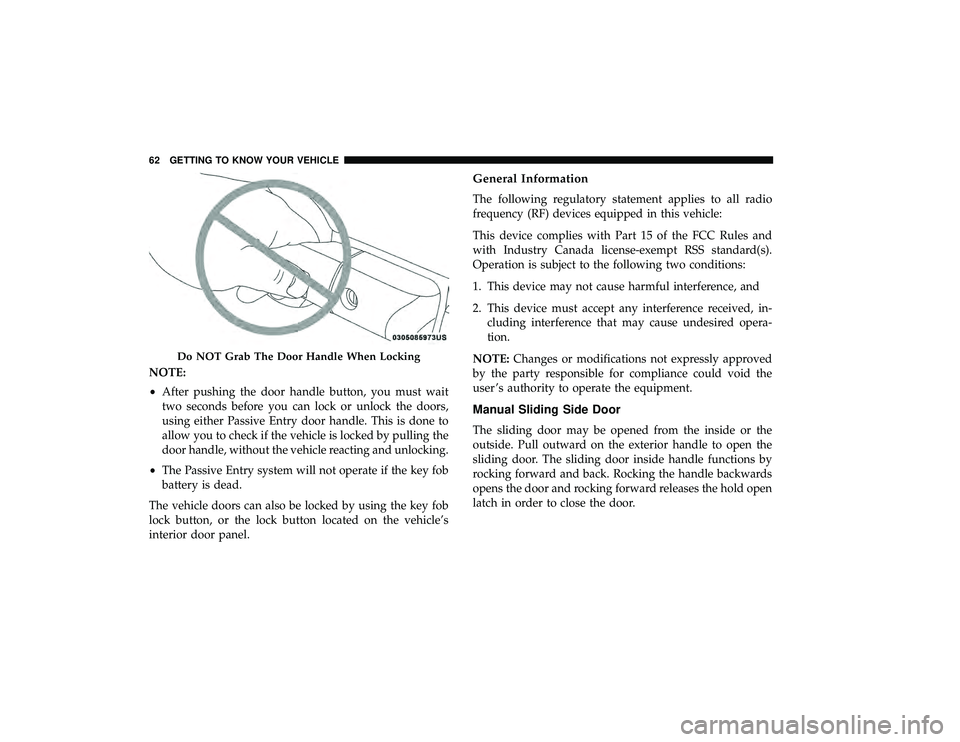
Do NOT grab the door handle, when pushing the door
handle button. This could unlock the door(s).
Push The Door Handle Button To Lock
3
GETTING TO KNOW YOUR VEHICLE 61
Page 64 of 620
NOTE:
•After pushing the door handle button, you must wait
two seconds before you can lock or unlock the doors,
using either Passive Entry door handle. This is done to
allow you to check if the vehicle is locked by pulling the
door handle, without the vehicle reacting and unlocking.
• The Passive Entry system will not operate if the key fob
battery is dead.
The vehicle doors can also be locked by using the key fob
lock button, or the lock button located on the vehicle’s
interior door panel.
General Information
The following regulatory statement applies to all radio
frequency (RF) devices equipped in this vehicle:
This device complies with Part 15 of the FCC Rules and
with Industry Canada license-exempt RSS standard(s).
Operation is subject to the following two conditions:
1. This device may not cause harmful interference, and
2. This device must accept any interference received, in- cluding interference that may cause undesired opera-
tion.
NOTE: Changes or modifications not expressly approved
by the party responsible for compliance could void the
user ’s authority to operate the equipment.
Manual Sliding Side Door
The sliding door may be opened from the inside or the
outside. Pull outward on the exterior handle to open the
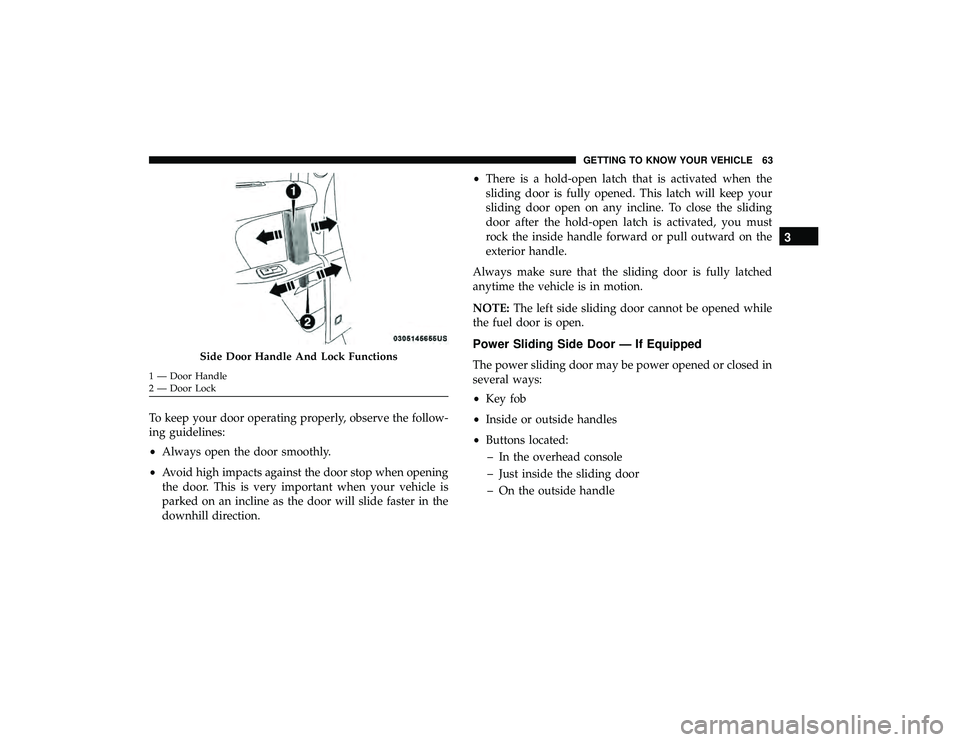
sliding door. The sliding door inside handle functions by
rocking forward and back. Rocking the handle backwards
opens the door and rocking forward releases the hold open
latch in order to close the door.
Do NOT Grab The Door Handle When Locking
62 GETTING TO KNOW YOUR VEHICLE
Page 65 of 620
To keep your door operating properly, observe the follow-
ing guidelines:
•Always open the door smoothly.
• Avoid high impacts against the door stop when opening
the door. This is very important when your vehicle is
parked on an incline as the door will slide faster in the
downhill direction. •
There is a hold-open latch that is activated when the
sliding door is fully opened. This latch will keep your
sliding door open on any incline. To close the sliding
door after the hold-open latch is activated, you must
rock the inside handle forward or pull outward on the
exterior handle.
Always make sure that the sliding door is fully latched
anytime the vehicle is in motion.
NOTE: The left side sliding door cannot be opened while
the fuel door is open.
Power Sliding Side Door — If Equipped
The power sliding door may be power opened or closed in
several ways:
• Key fob
• Inside or outside handles
• Buttons located:
– In the overhead console
– Just inside the sliding door
– On the outside handleSide Door Handle And Lock Functions
1 — Door Handle
2 — Door Lock
3
GETTING TO KNOW YOUR VEHICLE 63
Page 66 of 620
Push the button on the key fob twice within five
seconds to open, close, or reverse a power sliding
door.
The key fob and the overhead console button will operate
the door when the door is locked. All other ways require
the sliding door to be unlocked. If the vehicle is equipped
with Passive Entry, pressing the button on the outside
handle or Hands-Free feature (if equipped) will unlock and
open the sliding door, with a valid Passive Entry key fob
within 5 ft (1.5 m) of the door handle.
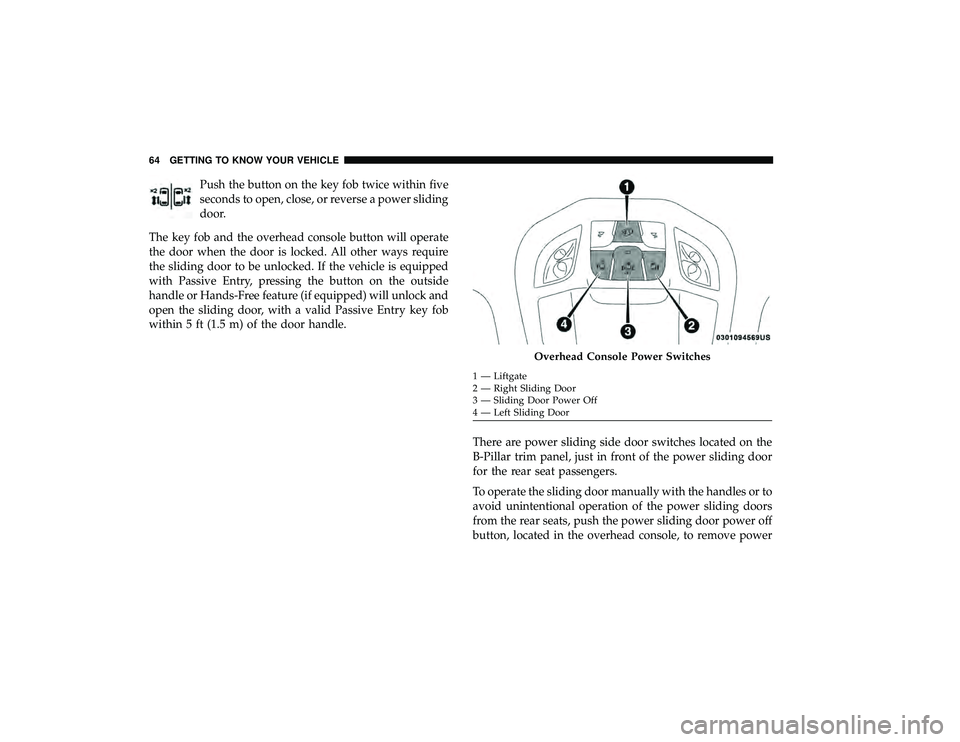
There are power sliding side door switches located on the
B-Pillar trim panel, just in front of the power sliding door
for the rear seat passengers.
To operate the sliding door manually with the handles or to
avoid unintentional operation of the power sliding doors
from the rear seats, push the power sliding door power off
button, located in the overhead console, to remove power
Overhead Console Power Switches
1 — Liftgate
2 — Right Sliding Door
3 — Sliding Door Power Off
4 — Left Sliding Door
64 GETTING TO KNOW YOUR VEHICLE
Page 69 of 620
NOTE:
•To open the Hands-Free Sliding Doors requires a valid
Passive Entry key fob within 5 ft (1.5 m) of the door
handle. If a valid Passive Entry key fob is not within 5 ft
(1.5 m), the door will not respond to any kicks.
• The Hands-Free Sliding Door will only operate when the
transmission is in PARK.
• With every movement of the Hands-Free sliding doors,
an audible tone will sound and the turn signals will
flash. Refer to “Uconnect Settings” in “Multimedia” in
the Owner ’s Manual for further information on turning
these alerts on or off.
• If anything obstructs the power sliding side door while
it is closing or opening, the door will automatically
reverse to the closed or open position and an audible
tone will sound, provided it meets sufficient resistance.
The turn signals will flash with sliding door movements.
• If the power sliding doors encounters multiple obstruc-
tions within the same cycle, the system will automati-
cally stop. The Hands-Free Sliding Doors feature may be turned off
through Uconnect Settings. Refer to “Uconnect Settings” in
“Multimedia” for further information. The Hands-Free
Sliding Doors feature should be turned off during Jacking,
Tire Changing, and Vehicle Service.
Child Locks
To provide a safer environment for small children riding in
the rear seats, the sliding doors are equipped with a Child
Protection Door Lock system.
To Engage The Child Protection Door Lock
1. Open the sliding side door.
2. On the rear of the sliding door, slide the Child Protection
Door Lock control inward (toward the vehicle) to en-
gage the Child Protection Door Lock.
3
GETTING TO KNOW YOUR VEHICLE 67
Page 70 of 620
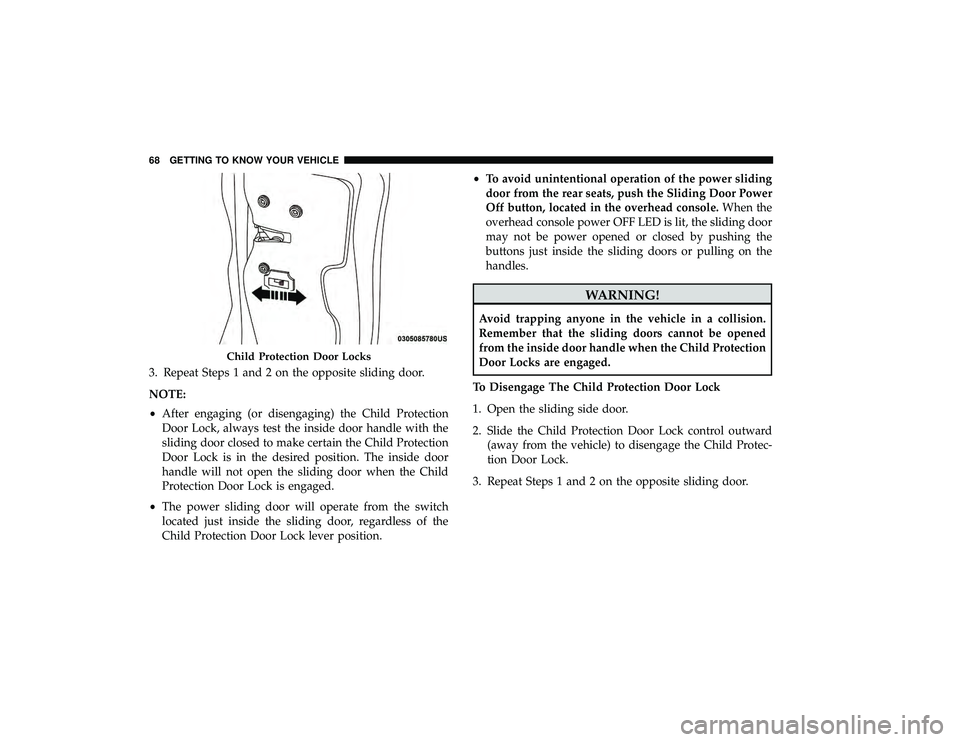
3. Repeat Steps 1 and 2 on the opposite sliding door.
NOTE:
•After engaging (or disengaging) the Child Protection
Door Lock, always test the inside door handle with the
sliding door closed to make certain the Child Protection
Door Lock is in the desired position. The inside door
handle will not open the sliding door when the Child
Protection Door Lock is engaged.
• The power sliding door will operate from the switch
located just inside the sliding door, regardless of the
Child Protection Door Lock lever position. •
To avoid unintentional operation of the power sliding
door from the rear seats, push the Sliding Door Power
Off button, located in the overhead console. When the
overhead console power OFF LED is lit, the sliding door
may not be power opened or closed by pushing the
buttons just inside the sliding doors or pulling on the
handles.
WARNING!
Avoid trapping anyone in the vehicle in a collision.
Remember that the sliding doors cannot be opened
from the inside door handle when the Child Protection
Door Locks are engaged.
To Disengage The Child Protection Door Lock
1. Open the sliding side door.
2. Slide the Child Protection Door Lock control outward (away from the vehicle) to disengage the Child Protec-
tion Door Lock.
3. Repeat Steps 1 and 2 on the opposite sliding door.
Child Protection Door Locks
68 GETTING TO KNOW YOUR VEHICLE
Page 71 of 620
NOTE:
•After disengaging (or engaging) the Child Protection
Door Lock, always test the inside door handle with the
sliding door closed to make certain the Child Protection
Door Lock is in the desired position. The inside door
handle will open the sliding door when the Child
Protection Door Lock is disengaged.
SEATS
Seats are a part of the Occupant Restraint System of the
vehicle.
WARNING!
• It is dangerous to ride in a cargo area, inside or
outside of a vehicle. In a collision, people riding in
these areas are more likely to be seriously injured or
killed.
• Do not allow people to ride in any area of your
vehicle that is not equipped with seats and seat belts.
(Continued)
WARNING! (Continued)
In a collision, people riding in these areas are more
likely to be seriously injured or killed.
• Be sure everyone in your vehicle is in a seat and
using a seat belt properly.
Manual Adjustment (Front Seats) — If Equipped
WARNING!
• Adjusting a seat while the vehicle is moving is
dangerous. The sudden movement of the seat could
cause you to lose control. The seat belt might not be
adjusted properly and you could be injured. Adjust
the seat only while the vehicle is parked.
• Do not ride with the seatback reclined so that the
shoulder belt is no longer resting against your chest.
In a collision you could slide under the seat belt and
be seriously or even fatally injured. Use the recliner
only when the vehicle is parked.
3
GETTING TO KNOW YOUR VEHICLE 69
Page 75 of 620
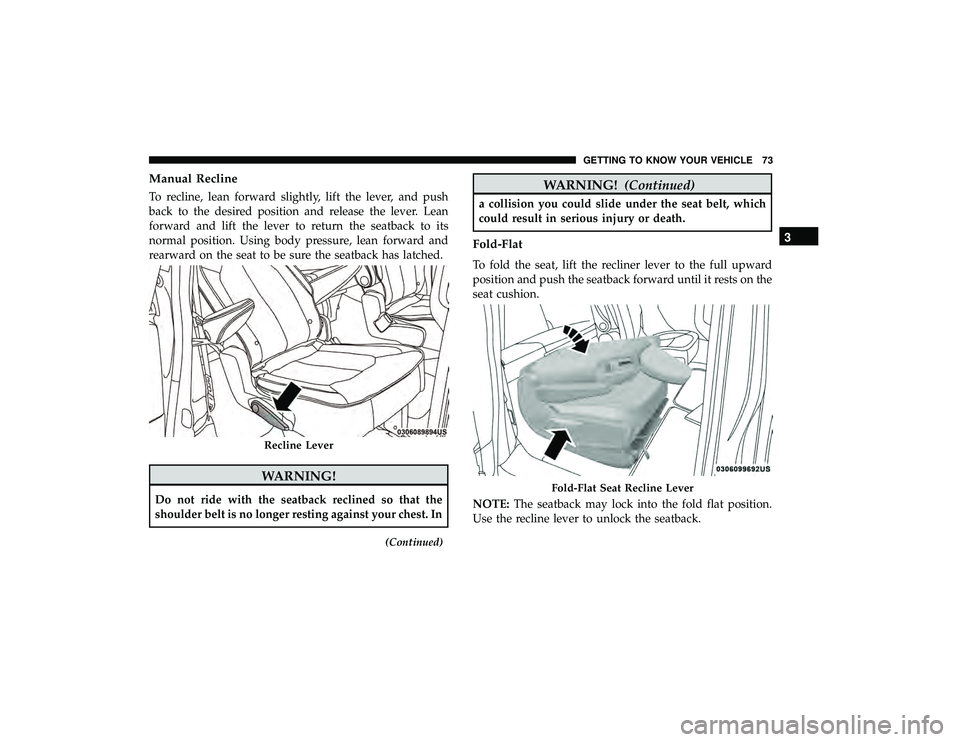
Manual Recline
To recline, lean forward slightly, lift the lever, and push
back to the desired position and release the lever. Lean
forward and lift the lever to return the seatback to its
normal position. Using body pressure, lean forward and
rearward on the seat to be sure the seatback has latched.
WARNING!
Do not ride with the seatback reclined so that the
shoulder belt is no longer resting against your chest. In
(Continued)
WARNING!(Continued)
a collision you could slide under the seat belt, which
could result in serious injury or death.
Fold-Flat
To fold the seat, lift the recliner lever to the full upward
position and push the seatback forward until it rests on the
seat cushion.
NOTE:The seatback may lock into the fold flat position.
Use the recline lever to unlock the seatback.
Recline Lever
Fold-Flat Seat Recline Lever
3
GETTING TO KNOW YOUR VEHICLE 73
Page 76 of 620
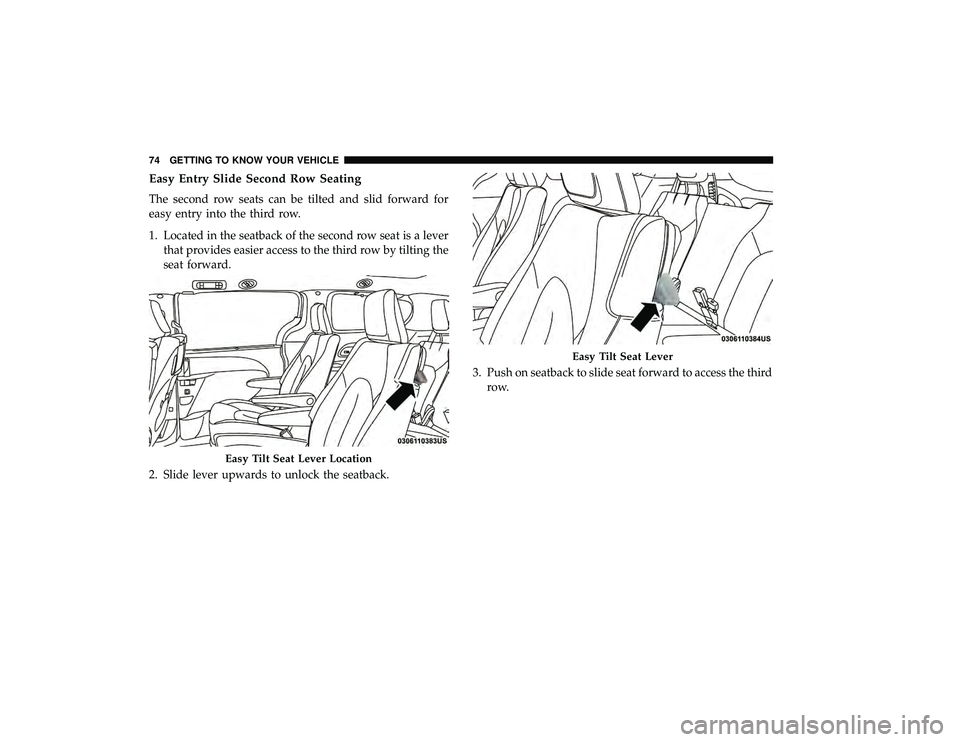
Easy Entry Slide Second Row Seating
The second row seats can be tilted and slid forward for
easy entry into the third row.
1. Located in the seatback of the second row seat is a leverthat provides easier access to the third row by tilting the
seat forward.
2. Slide lever upwards to unlock the seatback. 3. Push on seatback to slide seat forward to access the third
row.
Easy Tilt Seat Lever Location
Easy Tilt Seat Lever
74 GETTING TO KNOW YOUR VEHICLE
Page 77 of 620
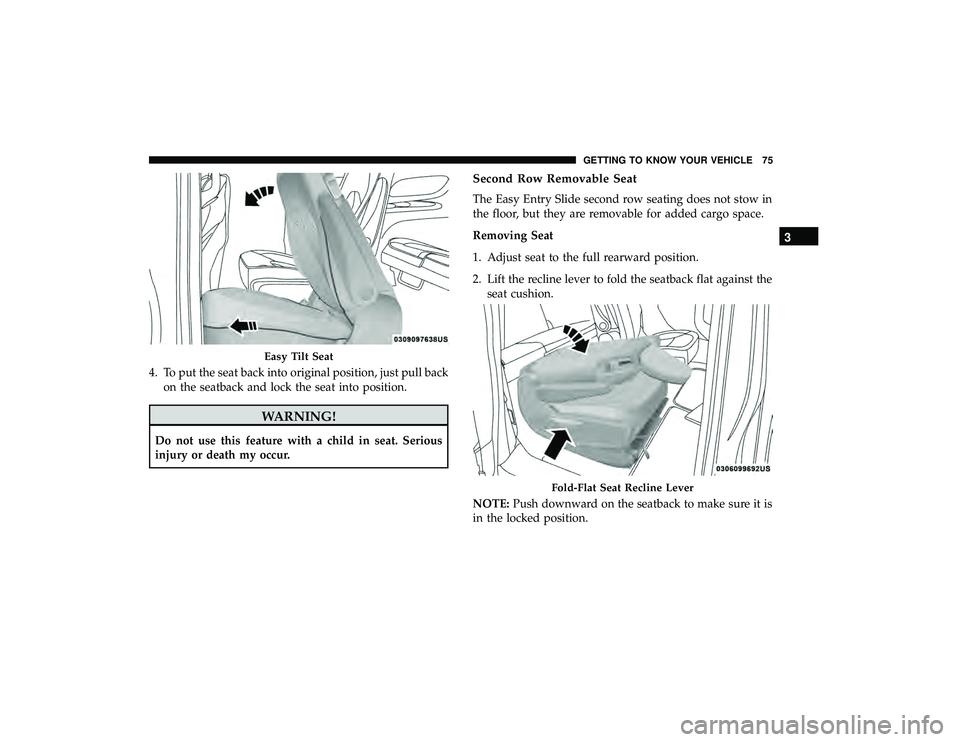
4. To put the seat back into original position, just pull backon the seatback and lock the seat into position.
WARNING!
Do not use this feature with a child in seat. Serious
injury or death my occur.
Second Row Removable Seat
The Easy Entry Slide second row seating does not stow in
the floor, but they are removable for added cargo space.
Removing Seat
1. Adjust seat to the full rearward position.
2. Lift the recline lever to fold the seatback flat against theseat cushion.
NOTE: Push downward on the seatback to make sure it is
in the locked position.
Easy Tilt Seat
Fold-Flat Seat Recline Lever
3
GETTING TO KNOW YOUR VEHICLE 75