fog CHRYSLER PACIFICA HYBRID 2020 Owners Manual
[x] Cancel search | Manufacturer: CHRYSLER, Model Year: 2020, Model line: PACIFICA HYBRID, Model: CHRYSLER PACIFICA HYBRID 2020Pages: 516, PDF Size: 28.69 MB
Page 5 of 516
3
MIRRORS ..............................................................59 Inside Day/Night Mirror — If Equipped ....... 59
Automatic Dimming Mirror —
If Equipped .................................................. 60 Outside Mirrors ........................................... 60
Driver's Outside Automatic Dimming
Mirror — If Equipped .................................... 60 Conversation Mirror ..................................... 60
Power Mirrors — If Equipped ...................... 61
Outside Mirrors Folding Feature ................. 61
Heated Mirrors — If Equipped ..................... 61
Tilt Side Mirrors In Reverse (Available With
Memory Seat Only) — If Equipped............... 61 Power Folding Mirrors — If Equipped .......... 62
Illuminated Vanity Mirrors — If Equipped .. 62
EXTERIOR LIGHTS ................................................63
Multifunction Lever ...................................... 63
Headlight Switch .......................................... 63
Daytime Running Lights (DRLs) —
If Equipped ................................................... 63 High/Low Beam Switch ............................... 64
Automatic High Beam — If Equipped ......... 64
Flash-To-Pass .............................................. 64
Automatic Headlights — If Equipped .......... 64
Headlights On With Wipers — If Equipped.. 65
Headlight Delay — If Equipped .................... 65
Lights-On Reminder .................................... 65
Front Fog Lights — If Equipped .................. 65
Turn Signals ................................................. 65
Lane Change Assist — If Equipped ............. 66
Battery Protection ....................................... 66 INTERIOR LIGHTS ................................................ 66
Courtesy/Interior Lighting .......................... 66
WINDSHIELD WIPER AND WASHERS .............. 68
Windshield Wiper Operation ....................... 68
Rain Sensing Wipers — If Equipped............ 69
Rear Wiper And Washer .............................. 70
CLIMATE CONTROLS ........................................... 70
Manual Climate Controls Overview ............ 70
Automatic Climate Control Overview .......... 80
Climate Control Functions........................... 90
Automatic Temperature Control (ATC) — If
Equipped ..................................................... 90 Operating Tips ............................................. 91
WINDOWS ............................................................. 93
Power Windows............................................ 93
PANORAMIC SUNROOF — IF EQUIPPED ........... 95
Opening Sunroof .......................................... 95
Closing Sunroof............................................ 96
Wind Buffeting ............................................. 96
Power Sunshade — If Equipped .................. 96
Pinch Protect Feature.................................. 97
Sunroof Maintenance.................................. 97
Ignition Off Operation .................................. 97
HOOD .................................................................... 97
Opening ........................................................ 97
Closing .......................................................... 98 LIFTGATE ................................................................99
Opening ........................................................ 99
Closing.......................................................... 99
Power Liftgate — If Equipped .................... 100 Hands-Free Liftgate — If Equipped ........... 101
Cargo Area Features ................................. 103
GARAGE DOOR OPENER — IF EQUIPPED ....... 109
Before You Begin Programming
HomeLink® ................................................ 109 Canadian/Gate Operator Programming... 111
Using HomeLink®...................................... 112
Security ...................................................... 112Troubleshooting Tips ................................. 112General Information .................................. 113
INTERNAL EQUIPMENT ..................................... 113
Storage ....................................................... 113
Sun Screens — If Equipped ....................... 117Power Outlets ............................................ 118Power Inverter — If Equipped ................... 119
Cigar Lighter — If Equipped ...................... 120
Smoker's Package Kit — If Equipped ....... 120
Overhead Sunglass Storage ..................... 120
STOW ‘N PLACE ROOF RACK —
IF EQUIPPED ...................................................... 121
Deploying The Crossbars .......................... 121
Stowing The Crossbars.............................. 123
20_RU_OM_EN_US_t.book Page 3
Page 65 of 516
GETTING TO KNOW YOUR VEHICLE63
EXTERIOR LIGHTS
Multifunction Lever
The multifunction lever is located on the left
side of the steering column. The multifunction
lever controls the turn signals, headlight high/
low beams, and flash-to-pass functions.
Multifunction Lever
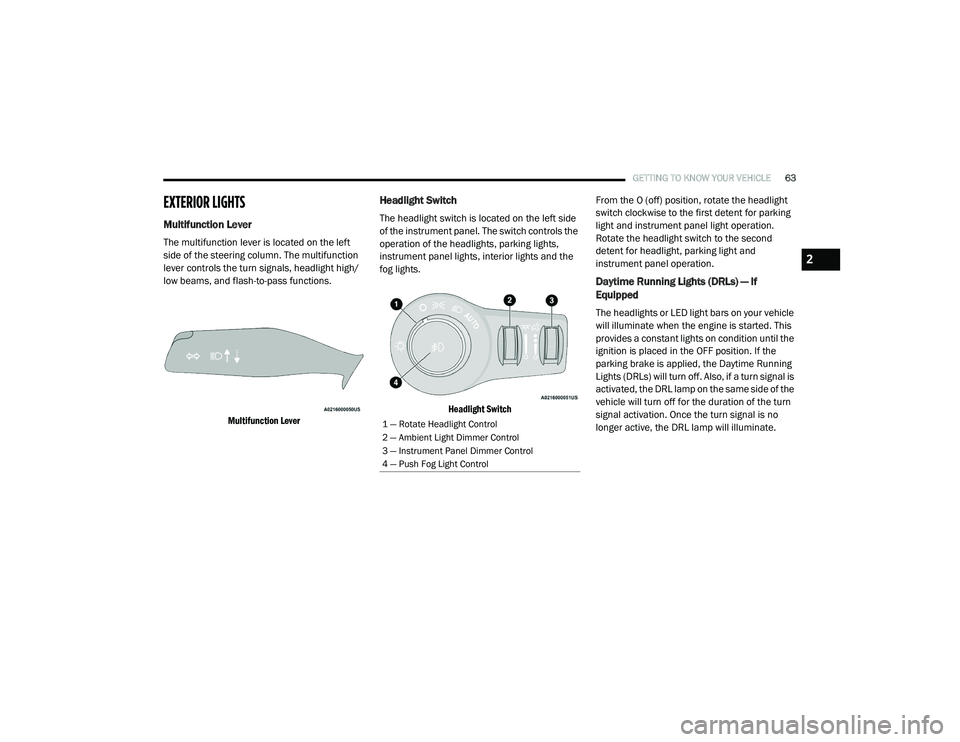
Headlight Switch
The headlight switch is located on the left side
of the instrument panel. The switch controls the
operation of the headlights, parking lights,
instrument panel lights, interior lights and the
fog lights.
Headlight Switch
From the O (off) position, rotate the headlight
switch clockwise to the first detent for parking
light and instrument panel light operation.
Rotate the headlight switch to the second
detent for headlight, parking light and
instrument panel operation.
Daytime Running Lights (DRLs) — If
Equipped
The headlights or LED light bars on your vehicle
will illuminate when the engine is started. This
provides a constant lights on condition until the
ignition is placed in the OFF position. If the
parking brake is applied, the Daytime Running
Lights (DRLs) will turn off. Also, if a turn signal is
activated, the DRL lamp on the same side of the
vehicle will turn off for the duration of the turn
signal activation. Once the turn signal is no
longer active, the DRL lamp will illuminate.
1 — Rotate Headlight Control
2 — Ambient Light Dimmer Control
3 — Instrument Panel Dimmer Control
4 — Push Fog Light Control
2
20_RU_OM_EN_US_t.book Page 63
Page 67 of 516
GETTING TO KNOW YOUR VEHICLE65
NOTE:
The engine must be running before the head -
lights will come on in the Automatic mode.
Headlights On With Wipers — If Equipped
When your headlights are in the AUTO mode
and the engine is running, the headlights will
automatically turn on when the wiper system is
also turned on. Headlights on when windshield
wipers are on may be found on vehicles
equipped with an automatic headlight system.
NOTE:
The Headlights with Wipers feature can be
turned on or off through the Uconnect system.
Refer to “Uconnect Settings” in “Multimedia”
for further information.
Headlight Delay — If Equipped
This feature provides the safety of headlight
illumination for up to 90 seconds after exiting
your vehicle.
To activate the delay feature, place the ignition
in the OFF position while the headlights are still
on. The 90 second delay interval begins when
headlight switch is turned off. If the headlights or parking lights are turned back on or the
ignition is placed in the ON position, the delay
will be cancelled.
When exiting the vehicle the driver can choose
to have the headlights remain on for 30, 60, or
90 seconds or not remain on. To change the
timer setting, select the proper setting through
the Uconnect System.
Refer to “Uconnect Settings” in “Multimedia”
for further information.
If the headlights are turned off before the
ignition, they will turn off in the normal manner.
NOTE:
The headlights must be turned off within
45 seconds of placing the ignition in the OFF
position to activate this feature.Lights-On Reminder
If the headlights or the parking lights are left on
after the ignition switch is placed in the OFF
position, a chime will sound when the driver's
door is opened.
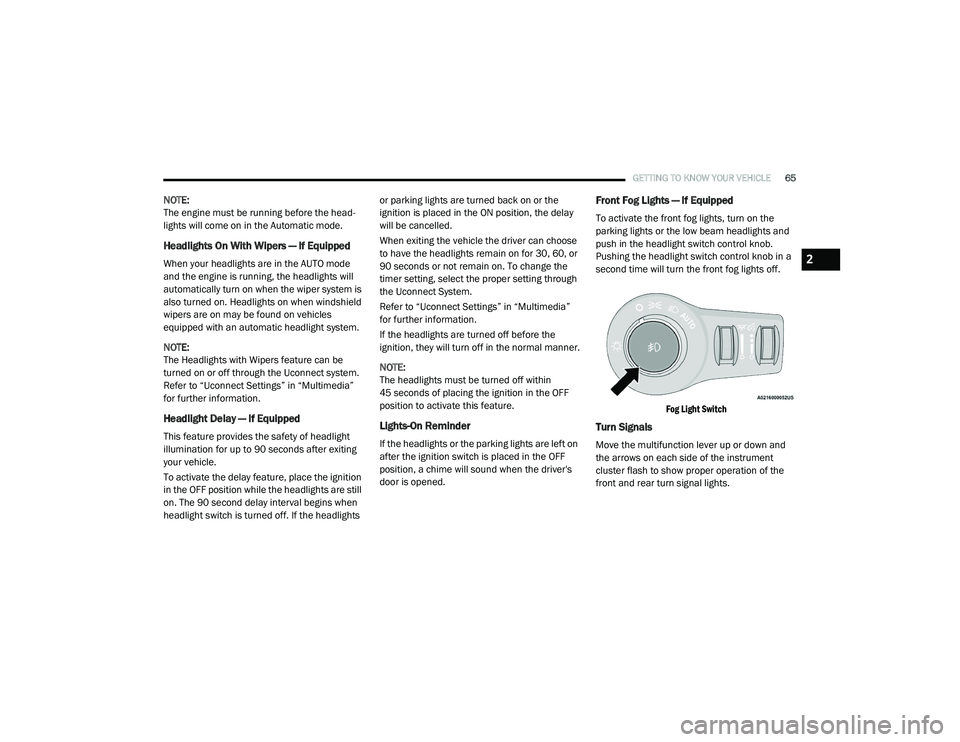
Front Fog Lights — If Equipped
To activate the front fog lights, turn on the
parking lights or the low beam headlights and
push in the headlight switch control knob.
Pushing the headlight switch control knob in a
second time will turn the front fog lights off.
Fog Light Switch
Turn Signals
Move the multifunction lever up or down and
the arrows on each side of the instrument
cluster flash to show proper operation of the
front and rear turn signal lights.
2
20_RU_OM_EN_US_t.book Page 65
Page 73 of 516
GETTING TO KNOW YOUR VEHICLE71
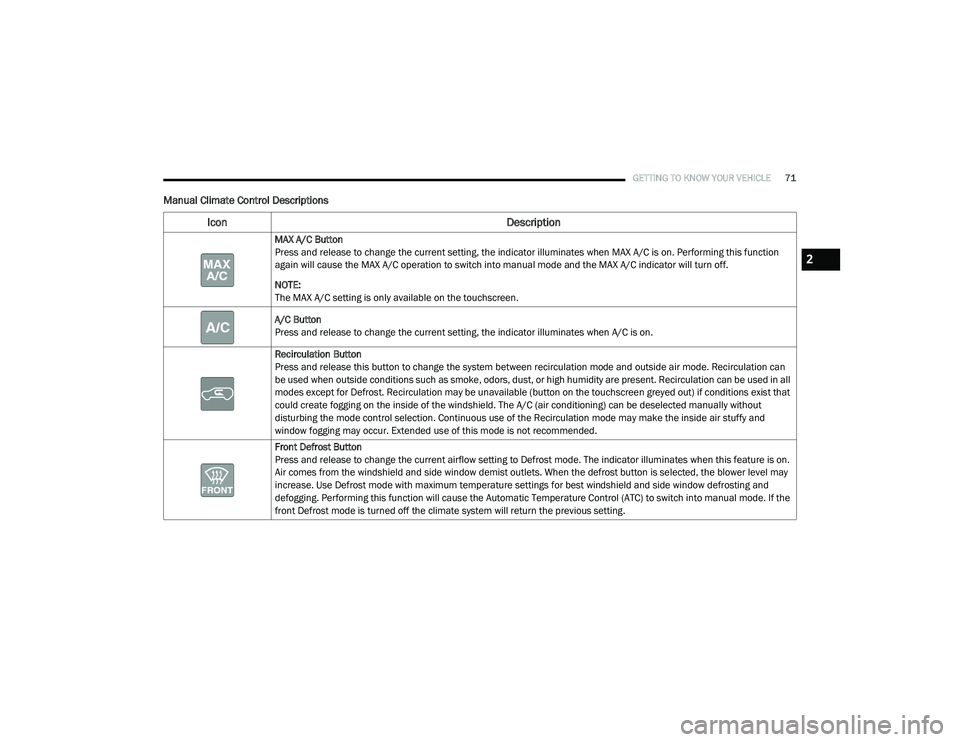
Manual Climate Control Descriptions
Icon Description
MAX A/C Button
Press and release to change the current setting, the indicator illuminates when MAX A/C is on. Performing this function
again will cause the MAX A/C operation to switch into manual mode and the MAX A/C indicator will turn off.
NOTE:
The MAX A/C setting is only available on the touchscreen.
A/C Button
Press and release to change the current setting, the indicator illuminates when A/C is on.
Recirculation Button
Press and release this button to change the system between recirculation mode and outside air mode. Recirculation can
be used when outside conditions such as smoke, odors, dust, or high humidity are present. Recirculation can be used in all
modes except for Defrost. Recirculation may be unavailable (button on the touchscreen greyed out) if conditions exist that
could create fogging on the inside of the windshield. The A/C (air conditioning) can be deselected manually without
disturbing the mode control selection. Continuous use of the Recirculation mode may make the inside air stuffy and
window fogging may occur. Extended use of this mode is not recommended.
Front Defrost Button
Press and release to change the current airflow setting to Defrost mode. The indicator illuminates when this feature is on.
Air comes from the windshield and side window demist outlets. When the defrost button is selected, the blower level may
increase. Use Defrost mode with maximum temperature settings for best windshield and side window defrosting and
defogging. Performing this function will cause the Automatic Temperature Control (ATC) to switch into manual mode. If the
front Defrost mode is turned off the climate system will return the previous setting.
2
20_RU_OM_EN_US_t.book Page 71
Page 83 of 516
GETTING TO KNOW YOUR VEHICLE81
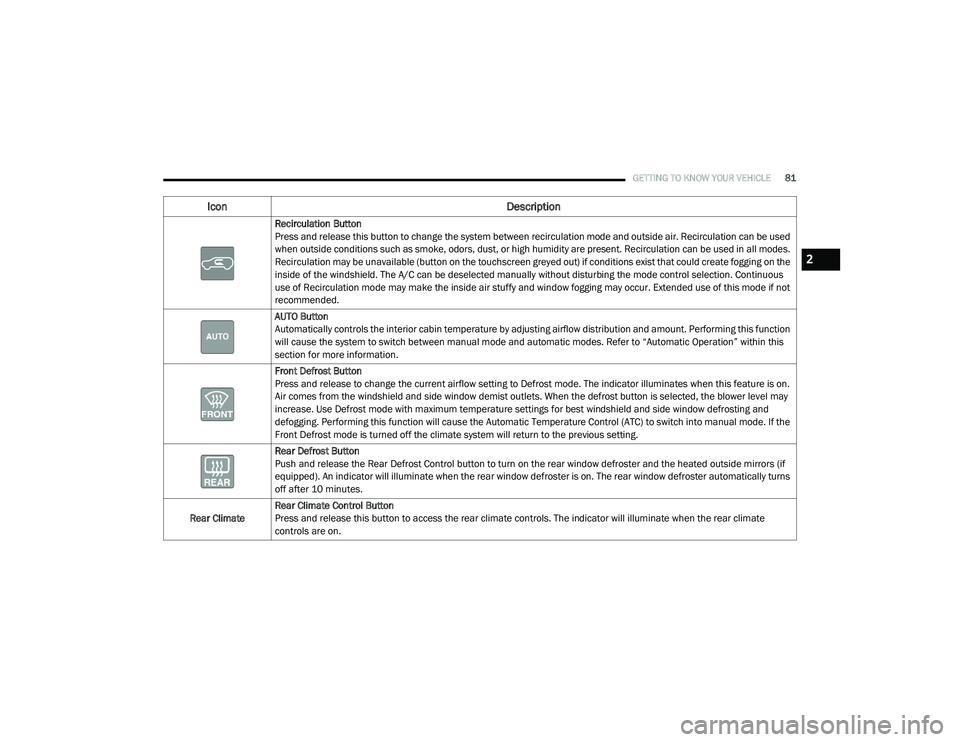
Recirculation Button
Press and release this button to change the system between recirculation mode and outside air. Recirculation can be used
when outside conditions such as smoke, odors, dust, or high humidity are present. Recirculation can be used in all modes.
Recirculation may be unavailable (button on the touchscreen greyed out) if conditions exist that could create fogging on the
inside of the windshield. The A/C can be deselected manually without disturbing the mode control selection. Continuous
use of Recirculation mode may make the inside air stuffy and window fogging may occur. Extended use of this mode if not
recommended.
AUTO Button
Automatically controls the interior cabin temperature by adjusting airflow distribution and amount. Performing this function
will cause the system to switch between manual mode and automatic modes. Refer to “Automatic Operation” within this
section for more information.
Front Defrost Button
Press and release to change the current airflow setting to Defrost mode. The indicator illuminates when this feature is on.
Air comes from the windshield and side window demist outlets. When the defrost button is selected, the blower level may
increase. Use Defrost mode with maximum temperature settings for best windshield and side window defrosting and
defogging. Performing this function will cause the Automatic Temperature Control (ATC) to switch into manual mode. If the
Front Defrost mode is turned off the climate system will return to the previous setting.
Rear Defrost Button
Push and release the Rear Defrost Control button to turn on the rear window defroster and the heated outside mirrors (if
equipped). An indicator will illuminate when the rear window defroster is on. The rear window defroster automatically turns
off after 10 minutes.
Rear Climate Rear Climate Control Button
Press and release this button to access the rear climate controls. The indicator will illuminate when the rear climate
controls are on.
Icon
Description
2
20_RU_OM_EN_US_t.book Page 81
Page 92 of 516
90GETTING TO KNOW YOUR VEHICLE
Climate Control Functions
Air Conditioning (A/C)
The Air Conditioning (A/C) button allows the
operator to manually activate or deactivate the
air conditioning system. When in A/C mode with
the ATC set to a cool temperature, dehumidified
air flows through the air outlets. If Economy
mode is desired, push the A/C button to turn off
the A/C mode in the Automatic Temperature
Control (ATC) display and deactivate the A/C
system.
NOTE:
If the system is in Mix or Defrost Mode, the A/C
can be turned off, but the A/C system shall
remain active to prevent fogging of the
windows.
If not operating in AUTO mode, the system
will not automatically sense the presence of
fog, mist or ice on the windshield. Defrost
Mode must be manually selected to clear the
windshield and side glass.
If fog or mist appears on the windshield or
side glass, select Defrost Mode and adjust
blower speed if needed.
Recirculation For Automatic Temperature
Control
When outside air contains smoke, odors, or
high humidity, or if rapid cooling is desired, you
may wish to recirculate interior air by pressing
the Recirculation control button. The
recirculation indicator will illuminate when this
button is selected. Press the button a second
time to turn off the Recirculation mode and
allow outside air into the vehicle.
NOTE:
In cold weather, use of recirculation mode may
lead to excessive window fogging. The recircula-
tion feature may be unavailable (button on the
touchscreen greyed out) if conditions exist that
could create fogging on the inside of the wind-
shield. On systems with Manual Climate
Controls, the Recirculation mode is not allowed
in Defrost Mode to improve window clearing
operation. Recirculation will be disabled auto -
matically if this mode is selected. Attempting to
use Recirculation while in this mode will cause
the LED in the control button to blink and then
turn off.
Automatic Temperature Control (ATC) — If
Equipped
Automatic Operation
1. Push the AUTO button on the faceplate, or the AUTO button on the touchscreen on the
Automatic Temperature Control (ATC)
Panel.
2. Next, adjust the temperature you would like the system to maintain by adjusting the
driver and passenger temperature control
buttons. Once the desired temperature is
displayed, the system will achieve and
automatically maintain that comfort level.
3. When the system is set up for your comfort level, it is not necessary to change the
settings. You will experience the greatest
efficiency by simply allowing the system to
function automatically.
20_RU_OM_EN_US_t.book Page 90
Page 93 of 516
GETTING TO KNOW YOUR VEHICLE91
NOTE:
It is not necessary to move the temperature
settings for cold or hot vehicles. The system
automatically adjusts the temperature,
mode, and blower speed to provide comfort
as quickly as possible.
The temperature can be displayed in U.S. or
Metric units by selecting the U.S./Metric
customer-programmable feature. Refer to
the “Uconnect Settings” in “Multimedia” for
further information.
To provide you with maximum comfort in the
Automatic mode during cold start-ups, the
blower fan will remain on low until the engine
warms up. The blower will increase in speed
and transition into Auto mode.
Manual Operation Override
This system offers a full complement of manual
override features. The AUTO symbol in the front
Automatic Temperature Control (ATC) display
will be turned off when the system is being used
in the manual mode.
Operating Tips
NOTE:
Refer to the chart at the end of this section for
suggested control settings for various weather
conditions.
Summer Operation
The engine cooling system must be protected
with a high-quality antifreeze coolant to provide
proper corrosion protection and to protect
against engine overheating. OAT coolant
(conforming to MS.90032) is recommended.
Refer to “Fluids And Lubricants” in “Technical
Specifications” for proper coolant selection.
Winter Operation
To ensure the best possible heater and
defroster performance, make sure the engine
cooling system is functioning properly and the
proper amount, type, and concentration of
coolant is used. Refer to “Fluids And
Lubricants” in “Technical Specifications” for
proper coolant selection. Use of the air
Recirculation mode during Winter months is not
recommended, because it may cause window
fogging.
Vacation/Storage
Before you store your vehicle, or keep it out of
service (i.e., vacation) for two weeks or more,
run the air conditioning system at idle for about
five minutes, in fresh air with the blower setting
on high. This will ensure adequate system
lubrication to minimize the possibility of
compressor damage when the system is started
again.
Window Fogging
Vehicle windows tend to fog on the inside in
mild, rainy, and/or humid weather. To clear the
windows, select Defrost or Mix mode and
increase the front blower speed. Do not use the
Recirculation mode without A/C (air
conditioning) for long periods, as fogging may
occur.
2
20_RU_OM_EN_US_t.book Page 91
Page 94 of 516
92GETTING TO KNOW YOUR VEHICLE
Outside Air Intake
Make sure the air intake, located directly in
front of the windshield, is free of obstructions
such as leaves. Leaves collected in the air
intake may reduce airflow, and if they enter the
plenum, they could plug the water drains. In
Winter months, make sure the air intake is clear
of ice, slush, and snow.
A/C Air Filter
The Climate Control system filters out dust and
pollen from the air. Refer to an authorized
dealer for filter replacement instructions.
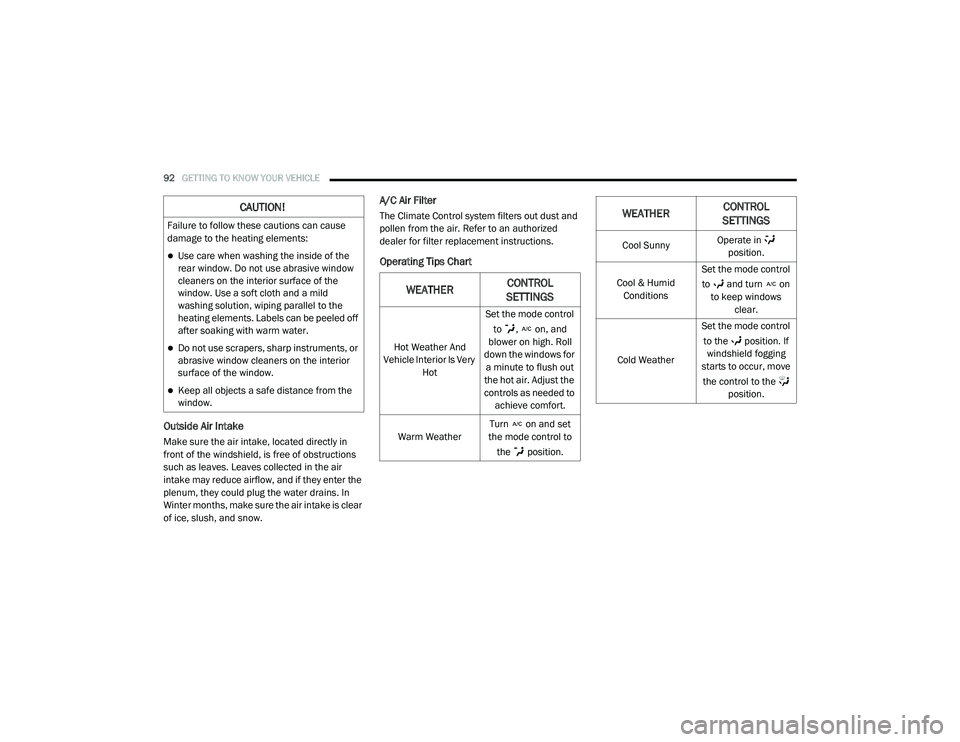
Operating Tips Chart
CAUTION!
Failure to follow these cautions can cause
damage to the heating elements:
Use care when washing the inside of the
rear window. Do not use abrasive window
cleaners on the interior surface of the
window. Use a soft cloth and a mild
washing solution, wiping parallel to the
heating elements. Labels can be peeled off
after soaking with warm water.
Do not use scrapers, sharp instruments, or
abrasive window cleaners on the interior
surface of the window.
Keep all objects a safe distance from the
window.
WEATHERCONTROL
SETTINGS
Hot Weather And
Vehicle Interior Is Very Hot Set the mode control
to , on, and
blower on high. Roll
down the windows for a minute to flush out
the hot air. Adjust the
controls as needed to achieve comfort.
Warm Weather Turn on and set
the mode control to
the position.
Cool Sunny Operate in
position.
Cool & Humid Conditions Set the mode control
to and turn on to keep windows clear.
Cold Weather Set the mode control
to the position. If windshield fogging
starts to occur, move
the control to the position.
WEATHER CONTROL
SETTINGS
20_RU_OM_EN_US_t.book Page 92
Page 150 of 516
148GETTING TO KNOW YOUR INSTRUMENT PANEL
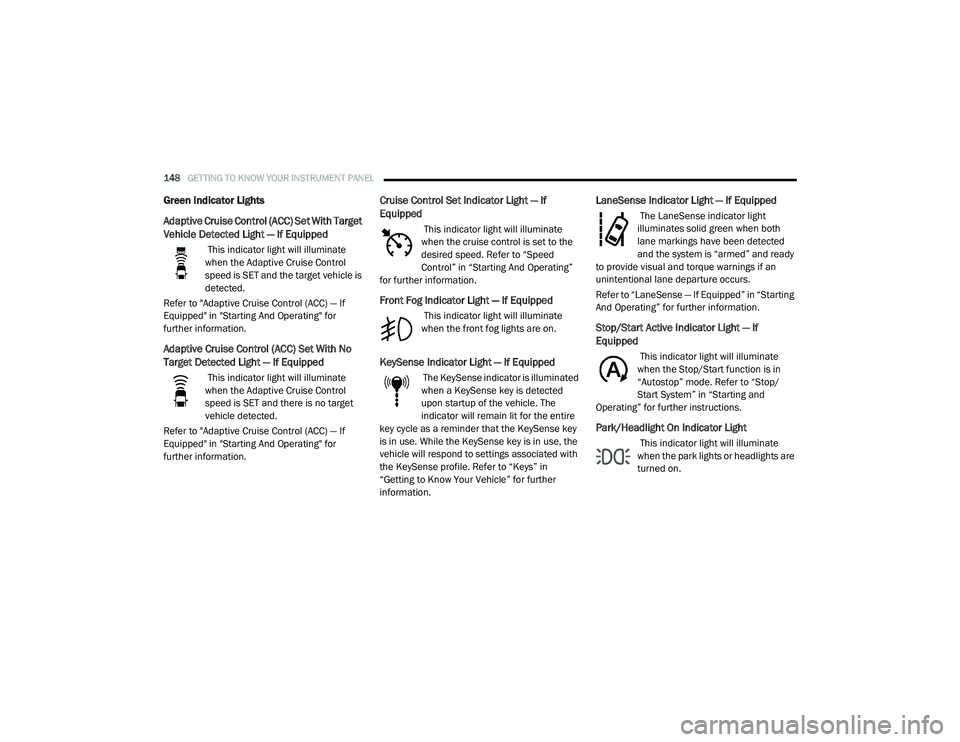
Green Indicator Lights
Adaptive Cruise Control (ACC) Set With Target
Vehicle Detected Light — If Equipped
This indicator light will illuminate
when the Adaptive Cruise Control
speed is SET and the target vehicle is
detected.
Refer to "Adaptive Cruise Control (ACC) — If
Equipped" in "Starting And Operating" for
further information.
Adaptive Cruise Control (ACC) Set With No
Target Detected Light — If Equipped
This indicator light will illuminate
when the Adaptive Cruise Control
speed is SET and there is no target
vehicle detected.
Refer to "Adaptive Cruise Control (ACC) — If
Equipped" in "Starting And Operating" for
further information.
Cruise Control Set Indicator Light — If
Equipped
This indicator light will illuminate
when the cruise control is set to the
desired speed. Refer to “Speed
Control” in “Starting And Operating”
for further information.
Front Fog Indicator Light — If Equipped
This indicator light will illuminate
when the front fog lights are on.
KeySense Indicator Light — If Equipped
The KeySense indicator is illuminated
when a KeySense key is detected
upon startup of the vehicle. The
indicator will remain lit for the entire
key cycle as a reminder that the KeySense key
is in use. While the KeySense key is in use, the
vehicle will respond to settings associated with
the KeySense profile. Refer to “Keys” in
“Getting to Know Your Vehicle” for further
information.
LaneSense Indicator Light — If Equipped
The LaneSense indicator light
illuminates solid green when both
lane markings have been detected
and the system is “armed” and ready
to provide visual and torque warnings if an
unintentional lane departure occurs.
Refer to “LaneSense — If Equipped” in “Starting
And Operating” for further information.
Stop/Start Active Indicator Light — If
Equipped
This indicator light will illuminate
when the Stop/Start function is in
“Autostop” mode. Refer to “Stop/
Start System” in “Starting and
Operating” for further instructions.
Park/Headlight On Indicator Light
This indicator light will illuminate
when the park lights or headlights are
turned on.
20_RU_OM_EN_US_t.book Page 148
Page 242 of 516
240STARTING AND OPERATING
(Continued)
NOTE:
If the sensor does not detect a vehicle ahead
of you, ACC will maintain a fixed set speed.
If the ACC sensor detects a vehicle ahead, ACC
will apply limited braking or accelerate (not to
exceed the original set speed) automatically to
maintain a preset following distance, while
matching the speed of the vehicle ahead.
The Cruise Control system has two control
modes:
Adaptive Cruise Control mode for maintaining
an appropriate distance between vehicles.
Normal (Fixed Speed) Cruise Control mode for
cruising at a constant preset speed. For addi -
tional information, refer to “Normal (Fixed
Speed) Cruise Control Mode” in this section.
NOTE:
Normal (Fixed Speed) Cruise Control will not
react to preceding vehicles. Always be aware of
the mode selected.
You can change the mode by using the Cruise
Control buttons. The two control modes
function differently. Always confirm which mode
is selected.
WARNING!
Adaptive Cruise Control (ACC) is a conve -
nience system. It is not a substitute for
active driver involvement. It is always the
driver’s responsibility to be attentive of
road, traffic, and weather conditions,
vehicle speed, distance to the vehicle
ahead; and, most importantly, brake opera -
tion to ensure safe operation of the vehicle
under all road conditions. Your complete
attention is always required while driving to
maintain safe control of your vehicle.
Failure to follow these warnings can result
in a collision and death or serious personal
injury.
The ACC system:
Does not react to pedestrians,
oncoming vehicles, and stationary
objects (e.g., a stopped vehicle in a
traffic jam or a disabled vehicle).
Cannot take street, traffic, and weather
conditions into account, and may be
limited upon adverse sight distance
conditions.
Does not always fully recognize
complex driving conditions, which can
result in wrong or missing distance
warnings.
Will bring the vehicle to a complete stop
while following a target vehicle and hold
the vehicle for approximately 3 minutes
in the stop position. If the target vehicle
does not start moving within 3 minutes
the parking brake will be activated, and
the ACC system will be cancelled.
You should switch off the ACC system:
When driving in fog, heavy rain, heavy
snow, sleet, heavy traffic, and complex
driving situations (i.e., in highway construc -
tion zones).
When entering a turn lane or highway off
ramp; when driving on roads that are
winding, icy, snow-covered, slippery, or
have steep uphill or downhill slopes.
When towing a trailer up or down steep
slopes.
When circumstances do not allow safe
driving at a constant speed.
WARNING! (Continued)
20_RU_OM_EN_US_t.book Page 240