remove CHRYSLER PACIFICA HYBRID 2022 Owners Manual
[x] Cancel search | Manufacturer: CHRYSLER, Model Year: 2022, Model line: PACIFICA HYBRID, Model: CHRYSLER PACIFICA HYBRID 2022Pages: 384, PDF Size: 23.92 MB
Page 18 of 384
16GETTING TO KNOW YOUR VEHICLE
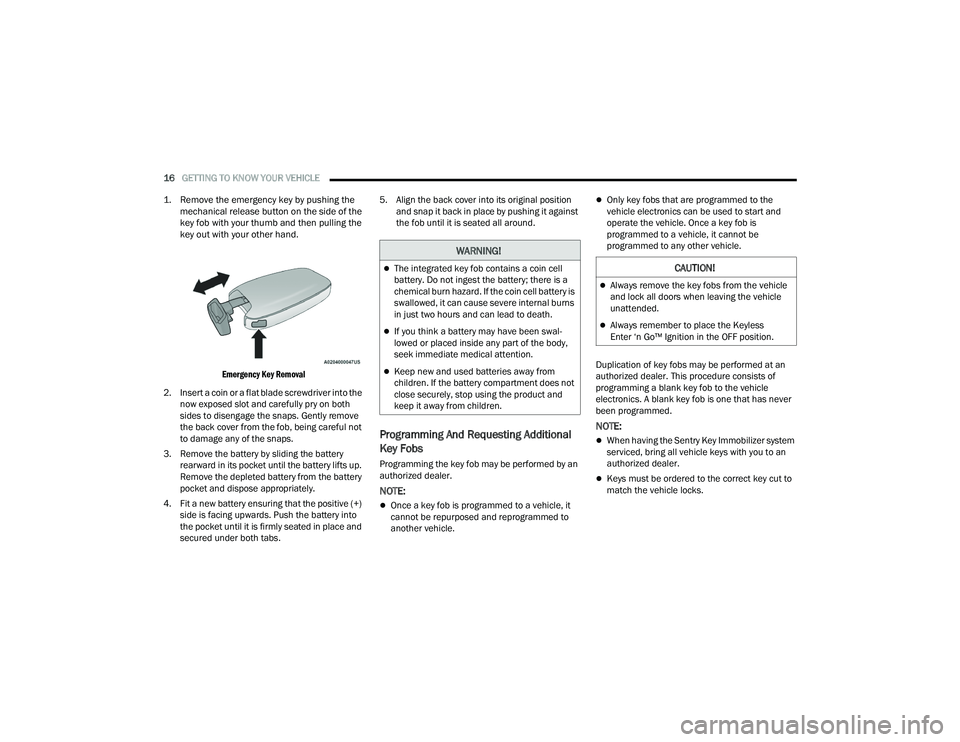
1. Remove the emergency key by pushing the mechanical release button on the side of the
key fob with your thumb and then pulling the
key out with your other hand.
Emergency Key Removal
2. Insert a coin or a flat blade screwdriver into the now exposed slot and carefully pry on both
sides to disengage the snaps. Gently remove
the back cover from the fob, being careful not
to damage any of the snaps.
3. Remove the battery by sliding the battery rearward in its pocket until the battery lifts up.
Remove the depleted battery from the battery
pocket and dispose appropriately.
4. Fit a new battery ensuring that the positive (+) side is facing upwards. Push the battery into
the pocket until it is firmly seated in place and
secured under both tabs. 5. Align the back cover into its original position
and snap it back in place by pushing it against
the fob until it is seated all around.
Programming And Requesting Additional
Key Fobs
Programming the key fob may be performed by an
authorized dealer.
NOTE:
Once a key fob is programmed to a vehicle, it
cannot be repurposed and reprogrammed to
another vehicle.
Only key fobs that are programmed to the
vehicle electronics can be used to start and
operate the vehicle. Once a key fob is
programmed to a vehicle, it cannot be
programmed to any other vehicle.
Duplication of key fobs may be performed at an
authorized dealer. This procedure consists of
programming a blank key fob to the vehicle
electronics. A blank key fob is one that has never
been programmed.
NOTE:
When having the Sentry Key Immobilizer system
serviced, bring all vehicle keys with you to an
authorized dealer.
Keys must be ordered to the correct key cut to
match the vehicle locks.
WARNING!
The integrated key fob contains a coin cell
battery. Do not ingest the battery; there is a
chemical burn hazard. If the coin cell battery is
swallowed, it can cause severe internal burns
in just two hours and can lead to death.
If you think a battery may have been swal-
lowed or placed inside any part of the body,
seek immediate medical attention.
Keep new and used batteries away from
children. If the battery compartment does not
close securely, stop using the product and
keep it away from children.
CAUTION!
Always remove the key fobs from the vehicle
and lock all doors when leaving the vehicle
unattended.
Always remember to place the Keyless
Enter ‘n Go™ Ignition in the OFF position.
22_RUP_OM_EN_USC_t.book Page 16
Page 21 of 384
GETTING TO KNOW YOUR VEHICLE19
(Continued)
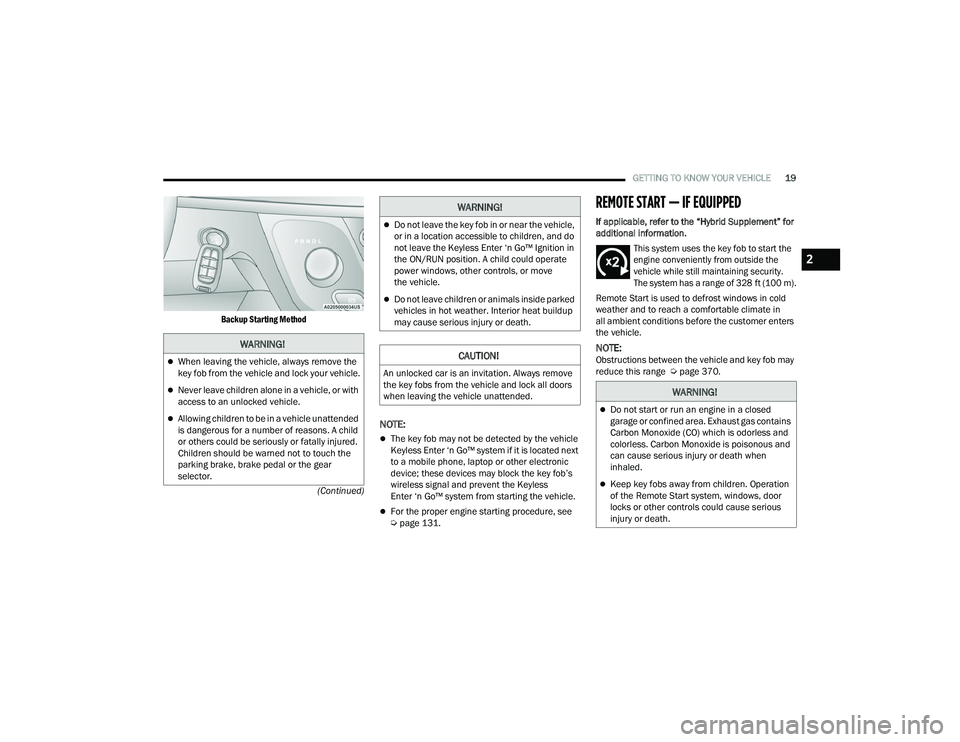
Backup Starting Method
NOTE:
The key fob may not be detected by the vehicle
Keyless Enter ‘n Go™ system if it is located next
to a mobile phone, laptop or other electronic
device; these devices may block the key fob’s
wireless signal and prevent the Keyless
Enter ‘n Go™ system from starting the vehicle.
For the proper engine starting procedure, see
Ú
page 131.
REMOTE START — IF EQUIPPED
If applicable, refer to the “Hybrid Supplement” for
additional information.
This system uses the key fob to start the
engine conveniently from outside the
vehicle while still maintaining security.
The system has a range of 328 ft (100 m).
Remote Start is used to defrost windows in cold
weather and to reach a comfortable climate in
all ambient conditions before the customer enters
the vehicle.
NOTE:Obstructions between the vehicle and key fob may
reduce this range Ú page 370.
WARNING!
When leaving the vehicle, always remove the
key fob from the vehicle and lock your vehicle.
Never leave children alone in a vehicle, or with
access to an unlocked vehicle.
Allowing children to be in a vehicle unattended
is dangerous for a number of reasons. A child
or others could be seriously or fatally injured.
Children should be warned not to touch the
parking brake, brake pedal or the gear
selector.
Do not leave the key fob in or near the vehicle,
or in a location accessible to children, and do
not leave the Keyless Enter ‘n Go™ Ignition in
the ON/RUN position. A child could operate
power windows, other controls, or move
the vehicle.
Do not leave children or animals inside parked
vehicles in hot weather. Interior heat buildup
may cause serious injury or death.
CAUTION!
An unlocked car is an invitation. Always remove
the key fobs from the vehicle and lock all doors
when leaving the vehicle unattended.
WARNING!
WARNING!
Do not start or run an engine in a closed
garage or confined area. Exhaust gas contains
Carbon Monoxide (CO) which is odorless and
colorless. Carbon Monoxide is poisonous and
can cause serious injury or death when
inhaled.
Keep key fobs away from children. Operation
of the Remote Start system, windows, door
locks or other controls could cause serious
injury or death.
2
22_RUP_OM_EN_USC_t.book Page 19
Page 26 of 384
24GETTING TO KNOW YOUR VEHICLE
(Continued)
If the door lock is in the locked position (no ribbing
is visible) when you shut the door, the door will
lock. Therefore, make sure the key fob is not inside
the vehicle before closing the door.
NOTE:The manual door locks will not lock or unlock the
liftgate.
POWER DOOR LOCKS — IF EQUIPPED
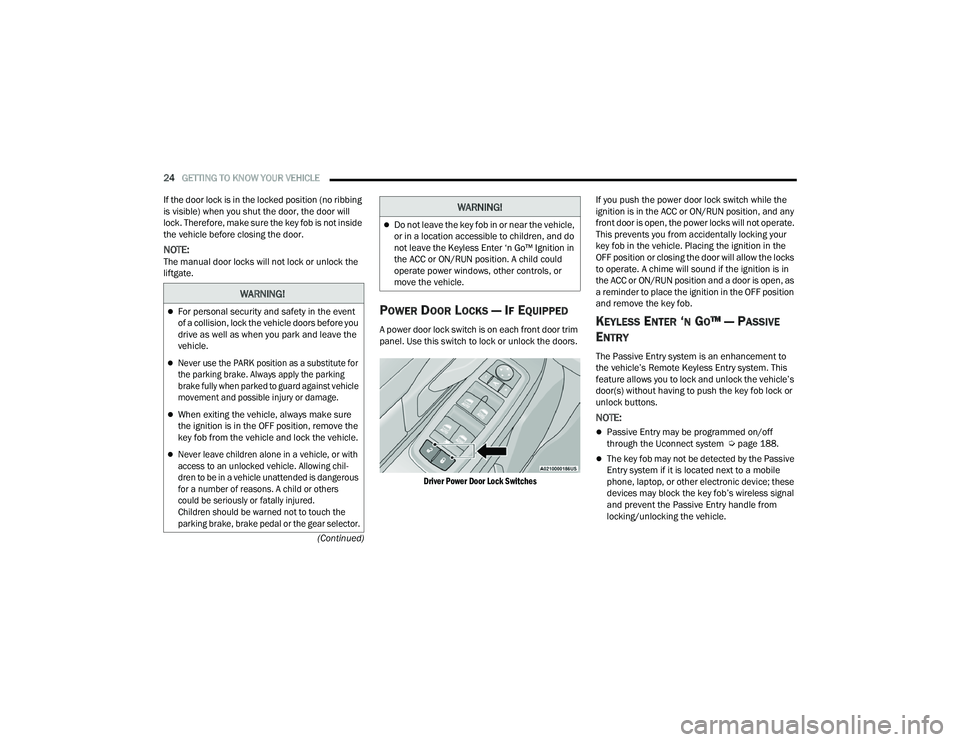
A power door lock switch is on each front door trim
panel. Use this switch to lock or unlock the doors.
Driver Power Door Lock Switches
If you push the power door lock switch while the
ignition is in the ACC or ON/RUN position, and any
front door is open, the power locks will not operate.
This prevents you from accidentally locking your
key fob in the vehicle. Placing the ignition in the
OFF position or closing the door will allow the locks
to operate. A chime will sound if the ignition is in
the ACC or ON/RUN position and a door is open, as
a reminder to place the ignition in the OFF position
and remove the key fob.KEYLESS ENTER ‘N GO™ — PASSIVE
E
NTRY
The Passive Entry system is an enhancement to
the vehicle’s Remote Keyless Entry system. This
feature allows you to lock and unlock the vehicle’s
door(s) without having to push the key fob lock or
unlock buttons.
NOTE:
Passive Entry may be programmed on/off
through the Uconnect system Ú page 188.
The key fob may not be detected by the Passive
Entry system if it is located next to a mobile
phone, laptop, or other electronic device; these
devices may block the key fob’s wireless signal
and prevent the Passive Entry handle from
locking/unlocking the vehicle.
WARNING!
For personal security and safety in the event
of a collision, lock the vehicle doors before you
drive as well as when you park and leave the
vehicle.
Never use the PARK position as a substitute for
the parking brake. Always apply the parking
brake fully when parked to guard against vehicle
movement and possible injury or damage.
When exiting the vehicle, always make sure
the ignition is in the OFF position, remove the
key fob from the vehicle and lock the vehicle.
Never leave children alone in a vehicle, or with
access to an unlocked vehicle. Allowing chil -
dren to be in a vehicle unattended is dangerous
for a number of reasons. A child or others
could be seriously or fatally injured.
Children should be warned not to touch the
parking brake, brake pedal or the gear selector.
Do not leave the key fob in or near the vehicle,
or in a location accessible to children, and do
not leave the Keyless Enter ‘n Go™ Ignition in
the ACC or ON/RUN position. A child could
operate power windows, other controls, or
move the vehicle.
WARNING!
22_RUP_OM_EN_USC_t.book Page 24
Page 30 of 384
28GETTING TO KNOW YOUR VEHICLE
POWER SLIDING SIDE DOOR —
I
F EQUIPPED
The power sliding door may be power opened or
closed in several ways:
Key fob
Inside or outside handles
Buttons located:
In the overhead console
Just inside the sliding door
On the outside handle
Push the button on the key fob twice
within five seconds to open, close, or
reverse a power sliding door.
The key fob and the overhead console button will
operate the door when the door is locked. All other
ways require the sliding door to be unlocked. If the
vehicle is equipped with Passive Entry, pushing the
button on the outside handle or Hands-Free
feature (if equipped) will unlock and open the
sliding door, with a valid Passive Entry key fob
within 5 ft (1.5 m) of the door handle.
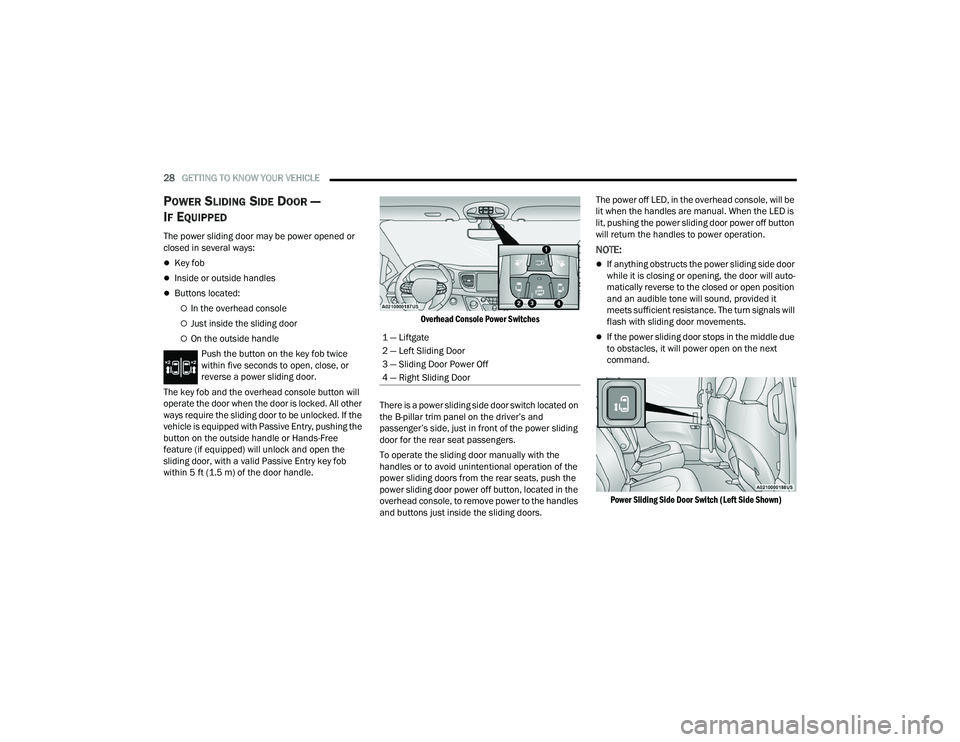
Overhead Console Power Switches
There is a power sliding side door switch located on
the B-pillar trim panel on the driver’s and
passenger’s side, just in front of the power sliding
door for the rear seat passengers.
To operate the sliding door manually with the
handles or to avoid unintentional operation of the
power sliding doors from the rear seats, push the
power sliding door power off button, located in the
overhead console, to remove power to the handles
and buttons just inside the sliding doors. The power off LED, in the overhead console, will be
lit when the handles are manual. When the LED is
lit, pushing the power sliding door power off button
will return the handles to power operation.
NOTE:
If anything obstructs the power sliding side door
while it is closing or opening, the door will auto
-
matically reverse to the closed or open position
and an audible tone will sound, provided it
meets sufficient resistance. The turn signals will
flash with sliding door movements.
If the power sliding door stops in the middle due
to obstacles, it will power open on the next
command.
Power Sliding Side Door Switch (Left Side Shown)
1 — Liftgate
2 — Left Sliding Door
3 — Sliding Door Power Off
4 — Right Sliding Door
22_RUP_OM_EN_USC_t.book Page 28
Page 38 of 384
36GETTING TO KNOW YOUR VEHICLE
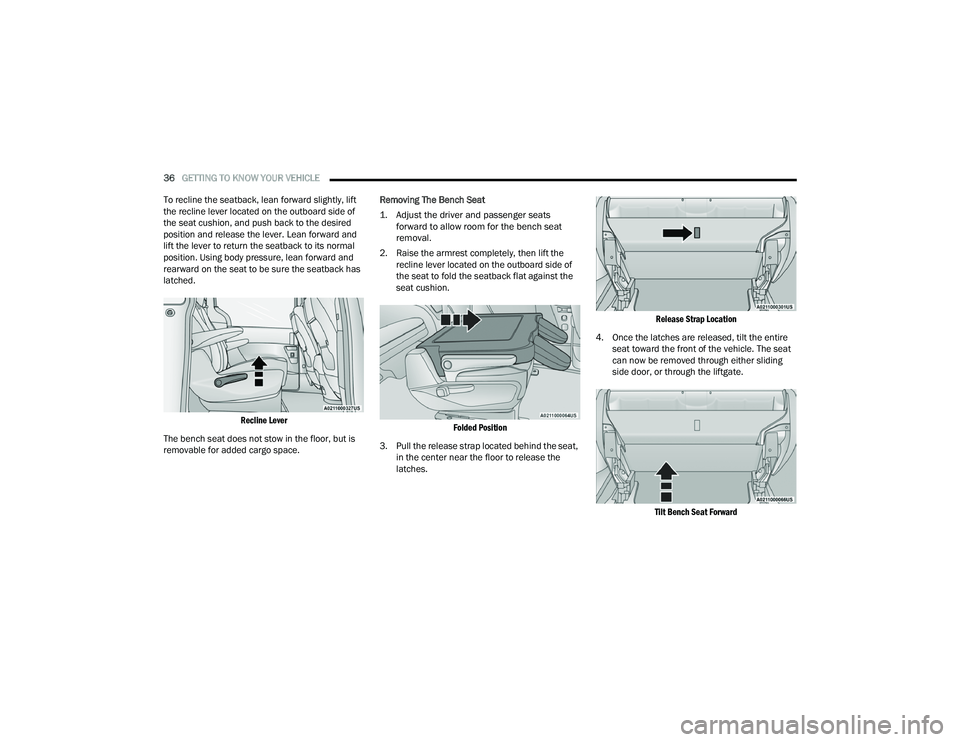
To recline the seatback, lean forward slightly, lift
the recline lever located on the outboard side of
the seat cushion, and push back to the desired
position and release the lever. Lean forward and
lift the lever to return the seatback to its normal
position. Using body pressure, lean forward and
rearward on the seat to be sure the seatback has
latched.
Recline Lever
The bench seat does not stow in the floor, but is
removable for added cargo space. Removing The Bench Seat
1. Adjust the driver and passenger seats
forward to allow room for the bench seat
removal.
2. Raise the armrest completely, then lift the recline lever located on the outboard side of
the seat to fold the seatback flat against the
seat cushion.
Folded Position
3. Pull the release strap located behind the seat, in the center near the floor to release the
latches.
Release Strap Location
4. Once the latches are released, tilt the entire seat toward the front of the vehicle. The seat
can now be removed through either sliding
side door, or through the liftgate.
Tilt Bench Seat Forward
22_RUP_OM_EN_USC_t.book Page 36
Page 39 of 384
GETTING TO KNOW YOUR VEHICLE37
NOTE:
Due to the weight of the bench seat, it is recom -
mended that two people are utilized for its
removal.
When storing the removed bench seat, it is
important to keep the seatback in the folded
position.
Reinstalling The Bench Seat
1. To reinstall the bench seat, align the seats front attachments into the detent positions
on the floor.
2. Tilt seat rearward to lock the seatback into its original position.
NOTE:Push downward to ensure the rear latches are in
the locked position.
3. Lift the recline handle and return the seatback to the seating position.
Second Row Removable 8th Seat —
If Equipped
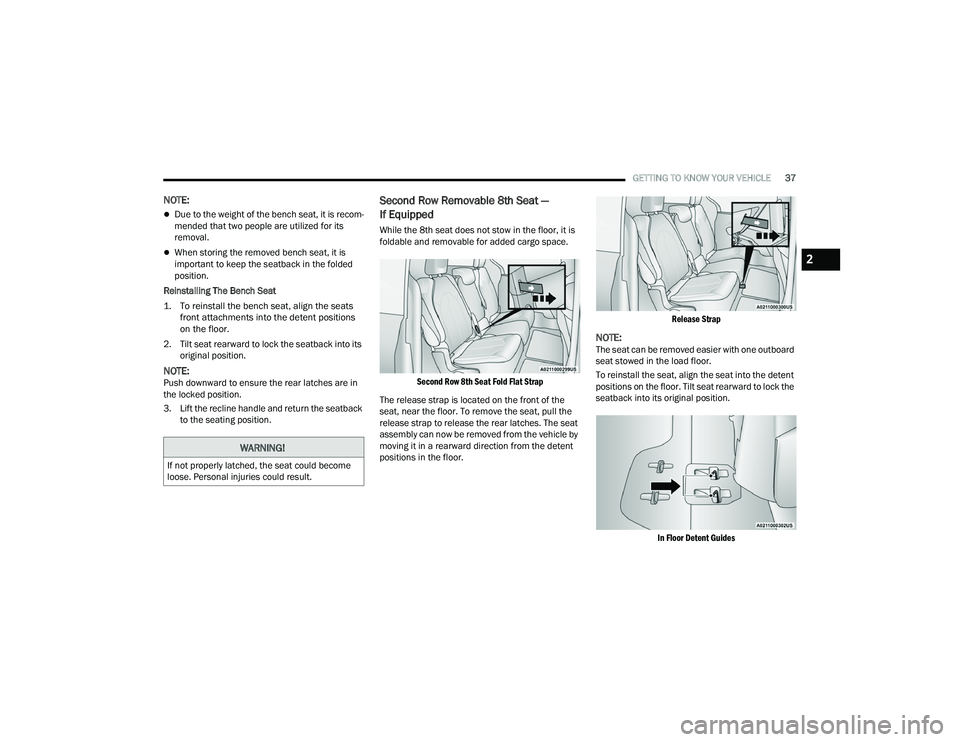
While the 8th seat does not stow in the floor, it is
foldable and removable for added cargo space.
Second Row 8th Seat Fold Flat Strap
The release strap is located on the front of the
seat, near the floor. To remove the seat, pull the
release strap to release the rear latches. The seat
assembly can now be removed from the vehicle by
moving it in a rearward direction from the detent
positions in the floor.
Release Strap
NOTE:The seat can be removed easier with one outboard
seat stowed in the load floor.
To reinstall the seat, align the seat into the detent
positions on the floor. Tilt seat rearward to lock the
seatback into its original position.
In Floor Detent Guides
WARNING!
If not properly latched, the seat could become
loose. Personal injuries could result.
2
22_RUP_OM_EN_USC_t.book Page 37
Page 42 of 384
40GETTING TO KNOW YOUR VEHICLE
Second Row Removable Quad Seat
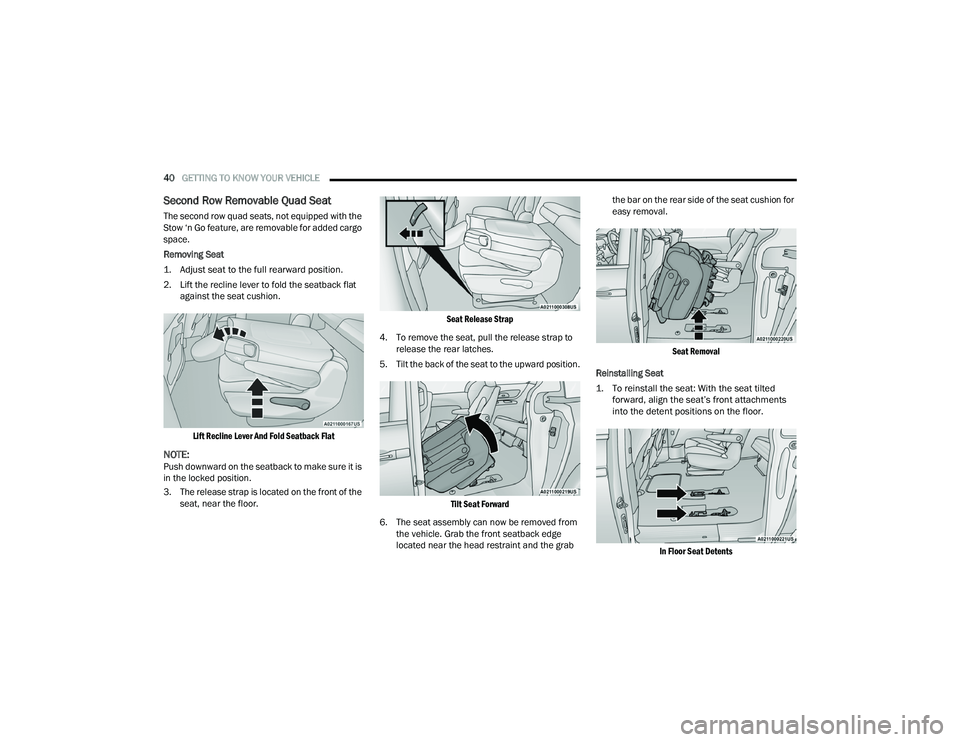
The second row quad seats, not equipped with the
Stow ‘n Go feature, are removable for added cargo
space.
Removing Seat
1. Adjust seat to the full rearward position.
2. Lift the recline lever to fold the seatback flat
against the seat cushion.
Lift Recline Lever And Fold Seatback Flat
NOTE:Push downward on the seatback to make sure it is
in the locked position.
3. The release strap is located on the front of the seat, near the floor.
Seat Release Strap
4. To remove the seat, pull the release strap to release the rear latches.
5. Tilt the back of the seat to the upward position.
Tilt Seat Forward
6. The seat assembly can now be removed from the vehicle. Grab the front seatback edge
located near the head restraint and the grab the bar on the rear side of the seat cushion for
easy removal.
Seat Removal
Reinstalling Seat
1. To reinstall the seat: With the seat tilted forward, align the seat’s front attachments
into the detent positions on the floor.
In Floor Seat Detents
22_RUP_OM_EN_USC_t.book Page 40
Page 45 of 384
GETTING TO KNOW YOUR VEHICLE43
Using the Auto Advance ‘n Return Feature
NOTE:
The button is only functional when the power
sliding door is open and the vehicle is in PARK.
If the door is not open or the vehicle is not in
PARK when the button is pushed, the front seat
will not move and a message will be displayed in
the instrument cluster display.
If the power sliding door is closing when the
button is pushed, the front seat will not move
and a message will be displayed in the instru -
ment cluster display.
The Auto Advance ‘n Return feature will not
function if the front doors are open.
1. Push and release the Auto Advance ‘n Return button.
2. Perform the second row Stow ‘n Go seat movement Ú page 43.
3. Push and release the Auto Advance ‘n Return button a second time. The front seat cushion
and seatback will return to the original starting
location.
NOTE:
To abort seat operation while seat is in motion,
push the Auto Advance ‘n Return button, or
push the front power seat button to stop the seat movement. Pushing the Auto Advance ‘n
Return button again will return the front seat to
the original starting location.
The Auto Advance ‘n Return system includes
obstacle detection. When the system detects an
obstacle, the seat will stop, reverse direction,
and return to the previous location. A message
will be displayed in the instrument cluster indi
-
cating that an obstacle has been detected.
If the front seat is already in a location that will
allow space for Stow ‘n Go of the second row
seat, the front seat will not move and a message
will be displayed in the instrument cluster.
If calibration of the front seat is lost, the seat will
automatically recalibrate when the Auto
Advance ‘n Return button is pushed. This may
result in the seat cushion moving forward and
downward, before moving to the location that
will allow space for the second row Stow ‘n Go
seat movement.
SECOND ROW STOW 'N GO
For Manual Seats: To stow the seat in the floor, move
the front seat all the way forward using the manual
seat adjustment bar. Move the seatback all the way
forward using the recliner handle located on the
outboard side of the cushion. Move the seat height to
at least mid position using the height adjuster handle
in the outboard side of the cushion.
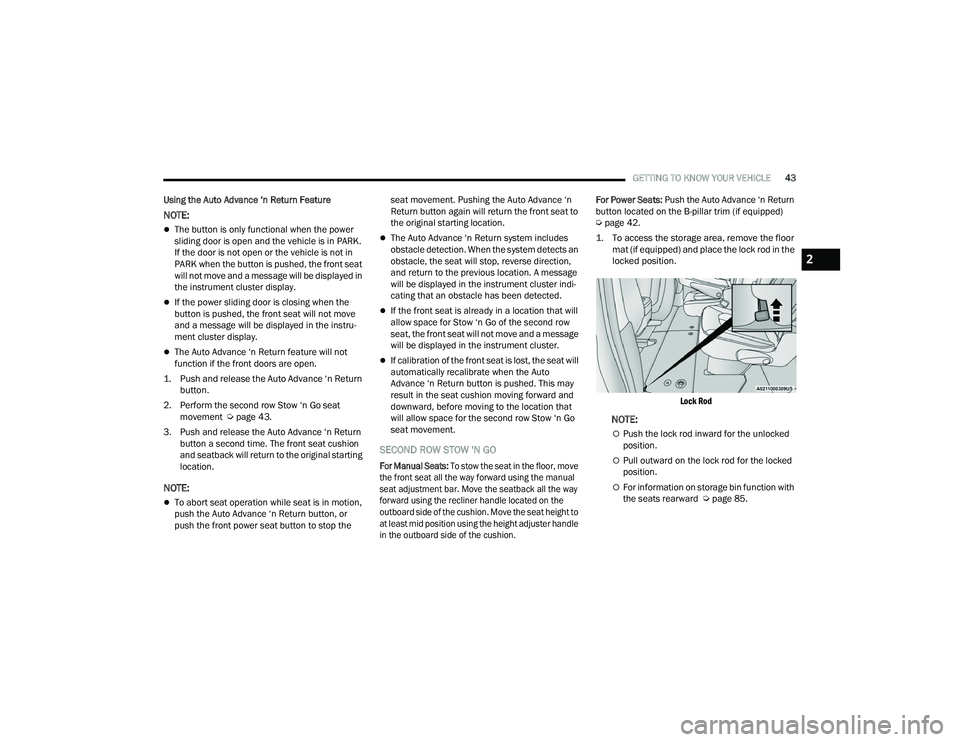
For Power Seats:
Push the Auto Advance ‘n Return
button located on the B-pillar trim (if equipped)
Ú page 42.
1. To access the storage area, remove the floor mat (if equipped) and place the lock rod in the
locked position.
Lock Rod
NOTE:
Push the lock rod inward for the unlocked
position.
Pull outward on the lock rod for the locked
position.
For information on storage bin function with
the seats rearward Ú page 85.
2
22_RUP_OM_EN_USC_t.book Page 43
Page 46 of 384
44GETTING TO KNOW YOUR VEHICLE
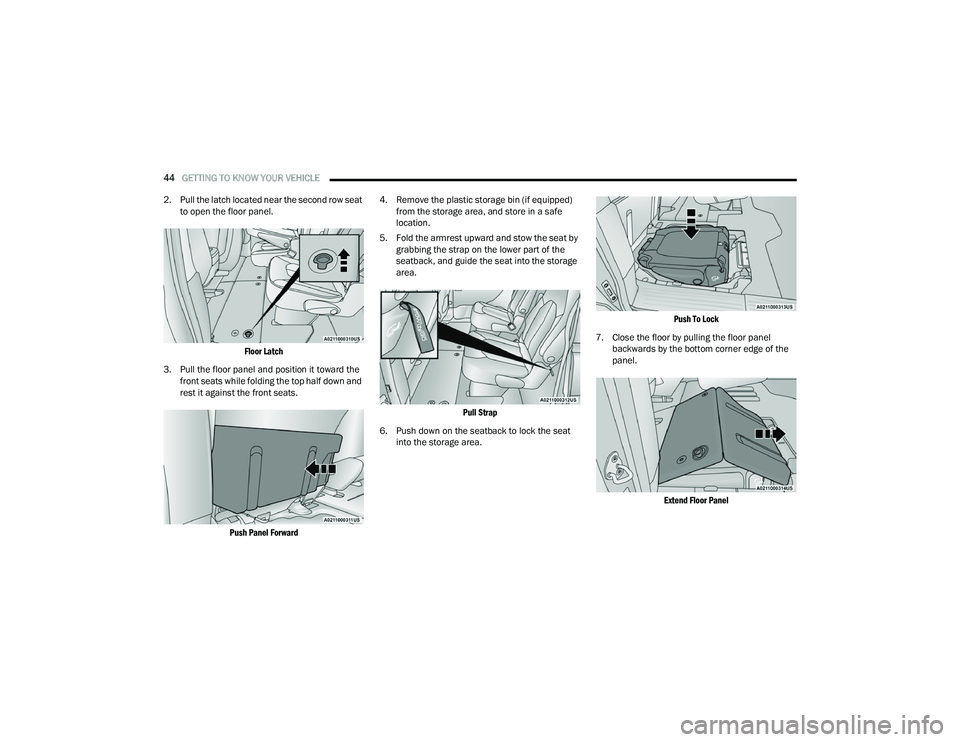
2. Pull the latch located near the second row seat to open the floor panel.
Floor Latch
3. Pull the floor panel and position it toward the front seats while folding the top half down and
rest it against the front seats.
Push Panel Forward
4. Remove the plastic storage bin (if equipped)
from the storage area, and store in a safe
location.
5. Fold the armrest upward and stow the seat by grabbing the strap on the lower part of the
seatback, and guide the seat into the storage
area.
Pull Strap
6. Push down on the seatback to lock the seat into the storage area.
Push To Lock
7. Close the floor by pulling the floor panel backwards by the bottom corner edge of the
panel.
Extend Floor Panel
22_RUP_OM_EN_USC_t.book Page 44
Page 47 of 384
GETTING TO KNOW YOUR VEHICLE45
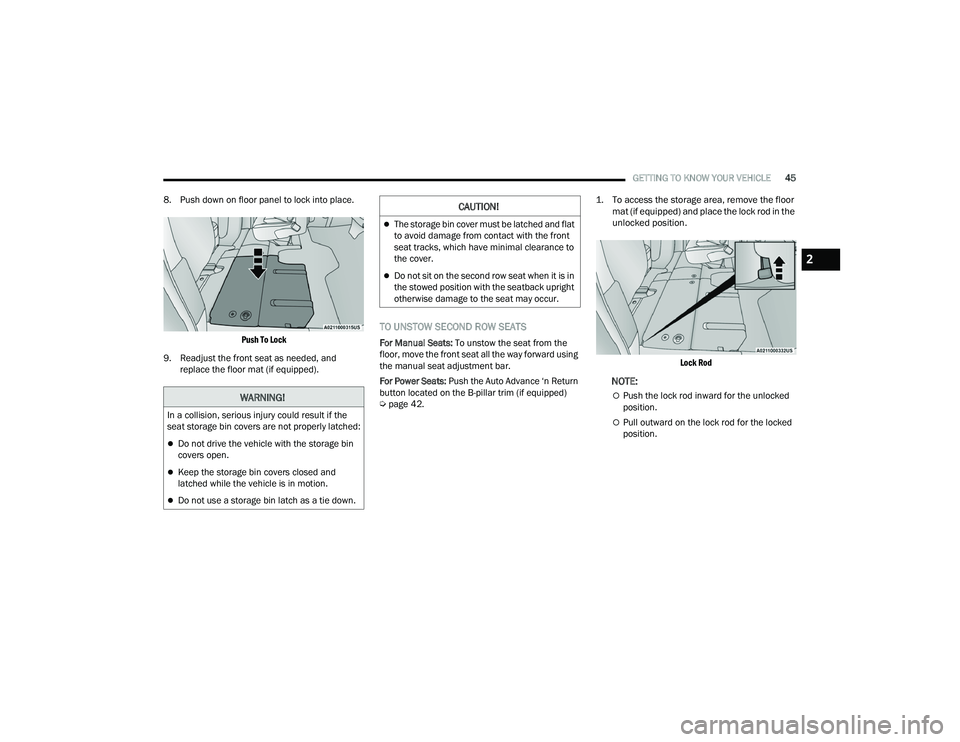
8. Push down on floor panel to lock into place.
Push To Lock
9. Readjust the front seat as needed, and replace the floor mat (if equipped).
TO UNSTOW SECOND ROW SEATS
For Manual Seats: To unstow the seat from the
floor, move the front seat all the way forward using
the manual seat adjustment bar.
For Power Seats: Push the Auto Advance ‘n Return
button located on the B-pillar trim (if equipped)
Ú page 42.
1. To access the storage area, remove the floor
mat (if equipped) and place the lock rod in the
unlocked position.
Lock Rod
NOTE:
Push the lock rod inward for the unlocked
position.
Pull outward on the lock rod for the locked
position.
WARNING!
In a collision, serious injury could result if the
seat storage bin covers are not properly latched:
Do not drive the vehicle with the storage bin
covers open.
Keep the storage bin covers closed and
latched while the vehicle is in motion.
Do not use a storage bin latch as a tie down.
CAUTION!
The storage bin cover must be latched and flat
to avoid damage from contact with the front
seat tracks, which have minimal clearance to
the cover.
Do not sit on the second row seat when it is in
the stowed position with the seatback upright
otherwise damage to the seat may occur.
2
22_RUP_OM_EN_USC_t.book Page 45