instrument panel CHRYSLER PT CRUISER 2004 1.G User Guide
[x] Cancel search | Manufacturer: CHRYSLER, Model Year: 2004, Model line: PT CRUISER, Model: CHRYSLER PT CRUISER 2004 1.GPages: 341, PDF Size: 5.06 MB
Page 64 of 341

NFolding Front Passenger Seat Ð If Equipped . . .84
NAdjustable Head Restraints...............85
NHeated Seats Ð If Equipped..............85
NFolding Rear Seat......................86
NTumbling Rear Seat.....................88
NRear Seat Removal.....................90
mTo Open And Close The Hood..............92
mLights................................93
NOverhead Console Map/Reading Lights Ð If
Equipped............................93
NInterior Lights........................94
NMulti-Function Control Lever..............95
NHeadlights, Parking Lights, Instrument Panel
Lights..............................96NDaytime Running Lights (Canada Only)......96
NLights-On Reminder....................96
NFog Lights Ð If Equipped................97
NTurn Signals..........................97
NHighbeam/Lowbeam Select Switch..........97
NPassing Light.........................97
mWindshield Wipers And Washers............98
NWindshield Washers....................98
NMist Feature..........................98
NWindshield Wiper Operation..............99
NIntermittent Wiper System................99
mTilt Steering Column....................100
mTraction Control Switch Ð If Equipped.......100
64 UNDERSTANDING THE FEATURES OF YOUR VEHICLE
Page 68 of 341

Outside MirrorÐPassenger's Side
Adjust the convex outside mirror so you can just see the
side of your vehicle in the part of the mirror closest to the
vehicle.
WARNING!
Vehicles and other objects seen in the passenger side
convex mirror will look smaller and farther away
than they really are. Relying too much on your
passenger side mirror could cause you to collide
with another vehicle or other object. Use your inside
mirror when judging the size or distance of a vehicle
seen in this convex mirror.
Electric Remote-Control Mirrors Ð If Equipped
Use the mirror select switch, located to the left of the
steering column on the instrument panel, to adjust the
view obtained in the outside mirrors. Press the L or R
button for Left or Right mirror selection. Use the center
off position to guard against accidentally moving a
mirror position.
68 UNDERSTANDING THE FEATURES OF YOUR VEHICLE
Page 92 of 341

TO OPEN AND CLOSE THE HOOD
To open the hood, two latches must be released. First pull
the hood release lever located under the left side of the
instrument panel.
Then move the safety catch located under the front edge
of the hood, near the center and slightly to the right, and
raise the hood.Use the hood prop rod clipped to the driver's side of the
engine compartment to secure the hood in the open
position. Place the hood prop at the location stamped into
the inner hood surface.
To prevent possible damage, do not slam the hood to
close it. Lower the hood until it is open approximately 20
cm (8 inches) and then drop it. This should secure both
latches. Never drive your vehicle unless the hood is fully
closed, with both latches engaged.
WARNING!
If the hood is not fully latched it could fly up when
the vehicle is moving and block your forward vision.
You could have a collision. Be sure all hood latches
are fully latched before driving.
92 UNDERSTANDING THE FEATURES OF YOUR VEHICLE
Page 94 of 341

Interior Lights
The interior lights come on when a door is opened.
With the ignition key in the OFF position, the interior
lights will automatically turn off in about 8 minutes if a
door is left open or the dimmer control is left in the Dome
light position. Turn the ignition switch ON to restore the
interior light operation.
Dimmer Control
With the parking lights or headlights
on, rotating the dimmer control for the
interior lights on the Multi-Function
Control Lever upward will increase
the brightness of the instrument panel
lights.
Dome Light Position
Rotate the dimmer control completely
upward to the second detent to turn
on the interior lights. The interior
lights will remain on when the dim-
mer control is in this position. With the
ignition key in the OFF position, the
interior lights will automatically turn
off in about 8 minutes if the dimmer
control is left in the Dome light posi-
tion.
94 UNDERSTANDING THE FEATURES OF YOUR VEHICLE
Page 95 of 341

Interior light Defeat (OFF)
Rotate the dimmer control to the ex-
treme bottom ªOFFº position. The in-
terior lights will remain off when the
doors are open.
Parade Mode (Daytime Brightness Feature)
Rotate the dimmer control to the first
detent (white semi-circle). This feature
brightens the odometer and radio dis-
play when the parking lights or head-
lights are on during daylight condi-
tions.
Multi-Function Control Lever
The Multi-Function Control Lever controls the operation
of the headlights, parking lights, turn signals, headlight
beam selection, instrument panel light dimming, interior
lights, the passing lights, and fog lights. The lever is
located on the left side of the steering column.
UNDERSTANDING THE FEATURES OF YOUR VEHICLE 95
3
Page 96 of 341

Headlights, Parking Lights, Instrument Panel
Lights
Turn the end of the Multi-Function Control Lever to the
first detent for parking light operation. Turn to the
second detent for headlight operation.To change the brightness of the instrument panel lights,
rotate the center portion of the Multi-Function Control
Lever up or down.
Daytime Running Lights (Canada Only)
The front turn signal lights will come on as Daytime
Running Lights whenever the ignition switch is on, the
headlights are off, and the parking brake is off. The
headlight switch must be used for normal night time
driving.
Lights-on Reminder
If the headlights or parking lights are on after the ignition
is turned OFF, a chime will sound to alert the driver
when the driver's door is opened.
96 UNDERSTANDING THE FEATURES OF YOUR VEHICLE
Page 100 of 341
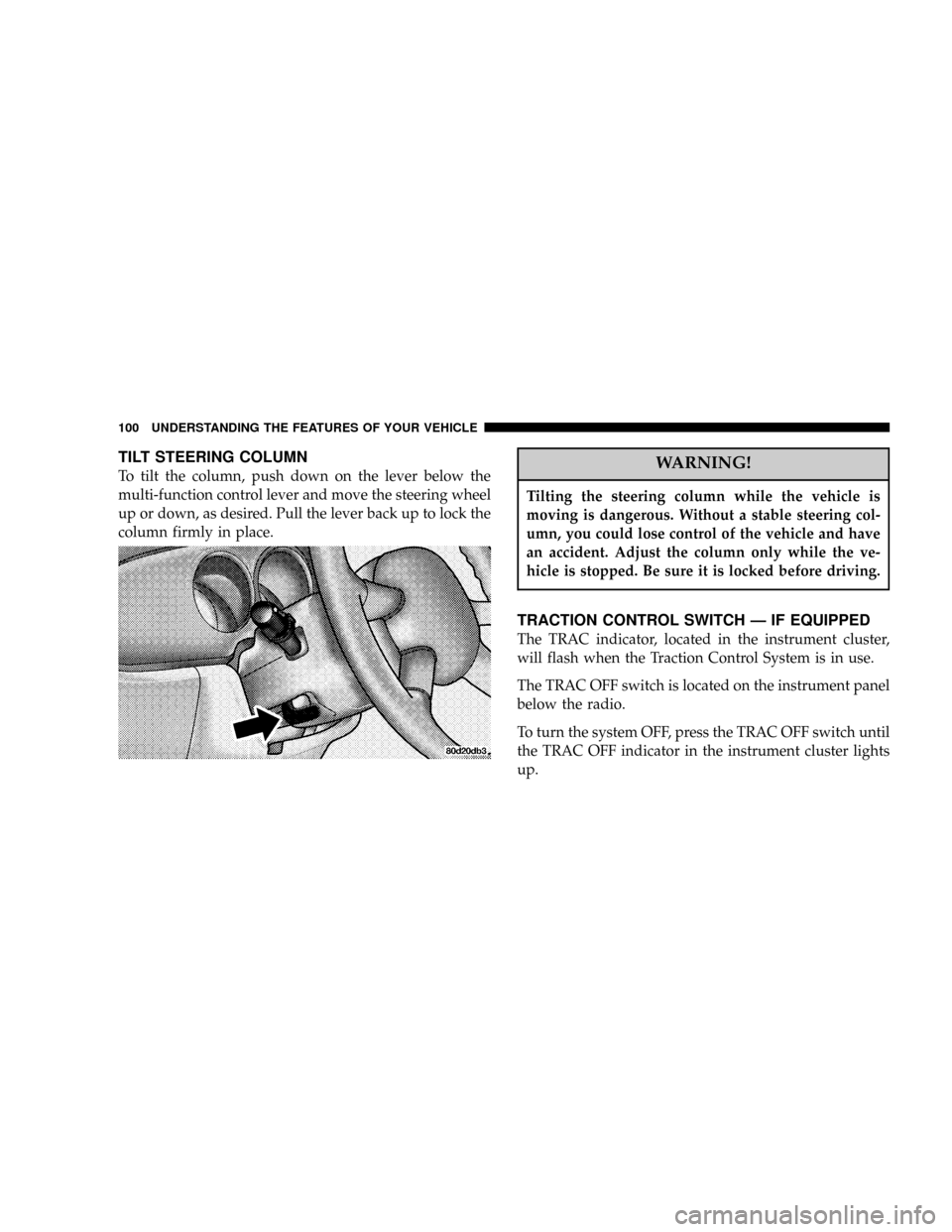
TILT STEERING COLUMN
To tilt the column, push down on the lever below the
multi-function control lever and move the steering wheel
up or down, as desired. Pull the lever back up to lock the
column firmly in place.WARNING!
Tilting the steering column while the vehicle is
moving is dangerous. Without a stable steering col-
umn, you could lose control of the vehicle and have
an accident. Adjust the column only while the ve-
hicle is stopped. Be sure it is locked before driving.
TRACTION CONTROL SWITCH Ð IF EQUIPPED
The TRAC indicator, located in the instrument cluster,
will flash when the Traction Control System is in use.
The TRAC OFF switch is located on the instrument panel
below the radio.
To turn the system OFF, press the TRAC OFF switch until
the TRAC OFF indicator in the instrument cluster lights
up.
100 UNDERSTANDING THE FEATURES OF YOUR VEHICLE
Page 111 of 341

There are two optional power outlets. One is in the
Accessory Switch Bank, in the center of the instrument
panel.
This outlet is powered directly by the battery, regardless
of the ignition switch position. All accessories connected
to this outlet should be removed or turned off when the
vehicle is not in use, to protect the battery against
discharge.The second is in the right rear cargo area.
Since this outlet is remote from the driver, it is powered
by the ignition switch, only when it is in the9ON9or
9ACCESSORY9positions, to protect the battery against
discharge. Note: Neither of the power outlets will accept
a cigar lighter unit. They are intended only for accessory
usage.
UNDERSTANDING THE FEATURES OF YOUR VEHICLE 111
3
Page 121 of 341

UNDERSTANDING YOUR INSTRUMENT PANEL
CONTENTS
mInstrument Panel Features.................125
mInstrument Cluster......................126
mInstrument ClusterÐTurbo, With AutoStick....127
mInstrument ClusterÐTurbo, Without AutoStick . . 128
mInstrument Cluster Descriptions............129
mElectronic Digital Clock..................136
NClock Setting Procedure.................136
mRadio General Information................136
NRadio Broadcast Signals.................136NTwo Types Of Signals..................136
NElectrical Disturbances..................137
NAM Reception.......................137
NFM Reception........................137
mSales Code RAZÐAM/ FM Stereo Radio With
Cassette Tape Player, CD Player And CD
Changer Controls Ð If Equipped...........138
NOperating Instructions Ð Radio...........138
NPower Switch, Volume Control............138
NSeek Button (Radio Mode)...............1384
Page 122 of 341

NTuning.............................138
NPTY (Program Type) Button..............139
NBalance............................140
NFade..............................140
NTone Control........................140
NAM/FM Selection.....................141
NScan Button.........................141
NTo Set The Radio Push-Button Memory......141
NTo Change From Clock To Radio Mode......142
NOperating Instructions Ð Tape Player.......142
NSeek Button.........................142
NFast Forward (FF).....................142
NRewind (RW)........................142NTape Eject...........................143
NScan Button.........................143
NChanging Tape Direction................143
NMetal Tape Selection...................143
NPinch Roller Release...................143
NNoise Reduction......................143
NOperating Instructions Ð CD Player........144
NInserting The Compact Disc..............144
NSeek Button.........................145
NEJT CD (Eject) Button..................145
NFF/Tune/RW........................145
NProgram Button 4 (Random Play)..........145
NMode..............................146
122 UNDERSTANDING YOUR INSTRUMENT PANEL