lights CHRYSLER PT CRUISER 2004 1.G User Guide
[x] Cancel search | Manufacturer: CHRYSLER, Model Year: 2004, Model line: PT CRUISER, Model: CHRYSLER PT CRUISER 2004 1.GPages: 341, PDF Size: 5.06 MB
Page 97 of 341

Fog Lights Ð If Equipped
The front fog light switch is on the Multi-Function
Control Lever. To activate the front fog lights, turn
on the parking lights or the low beam headlights
and pull out the end of the control lever.
NOTE:The fog lights will only operate with the head-
lights on low beam. Selecting high beam headlights will
turn off the fog lights.
Turn Signals
Move the Multi-Function Control Lever up or down and
the arrows on each side of the instrument cluster flash to
show proper operation of the front and rear turn signal
lights. You can signal a lane change by moving the lever
partially up or down without moving beyond the detent.If either light remains on and does not flash, or there is a
very fast flash rate, check for a defective outside light
bulb. If an indicator fails to light when the lever is
moved, it would suggest that the fuse or indicator bulb is
defective.
Highbeam/Lowbeam Select Switch
Pull the Multi-Function Control Lever towards you to
switch the headlights to HIGH beam. Pull the control
lever a second time to switch the headlights to LOW
beam.
Passing Light
You can signal another vehicle with your headlights by
lightly pulling the Multi-Function Control Lever toward
you. This will cause the headlights to turn on at high
beam and remain on until the lever is released.
UNDERSTANDING THE FEATURES OF YOUR VEHICLE 97
3
Page 100 of 341
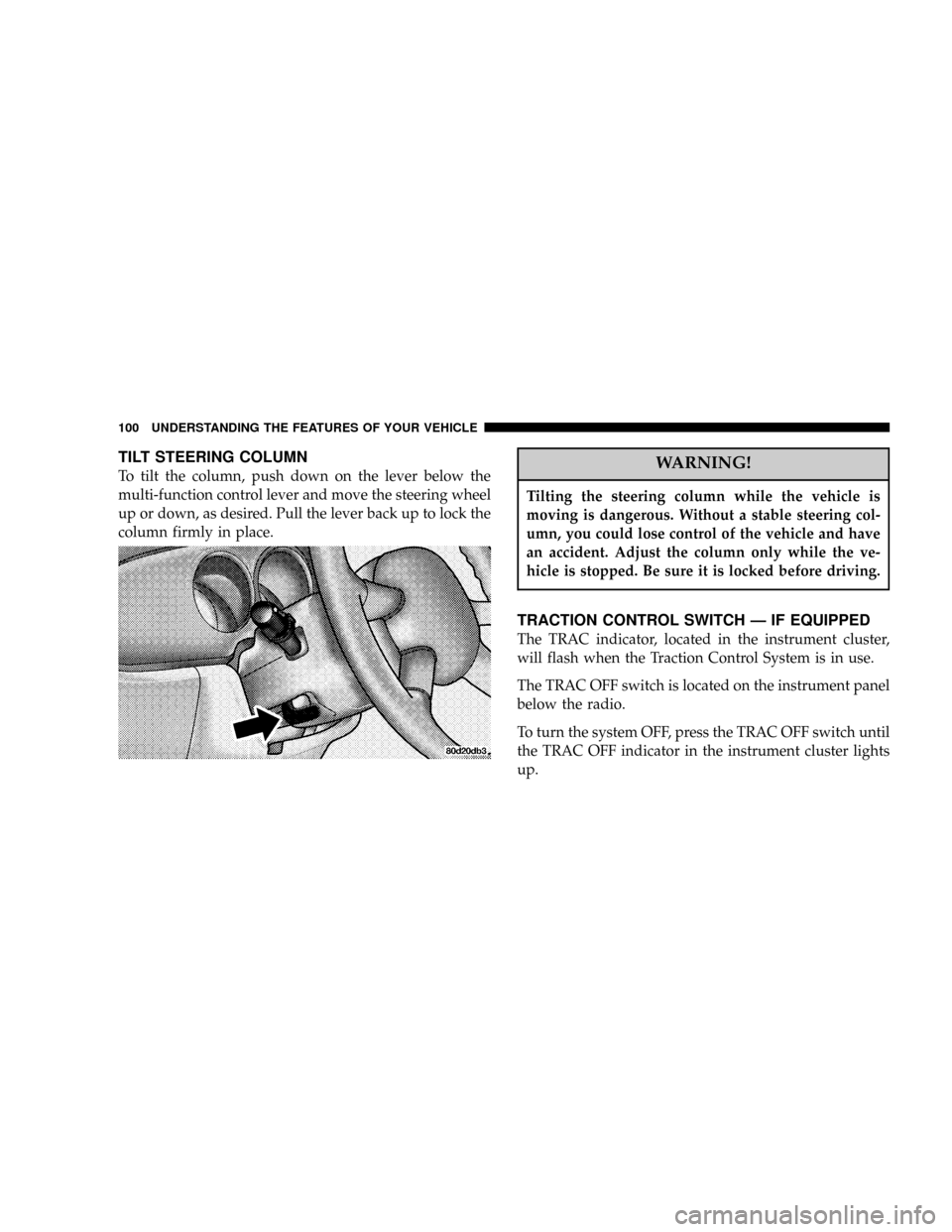
TILT STEERING COLUMN
To tilt the column, push down on the lever below the
multi-function control lever and move the steering wheel
up or down, as desired. Pull the lever back up to lock the
column firmly in place.WARNING!
Tilting the steering column while the vehicle is
moving is dangerous. Without a stable steering col-
umn, you could lose control of the vehicle and have
an accident. Adjust the column only while the ve-
hicle is stopped. Be sure it is locked before driving.
TRACTION CONTROL SWITCH Ð IF EQUIPPED
The TRAC indicator, located in the instrument cluster,
will flash when the Traction Control System is in use.
The TRAC OFF switch is located on the instrument panel
below the radio.
To turn the system OFF, press the TRAC OFF switch until
the TRAC OFF indicator in the instrument cluster lights
up.
100 UNDERSTANDING THE FEATURES OF YOUR VEHICLE
Page 112 of 341

Electrical Outlet Use With Engine Off
CAUTION!
²Many accessories that can be plugged in draw
power from the vehicle's battery, even when not
in use (i.e. cellular phones, etc.). Eventually, if
plugged in long enough, the vehicle's battery will
discharge sufficiently to degrade battery life
and/or prevent engine starting.
²Accessories that draw higher power (i.e. coolers,
vacuum cleaners, lights, etc.), will degrade the
battery even more quickly. Only use these inter-
mittently and with greater caution.
²After the use of high power draw accessories, or
long periods of the vehicle not being started (with
accessories still plugged in), the vehicle must be
driven a sufficient length of time to allow the
generator to recharge the vehicle's battery.
CONSOLE FEATURES
The console has two front cup holders, a coin holder, 12
volt power outlet and a front storage tray. There are
additional cup holders; one is molded in the center of the
console to hold large cups and the other is at the rear of
the console to serve passengers in the rear seat. The floor
console power outlet will also operate a conventional
cigar lighter unit (if equipped with an optional Smoker's
Package).
112 UNDERSTANDING THE FEATURES OF YOUR VEHICLE
Page 113 of 341

CAUTION!
²Many accessories that can be plugged into the 12
volt power outlet, draw power from the vehicle's
battery, even when not in use; i.e. cellular phones,
etc. Eventually, if plugged in long enough, the
vehicle's battery will discharge sufficiently to
degrade battery life and/or prevent engine start-
ing.
²Accessories that draw higher power such as cool-
ers, vacuum cleaners, lights, etc., will discharge
the battery even more quickly. Only use these
intermittently and with greater caution.
²After the use of high power draw accessories, or
long periods of the vehicle not being started,
(with accessories still plugged in), the vehicle
must be driven a sufficient length of time to allow
the generator to recharge the vehicle's battery.
UNDERSTANDING THE FEATURES OF YOUR VEHICLE 113
3
Page 131 of 341

10. High Beam Indicator
This light shows that the headlights are on high
beam. Pull the turn signal lever toward the steer-
ing wheel to switch the headlights from high or low
beam.
11. Tachometer
The white area of the scale shows the permissible engine
revolutions-per-minute (rpm x 1000) for each gear range.
Before reaching the red area, ease up on the accelerator to
prevent engine damage.
12. Anti-Lock Warning Light (ABS) Ð If Equipped
This light monitors the Anti-Lock Brake System
(ABS) described elsewhere in this manual. This
light will come on when the ignition key is
turned to the ON position and may stay on for
as long as four seconds.
If the ABS light remains on or comes on during driving,
it indicates that the Anti-Lock portion of the brake systemis not functioning and that service is required, however,
the conventional brake system will continue to operate
normally provided that the BRAKE warning light is not
on.
If the ABS light is on, the brake system should be serviced
as soon as possible to restore the benefit of Anti-Lock
Brakes.
The warning light should be checked frequently to assure
that it is operating properly. Turn the ignition key to the
on position, but do not start the vehicle. The light should
come on. If the light does not come on, have the system
checked by an authorized dealer.
13. Seat Belt Reminder Light
When the ignition switch is first turned ON, this
light will come on for about six seconds. A chime
will sound if you have not pulled the shoulder belt
out of the retractor. This is a reminder to ªbuckle upº. If
you do not buckle up, the light will remain on.
UNDERSTANDING YOUR INSTRUMENT PANEL 131
4
Page 135 of 341

Certain conditions such as a loose or missing gas cap,
poor fuel quality, etc. may illuminate the light after
engine start. The vehicle should be serviced if the light
stays on through several of your typical driving cycles. In
most situations the vehicle will drive normally and will
not require towing.
If the Malfunction Indicator Light flashes when the
engine is running, serious conditions may exist that
could lead to immediate loss of power or severe catalytic
converter damage. The vehicle should be serviced as
soon as possible if this occurs.
23. Front Fog Light Indicator Ð If Equipped
This light shows when the front fog lights are ON.
24. Low Fuel Light
When the fuel level drops to about 1/8 tank, the
fuel symbol will light and a single chime will
sound. The light will remain on until fuel is added.If the fuel level drops to approximately 1.0 gallon (3.75
Liter), the fuel symbol will flash several times and the
chime will sound several times.
25. AutoStick Gear PositionÐ If Equipped
This vacuum fluorescent display indicator illuminates
when the gearshift lever is moved to the AutoStick
position and shows the current gear selection.
26. Fuel Door Reminder
This symbol is a reminder that the Fuel Filler Door is
located on the front passenger's (right) side of the vehicle.
27. Odometer/Trip Odometer Reset Knob
Press the knob to switch between the odometer and trip
odometer. While the trip odometer is being displayed,
press and hold this knob for a few seconds to reset the
trip odometer to zero miles/kilometers.
UNDERSTANDING YOUR INSTRUMENT PANEL 135
4
Page 190 of 341

2.4 Liter TurboÐ If Equipped
The neutral position of the shift lever is located between
THIRD and FOURTH gear. This is the position the shifter
lever will return to automatically when neutral is se-
lected. When shifting into FIFTH gear, be sure to press
the shifter lever all the way to the right to avoid acciden-
tally selecting THIRD gear. Also, use care when selecting
FIRST gear to avoid accidentally selecting REVERSE.When moving the shifter lever into REVERSE press the
lever to the left until the resistance is overcome. When the
ignition switch is in the ON position, a chime will sound
to confirm that reverse has been selected and the backup
lights will illuminate.
NOTE:Listen for the audible chime to confirm RE-
VERSE gear is properly selected. Never shift into RE-
VERSE until the vehicle has come to a complete stop.
Recommended Shift Speeds
To use your manual transaxle for optimal fuel economy,
it should be upshifted as listed in table 1.
TABLE 1-MANUAL TRANSAXLE NORMAL
ACCELERATION AND CRUISE SHIFT SPEEDS
IN mph (km/h)
ENGINE
SIZE1to2 2to3 3to4 4to5
2.4L15 25 33 44
(24) (40) (53) (70)
190 STARTING AND OPERATING
Page 225 of 341

WARNING!
Connecting trailer brakes to your vehicle's hydraulic
brake lines can overload your brake system and
cause it to fail. You might not have brakes when you
need them and could have an accident.
²Do not attempt to tow a trailer while using a compact
spare tire.
²Whenever you pull a trailer, regardless of the trailer
size, stop lights and turn signals on the trailer are
recommended for motoring safety.
²The automatic transaxle fluid and filter should be
changed if you REGULARLY tow a trailer for more
than 45 minutes of continuous operation. See Schedule
ªBº in section 8 of this manual for transaxle fluid
change intervals.NOTE:Check the automatic transaxle fluid level before
towing.
NOTE:For vehicles equipped with Autostick. By using
the Autostick modes, and selecting a specific gear range,
frequent shifting can be avoided. The highest gear range
should be selected that allows for adequate performance.
For example, choose ª4º if the desired speed can be
maintained. Choose ª3º or ª2º if needed to maintain the
desired speed.
NOTE:Extended driving at high RPM should be
avoided to prevent excess heat generation. A reduction in
vehicle speed may be required to avoid extended driving
at high RPM. Return to a higher gear range or vehicle
speed when road conditions and RPM level allows.
STARTING AND OPERATING 225
5
Page 244 of 341

NAir Conditioner......................261
NPower Steering Ð Fluid Check............261
NFront Suspension Ball Joints..............262
NBody Lubrication.....................262
NWindshield Wiper Blades................263
NWindshield Washer Reservoir.............264
NExhaust System......................264
NCooling System.......................265
NHoses And Vacuum/Vapor Harnesses.......269
NFuel System Connections................270
NBrake System........................270
NAutomatic Transaxle...................273
NManual Transaxle.....................276NAppearance Care And Protection From
Corrosion...........................276
mFuses...............................282
NUnderhood Fuses
(Power Distribution Center)..............282
NInterior Fuses........................285
mVehicle Storage........................285
mReplacement Bulbs......................286
mBulb Replacement......................287
NHeadlight Bulb Replacement.............287
NFront Park/Turn Signal/Side Marker Lights . . 288
NFront Fog Lights Ð If Equipped...........288
NTail/Stop, And Rear Turn Signal Lights......288
NBack Up Light Bulb....................289
244 MAINTAINING YOUR VEHICLE
Page 281 of 341

Cleaning Headlights
Your vehicle has plastic headlights that are lighter and
less susceptible to stone breakage than glass headlights.
Plastic is not as scratch resistant as glass and therefore
different lens cleaning procedures must be followed.
To minimize the possibility of scratching the lenses and
reducing light output, avoid wiping with a dry cloth. To
remove road dirt, wash with a mild soap solution fol-
lowed by rinsing.
Do not use abrasive cleaning components, solvents, steel
wool or other aggressive material to clean the lenses.
Glass Surfaces
All glass surfaces should be cleaned on a regular basis
with any commercial household-type glass cleaner.
Never use an abrasive type cleaner. Use caution whencleaning inside rear windows equipped with electric
defrosters. Do not use scrapers or other sharp instru-
ments which may scratch the elements.
Instrument Panel Cover
The instrument panel cover has a low glare surface which
minimizes reflections in the windshield. Do not use
protectants or other products which may cause undesir-
able reflections. Use soap and warm water to restore the
low glare surface.
Cleaning Plastic Instrument Cluster Lenses
The lenses in front of the instruments in the vehicle are
molded in clear plastic. When cleaning the lenses, care
must be taken to avoid scratching the plastic.
1. Clean with a wet soft rag. A mild soap solution may be
used, but do not use high alcohol content of abrasive
cleaners. If soap is used, wipe clean with a clean damp
rag.
MAINTAINING YOUR VEHICLE 281
7