warning CHRYSLER PT CRUISER 2005 1.G Owner's Guide
[x] Cancel search | Manufacturer: CHRYSLER, Model Year: 2005, Model line: PT CRUISER, Model: CHRYSLER PT CRUISER 2005 1.GPages: 368, PDF Size: 10.02 MB
Page 101 of 368
WARNING!
Tilting the steering column while the vehicle is
moving is dangerous. Without a stable steering col-
umn, you could lose control of the vehicle and have
an accident. Adjust the column only while the ve-
hicle is stopped. Be sure it is locked before driving.
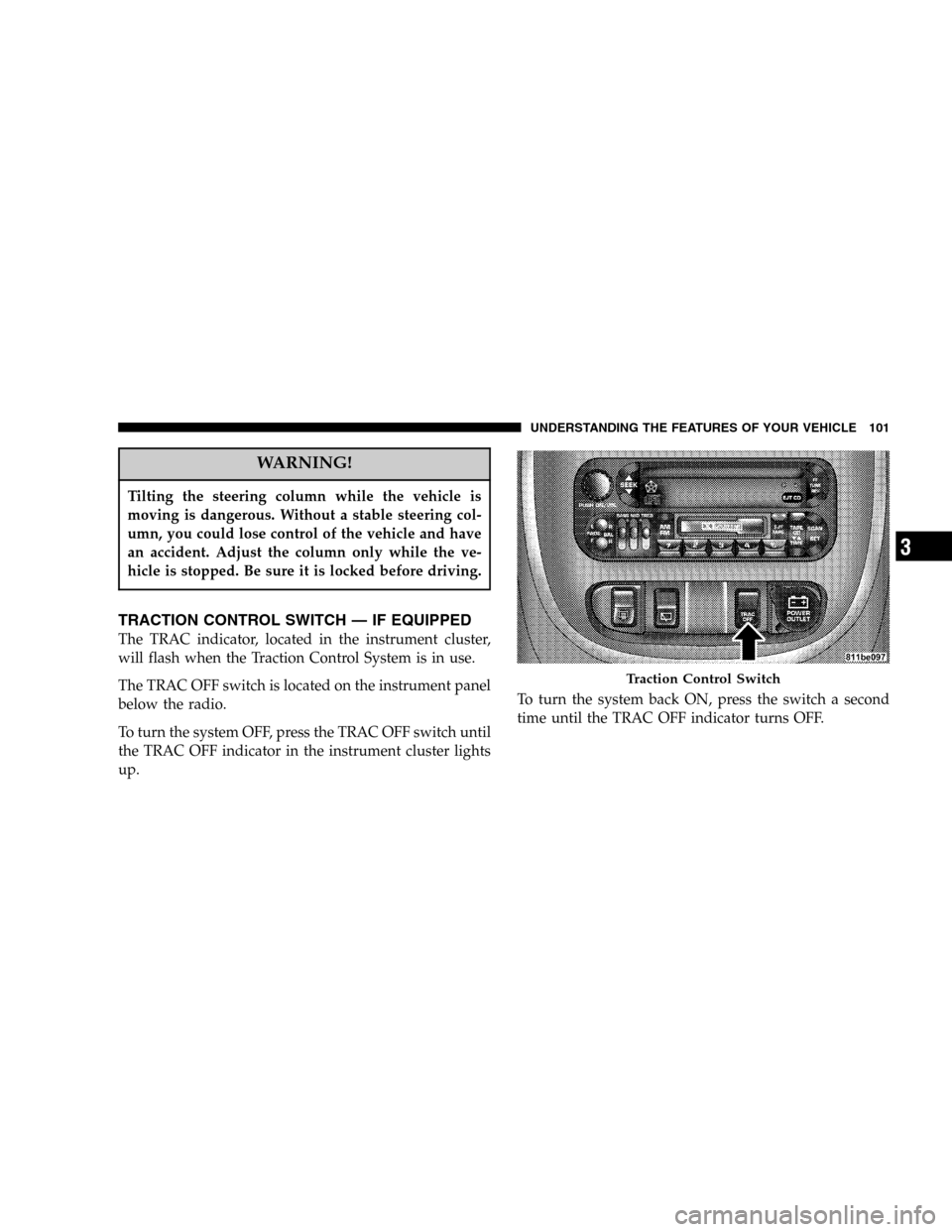
TRACTION CONTROL SWITCH — IF EQUIPPED
The TRAC indicator, located in the instrument cluster,
will flash when the Traction Control System is in use.
The TRAC OFF switch is located on the instrument panel
below the radio.
To turn the system OFF, press the TRAC OFF switch until
the TRAC OFF indicator in the instrument cluster lights
up.To turn the system back ON, press the switch a second
time until the TRAC OFF indicator turns OFF.
Traction Control Switch
UNDERSTANDING THE FEATURES OF YOUR VEHICLE 101
3
Page 103 of 368
WARNING!
Leaving the Electronic Speed Control system on
when not in use is dangerous. You could accidentally
set the system or cause it to go faster than you want.
You could lose control and have an accident. Always
leave the system OFF when you are not using it.
To Set At A Desired Speed:
When the vehicle has reached the desired speed, press
down on the lever and release. Release the accelerator
and the vehicle will operate at the selected speed.
NOTE:The vehicle should be traveling at a steady
speed and on level ground before pressing the SET lever.
While in the AutoStick mode, speed control will only
operate in third and fourth gear.
To Deactivate:
A soft tap on the brake pedal, pulling the speed control
lever towards you “CANCEL”, or normal brake or clutch
pressure while slowing the vehicle will deactivate speed
control without erasing the set speed memory. Pressing
the ON/OFF button or turning off the ignition switch
erases the set speed memory.
To Resume Speed:
To resume a previously set speed, push the “ACC/RES”
lever up and release. Resume can be used at any speed
above 20 mph (32 km/h).
To Vary The Speed Setting:
When the speed control is ON, speed can be increased by
pushing up and holding “ACC/RES”. Release the lever
when the desired speed is reached, and the new speed
will be set.
UNDERSTANDING THE FEATURES OF YOUR VEHICLE 103
3
Page 104 of 368

Tapping “ACC/RES” once will result in a 2 mph (3
km/h) speed increase. Each time the lever is tapped,
speed increases so that tapping the lever three times will
increase speed by 6 mph (10 km/h), etc.
To decrease speed while speed control is ON, push down
and hold “COAST/SET”. Release the lever when the
desired speed is reached, and the new speed will be set.
Tapping the “COAST/SET” button once will result in a 1
mph (2 km/h) speed decrease. Each time the button is
tapped, speed decreases.
Manual Transaxle:
Depressing the clutch pedal will disengage the speed
control. A slight increase in engine RPM before the speed
control disengages is normal.
Vehicles equipped with manual transaxles may need to
be shifted into a lower gear to climb hills without speed
loss.
WARNING!
Speed Control can be dangerous where the system
can’t maintain a constant speed. Your vehicle could
go too fast for the conditions, and you could lose
control. An accident could be the result. Don’t use
Speed Control in heavy traffic or on roads that are
winding, icy, snow-covered, or slippery.
To Accelerate For Passing:
Depress the accelerator as you would normally. When the
pedal is released, the vehicle will return to the set speed.
Using Speed Control On Hills
NOTE:The speed control system maintains speed up
and down hills. A slight speed change on moderate hills
is normal.
104 UNDERSTANDING THE FEATURES OF YOUR VEHICLE
Page 106 of 368
WARNING!
A moving garage door can cause injury to people and
pets in the path of the door. People or pets could be
seriously or fatally injured. Only use this transceiver
with a garage door opener that has a “stop and
reverse” feature as required by federal safety stan-
dards. This includes most garage door opener mod-
els manufactured after 1982. Do not use a garage
door opener without these safety features it could
cause injury or death. Call toll-free 1–800–355–3515
or, on the Internet at www.homelink.com for safety
information or assistance.
Programming The Universal Transceiver
For best results, install a new battery in the hand held
transmitter before programming. If your garage door
opener (located in the garage) is equipped with an
antenna, make sure that the antenna is hanging straight
down.
1. Turn off the engine.
WARNING!
Vehicle exhaust contains carbon monoxide, a danger-
ous gas. Do not run the vehicle’s exhaust while
training the transceiver. Exhaust gas can cause seri-
ous injury or death.
106 UNDERSTANDING THE FEATURES OF YOUR VEHICLE
Page 107 of 368
WARNING!
Your motorized door or gate will open and close
while you are training the Universal Transceiver. Do
not train the transceiver if people or pets are in the
path of the door or gate. A moving door or gate can
cause serious injury or death to people and pets or
damage to objects.
2. Erase the factory test codes by pressing the two
outside buttons. Release the buttons when the light in the
Universal Transceiver begins to flash (about 20 seconds).
NOTE:Step 2 does not have to be followed to program
additional hand held transmitters.
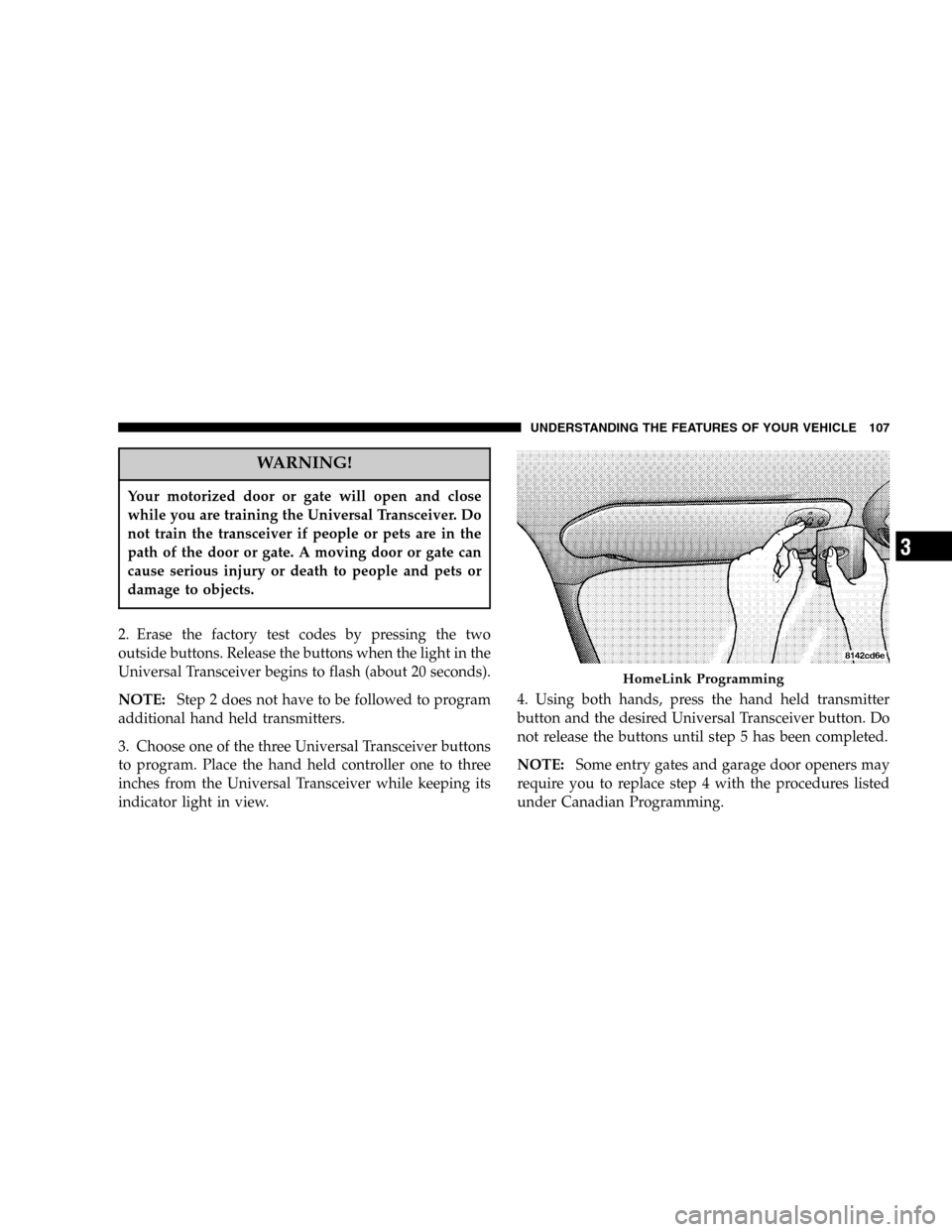
3. Choose one of the three Universal Transceiver buttons
to program. Place the hand held controller one to three
inches from the Universal Transceiver while keeping its
indicator light in view.4. Using both hands, press the hand held transmitter
button and the desired Universal Transceiver button. Do
not release the buttons until step 5 has been completed.
NOTE:Some entry gates and garage door openers may
require you to replace step 4 with the procedures listed
under Canadian Programming.
HomeLink Programming
UNDERSTANDING THE FEATURES OF YOUR VEHICLE 107
3
Page 112 of 368
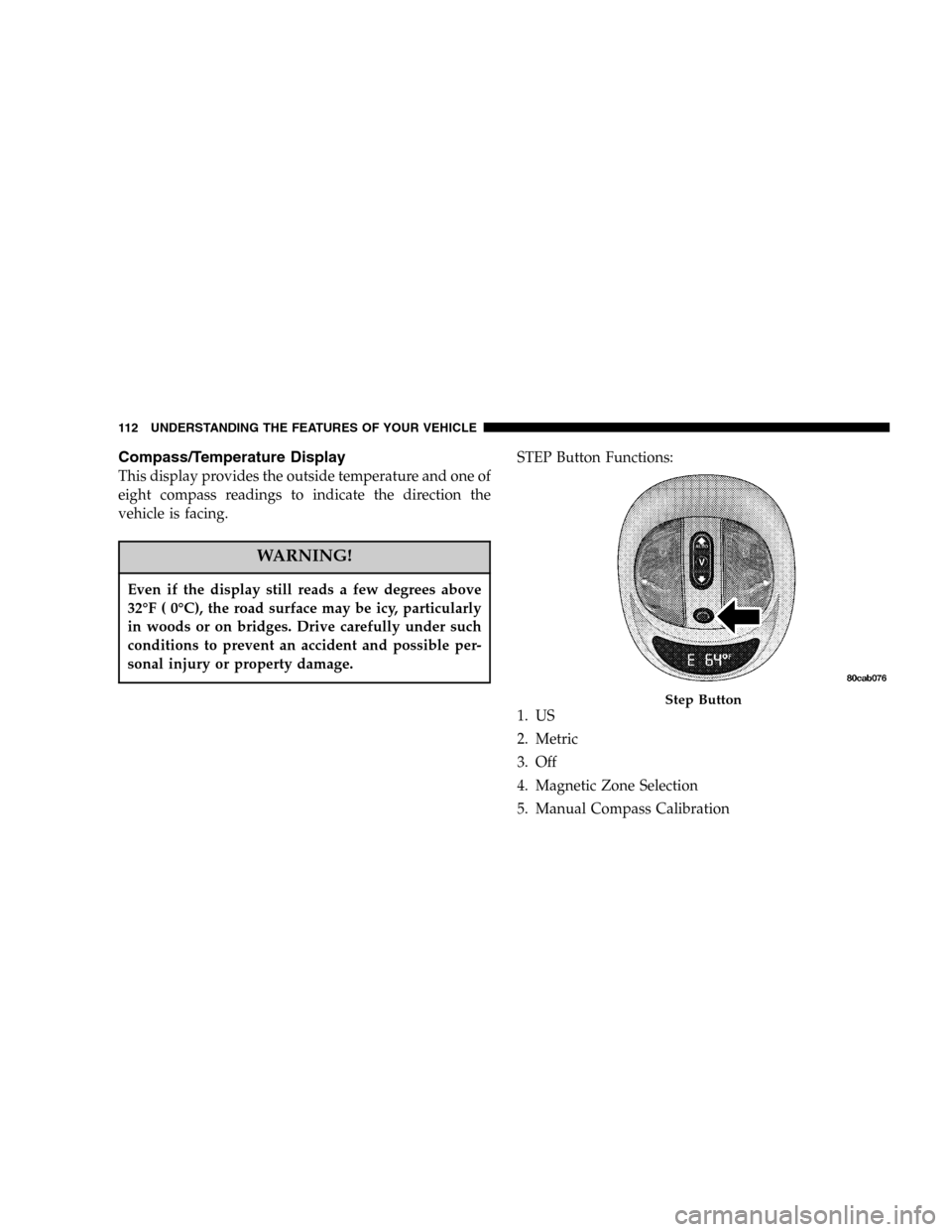
Compass/Temperature Display
This display provides the outside temperature and one of
eight compass readings to indicate the direction the
vehicle is facing.
WARNING!
Even if the display still reads a few degrees above
32°F ( 0°C), the road surface may be icy, particularly
in woods or on bridges. Drive carefully under such
conditions to prevent an accident and possible per-
sonal injury or property damage.
STEP Button Functions:
1. US
2. Metric
3. Off
4. Magnetic Zone Selection
5. Manual Compass Calibration
Step Button
112 UNDERSTANDING THE FEATURES OF YOUR VEHICLE
Page 116 of 368

The sunshade can be opened manually. It will also open
as the sunroof opens. The sunshade cannot be closed if
the sunroof is open.
WARNING!
Never leave children in a vehicle, with the keys in
the ignition switch. Occupants, particularly unat-
tended children, can become entrapped by the
power sunroof while operating the power sunroof
switch. Such entrapment may result in serious injury
or death.
WARNING!
In an accident, there is a greater risk of being thrown
from a vehicle with an open sunroof. You could also
be seriously injured or killed. Always fasten your
seat belt properly and make sure all passengers are
properly secured too.
Do not allow small children to operate the sunroof.
Never allow fingers or other body parts, or any
object to project through the sunroof opening. Injury
may result.
116 UNDERSTANDING THE FEATURES OF YOUR VEHICLE
Page 122 of 368

Storage Pockets
There are also Storage pockets located on each door trim
panel.
REAR SHELF PANEL
The rear shelf panel attaches to guides in the rear cargo
area. The rear shelf panel may be installed in one of five
different positions.
NOTE:The liftgate may be opened or closed with the
rear cargo shelf panel in position 1, position 2, position 3
or position 4.
WARNING!
•To avoid tipping, lock the shelf securely in all
positions.
•Do not drive this vehicle with the liftgate open, or
use the shelf as a seat.
•Failure to follow these warnings could result in
serious or fatal injury.
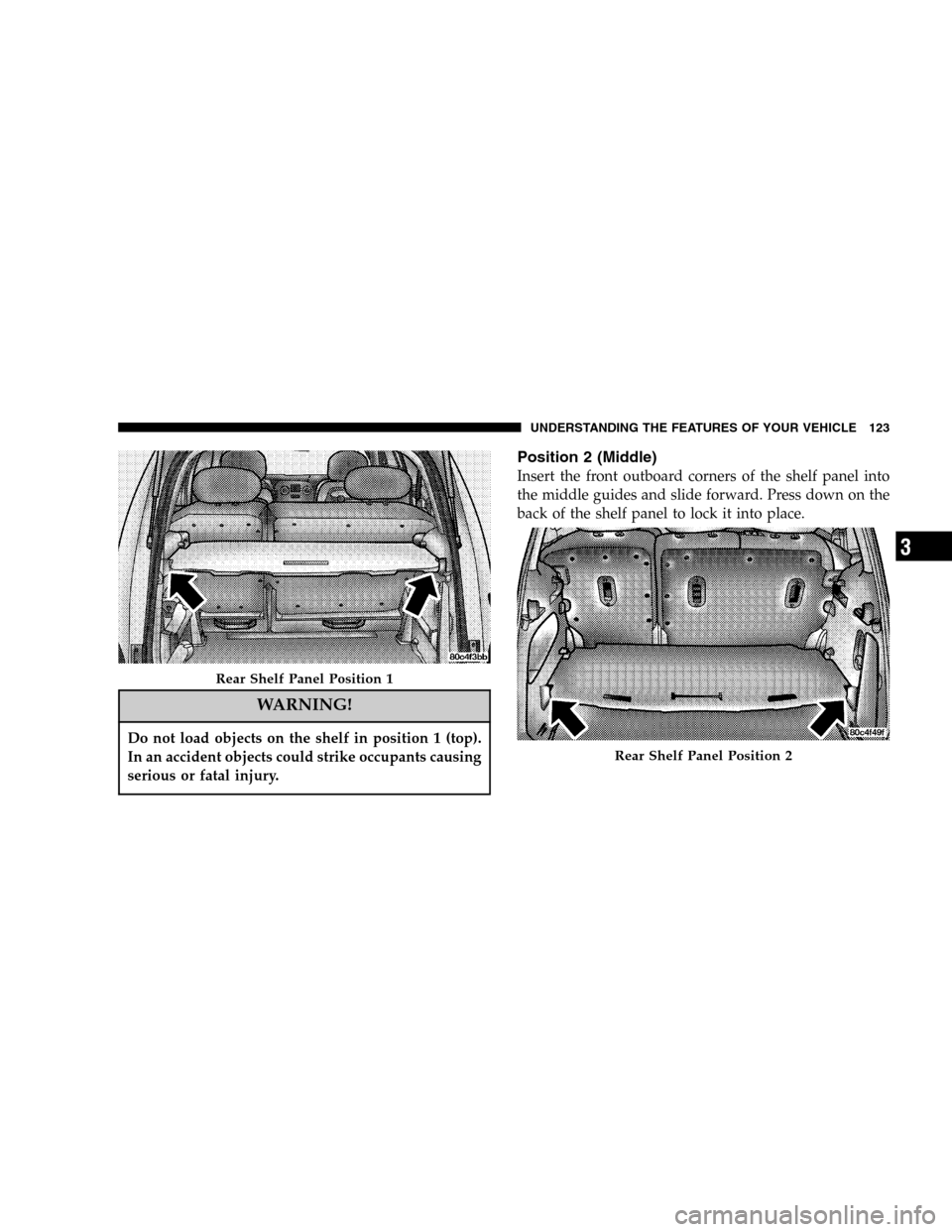
Position 1 (Top)
Insert the front outboard corners of the shelf panel into
the top guides and slide forward. Press down on the back
of the shelf panel to lock it into place.
122 UNDERSTANDING THE FEATURES OF YOUR VEHICLE
Page 123 of 368
WARNING!
Do not load objects on the shelf in position 1 (top).
In an accident objects could strike occupants causing
serious or fatal injury.
Position 2 (Middle)
Insert the front outboard corners of the shelf panel into
the middle guides and slide forward. Press down on the
back of the shelf panel to lock it into place.
Rear Shelf Panel Position 1
Rear Shelf Panel Position 2
UNDERSTANDING THE FEATURES OF YOUR VEHICLE 123
3
Page 124 of 368

WARNING!
Do not load objects over 100 lbs (45 kg) in position 2
(middle). Failure to follow this warning could cause
the shelf to collapse resulting in personal injury.
Position 3 (Floor)
Insert the front outboard corners of the shelf panel into
the bottom guides and slide forward.
NOTE:To carry items that may soil the carpeting, the
rear shelf panel may be inverted in position 2 or position
3.
Position 4 (Vertical)
Insert the front outboard corners of the shelf panel into
the vertical guides behind the rear seatbacks near the
floor and slide downward. Push the shelf panel forward
to lock it into place.
Rear Shelf Panel Position 4
124 UNDERSTANDING THE FEATURES OF YOUR VEHICLE