radio CHRYSLER PT CRUISER 2007 1.G User Guide
[x] Cancel search | Manufacturer: CHRYSLER, Model Year: 2007, Model line: PT CRUISER, Model: CHRYSLER PT CRUISER 2007 1.GPages: 467, PDF Size: 7.57 MB
Page 152 of 467

training mode, follow one of the two procedures: From
outside the UConnect mode (e.g. from radio mode),
²Press and hold the `Voice Recognition' button for 5
seconds until the session begins, or
²Press the `Voice Recognition' button and say9Setup,
Voice Training9command.
Repeat the words and phrases when prompted by the
UConnect System. For best results, the Voice Training
session should be completed when the vehicle is parked,
engine running, all windows closed, and the blower fan
switched off.
This procedure may be repeated with a new user. The
system will adapt to the last trained voice only.
To restore the Voice recognition system to factory default
settings, enter the Voice Training session via the above
procedure and follow the prompts.
Voice Recognition (VR)
²
Always wait for the beep before speaking.
²Speak normally, without pausing, just as you would
speak to a person sitting approximately eight (8) feet
away from you.
²Make sure that no one other than you is speaking
during a voice recognition period.
²Performance is maximized under:
²low-to-medium blower setting,
²low-to-medium vehicle speed,
²low road noise,
²smooth road surface,
²fully closed windows,
²dry weather condition.
152 UNDERSTANDING THE FEATURES OF YOUR VEHICLE
Page 166 of 467
Heated Seats Ð If Equipped
WARNING!
Persons who are unable to feel pain to the skin
because of advanced age, chronic illness, diabetes,
spinal cord injury, medication, alcohol use, exhaus-
tion or other physical condition must exercise care
when using the seat heater. It may cause burns even
at low temperatures, especially if used for long
periods of time. Do not place anything on the seat
that insulates against heat, such as a blanket or
cushion. This may cause the seat heater to overheat.
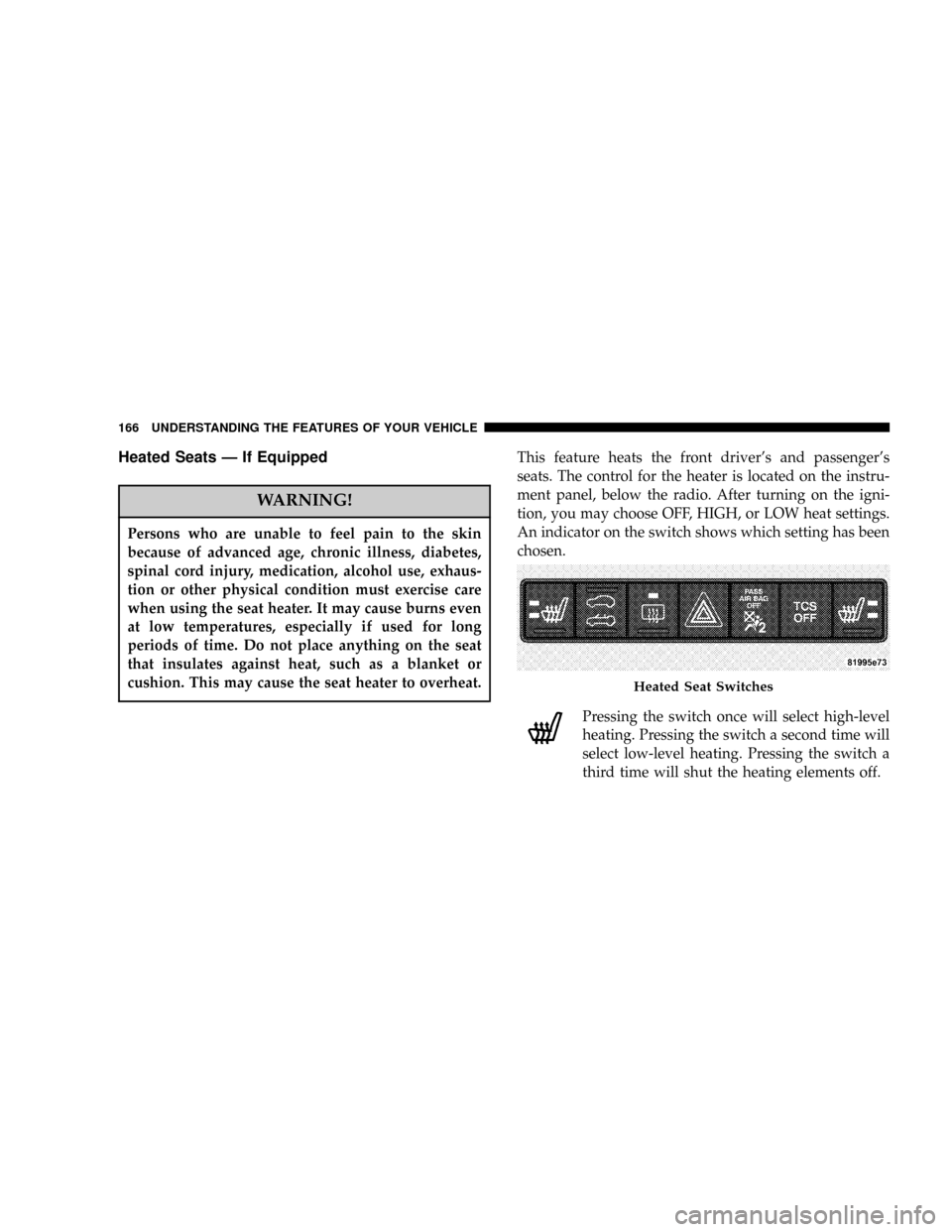
This feature heats the front driver's and passenger's
seats. The control for the heater is located on the instru-
ment panel, below the radio. After turning on the igni-
tion, you may choose OFF, HIGH, or LOW heat settings.
An indicator on the switch shows which setting has been
chosen.
Pressing the switch once will select high-level
heating. Pressing the switch a second time will
select low-level heating. Pressing the switch a
third time will shut the heating elements off.
Heated Seat Switches
166 UNDERSTANDING THE FEATURES OF YOUR VEHICLE
Page 215 of 467

REAR WINDOW FEATURES
Electric Rear Window Defroster
The push-button is located at the center of the
instrument panel, below the radio. Press this but-
ton to turn on the rear window defroster, and the
optional electric remote control heated mirrors. An amber
light shows that the defroster is on.
NOTE:The defroster turns off automatically after 10
minutes of operation. Each following activation of the
defroster will last for five minutes.
CAUTION!
To avoid damaging the electrical conductors, do not
use scrapers, sharp instruments, or abrasive window
cleaners on the interior surface of the rear window.
Labels can be peeled off after soaking with warm
water.
Rear Wiper/Washer Switch Ð If Equipped
A switch on the right side of the steering column controls
operation of the rear wiper/washer function. Rotating
the center of the switch forward to the ON position will
activate the wiper. Rotating the center of the switch all
the way forward will turn on the wash function. The
wash pump will continue to operate as long as the button
is pressed. Upon release, the wipers will cycle two times
before returning to the set position.
Rear Defroster Switch
UNDERSTANDING THE FEATURES OF YOUR VEHICLE 215
3
Page 217 of 467

UNDERSTANDING YOUR INSTRUMENT PANEL
CONTENTS
mInstrument Panel Features.................220
mInstrument ClusterÐBase.................221
mInstrument ClusterÐPremium..............222
mInstrument ClusterÐTurbo................223
mInstrument Cluster Descriptions............224
mElectronic Vehicle Information Center (EVIC)±
If Equipped...........................231
NEVIC Functions.......................233
NCompass/Temperature/Audio............233NAverage Fuel Economy.................234
NDistance To Empty (DTE)...............234
NElapsed Time........................234
NPersonal Settings
(Customer Programmable Features)........234
mSetting The Analog Clock.................240
mRadio General Information................241
NRadio Broadcast Signals.................241
NTwo Types Of Signals..................2414
Page 218 of 467

NElectrical Disturbances..................241
NAM Reception.......................241
NFM Reception........................241
mSales Code REF Ð AM/FM/CD (Single Disc)
Radio With Optional Satellite Radio And Hands
Free Phone Capability...................242
NOperating Instructions - Radio Mode.......242
NOperation Instructions - CD Mode.........246
NOperation Instructions - Auxiliary Mode.....248
NOperating Instructions - Hands Free Phone Ð
If Equipped.........................249
NOperating Instructions - Satellite Radio Ð
If Equipped.........................250mSales Code RAQ ± AM/FM/CD (6-Disc) Radio With
Optional Satellite Radio, Hands Free Phone, And
Vehicle Entertainment Systems (VES)
Capabilities...........................250
NOperating Instructions - Radio Mode.......250
NOperation Instructions -
(CD Mode For CD Audio Play)...........256
NLoad/Eject Button
(CD Mode For CD Audio Play)...........257
NNotes On Playing MP3 Files.............259
NOperation Instructions -
(CD Mode For MP3 Audio Play)..........262
NLoad/Eject Button (CD Mode For MP3 Play) . . 262
mSatellite Radio Ð If Equipped..............264
NSystem Activation.....................264
218 UNDERSTANDING YOUR INSTRUMENT PANEL
Page 219 of 467

NElectronic Serial Number/Sirius Identification
Number (ESN/SID)....................264
NSelecting Satellite Mode In REF, And RAQ,
Radios.............................265
NSelecting a Channel....................266
NStoring And Selecting Pre-Set Channels......266
NUsing The PTY (Program Type) Button
(If Equipped)........................266
NPTY Button9Scan9.....................267NPTY Button9Seek9.....................267
NSatellite Antenna......................267
NReception Quality.....................267
mCD/DVD Disc Maintenance...............268
mRadio Operation And Cellular Phones........268
mClimate Controls.......................269
NClimate Controls......................269
NOperating Tips.......................274
UNDERSTANDING YOUR INSTRUMENT PANEL 219
4
Page 233 of 467

EVIC Functions
Press the EVIC button until one of the following func-
tions are displayed on the EVIC:
²Compass/Temperature/Audio
²Average Fuel Economy
²Distance To Empty (DTE)
²Elapsed Time
²Personal Settings
To Reset The Display
Pressing and holding the EVIC button once will clear the
resettable function currently being displayed. Reset will
only occur if a resettable function is currently being
displayed. To reset all resettable functions, press and
release the EVIC button a second time within 3 seconds
of resetting the currently displayed function (Reset ALL
will be displayed during this 3 second window).
Compass/Temperature/Audio
Press and release the EVIC button to display one of eight
compass headings to indicate the direction the vehicle is
facing, the outside temperature and the current radio
station.
EVIC Button
UNDERSTANDING YOUR INSTRUMENT PANEL 233
4
Page 237 of 467

NOTE:Turning the headlights on during the daytime
causes the instrument panel lights to dim. To increase the
brightness, refer to ªLightsº in this section.
Delay Power Off to Accessories Until Exit
When this feature is selected, the power window
switches, radio, hands±free system, DVD video system,
power sunroof, and power outlets will remain active for
up to 60 minutes after the ignition switch has been turned
off. Opening a vehicle door will cancel this feature. Press
and hold the EVIC button when in this display until
ªOffº, ª45 sec.º, ª5 min.º, or ª10 min.º appears to make
your selection.
Turn Headlamps on with Remote Key Unlock
When this feature is selected the headlamps will activate
and remain on for up to 90 seconds when the doors are
unlocked using the remote keyless entry transmitter.Press and hold the EVIC button when in this display until
ªOFFº, ª30 sec.º, ª60 sec.º, or ª90 sec.º appears to make
your selection.
Confirmation of Voice Commands Ð If Equipped
When ON is selected all voice commands from the
U-Connect system are confirmed. Press and hold the
EVIC button when in this display until ªONº or ªOFFº
appears to make your selection.
Display English or Metric
The EVIC, odometer, and navigation system units can be
changed between English and Metric.
Press and hold the EVIC button when in this display until
ªUSº or ªMETRICº appears to make your selection.
UNDERSTANDING YOUR INSTRUMENT PANEL 237
4
Page 241 of 467

RADIO GENERAL INFORMATION
Radio Broadcast Signals
Your new radio will provide excellent reception under
most operating conditions. Like any system, however, car
radios have performance limitations, due to mobile op-
eration and natural phenomena, which might lead you to
believe your sound system is malfunctioning. To help
you understand and save you concern about these ªap-
parentº malfunctions, you must understand a point or
two about the transmission and reception of radio sig-
nals.
Two Types of Signals
There are two basic types of radio signals... AM or
Amplitude Modulation, in which the transmitted sound
causes the amplitude, or height, of the radio waves to
vary... and FM or Frequency Modulation, in which the
frequency of the wave is varied to carry the sound.
Electrical Disturbances
Radio waves may pick up electrical disturbances during
transmission. They mainly affect the wave amplitude,
and thus remain a part of the AM reception. They
interfere very little with the frequency variations that
carry the FM signal.
AM Reception
AM sound is based on wave amplitude, so AM reception
can be disrupted by such things as lightning, power lines
and neon signs.
FM Reception
Because FM transmission is based on frequency varia-
tions, interference that consists of amplitude variations
can be filtered out, leaving the reception relatively clear,
which is the major feature of FM radio.
UNDERSTANDING YOUR INSTRUMENT PANEL 241
4
Page 242 of 467

NOTE:The radio, steering wheel radio controls (if
equipped), and 6 disc CD/DVD changer (if equipped)
will remain active for up to 10 minutes after the ignition
switch has been turned off. Opening a vehicle front door
will cancel this feature.
SALES CODE REF Ð AM/FM/CD (SINGLE DISC)
RADIO WITH OPTIONAL SATELLITE RADIO AND
HANDS FREE PHONE CAPABILITY
NOTE:The radio sales code is located on the lower right
side of your radio faceplate.
Operating Instructions - Radio Mode
NOTE:The ignition switch must be in the ON or ACC
position to operate the radio.
REF Radio
242 UNDERSTANDING YOUR INSTRUMENT PANEL