lock CHRYSLER PT CRUISER 2007 1.G Repair Manual
[x] Cancel search | Manufacturer: CHRYSLER, Model Year: 2007, Model line: PT CRUISER, Model: CHRYSLER PT CRUISER 2007 1.GPages: 467, PDF Size: 7.57 MB
Page 211 of 467
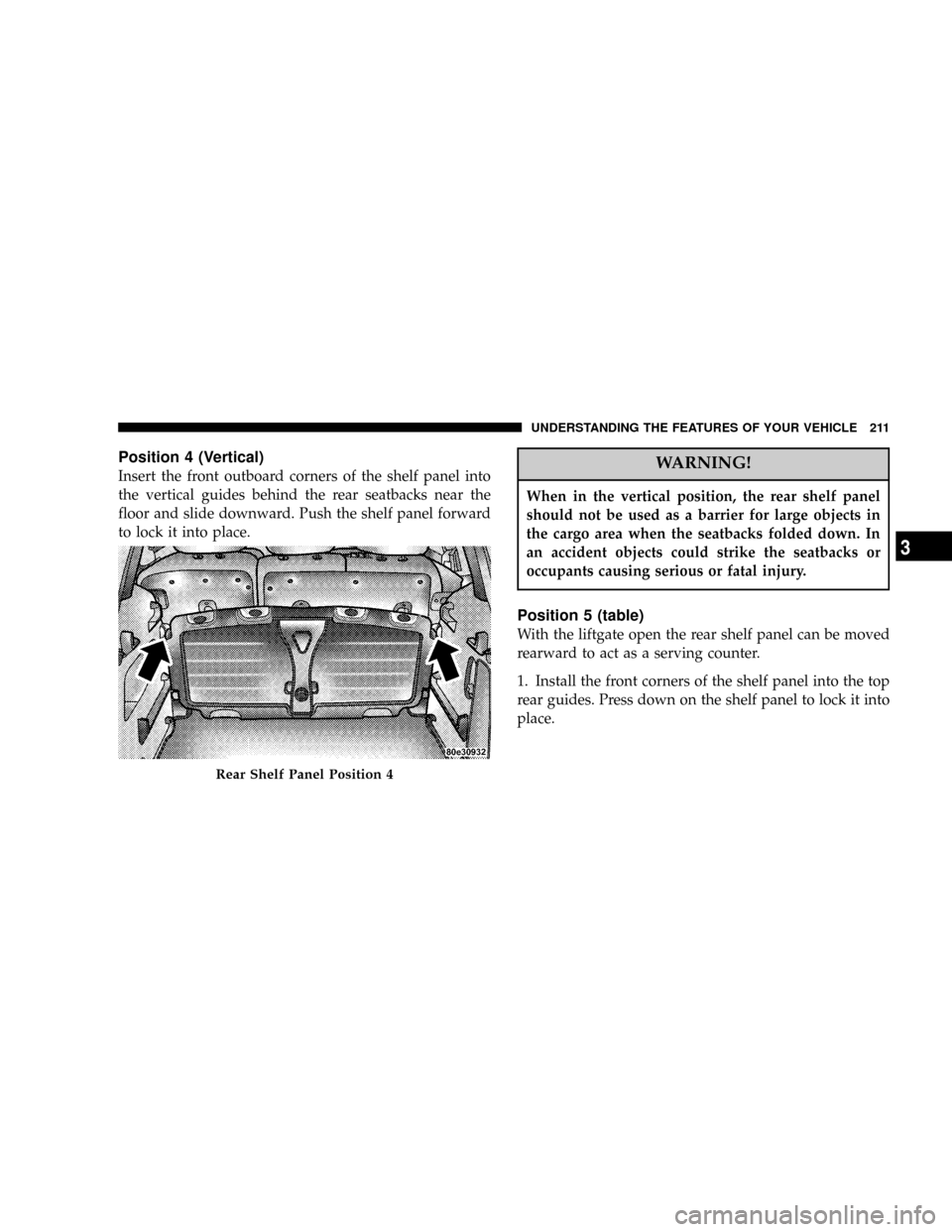
Position 4 (Vertical)
Insert the front outboard corners of the shelf panel into
the vertical guides behind the rear seatbacks near the
floor and slide downward. Push the shelf panel forward
to lock it into place.WARNING!
When in the vertical position, the rear shelf panel
should not be used as a barrier for large objects in
the cargo area when the seatbacks folded down. In
an accident objects could strike the seatbacks or
occupants causing serious or fatal injury.
Position 5 (table)
With the liftgate open the rear shelf panel can be moved
rearward to act as a serving counter.
1. Install the front corners of the shelf panel into the top
rear guides. Press down on the shelf panel to lock it into
place.
Rear Shelf Panel Position 4
UNDERSTANDING THE FEATURES OF YOUR VEHICLE 211
3
Page 213 of 467

ROOF LUGGAGE RACK Ð IF EQUIPPED
The crossbars and siderails are designed to carry the
weight on vehicles equipped with a luggage rack. The
load must not exceed 150 lbs (68 kg), and should be
uniformly distributed over the luggage rack crossbars.
Use both adjustable crossbars assemblies to support the
load and distribute the load as evenly as possible.
To adjust the crossbars with latch style releases, release
the latches on the inboard side of the crossbar supports
on each side of the vehicle, then move the crossbars to the
desired position. Once the crossbar is in the desired
position, return both latches to the locked position.
To adjust the crossbars with botton style releases, depress
the button and slide the crossbar to the next locking
position. Alternate sides until the crossbars are posi-
tioned correctly for your cargo and the stanchions are
locked square to the slide rails.External racks do not increase the total load carrying
capacity of the vehicle. Be sure that the total occupant
and luggage load inside the vehicle, plus the load on the
luggage rack, do not exceed the rated vehicle capacity.
NOTE:When the luggage rack is not in use, place the
crossbars together at the rear of the vehicle. In this
position they are designed to improve the vehicle aero-
dynamics and reduce wind noise.
UNDERSTANDING THE FEATURES OF YOUR VEHICLE 213
3
Page 217 of 467

UNDERSTANDING YOUR INSTRUMENT PANEL
CONTENTS
mInstrument Panel Features.................220
mInstrument ClusterÐBase.................221
mInstrument ClusterÐPremium..............222
mInstrument ClusterÐTurbo................223
mInstrument Cluster Descriptions............224
mElectronic Vehicle Information Center (EVIC)±
If Equipped...........................231
NEVIC Functions.......................233
NCompass/Temperature/Audio............233NAverage Fuel Economy.................234
NDistance To Empty (DTE)...............234
NElapsed Time........................234
NPersonal Settings
(Customer Programmable Features)........234
mSetting The Analog Clock.................240
mRadio General Information................241
NRadio Broadcast Signals.................241
NTwo Types Of Signals..................2414
Page 227 of 467
12. Brake System Warning Light
This light monitors various brake functions,
including brake fluid level and parking brake
application. If the brake light turns on, it may
indicate that the parking brake is applied, there
is a low brake fluid level or there is a problem with the
anti-lock brake system.
The dual brake system provides a reserve braking capac-
ity in the event of a failure to a portion of the hydraulic
system. Failure of either half of the dual brake system is
indicated by the Brake Warning Light which will turn on
when the brake fluid level in the master cylinder has
dropped below a specified level.
The light will remain on until the cause is corrected.
NOTE:The light may flash momentarily during sharp
cornering maneuvers which change fluid level condi-
tions. The vehicle should have service performed, and
the brake fluid level checked.If brake failure is indicated, immediate repair is neces-
sary.
WARNING!
Driving a vehicle with the brake light on is danger-
ous. Part of the brake system may have failed. It will
take longer to stop the vehicle. You could have an
accident. Have the vehicle checked immediately.
Vehicles equipped with Anti-Lock brakes (ABS), are also
equipped with Electronic Brake Force Distribution (EBD).
In the event of an EBD failure, the Brake Warning Light
will turn on along with the ABS Light. Immediate repair
to the ABS system is required.
The operation of the Brake Warning Light can be checked
by turning the ignition switch from the OFF position to
UNDERSTANDING YOUR INSTRUMENT PANEL 227
4
Page 229 of 467

17. Low Fuel Light
When the fuel level drops to 2 gallons, the fuel
symbol will light and a single chime will sound.
18. Anti-Lock Warning Light (ABS) Ð If Equipped
This light monitors the Anti-Lock Brake System
(ABS) described elsewhere in this manual. This
light will come on when the ignition key is
turned to the ON position and may stay on for
as long as four seconds.
If the ABS light remains on or comes on during driving,
it indicates that the Anti-Lock portion of the brake system
is not functioning and that service is required, however,
the conventional brake system will continue to operate
normally provided that the BRAKE warning light is not
on.
If the ABS light is on, the brake system should be serviced
as soon as possible to restore the benefit of Anti-Lock
Brakes.The warning light should be checked frequently to assure
that it is operating properly. Turn the ignition key to the
on position, but do not start the vehicle. The light should
come on. If the light does not come on, have the system
checked by an authorized dealer.
19. Front Fog Light Indicator Ð If Equipped
This light shows when the front fog lights are ON.
(See page 183 for more information.)
20. Airbag Light
The light comes on and remains on for 6 to 8
seconds as a bulb check when the ignition
switch is first turned ON. If the light does not
come on during starting, stays on, or comes on
while driving, have the system checked by an authorized
dealer. (See page 102 for more information.)
21. Oil Pressure Light
Shows low engine oil pressure. The light will come
on and remain on when the ignition switch is
UNDERSTANDING YOUR INSTRUMENT PANEL 229
4
Page 235 of 467

Press and release the EVIC button until Personal Settings
is displayed in the EVIC.
Use the EVIC button to display one of the following
choices:
Language
When in this display you may select different languages
for all display nomenclature, including the trip functions.
Pressing the EVIC button while in this display selects
English, Espanol, Deutsch, Italiano, or Francais depend-
ing on availability. As you continue the displayed infor-
mation will be shown in the selected language.
NOTE:UConnectŸ language will not change using the
EVIC. Please refer to ªLanguage Selectionº in the
HANDS±FREE COMMUNICATION (UConnectŸ) Ð IF
EQUIPPED section of this manual for details.
Lock Doors Automatically at 15 MPH (24 Km/h)
When ON is selected all doors lock automatically when
the speed of the vehicle reaches 15 mph (24 km/h). Press
and hold the EVIC button when in this display until
ªONº or ªOFFº appears to make your selection.
Auto Unlock On Exit
When ON is selected all the vehicle's doors will unlock
when the driver's door is opened if the vehicle is stopped
(manual transmissions) or the vehicle is stopped and the
transmission is in P (Park) or N (Neutral) position
(automatic transmissions). Press and hold the EVIC but-
ton when in this display until ªONº or ªOFFº appears to
make your selection.
Remote Unlock Driver's Door 1st
WhenDRIVER'S DOOR 1STis selected only the driv-
er's door will unlock on the first press of the remote
keyless entry unlock button and require a second press to
unlock the remaining locked doors. WhenREMOTE
UNDERSTANDING YOUR INSTRUMENT PANEL 235
4
Page 236 of 467

UNLOCK ALL DOORSis selected all of the doors will
unlock at the first press of the remote keyless entry
unlock button. Press and hold the EVIC button when in
this display until ªDRIVER'S DOOR 1STº or ªALL
DOORSº appears to make your selection.
Sound Horn with Remote Key Lock
When ON is selected a short horn sound will occur when
the remote keyless entry ªLockº button is pressed. This
feature may be selected with or without the flash lights
on lock/unlock feature. Press and hold the EVIC button
when in this display until ªONº or ªOFFº appears to
make your selection.
Flash Lights with Remote Key Lock
When ON is selected, the front and rear turn signals will
flash when the doors are locked or unlocked using the
remote keyless entry transmitter. This feature may be
selected with or without the sound horn on lock featureselected. Press and hold the EVIC button when in this
display until ªONº or ªOFFº appears to make your
selection.
Delay Turning Headlamps Off
When this feature is selected the driver can choose to
have the headlamps remain on for 0, 30, 60, or 90 seconds
when exiting the vehicle. Press and hold the EVIC button
when in this display until 0, 30, 60, or 90 appears to make
your selection.
Headlamps On With Wipers (Available with Auto
Headlights Only)
When ON is selected and the headlight switch is in the
AUTO position, the headlights will turn on approxi-
mately 10 seconds after the wipers are turned on. The
headlights will also turn off when the wipers are turned
off if they were turned on by this feature. Press and hold
the EVIC button when in this display until ªONº or
ªOFFº appears to make your selection.
236 UNDERSTANDING YOUR INSTRUMENT PANEL
Page 237 of 467

NOTE:Turning the headlights on during the daytime
causes the instrument panel lights to dim. To increase the
brightness, refer to ªLightsº in this section.
Delay Power Off to Accessories Until Exit
When this feature is selected, the power window
switches, radio, hands±free system, DVD video system,
power sunroof, and power outlets will remain active for
up to 60 minutes after the ignition switch has been turned
off. Opening a vehicle door will cancel this feature. Press
and hold the EVIC button when in this display until
ªOffº, ª45 sec.º, ª5 min.º, or ª10 min.º appears to make
your selection.
Turn Headlamps on with Remote Key Unlock
When this feature is selected the headlamps will activate
and remain on for up to 90 seconds when the doors are
unlocked using the remote keyless entry transmitter.Press and hold the EVIC button when in this display until
ªOFFº, ª30 sec.º, ª60 sec.º, or ª90 sec.º appears to make
your selection.
Confirmation of Voice Commands Ð If Equipped
When ON is selected all voice commands from the
U-Connect system are confirmed. Press and hold the
EVIC button when in this display until ªONº or ªOFFº
appears to make your selection.
Display English or Metric
The EVIC, odometer, and navigation system units can be
changed between English and Metric.
Press and hold the EVIC button when in this display until
ªUSº or ªMETRICº appears to make your selection.
UNDERSTANDING YOUR INSTRUMENT PANEL 237
4
Page 240 of 467

calibration mode. The Cal indicator will come on con-
tinuously in the EVIC display to indicate that the com-
pass is now in the calibration mode and that the vehicle
can now be driven to calibrate. (A short EVIC button
press from the9Calibrate Compass (Yes)9screen will exit
the EVIC Customer Programmable features, and return it
to its normal operating mode). To complete the compass
calibration, drive the vehicle in one or more complete 360
degree circles under 5 mph (8 km/h) in an area free from
power lines, large metallic objects, until the CAL indica-
tor turns off. The compass will now function normally.
SETTING THE ANALOG CLOCK
To set the analog clock at the top center of the instrument
panel, press and hold the button until the setting is
correct. The clock will adjust slowly at first and then
quicker the longer the button is held.
Setting The Analog Clock
240 UNDERSTANDING YOUR INSTRUMENT PANEL
Page 244 of 467

SCAN Button (Radio Mode)
Pressing the SCAN button causes the tuner to search for
the next listenable station in either, AM, FM, or Satellite
(if equipped) frequencies, pausing for 5 seconds at each
listenable station before continuing to the next. To stop
the search, press SCAN a second time.
PSCAN Button (Radio Mode)
Pressing the PSCAN button causes the tuner to scan
through preset stations in either, AM, FM, or Satellite (if
equipped) frequencies, pausing for 5 seconds at each
preset station before continuing to the next. To stop the
search, press PSCAN a second time.
Time Button
Press the time button and the time of day will display for
5 seconds.
Clock Setting Procedure
1. Press and hold the time button until the hours blink.2. Adjust the hours by turning the right side Tune/
Audio control.
3. After the hours are adjusted, press the right side
Tune/Audio control to set the minutes. The minutes will
begin to blink.
4. Adjust the minutes using the right side Tune/Audio
control.
5. To exit, press any button/knob or wait 5 seconds.
RW/FF (Radio Mode)
Pressing the rewind/fast forward button causes the tuner
to search for the next frequency in the direction of the
arrows. This feature operates in either AM, FM or Satel-
lite (if equipped) frequencies.
TUNE Control (Radio Mode)
Turn the right side rotary control clockwise to increase or
counter-clockwise to decrease the frequency.
244 UNDERSTANDING YOUR INSTRUMENT PANEL