airbag off CHRYSLER PT CRUISER 2008 1.G User Guide
[x] Cancel search | Manufacturer: CHRYSLER, Model Year: 2008, Model line: PT CRUISER, Model: CHRYSLER PT CRUISER 2008 1.GPages: 491, PDF Size: 7.08 MB
Page 101 of 491
indicates that you should take the vehicle to an autho-
rized dealer. The Airbag Warning Light is turned on
whenever there is fault that can affect the operation of the
airbag system. If there is a fault present in the PAD
Indicator Light the Airbag Warning Light remains illu-
minated to show that the passenger airbag is turned off
until the fault is cleared. If an object is lodged under the
seat and interferes with operation of the weight sensors,
a fault will occur which turns on both the PAD Indicator
Light and the Airbag Warning Light. Once the lodged
object is removed, the fault will be automatically cleared
after a short period of time.•
TheDriver and Passenger Airbag/Inflator Units are
located in the center of the steering wheel and the right
side of the instrument panel. When the ORC detects a
collision requiring the airbags, it signals the inflator
units. A large quantity of nontoxic gas is generated to
inflate the front airbags. Different airbag inflation rates may be possible based on collision severity and occu-
pant size. The steering wheel hub trim cover and the
upper right side of the instrument panel separate and
fold out of the way as the bags inflate to their full size.
The bags fully inflate in about 50 - 70 milliseconds.
This is about half of the time it takes to blink your eyes.
The bags then quickly deflate while helping to restrain
the driver and front passenger. The driver’s and pas-
senger’s front airbag gas is vented through holes in the
sides of the airbag. In this way the airbags do not
interfere with your control of the vehicle.
•
The
Occupant Classification Module (OCM) is lo-
cated beneath the front passenger seat. The OCM
classifies the occupant into categories based on the
measurements made by the seat weight sensors. The
OCM communicates with the ORC. The ORC uses the
occupant category to determine whether the front
passenger airbag should be turned off. It also deter-
mines the rate of airbag inflation during a collision.THINGS TO KNOW BEFORE STARTING YOUR VEHICLE 99
2
Page 107 of 491
Event Data Recorder (EDR)In the event of an accident, your vehicle is designed to
record up to five seconds of specific vehicle data param-
eters (see list below) in an event data recorder prior to the
moment of airbag deployment, or near-deployment, and
up to a quarter second of high-speed deceleration data
during and/or after air bag deployment or near-
deployment. EDR data are ONLY recorded if an airbag
deploys, or nearly deploys, and are otherwise unavail-
able.
NOTE:
1. A near-deployment event occurs when the airbag
sensor detects severe vehicle deceleration usually indica-
tive of a crash, but not severe enough to warrant airbag
deployment.
2. Under certain circumstances, EDR data may not be
recorded (e.g., loss of battery power).In conjunction with other data gathered during a com-
plete accident investigation, the electronic data may be
used by DaimlerChrysler and others to learn more about
the possible causes of crashes and associated injuries in
order to assess and improve vehicle performance. In
addition to crash investigations initiated by
DaimlerChrysler, such investigations may be requested
by customers, insurance carriers, government officials,
and professional crash researchers, such as those associ-
ated with universities, and with hospital and insurance
organizations.
In the event that an investigation is undertaken by
DaimlerChrysler (regardless of initiative), the company
or its designated representative will first obtain permis-
sion of the appropriate custodial entity for the vehicle
(usually the vehicle owner or lessee) before accessing the
electronic data stored, unless ordered to download data
by a court with legal jurisdiction (i.e., pursuant to a
warrant). A copy of the data will be provided to the
THINGS TO KNOW BEFORE STARTING YOUR VEHICLE 105
2
Page 224 of 491
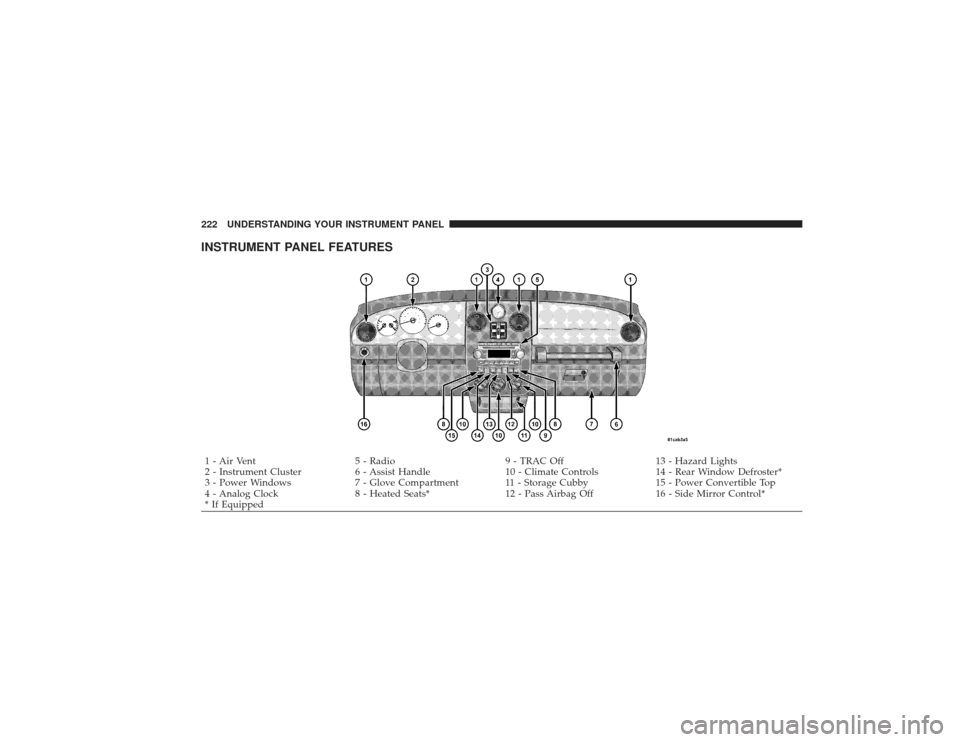
INSTRUMENT PANEL FEATURES1 - Air Vent5 - Radio9 - TRAC Off13 - Hazard Lights
2 - Instrument Cluster 6 - Assist Handle10 - Climate Controls14 - Rear Window Defroster*
3 - Power Windows 7 - Glove Compartment 11 - Storage Cubby 15 - Power Convertible Top
4 - Analog Clock 8 - Heated Seats*12 - Pass Airbag Off16 - Side Mirror Control*
* If Equipped
222 UNDERSTANDING YOUR INSTRUMENT PANEL
Page 236 of 491
22. Oil Pressure LightShows low engine oil pressure. The light will come
on and remain on when the ignition switch is
turned from the OFF to the ON position, and the light
will turn off after the engine is started. If the bulb does
not come on during starting, have the system checked by
an authorized dealer.
If the light comes on and remains on while driving, stop
the vehicle and shut off the engine. DO NOT OPERATE
THE VEHICLE UNTIL THE CAUSE IS CORRECTED.
The light does not show the quantity of oil in the engine.
This can be determined using the procedure shown in
Section 7.
23. Airbag Light The light comes on and remains on for 6 to 8
seconds as a bulb check when the ignition
switch is first turned ON. If the light does not come on during starting, stays on, or comes on while
driving, have the system checked by an authorized
dealer.
24. High Beam Indicator
This light shows that the headlights are on high
beam. Pull the turn signal lever toward the steer-
ing wheel to switch the headlights from high or low
beam.
25. Compass Mini-Trip Computer (CMTC) or Electronic
Vehicle Information Center (EVIC) Button—If Equipped
Pushing this button will switch between the different
EVIC functions.
Press the CMTC reset button to scroll through sub menus
(i.e. Trip Functions: AVG. Fuel Economy, DTE, Elapsed
Time, and Units.234 UNDERSTANDING YOUR INSTRUMENT PANEL