change time CHRYSLER PT CRUISER 2008 1.G User Guide
[x] Cancel search | Manufacturer: CHRYSLER, Model Year: 2008, Model line: PT CRUISER, Model: CHRYSLER PT CRUISER 2008 1.GPages: 488, PDF Size: 7.43 MB
Page 257 of 488

Press and hold the FF button to fast forward through the
tracks. Release the FF button to stop the fast forward
feature. If the RW button is pressed, the current track will
reverse to the beginning of the track and begin playing.
RND/SET Button (Random Play Button) (CD
Mode)
Press this button while the CD is playing to activate
Random play. This feature plays the selections on the
compact disc in random order to provide an interesting
change of pace.
Press the SEEK button to move to the next randomly
selected track.
Press the RND button a second time to stop Random
play.
Operating Instructions - Auxiliary Mode
The auxiliary (AUX) jack is an audio input jack, which
allows the user to plug in a portable device such as an
MP3 player, cassette player, or microphone and utilize
the vehicle's audio system to amplify the source and play
through the vehicle speakers.
The auxiliary mode becomes active when an electrical
device is plugged into the AUX jack using a standard 3.5
mm stereo audio cable and the user presses and releases
the MODE button until AUX appears on the display.
NOTE:The radio will return to the last stored mode if
the ignition switch is turned from the OFF/LOCK posi-
tion to the ACC position, the radio is turned on, and the
radio was previously in the AUX mode.
SEEK Button (Auxiliary Mode)
No function.
UNDERSTANDING YOUR INSTRUMENT PANEL 257
4
Page 258 of 488

MUTE Button (Auxiliary Mode)
Press the MUTE button to cancel the sound from the
speakers.9MUTE9will display. Press the MUTE button a
second time and the sound from the speakers will return.
Rotating the volume control or turning off the ignition
will also return the sound from the speakers.
SCAN Button (Auxiliary Mode)
No function.
EJECT Button (Auxiliary Mode)
No function.
PSCAN Button (Auxiliary Mode)
No function.
TIME Button (Auxiliary Mode)
Press this button to change the display from elapsed
playing time to time of day. The time of day will display
for five seconds.
RW/FF (Auxiliary Mode)
No function.
RND/SET Button (Auxiliary Mode)
No function.
Mode Button (Auxiliary Mode)
Press the MODE button repeatedly to select between the
CD player and Satellite Radio (if equipped).
Operating Instructions - Hands-Free Phone Ð If
Equipped
Refer to the ªHands-Free Phone (UConnectt)º section of
this Owner's Manual.
Operating Instructions - Satellite Radio Ð If
Equipped
Refer to the ªSatellite Radioº section of this Owner's
Manual.
258 UNDERSTANDING YOUR INSTRUMENT PANEL
Page 267 of 488

Radio display will show9EJECTING DISC9when the disc
is being ejected and prompt the user to remove the disc.
Press and hold the LOAD/ EJT button for five seconds
and all CDs will be ejected from the radio.
If you have ejected a disc and have not removed it within
15 seconds, it will be reloaded. If the CD is not removed,
the radio will continue to play the non-removed CD. If
the CD is removed and there are other CDs in the radio,
the radio will play the next CD after a two minute
timeout. If the CD is removed and there are no other CDs
in the radio, the radio will remain in CD mode and
display9INSERT DISCº for 10 seconds. If no discs are
inserted within 10 seconds ªNO DISCS LOADEDº will
be displayed.
On some vehicles a disc can be ejected with the radio and
ignition OFF.TIME Button (CD Mode for CD Audio Play)
Press this button to change the display from a large CD
playing time display to a small CD playing time display.
RW/FF (CD Mode for CD Audio Play)
Press and hold FF (Fast Forward) and the CD player will
begin to fast forward until FF is released or RW or
another CD button is pressed. The RW (Reverse) button
works in a similar manner.
Press and hold the FF button to fast forward through the
tracks. Release the FF button to stop the fast forward
feature.
TUNE Control (CD Mode for CD Audio Play)
Pressing the TUNE control allows the setting of the Tone,
Fade, and Balance. See Radio Mode.
AM/FM Button (CD Mode for CD Audio Play)
Switches the Radio to the Radio mode.
UNDERSTANDING YOUR INSTRUMENT PANEL 267
4
Page 268 of 488

RND/PTY Button (Random Play Button) (CD Mode
for CD Audio Play)
Press this button while the CD is playing to activate
Random Play. This feature plays the selections on the
compact disc in random order to provide an interesting
change of pace.
Press the SEEK button to move to the next randomly
selected track.
Press the RND button a second time to stop Random
play.
Buttons1-6(CDMode for CD Audio Play)
Selects disc positions1-6forPlay/Load/Eject.
Notes On Playing MP3 Files
The radio can play MP3 files, however, acceptable MP3
file recording media and formats are limited. When
writing MP3 files, pay attention to the following restric-
tions.
Supported Media (Disc Types)
The MP3 file recording media supported by the radio are
CD-ROM, CD-R and CD-RW.
Supported Medium Formats (File Systems)
The medium formats supported by the radio are ISO 9660
Level 1 and Level 2 and includes the Joliet extension.
When reading discs recorded using formats other than
ISO 9660 Level 1 and Level 2, the radio may fail to read
files properly and may be unable to play the file nor-
mally. UDF and Apple HFS formats are not supported.
The radio uses the following limits for file systems:
²Maximum number of directory levels: 15
²Maximum number of files: 255
²Maximum number of folders: 100
268 UNDERSTANDING YOUR INSTRUMENT PANEL
Page 275 of 488

Press and release the SCAN button (if equipped) to
automatically change channels every 7 seconds. The
radio will pause on each channel for 7 seconds before
moving on to the next channel. The word9SCAN9will
appear in the display between each channel change. Press
the SCAN button a second time to stop the search.
NOTE:Channels that may contain objectionable content
can be blocked. Contact Sirius Customer Care at 888-539-
7474 to discuss options for channel blocking or unblock-
ing. Please have your ESN/SID information available.
Storing and Selecting Pre-Set Channels
In addition to the 12 AM and 12 FM pre-set stations, you
may also commit 12 satellite stations to push button
memory. These satellite channel pre-set stations will not
erase any AM or FM pre-set memory stations. Follow the
memory pre-set procedures that apply to your radio.
Using the PTY (Program Type) Button (if
equipped)
Follow the PTY button instructions that apply to your
radio.
PTY Button(SCAN(
When the desired program type is obtained, press the
9SCAN9button within five seconds. The radio will play 7
seconds of the selected channel before moving to the next
channel of the selected program type. Press the9SCAN9
button a second time to stop the search.
NOTE:Pressing the9SEEK9or9SCAN9button while
performing a music type scan will change the channel by
one and stop the search. Pressing a pre-set memory
button during a music type scan, will call up the memory
channel and stop the search.
UNDERSTANDING YOUR INSTRUMENT PANEL 275
4
Page 397 of 488
checked for fluid level at regular intervals. Fill the
reservoir with windshield washer solvent (not radiator
antifreeze) and operate the system for a few seconds to
flush out the residual water.
WARNING!
Commercially available windshield washer solvents
are flammable. They could ignite and burn you. Care
must be exercised when filling or working around
the washer solution.
EXHAUST SYSTEM
The best protection against carbon monoxide entry into
the vehicle body is a properly maintained engine exhaust
system.
If you notice a change in the sound of the exhaust system,
or if exhaust fumes can be detected inside the vehicle, orwhen the underside or rear of the vehicle is damaged;
have a competent technician inspect the complete ex-
haust system and adjacent body areas for broken, dam-
aged, deteriorated, or mispositioned parts. Open seams
or loose connections could permit exhaust fumes to seep
into the passenger compartment. In addition, inspect the
exhaust system each time the vehicle is raised for an oil
change or lubrication. Replace as required.
WARNING!
Exhaust gases can injure or kill. They contain carbon
monoxide (CO) which is colorless and odorless.
Breathing it can make you unconscious and can
eventually poison you. To avoid breathing CO, refer
to Exhaust Gas in the Safety Tips section of this
manual.
MAINTAINING YOUR VEHICLE 397
7
Page 435 of 488
²Taxi, police, or delivery service (commercial ser-
vice).²L
²Off-road or desert operation.
²If equipped for and operating with E-85 (ethanol)
fuel.
NOTE:IfANYof these apply to you then change your
engine oil every 3,000 miles (5 000 km) or 3 months,
whichever comes first, and follow schedule ªBÐAll
Enginesº of the9Maintenance Schedules9section of this
manual.
NOTE:IFANYof these apply to you then flush and
replace the engine coolant every 102,000 miles (170 000
km) or 60 months, whichever comes first, and follow
schedule ªBÐAll Enginesº of the9Maintenance Sched-
ules9section of this manual.
NOTE:Most vehicles are operated under the conditions
listed for Schedule9B9ÐALL ENGINES.Second is ScheduleªAºÐNON TURBO. It is for vehicles
that are not operated under any of the conditions listed
under Schedule9B9ÐALL ENGINES.
Third is ScheduleªAºÐTURBO. It is for vehicles that are
not operated under any of the conditions listed under
Schedule9B9ÐALL ENGINES.
Use the schedule that best describes your driving condi-
tions. Where time and mileage are listed, follow the
interval that occurs first.
CAUTION!
Failure to perform the required maintenance items
may result in damage to the vehicle.
MAINTENANCE SCHEDULES 435
8
M
A
I
N
T
E
N
A
N
C
E
S
C
H
E
D
U
L
E
S
Page 447 of 488
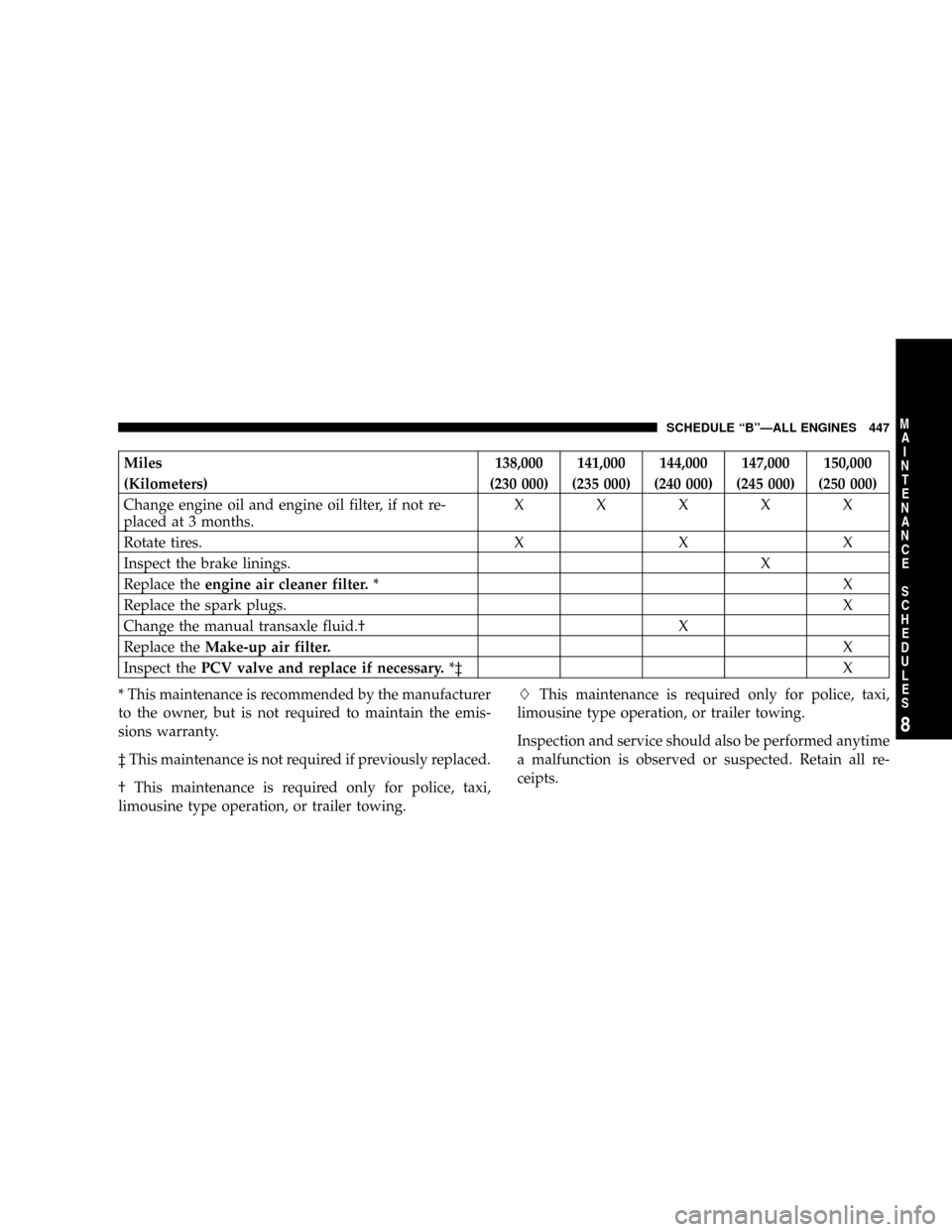
Miles 138,000 141,000 144,000 147,000 150,000
(Kilometers) (230 000) (235 000) (240 000) (245 000) (250 000)
Change engine oil and engine oil filter, if not re-
placed at 3 months.XXXXX
Rotate tires. X X X
Inspect the brake linings. X
Replace theengine air cleaner filter.*X
Replace the spark plugs.X
Change the manual transaxle fluid.² X
Replace theMake-up air filter.X
Inspect thePCV valve and replace if necessary.*³ X
* This maintenance is recommended by the manufacturer
to the owner, but is not required to maintain the emis-
sions warranty.
³ This maintenance is not required if previously replaced.
² This maintenance is required only for police, taxi,
limousine type operation, or trailer towing.LThis maintenance is required only for police, taxi,
limousine type operation, or trailer towing.
Inspection and service should also be performed anytime
a malfunction is observed or suspected. Retain all re-
ceipts.
SCHEDULE ªBºÐALL ENGINES 447
8
M
A
I
N
T
E
N
A
N
C
E
S
C
H
E
D
U
L
E
S
Page 452 of 488
![CHRYSLER PT CRUISER 2008 1.G User Guide Miles144,000 150,000
(Kilometers)(240 000) (250 000)
[Months][144] [150]
Change engine oil and engine oil filter. X X
Rotate tires.XX
Inspect thePCV valveand replace if necessary. * ³ X
Replace theai](/img/25/8517/w960_8517-451.png "CHRYSLER PT CRUISER 2008 1.G User Guide Miles144,000 150,000
(Kilometers)(240 000) (250 000)
[Months][144] [150]
Change engine oil and engine oil filter. X X
Rotate tires.XX
Inspect thePCV valveand replace if necessary. * ³ X
Replace theai")
Miles144,000 150,000
(Kilometers)(240 000) (250 000)
[Months][144] [150]
Change engine oil and engine oil filter. X X
Rotate tires.XX
Inspect thePCV valveand replace if necessary. * ³ X
Replace theair cleaner filter.X
* This maintenance is recommended by the manufacturer
to the owner but is not required to maintain the emis-
sions warranty.
³ This maintenance is not required if previously replaced.Inspection and service should also be performed anytime
a malfunction is observed or suspected. Retain all re-
ceipts.
452 SCHEDULE ªAºÐNON TURBO
8
M
A
I
N
T
E
N
A
N
C
E
S
C
H
E
D
U
L
E
S
Page 457 of 488
![CHRYSLER PT CRUISER 2008 1.G User Guide Miles 110,000 115,000 120,000
(Kilometers) (177 000) (185 000) (193 000)
[Month] [132] [138] [144]
Change engine oil and engine oil filter. X X X
Rotate tires. X X X
Inspect thePCV Valveand replace if](/img/25/8517/w960_8517-456.png "CHRYSLER PT CRUISER 2008 1.G User Guide Miles 110,000 115,000 120,000
(Kilometers) (177 000) (185 000) (193 000)
[Month] [132] [138] [144]
Change engine oil and engine oil filter. X X X
Rotate tires. X X X
Inspect thePCV Valveand replace if")
Miles 110,000 115,000 120,000
(Kilometers) (177 000) (185 000) (193 000)
[Month] [132] [138] [144]
Change engine oil and engine oil filter. X X X
Rotate tires. X X X
Inspect thePCV Valveand replace if necessary. * X
Replace theengine air cleaner filter.X
Replace thespark plugs and ignition cables.X
* This maintenance is recommended by the manufacturer
to the owner but is not required to maintain the emis-
sions warranty.
³ This maintenance is not required if previously replaced.
Inspection and service should also be performed anytime
a malfunction is observed or suspected. Retain all re-
ceipts.
WARNING!
You can be badly injured working on or around a
motor vehicle. Do only that service work for which
you have the knowledge and the right equipment. If
you have any doubt about your ability to perform a
service job, take your vehicle to a competent
mechanic.
SCHEDULE ªAºÐTURBO 457
8
M
A
I
N
T
E
N
A
N
C
E
S
C
H
E
D
U
L
E
S