reset CHRYSLER PT CRUISER 2009 1.G User Guide
[x] Cancel search | Manufacturer: CHRYSLER, Model Year: 2009, Model line: PT CRUISER, Model: CHRYSLER PT CRUISER 2009 1.GPages: 410, PDF Size: 5.24 MB
Page 179 of 410
3. Release the RESET button, then press and hold again
(approximately 10 seconds), until the direction is dis-
played with the CAL indicator on continuously in the
display.
4. To complete the compass calibration, drive the vehicle
in one or more complete 360 degree circles, under 5 mph
(8 km/h) in an area free from power lines and large
metallic objects, until the CAL indicator turns off. The
compass will now function normally.
Odometer Display
When the appropriate conditions exist, the following
odometer messages will display:
CRUISE...................... Cruise Activated
gASCAP ....................... Fuel Cap Fault
noFUSE .......................... Fuse Fault
These messages can be manually turned off by pressing
the right reset button (on the instrument cluster).
Trip Odometer (ODO)
This display shows the distance traveled since the last
reset. Press and release the right button (on the instru-
ment cluster) to switch from odometer, to trip A or trip B.
Press and hold the right button while the odometer/trip
odometer is displayed, to reset.
Trip A
Shows the total distance traveled for trip A since the last
reset.
Trip B
Shows the total distance traveled for trip B since the last
reset.
4
UNDERSTANDING YOUR INSTRUMENT PANEL 177
Page 182 of 410
•Tire Pressure Monitor (TPM)
•Personal Settings
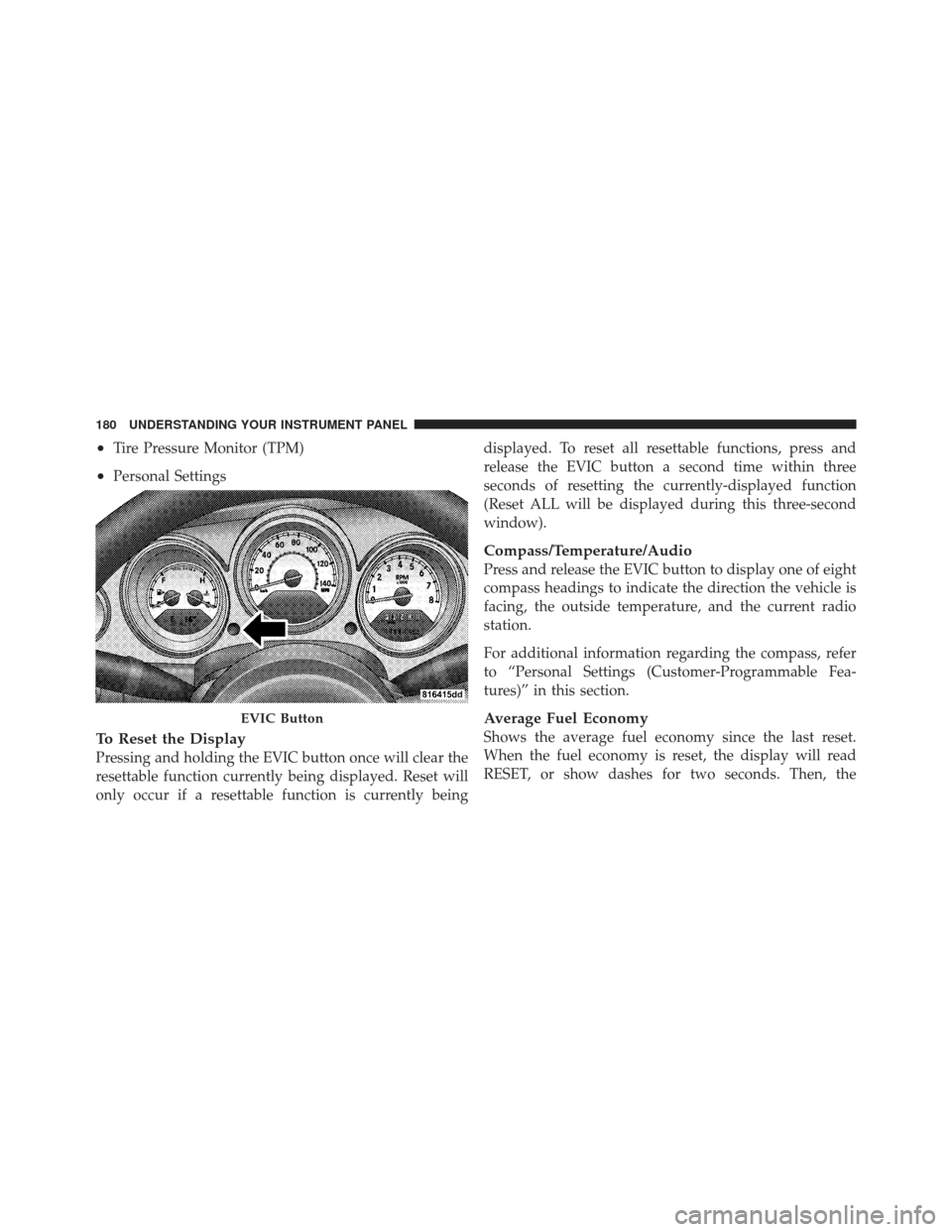
To Reset the Display
Pressing and holding the EVIC button once will clear the
resettable function currently being displayed. Reset will
only occur if a resettable function is currently beingdisplayed. To reset all resettable functions, press and
release the EVIC button a second time within three
seconds of resetting the currently-displayed function
(Reset ALL will be displayed during this three-second
window).
Compass/Temperature/Audio
Press and release the EVIC button to display one of eight
compass headings to indicate the direction the vehicle is
facing, the outside temperature, and the current radio
station.
For additional information regarding the compass, refer
to “Personal Settings (Customer-Programmable Fea-
tures)” in this section.
Average Fuel Economy
Shows the average fuel economy since the last reset.
When the fuel economy is reset, the display will read
RESET, or show dashes for two seconds. Then, the
EVIC Button
180 UNDERSTANDING YOUR INSTRUMENT PANEL
Page 183 of 410
history information will be erased, and the averaging will
continue from where it was before the reset.
Distance To Empty (DTE)
Shows the estimated distance that can be travelled with
the fuel remaining in the tank. This estimated distance is
determined by a weighted average of the instantaneous
and average fuel economy, according to the current fuel
tank level. This is not resettable.
NOTE:Significant changes in driving style or vehicle
loading will greatly affect the actual drivable distance of
the vehicle, regardless of the DTE displayed value.
When the DTE value is less than 30 miles (48 km)
estimated driving distance, the DTE display will change
to a text display of LOW FUEL. This display will con-
tinue until the vehicle runs out of fuel. Adding a signifi-
cant amount of fuel to the vehicle will turn off the LOW FUEL text and a new DTE value will be displayed, based
on the current values in the DTE calculation and the
current fuel tank level.Elapsed Time
Shows the total elapsed time of travel since the last reset
when the ignition switch is in the ACC position. Elapsed
time will increment when the ignition switch is in the ON
or START position.
Tire Pressure Monitor (TPM)
Refer to Section 5 “Tire Pressure Monitoring System
(TPMS),” for system operation.
Personal Settings (Customer-Programmable
Features)
This allows the driver to set and recall features when the
shift lever is in PARK (automatic transmission) or the
vehicle is stopped (manual transmission).
4
UNDERSTANDING YOUR INSTRUMENT PANEL 181
Page 194 of 410
Program Type16 Digit-Character
Display
Soft Rock Soft_Rock
Soft Rhythm and Blues Soft_R_&_B Sports SportsTalk Talk
Top 40 Top_40
Weather Weather
By pressing the SEEK button when the PTY icon is
displayed, the radio will be tuned to the next frequency
station with the same selected PTY name. The PTY
function only operates when in the FM mode.
If a preset button is activated while in the PTY (Program
Type) mode, the PTY mode will be exited and the radio
will tune to the preset station.SET/DIR Button (Radio Mode) — To Set the
Pushbutton Memory
When you are receiving a station that you wish to
commit to pushbutton memory, press the SET/DIR but-
ton. The symbol SET 1 will now show in the display
window. Select the button (1-6) you wish to lock onto this
station and press and release that button. If a button is
not selected within 5 seconds after pressing the SET/DIR
button, the station will continue to play but will not be
stored into pushbutton memory.
You may add a second station to each pushbutton by
repeating the above procedure with this exception: Press
the SET/DIR button twice and “SET 2” will show in the
display window. Each button can be set for SET 1 and
SET 2 in both AM and FM. This allows a total of 12 AM,
12 FM and 12 Satellite (if equipped) stations to be stored
into pushbutton memory. The stations stored in SET 2
memory can be selected by pressing the pushbutton
twice.
192 UNDERSTANDING YOUR INSTRUMENT PANEL
Page 195 of 410

Every time a preset button is used a corresponding
button number will be displayed.
Buttons1-6(Radio Mode)
These buttons tune the radio to the stations that you
commit to pushbutton memory {12 AM, 12 FM, and 12
Satellite (if equipped) stations}.
Operation Instructions - (CD Mode for CD Audio
Play)
NOTE:
•The ignition switch must be in the ON or ACC
position to operate the radio.
•Note: This radio is capable of playing compact discs
(CD), recordable compact discs (CD-R), rewritable
compact discs (CD-RW) compact discs with MP3
tracks and multisession compact discs with CD and
MP3 tracks.
Inserting Compact Disc(s)
Gently insert one CD into the CD player with the CD
label facing up. The CD will automatically be pulled into
the CD player and the CD icon will illuminate on the
radio display.
CAUTION!
This CD player will accept 4 3/4 inch (12 cm) discs
only. The use of other sized discs may damage the
CD player mechanism.
You may eject a disc with the radio OFF.
If you insert a disc with the ignition ON and the radio
ON, the unit will switch from radio to CD mode and
begin to play when you insert the disc. The display will
show the disc number, the track number, and index time
in minutes and seconds. Play will begin at the start of
track 1.4
UNDERSTANDING YOUR INSTRUMENT PANEL 193
Page 205 of 410
SCAN Button (Radio Mode)
Pressing the SCAN button causes the tuner to search for
the next listenable station in either, AM, FM, or Satellite
(if equipped) frequencies, pausing for five seconds at
each listenable station before continuing to the next. To
stop the search, press SCAN a second time.
PSCAN Button (Radio Mode)
Pressing the PSCAN button causes the tuner to scan
through preset stations in either AM, FM, or Satellite (if
equipped) frequencies, pausing for five seconds at each
preset station before continuing to the next. To stop the
search, press PSCAN a second time.
TIME Button
Press the TIME button and the time of day will display
for five seconds.
Clock Setting Procedure
1. Press and hold the TIME button until the hours blink.2. Adjust the hours by turning the TUNE/AUDIO con-
trol.
3. After the hours are adjusted, press the TUNE/AUDIO
control to set the minutes. The minutes will begin to
blink.
4. Adjust the minutes using the TUNE/AUDIO control.
5. To exit, press any button/knob or wait five seconds.
RW/FF (Radio Mode)
Pressing the Rewind/Fast Forward button causes the
tuner to search for the next frequency in the direction of
the arrows. This feature operates in either AM, FM or
Satellite (if equipped) frequencies.
TUNE Control (Radio Mode)
Turn the rotary TUNE control clockwise to increase or
counterclockwise to decrease the frequency.
4
UNDERSTANDING YOUR INSTRUMENT PANEL 203
Page 207 of 410

the SET button twice and “SET 2” will show in the
display window. Each button can be set for SET 1 and
SET 2 in both AM and FM. This allows a total of 12 AM,
12 FM, and 12 Satellite (if equipped) stations to be stored
into pushbutton memory. The stations stored in SET 2
memory can be selected by pressing the pushbutton
twice.
Every time a preset button is used, a corresponding
button number will display.
Preset Buttons1-6(Radio Mode)
These buttons tune the Radio to the stations that you
commit to pushbutton memory, 12 AM, 12 FM, and 12
Satellite (if equipped) stations.
Operating Instructions - CD Mode
NOTE:The ignition switch must be in the ON or ACC
position to operate the radio.
Inserting The Compact Disc (Single CD Player)
Gently insert one CD into the CD player with the CD
label facing up. The CD will automatically be pulled into
the CD player and the CD icon will illuminate on the
radio display.
If the volume control is ON, the unit will switch to CD
mode and begin to play. The display will show the track
number and play time in minutes and seconds. Play will
begin at the start of track one.
NOTE:
•On some vehicles, you may insert or eject a disc with
the radio or ignition switch OFF.
•If you insert a disc with the ignition ON and the radio
OFF, the CD will automatically be pulled into the CD
player.
•This radio does not play discs with MP3 tracks.
4
UNDERSTANDING YOUR INSTRUMENT PANEL 205
Page 233 of 410
NOTE:If a malfunction occurs, the system will trap the
key in the ignition cylinder to warn you that this safety
feature is inoperable. The engine can be started and
stopped but the key cannot be removed until you obtain
service.
Four-Speed Automatic Transaxle
NOTE: Under extreme cold temperatures (-6°F (-21°C)
and when in DRIVE, transmission operation may be
briefly limited to only second gear operation. Normal
operation will resume once the transmission temperature
has risen to a suitable level.
The electronically-controlled transaxle provides a precise
shift schedule. The transaxle electronics are self-
calibrating; therefore, the first few shifts on a new vehicle
may be somewhat abrupt. This is a normal condition, and
precision shifts will develop within a few shift cycles.
RESET Mode
The transaxle is monitored electronically for abnormal
conditions. If a condition is detected that could cause
damage, the transaxle shifts automatically into second
gear. The transaxle remains in second gear despite the
forward gear selected. PARK, REVERSE, and NEUTRAL
will continue to operate. This second gear limp-in feature
allows the vehicle to be driven to an authorized dealer for
service without damaging the transaxle.
In the event that the problem has been momentary, the
transaxle can be reset to regain all forward gears:
1. Stop the vehicle and move the shift lever into PARK.
2. Turn the ignition to OFF then restart the engine.
3. Move the shift lever into DRIVE and resume driving.
4. If the transaxle cannot be reset, authorized dealer
service is required.
5
STARTING AND OPERATING 231
Page 234 of 410
NOTE:Even if the transaxle can be reset, it is recom-
mended that you visit an authorized dealer at your
earliest possible convenience. Your authorized dealer has
diagnostic equipment to determine if the problem could
recur.
Gear Ranges
DO NOT race the engine when shifting from PARK or
NEUTRAL positions into another gear range.
PARK
This range supplements the parking brake by locking the
transmission. The engine can be started in this range.
Never use PARK while the vehicle is in motion. Apply
the parking brake when leaving the vehicle in this range.
Always apply the parking brake first, and then move the
shift lever into the PARK position.
WARNING!
Unintended movement of a vehicle could injure
those in and near the vehicle. As with all vehicles,
you should never exit a vehicle while the engine is
running. Before exiting a vehicle, you should always
shift the vehicle into PARK, remove the key from the
ignition, and apply the parking brake. Once the key
is removed from the ignition, the shift lever is locked
in the PARK position, securing the vehicle against
unwanted movement. Furthermore, you should never
leave unattended children inside a vehicle.
The following indicators should be used to ensure that
you have engaged the shift lever into the PARK position:
•When moving the shift lever into PARK, press the
button on the shift lever knob and firmly move the
lever all the way forward until it stops.
232 STARTING AND OPERATING
Page 273 of 410
CAUTION!
DO NOT use gasoline containing Methanol or E85
Ethanol. Use of these blends may result in starting
and drivability problems and may damage critical
fuel system components.
Problems that result from using methanol gasoline or E85
Ethanol blends are not the responsibility of the manufac-
turer. While MTBE is an oxygenate made from Methanol,
it does not have the negative effects of Methanol.
E-85 Usage In Non-Flex Fuel Vehicles
Non-FFV vehicles are compatible with gasoline contain-
ing 10% ethanol (E10). Gasoline with higher ethanol
content may void the vehicle’s warranty.
If a Non-FFV vehicle is inadvertently fueled with E-85
fuel, the engine will have some or all of these symptoms:
•operate in a lean mode
•OBD II “Malfunction Indicator Light” on
•poor engine performance
•poor cold start and cold drivability
•increased risk for fuel system component corrosion
To fix a Non-FFV vehicle inadvertently fueled once with
E-85 perform the following:
•drain the fuel tank (see your authorized dealer)
•change the engine oil and oil filter
•disconnect and reconnect the battery to reset the
engine controller memory
More extensive repairs will be required for prolonged
exposure to E-85 fuel.
5
STARTING AND OPERATING 271