Instrument CHRYSLER SEBRING 2004 2.G User Guide
[x] Cancel search | Manufacturer: CHRYSLER, Model Year: 2004, Model line: SEBRING, Model: CHRYSLER SEBRING 2004 2.GPages: 273, PDF Size: 4.88 MB
Page 51 of 273

UNDERSTANDING THE FEATURES OF YOUR VEHICLE
CONTENTS
mConsole Features.......................53
NConsole Features Ð Without Heated Seats....53
NConsole Features Ð With Heated Seats.......54
mMirrors..............................55
NInside Day/Night MirrorÐ If Equipped......55
NElectric Remote-Control MirrorsÐ If
Equipped............................55
NOutside Mirror Ð Driver's Side............56
NOutside Mirror Ð Passenger's Side..........56
NIlluminated Vanity Mirrors Ð If Equipped....56
mSeats................................57
NManual Front Seat Adjustments............57NPower Seats Ð If Equipped...............58
NHeated Seats Ð If Equipped..............58
NAdjustable Head Restraints...............59
NFolding Rear Seat......................59
mTo Open And Close The Hood.............60
mLights...............................61
NInterior Lights........................61
NFront Map/Reading Lights Ð If Equipped....62
NMulti-Function Control Lever..............63
NHeadlights, Parking Lights, Instrument Panel
Lights..............................64
NDaytime Running Lights (Canada Only)......64
3
Page 55 of 273

MIRRORS
Inside Day/Night MirrorÐ If Equipped
Adjust the mirror to center on the view through the rear
window. A two point pivot system allows for horizontal
and vertical mirror adjustment.
Annoying headlight glare can be reduced by moving the
small control under the mirror to the night position
(toward rear of vehicle). The mirror should be adjusted
while set in the day position (toward windshield).
Electric Remote-Control MirrorsÐ If Equipped
Both of the outside mirrors can be adjusted by using the
remote controls mounted on the instrument panel to the
left of the steering wheel.
NOTE:Place the mirror selector switch in the center
(neutral) position to prevent accidental movement of the
mirrors.
UNDERSTANDING THE FEATURES OF YOUR VEHICLE 55
3
Page 60 of 273
WARNING!
The cargo area in the rear of the vehicle (with the
rear seatbacks in the locked-up or folded down
position) should not be used as a play area by
children when the vehicle is in motion. They could
be seriously injured in an accident. Children should
be seated and using the proper restraint system.
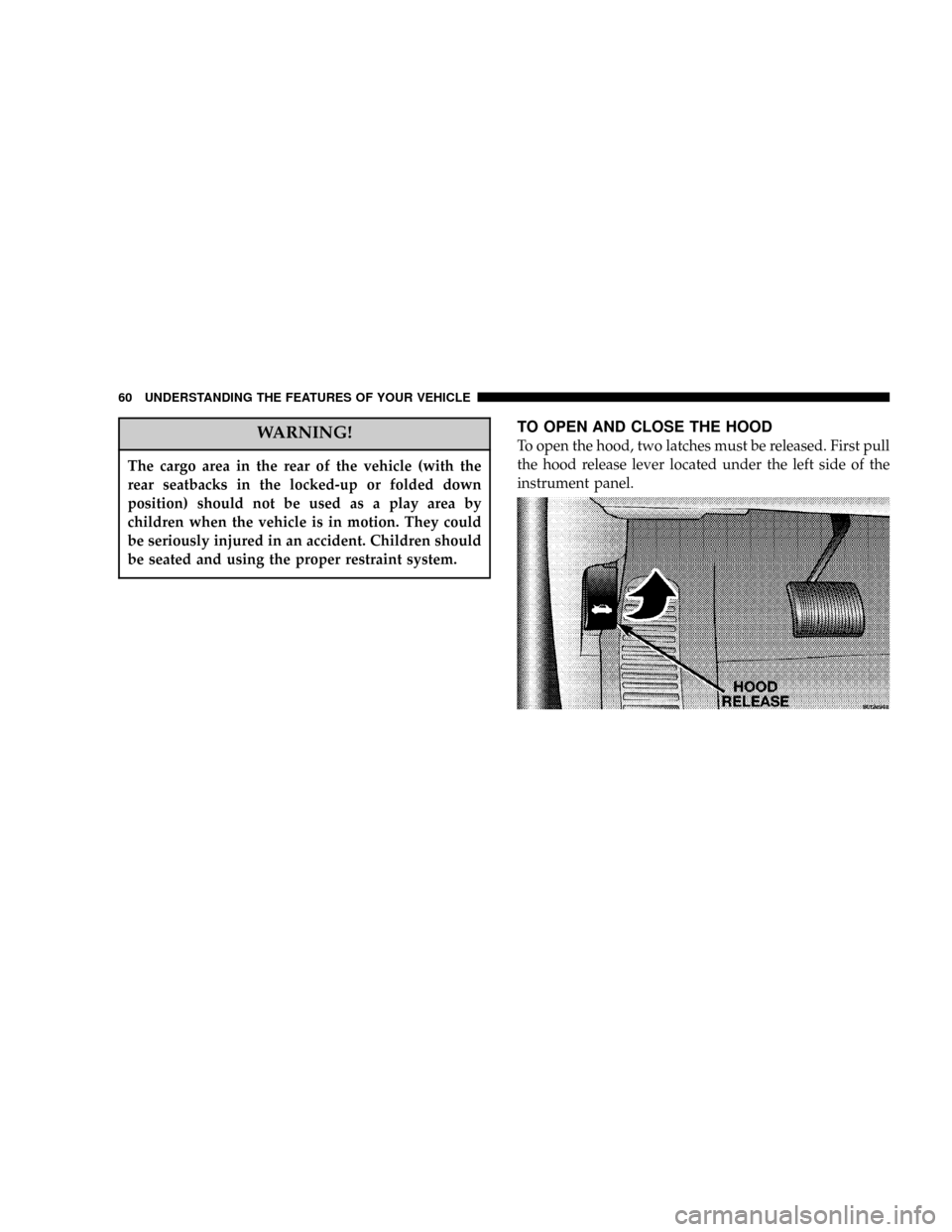
TO OPEN AND CLOSE THE HOOD
To open the hood, two latches must be released. First pull
the hood release lever located under the left side of the
instrument panel.
60 UNDERSTANDING THE FEATURES OF YOUR VEHICLE
Page 62 of 273

Dimmer Control
With the parking lights or headlights
on, rotating the dimmer control for the
interior lights on the Multi-Function
Control Lever upward will increase
the brightness of the instrument panel
lights.
Dome Light Position
Rotate the dimmer control completely
upward to the second detent to turn
on the interior lights. The interior
lights will remain on when the dim-
mer control is in this position.
Interior Light Defeat (OFF)
Rotate the dimmer control to the ex-
treme bottom full-circle position. The
interior lights will remain off when the
doors are open.
Daytime Mode (Daytime Brightness Feature)
Rotate the dimmer control to the first
detent (full-circle). This feature bright-
ens the odometer and radio display
when the parking lights or headlights
are on during daylight conditions.
Front Map/Reading Lights Ð If Equipped
These lights are mounted between the sun visors. Each
light has a push-on push-off switch.
NOTE:The lights will remain on until the switch is
pressed a second time, so be sure that they have been
turned off before leaving the vehicle.
The following two types of front map/reading lights may
be equipped on this vehicle:
62 UNDERSTANDING THE FEATURES OF YOUR VEHICLE
Page 63 of 273

Multi-Function Control Lever
The Multi-Function lever controls the operation of the
headlights, turn signals, headlight beam select switch,
instrument panel light dimming, courtesy lights, passing
lights, dome light and fog lights.
UNDERSTANDING THE FEATURES OF YOUR VEHICLE 63
3
Page 64 of 273

Headlights, Parking Lights, Instrument Panel
Lights
Turn the end of the control lever to the first detent for
parking light operation. Turn to the second detent for
headlight operation.
To change the brightness of the instrument panel lights,
turn the center portion of the lever up or down. Turning
the dimmer control to the full up position also turns on
the courtesy lights. Turning the dimmer control to the full
down position prevents the courtesy lights from coming
on when a door is opened.
Daytime Running Lights (Canada Only)
The headlights come on at a low intensity level whenever
the ignition switch is turned on. The lights remain on
until the ignition switch is turned OFF or the parking
brake is engaged. The headlight switch must be used for
normal night time driving.
Lights-on Reminder
If the headlights or parking lights are on after the ignition
is turned off, a chime will sound when the driver's door
is opened.
Fog Lights Ð If Equipped
The fog light switch is in the multi-function lever.
To activate the fog lights, turn on the low beam
headlights and pull out the end of the control
lever. A light in the instrument cluster shows when the
fog lights are on.
NOTE:The switch will turn on the fog lights only if the
low beam headlights are on. Turning on the high beam
headlights turns off the fog lights.
64 UNDERSTANDING THE FEATURES OF YOUR VEHICLE
Page 65 of 273

Turn Signals
Move the turn signal lever up or down and the arrows in
the instrument cluster flash to show proper operation of
the front and rear turn signal lights. You can signal a lane
change by moving the lever partially up or down.
Headlight Beam Select Switch
Pull the turn signal lever towards you to switch the
headlights to HIGH beam. Pull the turn signal lever a
second time to switch the headlights to LOW beam.
Passing Light
You can signal another vehicle with your headlights by
lightly pulling the turn signal lever toward the steering
wheel. This will cause the headlights to turn on at high
beam and remain on until the lever is released.
Headlight Time Delay
This feature provides the safety of headlight illumination
for about 90 seconds when leaving your vehicle in an
unlighted area.
To activate the delay, turn off the ignition while the
headlights are still on. Then turn off the headlights. The
delay interval begins when the ignition is turned off.If the headlights are turned off before the ignition, they
will turn off in the normal manner.
WINDSHIELD WIPERS AND WASHERS
The wipers and washers are operated by a switch in the
right side control lever. Turn the end of the control lever
to select the desired wiper speed.
NOTE:Always remove any build-up of snow that
prevents the windshield wiper blades from returning to
the OFF position. If the windshield wiper switch is
turned OFF and the blades cannot return to the OFF
position, damage to the wiper motor may occur.
UNDERSTANDING THE FEATURES OF YOUR VEHICLE 65
3
Page 67 of 273
WARNING!
Tilting the steering column while the vehicle is
moving is dangerous. Without a stable steering col-
umn, you could lose control of the vehicle and have
an accident. Adjust the column only while the ve-
hicle is stopped. Be sure it is locked before driving.
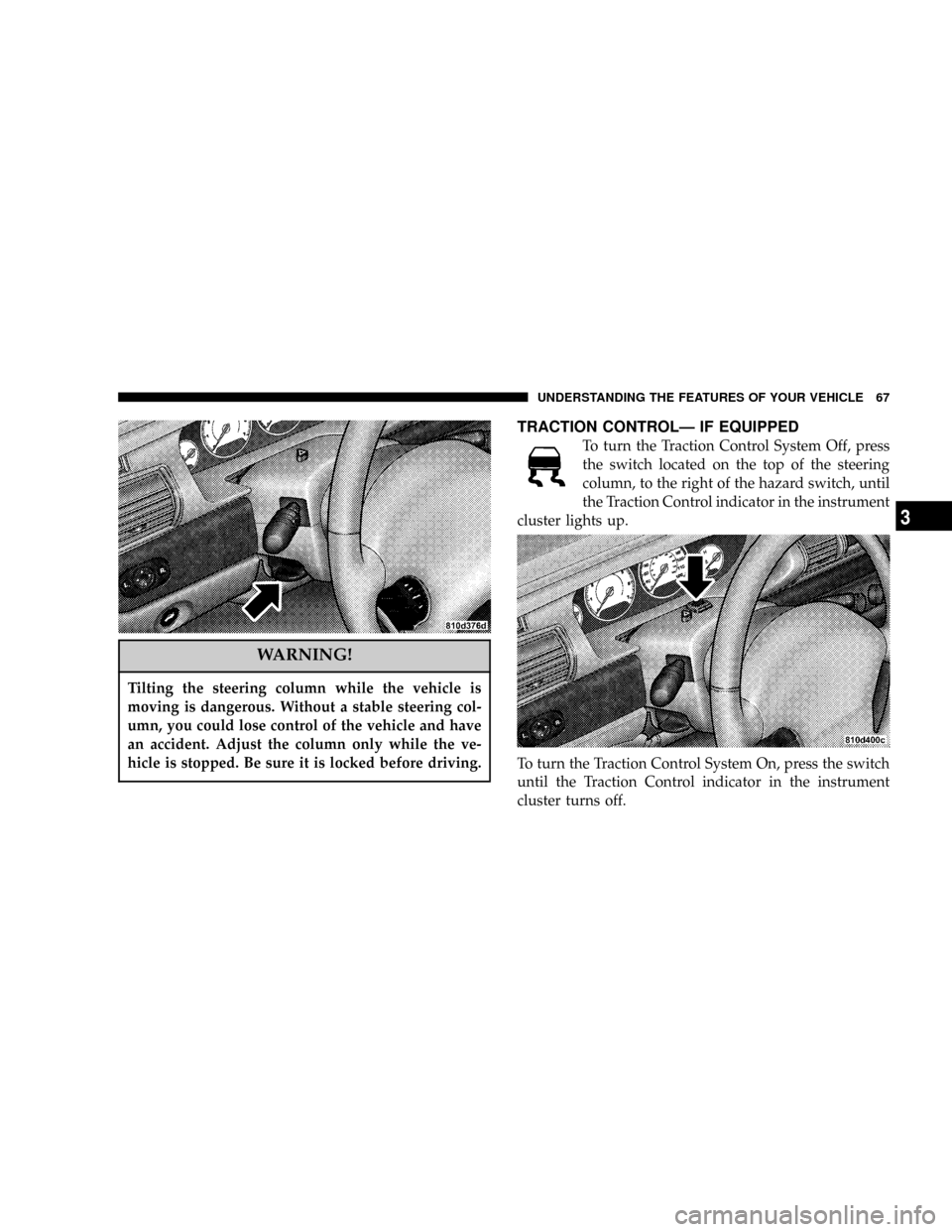
TRACTION CONTROLÐ IF EQUIPPED
To turn the Traction Control System Off, press
the switch located on the top of the steering
column, to the right of the hazard switch, until
the Traction Control indicator in the instrument
cluster lights up.
To turn the Traction Control System On, press the switch
until the Traction Control indicator in the instrument
cluster turns off.
UNDERSTANDING THE FEATURES OF YOUR VEHICLE 67
3
Page 68 of 273
NOTE:The Traction Control System is enabled each
time the ignition switch is turned On. This will occur
even if you used the switch to turn the system off before
powering down or turning the ignition to Lock.
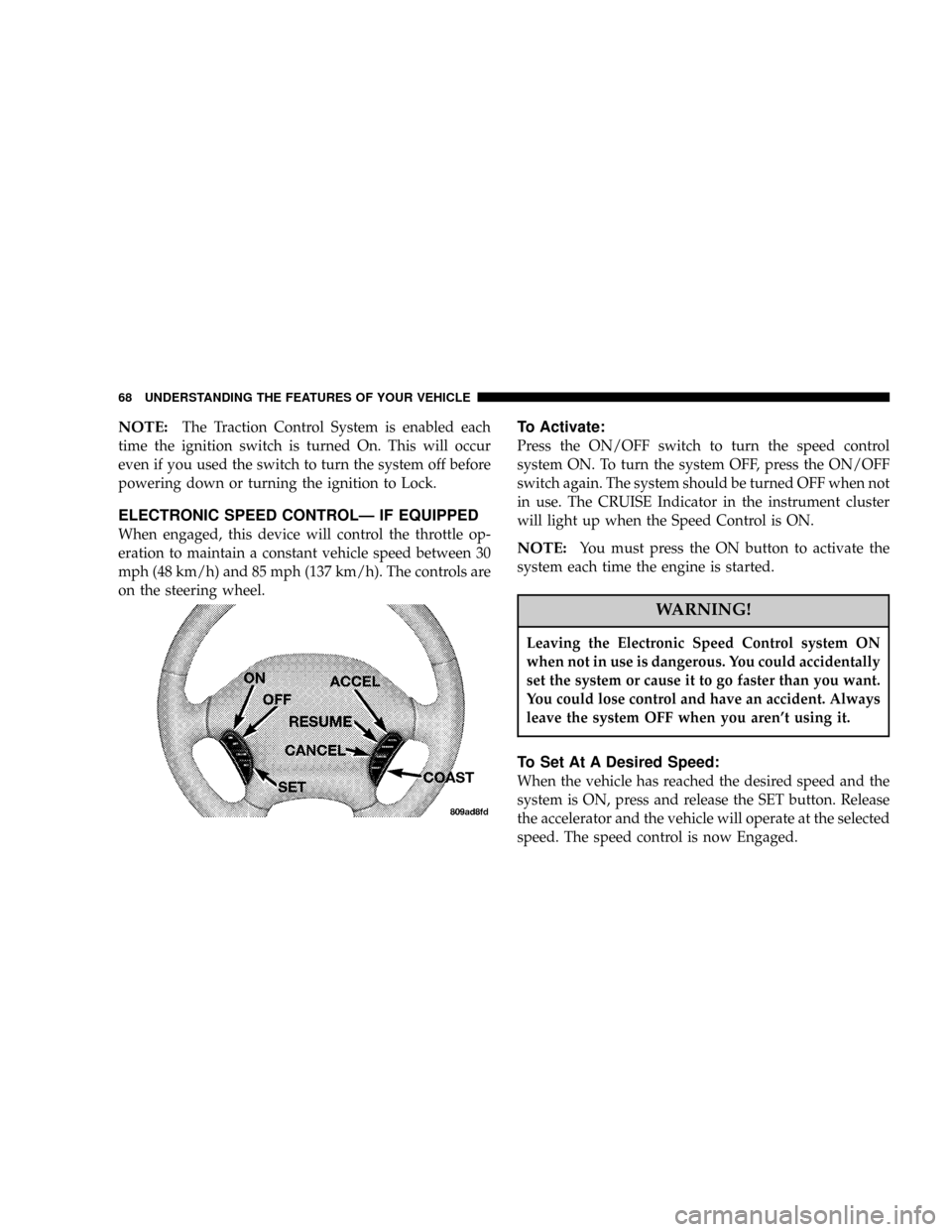
ELECTRONIC SPEED CONTROLÐ IF EQUIPPED
When engaged, this device will control the throttle op-
eration to maintain a constant vehicle speed between 30
mph (48 km/h) and 85 mph (137 km/h). The controls are
on the steering wheel.
To Activate:
Press the ON/OFF switch to turn the speed control
system ON. To turn the system OFF, press the ON/OFF
switch again. The system should be turned OFF when not
in use. The CRUISE Indicator in the instrument cluster
will light up when the Speed Control is ON.
NOTE:You must press the ON button to activate the
system each time the engine is started.
WARNING!
Leaving the Electronic Speed Control system ON
when not in use is dangerous. You could accidentally
set the system or cause it to go faster than you want.
You could lose control and have an accident. Always
leave the system OFF when you aren't using it.
To Set At A Desired Speed:
When the vehicle has reached the desired speed and the
system is ON, press and release the SET button. Release
the accelerator and the vehicle will operate at the selected
speed. The speed control is now Engaged.
68 UNDERSTANDING THE FEATURES OF YOUR VEHICLE
Page 77 of 273
NOTE:The sunshade can only be closed by hand.
WARNING!
In an accident, there is greater risk of being thrown
from a vehicle with an open sunroof. You could also
be seriously injured or killed. Always fasten your
seat belt properly and make sure all passengers are
properly secured too.
Do not allow small children to operate the sunroof.
Never allow fingers or other body parts, or any
object to project through the sunroof opening. Injury
may result.
Sunroof Maintenance
Use only a non abrasive cleaner and a soft cloth to clean
the glass panel.
Wind Buffeting
Wind buffeting can be described as the perception of
pressure on the ears or a helicopter type sound in the
ears. Your vehicle may exhibit wind buffeting with the
windows down, or the sunroof (if so equipped) in certain
open or partially open positions. This is a normal occur-
rence and can be minimized. If the buffeting occurs with
the rear windows open, open the front and rear windows
together to minimize the buffeting. If the buffeting occurs
with the sunroof open, adjust the sunroof opening to
minimize the buffeting.
ELECTRICAL POWER OUTLET
The power outlet is located in the lower center of your
instrument panel. If your vehicle is equipped with heated
seats, a second power outlet is located inside the center
console. All accessories connected to any outlet should be
removed or turned off when the vehicle is not in use.
UNDERSTANDING THE FEATURES OF YOUR VEHICLE 77
3