light CHRYSLER SEBRING CONVERTIBLE 2004 2.G Owner's Manual
[x] Cancel search | Manufacturer: CHRYSLER, Model Year: 2004, Model line: SEBRING CONVERTIBLE, Model: CHRYSLER SEBRING CONVERTIBLE 2004 2.GPages: 271, PDF Size: 5.31 MB
Page 59 of 271
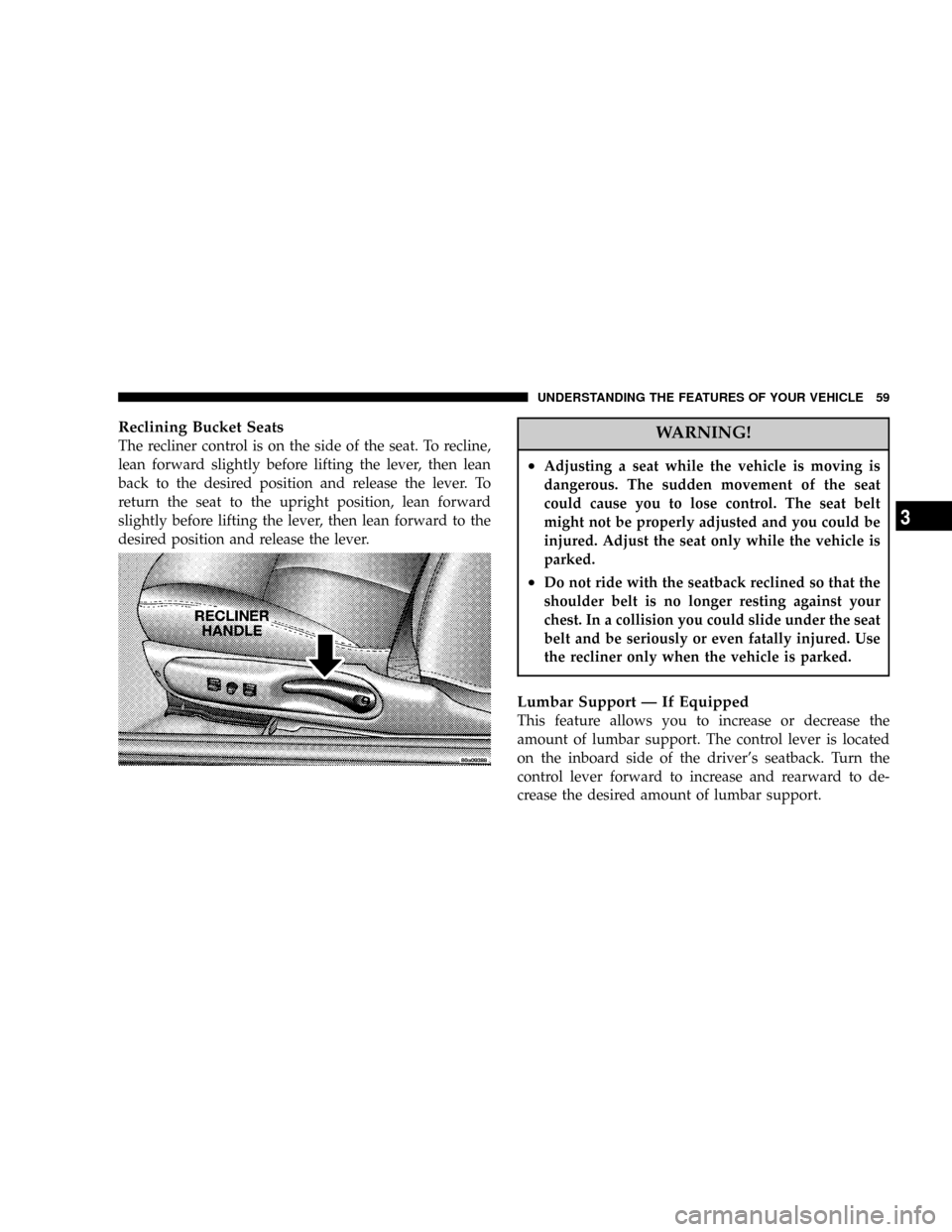
Reclining Bucket Seats
The recliner control is on the side of the seat. To recline,
lean forward slightly before lifting the lever, then lean
back to the desired position and release the lever. To
return the seat to the upright position, lean forward
slightly before lifting the lever, then lean forward to the
desired position and release the lever.WARNING!
²Adjusting a seat while the vehicle is moving is
dangerous. The sudden movement of the seat
could cause you to lose control. The seat belt
might not be properly adjusted and you could be
injured. Adjust the seat only while the vehicle is
parked.
²Do not ride with the seatback reclined so that the
shoulder belt is no longer resting against your
chest. In a collision you could slide under the seat
belt and be seriously or even fatally injured. Use
the recliner only when the vehicle is parked.
Lumbar Support Ð If Equipped
This feature allows you to increase or decrease the
amount of lumbar support. The control lever is located
on the inboard side of the driver's seatback. Turn the
control lever forward to increase and rearward to de-
crease the desired amount of lumbar support.
UNDERSTANDING THE FEATURES OF YOUR VEHICLE 59
3
Page 64 of 271

LIGHTS
Front Map/Reading Lights
These lights, located under the rearview mirror, come on
whenever a door is opened or the illuminated entry
system is activated. The lights can also be turned on with
the doors closed by means of switches located on the
front of the rearview mirror.
NOTE:The map lights will remain on until the mirror
switches have been turned to the OFF position, so be sure
that they have been turned off before leaving the vehicle.
Interior Lights
The console rear light, map/courtesy lights, and the
optional under-door courtesy lights come on when a
door is opened and the panel lamp dimmer switch
(located on the turn signal control stalk) is in any detent
except fully counter-clockwise (dome lamp ON position)
or fully clockwise (dome lamp OFF position). Rotating
the panel dimmer switch fully counter-clockwise will
64 UNDERSTANDING THE FEATURES OF YOUR VEHICLE
Page 65 of 271

turn on the lights. Turn the panel dimmer switch fully
clockwise to prevent the lights from coming on when a
door is opened.
NOTE:The interior lights have a ªfade to offº feature.
When the lights are turned off, they gradually ªfadeº off.
Dimmer Control
With the parking lights or headlights
on, rotating the dimmer control for the
interior lights on the Multi-Function
Control Lever upward will increase
the brightness of the instrument panel
lights.
Dome Light Position
Rotate the dimmer control completely
upward to the second detent to turn
on the interior lights. The interior
lights will remain on when the dim-
mer control is in this position.
Interior light Defeat (OFF)
Rotate the dimmer control to the ex-
treme bottom full-circle position. The
interior lights will remain off when the
doors are open.
Daytime Mode (Daytime Brightness Feature)
Rotate the dimmer control to the first
detent (full-circle). This feature bright-
ens the odometer and radio display
when the parking lights or headlights
are on during daylight conditions.
UNDERSTANDING THE FEATURES OF YOUR VEHICLE 65
3
Page 66 of 271

Multi-Function Control Lever
The Multi-Function lever controls the operation of the
headlights, turn signals, headlight beam select switch,
instrument panel light dimming, passing light, dome
light, and fog lights.
Headlights, Parking Lights, Instrument Panel
Lights
Turn the end of the control lever to the first detent for
parking light operation. Turn to the second detent for
headlight operation.To change the brightness of the instrument panel lights,
turn the center portion of the lever up or down. Turning
the dimmer control to the full up position also turns on
the courtesy lights. Turning the dimmer control to the full
down position prevents the courtesy lights from coming
on when a door is opened.
Daytime Running Lights (Canada Only)
The headlights come on at a low intensity level whenever
the ignition switch is turned on. The lights remain on
66 UNDERSTANDING THE FEATURES OF YOUR VEHICLE
Page 67 of 271

until the ignition switch is turned OFF or the parking
brake is engaged. The headlight switch must be used for
normal night time driving.
Lights-on Reminder
If the headlights or parking lights are on after the ignition
is turned off, a chime will sound when the driver's door
is opened.
Fog Lights Ð If Equipped
The fog light switch is in the multi-function lever.
To activate the fog lights, turn on the low beam
headlights and pull out the end of the control
lever. A light in the instrument cluster shows when the
fog lights are on.
NOTE:The switch will turn on the fog lights only if the
low beam headlights are on. Turning on the high beam
headlights turns off the fog lights.
Turn Signals
Move the turn signal lever up or down and the arrows in
the instrument cluster flash to show proper operation of
the front and rear turn signal lights. You can signal a lane
change by moving the lever partially up or down.
Headlight Beam Select Switch
Pull the turn signal lever towards you to switch the
headlights to HIGH beam. Pull the turn signal lever a
second time to switch the headlights to LOW beam.
Passing Light
You can signal another vehicle with your headlights by
lightly pulling the turn signal lever toward the steering
wheel. This will cause the headlights to turn on at high
beam and remain on until the lever is released.
Headlight Time Delay
This feature provides the safety of headlight illumination
for about 90 seconds when leaving your vehicle in an
unlighted area.
To activate the delay, turn off the ignition while the
headlights are still on. Then turn off the headlights. The
delay interval begins when the ignition is turned off.
If the headlights are turned off before the ignition, they
will go off in the normal manner.
UNDERSTANDING THE FEATURES OF YOUR VEHICLE 67
3
Page 70 of 271

TRACTION CONTROLÐ IF EQUIPPED
To turn the Traction Control System Off, press
the switch located on the top of the steering
column, to the right of the hazard switch, until
the Traction Control indicator in the instrument
cluster lights up.
To turn the Traction Control System On, press the switch
until the Traction Control indicator in the instrument
cluster turns off.
NOTE:The Traction Control System is enabled each
time the ignition switch is turned On. This will occureven if you used the switch to turn the system off before
powering down or turning the ignition to Lock.
ELECTRONIC SPEED CONTROLÐ IF EQUIPPED
When engaged, this device will control the throttle op-
eration to maintain a constant vehicle speed between 30
mph (48 km/h) and 85 mph (137 km/h). The controls are
on the steering wheel.
70 UNDERSTANDING THE FEATURES OF YOUR VEHICLE
Page 71 of 271
To Activate:
Press the ON/OFF switch to turn the speed control
system ON. To turn the system OFF, press the ON/OFF
switch again. The system should be turned OFF when not
in use. The CRUISE Indicator in the instrument cluster
will light up when the Speed Control is ON.
NOTE:You must press the ON button to activate the
system each time the engine is started.
WARNING!
Leaving the Electronic Speed Control system ON
when not in use is dangerous. You could accidentally
set the system or cause it to go faster than you want.
You could lose control and have an accident. Always
leave the system OFF when you aren't using it.
To Set At A Desired Speed:
When the vehicle has reached the desired speed and the
system is ON, press and release the SET button. Release
the accelerator and the vehicle will operate at the selected
speed. The speed control is now Engaged.
To Deactivate:
A soft tap on the brake pedal, pushing the CANCEL
button, or normal brake or clutch pressure will deactivate
speed control without erasing the memory. Pushing the
ON/OFF button or turning off the ignition turns the
speed control system off and erases the memory.
To Resume Speed:
To resume a previously set speed, push and release the
RESUME/ACCEL button. Resume can be used at any
speed above 25 mph (40 km/h).
To Vary The Speed Setting:
When the speed control is Engaged (actively controlling
to a SET speed), speed can be increased by pressing and
holding the RESUME/ACCEL button. When the button
is released, a new set speed will be established.
Tapping the RESUME/ACCEL button once will result in
a 2 mph (3 km/h) increase in the SET speed. Each time
the button is tapped, the SET speed increases. For ex-
ample tapping the button three times will increase speed
by 6 mph (10 km/h), etc.
UNDERSTANDING THE FEATURES OF YOUR VEHICLE 71
3
Page 73 of 271
Rolling Hills
The transaxle may downshift into third gear and remain
there as the vehicle travels over rolling hills. The trans-
axle will upshift into fourth gear when the road flattens
out.
The transaxle will resume its normal shift schedule if you
depress the accelerator pedal during any of the above
conditions.
WARNING!
Speed Control can be dangerous where the system
can't maintain a constant speed. Your vehicle could
go too fast for the conditions, and you could lose
control. An accident could be the result. Don't use
Speed Control in heavy traffic or on roads that are
winding, icy, snow-covered, or slippery.
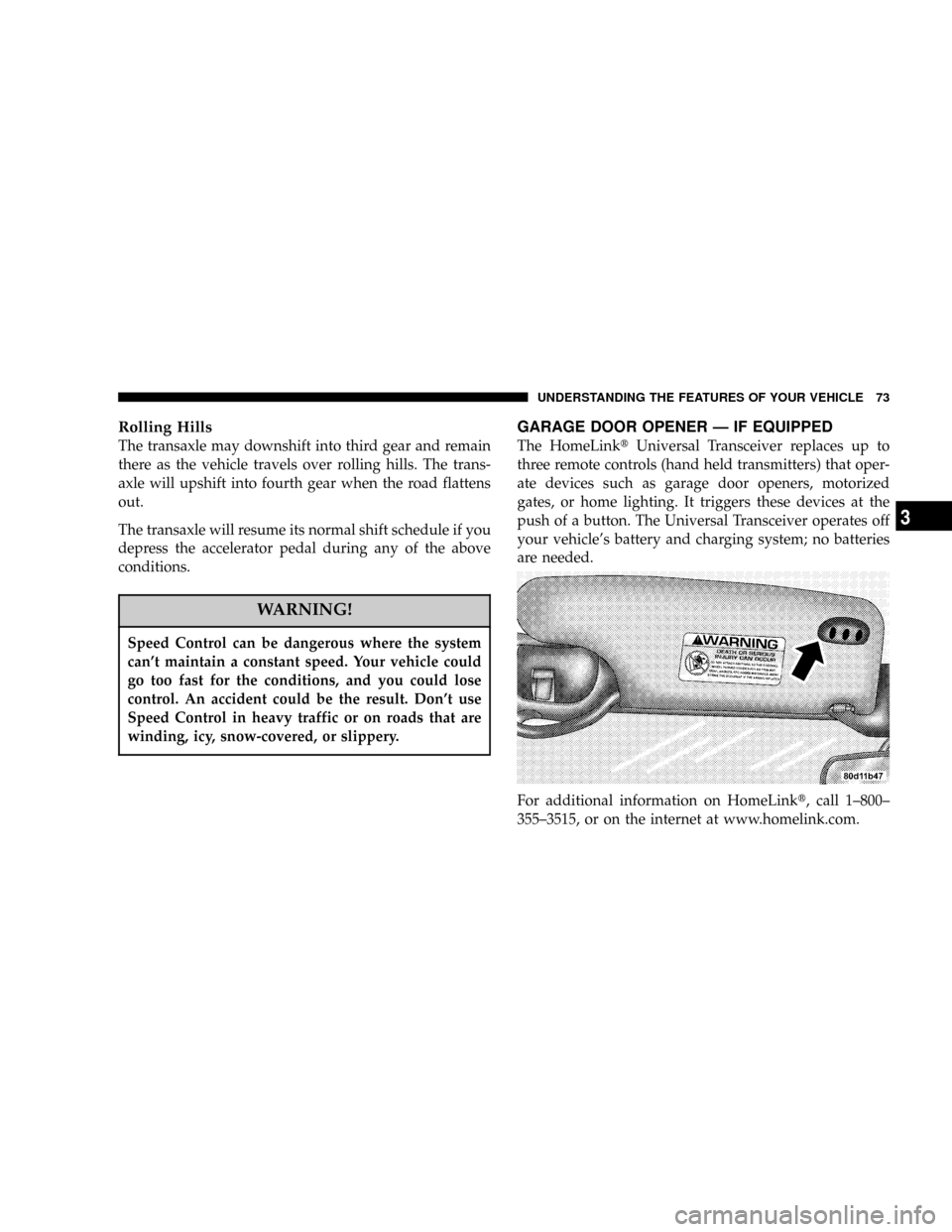
GARAGE DOOR OPENER Ð IF EQUIPPED
The HomeLinktUniversal Transceiver replaces up to
three remote controls (hand held transmitters) that oper-
ate devices such as garage door openers, motorized
gates, or home lighting. It triggers these devices at the
push of a button. The Universal Transceiver operates off
your vehicle's battery and charging system; no batteries
are needed.
For additional information on HomeLinkt, call 1±800±
355±3515, or on the internet at www.homelink.com.
UNDERSTANDING THE FEATURES OF YOUR VEHICLE 73
3
Page 74 of 271
WARNING!
A moving garage door can cause injury to people and
pets in the path of the door. People or pets could be
seriously or fatally injured. Only use this transceiver
with a garage door opener that has a ªstop and
reverseº feature as required by federal safety stan-
dards. This includes most garage door opener mod-
els manufactured after 1982. Do not use a garage
door opener without these safety features it could
cause injury or death. Call toll-free 1±800±355±3515
or, on the Internet at www.homelink.com for safety
information or assistance.
Programming The Universal Transceiver
For best results, install a new battery in the hand held
transmitter before programming. If your garage door
opener (located in the garage) is equipped with an
antenna, make sure that the antenna is hanging straight
down.
1. Turn off the engine.
WARNING!
Vehicle exhaust contains carbon monoxide, a danger-
ous gas. Do not run the vehicle's exhaust while
training the transceiver. Exhaust gas can cause seri-
ous injury or death.
WARNING!
Your motorized door or gate will open and close
while you are training the Universal Transceiver. Do
not train the transceiver if people or pets are in the
path of the door or gate. A moving door or gate can
cause serious injury or death to people and pets or
damage to objects.
2. Erase the factory test codes by pressing the two
outside buttons. Release the buttons when the light in the
Universal Transceiver begins to flash (about 20 seconds).
NOTE:Step 2 does not have to be followed to program
additional hand held transmitters.
74 UNDERSTANDING THE FEATURES OF YOUR VEHICLE
Page 75 of 271

3. Choose one of the three Universal Transceiver buttons
to program. Place the hand held controller one to three
inches from the Universal Transceiver while keeping its
indicator light in view.
4. Using both hands, press the hand held transmitter
button and the desired Universal Transceiver button. Do
not release the buttons until step 5 has been completed.
NOTE:Some entry gates and garage door openers may
require you to replace step 4 with the procedures listed
under Canadian Programming.5. The indicator light in the Universal Transceiver will
begin to flash, first slowly and then rapidly. The rapid
flashing indicates successful programming. If after 90
seconds the indicator light does not flash rapidly or goes
out, return to step 1 and repeat the procedure. To train the
other buttons, repeat steps 3 and 4. Be sure to keep your
hand held transmitters in case you need to retrain the
Universal Transceiver.
NOTE:If you do not successfully program the
Universal Transceiver to learn the signal of your hand
held transmitter, refer to the Rolling Code Paragraph, or
call toll free for customer assistance at 1±800±355±3515,
or on the internet at www.homelink.com.
ªRolling Codeº Programming
NOTE:
If your hand held transmitter appears to pro-
gram the Universal Transceiver, but your garage door or
other device does not operate, and your device was
manufactured after 1996, your garage door opener or
other device may have a ªRolling Codeº system.
UNDERSTANDING THE FEATURES OF YOUR VEHICLE 75
3