battery CHRYSLER SEBRING CONVERTIBLE 2008 3.G User Guide
[x] Cancel search | Manufacturer: CHRYSLER, Model Year: 2008, Model line: SEBRING CONVERTIBLE, Model: CHRYSLER SEBRING CONVERTIBLE 2008 3.GPages: 454, PDF Size: 5.8 MB
Page 110 of 454

hold may not become active automatically. This is cell
phone-dependent. To bring the call back from hold, press
and hold the PHONE button until you hear a single beep.
Redial
²
Press the PHONE button to begin.
²After the9Ready9prompt and the following beep, say
9Redial.9
²The UConnecttsystem will call the last number that
was dialed from your cellular phone.
NOTE:This may not be the last number dialed from the
UConnecttsystem.
Call Continuation
Call continuation is the progression of a phone call on the
UConnecttsystem after the vehicle ignition key has been
switched to OFF. Call continuation functionality avail-
able on the vehicle can be any one of three types:
²After the ignition key is switched OFF, a call can
continue on the UConnecttsystem either until the call
ends, or until the vehicle battery condition dictates
cessation of the call on the UConnecttsystem and
transfer of the call to the mobile phone.
²After the ignition key is switched to OFF, a call can
continue on the UConnecttsystem for a certain dura-
tion, after which the call is automatically transferred
from the UConnecttsystem to the mobile phone.
²An active call is automatically transferred to the
mobile phone after the ignition key is switched to OFF.
UConnectTSystem Features
Language Selection
To change the language that the UConnecttsystem is
using:
²Press the PHONE button to begin.
110 UNDERSTANDING THE FEATURES OF YOUR VEHICLE
Page 114 of 454

Turning Confirmation Prompts On/Off
Turning confirmation prompts off will stop the system
from confirming your choices (e.g., the UConnecttsys-
tem will not repeat a phone number before you dial it).
²Press the PHONE button to begin.
²After the9Ready9prompt and the following beep, say
9Setup Confirmations.9The UConnecttsystem will
play the current confirmation prompt status and you
will be given the choice to change it.
Phone and Network Status Indicators
If available on the radio and/or on a premium display
such as the instrument panel cluster, and supported by
your cell phone, the UConnecttsystem will provide
notification to inform you of your phone and network
status when you are attempting to make a phone call
using UConnectt. The status is given for roaming, net-
work signal strength, phone battery strength, etc.
Dialing Using the Cellular Phone Keypad
You can dial a phone number with your cellular phone
keypad and still use the UConnecttsystem (while dial-
ing via the cell phone keypad, the user must exercise
caution and take precautionary safety measures). By
dialing a number with your paired Bluetoothtcellular
phone, the audio will be played through your vehicle's
audio system. The UConnecttsystem will work the same
as if you dial the number using voice recognition.
NOTE:Certain brands of mobile phones do not send the
dial ring to the UConnecttsystem to play it on the
vehicle audio system, so you will not hear it. Under this
situation, after successfully dialing a number the user
may feel that the call did not go through even though the
call is in progress. Once your call is answered, you will
hear the audio.
114 UNDERSTANDING THE FEATURES OF YOUR VEHICLE
Page 144 of 454

Interior Lights
Two courtesy/reading lights are located in the bottom of
the rearview mirror. You can turn these lights on and off
from the switches in the mirror or from the Dimmer
Control in the Multi-Function Lever. These lights are also
controlled automatically by the illuminated entry system.A courtesy light is also found in the rear of the center
console. You can turn this light on and off from the
dimmer control in the Multi-Function Lever. This light is
also controlled automatically by the illuminated entry
system.
Battery Saver Feature
To protect the battery, the interior lights will turn off
automatically 10 minutes after the ignition switch is
moved to the LOCK position. This will occur if the
interior lights were switched on manually or are on
because a door is open.
Dimmer Control
The Dimmer Control is part of the Multi-Function Con-
trol Lever. It controls the operation of the interior lights
and the brightness of the instrument panel lights.
1 Ð Left Lamp 3 Ð Right Lamp Switch
2 Ð Left Lamp Switch 4 Ð Right Lamp 144 UNDERSTANDING THE FEATURES OF YOUR VEHICLE
Page 155 of 454

GARAGE DOOR OPENER Ð IF EQUIPPED
HomeLinktreplaces up to three remote controls (hand
held transmitters) that operate devices such as garage
door openers, motorized gates, lighting, or home security
systems. The HomeLinktunit operates off your vehicle's
battery.
The HomeLinktbuttons that are located in the headliner
or sun visor designate the three different HomeLinkt
channels.
NOTE:HomeLinktis disabled when the Vehicle Secu-
rity Alarm is active.
HomeLink Buttons
UNDERSTANDING THE FEATURES OF YOUR VEHICLE 155
3
Page 157 of 454

It is recommended that a new battery be placed in the
hand-held transmitter of the device being programmed
to HomeLinktfor more efficient training and accurate
transmission of the radio-frequency signal.
Your vehicle should be parked outside of the garage
when programming.
1. Turn the ignition switch to the ON/RUN position.
2. Hold the battery side of the hand-held transmitter
away from the HomeLinktbutton you wish to program.
Place the hand-held transmitter 1±3 inches (3±8 cm) away
from the HomeLinktbutton you wish to program while
keeping the indicator light in view.
3. Simultaneously press and hold both the chosen
HomeLinktbutton and the hand-held transmitter button
until the HomeLinktindicator changes from a slow to a
rapidly blinking light, then release both the HomeLinkt
and hand-held transmitter buttons.Watch for the HomeLinktindicator to change flash rates.
When it changes, it is programmed. It may take up to 30
seconds, or longer in rare cases. The garage door may
open & close while you train.
NOTE:
²Some gate operators and garage door openers may
require you to replace Step #3 with procedures noted
in the ªGate Operator/Canadian Programmingº sec-
tion.
²After training a HomeLinktchannel, if the garage
door does not operate with HomeLinktand the ga-
rage door opener was manufactured after 1995, the
garage door opener may have rolling code. If so,
proceed to the heading ªProgramming A Rolling Code
System.º
UNDERSTANDING THE FEATURES OF YOUR VEHICLE 157
3
Page 160 of 454

Then proceed with Step 4 under ªProgramming
HomeLinkt.º earlier in this section.
Using HomeLinkT
To operate, simply press and release the programmed
HomeLinktbutton. Activation will now occur for the
trained device (i.e. garage door opener, gate operator,
security system, entry door lock, home/office lighting,
etc. The hand-held transmitter of the device may also be
used at any time.
Reprogramming A Single HomeLinkTButton
To re-program a channel that has been previously
trained, follow these steps:
1. Turn the ignition switch to the ON/RUN position.
2. Press and hold the desired HomeLinktbutton until
the indicator light begins to flash after 20 seconds.Do not
release the button.3.Without releasing the button,proceed with PRO-
GRAMMING HOMELINKtStep #2 and follow all re-
maining steps.
Security
It is advised to erase all channels before you sell or turn
in your vehicle.
To do this, press and hold the two outside buttons for 20
seconds until the red indicator flashes. Note that all
channels will be erased. Individual channels cannot be
erased.
The HomeLinktUniversal Transceiver is disabled when
the Vehicle Security Alarm is active.
Troubleshooting Tips
If you are having trouble programming HomeLinkt, here
are some of the most common solutions:
²Replace the battery in the original transmitter.
160 UNDERSTANDING THE FEATURES OF YOUR VEHICLE
Page 162 of 454

NOTE:If desired, the instrument panel power outlet
can be converted by your authorized dealer to provide
power with the ignition switch while in the ªLOCKº
position.The center console power outlet is powered directly from
the battery (power available at all times). Items plugged
into this outlet may discharge the battery and/or prevent
engine starting.
Instrument Panel Power OutletConsole Interior
162 UNDERSTANDING THE FEATURES OF YOUR VEHICLE
Page 163 of 454
Electrical Outlet Use With Engine Off
CAUTION!
²Many accessories that can be plugged in draw
power from the vehicle's battery, even when not in
use (i.e. cellular phones, etc.). Eventually, if
plugged in long enough, the vehicle's battery will
discharge sufficiently to degrade battery life
and/or prevent engine starting.
²Accessories that draw higher power (i.e. coolers,
vacuum cleaners, lights, etc.) will degrade the
battery even more quickly. Only use these inter-
mittently and with greater caution.
²After the use of high power draw accessories, or
long periods of the vehicle not being started (with
accessories still plugged in), the vehicle must be
driven a sufficient length of time to allow the
generator to recharge the vehicle's battery.
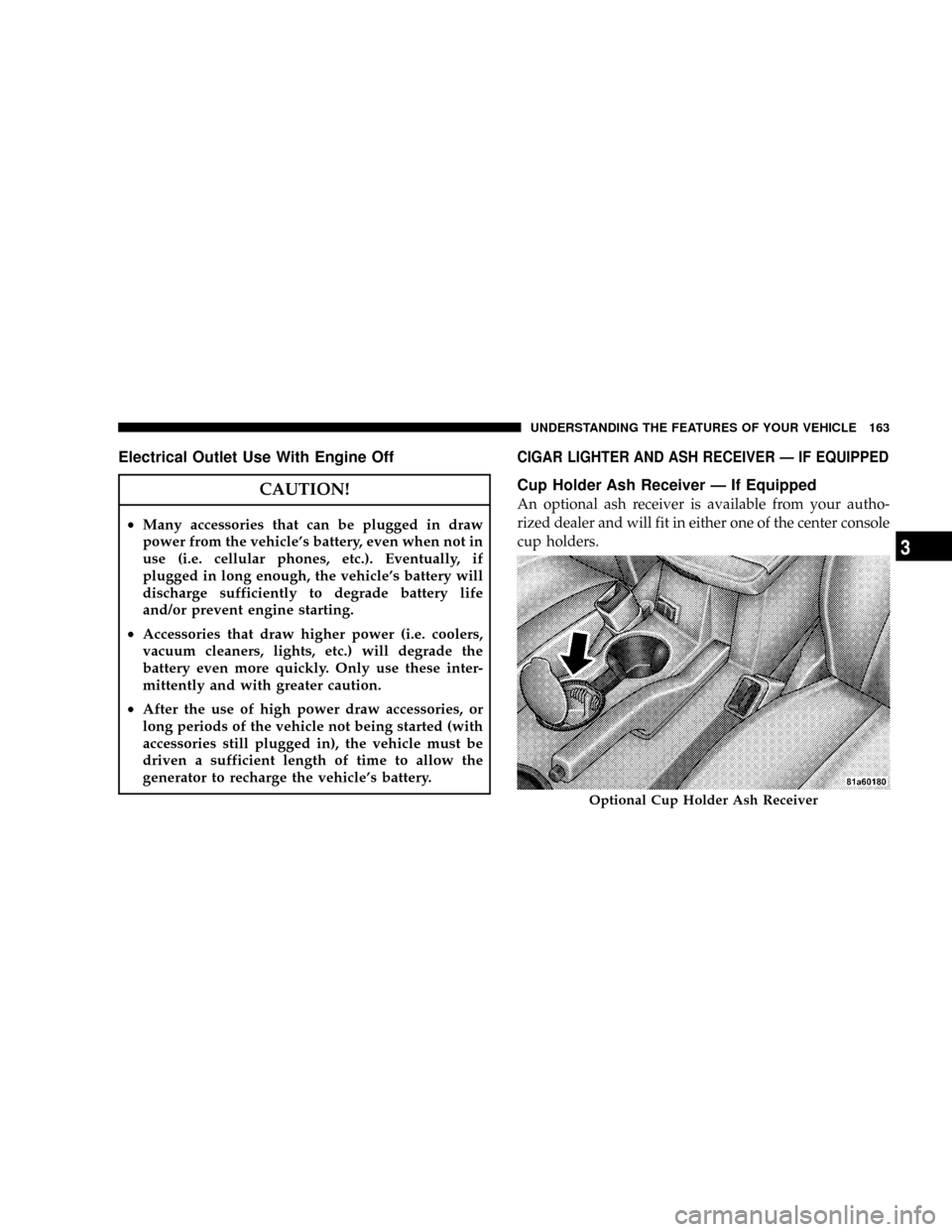
CIGAR LIGHTER AND ASH RECEIVER Ð IF EQUIPPED
Cup Holder Ash Receiver Ð If Equipped
An optional ash receiver is available from your autho-
rized dealer and will fit in either one of the center console
cup holders.
Optional Cup Holder Ash Receiver
UNDERSTANDING THE FEATURES OF YOUR VEHICLE 163
3
Page 189 of 454

²RKE (Remote Keyless Entry) Battery Low (with a
single chime)
²Personal Settings Not Available ± Vehicle Not in Park.
²Left/Right Door Ajar (one or more, with a single
chime if speed is above 1 mph)
²Door(s) Ajar (with a single chime if vehicle is in
motion)
²Trunk Ajar (with a single chime)
²Headlights On
²Key In Ignition
²Convertible Top In Operation (with a single chime)
²Convertible Top Complete (with a single chime)
²Secure Cargo Shield (with a single chime)
²Speed Too High (with a single chime)
²Convertible Top Malfunction (with a single chime)
²Oil Change Required (with a single chime)
Oil Change Required
Your vehicle is equipped with an engine oil change
indicator system. The ªOil Change Requiredº message
will flash in the EVIC display for approximately 10
seconds after a single chime has sounded to indicate the
next scheduled oil change interval. The engine oil change
indicator system is duty cycle based, which means the
engine oil change interval may fluctuate dependent upon
your personal driving style.
Unless reset, this message will continue to display each
time you turn the ignition switch to the ON/RUN
position. To turn off the message temporarily, press and
release the Menu button. To reset the oil change indicator
system (after performing the scheduled maintenance)
perform the following procedure:
UNDERSTANDING YOUR INSTRUMENT PANEL 189
4
Page 221 of 454

UNIVERSAL CONSUMER INTERFACE (UCI) Ð IF
EQUIPPED
NOTE:This section is for sales code and REQ radios
only with UConnect.Ÿ For sales code REN touch screen
radio, refer to the separate User's Manual.
This feature allows you to plug in an iPodtmobile digital
device into the vehicle's sound system through a connec-
tor (UCI connector) using an optional connection cable
(available through Mopart). See your authorized dealer
for details.
Using this feature,
²the iPodtaudio can be played on the vehicle's sound
system, providing metadata (Track Title, Artist, Al-
bum, etc.) information display on radio.
²the iPodtcan be controlled using the radio buttons to
Play, Browse and List the iPodtcontents.
²the iPodtbattery charges when plugged into the UCI
connector.
Connecting the iPodTDevice
Use the optional connection cable to connect an iPodtto
the vehicle's UCI connector (which is located in the glove
box on some vehicles. This location may vary with
vehicle). Once the iPodtis connected and synchronized
to the vehicle system (this may take a few seconds to
connect), the vehicle brand logo appears on the iPodt
display, and it starts charging and is ready for use by
pressing radio switches as described below.
Controlling the iPodTusing Radio Buttons
To get into the UCI (iPodt) mode and access a connected
iPodt, press the ªAUXº button on the radio faceplate.
Once in the UCI (iPodt) mode, the iPodtaudio track (if
available from iPodt) will start playing over the vehicle
audio system.
UNDERSTANDING YOUR INSTRUMENT PANEL 221
4