warning CHRYSLER SEBRING CONVERTIBLE 2008 3.G Workshop Manual
[x] Cancel search | Manufacturer: CHRYSLER, Model Year: 2008, Model line: SEBRING CONVERTIBLE, Model: CHRYSLER SEBRING CONVERTIBLE 2008 3.GPages: 454, PDF Size: 5.8 MB
Page 150 of 454
WARNING!
Commercially available windshield washer solvents
are flammable. They could ignite and burn you. Care
must be exercised when filling or working around
the washer solution.
TILT/TELESCOPING STEERING COLUMN
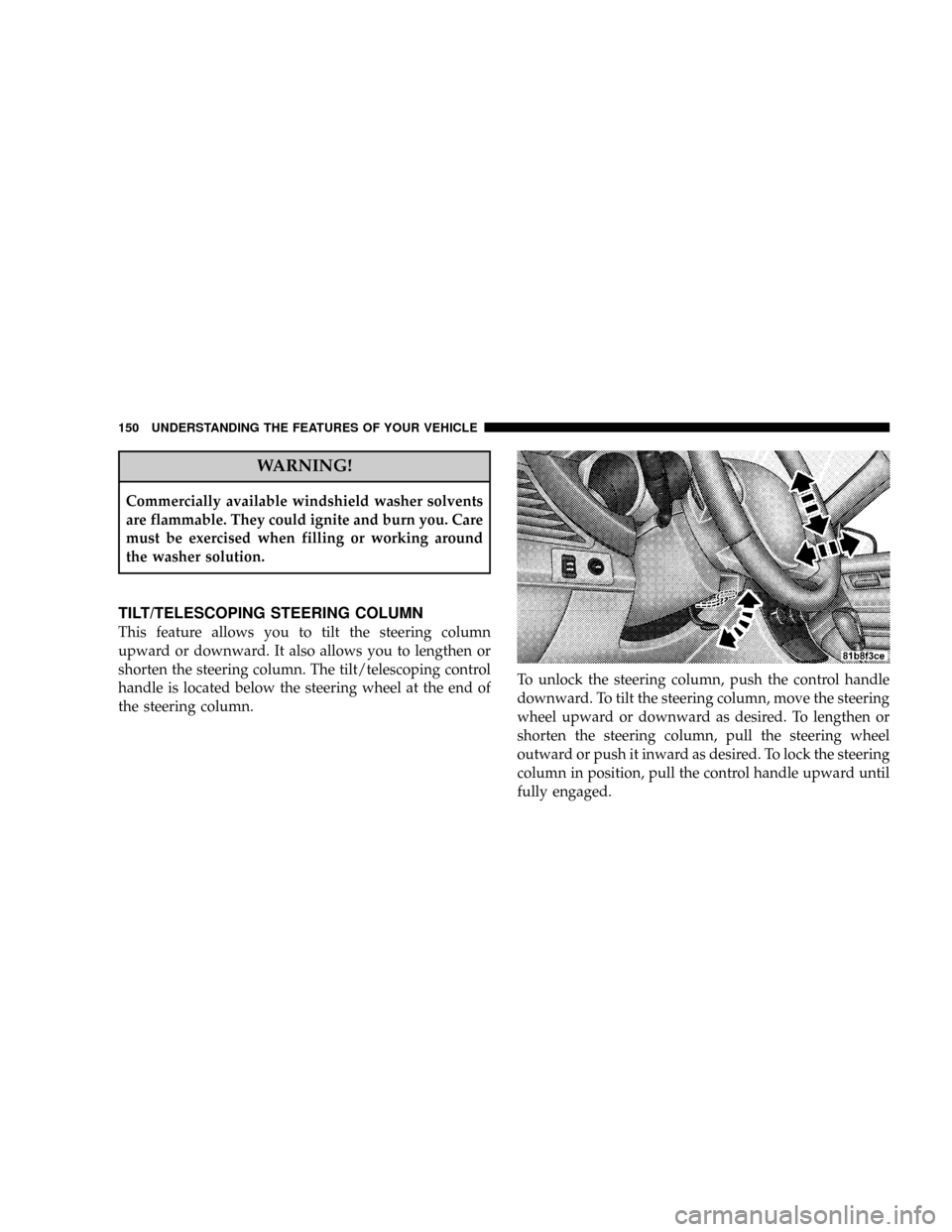
This feature allows you to tilt the steering column
upward or downward. It also allows you to lengthen or
shorten the steering column. The tilt/telescoping control
handle is located below the steering wheel at the end of
the steering column.To unlock the steering column, push the control handle
downward. To tilt the steering column, move the steering
wheel upward or downward as desired. To lengthen or
shorten the steering column, pull the steering wheel
outward or push it inward as desired. To lock the steering
column in position, pull the control handle upward until
fully engaged.
150 UNDERSTANDING THE FEATURES OF YOUR VEHICLE
Page 151 of 454
WARNING!
Do not adjust the steering wheel while driving. The
tilt/telescoping adjustment must be locked while
driving. Adjusting the steering wheel while driving
or driving without the tilt/telescoping adjustment
locked could cause the driver to lose control of the
vehicle.
ELECTRONIC SPEED CONTROL Ð IF EQUIPPED
When engaged, this device takes over the accelerator
operation at speeds greater than 25 mph (40 km/h).
Electronic Speed Control Operation
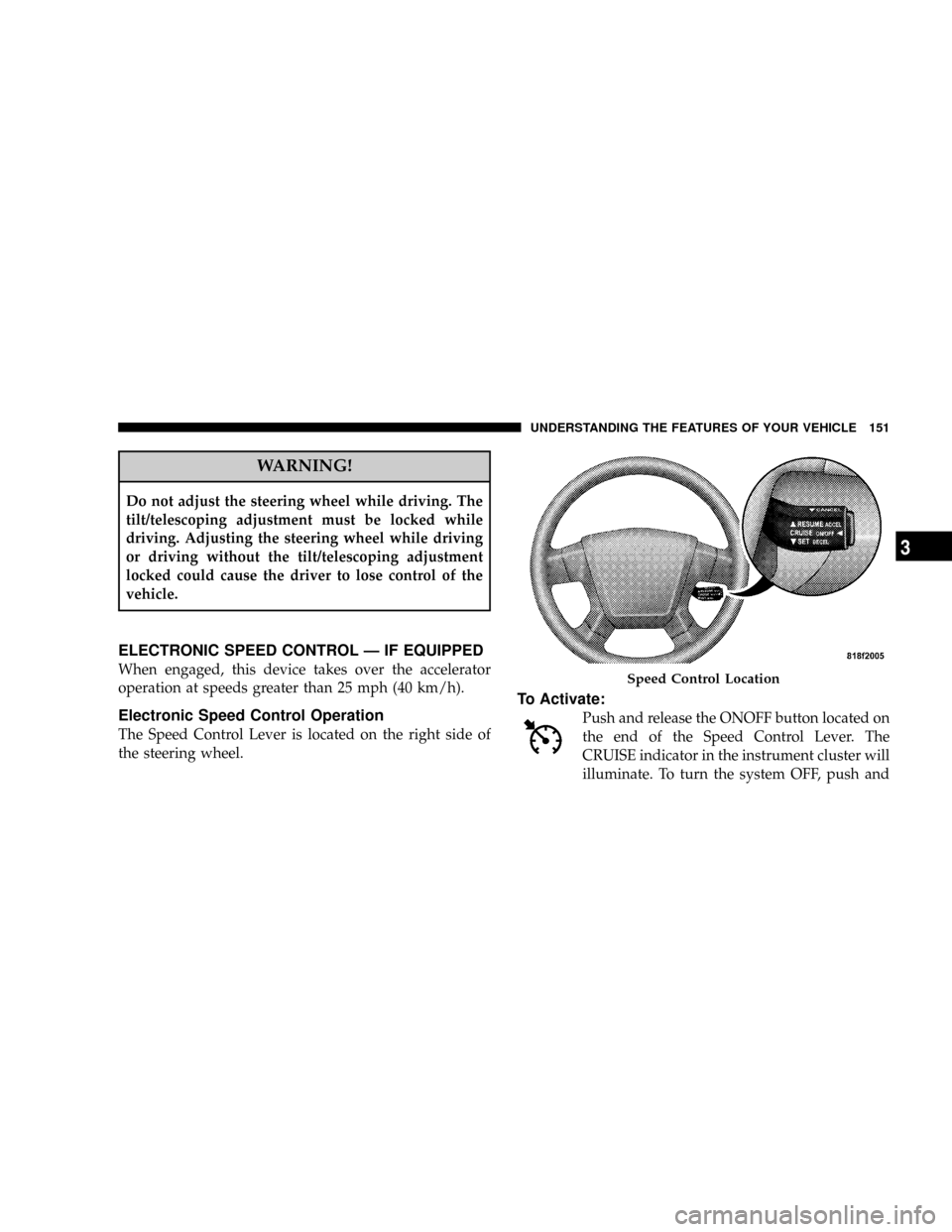
The Speed Control Lever is located on the right side of
the steering wheel.
To Activate:
Push and release the ONOFF button located on
the end of the Speed Control Lever. The
CRUISE indicator in the instrument cluster will
illuminate. To turn the system OFF, push and
Speed Control Location
UNDERSTANDING THE FEATURES OF YOUR VEHICLE 151
3
Page 152 of 454
release the ONOFF button a second time. The CRUISE
indicator will turn off. Be sure to turn the system OFF
when not in use.
NOTE:The Electronic Speed Control System will auto-
matically turn off when the engine is turned off.
WARNING!
Leaving the Electronic Speed Control system on
when not in use is dangerous. You could accidentally
set the system or cause it to go faster than you want.
You could lose control and have an accident. Always
leave the system OFF when you are not using it.
To Set At A Desired Speed:
When the vehicle reaches the speed desired, press down
on the lever and release SET DECEL. Release the accel-
erator and the vehicle will operate at the selected speed.
NOTE:
²The vehicle must be traveling at least 25 mph (40
km/h) for the speed control to set.
²The vehicle should be traveling at a steady speed and
on level ground before pressing the lever SET DECEL.
To Deactivate:
A soft tap on the brake pedal, or pulling the Speed
Control Lever toward you CANCEL, or normal brake
pressure while slowing the vehicle will deactivate the
speed control without erasing the set speed from
memory. Pressing the ONOFF button or turning off the
ignition erases the set speed from memory.
152 UNDERSTANDING THE FEATURES OF YOUR VEHICLE
Page 153 of 454
To Resume Speed:
If you deactivated the speed control without erasing the
set speed from memory and your vehicle speed is above
20 mph (32 km/h) you can resume the previous set
speed. To do so, push the lever up and release RESUME
ACCEL, and then remove your foot from the accelerator
pedal.
To Vary The Speed Setting:
When the speed control is set, you can increase speed by
pushing up and holding the lever RESUME ACCEL.
Release the lever when the desired speed is reached, and
the new set speed will be established.
Tapping RESUME ACCEL once will result in a 1 mph (2
km/h) speed increase. Each time the lever is tapped,
speed increases so that tapping the lever three times will
increase speed by 3 mph (5 km/h), etc.To decrease speed while the speed control is set, push
down and hold the lever SET DECEL. Release the lever
when the desired speed is reached, and the new set speed
will be established.
Tapping the SET DECEL button once will result in a 1
mph (2 km/h) speed decrease. Each time the button is
tapped, speed decreases.WARNING!
Speed Control can be dangerous where the system
can't maintain a constant speed. Your vehicle could
go too fast for the conditions, and you could lose
control. An accident could be the result. Don't use
Speed Control in heavy traffic or on roads that are
winding, icy, snow-covered, or slippery.
UNDERSTANDING THE FEATURES OF YOUR VEHICLE 153
3
Page 154 of 454

To Accelerate For Passing:
Depress the accelerator as you would normally. When the
pedal is released, the vehicle will return to the set speed.
Using Speed Control On Hills
NOTE:The speed control system maintains speed up
and down hills. A slight speed change on moderate hills
is normal.
On steep hills, a greater speed loss or gain may occur so
it may be preferable to drive without speed control.
WARNING!
Speed Control can be dangerous where the system
can't maintain a constant speed. Your vehicle could
go too fast for the conditions, and you could lose
control. An accident could be the result. Don't use
Speed Control in heavy traffic or on roads that are
winding, icy, snow-covered, or slippery.
154 UNDERSTANDING THE FEATURES OF YOUR VEHICLE
Page 156 of 454
WARNING!
Your motorized door or gate will open and close
while you are training the Universal Transceiver. Do
not train the transceiver if people or pets are in the
path of the door or gate. Only use this transceiver
with a garage door opener that has a ªstop and
reverseº feature as required by federal safety stan-
dards. This includes most garage door opener models
manufactured after 1982. Do not use a garage door
opener without these safety features. Call toll-free
1±800±355±3515 or, on the Internet at
www.HomeLink.com for safety information or
assistance.
WARNING!
Vehicle exhaust contains carbon monoxide, a danger-
ous gas. Do not run your vehicle in the garage while
training the transceiver. Exhaust gas can cause seri-
ous injury or death.
Programming HomeLinkT
Before You Begin
If you have not trained any of the HomeLinktbuttons,
erase all channels before you begin training.
To do this, press and hold the two outside buttons for 20
seconds until the red indicator flashes.
156 UNDERSTANDING THE FEATURES OF YOUR VEHICLE
Page 166 of 454
CONSOLE FEATURES
Storage
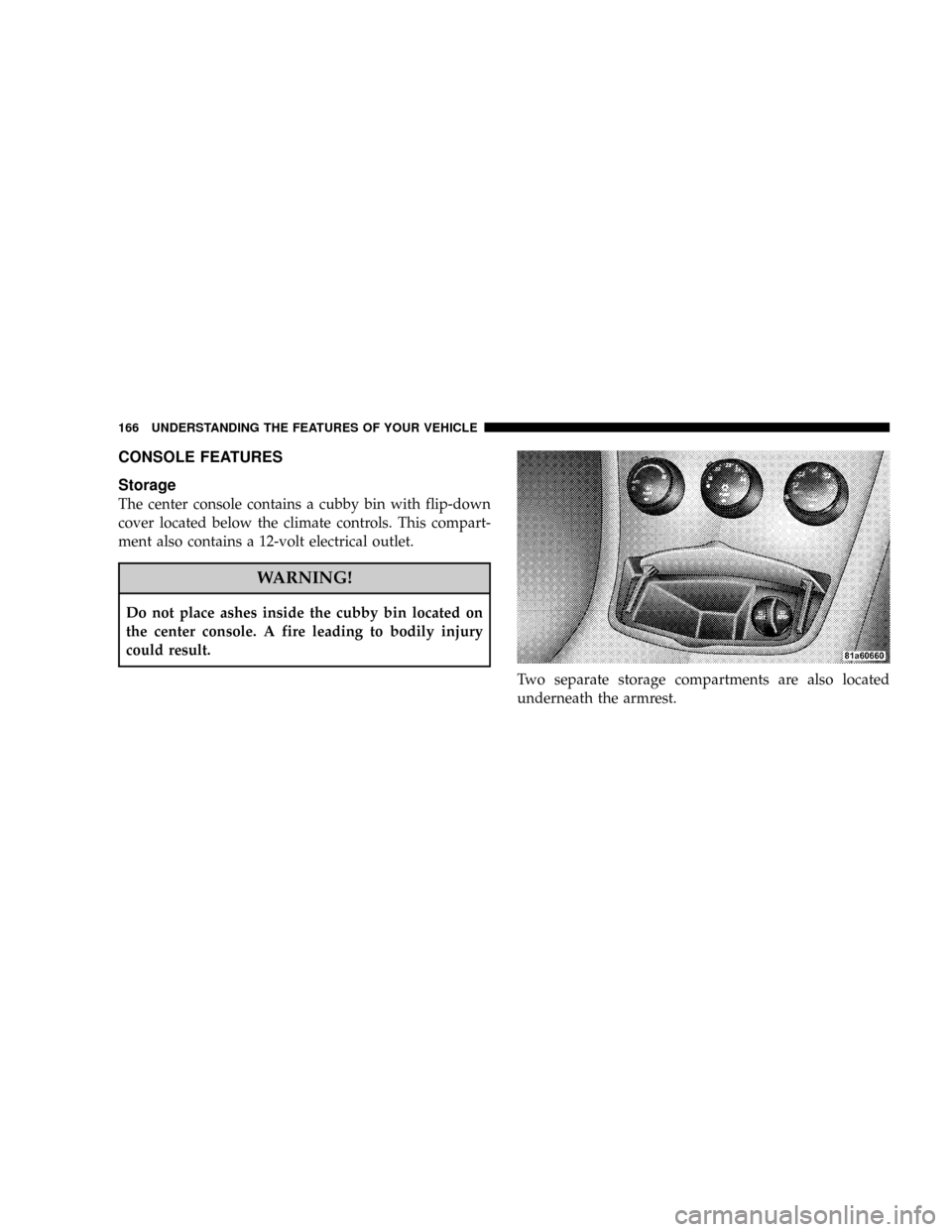
The center console contains a cubby bin with flip-down
cover located below the climate controls. This compart-
ment also contains a 12-volt electrical outlet.
WARNING!
Do not place ashes inside the cubby bin located on
the center console. A fire leading to bodily injury
could result.
Two separate storage compartments are also located
underneath the armrest.
166 UNDERSTANDING THE FEATURES OF YOUR VEHICLE
Page 178 of 454

will turn off after the engine is started. If the bulb does
not come on during starting, have the system checked by
an authorized dealer.
If the light comes on and remains on while driving, stop
the vehicle and shut off the engine. DO NOT OPERATE
THE VEHICLE UNTIL THE CAUSE IS CORRECTED.
The light does not show the quantity of oil in the engine.
This can be determined using the procedure shown in
Section 7.
11. Engine Temperature Warning Light
This light warns of an overheated engine condi-
tion. If the engine is critically hot, a warning chime
will sound 10 times. After the chime turns off, the
engine will still be critically hot until the light goes out.12. Tachometer
The white area of the scale shows the permissible engine
revolutions-per-minute (rpm x 1000) for each gear range.
Before reaching the red area, ease up on the accelerator to
prevent engine damage.
13. Transmission Range Indicator
This display indicator shows the automatic transaxle gear
selection.
14. Odometer/Trip Odometer
The odometer shows the total distance the vehicle has
been driven. U.S. federal regulations require that upon
transfer of vehicle ownership, the seller certify to the
purchaser the correct mileage that the vehicle has been
driven. Therefore, if the odometer reading is changed
during repair or replacement, be sure to keep a record of
the reading before and after the service so that the correct
mileage can be determined.
178 UNDERSTANDING YOUR INSTRUMENT PANEL
Page 179 of 454

The two trip odometers show individual trip mileage. To
switch from odometer to trip odometers, press and
release the Trip Odometer button. To reset a trip odom-
eter, display the desired trip odometer to be reset then
push and hold the button until the display resets (ap-
proximately 2 seconds). Refer to ªTrip Odometer Buttonº
for additional information.
Vehicle Warning Messages
When the appropriate conditions exist, ªDOOR AJAR,º
ªTRUNK AJAR,º or ªgASCAPº will display in the odom-
eter.
NOTE:If the instrument cluster is equipped with the
optional Electronic Vehicle Information Center (EVIC),
then all warnings including ªDOOR AJARº and
ªTRUNK AJARº will only display in the EVIC. (Refer to
ªElectronic Vehicle Information Center (EVIC)º in this
section for specific messages).gASCAP
If the vehicle diagnostic system detects a leak or change
in the evaporative system, or the fuel filler cap is loose,
improperly installed, or damaged, the words ªgASCAPº
will display in the odometer. If this occurs, tighten the
fuel filler cap properly and press the odometer reset
button to turn off the ªgASCAPº message. (Refer to
ªOnboard Diagnostic System Ð OBDIIº in Section 7 of
this manual for more information). If the problem con-
tinues, the message will appear the next time the vehicle
is started. See your authorized dealer service center as
soon as possible.
Change Oil
Your vehicle is equipped with an engine oil change
indicator system. The ªChange Oilº message will flash in
the instrument cluster odometer for approximately 12
seconds after a single chime has sounded to indicate the
next scheduled oil change interval. The engine oil change
UNDERSTANDING YOUR INSTRUMENT PANEL 179
4
Page 182 of 454
19. Brake System Warning Light
This light monitors various brake functions,
including brake fluid level and parking brake
application. If the brake light turns on, it may
indicate that the parking brake is applied, that
the brake fluid level is low, or that there is a problem with
the anti-lock brake system (if equipped).
The dual brake system provides a reserve braking capac-
ity in the event of a failure to a portion of the hydraulic
system. Failure of either half of the dual brake system is
indicated by the Brake Warning Light which will turn on
when the brake fluid level in the master cylinder has
dropped below a specified level.
The light will remain on until the cause is corrected.
NOTE:The light may flash momentarily during sharp
cornering maneuvers which change fluid level condi-
tions. The vehicle should have service performed, and
the brake fluid level checked.If brake failure is indicated, immediate repair is neces-
sary.
WARNING!
Driving a vehicle with the brake light on is danger-
ous. Part of the brake system may have failed. It will
take longer to stop the vehicle. You could have an
accident. Have the vehicle checked immediately.
Vehicles equipped with Anti-Lock brakes (ABS), are also
equipped with Electronic Brake Force Distribution (EBD).
In the event of an EBD failure, the Brake Warning Light
will turn on along with the ABS Light. Immediate repair
to the ABS system is required.
182 UNDERSTANDING YOUR INSTRUMENT PANEL