radio CHRYSLER SEBRING COUPE 2005 2.G Owners Manual
[x] Cancel search | Manufacturer: CHRYSLER, Model Year: 2005, Model line: SEBRING COUPE, Model: CHRYSLER SEBRING COUPE 2005 2.GPages: 394, PDF Size: 2.47 MB
Page 26 of 394

If an error occurs, the indicator will flash 3 times.
5. Repeat step 4 if you want to register additional keys.
Be sure to complete the entire registration process within
30 seconds after the theft-alarm indicator flashes in step
3.
General Information
Your sentry key operates on a radio frequency subject to
Federal Communications Commission (FCC) Rules. This
device complies with Part 15 of the FCC Rules. Operation
is subject to the following two conditions.
²This device may not cause harmful interference.
²This device must accept any interference, including
interference that may cause undesired operation.
DOOR LOCKS (MANUAL)
To lock the door without using the key
To lock the door, set the inside lock knob to the locked
position, and close the door.
Be sure the keys are not inside the vehicle before closing
the door.
F12A2370
26 LOCKING AND UNLOCKING
Page 31 of 394
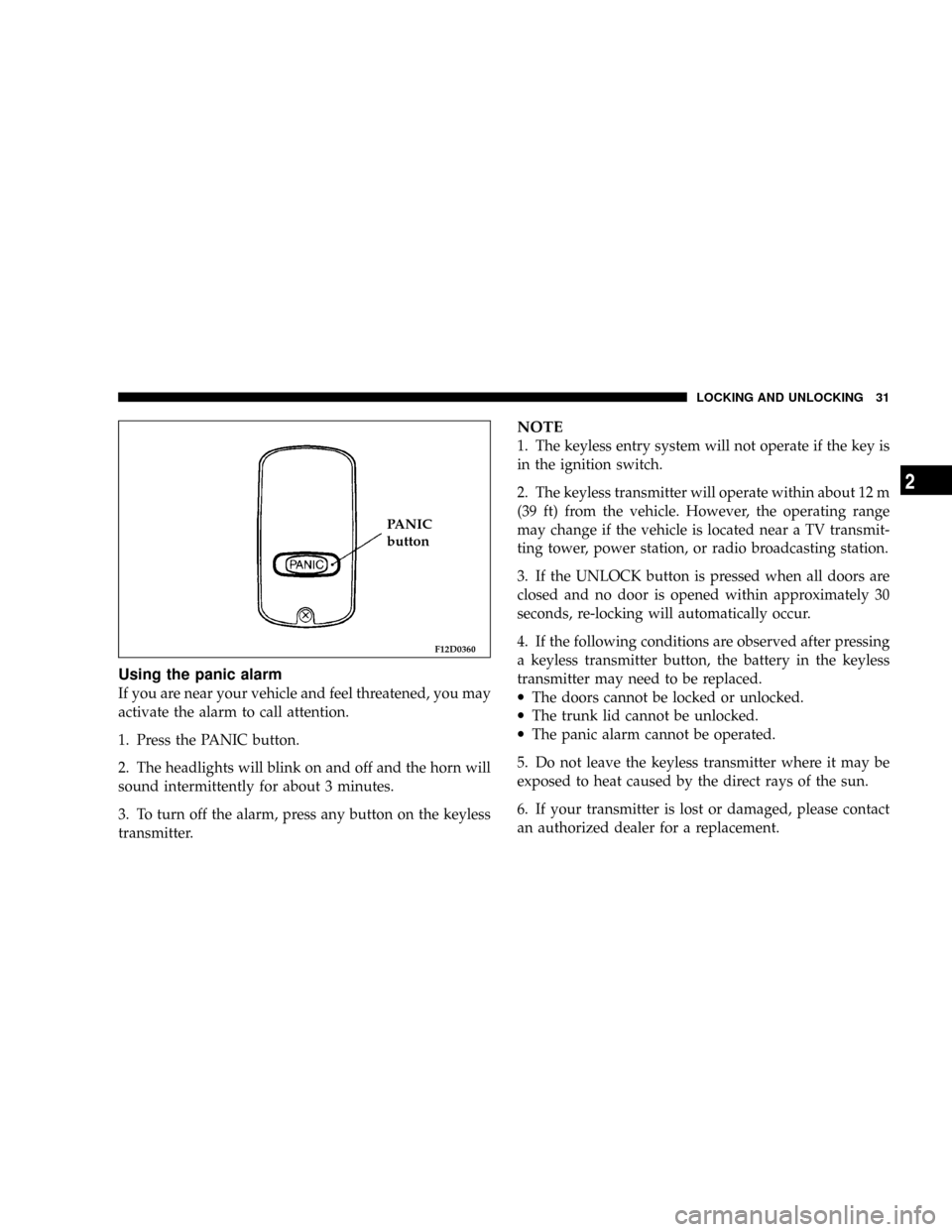
Using the panic alarm
If you are near your vehicle and feel threatened, you may
activate the alarm to call attention.
1. Press the PANIC button.
2. The headlights will blink on and off and the horn will
sound intermittently for about 3 minutes.
3. To turn off the alarm, press any button on the keyless
transmitter.
NOTE
1. The keyless entry system will not operate if the key is
in the ignition switch.
2. The keyless transmitter will operate within about 12 m
(39 ft) from the vehicle. However, the operating range
may change if the vehicle is located near a TV transmit-
ting tower, power station, or radio broadcasting station.
3. If the UNLOCK button is pressed when all doors are
closed and no door is opened within approximately 30
seconds, re-locking will automatically occur.
4. If the following conditions are observed after pressing
a keyless transmitter button, the battery in the keyless
transmitter may need to be replaced.
·The doors cannot be locked or unlocked.
·The trunk lid cannot be unlocked.
·The panic alarm cannot be operated.
5. Do not leave the keyless transmitter where it may be
exposed to heat caused by the direct rays of the sun.
6. If your transmitter is lost or damaged, please contact
an authorized dealer for a replacement.
F12D0360
PANIC
button
LOCKING AND UNLOCKING 31
2
Page 32 of 394

7. If you wish to add another transmitter, contact an
authorized dealer. A maximum of 4 keyless transmitters
may be programmed for your vehicle.
CAUTION!
The keyless transmitter is a precision electronic
device. Therefore;
·Avoid impact to the transmitter.
·Keep the transmitter dry.
·Do not disassemble the transmitter.
Your keyless entry system operates on a radio frequency
subject to Federal Communications Commission (FCC)
Rules. This device complies with Part 15 of the FCC
Rules. Operation is subject to the following two condi-
tions.
·This device may not cause harmful interference.
·This device must accept any interference, including
interference that may cause undesired operation.
CAUTION!
Changes or modifications not expressly approved by
the manufacturer for compliance could void the
user's authority to operate the equipment.
Procedure for replacing keyless transmitter
battery
1. Remove the transmitter case mounting screw (A) and
gently pry open the case.
F12D0390T
32 LOCKING AND UNLOCKING
Page 205 of 394

FOR PLEASANT DRIVING
CONTENTS
mSun visors............................209
NTo adjust the sun visor position...........209
NVanity mirror........................210
mAccessory socket.......................211
mCup holder...........................212
mAccessory boxes.......................213
NGlove compartment....................214
NCenter console with lid..................215
NTrunk net (if so equipped)...............215
mElectronic digital clock...................216
NClock setting procedure.................216
mGeneral information about your radio.......216
NSignal transmission....................217NWeak reception (fading).................217
NReflections...........................217
NCross modulation......................218
NFM stereo reception....................218
NCauses of disturbances..................218
mWhip antenna.........................219
mAM Stereo & FM Stereo Radio With Graphic
Equalizer, Cassette Tape Player And CD Player
(if so equipped)
.......................219
NOperating Instructions - Radio Mode.......219
NPower Switch, Volume Control............220
NSeek Button (Radio Mode)...............220
NTuning.............................220
NBalance............................220
6
Page 206 of 394

NFade..............................220
NGraphic Equalizer.....................220
NAM/FM Selection.....................220
NScan Button.........................220
NTo Set The Radio Pushbutton Memory......221
NGeneral Information...................221
NTo Change From Clock To Radio Mode......221
NTape Player Operation..................221
NSeek Button.........................222
NFast Forward (FF).....................222
NRewind (RW)........................222
NTape Eject...........................222
NScan Button.........................222
NChanging Tape Direction................222
NMetal Tape Selection...................222
NPinch Roller Release...................222NNoise Reduction......................223
NOperation InstructionsÐCD Player.........223
NInserting The Compact Disc..............223
NSeek Button.........................223
NEJT CD (Eject) Button..................223
NFF/Tune/RW Button...................223
NProgram Button 4 (Random Play)..........224
NTape /CD Button.....................224
NTime Button.........................224
NScan Button.........................224
mCassette Tape And Player Maintenance......224
mAM/FM Stereo Radio With 4 Disc CD Changer
(if so equipped)
.......................225
NOperating Instructions - Radio Mode.......225
NPower Switch, Volume Control............225
NSeek Button (Radio Mode)...............226
206 FOR PLEASANT DRIVING
Page 207 of 394

NTuning.............................226
NBalance............................226
NFade..............................226
NTone Control........................226
NMODE Selection......................226
NPTY (Program Type) Selection.............226
NScan Button.........................226
NTo Set The Pushbutton Memory...........227
NTo Change From Clock To Radio Mode......227
NGeneral Information...................227
NOperating Instructions Ð CD Changer......227
NInserting the Compact Disc..............227
NSeek Button.........................228
NFF /Tune/ RW Button..................228
NRandom Play........................228
NRadio/CD Button.....................228NTime Button.........................228
NScan Button.........................228
NLoading The CD Changer...............228
NPlaying Discs........................229
NRemoving Discs From The CD Changer.....229
mSteering wheel remote control switches (if so
equipped)
...........................229
NHow to adjust the volume...............230
NTo listen to the audio system..............230
NTo listen to the radio...................230
NAutomatic tuning the radio...............230
NTo select the preset memory..............230
NTo listen to a tape.....................231
NTo listen to a CD......................231
NHandling of compact discs...............232
mRadio operation and cellular phones........234
FOR PLEASANT DRIVING 207
6
Page 216 of 394

ELECTRONIC DIGITAL CLOCK
The clock and radio each use the display panel built into
the radio. A digital readout indicates the time in hours
and minutes whenever the ignition switch is in the ON or
ACC position.
Clock setting procedure
1. Using the point of a ballpoint pen or similar object,
press either the hour (H) or minute (M) buttons on the
radio. The time setting will increase each time you press
the button.
2. Press any other button to exit from the clock setting
mode.
GENERAL INFORMATION ABOUT YOUR RADIO
A vehicle is not an ideal place to listen to the radio,
because the vehicle moves, and reception conditions are
constantly changing. Buildings, terrain, signal distance
and noise from other vehicles are all working against
good reception.
Please read the following information regarding radio
reception, especially those regarding stereo transmission.
H12G0010
FM AM
25 to 40 mile radius
(40 to 64 Km)100 mile radius
(160 Km)
216 FOR PLEASANT DRIVING
Page 219 of 394

FM reception is not as sensitive to electrical disturbances
as AM. AM reception is sensitive to electrical distur-
bances such as power lines, lightning and other types of
similar electrical phenomena.
WHIP ANTENNA
To remove the whip antenna, turn it counterclockwise.
CAUTION!
It is recommended to remove the whip antenna
before going into an automatic vehicle wash or
passing under places with a low height clearance.
AM STEREO & FM STEREO RADIO WITH
GRAPHIC EQUALIZER, CASSETTE TAPE PLAYER
AND CD PLAYER (IF SO EQUIPPED)
Operating Instructions - Radio Mode
NOTE:
Power to operate the radio is supplied through
the ignition switch. It must be in the ON or ACC position
to operate the radio.
H11A3220
FOR PLEASANT DRIVING 219
6
Page 220 of 394

Power Switch, Volume Control
Press the ON/VOL control to turn the radio on. Turn the
volume control clockwise to increase the volume.
Seek Button (Radio Mode)
Press and release the Seek button to search for the next
station in either the AM or FM mode. Press the top of the
button to seek up and the bottom to seek down. The
radio will remain tuned to the new station until you
make another selection. Holding the button in will by-
pass stations without stopping until you release it.
Tuning
Press the TUNE control up or down to increase or
decrease the frequency. If you press and hold the button,
the radio will continue to tune until you release the
button. The frequency will be displayed and continu-
ously updated while the button is pressed.
Balance
The Balance control adjusts the left-to-right speaker bal-
ance. Push in the button and it will pop out. Adjust the
balance and push the button back in.
Fade
The Fade control provides for balance between the front
and rear speakers. Push in the button and it will pop out.
Adjust the balance and push the button back in.
Graphic Equalizer
The graphic equalizer has 3 separate bands. Each is
controlled by a slider control with a detent at the mid
position. Moving a control up or down increases or
decreases amplification of the band.
AM/FM Selection
Press the AM/FM button to change from AM to FM. The
operating mode will be displayed next to the station
frequency. The display will show ST when a stereo
station is received.
Scan Button
Pressing the SCAN button causes the tuner to search for
the next station, in either AM or FM, pausing for 5
seconds at each listenable station before continuing to the
next.
Pressing the AM/FM button continues the search in the
alternate frequency band.
220 FOR PLEASANT DRIVING
Page 221 of 394

To stop the search, press SCAN a second time.
To Set The Radio Pushbutton Memory
When you are receiving a station that you wish to
commit to push-button memory, press the SET button.
SET 1 will show in the display window. Select the
push-button you wish to lock onto this station and press
and release that button. If a station is not selected within
5 seconds after pressing the SET button, the station will
continue to play but will not be locked into push-button
memory.
You may add a second station to each push-button by
repeating the above procedure with this exception: Press
the SET button twice and SET 2 will show in the display
window. Each button can be set for SET 1 and SET 2 in
both AM and FM. This allows a total of 10 AM and 10 FM
stations to be locked into memory. You can recall the
stations stored in SET 2 memory by pressing the push-
button twice.
General Information
This radio complies with Part 15 of FCC rules and with
RS-210 of Industry Canada. Operation is subject to the
following conditions:1. This device may not cause harmful interference,
2. This device must accept any interference received,
including interference that may cause undesired opera-
tion.
NOTE:Changes or modifications not expressively ap-
proved by the party responsible for compliance could
void the user's authority to operate the equipment.
To Change From Clock To Radio Mode
Press the Time button to change the display between
radio frequency and time.
Tape Player Operation
Insert the cassette with the exposed tape side toward the
right and the mechanical action of the player will gently
pull the cassette into the play position.
NOTE:When subjected to extremely cold temperatures,
the tape mechanism may require a few minutes to warm
up for proper operation. Sometimes poor playback may
be experienced due to a defective cassette tape. Clean and
demagnetize the tape heads at least twice a year.
FOR PLEASANT DRIVING 221
6