lights CHRYSLER SEBRING SEDAN 2004 2.G User Guide
[x] Cancel search | Manufacturer: CHRYSLER, Model Year: 2004, Model line: SEBRING SEDAN, Model: CHRYSLER SEBRING SEDAN 2004 2.GPages: 273, PDF Size: 4.88 MB
Page 62 of 273

Dimmer Control
With the parking lights or headlights
on, rotating the dimmer control for the
interior lights on the Multi-Function
Control Lever upward will increase
the brightness of the instrument panel
lights.
Dome Light Position
Rotate the dimmer control completely
upward to the second detent to turn
on the interior lights. The interior
lights will remain on when the dim-
mer control is in this position.
Interior Light Defeat (OFF)
Rotate the dimmer control to the ex-
treme bottom full-circle position. The
interior lights will remain off when the
doors are open.
Daytime Mode (Daytime Brightness Feature)
Rotate the dimmer control to the first
detent (full-circle). This feature bright-
ens the odometer and radio display
when the parking lights or headlights
are on during daylight conditions.
Front Map/Reading Lights Ð If Equipped
These lights are mounted between the sun visors. Each
light has a push-on push-off switch.
NOTE:The lights will remain on until the switch is
pressed a second time, so be sure that they have been
turned off before leaving the vehicle.
The following two types of front map/reading lights may
be equipped on this vehicle:
62 UNDERSTANDING THE FEATURES OF YOUR VEHICLE
Page 63 of 273

Multi-Function Control Lever
The Multi-Function lever controls the operation of the
headlights, turn signals, headlight beam select switch,
instrument panel light dimming, courtesy lights, passing
lights, dome light and fog lights.
UNDERSTANDING THE FEATURES OF YOUR VEHICLE 63
3
Page 64 of 273

Headlights, Parking Lights, Instrument Panel
Lights
Turn the end of the control lever to the first detent for
parking light operation. Turn to the second detent for
headlight operation.
To change the brightness of the instrument panel lights,
turn the center portion of the lever up or down. Turning
the dimmer control to the full up position also turns on
the courtesy lights. Turning the dimmer control to the full
down position prevents the courtesy lights from coming
on when a door is opened.
Daytime Running Lights (Canada Only)
The headlights come on at a low intensity level whenever
the ignition switch is turned on. The lights remain on
until the ignition switch is turned OFF or the parking
brake is engaged. The headlight switch must be used for
normal night time driving.
Lights-on Reminder
If the headlights or parking lights are on after the ignition
is turned off, a chime will sound when the driver's door
is opened.
Fog Lights Ð If Equipped
The fog light switch is in the multi-function lever.
To activate the fog lights, turn on the low beam
headlights and pull out the end of the control
lever. A light in the instrument cluster shows when the
fog lights are on.
NOTE:The switch will turn on the fog lights only if the
low beam headlights are on. Turning on the high beam
headlights turns off the fog lights.
64 UNDERSTANDING THE FEATURES OF YOUR VEHICLE
Page 65 of 273

Turn Signals
Move the turn signal lever up or down and the arrows in
the instrument cluster flash to show proper operation of
the front and rear turn signal lights. You can signal a lane
change by moving the lever partially up or down.
Headlight Beam Select Switch
Pull the turn signal lever towards you to switch the
headlights to HIGH beam. Pull the turn signal lever a
second time to switch the headlights to LOW beam.
Passing Light
You can signal another vehicle with your headlights by
lightly pulling the turn signal lever toward the steering
wheel. This will cause the headlights to turn on at high
beam and remain on until the lever is released.
Headlight Time Delay
This feature provides the safety of headlight illumination
for about 90 seconds when leaving your vehicle in an
unlighted area.
To activate the delay, turn off the ignition while the
headlights are still on. Then turn off the headlights. The
delay interval begins when the ignition is turned off.If the headlights are turned off before the ignition, they
will turn off in the normal manner.
WINDSHIELD WIPERS AND WASHERS
The wipers and washers are operated by a switch in the
right side control lever. Turn the end of the control lever
to select the desired wiper speed.
NOTE:Always remove any build-up of snow that
prevents the windshield wiper blades from returning to
the OFF position. If the windshield wiper switch is
turned OFF and the blades cannot return to the OFF
position, damage to the wiper motor may occur.
UNDERSTANDING THE FEATURES OF YOUR VEHICLE 65
3
Page 67 of 273
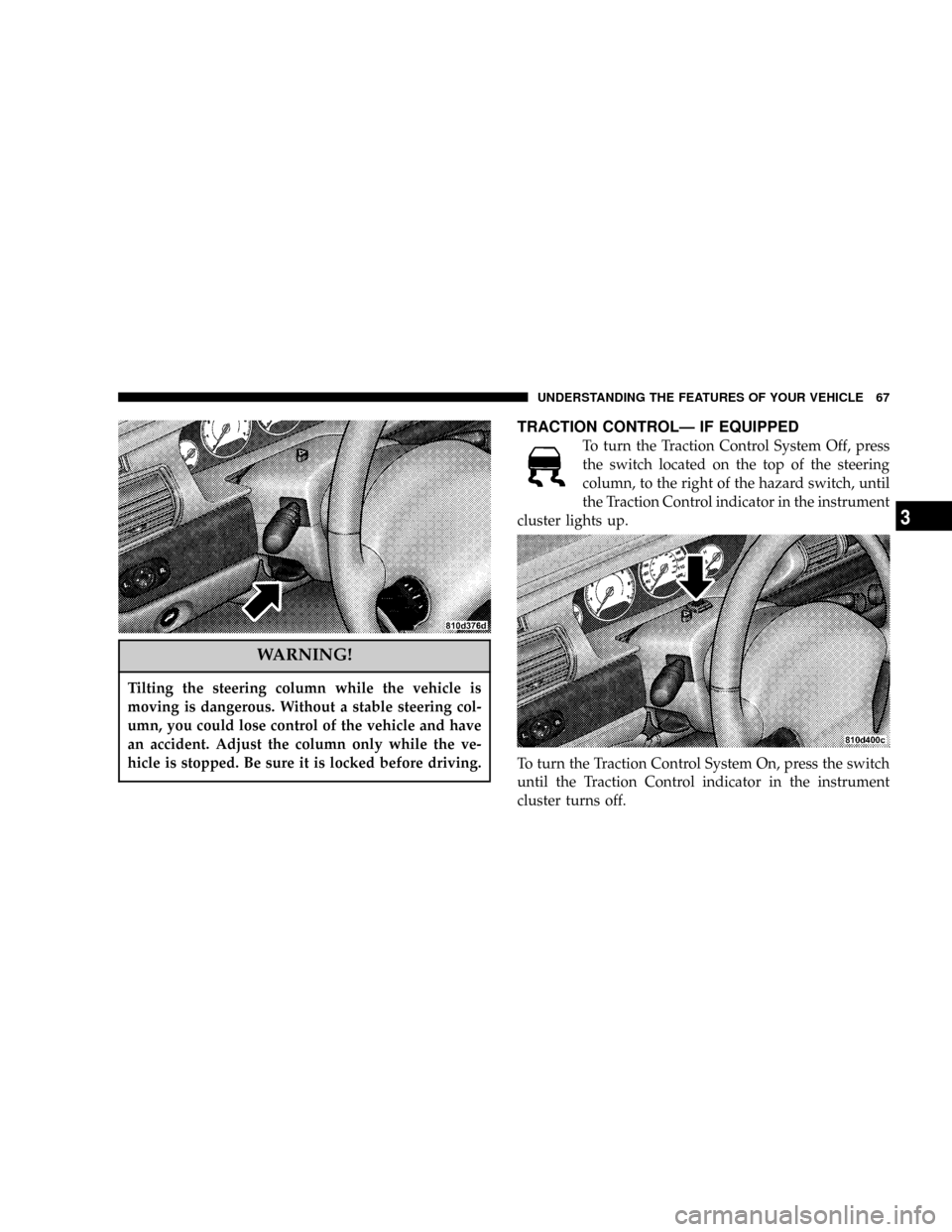
WARNING!
Tilting the steering column while the vehicle is
moving is dangerous. Without a stable steering col-
umn, you could lose control of the vehicle and have
an accident. Adjust the column only while the ve-
hicle is stopped. Be sure it is locked before driving.
TRACTION CONTROLÐ IF EQUIPPED
To turn the Traction Control System Off, press
the switch located on the top of the steering
column, to the right of the hazard switch, until
the Traction Control indicator in the instrument
cluster lights up.
To turn the Traction Control System On, press the switch
until the Traction Control indicator in the instrument
cluster turns off.
UNDERSTANDING THE FEATURES OF YOUR VEHICLE 67
3
Page 75 of 273

Reprogramming A Single Button
1. Press and hold the Universal Transceiver button to be
reprogrammed. Do not release until step 4 has been
completed.
2. When the indicator light begins to flash slowly (after
20 seconds) position the hand held transmitter one to
three inches away from the button to be trained.
3. Press and hold the hand held transmitter button.
4. The Universal Transceiver indicator light will begin to
flash, first slowly, then rapidly. When the indicator lights
begin to flash rapidly, release both buttons.
Security
If you sell your vehicle, be sure to erase the frequencies.
To erase all of the previously trained frequencies, hold
down both outside buttons until the green light begins to
flash.
This device complies with part 15 of FCC rules and with
RS-210 of Industry Canada. Operation is subject to the
following conditions:
1. This device may not cause harmful interference.
2. This device must accept any interference that may be
received including interference that may cause undesired
operation.
NOTE:Changes or modifications not expressly ap-
proved by the party responsible for compliance could
void the user's authority to operate the equipment.
HomeLinktis a trademark owned by Johnson Controls,
Inc.
UNDERSTANDING THE FEATURES OF YOUR VEHICLE 75
3
Page 78 of 273

CAUTION!
Electrical Outlet Use With Engine Off
²Many accessories that can be plugged in draw
power from the vehicle's battery, even when not
in use (i.e., cellular phones, etc.). Eventually, if
plugged in long enough, the vehicle's battery will
discharge sufficiently to degrade battery life
and/or prevent engine starting.
²Accessories that draw higher power (i.e., coolers,
vacuum cleaners, lights, etc.) will degrade the
battery even more quickly. Only use these inter-
mittently and with greater caution.
²After the use of high power draw accessories, or
long periods of the vehicle not being started (with
accessories still plugged in), the vehicle must be
driven a sufficient length of time to allow the
alternator to recharge the vehicle's battery.
78 UNDERSTANDING THE FEATURES OF YOUR VEHICLE
Page 87 of 273

5. Tachometer
The red area of the scale shows the maximum permissible
engine revolutions-per-minute (rpm x 1000) for each gear
range. Before reaching the red area (over 6,500 rpm), ease
up on the accelerator to prevent engine over speed.
6. Turn Signal Indicators
The arrows will flash in unison with the exterior turn
signal, when using the turn signal lever.
7. High Beam Indicator
This light shows that the headlights are on high
beam. Pull the turn signal lever toward the
steering wheel to switch the headlights from high or
low beam.
8. Speedometer
Shows the vehicle speed in miles-per-hour and
kilometers-per-hour.
9. Charging System Light
This light shows the status of the electrical
charging system. The light should come on
briefly when the ignition is first turned on and remain
on briefly as a bulb check. If the light stays on orcomes on while driving, turn off some of the vehicle's
electrical devices, such as the Fog Lights or Rear
Defroster. If the Charging System Light remains on, it
means that the vehicle is experiencing a problem with
the charging system. Obtain SERVICE IMMEDI-
ATELY. See your local authorized dealer.
10. Malfunction Indicator Light
This light is part of an onboard diagnostic
system called OBD that monitors engine and
automatic transmission control systems. The
light will illuminate as long as the key is in the ON
position, prior to engine start up. Approximately 15
seconds later the MIL may blink for 10 seconds then
resume to full illumination. (See ªEMISSIONS IN-
SPECTION AND MAINTENANCE PROGRAMSº in
the ªMAINTAINING YOUR VEHICLEº section of
your Owner Manual for more details). If the bulb does
not come on when turning the key from OFF to ON,
have the condition checked promptly.
Certain conditions such as a loose or missing gas cap or
poor fuel quality may illuminate the light after engine
start. The vehicle should be serviced if the light stays on
UNDERSTANDING YOUR INSTRUMENT PANEL 87
4
Page 88 of 273

through several of your typical driving cycles. In most
situations the vehicle will drive normally and will not
require towing.
The Malfunction Indicator Light flashes to alert to serious
conditions that could lead to immediate loss of power or
severe catalytic converter damage. The vehicle should be
serviced as soon as possible if this occurs.
11. Fog Light Indicator Ð If Equipped
This light shows when the fog lights are ON.
12. Temperature Gauge
The temperature gauge shows engine coolant
temperature. Any reading within the normal
range (approximately mid point on the scale)
shows that the cooling system is operating properly.
The gauge pointer may show a higher than normal
temperature when driving in hot weather, up moun-
tain grades, in heavy stop and go traffic, or when
towing a trailer.
If the pointer rises to the ªHº mark, stop the vehicle and
turn off the engine until the problem is corrected.There are steps that you can take to slow down an
impending overheat condition. If your air conditioning is
on, turn it off. The air conditioning system adds heat to
the cooling system and turning off the A/C removes this
heat. You can also turn the Temperature control to
maximum heat, the Mode control to Floor and the Fan
control to High. This allows the heater core to act as a
supplement to the radiator and aids in removing heat
from the cooling system.
13. Engine Temperature Warning Light
This light warns of an overheated engine cool-
ant condition.
14. Transmission Range Indicator
This indicator illuminates to show the automatic trans-
mission gear selection.
An optionalAutoStick Gear Indicatordisplays the current
transaxle gear when in AutoStick mode.
15. Odometer/Trip Odometer
The odometer shows the total distance the vehicle has
been driven.
88 UNDERSTANDING YOUR INSTRUMENT PANEL
Page 116 of 273

To insert additional CDs into the changer, the instructions
follow:
1. Select and press any numbered button without an
illuminated light above it.
2. Insert the CD while the light above the chosen button
is flashing and the two lights on either side of the slot are
illuminated.
3. Upon insertion, the CD will begin to play, and both the
button light and the lights in the corner of the loading
slot will illuminate.
4. Repeat the process for loading any additional CDs.
The CD player will stop while additional CDs are loaded.
Playing Discs
The radio will show the CD number, the CD track
number, and the Track Time Elapsed while the radio is in
the CD mode. If more than one CD is loaded in the
changer, the changer will automatically play the next disc
after playing the last track of the current disc.
Seek Button
Press the top of this button on the radio once to play the
next track. Press the bottom of the button once to return
to the beginning of the current track. Press the bottom of
the button twice to play the previous track.
FF/TUNE/RW
Press the FF (fast forward) button and the CD player will
fast forward through the tracks until the button is re-
leased. Press the RW (rewind) button and the CD player
will reverse through the tracks until the button is re-
leased.
Mode Button
Press this button to toggle between radio and cd modes.
Program Button 1
Press this button to play the next available disc.
Program Button 4 (Random Play)
Press this button while the CD is playing to activate
Random Play. This feature plays the selections on the
current compact disc in random order to provide an
interesting change of pace. The CD changer stays in the
random play mode when changing to the next disc.
116 UNDERSTANDING YOUR INSTRUMENT PANEL