service reset CHRYSLER VOYAGER 2001 Owner's Manual
[x] Cancel search | Manufacturer: CHRYSLER, Model Year: 2001, Model line: VOYAGER, Model: CHRYSLER VOYAGER 2001Pages: 4284, PDF Size: 83.53 MB
Page 559 of 4284
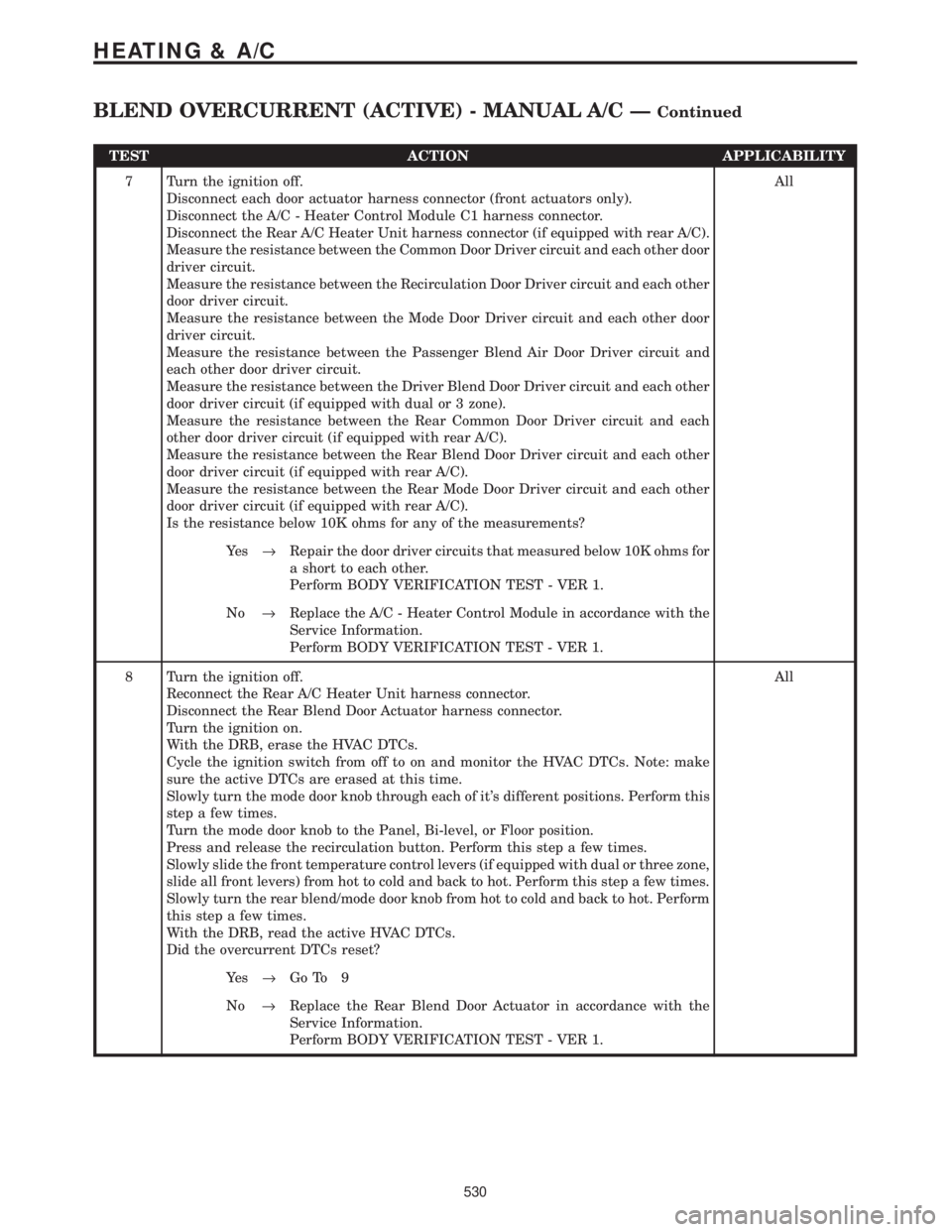
TEST ACTION APPLICABILITY
7 Turn the ignition off.
Disconnect each door actuator harness connector (front actuators only).
Disconnect the A/C - Heater Control Module C1 harness connector.
Disconnect the Rear A/C Heater Unit harness connector (if equipped with rear A/C).
Measure the resistance between the Common Door Driver circuit and each other door
driver circuit.
Measure the resistance between the Recirculation Door Driver circuit and each other
door driver circuit.
Measure the resistance between the Mode Door Driver circuit and each other door
driver circuit.
Measure the resistance between the Passenger Blend Air Door Driver circuit and
each other door driver circuit.
Measure the resistance between the Driver Blend Door Driver circuit and each other
door driver circuit (if equipped with dual or 3 zone).
Measure the resistance between the Rear Common Door Driver circuit and each
other door driver circuit (if equipped with rear A/C).
Measure the resistance between the Rear Blend Door Driver circuit and each other
door driver circuit (if equipped with rear A/C).
Measure the resistance between the Rear Mode Door Driver circuit and each other
door driver circuit (if equipped with rear A/C).
Is the resistance below 10K ohms for any of the measurements?All
Ye s®Repair the door driver circuits that measured below 10K ohms for
a short to each other.
Perform BODY VERIFICATION TEST - VER 1.
No®Replace the A/C - Heater Control Module in accordance with the
Service Information.
Perform BODY VERIFICATION TEST - VER 1.
8 Turn the ignition off.
Reconnect the Rear A/C Heater Unit harness connector.
Disconnect the Rear Blend Door Actuator harness connector.
Turn the ignition on.
With the DRB, erase the HVAC DTCs.
Cycle the ignition switch from off to on and monitor the HVAC DTCs. Note: make
sure the active DTCs are erased at this time.
Slowly turn the mode door knob through each of it's different positions. Perform this
step a few times.
Turn the mode door knob to the Panel, Bi-level, or Floor position.
Press and release the recirculation button. Perform this step a few times.
Slowly slide the front temperature control levers (if equipped with dual or three zone,
slide all front levers) from hot to cold and back to hot. Perform this step a few times.
Slowly turn the rear blend/mode door knob from hot to cold and back to hot. Perform
this step a few times.
With the DRB, read the active HVAC DTCs.
Did the overcurrent DTCs reset?All
Ye s®Go To 9
No®Replace the Rear Blend Door Actuator in accordance with the
Service Information.
Perform BODY VERIFICATION TEST - VER 1.
530
HEATING & A/C
BLEND OVERCURRENT (ACTIVE) - MANUAL A/C ÐContinued
Page 560 of 4284
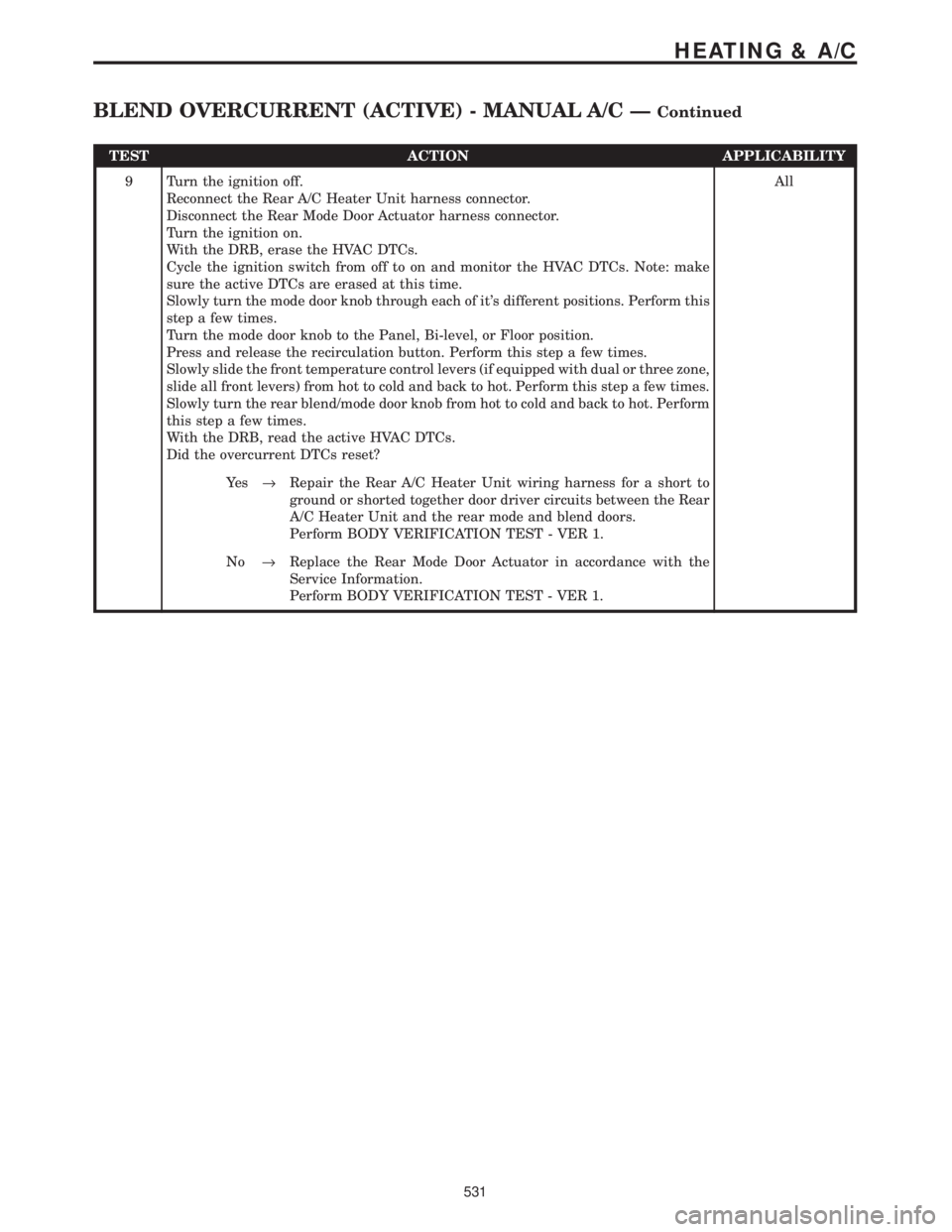
TEST ACTION APPLICABILITY
9 Turn the ignition off.
Reconnect the Rear A/C Heater Unit harness connector.
Disconnect the Rear Mode Door Actuator harness connector.
Turn the ignition on.
With the DRB, erase the HVAC DTCs.
Cycle the ignition switch from off to on and monitor the HVAC DTCs. Note: make
sure the active DTCs are erased at this time.
Slowly turn the mode door knob through each of it's different positions. Perform this
step a few times.
Turn the mode door knob to the Panel, Bi-level, or Floor position.
Press and release the recirculation button. Perform this step a few times.
Slowly slide the front temperature control levers (if equipped with dual or three zone,
slide all front levers) from hot to cold and back to hot. Perform this step a few times.
Slowly turn the rear blend/mode door knob from hot to cold and back to hot. Perform
this step a few times.
With the DRB, read the active HVAC DTCs.
Did the overcurrent DTCs reset?All
Ye s®Repair the Rear A/C Heater Unit wiring harness for a short to
ground or shorted together door driver circuits between the Rear
A/C Heater Unit and the rear mode and blend doors.
Perform BODY VERIFICATION TEST - VER 1.
No®Replace the Rear Mode Door Actuator in accordance with the
Service Information.
Perform BODY VERIFICATION TEST - VER 1.
531
HEATING & A/C
BLEND OVERCURRENT (ACTIVE) - MANUAL A/C ÐContinued
Page 571 of 4284

Symptom List:
FRONT AND REAR BLOWER OUTPUT 1 OPEN
FRONT AND REAR BLOWER OUTPUT 2 OPEN
Test Note: All symptoms listed above are diagnosed using the same tests.
The title for the tests will be FRONT AND REAR BLOWER
OUTPUT 1 OPEN.
When Monitored and Set Condition:
FRONT AND REAR BLOWER OUTPUT 1 OPEN
When Monitored: Continuously.
Set Condition: If the FCM detects no voltage present on the Front/Rear Blower Motor
Relay Control circuit.
FRONT AND REAR BLOWER OUTPUT 2 OPEN
When Monitored: Continuously.
Set Condition: If the FCM detects no voltage present on the Front/Rear Blower Motor
Relay Control circuit.
POSSIBLE CAUSES
CHECK DTCS
B+ CIRCUIT OPEN
FRONT AND REAR BLOWER RELAYS OPEN
FRONT/REAR BLOWER MOTOR RELAY CONTROL CIRCUIT SHORTED TO GROUND
FRONT/REAR BLOWER MOTOR RELAY CONTROL CIRCUIT OPEN
FRONT CONTROL MODULE
TEST ACTION APPLICABILITY
1 Turn the ignition on.
NOTE: If neither DTC will reset or is active, refer to the wiring diagrams
located in the service information to help isolate a possible intermittent
condition.
With the DRB, read the FCM DTC's.
Are both the Front/Rear Blower Output 1 Open and the Front/Rear Blower Output
2 Open DTC's set?All
Ye s®Go To 2
No®Replace the Front Control Module (FCM) in accordance with the
Service Information.
Perform BODY VERIFICATION TEST - VER 1.
542
HEATING & A/C
Page 572 of 4284
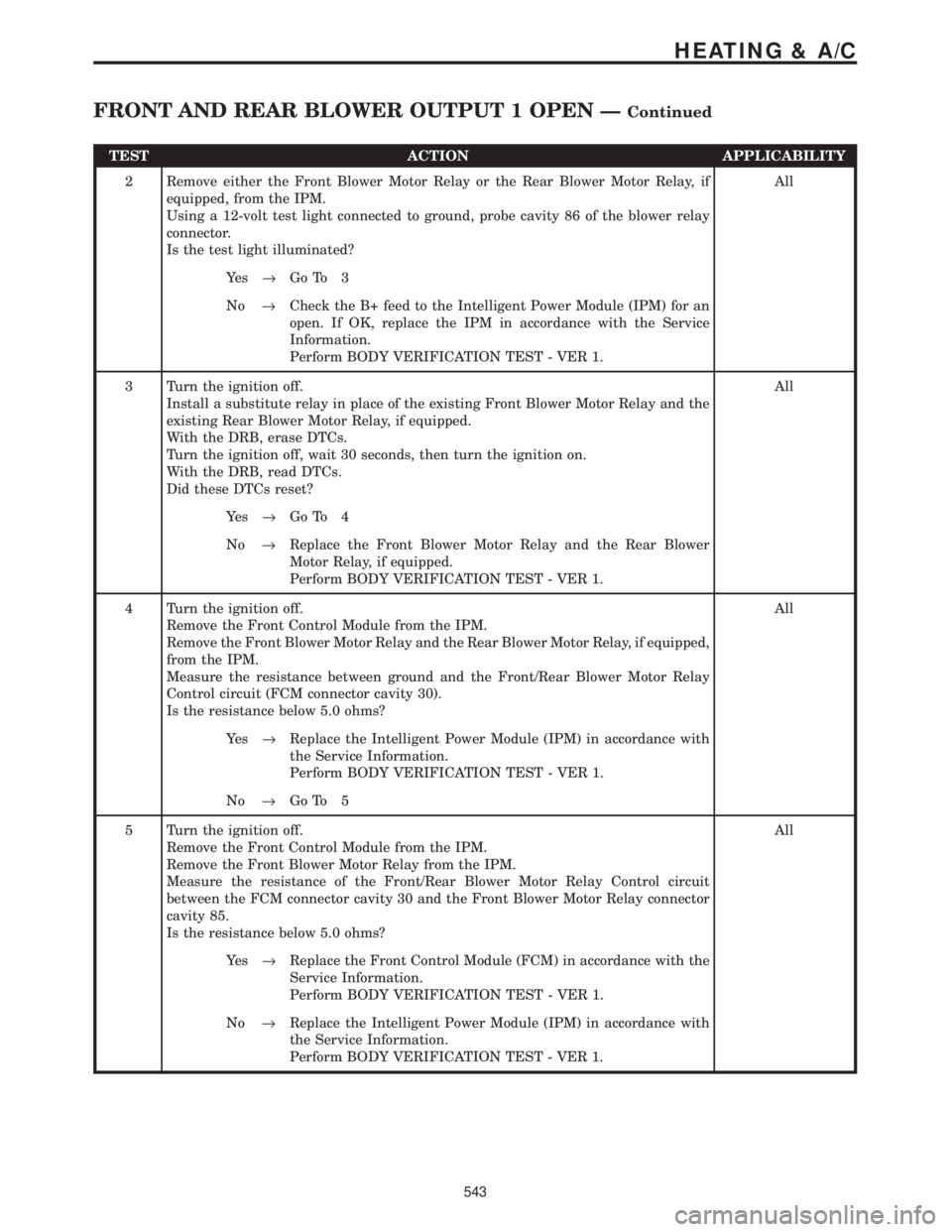
TEST ACTION APPLICABILITY
2 Remove either the Front Blower Motor Relay or the Rear Blower Motor Relay, if
equipped, from the IPM.
Using a 12-volt test light connected to ground, probe cavity 86 of the blower relay
connector.
Is the test light illuminated?All
Ye s®Go To 3
No®Check the B+ feed to the Intelligent Power Module (IPM) for an
open. If OK, replace the IPM in accordance with the Service
Information.
Perform BODY VERIFICATION TEST - VER 1.
3 Turn the ignition off.
Install a substitute relay in place of the existing Front Blower Motor Relay and the
existing Rear Blower Motor Relay, if equipped.
With the DRB, erase DTCs.
Turn the ignition off, wait 30 seconds, then turn the ignition on.
With the DRB, read DTCs.
Did these DTCs reset?All
Ye s®Go To 4
No®Replace the Front Blower Motor Relay and the Rear Blower
Motor Relay, if equipped.
Perform BODY VERIFICATION TEST - VER 1.
4 Turn the ignition off.
Remove the Front Control Module from the IPM.
Remove the Front Blower Motor Relay and the Rear Blower Motor Relay, if equipped,
from the IPM.
Measure the resistance between ground and the Front/Rear Blower Motor Relay
Control circuit (FCM connector cavity 30).
Is the resistance below 5.0 ohms?All
Ye s®Replace the Intelligent Power Module (IPM) in accordance with
the Service Information.
Perform BODY VERIFICATION TEST - VER 1.
No®Go To 5
5 Turn the ignition off.
Remove the Front Control Module from the IPM.
Remove the Front Blower Motor Relay from the IPM.
Measure the resistance of the Front/Rear Blower Motor Relay Control circuit
between the FCM connector cavity 30 and the Front Blower Motor Relay connector
cavity 85.
Is the resistance below 5.0 ohms?All
Ye s®Replace the Front Control Module (FCM) in accordance with the
Service Information.
Perform BODY VERIFICATION TEST - VER 1.
No®Replace the Intelligent Power Module (IPM) in accordance with
the Service Information.
Perform BODY VERIFICATION TEST - VER 1.
543
HEATING & A/C
FRONT AND REAR BLOWER OUTPUT 1 OPEN ÐContinued
Page 573 of 4284

Symptom List:
FRONT AND REAR BLOWER OUTPUT 1 SHORT TO BATT
FRONT AND REAR BLOWER OUTPUT 2 SHORT TO BATT
Test Note: All symptoms listed above are diagnosed using the same tests.
The title for the tests will be FRONT AND REAR BLOWER
OUTPUT 1 SHORT TO BATT.
When Monitored and Set Condition:
FRONT AND REAR BLOWER OUTPUT 1 SHORT TO BATT
When Monitored: With the ignition on.
Set Condition: The FCM detects excessive current when attempting to close the Front/
Rear Blower Motor Relays.
FRONT AND REAR BLOWER OUTPUT 2 SHORT TO BATT
When Monitored: With the ignition on.
Set Condition: The FCM detects excessive current when attempting to close the Front/
Rear Blower Motor Relays.
POSSIBLE CAUSES
CHECK DTCS
FRONT BLOWER MOTOR RELAY SHORTED
REAR BLOWER MOTOR RELAY SHORTED
FRONT/REAR BLOWER MOTOR RELAY CONTROL CIRCUIT SHORTED TO BATTERY
FRONT CONTROL MODULE
TEST ACTION APPLICABILITY
1 Turn the ignition on.
NOTE: If neither DTC will reset or is active, refer to the wiring diagrams
located in the service information to help isolate a possible intermittent
condition.
With the DRB, read the FCM DTC's.
Are both of these DTCs set?All
Ye s®Go To 2
No®Replace the Front Control Module (FCM) in accordance with the
Service Information.
Perform BODY VERIFICATION TEST - VER 1.
544
HEATING & A/C
Page 574 of 4284
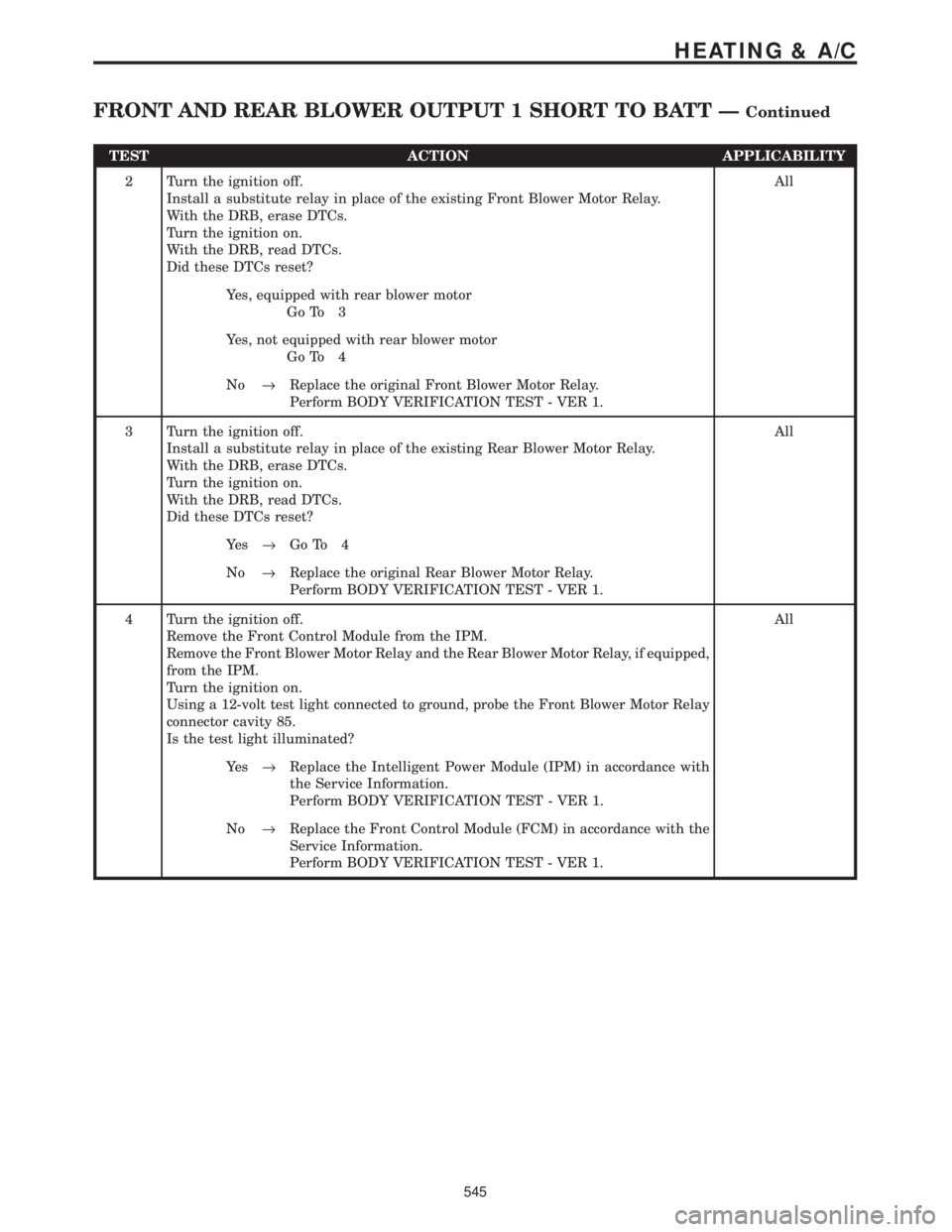
TEST ACTION APPLICABILITY
2 Turn the ignition off.
Install a substitute relay in place of the existing Front Blower Motor Relay.
With the DRB, erase DTCs.
Turn the ignition on.
With the DRB, read DTCs.
Did these DTCs reset?All
Yes, equipped with rear blower motor
Go To 3
Yes, not equipped with rear blower motor
Go To 4
No®Replace the original Front Blower Motor Relay.
Perform BODY VERIFICATION TEST - VER 1.
3 Turn the ignition off.
Install a substitute relay in place of the existing Rear Blower Motor Relay.
With the DRB, erase DTCs.
Turn the ignition on.
With the DRB, read DTCs.
Did these DTCs reset?All
Ye s®Go To 4
No®Replace the original Rear Blower Motor Relay.
Perform BODY VERIFICATION TEST - VER 1.
4 Turn the ignition off.
Remove the Front Control Module from the IPM.
Remove the Front Blower Motor Relay and the Rear Blower Motor Relay, if equipped,
from the IPM.
Turn the ignition on.
Using a 12-volt test light connected to ground, probe the Front Blower Motor Relay
connector cavity 85.
Is the test light illuminated?All
Ye s®Replace the Intelligent Power Module (IPM) in accordance with
the Service Information.
Perform BODY VERIFICATION TEST - VER 1.
No®Replace the Front Control Module (FCM) in accordance with the
Service Information.
Perform BODY VERIFICATION TEST - VER 1.
545
HEATING & A/C
FRONT AND REAR BLOWER OUTPUT 1 SHORT TO BATT ÐContinued
Page 589 of 4284
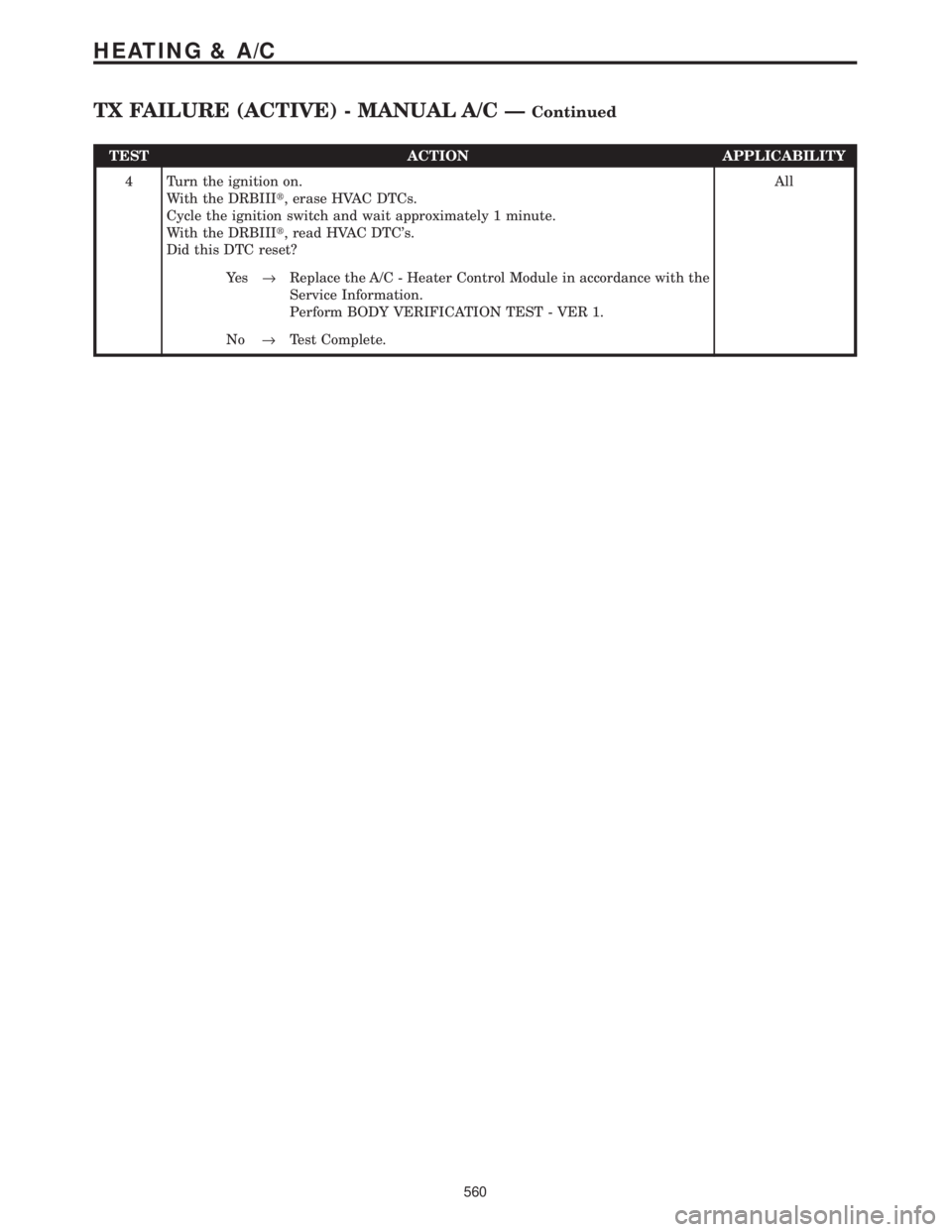
TEST ACTION APPLICABILITY
4 Turn the ignition on.
With the DRBIIIt, erase HVAC DTCs.
Cycle the ignition switch and wait approximately 1 minute.
With the DRBIIIt, read HVAC DTC's.
Did this DTC reset?All
Ye s®Replace the A/C - Heater Control Module in accordance with the
Service Information.
Perform BODY VERIFICATION TEST - VER 1.
No®Test Complete.
560
HEATING & A/C
TX FAILURE (ACTIVE) - MANUAL A/C ÐContinued
Page 671 of 4284

Symptom:
BCM MESSAGE NOT RECEIVED
When Monitored and Set Condition:
BCM MESSAGE NOT RECEIVED
When Monitored: Continuously when the PCI bus is active.
Set Condition: If the Memory Seat Mirror Module does receive this Bus message from the
BCM. Code will remain for 50 ignition cycles.
POSSIBLE CAUSES
BCM RESPONSE
STORED CODE/PCI BUS COMMUNICATION PROBLEMS
MEMORY SEAT MIRROR MODULE
INTERMITTENT PROBLEM
TEST ACTION APPLICABILITY
1 Turn ignition on.
With the DRBIIItselect Body Control Module.
Is there a response from the Body Control Module?All
Ye s®Go To 2
No®Refer to symptom *NO RESPONSE FROM BODY CONTROL
MODULE in the COMMUNICATION category
Perform MEMORY SYSTEM VERIFICATION TEST - VER 1.
2 With the DRBIIIt, erase the DTC from Memory Seat Mirror Module.
Turn the ignition switch to the Off position then start the engine and let run for one
minute.
Now be sure that there is still communication with the Body Control module, if not
repair as necessary.
With the DRB check for the same DTC to reset in the MSMM.
Did the same DTC reset?All
Ye s®Go To 3
No®Test complete.
Perform MEMORY SYSTEM VERIFICATION TEST - VER 1.
3NOTE: Visually inspect the related wiring harness including the PCI bus
wire. Look for any chafed, pierced, pinched, or partially broken wires.
Note: Visually inspect the related wiring harness connectors. Look for
broken, bent, pushed out, or corroded terminals.
Note: Refer to any technical service bulletins that may apply.
Were any problems found?All
No®Replace the Memory Seat Mirror Module.
Perform MEMORY SYSTEM VERIFICATION TEST - VER 1.
Ye s®Repair as necessary.
Perform MEMORY SYSTEM VERIFICATION TEST - VER 1.
642
MEMORY SEAT
Page 672 of 4284
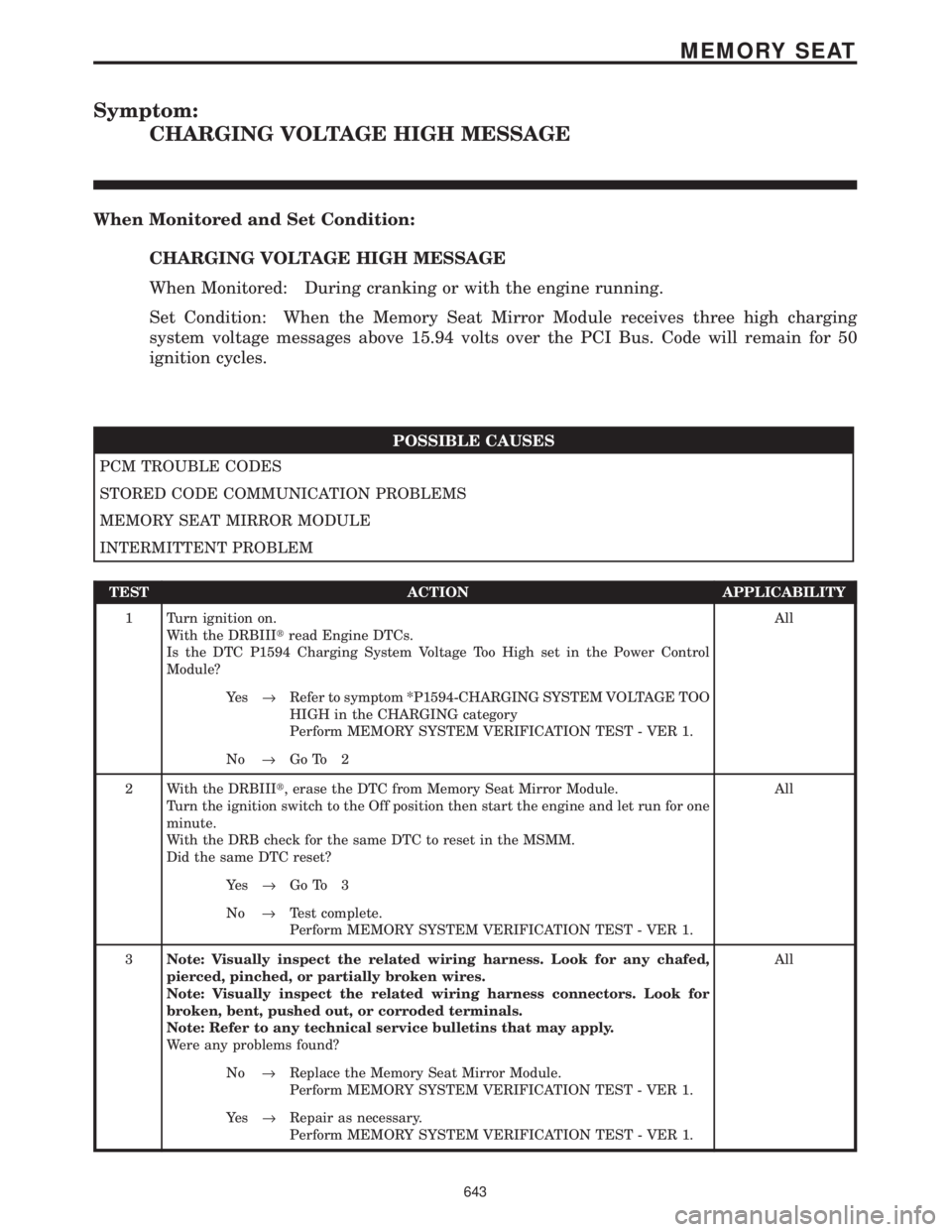
Symptom:
CHARGING VOLTAGE HIGH MESSAGE
When Monitored and Set Condition:
CHARGING VOLTAGE HIGH MESSAGE
When Monitored: During cranking or with the engine running.
Set Condition: When the Memory Seat Mirror Module receives three high charging
system voltage messages above 15.94 volts over the PCI Bus. Code will remain for 50
ignition cycles.
POSSIBLE CAUSES
PCM TROUBLE CODES
STORED CODE COMMUNICATION PROBLEMS
MEMORY SEAT MIRROR MODULE
INTERMITTENT PROBLEM
TEST ACTION APPLICABILITY
1 Turn ignition on.
With the DRBIIItread Engine DTCs.
Is the DTC P1594 Charging System Voltage Too High set in the Power Control
Module?All
Ye s®Refer to symptom *P1594-CHARGING SYSTEM VOLTAGE TOO
HIGH in the CHARGING category
Perform MEMORY SYSTEM VERIFICATION TEST - VER 1.
No®Go To 2
2 With the DRBIIIt, erase the DTC from Memory Seat Mirror Module.
Turn the ignition switch to the Off position then start the engine and let run for one
minute.
With the DRB check for the same DTC to reset in the MSMM.
Did the same DTC reset?All
Ye s®Go To 3
No®Test complete.
Perform MEMORY SYSTEM VERIFICATION TEST - VER 1.
3Note: Visually inspect the related wiring harness. Look for any chafed,
pierced, pinched, or partially broken wires.
Note: Visually inspect the related wiring harness connectors. Look for
broken, bent, pushed out, or corroded terminals.
Note: Refer to any technical service bulletins that may apply.
Were any problems found?All
No®Replace the Memory Seat Mirror Module.
Perform MEMORY SYSTEM VERIFICATION TEST - VER 1.
Ye s®Repair as necessary.
Perform MEMORY SYSTEM VERIFICATION TEST - VER 1.
643
MEMORY SEAT
Page 673 of 4284

Symptom:
CHARGING VOLTAGE LOW MESSAGE
When Monitored and Set Condition:
CHARGING VOLTAGE LOW MESSAGE
When Monitored: During cranking or with the engine running.
Set Condition: When the Memory Seat Mirror Module receives three low charging system
voltage messages below 9 volts over the PCI Bus. Code will remain for 50 ignition cycles.
POSSIBLE CAUSES
PCM TROUBLE CODES
STORED CODE COMMUNICATION PROBLEMS
MEMORY SEAT MIRROR MODULE
INTERMITTENT PROBLEM
TEST ACTION APPLICABILITY
1 Turn ignition on.
With the DRBIIItread Engine DTCs.
Is the DTC P1682 Charging System Voltage Too Low set in the Power Control
Module?All
Ye s®Refer to symptom *P1682-CHARGING SYSTEM VOLTAGE TOO
LOW in the CHARGING category
Perform MEMORY SYSTEM VERIFICATION TEST - VER 1.
No®Go To 2
2 With the DRBIIIt, erase the DTC from Memory Seat Mirror Module.
Turn the ignition switch to the Off position then start the engine and let run for one
minute.
With the DRB check for the same DTC to reset in the MSMM.
Did the same DTC reset?All
Ye s®Go To 3
No®Test complete.
Perform MEMORY SYSTEM VERIFICATION TEST - VER 1.
3Note: Visually inspect the related wiring harness. Look for any chafed,
pierced, pinched, or partially broken wires.
Note: Visually inspect the related wiring harness connectors. Look for
broken, bent, pushed out, or corroded terminals.
Note: Refer to any technical service bulletins that may apply.
Were any problems found?All
No®Replace the Memory Seat Mirror Module.
Perform MEMORY SYSTEM VERIFICATION TEST - VER 1.
Ye s®Repair as necessary.
Perform MEMORY SYSTEM VERIFICATION TEST - VER 1.
644
MEMORY SEAT