park CHRYSLER VOYAGER 2004 Owner's Manual
[x] Cancel search | Manufacturer: CHRYSLER, Model Year: 2004, Model line: VOYAGER, Model: CHRYSLER VOYAGER 2004Pages: 2585, PDF Size: 62.54 MB
Page 149 of 2585
CLEANING - CALIPER...................25
INSPECTION - CALIPER..................25
ASSEMBLY
ASSEMBLY - CALIPER GUIDE PIN
BUSHINGS (DISC/DISC BRAKES).........25
ASSEMBLY - CALIPER PISTON AND SEAL . . 26
INSTALLATION
INSTALLATION - FRONT DISC BRAKE
CALIPER (DISC/DISC BRAKES)...........27
INSTALLATION - FRONT DISC BRAKE
CALIPER (DISC/DRUM BRAKES)..........27
DISC BRAKE CALIPER - REAR
REMOVAL - REAR DISC BRAKE CALIPER....27
DISASSEMBLY - CALIPER PISTON AND SEAL . 28
CLEANING - CALIPER...................29
INSPECTION - CALIPER..................29
ASSEMBLY - CALIPER PISTON AND SEAL . . . 29
INSTALLATION - REAR DISC BRAKE CALIPER . 30
DISC BRAKE CALIPER ADAPTER
REMOVAL - FRONT DISC BRAKE CALIPER
ADAPTER...........................31
INSTALLATION - FRONT DISC BRAKE
CALIPER ADAPTER....................31
DISC BRAKE CALIPER GUIDE PINS
REMOVAL - DISC BRAKE CALIPER GUIDE
PINS (DISC/DRUM BRAKES).............31
INSTALLATION - DISC BRAKE CALIPER
GUIDE PINS (DISC/DRUM BRAKES).......31
DRUM
REMOVAL.............................32
INSTALLATION.........................32
FLUID
DIAGNOSIS AND TESTING - BRAKE FLUID
CONTAMINATION.....................32
STANDARD PROCEDURE - BRAKE FLUID
LEVEL CHECKING.....................32
SPECIFICATIONS
BRAKE FLUID........................33
JUNCTION BLOCK
DESCRIPTION - NON-ABS JUNCTION BLOCK . 33
OPERATION - NON-ABS JUNCTION BLOCK . . 33
REMOVAL - NON-ABS JUNCTION BLOCK....33
INSTALLATION - NON-ABS JUNCTION BLOCK . 33
MASTER CYLINDER
DESCRIPTION
DESCRIPTION........................34
DESCRIPTION - RHD..................35
OPERATION...........................35
STANDARD PROCEDURE - MASTER
CYLINDER BLEEDING..................35
REMOVAL
REMOVAL - LHD......................36
REMOVAL - RHD......................37
DISASSEMBLY - MASTER CYLINDER (FLUID
RESERVOIR).........................37
ASSEMBLY - MASTER CYLINDER (FLUID
RESERVOIR).........................38INSTALLATION
INSTALLATION - LHD..................38
INSTALLATION - RHD..................39
PEDAL TORQUE SHAFT - RHD
REMOVAL.............................39
INSTALLATION.........................39
POWER BRAKE BOOSTER
DESCRIPTION.........................40
OPERATION...........................41
DIAGNOSIS AND TESTING - POWER BRAKE
BOOSTER...........................41
REMOVAL
REMOVAL - LHD......................42
REMOVAL - RHD......................43
INSTALLATION
INSTALLATION - LHD..................46
INSTALLATION - RHD..................47
PROPORTIONING VALVE
DESCRIPTION - PROPORTIONING VALVE
(HEIGHT SENSING)....................48
OPERATION - PROPORTIONING VALVE
(HEIGHT SENSING)....................48
DIAGNOSIS AND TESTING -
PROPORTIONING VALVE (HEIGHT
SENSING)...........................49
REMOVAL - PROPORTIONING VALVE
(HEIGHT SENSING)....................50
INSTALLATION - PROPORTIONING VALVE
(HEIGHT SENSING)....................51
ROTOR
DIAGNOSIS AND TESTING - BRAKE ROTOR . . 51
STANDARD PROCEDURE - BRAKE ROTOR
MACHINING..........................53
REMOVAL - FRONT BRAKE ROTOR........54
INSTALLATION - FRONT BRAKE ROTOR.....54
SPECIFICATIONS
BRAKE ROTOR.......................55
BRAKE ROTOR - EXPORT..............55
SUPPORT PLATE - DRUM BRAKE
REMOVAL.............................56
INSTALLATION.........................56
WHEEL CYLINDERS
REMOVAL.............................57
INSPECTION..........................57
INSTALLATION.........................57
PARKING BRAKE
DESCRIPTION
DESCRIPTION........................57
DESCRIPTION - EXPORT...............58
OPERATION...........................58
STANDARD PROCEDURE
STANDARD PROCEDURE - PARKING
BRAKE AUTOMATIC ADJUSTER TENSION
RELEASE...........................58
STANDARD PROCEDURE - PARKING
BRAKE AUTOMATIC ADJUSTER TENSION
RESET.............................59
5 - 2 BRAKES - BASERS
Page 150 of 2585
CABLES - PARKING BRAKE
REMOVAL
REMOVAL - PARKING BRAKE CABLE
(FRONT)............................59
REMOVAL - PARKING BRAKE CABLE
(INTERMEDIATE)......................60
REMOVAL - PARKING BRAKE CABLE
(RIGHT REAR)........................60
REMOVAL - PARKING BRAKE CABLE (LEFT
REAR)..............................62
INSTALLATION
INSTALLATION - PARKING BRAKE CABLE
(FRONT)............................63
INSTALLATION - PARKING BRAKE CABLE
(INTERMEDIATE)......................63
INSTALLATION - PARKING BRAKE CABLE
(RIGHT REAR)........................63
INSTALLATION - PARKING BRAKE CABLE
(LEFT REAR).........................64ADJUSTMENTS
ADJUSTMENT - PARKING BRAKE CABLES . 64
CABLES - PARKING BRAKE (EXPORT)
REMOVAL - FRONT CABLE...............64
INSTALLATION - FRONT CABLE............64
LEVER - PARKING BRAKE
REMOVAL.............................64
INSTALLATION.........................65
LEVER - PARKING BRAKE (EXPORT)
REMOVAL - PARKING BRAKE LEVER AND
FRONT CABLE.......................65
INSTALLATION - PARKING BRAKE LEVER
AND FRONT CABLE...................66
SHOES - PARKING BRAKE
REMOVAL.............................67
INSTALLATION.........................72
ADJUSTMENTS
ADJUSTMENT - PARKING BRAKE SHOES . . 73
BRAKES - BASE
DESCRIPTION
DESCRIPTION - BASE BRAKES
The base brake system consists of the following
components:
²Brake pedal
²Power brake booster
²Master cylinder
²Brake tubes and hoses
²Proportioning valve (non-ABS vehicles only)
²Disc brakes
²Drum brakes
²Brake lamp switch
²Brake fluid level switch
²Parking brakes
Front disc brakes control the braking of the front
wheels; rear braking is controlled by rear drum
brakes or rear disc brakes depending on options.
The hydraulic brake system is diagonally split on
both the non-antilock braking systems and antilock
braking systems. That means the left front and right
rear brakes are on one hydraulic circuit and the right
front and left rear are on the other.
For information on the brake lamp switch, (Refer
to 8 - ELECTRICAL/LAMPS/LIGHTING - EXTERI-
OR/BRAKE LAMP SWITCH - DESCRIPTION)Vehicles equipped with the optional antilock brake
system (ABS) use a system designated Mark 20e. It
is available with or without traction control. This
system shares most base brake hardware used on
vehicles without ABS. ABS components are described
in detail in ANTILOCK BRAKE SYSTEM.DESCRIPTION - BASE BRAKES (EXPORT)
Four-Wheel Disc Antilock Brakes are standard on
all models.
OPERATION - BASE BRAKES
When a vehicle needs to be stopped, the driver
applies the brake pedal. The brake pedal pushes the
input rod of the power brake booster into the booster.
The booster uses vacuum to ease pedal effort as force
is transferred through the booster to the master cyl-
inder. The booster's output rod pushes in the master
cylinder's primary and secondary pistons applying
hydraulic pressure through the chassis brake tubes
to the brakes at each tire and wheel assembly.
The parking brakes are foot-operated. When
applied, the parking brake lever pulls on cables that
actuate brake shoes at each rear wheel. These shoes
come in contact with a hub mounted drum (drum for
disc/drum brakes or drum-in-hat for disc/disc brakes)
and hold it in place.
RSBRAKES - BASE5-3
Page 152 of 2585
RED BRAKE WARNING INDICATOR LAMP
CONDITION POSSIBLE CAUSES CORRECTION
RED BRAKE WARNING
LAMP ON1. Parking brake lever not fully
released.1. Release parking brake lever.
2. Parking brake warning lamp
switch on parking brake lever.2. Inspect and replace switch as necessary.
3. Brake fluid level low in reservoir. 3. Fill reservoir. Check entire system for
leaks. Repair or replace as required.
4. Brake fluid level switch. 4. Disconnect switch wiring connector. If
lamp goes out, replace switch.
5. Mechanical instrument cluster
(MIC) problem.5. Refer to appropriate Diagnostic
information.
6. Amber ABS Warning Indicator
Lamp also illuminated.6. Refer to appropriate Diagnostic
information.
BRAKE NOISE
CONDITION POSSIBLE CAUSES CORRECTION
CLICK OR SQUAWK ON
PEDAL APPLICATION1. Brake lamp switch. 1. Replace switch.
2. Brake Transmission Shift Interlock
Linkage.2. Lubricate BTSI linkage.
3. Pedal pivot bushings 3. Lubricate pivot bushings. Replace if
necessary.
DISC BRAKE CHIRP 1. Excessive brake rotor runout. 1. Follow brake rotor diagnosis and testing.
Correct as necessary.
2. Lack of lubricant on brake caliper
slides.2. Lubricate brake caliper slides.
3. Caliper/shoes not fully seated. 3. Reseat caliper/shoes.
DISC BRAKE RATTLE OR
CLUNK1. Broken or missing anti-rattle
spring clips on shoes.1. Replace brake shoes.
2. Caliper guide pins/bolts loose. 2. Tighten guide pins/bolts.
DISC BRAKE SQUEAK AT
LOW SPEED (WHILE
APPLYING LIGHT BRAKE
PEDAL EFFORT)1. Brake shoe linings. 1. Replace brake shoes.
DRUM BRAKE CHIRP 1. Lack of lubricant on brake shoe
support plate where shoes ride.1. Lubricate shoe contact areas on brake
shoe support plates.
DRUM BRAKE CLUNK 1. Drum(s) have threaded machined
braking surface.1. Replace brake drums as necessary.
DRUM BRAKE HOWL OR
MOAN1. Lack of lubricant on brake shoe
support plate where shoes ride and
at the anchor.1. Lubricate shoe contact areas on brake
shoe support plates and at the anchor.
2. Rear brake shoes. 2. Replace rear brake shoes.
DRUM BRAKE SCRAPING
OR WHIRRING1. ABS wheel speed sensor or tone
wheel.1. Inspect, correct or replace faulty
component(s).
RSBRAKES - BASE5-5
BRAKES - BASE (Continued)
Page 153 of 2585
CONDITION POSSIBLE CAUSES CORRECTION
SCRAPING (METAL-TO-
METAL).1. Foreign object interference with
brakes.1. Inspect brakes and remove foreign
object.
2. Brake shoes worn out. 2. Replace brake shoes. Inspect rotors and
drums. Reface or replace as necessary.
OTHER BRAKE CONDITIONS
CONDITION POSSIBLE CAUSES CORRECTION
BRAKES CHATTER 1. Rear brake drum out of round or
disc brake rotor has excessive
thickness variation.1. Isolate condition as rear or front.
Reface or replace brake drums or
rotors as necessary.
BRAKES DRAG (FRONT
OR ALL)1. Contaminated brake fluid. 1. Check for swollen seals. Replace all
system components containing rubber.
2. Binding caliper pins or bushings. 2. Replace pins and bushings.
3. Binding master cylinder. 3. Replace master cylinder.
4. Binding brake pedal. 4. Replace brake pedal.
5. Brake lamp switch not adjusted
properly and mounting bracket is
bent.5. Straighten mounting bracket and
replace brake lamp switch.
BRAKES DRAG (REAR
ONLY)1. Parking brake cables binding or
froze up.1. Check cable routing. Replace cables
as necessary.
2. Parking brake cable return spring
not returning shoes.2. Replace cables as necessary.
3. Service brakes not adjusted
properly (rear drum brakes only).3. Follow the procedure listed in the
adjustment section.
4. Rear disc brake parking brake not
properly adjusted.Adjust parking brake shoes.
BRAKES GRAB 1. Contaminated brake shoe linings. 1. Inspect and clean, or replace shoes.
Repair source of contamination.
2. Improper power brake booster
assist.2. Refer to power brake booster
diagnosis and testing.
EXCESSIVE PEDAL
EFFORT1. Obstruction of brake pedal. 1. Inspect, remove or move obstruction.
2. Low power brake booster assist
(vacuum leak).2. Refer to power brake booster
diagnosis and testing.
3. Glazed brake linings. 3. Reface or replace brake rotors as
necessary. Replace brake shoes.
4. Brake shoe lining transfer to brake
rotor.4. Reface or replace brake rotors as
necessary. Replace brake shoes.
EXCESSIVE PEDAL
TRAVEL (VEHICLE STOPS
OK)1. Air in brake lines. 1. Bleed brakes.
2. Rear drum brake auto-adjuster
malfunctioning.2. Inspect and replace drum brake
components as necessary. Adjust rear
brakes.
5 - 6 BRAKES - BASERS
BRAKES - BASE (Continued)
Page 154 of 2585
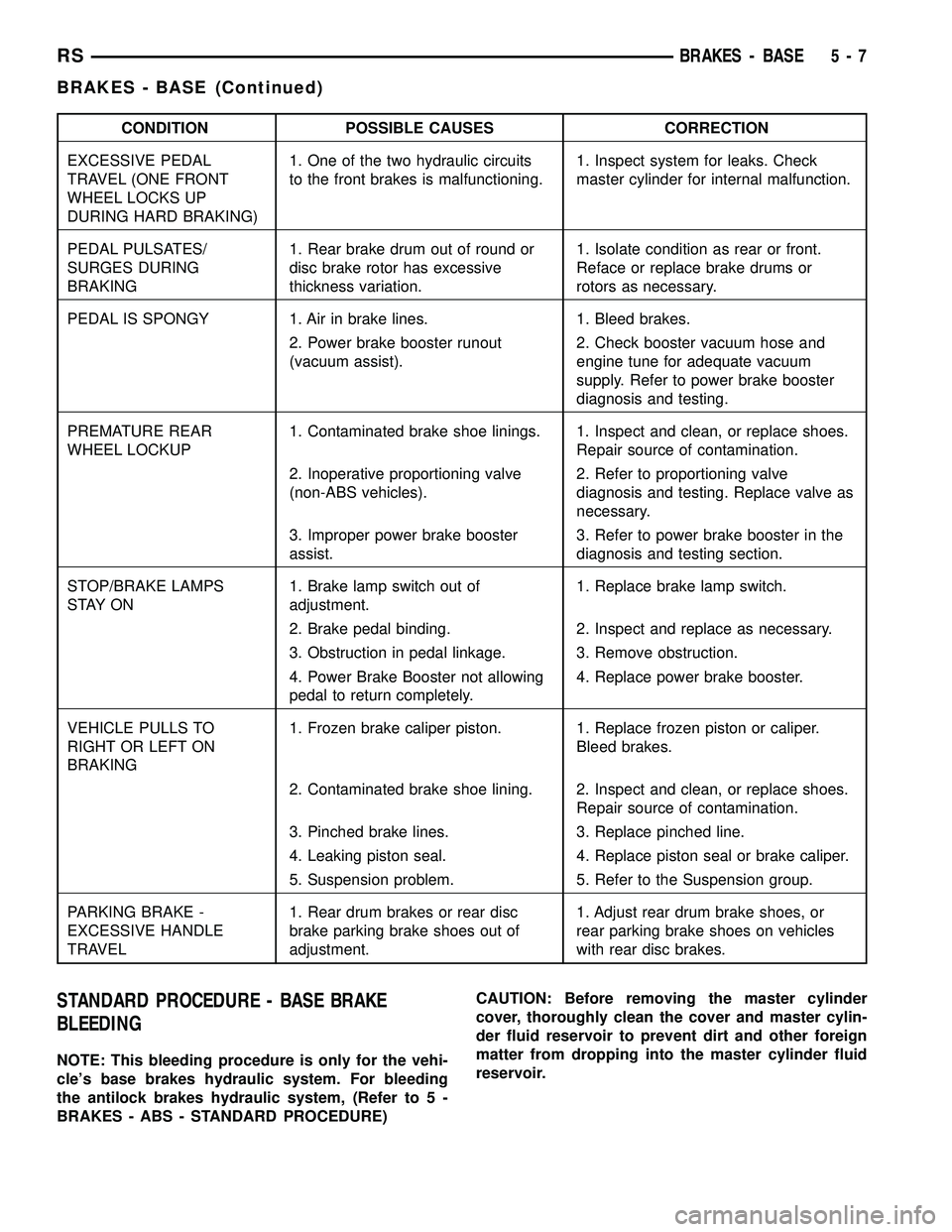
CONDITION POSSIBLE CAUSES CORRECTION
EXCESSIVE PEDAL
TRAVEL (ONE FRONT
WHEEL LOCKS UP
DURING HARD BRAKING)1. One of the two hydraulic circuits
to the front brakes is malfunctioning.1. Inspect system for leaks. Check
master cylinder for internal malfunction.
PEDAL PULSATES/
SURGES DURING
BRAKING1. Rear brake drum out of round or
disc brake rotor has excessive
thickness variation.1. Isolate condition as rear or front.
Reface or replace brake drums or
rotors as necessary.
PEDAL IS SPONGY 1. Air in brake lines. 1. Bleed brakes.
2. Power brake booster runout
(vacuum assist).2. Check booster vacuum hose and
engine tune for adequate vacuum
supply. Refer to power brake booster
diagnosis and testing.
PREMATURE REAR
WHEEL LOCKUP1. Contaminated brake shoe linings. 1. Inspect and clean, or replace shoes.
Repair source of contamination.
2. Inoperative proportioning valve
(non-ABS vehicles).2. Refer to proportioning valve
diagnosis and testing. Replace valve as
necessary.
3. Improper power brake booster
assist.3. Refer to power brake booster in the
diagnosis and testing section.
STOP/BRAKE LAMPS
S TAY O N1. Brake lamp switch out of
adjustment.1. Replace brake lamp switch.
2. Brake pedal binding. 2. Inspect and replace as necessary.
3. Obstruction in pedal linkage. 3. Remove obstruction.
4. Power Brake Booster not allowing
pedal to return completely.4. Replace power brake booster.
VEHICLE PULLS TO
RIGHT OR LEFT ON
BRAKING1. Frozen brake caliper piston. 1. Replace frozen piston or caliper.
Bleed brakes.
2. Contaminated brake shoe lining. 2. Inspect and clean, or replace shoes.
Repair source of contamination.
3. Pinched brake lines. 3. Replace pinched line.
4. Leaking piston seal. 4. Replace piston seal or brake caliper.
5. Suspension problem. 5. Refer to the Suspension group.
PARKING BRAKE -
EXCESSIVE HANDLE
TRAVEL1. Rear drum brakes or rear disc
brake parking brake shoes out of
adjustment.1. Adjust rear drum brake shoes, or
rear parking brake shoes on vehicles
with rear disc brakes.
STANDARD PROCEDURE - BASE BRAKE
BLEEDING
NOTE: This bleeding procedure is only for the vehi-
cle's base brakes hydraulic system. For bleeding
the antilock brakes hydraulic system, (Refer to 5 -
BRAKES - ABS - STANDARD PROCEDURE)CAUTION: Before removing the master cylinder
cover, thoroughly clean the cover and master cylin-
der fluid reservoir to prevent dirt and other foreign
matter from dropping into the master cylinder fluid
reservoir.
RSBRAKES - BASE5-7
BRAKES - BASE (Continued)
Page 156 of 2585
(6) Check pedal travel. If pedal travel is excessive
or has not been improved, enough fluid has not
passed through the system to expel all the trapped
air. Be sure to monitor the fluid level in the pressure
bleeder, so it stays at a proper level so air will not
enter the brake system through the master cylinder.
(7) Perform a final adjustment of the rear brake
shoes (when applicable), then test drive vehicle to be
sure brakes are operating correctly and that pedal is
solid.
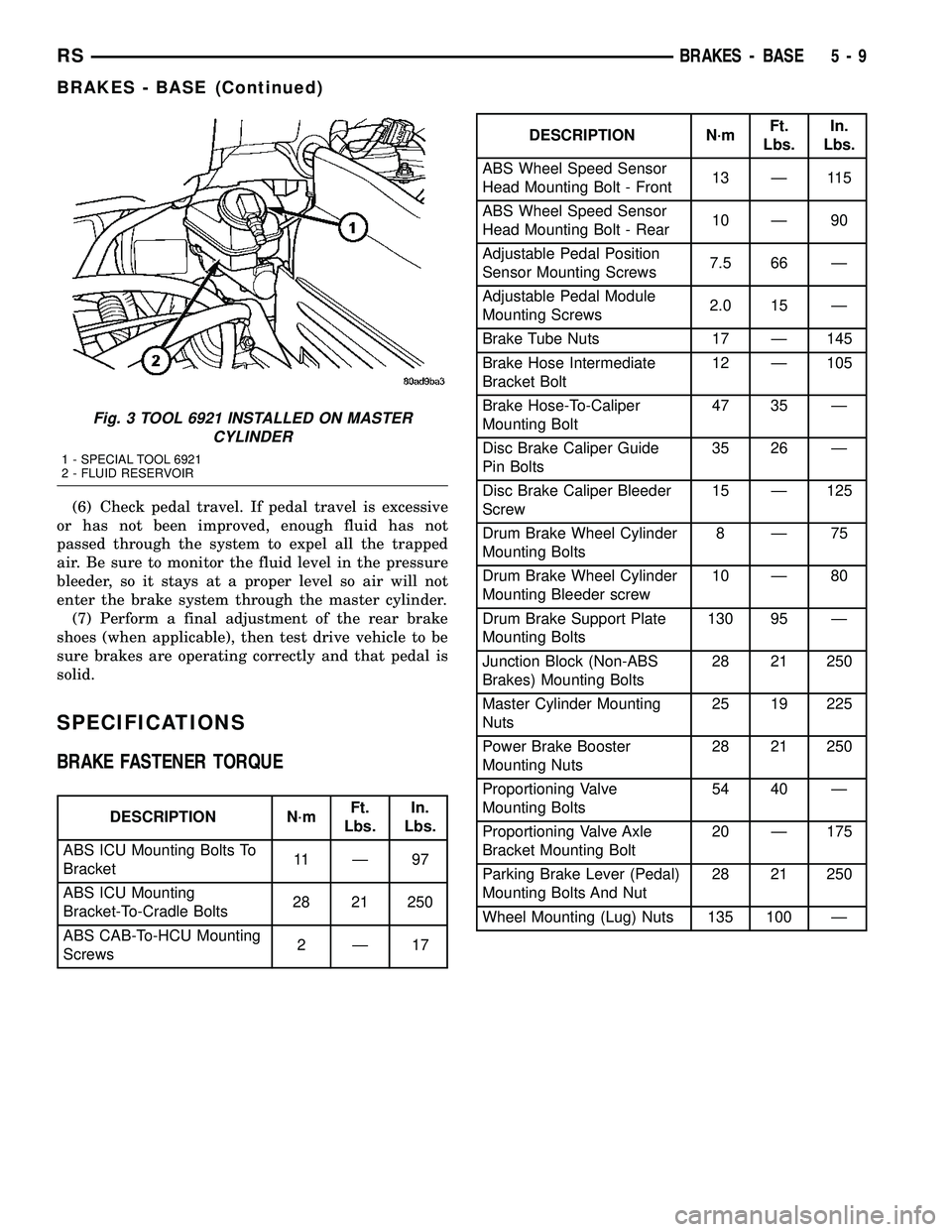
SPECIFICATIONS
BRAKE FASTENER TORQUE
DESCRIPTION N´mFt.
Lbs.In.
Lbs.
ABS ICU Mounting Bolts To
Bracket11 Ð 9 7
ABS ICU Mounting
Bracket-To-Cradle Bolts28 21 250
ABS CAB-To-HCU Mounting
Screws2Ð17
DESCRIPTION N´mFt.
Lbs.In.
Lbs.
ABS Wheel Speed Sensor
Head Mounting Bolt - Front13 Ð 115
ABS Wheel Speed Sensor
Head Mounting Bolt - Rear10 Ð 90
Adjustable Pedal Position
Sensor Mounting Screws7.5 66 Ð
Adjustable Pedal Module
Mounting Screws2.0 15 Ð
Brake Tube Nuts 17 Ð 145
Brake Hose Intermediate
Bracket Bolt12 Ð 105
Brake Hose-To-Caliper
Mounting Bolt47 35 Ð
Disc Brake Caliper Guide
Pin Bolts35 26 Ð
Disc Brake Caliper Bleeder
Screw15 Ð 125
Drum Brake Wheel Cylinder
Mounting Bolts8Ð75
Drum Brake Wheel Cylinder
Mounting Bleeder screw10 Ð 80
Drum Brake Support Plate
Mounting Bolts130 95 Ð
Junction Block (Non-ABS
Brakes) Mounting Bolts28 21 250
Master Cylinder Mounting
Nuts25 19 225
Power Brake Booster
Mounting Nuts28 21 250
Proportioning Valve
Mounting Bolts54 40 Ð
Proportioning Valve Axle
Bracket Mounting Bolt20 Ð 175
Parking Brake Lever (Pedal)
Mounting Bolts And Nut28 21 250
Wheel Mounting (Lug) Nuts 135 100 Ð
Fig. 3 TOOL 6921 INSTALLED ON MASTER
CYLINDER
1 - SPECIAL TOOL 6921
2 - FLUID RESERVOIR
RSBRAKES - BASE5-9
BRAKES - BASE (Continued)
Page 159 of 2585

CAUTION: TRW and Continental Teves calipers are
not interchangeable. Each caliper is specifically
designed for the unique brake system. If calipers
are interchanged, improper performance, noise and
increased stopping distance can occur.
The two different brake calipers use different
devices to control rattling. While the TRW brakes use
spring clips that mount at the ends of the shoes in
the adapters, Continental Teves brakes use a clip on
the rear of the inboard pad to hold it to the piston
and a larger clip on the outside of the caliper, holding
it to the adapter (Fig. 7).
All brake caliper adapters mount to the steering
knuckle in the same way using two mounting bolts.The brake rotors are also different depending on
brake system. The TRW (disc/drum) front brakes uti-
lize an inverted-hat style rotor. This rotor is exter-
nally vented meaning the inner most diameter of the
braking disc vents to the outboard side (or face) of
the rotor (Fig. 8). The Continental Teves (disc/disc)
front brakes utilize the familiar internally-vented hat
style rotor. Internally-vented refers to the fact that
the inner most diameter of the braking disc vents to
the inboard side of the rotor (Fig. 8).
CAUTION: Do not mix rotor types on the same vehi-
cle. If brake rotors are mixed, noise and wear prob-
lems can result.
DESCRIPTION - DISC BRAKES (REAR)
There are several distinctive features to the rear
disc brakes on this vehicle (Fig. 9). The single piston,
floating caliper rear disc brake system includes a hub
and bearing assembly, adapter, rotor, caliper, and
brake shoes.
This vehicle is equipped with a caliper having a 42
mm (1.65 in.) piston and uses a 15 inch solid non-
vented brake rotor. The brake rotor is described as a
drum-in-hat style because of its dual role as a brak-
ing disc and parking brake drum.
The parking brake system on vehicles equipped
with rear disc brakes consists of a small duo-servo
drum brake mounted to the caliper adapter and uses
the interior of the rear disc brake rotor as a drum
(hat section of drum-in-hat style brake rotor).
Fig. 6 Guide Pins And Boots
1 - PINS
2 - BOOTS
Fig. 7 ANTI-RATTLE DEVICES ON CALIPERS
1 - CONTINENTAL TEVES CALIPER
2 - TRW CALIPER
3 - ANTI-RATTLE CLIP
4 - ANTI-RATTLE CLIP
Fig. 8 Externally and Internally Vented Rotors
(Cross-Sectional View)
1 - EXTERNAL VENTS (TRW)
2 - INTERNAL VENTS (Continetal Teves)
5 - 12 BRAKES - BASERS
HYDRAULIC/MECHANICAL (Continued)
Page 166 of 2585
If the brake shoe assemblies do not require
replacement, be sure to reinstall the brake shoes in
the original position they were removed from.
INSTALLATION - REAR DISC BRAKE SHOES
(1) Completely retract caliper piston back into pis-
ton bore of caliper assembly.
(2) Lubricate both adapter abutments where the
shoes contact with a liberal amount of MopartMul-
tipurpose Lubricant, or equivalent.
(3) If removed, install the brake rotor on the hub,
making sure it is squarely seated on the face of the
hub.
(4) Install the inboard brake shoe into the caliper
piston by firmly pressing it into the piston bore using
your thumbs. Be sure inboard brake shoe is posi-
tioned squarely against the face of the caliper piston.
NOTE: The outboard shoes are different left to
right. They can be identified by a L or R stamped on
the clip.
(5) Install the outboard brake shoe on the disc
brake caliper. Be sure the outboard shoe is positioned
squarely against the outboard fingers of the caliper.
CAUTION: Use care when installing the caliper
assembly onto the adapter, so the caliper guide pin
bushings do not get damaged by the mounting
bosses.
(6) Carefully lower caliper and brake shoes over
rotor and onto adapter, reversing the removal proce-
dure (Fig. 16).
CAUTION: When installing the caliper guide pin
bolts extreme caution should be taken not to
crossthread the guide pin bolts.
(7) Install the caliper guide pin bolts. Tighten the
guide pin bolts to a torque of 35 N´m (26 ft. lbs.).
(8) Install the wheel and tire assembly. Tighten
the wheel mounting nuts in proper sequence until all
nuts are torqued to half specification. Then repeat
the tightening sequence to the full specified torque of
135 N´m (100 ft. lbs.).
(9) Lower vehicle.
CAUTION: Before moving vehicle, pump the brake
pedal several times to insure the vehicle has a firm
brake pedal to adequately stop the vehicle.
(10) Pump brake pedal several times to set brake
shoes to rotors.(11) Check fluid level in reservoir.
(12) Road test the vehicle and make several stops
to wear off any foreign material on the brakes and to
seat the brake shoe linings.BRAKE PADS/SHOES - REAR
DRUM
REMOVAL - REAR DRUM BRAKE SHOES
(1) Raise vehicle. (Refer to LUBRICATION &
MAINTENANCE/HOISTING - STANDARD PROCE-
DURE).
(2) Remove the rear wheel and tire assemblies
from the vehicle.
(3) Remove rear brake drum to hub retaining clips
(if equipped), then remove rear brake drums. (Refer
to 5 - BRAKES/HYDRAULIC/MECHANICAL/DRUM
- REMOVAL)
NOTE: When creating slack in the park brake cables
by locking out the automatic adjuster, (Fig. 19) be
sure that the park brake pedal is in the released
(most upward) position.
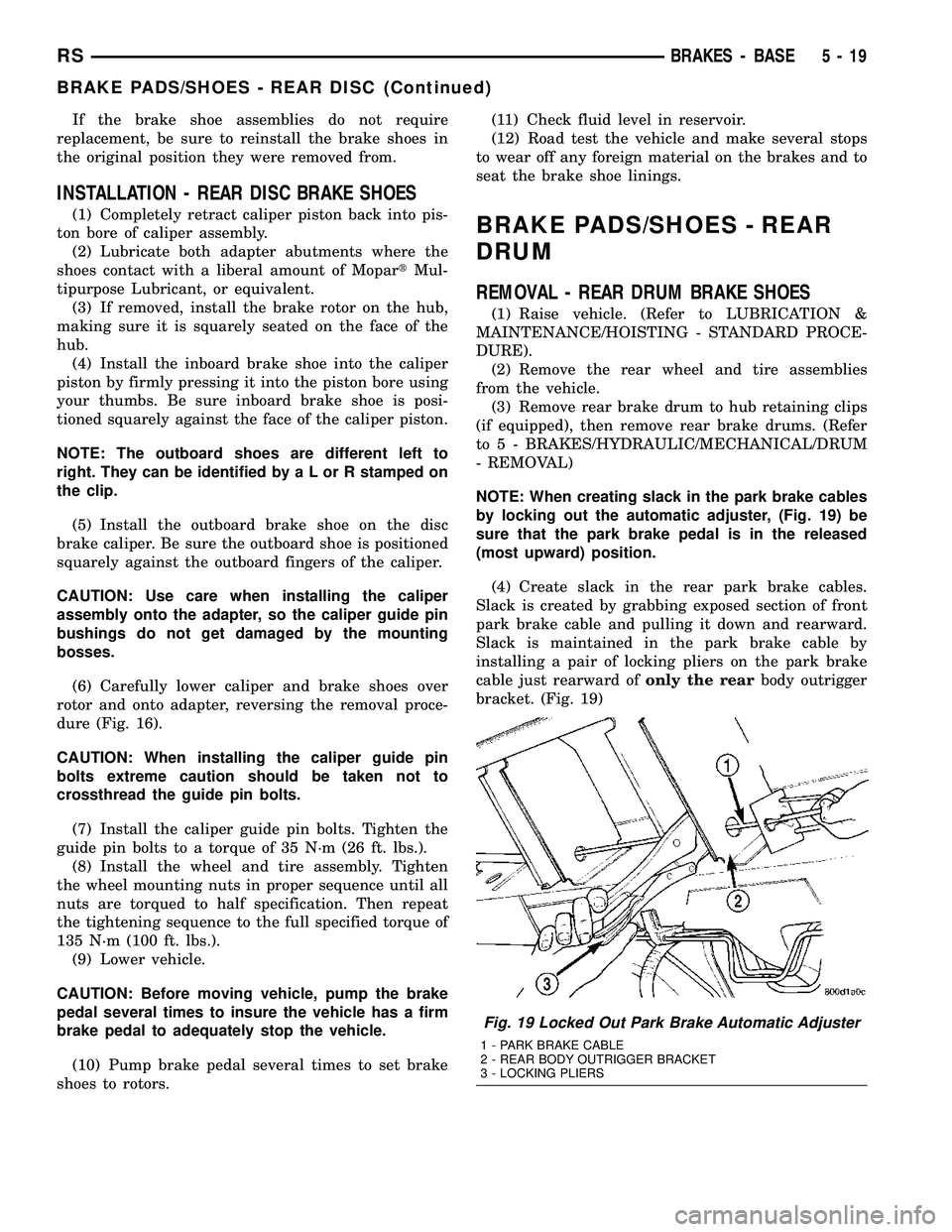
(4) Create slack in the rear park brake cables.
Slack is created by grabbing exposed section of front
park brake cable and pulling it down and rearward.
Slack is maintained in the park brake cable by
installing a pair of locking pliers on the park brake
cable just rearward ofonly the rearbody outrigger
bracket. (Fig. 19)
Fig. 19 Locked Out Park Brake Automatic Adjuster
1 - PARK BRAKE CABLE
2 - REAR BODY OUTRIGGER BRACKET
3 - LOCKING PLIERS
RSBRAKES - BASE5-19
BRAKE PADS/SHOES - REAR DISC (Continued)
Page 168 of 2585
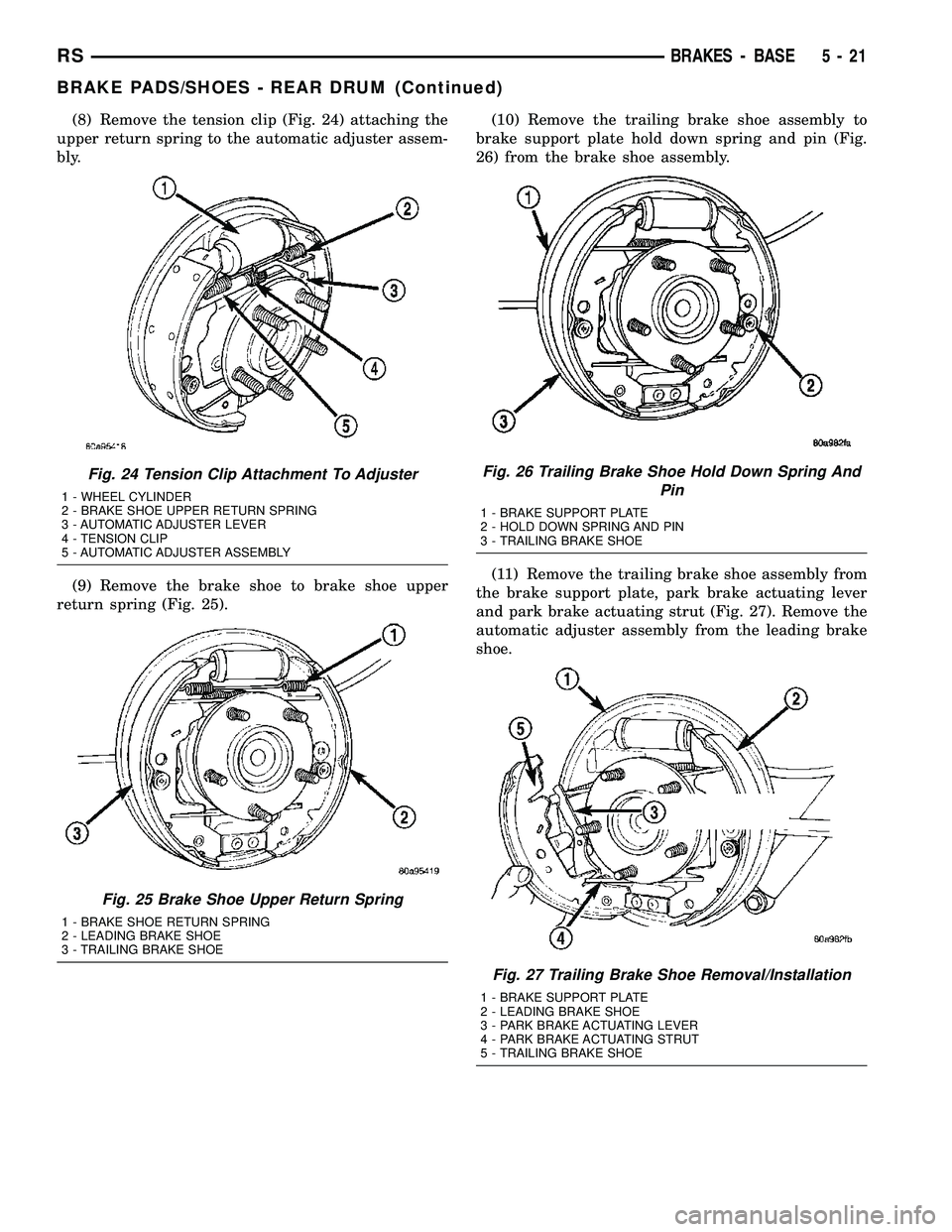
(8) Remove the tension clip (Fig. 24) attaching the
upper return spring to the automatic adjuster assem-
bly.
(9) Remove the brake shoe to brake shoe upper
return spring (Fig. 25).(10) Remove the trailing brake shoe assembly to
brake support plate hold down spring and pin (Fig.
26) from the brake shoe assembly.
(11) Remove the trailing brake shoe assembly from
the brake support plate, park brake actuating lever
and park brake actuating strut (Fig. 27). Remove the
automatic adjuster assembly from the leading brake
shoe.
Fig. 24 Tension Clip Attachment To Adjuster
1 - WHEEL CYLINDER
2 - BRAKE SHOE UPPER RETURN SPRING
3 - AUTOMATIC ADJUSTER LEVER
4 - TENSION CLIP
5 - AUTOMATIC ADJUSTER ASSEMBLY
Fig. 25 Brake Shoe Upper Return Spring
1 - BRAKE SHOE RETURN SPRING
2 - LEADING BRAKE SHOE
3 - TRAILING BRAKE SHOE
Fig. 26 Trailing Brake Shoe Hold Down Spring And
Pin
1 - BRAKE SUPPORT PLATE
2 - HOLD DOWN SPRING AND PIN
3 - TRAILING BRAKE SHOE
Fig. 27 Trailing Brake Shoe Removal/Installation
1 - BRAKE SUPPORT PLATE
2 - LEADING BRAKE SHOE
3 - PARK BRAKE ACTUATING LEVER
4 - PARK BRAKE ACTUATING STRUT
5 - TRAILING BRAKE SHOE
RSBRAKES - BASE5-21
BRAKE PADS/SHOES - REAR DRUM (Continued)
Page 169 of 2585
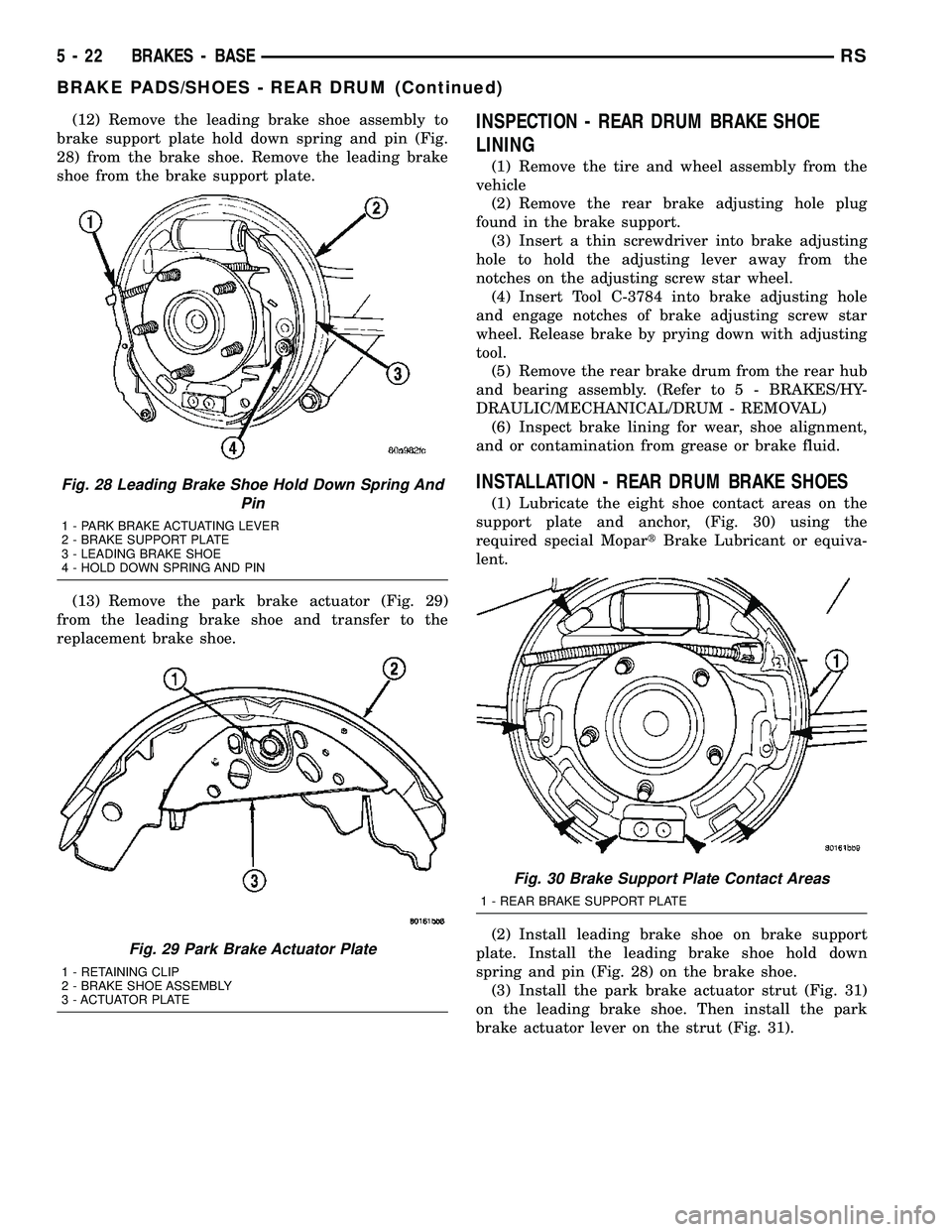
(12) Remove the leading brake shoe assembly to
brake support plate hold down spring and pin (Fig.
28) from the brake shoe. Remove the leading brake
shoe from the brake support plate.
(13) Remove the park brake actuator (Fig. 29)
from the leading brake shoe and transfer to the
replacement brake shoe.INSPECTION - REAR DRUM BRAKE SHOE
LINING
(1) Remove the tire and wheel assembly from the
vehicle
(2) Remove the rear brake adjusting hole plug
found in the brake support.
(3) Insert a thin screwdriver into brake adjusting
hole to hold the adjusting lever away from the
notches on the adjusting screw star wheel.
(4) Insert Tool C-3784 into brake adjusting hole
and engage notches of brake adjusting screw star
wheel. Release brake by prying down with adjusting
tool.
(5) Remove the rear brake drum from the rear hub
and bearing assembly. (Refer to 5 - BRAKES/HY-
DRAULIC/MECHANICAL/DRUM - REMOVAL)
(6) Inspect brake lining for wear, shoe alignment,
and or contamination from grease or brake fluid.
INSTALLATION - REAR DRUM BRAKE SHOES
(1) Lubricate the eight shoe contact areas on the
support plate and anchor, (Fig. 30) using the
required special MopartBrake Lubricant or equiva-
lent.
(2) Install leading brake shoe on brake support
plate. Install the leading brake shoe hold down
spring and pin (Fig. 28) on the brake shoe.
(3) Install the park brake actuator strut (Fig. 31)
on the leading brake shoe. Then install the park
brake actuator lever on the strut (Fig. 31).
Fig. 28 Leading Brake Shoe Hold Down Spring And
Pin
1 - PARK BRAKE ACTUATING LEVER
2 - BRAKE SUPPORT PLATE
3 - LEADING BRAKE SHOE
4 - HOLD DOWN SPRING AND PIN
Fig. 29 Park Brake Actuator Plate
1 - RETAINING CLIP
2 - BRAKE SHOE ASSEMBLY
3 - ACTUATOR PLATE
Fig. 30 Brake Support Plate Contact Areas
1 - REAR BRAKE SUPPORT PLATE
5 - 22 BRAKES - BASERS
BRAKE PADS/SHOES - REAR DRUM (Continued)