lock CHRYSLER VOYAGER 2005 Service Manual
[x] Cancel search | Manufacturer: CHRYSLER, Model Year: 2005, Model line: VOYAGER, Model: CHRYSLER VOYAGER 2005Pages: 2339, PDF Size: 59.69 MB
Page 1842 of 2339

INSTALLATION
(1) Place hood in position on vehicle. With assis-
tance from a helper at the opposite side of the vehicle
to support the hood, install bottom bolts attaching
hood to hinge finger tight.
(2) Install top bolts attaching hood to hinge finger
tight.
(3) Position bolts at marks and tighten. Tighten
bolts to 13.5 N´m (120 in. lbs.) torque. The hood
should be aligned to 4 mm (0.160 in.) gap to the front
fenders and flush across the top surfaces along fend-
ers.
(4) Verify hood operation and alignment.
LATCH
REMOVAL
(1) Release hood latch and open hood.
(2) Remove bolts attaching hood latch to radiator
closure panel crossmember (Fig. 3).
(3) Remove hood latch from crossmember.
(4) Disconnect hood release cable from hood latch
(Fig. 4).
(5) Remove hood latch from vehicle.
INSTALLATION
(1) Position hood latch on vehicle.
(2) Connect hood release cable from hood latch.
(3) Position hood latch on crossmember.
(4) Align hood latch by placing latch over net
pierced tabs. If alignment is required, flatten or
grind tabs.
(5) Verify hood operation and alignment. Adjust as
necessary.(6) Tighten attaching bolts to 13.5 N´m (10 ft. lbs.)
torque.
LATCH RELEASE CABLE
REMOVAL
(1) Remove hood latch.
(2) Disengage cable end from hood latch locking
mechanism.
(3) Slide cable case end sideways in keyhole slot of
hood latch while pinching barb on cable case closed.
(4) Remove cable from latch (Fig. 4).
(5) Remove hood release handle from instrument
panel.
(6) Disengage rubber grommet cable insulator
from hole in dash panel.
(7) Attach a suitable length of mechanic's wire to
latch end of cable to assist cable installation.
Fig. 2 HOOD
1 - HOOD
2 - HOOD LATCH STRIKER
3 - HOOD HALF OF HOOD HINGE
Fig. 3 HOOD LATCH
1 - HOOD RELEASE CABLE
2 - HOOD LATCH
3 - RADIATOR CLOSURE PANEL CROSSMEMBER
Fig. 4 HOOD
1 - RELEASE CABLE CASE
2 - HOOD LATCH
3 - RELEASE CABLE END
RSHOOD23-63
HOOD (Continued)
Page 1843 of 2339

(8) Route cable back from latch through engine
compartment toward dash panel near power brake
booster (Fig. 5).
(9) Remove attaching clips from cable case.
(10) From inside vehicle, pull cable through dash
panel until mechanic's wire is exposed.
(11) Disconnect cable from mechanic's wire.
(12) Remove hood release cable from vehicle.
INSTALLATION
(1) Place hood release cable in position under
instrument panel.
(2) Attach latch end of hood release cable to
mechanic's wire protruding through dash panel.
(3) Route cable forward through engine compart-
ment toward latch by pulling on mechanic's wire
(Fig. 5).(4) Disconnect mechanic's wire from cable.
(5) Engage rubber grommet cable insulator into
hole in dash panel.
(6) Install hood release handle into instrument
panel.
(7) Place cable in position on latch.
(8) Slide cable case end sideways into keyhole slot
of hood latch.
(9) Engage cable end into hood latch locking mech-
anism.
(10) Install hood latch.
(11) Install attaching clips to cable case and install
clips into original holes in strut tower, fender, head-
lamp area, and radiator closure panel crossmember.
LATCH STRIKER
REMOVAL
(1) Release hood latch and open hood.
(2) Remove bolts attaching striker to inside of
hood.
(3) Remove hood latch striker from vehicle.
INSTALLATION
(1) Position hood latch striker on vehicle, aligning
with paint breaks.
(2) Install bolts attaching hood latch striker to
hood.
(3) Align hood latch striker to engage smoothly
into hood latch.
(4) Verify hood operation and alignment. Adjust as
necessary.
(5) Tighten attaching bolts to 13.5 N´m (10 ft. lbs.)
torque.Fig. 5 HOOD RELEASE CABLE ROUTING
1 - GROMMET
2 - HOOD RELEASE CABLE
3 - RADIATOR CLOSURE PANEL CROSSMEMBER
23 - 64 HOODRS
LATCH RELEASE CABLE (Continued)
Page 1844 of 2339
INSTRUMENT PANEL
TABLE OF CONTENTS
page page
CLUSTER BEZEL
REMOVAL.............................65
INSTALLATION.........................65
CUP HOLDER
REMOVAL.............................65
INSTALLATION.........................65
GLOVE BOX
REMOVAL.............................66
INSTALLATION.........................66
GLOVE BOX LATCH
REMOVAL.............................66
INSTALLATION.........................66
GLOVE BOX LATCH STRIKER
REMOVAL.............................66
INSTALLATION.........................66
INSTRUMENT PANEL ASSEMBLY
REMOVAL.............................67
INSTALLATION.........................70
INSTRUMENT PANEL CENTER BEZEL
REMOVAL.............................71
INSTALLATION.........................72
INSTRUMENT PANEL RIGHT END CAP
REMOVAL.............................72INSTALLATION.........................72
INSTRUMENT PANEL TOP COVER
REMOVAL.............................72
INSTALLATION.........................72
LOWER CONSOLE
REMOVAL.............................73
INSTALLATION.........................73
LOWER INSTRUMENT PANEL
REMOVAL.............................73
INSTALLATION.........................73
LOWER STEERING COLUMN COVER
REMOVAL.............................74
INSTALLATION.........................74
BLOCKER- INFLATABLE KNEE
REMOVAL.............................75
INSTALLATION.........................75
OVER STEERING COLUMN COVER
REMOVAL.............................76
INSTALLATION.........................76
INSTRUMENT PANEL TOP PAD ASSEMBLY
REMOVAL.............................77
INSTALLATION.........................77
CLUSTER BEZEL
REMOVAL
(1) Disconnect and isolate the battery negative
cable.
(2) Remove Over Steering Column Bezel by lifting
it straight up with a firm pull.
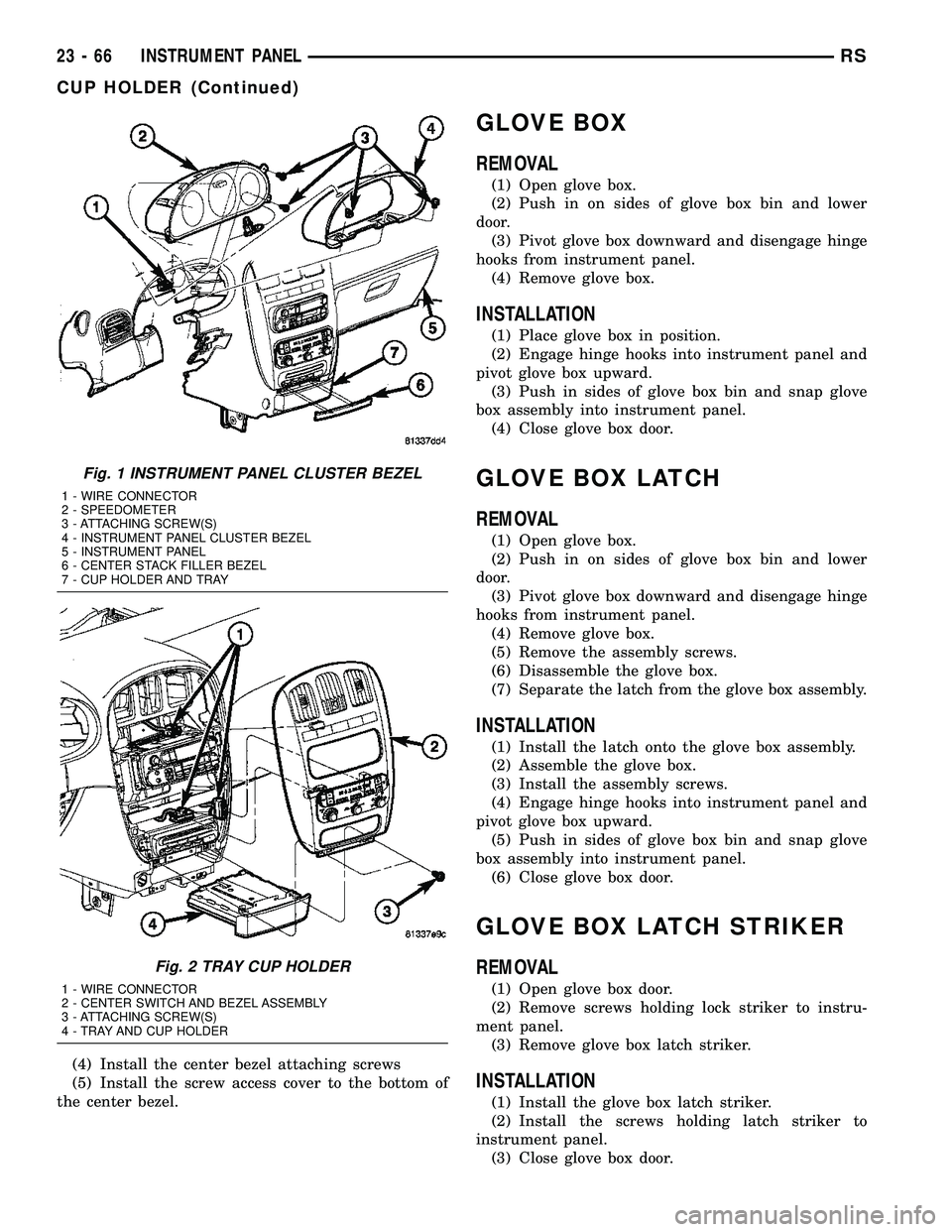
(3) Remove the four bezel attaching screws (Fig.
1).
(4) Tilt the steering column in the full down posi-
tion.
(5) Pull rearward on the cluster bezel and remove.
INSTALLATION
(1) Maneuver cluster bezel over steering column
and into position (Fig. 1).
(2) Install the four bezel attaching screws.
(3) Install the Over Steering Column Bezel by
positioning it over the retaining slots and firmly
snapping it into place.
(4) Connect the battery negative cable.
CUP HOLDER
REMOVAL
(1) Remove the screw access cover from the bottom
of the center bezel.
(2) Remove the center bezel attaching screws.
(3) Using a trim stick (special tool # C-4755) or
equivalent, gently pry out on the edge of the instru-
ment panel center bezel. Hang off to the side leaving
the accessory switches connected.
(4) Pull the cup holder assembly rearward to dis-
engage the rear guide studs from instrument panel
(Fig. 2).
(5) Remove the cup holder assembly from lower
instrument panel.
INSTALLATION
(1) Ensure the cup holder assembly is in the closed
position. The cup holder assembly must be installed
as an assembly to ensure proper track position.
(2) Place the cup holder assembly into position in
the lower instrument panel and slide into opening
until the rear guide struts snap into place (Fig. 2).
(3) Install the center bezel.
RSINSTRUMENT PANEL23-65
Page 1845 of 2339
(4) Install the center bezel attaching screws
(5) Install the screw access cover to the bottom of
the center bezel.
GLOVE BOX
REMOVAL
(1) Open glove box.
(2) Push in on sides of glove box bin and lower
door.
(3) Pivot glove box downward and disengage hinge
hooks from instrument panel.
(4) Remove glove box.
INSTALLATION
(1) Place glove box in position.
(2) Engage hinge hooks into instrument panel and
pivot glove box upward.
(3) Push in sides of glove box bin and snap glove
box assembly into instrument panel.
(4) Close glove box door.
GLOVE BOX LATCH
REMOVAL
(1) Open glove box.
(2) Push in on sides of glove box bin and lower
door.
(3) Pivot glove box downward and disengage hinge
hooks from instrument panel.
(4) Remove glove box.
(5) Remove the assembly screws.
(6) Disassemble the glove box.
(7) Separate the latch from the glove box assembly.
INSTALLATION
(1) Install the latch onto the glove box assembly.
(2) Assemble the glove box.
(3) Install the assembly screws.
(4) Engage hinge hooks into instrument panel and
pivot glove box upward.
(5) Push in sides of glove box bin and snap glove
box assembly into instrument panel.
(6) Close glove box door.
GLOVE BOX LATCH STRIKER
REMOVAL
(1) Open glove box door.
(2) Remove screws holding lock striker to instru-
ment panel.
(3) Remove glove box latch striker.
INSTALLATION
(1) Install the glove box latch striker.
(2) Install the screws holding latch striker to
instrument panel.
(3) Close glove box door.
Fig. 1 INSTRUMENT PANEL CLUSTER BEZEL
1 - WIRE CONNECTOR
2 - SPEEDOMETER
3 - ATTACHING SCREW(S)
4 - INSTRUMENT PANEL CLUSTER BEZEL
5 - INSTRUMENT PANEL
6 - CENTER STACK FILLER BEZEL
7 - CUP HOLDER AND TRAY
Fig. 2 TRAY CUP HOLDER
1 - WIRE CONNECTOR
2 - CENTER SWITCH AND BEZEL ASSEMBLY
3 - ATTACHING SCREW(S)
4 - TRAY AND CUP HOLDER
23 - 66 INSTRUMENT PANELRS
CUP HOLDER (Continued)
Page 1847 of 2339

(13) Remove the right end cover by pulling out-
board.
(14) Remove the right side A-pillar retaining bolts
(Fig. 5). There are two 13 mm bolts and one 10 mm
bolt.
(15) Loosen the right side cowl side roll down bolt.
(16) Remove over steering column cover. (Refer to
23 - BODY/INSTRUMENT PANEL/STEERING COL-
UMN OPENING COVER - REMOVAL).
(17) Remove the cluster bezel. (Refer to 23 -
BODY/INSTRUMENT PANEL/CLUSTER BEZEL -
REMOVAL).
(18) Remove the lower steering column cover and
end cap. (Refer to 23 - BODY/INSTRUMENT PAN-
EL/LOWER STEERING COLUMN COVER -
REMOVAL)
(19) Remove the inflatable knee blocker. (Refer to
23 - BODY/INSTRUMENT PANEL/INFLATABLE
KNEE BLOCKER - REMOVAL)(20) Remove the two screws to the hood release
handle.
(21) Remove the two steering column fixed shroud
retaining screws (Fig. 6).
(22) Remove the four steering column shroud
retaining screws. Separate the steering column bear-
ing shroud and steering column shroud and remove
from vehicle (Fig. 6).
(23) Disconnect the left side wiring:
(a) Brake switch.
(b) Main bulkhead connector.
(c) Five harness connectors.
(d) Driver airbag connector.
(24) Disconnect the steering column wiring. There
are seven connectors and then unclip the harness
from the column.
(25) Disconnect the Occupant Restraint Controller
(ORC) harness connector.
Fig. 4 INSTRUMENT PANEL REMOVAL
1 - INSTRUMENT PANEL
2 - SIX ATTACHING SCREWS
3 - 13 mm BOLT - TWO ON EACH SIDE4 - ROLL DOWN BRACKET
5 - 10 mm BOLT - STARTING BOLT ONE EACH SIDE
23 - 68 INSTRUMENT PANELRS
INSTRUMENT PANEL ASSEMBLY (Continued)
Page 1848 of 2339

(26) Remove the three nuts retaining the steering
column to the dash panel steering column mounting
bracket and lower column to the floor (Fig. 7).(27) Remove the three nuts attaching the instru-
ment panel to the brake pedal support bracket.
(28) Remove six instrument panel steering column
cover plate attaching screws and remove cover plate
(Fig. 8).Remove the screws attaching the instrument
panel reinforcement and remove (Fig. 9).
Fig. 5 RIGHT SIDE INSTRUMENT PANEL
ATTACHING SCREWS
1 - INSTRUMENT PANEL ATTACHING SCREWS
2 - INSTRUMENT PANEL TO COWL SIDE LOCATOR SCREW
3 - COWL SIDE COWL REINFORCEMENT
4 - COWL PANEL
5 - INSTRUMENT PANEL COWL SIDE ROLL DOWN BOLT
Fig. 6 STEERING COLUMN SHROUDS
1 - FIXED SHROUD
2 - ATTACHING SCREW(S)
3 - STEERING COLUMN BEARING SHROUD
4 - TRACTION CONTROL DISABLE SWITCH
5 - MULTI-FUNCTION SWITCH AND CLOCKSPRING HOUSING
6 - STEERING COLUMN SHROUD
7 - STEERING COLUMN
Fig. 7 STEERING COLUMN MOUNTING BRACKET
1 - DASH PANEL STEERING COLUMN MOUNTING BRACKET
2 - INSTRUMENT PANEL STEERING COLUMN BRACKET
3 - ATTACHING NUT(S)
Fig. 8 LEFT SIDE I/P ATTACHING SCREWS
1 - INSTRUMENT PANEL ATTACHING SCREWS
2 - INSTRUMENT PANEL
3 - COLUMN COVER PLATE ATTACHING SCREWS
4 - INSTRUMENT PANEL COLUMN COVER PLATE
5 - INSTRUMENT PANEL COWL SIDE ROLL DOWN SCREW
6 - COWL PANEL
RSINSTRUMENT PANEL23-69
INSTRUMENT PANEL ASSEMBLY (Continued)
Page 1850 of 2339

(7) Place steering column cover plate into position
(Fig. 8).
(8) Install six instrument panel steering column
cover plate attaching screws.
(9) Install the screws attaching the instrument
panel reinforcement (Fig. 9).
(10) Place brake pedal support bracket into posi-
tion and install three nuts attaching to instrument
panel.
(11) Place steering column into position and install
four nuts retaining the steering column to the dash
panel steering column mounting bracket and lower
column to the floor (Fig. 7).
(12) Connect the Occupant Restraint Controller
(ORC) harness connector.
(13) Connect the steering column wiring. There
are seven connectors and clip the harness to the col-
umn.
(14) Connect the left side wiring:
(a) Brake switch.
(b) Main bulkhead connector.
(c) Five harness connectors.
(d) Driver airbag connector.
(15) Place steering column bearing shroud and
steering column shroud into position and install four
steering column shroud retaining screws (Fig. 6).
(16) Place fixed shroud into position and install
two steering column fixed shroud retaining screws
(Fig. 6).
(17) Install two screws to the hood release handle.
(18) Install the inflatable knee blocker. (Refer to
23 - BODY/INSTRUMENT PANEL/KNEE BLOCKER
- INSTALLATION).
(19) Install the lower steering column cover and
end cap. (Refer to 23 - BODY/INSTRUMENT PAN-
EL/LOWER STEERING COLUMN COVER AND
END CAP - INSTALLATION).
(20) Install the cluster bezel. (Refer to 23 - BODY/
INSTRUMENT PANEL/CLUSTER BEZEL -
INSTALLATION).
(21) Install over steering column cover. (Refer to
23 - BODY/INSTRUMENT PANEL/STEERING COL-
UMN OPENING COVER - INSTALLATION).
(22) Install the right end cover. Position over
retaining slots and firmly snap into place.
(23) Connect the right side wire connectors to the
HVAC behind the glove box area and the two
antenna connectors behind the glove box hinge.
(24) Install the glove box:
(a) Install glove box into the vehicle. Line up the
hinges and firmly snap together.(b) Push in on sides of glove box bin and raise
door.
(25) Install two screws to each right and left cowl
trim covers.
(26) Connect the wire connectors to the Passenger
Airbag.
(27) Install the screws attaching the instrument
panel frame to the dash panel below windshield
opening.
(28) Install screws attaching instrument panel
frame to the dash panel below windshield opening
(Fig. 4).
(29) Install the instrument panel top cover and
silencer. (Refer to 23 - BODY/INSTRUMENT PAN-
EL/INSTRUMENT PANEL TOP PAD - INSTALLA-
TION).
(30) Install both left and right side A-pillar trim
covers.
(31) Install bolts attaching the lower supports to
the floor pan (Fig. 3).
(32) Install bolts attaching the lower supports to
the instrument panel frame.
(33) Install the lower console:
(a) Install lower console to vehicle.
(b) Connect the auxiliary power outlet.
(c) Install the six retaining screws.
(34) Connect the battery negative cable.
INSTRUMENT PANEL CENTER
BEZEL
REMOVAL
(1) Disconnect and isolate the battery negative
cable.
(2) Insert the trim stick (special tool #C-4755) or
equivalent between access cover and center bezel
gently pry outward.
(3) Carefully pry the access cover from the instru-
ment panel (Fig. 10).
(4) Remove the two center bezel attaching screws.
(5) Using a trim stick or equivalent, gently pry out
on the edge of the instrument panel center bezel and
pull outward.
(6) Disconnect the wire connectors to the accessory
switches and HVAC control.
(7) Remove the instrument panel center bezel from
the vehicle.
RSINSTRUMENT PANEL23-71
INSTRUMENT PANEL ASSEMBLY (Continued)
Page 1854 of 2339

(3) Place the lower steering column cover into posi-
tion and push spring clips into position.
(4) Install the two screws attaching the lower
steering column cover to instrument panel.
BLOCKER- INFLATABLE KNEE
REMOVAL
(1) Remove lower steering column cover (Refer to
23 - BODY/INSTRUMENT PANEL/STEERING COL-
UMN OPENING COVER - REMOVAL).
(2) Remove the park brake release handle link
from the park brake release handle.
(3) Disengage inflatable knee blocker wire connec-
tor from lower instrument and disconnect the wire
connector (Fig. 17).(4) Remove screws attaching to instrument panel.
(5) Remove inflatable knee blocker from vehicle.
INSTALLATION
(1) Place inflatable knee blocker into position (Fig.
17).
(2) Connect inflatable knee blocker wire connector
and install inflatable knee blocker attaching screws.
(3) Install the steering column cover backing plate
into vehicle.
(4) Install park brake release handle link to park
brake release handle.
(5) Install the lower steering column cover (Refer
to 23 - BODY/INSTRUMENT PANEL/STEERING
COLUMN OPENING COVER - INSTALLATION).
Fig. 16 STEERING COLUMN COVER AND END CAP
1 - INSTRUMENT PANEL UPPER AND LOWER PANEL
2 - ATTACHING SCREW(S)
3 - END CAP
4 - INSTRUMENT PANEL STEERING COLUMN COVER5 - INSTRUMENT PANEL STEERING COLUMN COVER PLATE
6 - COWL PANEL
7 - COWL SIDE TAPPING PLATE
RSINSTRUMENT PANEL23-75
LOWER STEERING COLUMN COVER (Continued)
Page 1855 of 2339

OVER STEERING COLUMN
COVER
REMOVAL
(1) Taking a firm grasp of the over steering col-
umn cover front edge, give a quick upward pulling
motion to disengage the cover from the instrument
panel (Fig. 18).
(2) Remove the over steering column cover from
the vehicle.
INSTALLATION
(1) Place the over steering column cover into posi-
tion over the retaining slots and firmly snap into
place (Fig. 18).
Fig. 17 INFLATABLE KNEE BLOCKER
1 - INSTRUMENT PANEL COLUMN COVER PLATE
2 - COWL SIDE TAPPING PLATE
3 - LOWER INSTRUMENT PANEL REINFORCEMENT4 - INFLATABLE KNEE BLOCKER WIRE CONNECTOR
5 - INFLATABLE KNEE BLOCKER
6 - KNEE LOCKER ATTACHING SCREWS
Fig. 18 OVER STEERING COLUMN COVER
1 - INSTRUMENT PANEL OVER STEERING COLUMN COVER
2 - INSTRUMENT PANEL
23 - 76 INSTRUMENT PANELRS
BLOCKER- INFLATABLE KNEE (Continued)
Page 1857 of 2339

INTERIOR
TABLE OF CONTENTS
page page
A-PILLAR LOWER EXTENSION TRIM
REMOVAL.............................79
INSTALLATION.........................79
A-PILLAR TRIM
REMOVAL.............................79
INSTALLATION.........................79
ASSIST HANDLE
REMOVAL.............................79
INSTALLATION.........................79
B-PILLAR LOWER TRIM
REMOVAL.............................79
INSTALLATION.........................80
B-PILLAR UPPER TRIM
REMOVAL.............................80
INSTALLATION.........................80
CARPETS AND FLOOR MATS
REMOVAL.............................81
INSTALLATION.........................81
CARPETS - FOLD-IN-FLOOR
REMOVAL.............................82
INSTALLATION.........................83
CARPET TRIM RING AND COVER - FOLD-IN-
FLOOR
REMOVAL.............................84
INSTALLATION.........................84
COWL TRIM
REMOVAL.............................88
INSTALLATION.........................88
C-PILLAR TRIM
REMOVAL.............................88
INSTALLATION.........................88
DOOR SILL TRIM PLATE
REMOVAL.............................89
INSTALLATION.........................89
FLOOR CONSOLE BASE TRAY
REMOVAL.............................89
INSTALLATION.........................89
FLOOR CONSOLE - FOLD-IN-FLOOR
REMOVAL.............................89
INSTALLATION.........................89
FLOOR CONSOLE KEY LOCK TUMBLER -
FOLD-IN-FLOOR
REMOVAL.............................90
INSTALLATION.........................90
FLOOR CONSOLE LID LATCH - FOLD-IN-
FLOOR
REMOVAL.............................90
INSTALLATION.........................90HEADLINER
REMOVAL.............................91
INSTALLATION.........................92
LEFT D-PILLAR TRIM PANEL
REMOVAL.............................94
INSTALLATION.........................94
LEFT QUARTER TRIM PANEL
REMOVAL.............................94
INSTALLATION.........................94
LIFTGATE SILL PLATE
REMOVAL.............................94
INSTALLATION.........................95
QUARTER TRIM BOLSTER
REMOVAL.............................95
INSTALLATION.........................95
REAR FLOOR TUB CARPETS INSERT -
FOLD-IN-FLOOR
REMOVAL.............................95
INSTALLATION.........................96
REAR HEADER TRIM
REMOVAL.............................96
INSTALLATION.........................96
REAR HVAC LOUVER
REMOVAL.............................96
INSTALLATION.........................97
RIGHT QUARTER TRIM PANEL
REMOVAL.............................97
INSTALLATION.........................97
REAR VIEW MIRROR
REMOVAL.............................97
INSTALLATION.........................97
RIGHT D-PILLAR TRIM PANEL
REMOVAL.............................97
INSTALLATION.........................98
SECOND ROW FLOOR TUB CARPET INSERT -
FOLD-IN-FLOOR
REMOVAL.............................98
INSTALLATION.........................98
SLIDING DOOR SILL PLATE
REMOVAL.............................98
INSTALLATION.........................99
SUN VISOR
REMOVAL.............................99
INSTALLATION.........................99
SUN VISOR SUPPORT
REMOVAL.............................99
INSTALLATION.........................99
23 - 78 INTERIORRS