Instrument CHRYSLER VOYAGER 2020 Owners Manual
[x] Cancel search | Manufacturer: CHRYSLER, Model Year: 2020, Model line: VOYAGER, Model: CHRYSLER VOYAGER 2020Pages: 516, PDF Size: 28.69 MB
Page 279 of 516
STARTING AND OPERATING277
The ParkSense Active Park Assist system will
allow a maximum of eight shifts between
DRIVE or REVERSE. If the maneuver cannot
be completed within eight shifts, the system
will cancel and the instrument cluster display
will instruct the driver to complete the
maneuver manually.
The system will cancel the maneuver if the
vehicle speed exceeds 5 mph (7 km/h)
during active steering guidance into the
parking space. The system will provide a
warning to the driver at 3 mph (5 km/h) that
tells them to slow down. The driver is then
responsible for completing the maneuver if
the system is canceled.
If the system is canceled during the
maneuver for any reason, the driver must
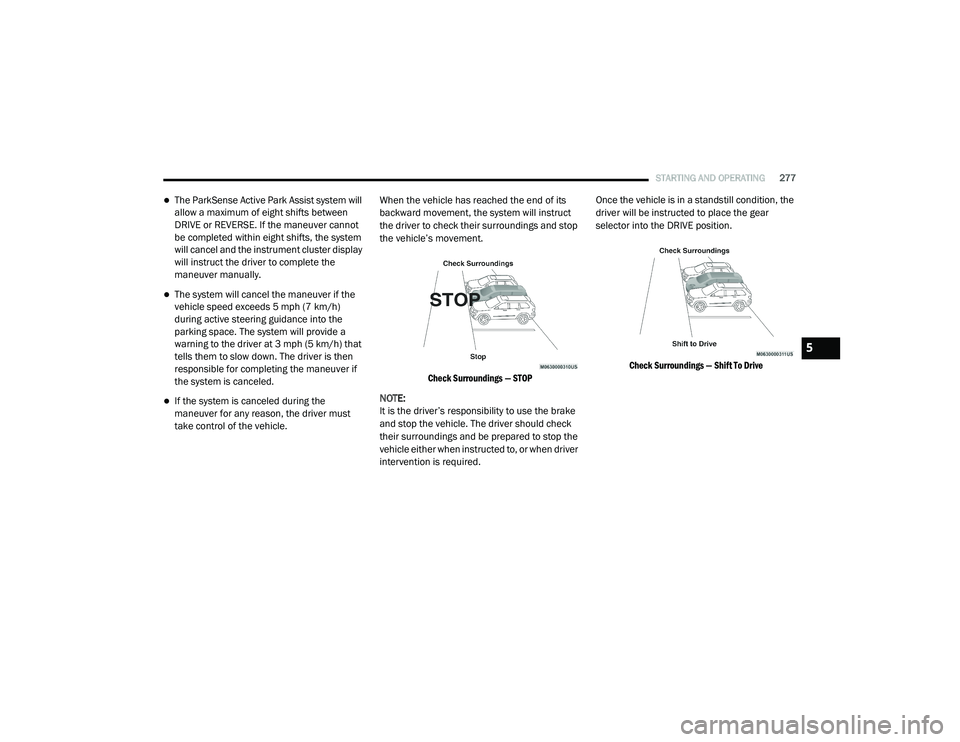
take control of the vehicle. When the vehicle has reached the end of its
backward movement, the system will instruct
the driver to check their surroundings and stop
the vehicle’s movement.
Check Surroundings — STOP
NOTE:
It is the driver’s responsibility to use the brake
and stop the vehicle. The driver should check
their surroundings and be prepared to stop the
vehicle either when instructed to, or when driver
intervention is required. Once the vehicle is in a standstill condition, the
driver will be instructed to place the gear
selector into the DRIVE position.
Check Surroundings — Shift To Drive
5
20_RU_OM_EN_US_t.book Page 277
Page 282 of 516
280STARTING AND OPERATING
LANESENSE — IF EQUIPPED
LaneSense Operation
The LaneSense system is operational at speeds
above 37 mph (60 km/h) and below 112 mph
(180 km/h). It uses a forward looking camera to
detect lane markings and measure vehicle
position within the lane boundaries.
When both lane markings are detected and the
driver unintentionally drifts out of the lane (no
turn signal applied), the LaneSense system
provides a haptic warning in the form of torque
applied to the steering wheel to prompt the
driver to remain within the lane boundaries. The
LaneSense system will also provide a visual
warning through the instrument cluster display
to prompt the driver to remain within the lane
boundaries.
The driver may manually override the haptic
warning by applying torque into the steering
wheel at any time. When only a single lane marking is detected
and the driver unintentionally drifts across that
lane marking (no turn signal applied), the
LaneSense system provides a visual warning
through the instrument cluster display to
prompt the driver to remain within the lane.
When only a single lane marking is detected, a
haptic (torque) warning will not be provided.
NOTE:
When operating conditions have been met, the
LaneSense system will monitor if the driver’s
hands are on the steering wheel and provide an
audible and visual warning to the driver when
the driver’s hands are not detected on the
steering wheel. The system will cancel if the
driver does not return their hands to the wheel.
Turning LaneSense On Or Off
The LaneSense button is located on
the switch panel below the Uconnect
display.
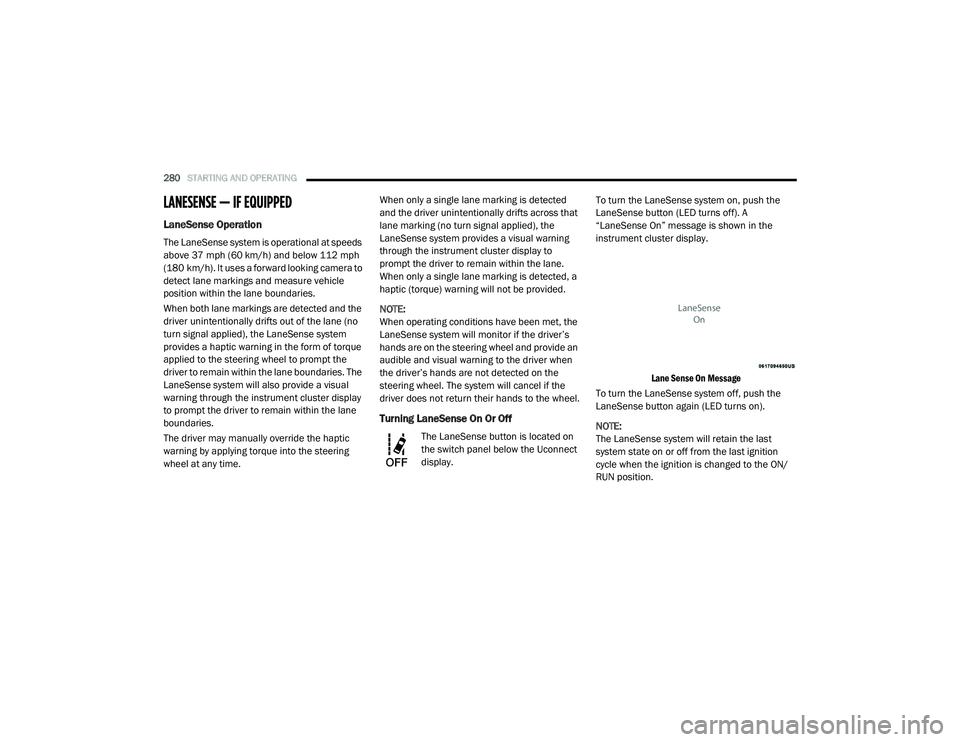
To turn the LaneSense system on, push the
LaneSense button (LED turns off). A
“LaneSense On” message is shown in the
instrument cluster display.
Lane Sense On Message
To turn the LaneSense system off, push the
LaneSense button again (LED turns on).
NOTE:
The LaneSense system will retain the last
system state on or off from the last ignition
cycle when the ignition is changed to the ON/
RUN position.
20_RU_OM_EN_US_t.book Page 280
Page 283 of 516
STARTING AND OPERATING281
LaneSense Warning Message
The LaneSense system will indicate the current
lane drift condition through the instrument
cluster display.
Instrument Cluster Display
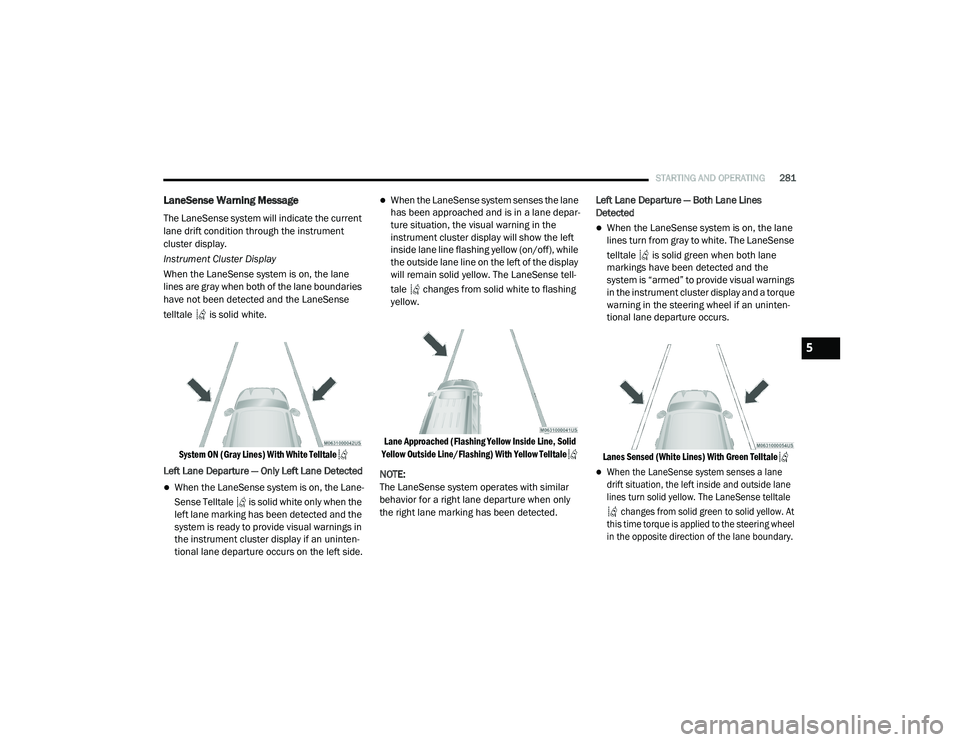
When the LaneSense system is on, the lane
lines are gray when both of the lane boundaries
have not been detected and the LaneSense
telltale is solid white.
System ON (Gray Lines) With White Telltale
Left Lane Departure — Only Left Lane Detected
When the LaneSense system is on, the Lane -
Sense Telltale is solid white only when the
left lane marking has been detected and the
system is ready to provide visual warnings in
the instrument cluster display if an uninten -
tional lane departure occurs on the left side.
When the LaneSense system senses the lane
has been approached and is in a lane depar -
ture situation, the visual warning in the
instrument cluster display will show the left
inside lane line flashing yellow (on/off), while
the outside lane line on the left of the display
will remain solid yellow. The LaneSense tell -
tale changes from solid white to flashing
yellow.
Lane Approached (Flashing Yellow Inside Line, Solid
Yellow Outside Line/Flashing) With Yellow Telltale
NOTE:
The LaneSense system operates with similar
behavior for a right lane departure when only
the right lane marking has been detected. Left Lane Departure — Both Lane Lines
Detected
When the LaneSense system is on, the lane
lines turn from gray to white. The LaneSense
telltale is solid green when both lane
markings have been detected and the
system is “armed” to provide visual warnings
in the instrument cluster display and a torque
warning in the steering wheel if an uninten
-
tional lane departure occurs.
Lanes Sensed (White Lines) With Green Telltale
When the LaneSense system senses a lane
drift situation, the left inside and outside lane
lines turn solid yellow. The LaneSense telltale changes from solid green to solid yellow. At
this time torque is applied to the steering wheel
in the opposite direction of the lane boundary.
5
20_RU_OM_EN_US_t.book Page 281
Page 303 of 516
301
IN CASE OF EMERGENCY
HAZARD WARNING FLASHERS
The Hazard Warning Flashers switch is located
in the lower center area of the instrument
panel.
Push the switch to turn on the Hazard
Warning Flashers. When the switch is
activated, all directional turn signals
will flash on and off to warn oncoming
traffic of an emergency. Push the switch a second
time to turn off the Hazard Warning Flashers.
This is an emergency warning system and it
should not be used when the vehicle is in
motion. Use it when your vehicle is disabled and
it is creating a safety hazard for other motorists.
When you must leave the vehicle to seek
assistance, the Hazard Warning Flashers will
continue to operate even though the ignition is
placed in the OFF position.
NOTE:
With extended use, the Hazard Warning
Flashers may wear down your battery.
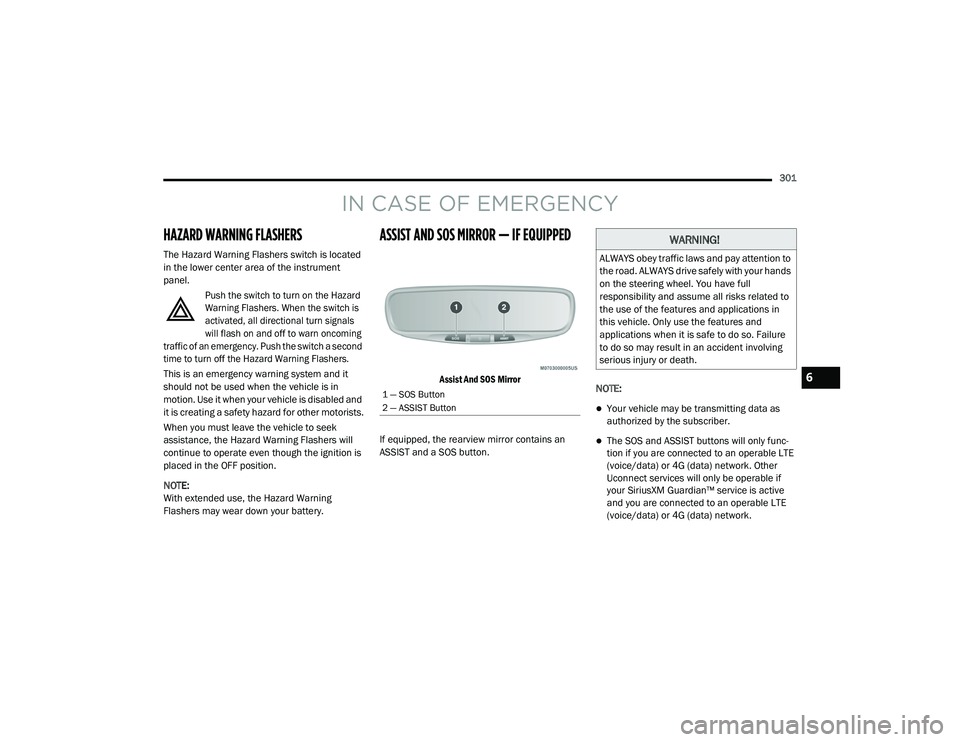
ASSIST AND SOS MIRROR — IF EQUIPPED
Assist And SOS Mirror
If equipped, the rearview mirror contains an
ASSIST and a SOS button. NOTE:
Your vehicle may be transmitting data as
authorized by the subscriber.
The SOS and ASSIST buttons will only func
-
tion if you are connected to an operable LTE
(voice/data) or 4G (data) network. Other
Uconnect services will only be operable if
your SiriusXM Guardian™ service is active
and you are connected to an operable LTE
(voice/data) or 4G (data) network.
1 — SOS Button
2 — ASSIST Button
WARNING!
ALWAYS obey traffic laws and pay attention to
the road. ALWAYS drive safely with your hands
on the steering wheel. You have full
responsibility and assume all risks related to
the use of the features and applications in
this vehicle. Only use the features and
applications when it is safe to do so. Failure
to do so may result in an accident involving
serious injury or death.
6
20_RU_OM_EN_US_t.book Page 301
Page 306 of 516
304IN CASE OF EMERGENCY
Even if the SOS Call system is fully functional,
factors beyond FCA US LLC’s control may
prevent or stop the SOS Call system operation. These include, but are not limited to, the
following factors:
Delayed accessories mode is active
The ignition is in the OFF position
The vehicle’s electrical systems are not intact
The SOS Call system software and/or hard
-
ware are damaged during a crash
The vehicle battery loses power or becomes
disconnected during a vehicle crash
LTE (voice/data) or 4G (data) network and/or
Global Positioning Satellite signals are
unavailable or obstructed
Equipment malfunction at the SOS operator
facility
Operator error by the SOS operator
LTE (voice/data) or 4G (data) network
congestion
Weather
Buildings, structures, geographic terrain, or
tunnels
WARNING!
Ignoring the Rearview Mirror light could
mean you will not have SOS Call services. If
the Rearview Mirror light is illuminated,
have an authorized dealer service the SOS
Call system immediately.
The Occupant Restraint Control module
turns on the air bag Warning Light on the
instrument panel if a malfunction in any
part of the system is detected. If the Air Bag
Warning Light is illuminated, have an
authorized dealer service the Occupant
Restraint Control system immediately.
WARNING!
ALWAYS obey traffic laws and pay attention to
the road. ALWAYS drive safely with your hands
on the steering wheel. You have full
responsibility and assume all risks related to
the use of the features and applications in
this vehicle. Only use the features and
applications when it is safe to do so. Failure
to do so may result in an accident involving
serious injury or death.
20_RU_OM_EN_US_t.book Page 304
Page 308 of 516
306IN CASE OF EMERGENCY
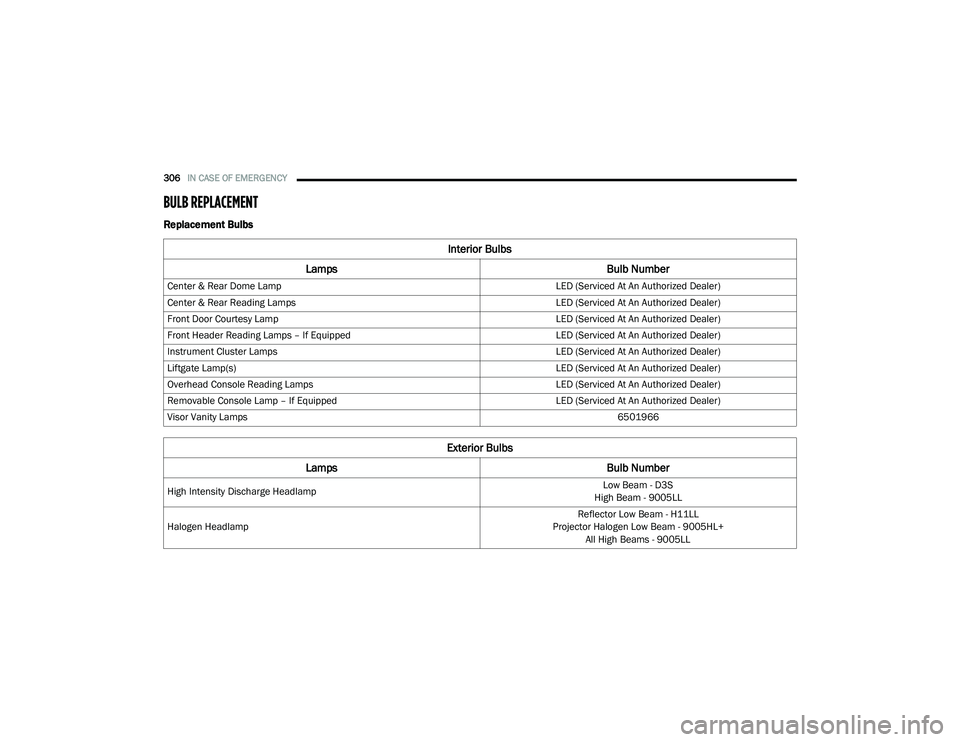
BULB REPLACEMENT
Replacement Bulbs
Interior Bulbs
Lamps Bulb Number
Center & Rear Dome Lamp LED (Serviced At An Authorized Dealer)
Center & Rear Reading Lamps LED (Serviced At An Authorized Dealer)
Front Door Courtesy Lamp LED (Serviced At An Authorized Dealer)
Front Header Reading Lamps – If Equipped LED (Serviced At An Authorized Dealer)
Instrument Cluster Lamps LED (Serviced At An Authorized Dealer)
Liftgate Lamp(s) LED (Serviced At An Authorized Dealer)
Overhead Console Reading Lamps LED (Serviced At An Authorized Dealer)
Removable Console Lamp – If Equipped LED (Serviced At An Authorized Dealer)
Visor Vanity Lamps 6501966
Exterior Bulbs
Lamps Bulb Number
High Intensity Discharge Headlamp Low Beam - D3S
High Beam - 9005LL
Halogen Headlamp Reflector Low Beam - H11LL
Projector Halogen Low Beam - 9005HL+ All High Beams - 9005LL
20_RU_OM_EN_US_t.book Page 306
Page 318 of 516
316IN CASE OF EMERGENCY
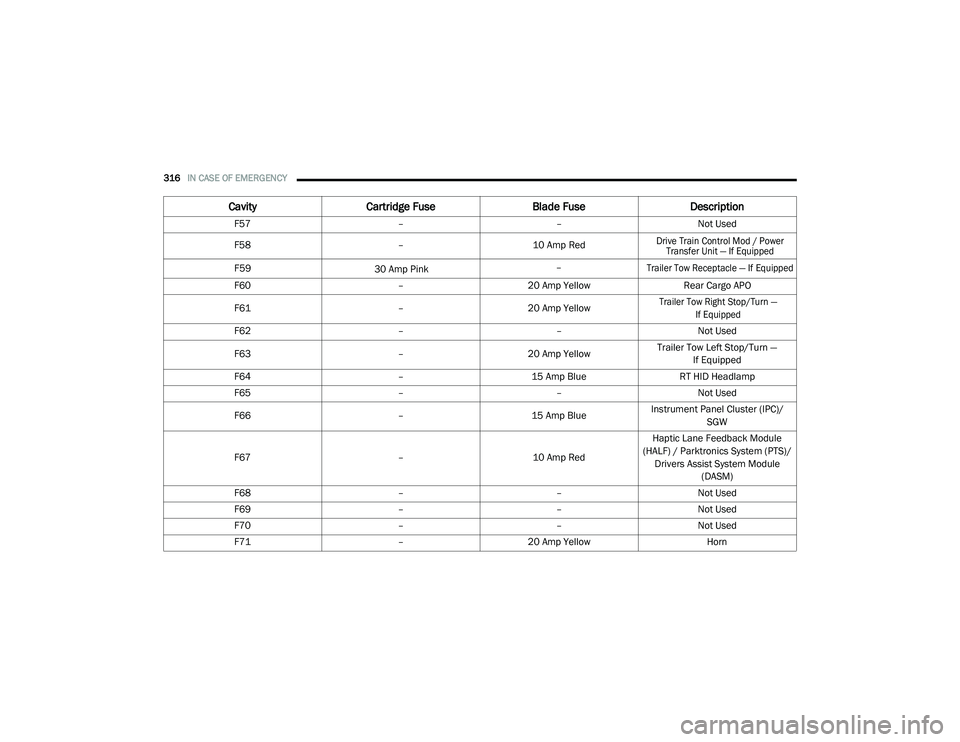
F57 ––Not Used
F58 – 10 Amp Red
Drive Train Control Mod / Power
Transfer Unit — If Equipped
F59
30 Amp Pink –
Trailer Tow Receptacle — If Equipped
F60
–20 Amp Yellow Rear Cargo APO
F61 –20 Amp Yellow
Trailer Tow Right Stop/Turn —
If Equipped
F62––Not Used
F63 –20 Amp Yellow Trailer Tow Left Stop/Turn —
If Equipped
F64–15 Amp Blue RT HID Headlamp
F65 ––Not Used
F66 –15 Amp BlueInstrument Panel Cluster (IPC)/
SGW
F67 –10 Amp RedHaptic Lane Feedback Module
(HALF) / Parktronics System (PTS)/ Drivers Assist System Module (DASM)
F68 ––Not Used
F69 ––Not Used
F70 ––Not Used
F71 –20 Amp Yellow Horn
CavityCartridge Fuse Blade FuseDescription
20_RU_OM_EN_US_t.book Page 316
Page 319 of 516
IN CASE OF EMERGENCY317
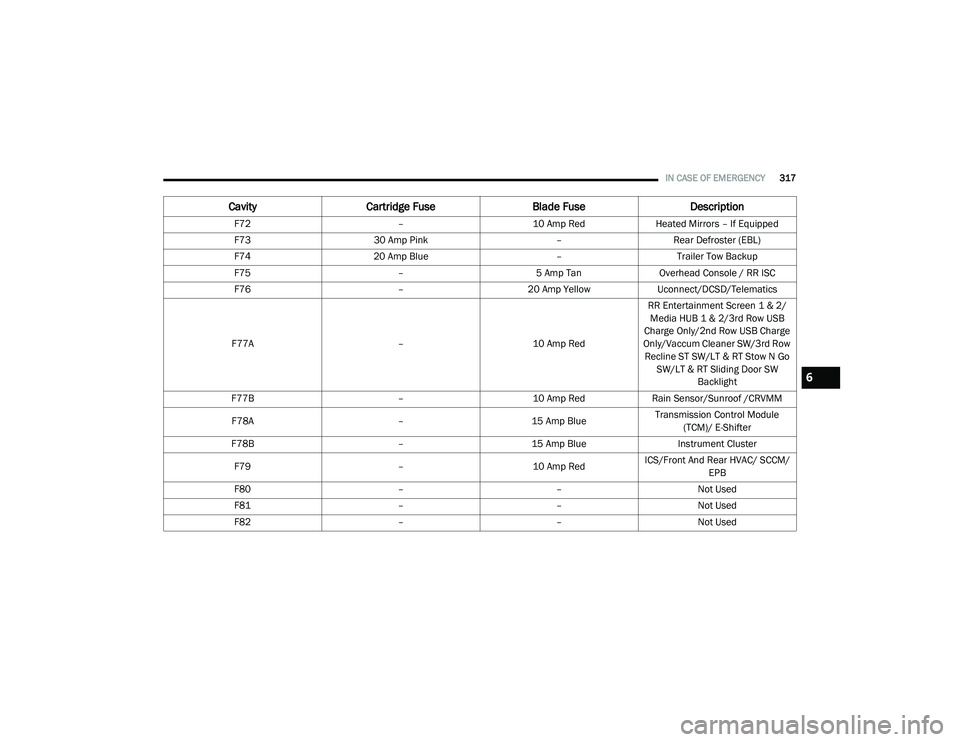
F72 –10 Amp RedHeated Mirrors – If Equipped
F73 30 Amp Pink –Rear Defroster (EBL)
F74 20 Amp Blue –Trailer Tow Backup
F75 –5 Amp TanOverhead Console / RR ISC
F76 –20 Amp YellowUconnect/DCSD/Telematics
F77A –10 Amp RedRR Entertainment Screen 1 & 2/
Media HUB 1 & 2/3rd Row USB
Charge Only/2nd Row USB Charge
Only/Vaccum Cleaner SW/3rd Row Recline ST SW/LT & RT Stow N Go SW/LT & RT Sliding Door SW Backlight
F77B –10 Amp RedRain Sensor/Sunroof /CRVMM
F78A –15 Amp BlueTransmission Control Module
(TCM)/ E-Shifter
F78B –15 Amp Blue Instrument Cluster
F79 –10 Amp RedICS/Front And Rear HVAC/ SCCM/
EPB
F80 ––Not Used
F81 ––Not Used
F82 ––Not Used
CavityCartridge Fuse Blade FuseDescription
6
20_RU_OM_EN_US_t.book Page 317
Page 347 of 516
345
SERVICING AND MAINTENANCE
SCHEDULED SERVICING
Your vehicle is equipped with an automatic oil
change indicator system. The oil change
indicator system will remind you that it is time to
take your vehicle in for scheduled maintenance.
Based on engine operation conditions, the oil
change indicator message will illuminate. This
means that service is required for your vehicle.
Operating conditions such as frequent short-trips,
trailer tow, extremely hot or cold ambient
temperatures will influence when the “Oil Change
Required” message is displayed. Severe
Operating Conditions can cause the change oil
message to illuminate as early as 3,500 miles
(5,600 km) since last reset. Have your vehicle
serviced as soon as possible, within the next
500 miles (805 km).
An authorized dealer will reset the oil change
indicator message after completing the
scheduled oil change. If a scheduled oil change
is performed by someone other than an
authorized dealer, the message can be reset by
referring to “Instrument Cluster Display” in
“Getting To Know Your Instrument Panel”.NOTE:
Under no circumstances should oil change
intervals exceed 10,000 miles (16,000 km),
12 months or 350 hours of engine run time,
whichever comes first. The 350 hours of engine
run or idle time is generally only a concern for
fleet customers.
Severe Duty All Models
Change Engine Oil at 4,000 miles (6,500 km) or
350 hours of engine run time if the vehicle is
operated in a dusty and off road environment or
is operated predominately at idle or only very
low engine RPM. This type of vehicle use is
considered Severe Duty.
Once A Month Or Before A Long Trip:Check engine oil level
Check windshield washer fluid level
Check tire pressure and look for unusual
wear or damage. Rotate tires at the first sign
of irregular wear, even if it occurs before the
oil indicator system turns on
Check the fluid levels of the coolant reservoir
and brake master cylinder, fill as needed
Check function of all interior and exterior
lights
Maintenance Plan
Required Maintenance Intervals
Refer to the required maintenance intervals.
7
20_RU_OM_EN_US_t.book Page 345
Page 389 of 516
SERVICING AND MAINTENANCE387
Plastic And Coated Parts
Use Mopar Total Clean to clean vinyl upholstery.
Cleaning Plastic Instrument Cluster Lenses
The lenses in front of the instruments in this
vehicle are molded in clear plastic. When
cleaning the lenses, care must be taken to
avoid scratching the plastic.
1. Clean with a wet soft cloth. A mild soap
solution may be used, but do not use high
alcohol content or abrasive cleaners. If soap
is used, wipe clean with a clean damp cloth.
2. Dry with a soft cloth.
Leather Parts
Mopar Total Clean is specifically recommended
for leather upholstery.
Your leather upholstery can be best preserved
by regular cleaning with a damp soft cloth.
Small particles of dirt can act as an abrasive
and damage the leather upholstery and should
be removed promptly with a damp cloth.
Stubborn soils can be removed easily with a soft
cloth and Mopar Total Clean. Care should be
taken to avoid soaking your leather upholstery
with any liquid. Please do not use polishes, oils,
cleaning fluids, solvents, detergents, or
ammonia-based cleaners to clean your leather
upholstery. Application of a leather conditioner
is not required to maintain the original
condition.
NOTE:
If equipped with light colored leather, it tends to
show any foreign material, dirt, and fabric dye
transfer more so than darker colors. The leather
is designed for easy cleaning, and FCA recom -
mends Mopar total care leather cleaner applied
on a cloth to clean the leather seats as needed.
Glass Surfaces
All glass surfaces should be cleaned on a
regular basis with Mopar Glass Cleaner, or any
commercial household-type glass cleaner.
Never use an abrasive type cleaner. Use caution
when cleaning the inside rear window equipped
with electric defrosters or windows equipped
with radio antennas. Do not use scrapers or
other sharp instruments that may scratch the
elements.
When cleaning the rear view mirror, spray
cleaner on the towel or cloth that you are using.
Do not spray cleaner directly on the mirror.
CAUTION!
Direct contact of air fresheners, insect
repellents, suntan lotions, or hand sani -
tizers to the plastic, painted, or decorated
surfaces of the interior may cause perma -
nent damage. Wipe away immediately.
Damage caused by these type of products
may not be covered by your New Vehicle
Limited Warranty.
CAUTION!
Do not use Alcohol and Alcohol-based and/or
Ketone based cleaning products to clean
leather seats, as damage to the seat may
result.
7
20_RU_OM_EN_US_t.book Page 387