emergency alarm signal CHRYSLER VOYAGER 2020 Owners Manual
[x] Cancel search | Manufacturer: CHRYSLER, Model Year: 2020, Model line: VOYAGER, Model: CHRYSLER VOYAGER 2020Pages: 516, PDF Size: 28.69 MB
Page 15 of 516
GETTING TO KNOW YOUR VEHICLE13
Features/Benefits
Pre-installed on your Uconnect touchscreen radio
Enhanced search and browsing capability
Robust NAV application (if equipped)
Add selected topics to a fast-access Favor -
ites category
Icon and symbol glossary
Warranty information
Crucial driver information and assistance:
Operating Instructions
Warranty Information
Fluid Level Standards
Maintenance Schedules
Emergency Procedures
911 Contact and More
TIP:
When viewing a topic, tap the star icon to add it
to your Favorites, for easy access in the future.
KEYS
Key Fob
Your vehicle uses a keyless ignition system. The
ignition system consists of a key fob with
Remote Keyless Entry (RKE) and a START/STOP
push button ignition system. The RKE system
uses a receiver module in the vehicle that
wirelessly links with the key fob.
NOTE:
The key fob may not be found if it is located next
to a mobile phone, laptop or other electronic
device; these devices may block the key fob’s
wireless signal.
This system allows you to lock or unlock the
doors and liftgate, activate the Panic Alarm,
optional power liftgate, left power sliding door,
and right power sliding door from distances up
to approximately 66 ft (20 m) using a key fob.
When any button on the key fob is pushed, or when any signal is being transferred between
the key fob and the vehicle, an LED light on the
key fob will flash as an indicator. The key fob
does not need to be pointed at the vehicle to
activate the system.
NOTE:
The emergency key allows for entry into the
vehicle should the battery in the vehicle or the
key fob become depleted. The emergency key is
also for locking/unlocking the glove compart
-
ment. You can keep the emergency key with you
when valet parking.
2
20_RU_OM_EN_US_t.book Page 13
Page 16 of 516
14GETTING TO KNOW YOUR VEHICLE
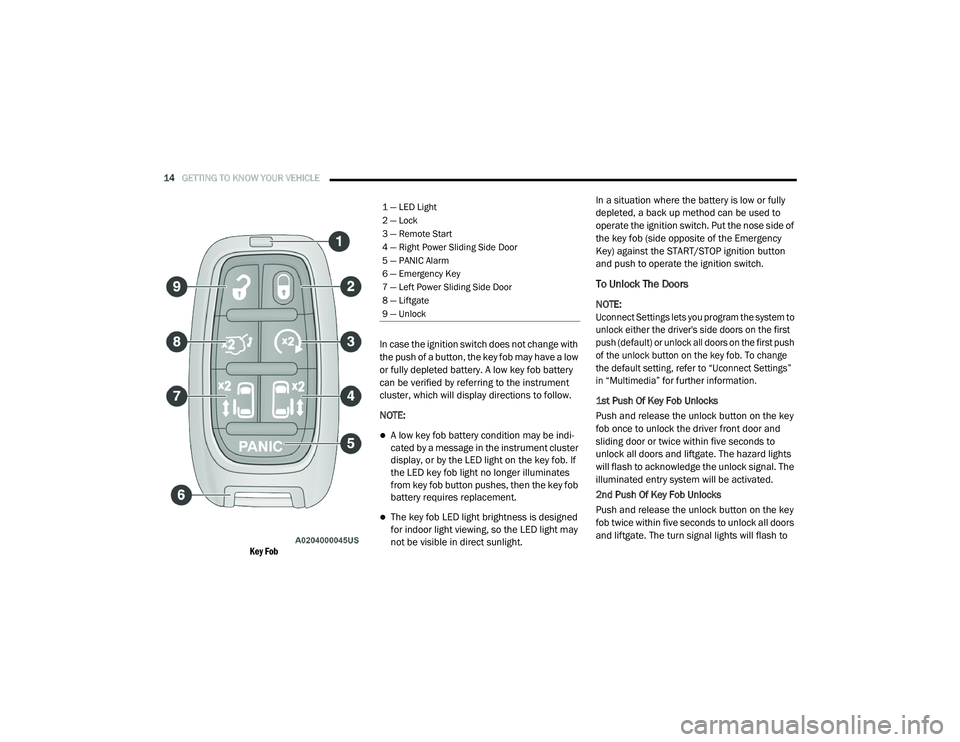
Key Fob
In case the ignition switch does not change with
the push of a button, the key fob may have a low
or fully depleted battery. A low key fob battery
can be verified by referring to the instrument
cluster, which will display directions to follow.
NOTE:
A low key fob battery condition may be indi
-
cated by a message in the instrument cluster
display, or by the LED light on the key fob. If
the LED key fob light no longer illuminates
from key fob button pushes, then the key fob
battery requires replacement.
The key fob LED light brightness is designed
for indoor light viewing, so the LED light may
not be visible in direct sunlight. In a situation where the battery is low or fully
depleted, a back up method can be used to
operate the ignition switch. Put the nose side of
the key fob (side opposite of the Emergency
Key) against the START/STOP ignition button
and push to operate the ignition switch.
To Unlock The Doors
NOTE:
Uconnect Settings lets you program the system to
unlock either the driver's side doors on the first
push (default) or unlock all doors on the first push
of the unlock button on the key fob. To change
the default setting, refer to “Uconnect Settings”
in “Multimedia” for further information.
1st Push Of Key Fob Unlocks
Push and release the unlock button on the key
fob once to unlock the driver front door and
sliding door or twice within five seconds to
unlock all doors and liftgate. The hazard lights
will flash to acknowledge the unlock signal. The
illuminated entry system will be activated.
2nd Push Of Key Fob Unlocks
Push and release the unlock button on the key
fob twice within five seconds to unlock all doors
and liftgate. The turn signal lights will flash to
1 — LED Light
2 — Lock
3 — Remote Start
4 — Right Power Sliding Side Door
5 — PANIC Alarm
6 — Emergency Key
7 — Left Power Sliding Side Door
8 — Liftgate
9 — Unlock
20_RU_OM_EN_US_t.book Page 14