head light adjustment CHRYSLER VOYAGER 2020 Owners Manual
[x] Cancel search | Manufacturer: CHRYSLER, Model Year: 2020, Model line: VOYAGER, Model: CHRYSLER VOYAGER 2020Pages: 516, PDF Size: 28.69 MB
Page 409 of 516
MULTIMEDIA407
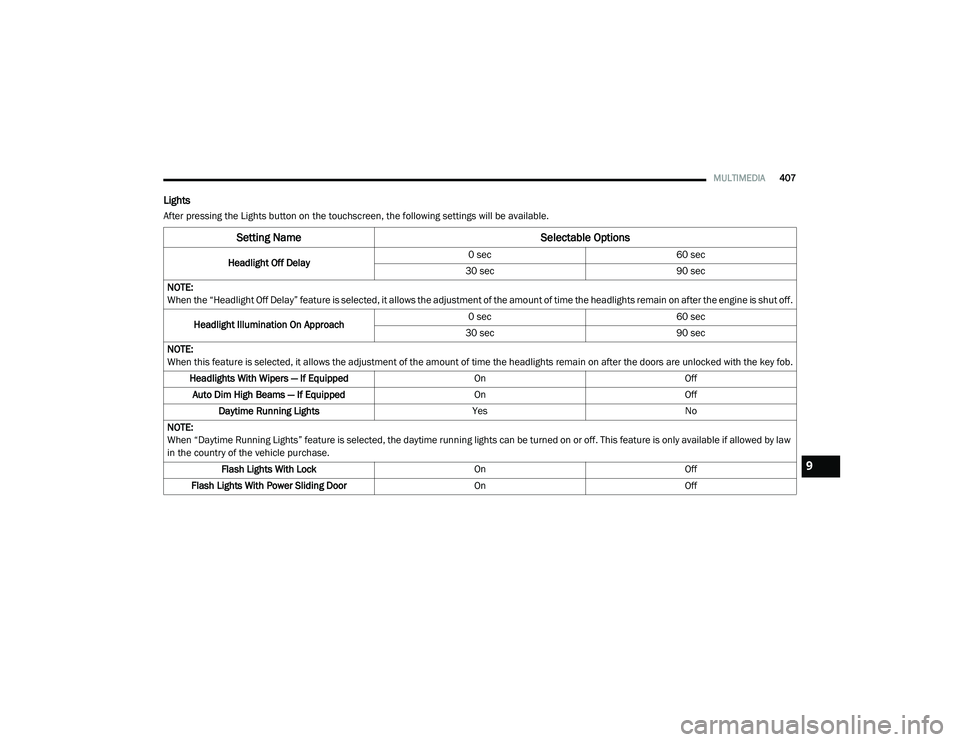
Lights
After pressing the Lights button on the touchscreen, the following settings will be available.
Setting Name Selectable Options
Headlight Off Delay0 sec
60 sec
30 sec 90 sec
NOTE:
When the “Headlight Off Delay” feature is selected, it allows the adjustment of the amount of time the headlights remain on after the engine is shut off.
Headlight Illumination On Approach 0 sec
60 sec
30 sec 90 sec
NOTE:
When this feature is selected, it allows the adjustment of the amount of time the headlights remain on after the doors are unlocked with the key fob. Headlights With Wipers — If Equipped OnOff
Auto Dim High Beams — If Equipped OnOff
Daytime Running Lights YesNo
NOTE:
When “Daytime Running Lights” feature is selected, the daytime running lights can be turned on or off. This feature is only available if allowed by law
in the country of the vehicle purchase. Flash Lights With Lock OnOff
Flash Lights With Power Sliding Door OnOff
9
20_RU_OM_EN_US_t.book Page 407
Page 413 of 516
MULTIMEDIA411
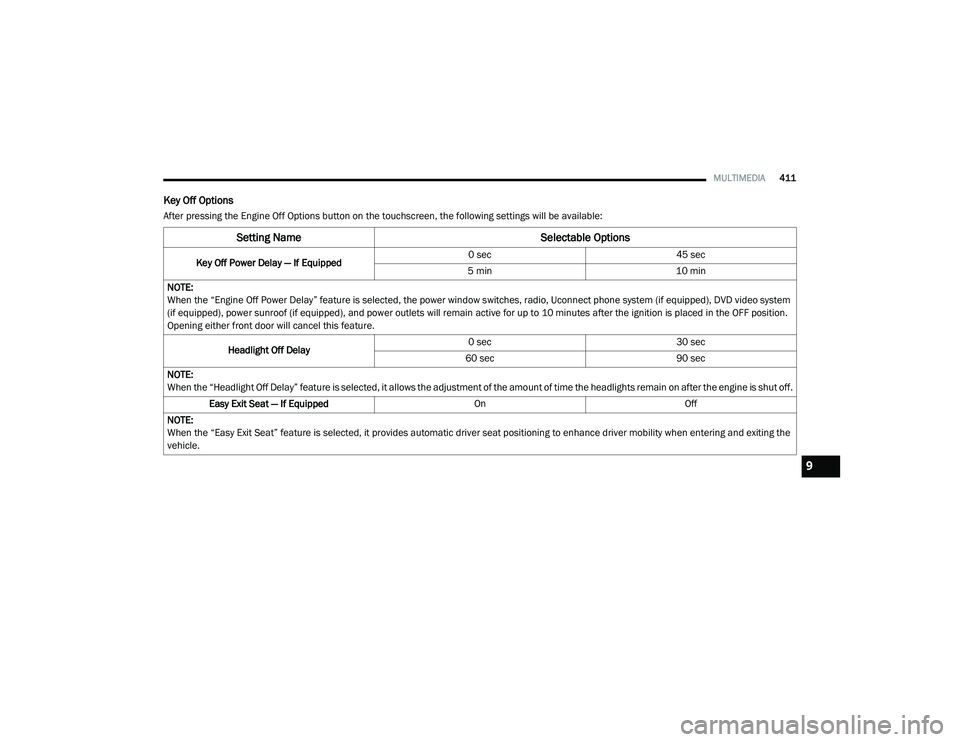
Key Off Options
After pressing the Engine Off Options button on the touchscreen, the following settings will be available:
Setting Name Selectable Options
Key Off Power Delay — If Equipped 0 sec
45 sec
5 min 10 min
NOTE:
When the “Engine Off Power Delay” feature is selected, the power window switches, radio, Uconnect phone system (if equipped), DVD video system
(if equipped), power sunroof (if equipped), and power outlets will remain active for up to 10 minutes after the ignition is placed in the OFF position.
Opening either front door will cancel this feature.
Headlight Off Delay 0 sec
30 sec
60 sec 90 sec
NOTE:
When the “Headlight Off Delay” feature is selected, it allows the adjustment of the amount of time the headlights remain on after the engine is shut off. Easy Exit Seat — If Equipped OnOff
NOTE:
When the “Easy Exit Seat” feature is selected, it provides automatic driver seat positioning to enhance driver mobility when entering and exiting the
vehicle.
9
20_RU_OM_EN_US_t.book Page 411
Page 429 of 516
MULTIMEDIA427
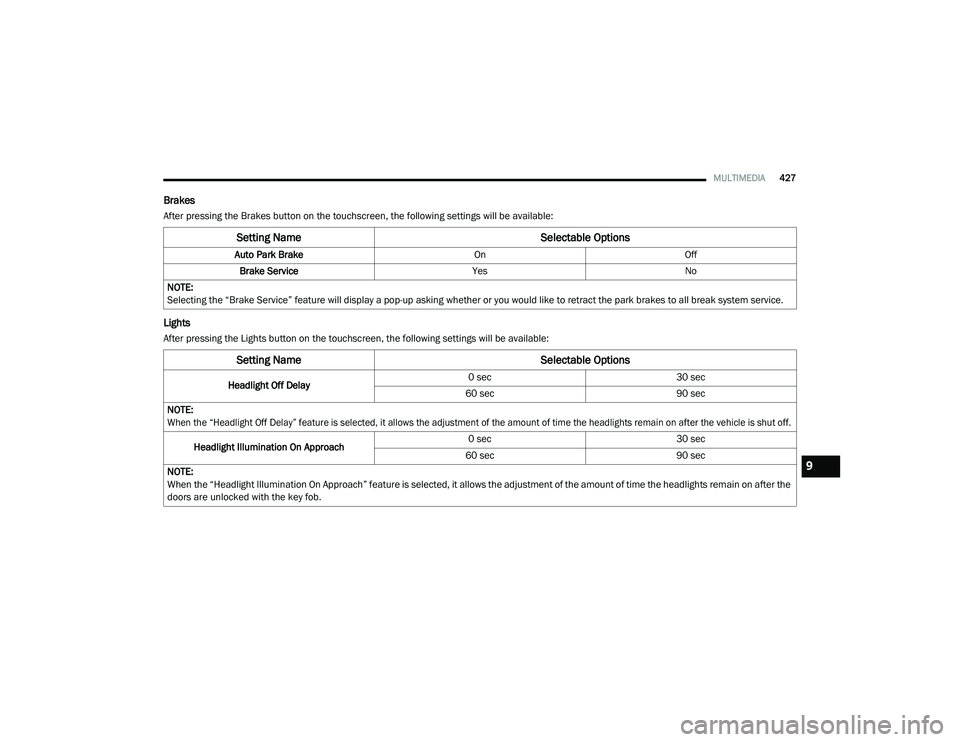
Brakes
After pressing the Brakes button on the touchscreen, the following settings will be available:
Lights
After pressing the Lights button on the touchscreen, the following settings will be available:
Setting Name Selectable Options
Auto Park BrakeOnOff
Brake Service YesNo
NOTE:
Selecting the “Brake Service” feature will display a pop-up asking whether or you would like to retract the park brakes to all break system service.
Setting Name Selectable Options
Headlight Off Delay0 sec
30 sec
60 sec 90 sec
NOTE:
When the “Headlight Off Delay” feature is selected, it allows the adjustment of the amount of time the headlights remain on after the vehicle is shut off.
Headlight Illumination On Approach 0 sec
30 sec
60 sec 90 sec
NOTE:
When the “Headlight Illumination On Approach” feature is selected, it allows the adjustment of the amount of time the headlights remain on after the
doors are unlocked with the key fob.
9
20_RU_OM_EN_US_t.book Page 427
Page 433 of 516
MULTIMEDIA431
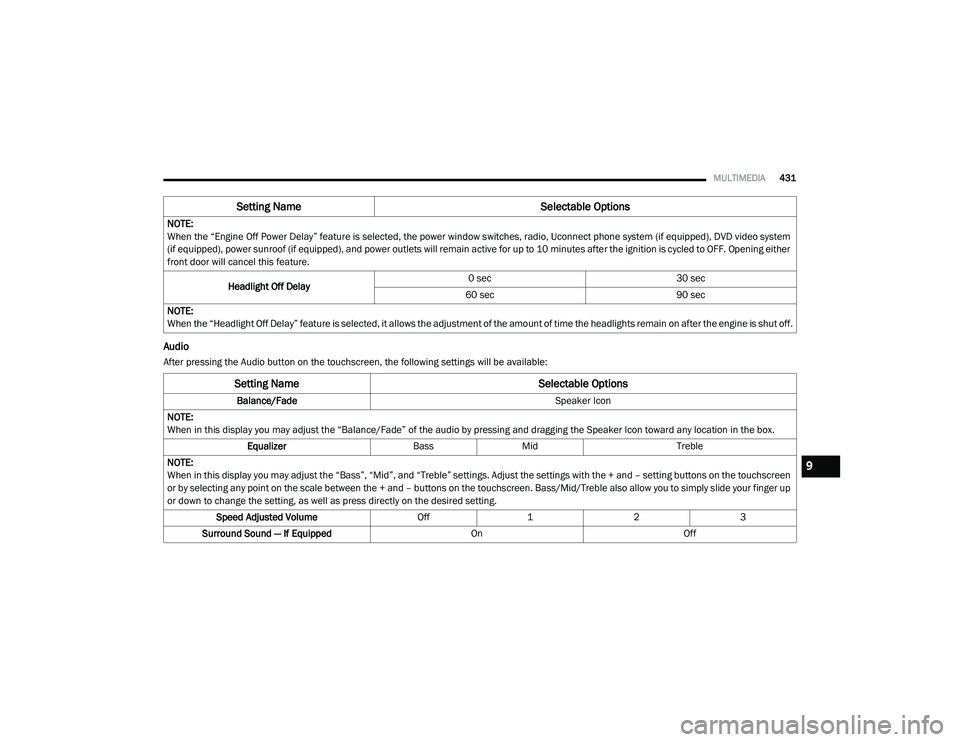
Audio
After pressing the Audio button on the touchscreen, the following settings will be available:NOTE:
When the “Engine Off Power Delay” feature is selected, the power window switches, radio, Uconnect phone system (if equipped), DVD video system
(if equipped), power sunroof (if equipped), and power outlets will remain active for up to 10 minutes after the ignition is cycled to OFF. Opening either
front door will cancel this feature.
Headlight Off Delay 0 sec
30 sec
60 sec 90 sec
NOTE:
When the “Headlight Off Delay” feature is selected, it allows the adjustment of the amount of time the headlights remain on after the engine is shut off.
Setting Name Selectable Options
Setting NameSelectable Options
Balance/Fade Speaker Icon
NOTE:
When in this display you may adjust the “Balance/Fade” of the audio by pressing and dragging the Speaker Icon toward any location in the box. Equalizer BassMid Treble
NOTE:
When in this display you may adjust the “Bass”, “Mid”, and “Treble” settings. Adjust the settings with the + and – setting buttons on the touchscreen
or by selecting any point on the scale between the + and – buttons on the touchscreen. Bass/Mid/Treble also allow you to simply slide your finger up
or down to change the setting, as well as press directly on the desired setting. Speed Adjusted Volume Off123
Surround Sound — If Equipped OnOff
9
20_RU_OM_EN_US_t.book Page 431
Page 512 of 516
510
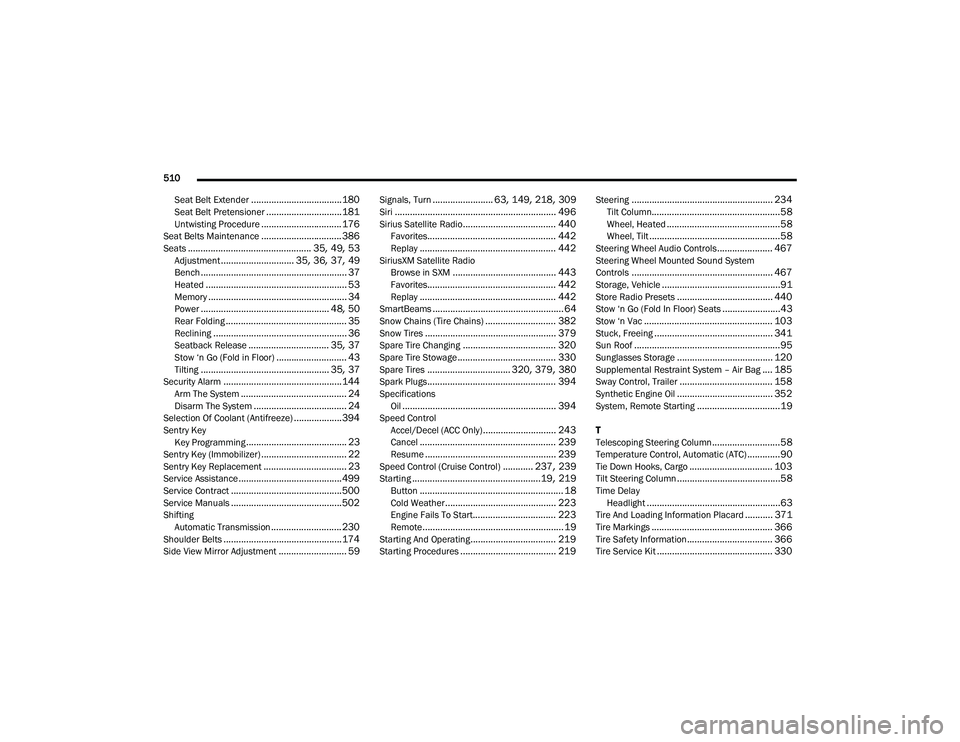
Seat Belt Extender
.................................... 180Seat Belt Pretensioner.............................. 181Untwisting Procedure................................ 176Seat Belts Maintenance................................ 386Seats................................................. 35, 49, 53Adjustment............................. 35, 36, 37, 49Bench.......................................................... 37Heated........................................................ 53Memory....................................................... 34Power................................................... 48, 50Rear Folding................................................ 35Reclining..................................................... 36Seatback Release................................ 35, 37Stow ‘n Go (Fold in Floor)............................ 43Tilting................................................... 35, 37Security Alarm............................................... 144Arm The System.......................................... 24Disarm The System..................................... 24Selection Of Coolant (Antifreeze)...................394Sentry Key Key Programming........................................ 23Sentry Key (Immobilizer).................................. 22Sentry Key Replacement................................. 23Service Assistance......................................... 499Service Contract............................................ 500Service Manuals............................................ 502ShiftingAutomatic Transmission............................ 230Shoulder Belts............................................... 174Side View Mirror Adjustment........................... 59
Signals, Turn........................ 63, 149, 218, 309Siri................................................................ 496Sirius Satellite Radio..................................... 440Favorites................................................... 442Replay...................................................... 442SiriusXM Satellite RadioBrowse in SXM......................................... 443Favorites................................................... 442Replay...................................................... 442SmartBeams.................................................... 64Snow Chains (Tire Chains)............................ 382Snow Tires.................................................... 379Spare Tire Changing..................................... 320Spare Tire Stowage....................................... 330Spare Tires................................. 320, 379, 380Spark Plugs................................................... 394SpecificationsOil............................................................. 394Speed ControlAccel/Decel (ACC Only)............................. 243Cancel...................................................... 239Resume.................................................... 239Speed Control (Cruise Control)............ 237, 239Starting...................................................19, 219Button......................................................... 18Cold Weather............................................ 223Engine Fails To Start................................. 223Remote........................................................ 19Starting And Operating.................................. 219Starting Procedures...................................... 219
Steering........................................................ 234Tilt Column...................................................58Wheel, Heated.............................................58Wheel, Tilt....................................................58Steering Wheel Audio Controls...................... 467Steering Wheel Mounted Sound System
Controls........................................................ 467Storage, Vehicle...............................................91Store Radio Presets...................................... 440Stow ‘n Go (Fold In Floor) Seats.......................43Stow ‘n Vac................................................... 103Stuck, Freeing............................................... 341Sun Roof..........................................................95Sunglasses Storage...................................... 120Supplemental Restraint System – Air Bag.... 185Sway Control, Trailer..................................... 158Synthetic Engine Oil...................................... 352System, Remote Starting.................................19
T
Telescoping Steering Column...........................58Temperature Control, Automatic (ATC).............90Tie Down Hooks, Cargo................................. 103Tilt Steering Column.........................................58Time DelayHeadlight.....................................................63Tire And Loading Information Placard........... 371Tire Markings................................................ 366Tire Safety Information.................................. 366Tire Service Kit.............................................. 330
20_RU_OM_EN_US_t.book Page 510