power door CHRYSLER VOYAGER 2021 Owners Manual
[x] Cancel search | Manufacturer: CHRYSLER, Model Year: 2021, Model line: VOYAGER, Model: CHRYSLER VOYAGER 2021Pages: 348, PDF Size: 18.73 MB
Page 4 of 348

2
INTRODUCTION
SYMBOLS KEY ...........................................................8
VEHICLE MODIFICATIONS/ALTERATIONS .............8
SYMBOL GLOSSARY.................................................8
GETTING TO KNOW YOUR VEHICLE
KEYS ........................................................................ 12 Key Fob .............................................................12
SENTRY KEY ........................................................... 15
IGNITION SWITCH .................................................. 15
Keyless Enter ‘n Go™ Ignition .........................15
REMOTE START — IF EQUIPPED .......................... 16
How To Use Remote Start ................................17
To Exit Remote Start Mode ..............................18
Remote Start Front Defrost Activation —
If Equipped........................................................18
Remote Start Comfort Systems —
If Equipped........................................................18
Remote Start Windshield Wiper De–Icer
Activation — If Equipped ..................................19
Remote Start Cancel Message ........................19
VEHICLE SECURITY SYSTEM — IF EQUIPPED ..... 19
To Arm The System .........................................19
To Disarm The System .....................................19
Rearming Of The System .................................20 DOORS .....................................................................20
Manual Door Locks — If Equipped ..................20
Power Door Locks — If Equipped.....................21
Keyless Enter ‘n Go™ — Passive Entry ...........22
Automatic Unlock Doors On Exit —
If Equipped........................................................23
Manual Sliding Side Door ................................24
Power Sliding Side Door —
If Equipped........................................................24
Child Protection Door Lock System —
Rear Doors ........................................................26
STEERING WHEEL ..................................................27
Tilt/Telescoping Steering Column ...................27
Heated Steering Wheel —
If Equipped........................................................27
SEATS ......................................................................28
Manual Adjustment (Front Seats) —
If Equipped........................................................28
Manual Adjustment (Rear Seats) ....................29
Power Adjustment (Front Seats) —
If Equipped........................................................41
Heated Seats ...................................................43
Adjustable Armrest (Front Seats) —
If Equipped........................................................43
Head Restraints ..............................................43 UCONNECT VOICE RECOGNITION ........................ 47
Introducing Voice Recognition ........................ 47
Basic Voice Commands ................................... 47
Get Started .......................................................47
Additional Information ..................................... 47
MIRRORS ................................................................ 48
Inside Rearview Mirror..................................... 48
Illuminated Vanity Mirrors —
If Equipped ...................................................... 48
Outside Mirrors ................................................ 48
Conversation Mirror ......................................... 49
Power Mirrors — If Equipped .......................... 49
Outside Mirrors Folding Feature ..................... 49
UNIVERSAL GARAGE DOOR OPENER
(HOMELINK®) — IF EQUIPPED ............................ 50
Before You Begin Programming
HomeLink® ...................................................... 50
Erasing All The HomeLink® Channels ............ 50
Identifying Whether You Have A Rolling
Code Or Non-Rolling Code Device ................... 50
Programming HomeLink® To A Garage
Door Opener ..................................................... 51
Programming HomeLink® To A
Miscellaneous Device ...................................... 52
Reprogramming A Single HomeLink®
Button ............................................................... 52
Canadian/Gate Operator Programming ......... 52
21_RUV_OM_EN_USC_t.book Page 2
Page 11 of 348
9
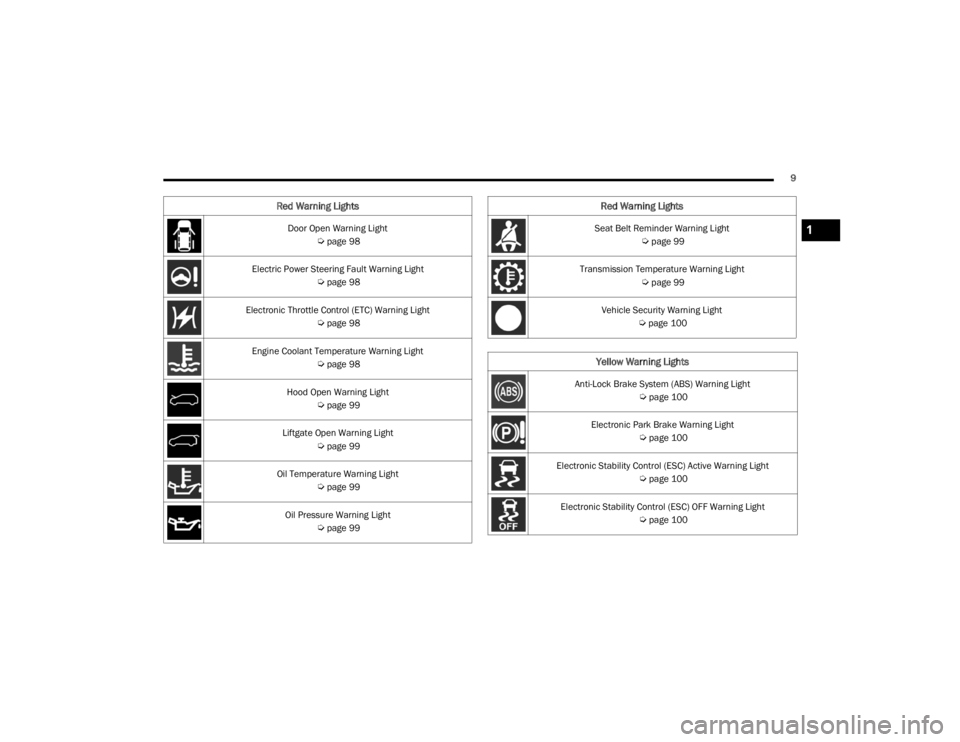
Door Open Warning Light
Úpage 98
Electric Power Steering Fault Warning Light
Úpage 98
Electronic Throttle Control (ETC) Warning Light
Úpage 98
Engine Coolant Temperature Warning Light
Úpage 98
Hood Open Warning Light
Úpage 99
Liftgate Open Warning Light
Úpage 99
Oil Temperature Warning Light
Úpage 99
Oil Pressure Warning Light
Úpage 99
Red Warning Lights
Seat Belt Reminder Warning Light
Úpage 99
Transmission Temperature Warning Light
Úpage 99
Vehicle Security Warning Light
Úpage 100
Yellow Warning Lights
Anti-Lock Brake System (ABS) Warning Light
Úpage 100
Electronic Park Brake Warning Light
Úpage 100
Electronic Stability Control (ESC) Active Warning Light
Úpage 100
Electronic Stability Control (ESC) OFF Warning Light
Úpage 100
Red Warning Lights
1
21_RUV_OM_EN_USC_t.book Page 9
Page 14 of 348

12
GETTING TO KNOW YOUR VEHICLE
KEYS
KEY FOB
Your vehicle is equipped with a key fob which
supports Passive Entry, Remote Keyless Entry
(RKE), Keyless Enter ‘n Go™ (if equipped), and
Remote Start (if equipped). The key fob allows you
to lock or unlock all doors and liftgate, as well as
activate the Panic Alarm from distances up to
approximately 66 ft (20 m). The key fob does not need to be pointed at the vehicle to activate the
system. The key fob also contains an emergency
key, which is stored in the rear of the key fob.
The emergency key allows for entry into the vehicle
should the battery in the vehicle or the key fob
become depleted. The emergency key is also for
locking/unlocking the glove compartment. You can
keep the emergency key with you when valet
parking.
NOTE:
The key fob’s wireless signal may be blocked if
the key fob is located next to a mobile phone,
laptop, or other electronic device. This may
result in poor performance.
A low key fob battery condition may be indicated
by a message in the instrument cluster display,
or by the LED light on the key fob. If the LED key
fob light no longer illuminates from key fob
button pushes, then the key fob battery requires
replacement.
The key fob LED light brightness is designed for
indoor light viewing, so the LED light may not be
visible in direct sunlight
Úpage 331.
Key Fob
1 — LED Light
2 — Unlock
3 — Liftgate
4 — Left Power Sliding Side Door
5 — Emergency Key
6 — Lock
7 — Remote Start
8 — Right Power Sliding Side Door
9 — PANIC Alarm
21_RUV_OM_EN_USC_t.book Page 12
Page 18 of 348
16GETTING TO KNOW YOUR VEHICLE
(Continued)
The push button ignition can be placed in the
following modes:
OFF
The engine is stopped
Some electrical devices (e.g. power locks,
alarm, etc.) are still available
ACC
The engine is stopped
Some electrical devices are available (e.g.
power windows)
ON/RUN
Driving position
All the electrical devices are available (e.g.
climate controls, etc.)
START
The engine will start (when foot is on the brake
pedal)
The engine only runs in the ON/RUN ignition
position or from a Remote Start request.
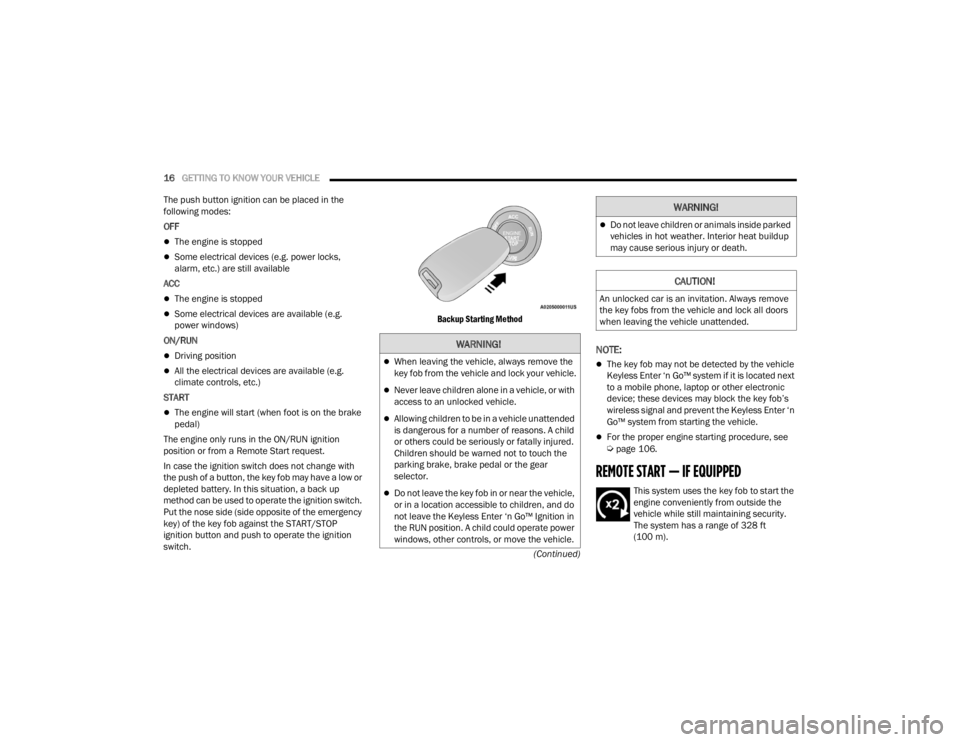
In case the ignition switch does not change with
the push of a button, the key fob may have a low or
depleted battery. In this situation, a back up
method can be used to operate the ignition switch.
Put the nose side (side opposite of the emergency
key) of the key fob against the START/STOP
ignition button and push to operate the ignition
switch.
Backup Starting Method
NOTE:
The key fob may not be detected by the vehicle
Keyless Enter ‘n Go™ system if it is located next
to a mobile phone, laptop or other electronic
device; these devices may block the key fob’s
wireless signal and prevent the Keyless Enter ‘n
Go™ system from starting the vehicle.
For the proper engine starting procedure, see Úpage 106.
REMOTE START — IF EQUIPPED
This system uses the key fob to start the
engine conveniently from outside the
vehicle while still maintaining security.
The system has a range of 328 ft
(100 m).
WARNING!
When leaving the vehicle, always remove the
key fob from the vehicle and lock your vehicle.
Never leave children alone in a vehicle, or with
access to an unlocked vehicle.
Allowing children to be in a vehicle unattended
is dangerous for a number of reasons. A child
or others could be seriously or fatally injured.
Children should be warned not to touch the
parking brake, brake pedal or the gear
selector.
Do not leave the key fob in or near the vehicle,
or in a location accessible to children, and do
not leave the Keyless Enter ‘n Go™ Ignition in
the RUN position. A child could operate power
windows, other controls, or move the vehicle.
Do not leave children or animals inside parked
vehicles in hot weather. Interior heat buildup
may cause serious injury or death.
CAUTION!
An unlocked car is an invitation. Always remove
the key fobs from the vehicle and lock all doors
when leaving the vehicle unattended.
WARNING!
21_RUV_OM_EN_USC_t.book Page 16
Page 19 of 348

GETTING TO KNOW YOUR VEHICLE17
Remote Start is used to defrost windows in cold
weather and to reach a comfortable climate in all
ambient conditions before the customer enters the
vehicle.
NOTE:Obstructions between the vehicle and key fob may
reduce this range Úpage 331.
HOW TO USE REMOTE START
Push and release the Remote Start button on the
key fob twice within five seconds. The vehicle
doors will lock, the parking lights will flash, and the
horn will chirp twice (if programmed). Then, the
engine will start, and the vehicle will remain in the
Remote Start mode for a 15 minute cycle. Pushing the Remote Start button a third time shuts
the engine off.
To drive the vehicle, push the unlock button and
place the ignition in the ON/RUN position.
NOTE:
With Remote Start, the engine will only run for
15 minutes.
Remote Start can only be used twice.
If an engine fault is present or fuel level is
low, the vehicle will start and then shut down
in 10 seconds.
The parking lights will turn on and remain on
during Remote Start mode.
For security, power window operations are
disabled when the vehicle is in the Remote Start
mode.
The ignition must be placed in the ON/RUN posi
-
tion before the Remote Start sequence can be
repeated for a third cycle.
All of the following conditions must be met before
the engine will Remote Start:
Gear selector in PARK
Doors closed
Hood closed
Liftgate closed
Hazard switch off
Brake switch inactive (brake pedal not pressed)
Battery at an acceptable charge level
PANIC button not pushed
System not disabled from previous Remote
Start event
Vehicle Security system indicator flashing
Ignition in OFF position
Fuel level meets minimum requirement
Vehicle Security system is not signaling an intru -
sion
Malfunction Indicator Light (MIL) is not
illuminated
WARNING!
Do not start or run an engine in a closed
garage or confined area. Exhaust gas contains
Carbon Monoxide (CO) which is odorless and
colorless. Carbon Monoxide is poisonous and
can cause serious injury or death when
inhaled.
Keep key fobs away from children. Operation
of the Remote Start system, windows, door
locks or other controls could cause serious
injury or death.WARNING!
Do not start or run an engine in a closed
garage or confined area. Exhaust gas contains
Carbon Monoxide (CO) which is odorless and
colorless. Carbon Monoxide is poisonous and
can cause serious injury or death when
inhaled.
Keep key fobs away from children. Operation
of the Remote Start system, windows, door
locks or other controls could cause serious
injury or death.
2
21_RUV_OM_EN_USC_t.book Page 17
Page 21 of 348

GETTING TO KNOW YOUR VEHICLE19
NOTE:These features will stay on through the duration of
Remote Start until the ignition is placed in the
ON/RUN position. The climate control settings
will change, and exit automatic operation, if
manually adjusted by the driver while the vehicle is
in Remote Start mode. This includes the OFF
button on the climate controls, which will turn the
system off.
REMOTE START WINDSHIELD WIPER
D
E–ICER ACTIVATION — IF EQUIPPED
When the Remote Start system is active and the
outside ambient temperature is less than 33°F
(0.6°C), the Windshield Wiper De-Icer will activate.
Exiting Remote Start will resume its previous
operation. If the Windshield Wiper De-Icer was
active, the timer and operation will continue.
REMOTE START CANCEL MESSAGE
The following messages will display in the
instrument cluster if the vehicle fails to remote
start or exits Remote Start prematurely:
Remote Start Cancelled — Door Open
Remote Start Cancelled — Hood Open
Remote Start Cancelled — Fuel Low
Remote Start Cancelled — Liftgate Open
Remote Start Cancelled — Time Expired
Remote Start Disabled — Start Vehicle To Reset
The message will stay active until the ignition is
placed in the ON/RUN position.
VEHICLE SECURITY SYSTEM — IF EQUIPPED
The Vehicle Security system monitors the vehicle
doors for unauthorized entry and the ignition
switch for unauthorized operation. When the alarm
is activated, the interior switches for door locks,
power sliding doors and power liftgate are
disabled. The Vehicle Security system provides
both audible and visible signals. If something
triggers the alarm, the Vehicle Security system will
provide the following audible and visible signals:
the horn will pulse, the park lamps and/or turn
signals will flash, and the Vehicle Security Light in
the instrument cluster will flash.
TO ARM THE SYSTEM
Follow these steps to arm the Vehicle Security
system:
1. Make sure the vehicle’s ignition is placed in the OFF position.
For vehicles equipped with Keyless
Enter ‘n Go™ — Passive Entry, make sure
the vehicle ignition system is OFF. 2. Perform one of the following methods to lock
the vehicle:
Push lock on the interior power door lock
switch with the driver and/or passenger
door open.
Push the lock button on the exterior Passive
Entry door handle with a valid key fob avail -
able in the same exterior zone
Úpage 22.
Push the lock button on the key fob.
3. If any doors are open, close them.
TO DISARM THE SYSTEM
The Vehicle Security system can be disarmed using
any of the following methods:
Push the unlock button on the key fob.
Grab the Passive Entry door handle (if equipped) Úpage 22.
Cycle the vehicle ignition system out of the OFF
position.
For vehicles equipped with Keyless
Enter ‘n Go™ — Passive Entry, push the
keyless ignition START/STOP ignition button
(requires at least one valid key fob in the
vehicle).
2
21_RUV_OM_EN_USC_t.book Page 19
Page 22 of 348
20GETTING TO KNOW YOUR VEHICLE
NOTE:
The driver's door key cylinder and the liftgate
button on the key fob cannot arm or disarm the
Vehicle Security system.
The Vehicle Security system remains armed
during power liftgate entry. Pushing the liftgate
button will not disarm the Vehicle Security
system. If someone enters the vehicle through
the liftgate and opens any door, the alarm will
sound.
When the Vehicle Security system is armed, the
interior power door lock switches will not unlock
the doors.
The Vehicle Security system is designed to protect
your vehicle. However, you can create conditions
where the system will give you a false alarm. If one
of the previously described arming sequences has
occurred, the Vehicle Security system will arm
regardless of whether you are in the vehicle or not.
If you remain in the vehicle and open a door, the
alarm will sound. If this occurs, disarm the Vehicle
Security system. If the Vehicle Security system is armed and the
battery becomes disconnected, the Vehicle
Security system will remain armed when the
battery is reconnected; the exterior lights will flash,
and the horn will sound. If this occurs, disarm the
Vehicle Security system.
REARMING OF THE SYSTEM
If something triggers the alarm and no action is
taken to disarm it, the Vehicle Security system will
turn the horn off after a 29 second cycle (with five
seconds between cycles and up to eight cycles if
the trigger remains active) and then rearm itself.
DOORS
MANUAL DOOR LOCKS — IF EQUIPPED
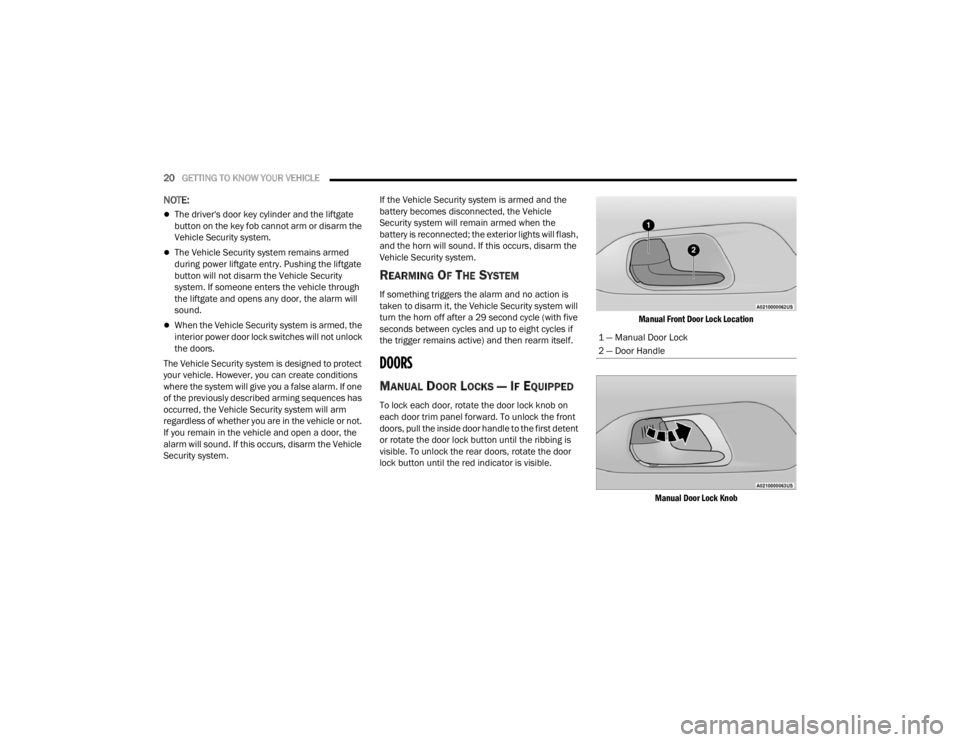
To lock each door, rotate the door lock knob on
each door trim panel forward. To unlock the front
doors, pull the inside door handle to the first detent
or rotate the door lock button until the ribbing is
visible. To unlock the rear doors, rotate the door
lock button until the red indicator is visible.
Manual Front Door Lock Location
Manual Door Lock Knob
1 — Manual Door Lock
2 — Door Handle
21_RUV_OM_EN_USC_t.book Page 20
Page 23 of 348
GETTING TO KNOW YOUR VEHICLE21
(Continued)
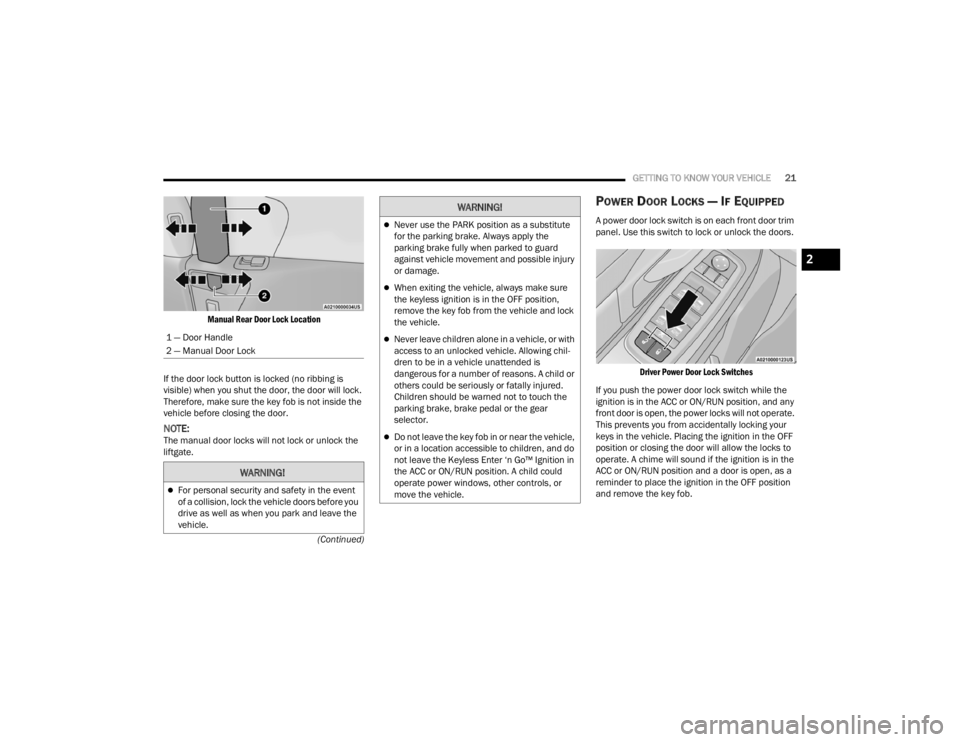
Manual Rear Door Lock Location
If the door lock button is locked (no ribbing is
visible) when you shut the door, the door will lock.
Therefore, make sure the key fob is not inside the
vehicle before closing the door.
NOTE:The manual door locks will not lock or unlock the
liftgate.
POWER DOOR LOCKS — IF EQUIPPED
A power door lock switch is on each front door trim
panel. Use this switch to lock or unlock the doors.
Driver Power Door Lock Switches
If you push the power door lock switch while the
ignition is in the ACC or ON/RUN position, and any
front door is open, the power locks will not operate.
This prevents you from accidentally locking your
keys in the vehicle. Placing the ignition in the OFF
position or closing the door will allow the locks to
operate. A chime will sound if the ignition is in the
ACC or ON/RUN position and a door is open, as a
reminder to place the ignition in the OFF position
and remove the key fob.
1 — Door Handle
2 — Manual Door Lock
WARNING!
For personal security and safety in the event
of a collision, lock the vehicle doors before you
drive as well as when you park and leave the
vehicle.
Never use the PARK position as a substitute
for the parking brake. Always apply the
parking brake fully when parked to guard
against vehicle movement and possible injury
or damage.
When exiting the vehicle, always make sure
the keyless ignition is in the OFF position,
remove the key fob from the vehicle and lock
the vehicle.
Never leave children alone in a vehicle, or with
access to an unlocked vehicle. Allowing chil
-
dren to be in a vehicle unattended is
dangerous for a number of reasons. A child or
others could be seriously or fatally injured.
Children should be warned not to touch the
parking brake, brake pedal or the gear
selector.
Do not leave the key fob in or near the vehicle,
or in a location accessible to children, and do
not leave the Keyless Enter ‘n Go™ Ignition in
the ACC or ON/RUN position. A child could
operate power windows, other controls, or
move the vehicle.
WARNING!
2
21_RUV_OM_EN_USC_t.book Page 21
Page 26 of 348
24GETTING TO KNOW YOUR VEHICLE
MANUAL SLIDING SIDE DOOR
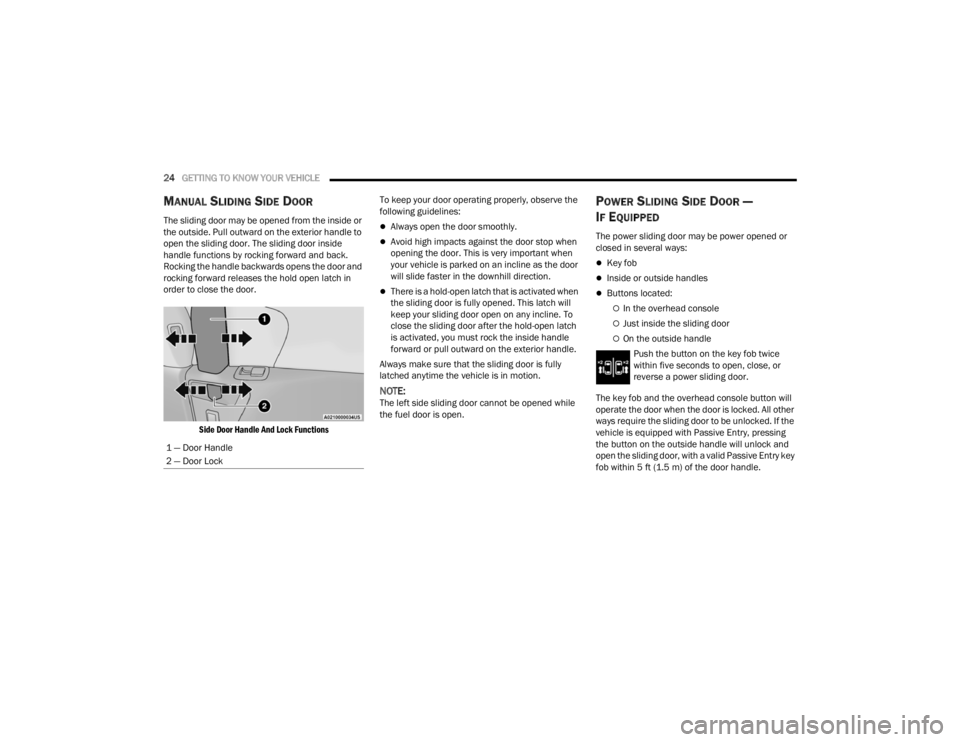
The sliding door may be opened from the inside or
the outside. Pull outward on the exterior handle to
open the sliding door. The sliding door inside
handle functions by rocking forward and back.
Rocking the handle backwards opens the door and
rocking forward releases the hold open latch in
order to close the door.
Side Door Handle And Lock Functions
To keep your door operating properly, observe the
following guidelines:Always open the door smoothly.
Avoid high impacts against the door stop when
opening the door. This is very important when
your vehicle is parked on an incline as the door
will slide faster in the downhill direction.
There is a hold-open latch that is activated when
the sliding door is fully opened. This latch will
keep your sliding door open on any incline. To
close the sliding door after the hold-open latch
is activated, you must rock the inside handle
forward or pull outward on the exterior handle.
Always make sure that the sliding door is fully
latched anytime the vehicle is in motion.
NOTE:The left side sliding door cannot be opened while
the fuel door is open.
POWER SLIDING SIDE DOOR —
I
F EQUIPPED
The power sliding door may be power opened or
closed in several ways:
Key fob
Inside or outside handles
Buttons located:
In the overhead console
Just inside the sliding door
On the outside handle
Push the button on the key fob twice
within five seconds to open, close, or
reverse a power sliding door.
The key fob and the overhead console button will
operate the door when the door is locked. All other
ways require the sliding door to be unlocked. If the
vehicle is equipped with Passive Entry, pressing
the button on the outside handle will unlock and
open the sliding door, with a valid Passive Entry key
fob within 5 ft (1.5 m) of the door handle.
1 — Door Handle
2 — Door Lock
21_RUV_OM_EN_USC_t.book Page 24
Page 27 of 348
GETTING TO KNOW YOUR VEHICLE25
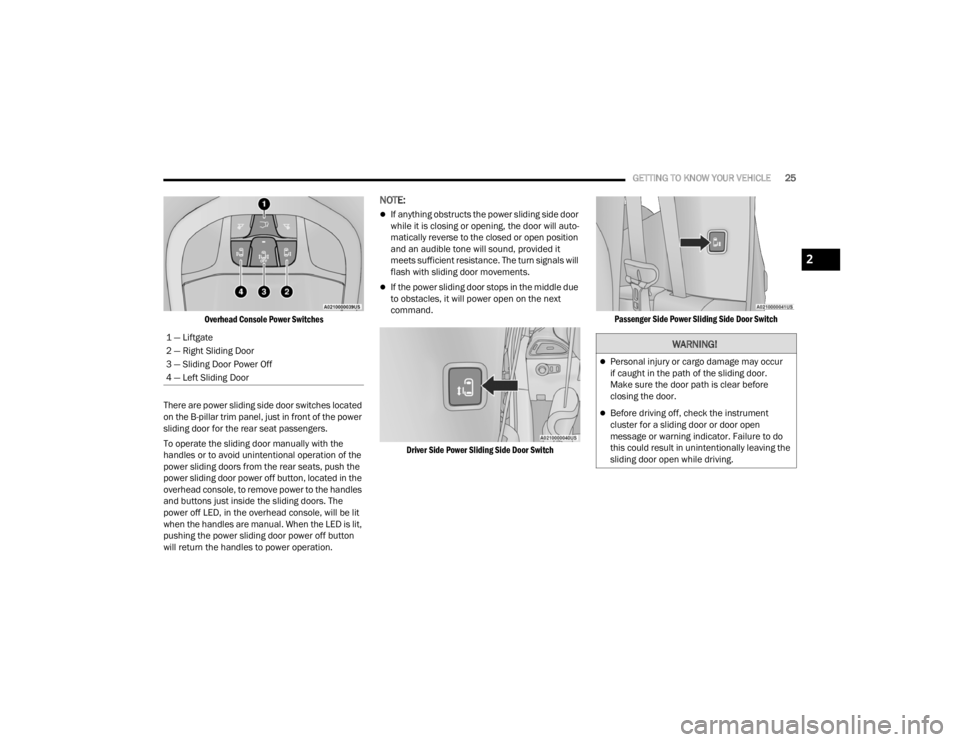
Overhead Console Power Switches
There are power sliding side door switches located
on the B-pillar trim panel, just in front of the power
sliding door for the rear seat passengers.
To operate the sliding door manually with the
handles or to avoid unintentional operation of the
power sliding doors from the rear seats, push the
power sliding door power off button, located in the
overhead console, to remove power to the handles
and buttons just inside the sliding doors. The
power off LED, in the overhead console, will be lit
when the handles are manual. When the LED is lit,
pushing the power sliding door power off button
will return the handles to power operation.
NOTE:
If anything obstructs the power sliding side door
while it is closing or opening, the door will auto -
matically reverse to the closed or open position
and an audible tone will sound, provided it
meets sufficient resistance. The turn signals will
flash with sliding door movements.
If the power sliding door stops in the middle due
to obstacles, it will power open on the next
command.
Driver Side Power Sliding Side Door Switch Passenger Side Power Sliding Side Door Switch
1 — Liftgate
2 — Right Sliding Door
3 — Sliding Door Power Off
4 — Left Sliding Door
WARNING!
Personal injury or cargo damage may occur
if caught in the path of the sliding door.
Make sure the door path is clear before
closing the door.
Before driving off, check the instrument
cluster for a sliding door or door open
message or warning indicator. Failure to do
this could result in unintentionally leaving the
sliding door open while driving.
2
21_RUV_OM_EN_USC_t.book Page 25