maintenance CHRYSLER VOYAGER 2022 Owners Manual
[x] Cancel search | Manufacturer: CHRYSLER, Model Year: 2022, Model line: VOYAGER, Model: CHRYSLER VOYAGER 2022Pages: 316, PDF Size: 17.41 MB
Page 3 of 316
TABLE OF CONTENTS
1
2
3
4
5
6
7
8
9
10
11
1 INTRODUCTION .............................................................................................................................. 7
2 GETTING TO KNOW YOUR VEHICLE ..................................................................................12
3 GETTING TO KNOW YOUR INSTRUMENT PANEL ........................................................82
4 STARTING AND OPERATING .............................................................................................. 104 5 MULTIMEDIA .............................................................................................................................. 140
6 SAFETY ......................................................................................................................................... 158 7 IN CASE OF EMERGENCY ..................................................................................................... 217
8 SERVICING AND MAINTENANCE ...................................................................................... 243
9 TECHNICAL SPECIFICATIONS ............................................................................................ 295
10 CUSTOMER ASSISTANCE ......................................................................................................301 11 INDEX .............................................................................................................................................305
22_RUVG_OM_EN_USC_t.book Page 1
Page 5 of 316
3
EXTERIOR LIGHTS ................................................. 54 Multifunction Lever ..........................................54
Headlight Switch...............................................54
Daytime Running Lights (DRLs) —
If Equipped........................................................55
High/Low Beam Switch....................................55
Flash-To-Pass ..................................................55
Automatic Headlights — If Equipped ...............55
Headlight Time Delay — If Equipped ...............56
Lights-On Reminder..........................................56
Front Fog Lights — If Equipped ........................56
Turn Signals ......................................................56
Lane Change Assist — If Equipped ..................57
Battery Protection ...........................................57
INTERIOR LIGHTS .................................................. 57
Interior Courtesy Lights ...................................57
WINDSHIELD WIPER AND WASHERS ................ 58
Windshield Wiper Operation ............................58
Rear Wiper And Washer ...................................60
CLIMATE CONTROLS ............................................. 60
Manual Climate Control Descriptions And
Functions ..........................................................60
Operating Tips ..................................................65
INTERIOR STORAGE AND EQUIPMENT ............... 66
Storage..............................................................66
Sun Screens — If Equipped..............................69
USB/AUX Control .............................................69
Power Outlets ...................................................70 WINDOWS ...............................................................72
Power Windows ................................................72
Automatic Window Features ...........................73
Reset Auto Up...................................................74
Wind Buffeting ..................................................74
HOOD ...................................................................74
Opening.............................................................74
Closing ..............................................................75
LIFTGATE ................................................................. 75
To Unlock/Open The Liftgate...........................75
To Lock/Close The Liftgate ..............................76
Power Liftgate — If Equipped ...........................76
Cargo Area Features ....................................77
STOW ‘N PLACE ROOF RACK —
IF EQUIPPED ...........................................................77
Deploying The Crossbars .................................78
Stowing The Crossbars ....................................79
GETTING TO KNOW YOUR
INSTRUMENT PANEL
INSTRUMENT CLUSTER .........................................82Instrument Cluster Descriptions .....................83
INSTRUMENT CLUSTER .........................................84
Instrument Cluster Descriptions .....................85 INSTRUMENT CLUSTER DISPLAY ........................ 85
Instrument Cluster Display Location And
Controls............................................................. 86
Oil Life Reset .................................................... 87
KeySense Cluster Messages —
If Equipped .......................................................87
Instrument Cluster Display Menu Items ........ 88
Battery Saver On/Battery Saver Mode
Message — Electrical Load Reduction
Actions — If Equipped ...................................... 93
TRIP COMPUTER ................................................... 94
WARNING LIGHTS AND MESSAGES ................... 95
Red Warning Lights ..........................................95
Yellow Warning Lights ...................................... 98
Yellow Indicator Lights .................................. 101 Green Indicator Lights .................................. 101White Indicator Lights ................................... 101
Blue Indicator Lights ..................................... 101
ONBOARD DIAGNOSTIC SYSTEM — OBD II ...... 102
Onboard Diagnostic System
(OBD II) Cybersecurity ................................... 102
EMISSIONS INSPECTION AND
MAINTENANCE PROGRAMS............................... 103
22_RUVG_OM_EN_USC_t.book Page 3
Page 7 of 316
5
SAFETY
SAFETY FEATURES .............................................. 158Anti-Lock Brake System (ABS) ..................... 158
Rear Seat Reminder Alert (RSRA) ................ 159
Electronic Brake Control (EBC) System ...... 159
AUXILIARY DRIVING SYSTEMS .......................... 164
Blind Spot Monitoring (BSM) —
If Equipped..................................................... 164
Forward Collision Warning (FCW) With
Mitigation — If Equipped ............................... 168
Tire Pressure Monitoring System
(TPMS)............................................................ 171
OCCUPANT RESTRAINT SYSTEMS .................... 174
Occupant Restraint Systems Features ....... 174Important Safety Precautions....................... 174
Seat Belt Systems ........................................ 175
Supplemental Restraint Systems (SRS) ...... 184
Child Restraints ........................................... 197
SAFETY TIPS ......................................................213
Transporting Passengers .............................. 213Transporting Pets ....................................... 214
Safety Checks You Should Make
Inside The Vehicle ........................................ 214
Periodic Safety Checks You Should Make
Outside The Vehicle ...................................... 215Exhaust Gas ................................................... 216Carbon Monoxide Warnings ......................... 216
IN CASE OF EMERGENCY
HAZARD WARNING FLASHERS......................... 217
ASSIST AND SOS MIRROR — IF EQUIPPED ..... 217
JACKING AND TIRE CHANGING —
IF EQUIPPED ..................................................... 220 Preparations For Jacking ............................. 221
Jack And Spare Tire Location ....................... 221
Equipment Removal ..................................... 221
Jacking Instructions .................................... 223
Road Tire Installation .................................... 226
Portable Air Compressor —
If Equipped..................................................... 227Return Inflatable Spare Tire ....................... 228
TIRE SERVICE KIT — IF EQUIPPED .................... 228
JUMP STARTING .................................................. 234 Preparations For Jump Start ........................ 234
Jump Starting Procedure .............................. 235
REFUELING IN EMERGENCY –
IF EQUIPPED ....................................................... 236
IF YOUR ENGINE OVERHEATS ........................... 237
MANUAL PARK RELEASE .................................. 238
FREEING A STUCK VEHICLE .............................. 239
TOWING A DISABLED VEHICLE ......................... 240
ENHANCED ACCIDENT RESPONSE SYSTEM
(EARS) .................................................................. 242
EVENT DATA RECORDER (EDR) ........................ 242
SERVICING AND MAINTENANCE
SCHEDULED SERVICING ..................................... 243
Maintenance Plan ......................................... 244
ENGINE COMPARTMENT .................................... 247
3.6L Engine ................................................... 247
Checking Oil Level ......................................... 248
Adding Washer Fluid .................................... 248
Maintenance-Free Battery ........................... 248
Pressure Washing ......................................... 249
VEHICLE MAINTENANCE ..................................... 249
Engine Oil ...................................................... 249
Engine Oil Filter ........................................... 250
Engine Air Cleaner Filter ............................ 250
Accessory Drive Belt Inspection ................... 250Air Conditioner Maintenance ....................... 251
Body Lubrication ........................................... 253
Windshield Wiper Blades ............................. 253Exhaust System ............................................ 256
Cooling System.............................................. 258
Brake System ................................................ 261
Automatic Transmission .............................. 262
Fuses.............................................................. 263
Bulb Replacement ........................................ 272
22_RUVG_OM_EN_USC_t.book Page 5
Page 8 of 316
6
TIRES .................................................................... 275 Tire Safety Information ................................. 275Tires — General Information ......................... 282Tire Types ....................................................... 286
Spare Tires — If Equipped ............................. 286
Wheel And Wheel Trim Care ......................... 288Snow Traction Devices ................................. 289Tire Rotation Recommendations ................. 290
DEPARTMENT OF TRANSPORTATION
UNIFORM TIRE QUALITY GRADES ..................... 291
Treadwear ...................................................... 291Traction Grades ............................................. 291
Temperature Grades ..................................... 291
STORING THE VEHICLE ....................................... 292
BODYWORK .......................................................... 292
Protection From Atmospheric Agents .......... 292
Body And Underbody Maintenance.............. 292
Preserving The Bodywork ............................. 292
INTERIORS ........................................................... 293
Seats And Fabric Parts.................................. 293
Plastic And Coated Parts .............................. 294Leather Surfaces ........................................... 294Glass Surfaces .............................................. 294
TECHNICAL SPECIFICATIONS
VEHICLE IDENTIFICATION NUMBER (VIN) ........ 295
BRAKE SYSTEM ................................................... 295
WHEEL AND TIRE TORQUE
SPECIFICATIONS ................................................. 295
Torque Specifications ................................... 295
FUEL REQUIREMENTS ....................................... 296
3.6L Engine ................................................... 296
Reformulated Gasoline ................................. 296
Gasoline/Oxygenate Blends ......................... 297
Do Not Use E-85 In Non-Flex Fuel
Vehicles.......................................................... 297CNG And LP Fuel System Modifications ...... 297Methylcyclopentadienyl Manganese
Tricarbonyl (MMT) In Gasoline...................... 297Materials Added To Fuel ............................... 298
Fuel System Cautions ................................... 298
FLUID CAPACITIES .............................................. 299
ENGINE FLUIDS AND LUBRICANTS .................. 299
CHASSIS FLUIDS AND LUBRICANTS ................ 300
CUSTOMER ASSISTANCE
SUGGESTIONS FOR OBTAINING SERVICE
FOR YOUR VEHICLE ............................................. 301
Prepare For The Appointment ...................... 301
Prepare A List ................................................ 301
Be Reasonable With Requests..................... 301
IF YOU NEED ASSISTANCE ................................. 301
FCA US LLC Customer Center....................... 301
FCA Canada Inc. Customer Center .............. 301
Mexico............................................................ 302
Puerto Rico And US Virgin Islands ............... 302
Customer Assistance For The Hearing
Or Speech Impaired
(TDD/TTY) ...................................................... 302
Service Contract ........................................... 302
WARRANTY INFORMATION ................................ 303
MOPAR® PARTS ................................................. 303
REPORTING SAFETY DEFECTS .......................... 303
In The 50 United States And
Washington, D.C............................................ 303
In Canada ...................................................... 303
PUBLICATION ORDER FORMS .......................... 304
GENERAL INFORMATION.................................... 304
22_RUVG_OM_EN_USC_t.book Page 6
Page 9 of 316
7
INTRODUCTION
Dear Customer,
Congratulations on the purchase of your new Chrysler vehicle. Be assured that it represents precision workmanship, distinctive styling, and high quality.
This Owner's Manual has been prepared with the assistance of service and engineering specialists to acquaint you with the operation and maintenance of your
vehicle. It is supplemented by customer-oriented documents. Within this information, you will find a description of the services that FCA US LLC offers to its
customers as well as the details of the terms and conditions for maintaining its validity. Please take the time to read all of these publications carefully before
driving your vehicle for the first time. Following the instructions, recommendations, tips, and important warnings in this manual will help ensure safe and
enjoyable operation of your vehicle.
This Owner’s Manual describes all versions of this vehicle. Options and equipment dedicated to specific markets or versions are not expressly indicated in the
text. Therefore, you should only consider the information that is related to the trim level, engine, and version that you have purchased. Any content introduced
throughout the Owner’s Information, which may or may not be applicable to your vehicle, will be identified with the wording “If Equipped”. All data contained in
this publication are intended to help you use your vehicle in the best possible way. FCA US LLC aims at a constant improvement of the vehicles produced. For
this reason, it reserves the right to make changes to the model described for technical and/or commercial reasons. For further information, contact an authorized
dealer.
When it comes to service, remember that authorized dealers know your Chrysler vehicle best, have factory-trained technicians and genuine Mopar® parts, and
care about your satisfaction.1
22_RUVG_OM_EN_USC_t.book Page 7
Page 89 of 316
GETTING TO KNOW YOUR INSTRUMENT PANEL87
The instrument cluster display (base/premium
cluster) features a driver interactive display that is
located in the center of the instrument cluster, and
may include the following menu/submenu items:
Speedometer
Vehicle Info
Driver Assist — If Equipped
Fuel Economy
Trip (Trip A / Trip B)
Stop / Start — If Equipped
Audio
Messages
Screen Setup
OIL LIFE RESET
Your vehicle is equipped with an engine oil
change indicator system. The “Oil Change
Required” message will display for approxi -
mately five seconds after a single chime has
sounded, to indicate it is time to change the
engine oil. The engine oil change indicator
system is duty cycle based, which means the
engine oil change interval may fluctuate, depen -
dent upon your personal driving style.
Unless reset, this message will continue to
display each time the ignition is cycled to the
ON/RUN position.
To reset the oil change indicator after
performing the scheduled maintenance, refer to
the following procedure.
NOTE:This procedure should only be performed after
scheduled maintenance is completed. Resetting
oil life other than when associated with a
scheduled maintenance may result in damage due
to not properly maintaining the engine oil.
Oil Life Reset
1. Without pressing the brake pedal, push the ENGINE START/STOP button and place the
ignition in the ON/RUN position (do not start
the vehicle.)
2. Push the OK button to enter the instrument
cluster display menu screen.
3. Push and release the down arrow button to
access the ”Vehicle Info” menu screen.
4. Push the left arrow button or right arrow
button to access the “Oil Life” submenu.
5. Hold the OK button to reset the “Oil Life” to
100%.
6. Push the up arrow button to exit the
instrument cluster display menu screen. Secondary Method For Oil Life Reset Procedure
1. Without pushing the brake pedal, place the
ignition in the ON/RUN position (do not start
the engine).
2. Fully press the accelerator pedal, slowly, three times within 10 seconds.
3. Without pushing the brake pedal, place the ignition in the OFF position.
NOTE:If the indicator message illuminates when you start
the vehicle, the oil change indicator system did not
reset. If necessary, repeat this procedure.
KEYSENSE CLUSTER MESSAGES —
I
F EQUIPPED
When the KeySense key is in use there will be:
Continuous, dedicated telltale
Unique Display Splash Screen
With KeySense in use there will be multiple
associated messages shown in the following table:
3
22_RUVG_OM_EN_USC_t.book Page 87
Page 102 of 316
100GETTING TO KNOW YOUR INSTRUMENT PANEL
Tire Pressure Monitoring System (TPMS)
Warning Light
The warning light switches on and a
message is displayed to indicate that the
tire pressure is lower than the
recommended value and/or that slow
pressure loss is occurring. In these cases, optimal
tire duration and fuel consumption may not be
guaranteed.
Should one or more tires be in the condition
mentioned above, the display will show the
indications corresponding to each tire.
Each tire, including the spare (if provided), should
be checked monthly when cold and inflated to the
inflation pressure recommended by the vehicle
manufacturer on the vehicle placard or tire
inflation pressure label. If your vehicle has tires of a different size than the size indicated on the
vehicle placard or tire inflation pressure label, you
should determine the proper tire inflation pressure
for those tires.
As an added safety feature, your vehicle has been
equipped with a TPMS that illuminates a low tire
pressure light when one or more of your tires is
significantly underinflated. Accordingly, when the
low tire pressure light illuminates, you should stop
and check your tires as soon as possible, and
inflate them to the proper pressure. Driving on a
significantly underinflated tire causes the tire to
overheat and can lead to tire failure. Underinflation
also reduces fuel efficiency and tire tread life, and
may affect the vehicle’s handling and stopping
ability.
Please note that the TPMS is not a substitute for
proper tire maintenance, and it is the driver’s
responsibility to maintain correct tire pressure,
even if underinflation has not reached the level to
trigger illumination of the TPMS low tire pressure
light.
Your vehicle has also been equipped with a TPMS
malfunction indicator to indicate when the system
is not operating properly. The TPMS malfunction
indicator is combined with the low tire pressure
light. When the system detects a malfunction, the
light will flash for approximately one minute and
then remain continuously illuminated. This
sequence will continue upon subsequent vehicle start-ups as long as the malfunction exists. When
the malfunction indicator is illuminated, the
system may not be able to detect or signal low tire
pressure as intended. TPMS malfunctions may
occur for a variety of reasons, including the
installation of replacement or alternate tires or
wheels on the vehicle that prevent the TPMS from
functioning properly. Always check the TPMS
malfunction light after replacing one or more tires
or wheels on your vehicle to ensure that the
replacement or alternate tires and wheels allow
the TPMS to continue to function properly.
CAUTION!
Do not continue driving with one or more flat
tires as handling may be compromised. Stop the
vehicle, avoiding sharp braking and steering. If a
tire puncture occurs, repair immediately using
the dedicated tire repair kit and contact an
authorized dealer as soon as possible.
CAUTION!
The TPMS has been optimized for the original
equipment tires and wheels. TPMS pressures
and warning have been established for the tire
size equipped on your vehicle. Undesirable
system operation or sensor damage may result
when using replacement equipment that is not
of the same size, type, and/or style. Aftermarket
wheels can cause sensor damage. Using
aftermarket tire sealants may cause the Tire
Pressure Monitoring System (TPMS) sensor to
become inoperable. After using an aftermarket
tire sealant it is recommended that you take
your vehicle to an authorized dealer to have your
sensor function checked.
22_RUVG_OM_EN_USC_t.book Page 100
Page 105 of 316
GETTING TO KNOW YOUR INSTRUMENT PANEL103
EMISSIONS INSPECTION AND
MAINTENANCE PROGRAMS
In some localities, it may be a legal requirement to
pass an inspection of your vehicle's emissions
control system. Failure to pass could prevent
vehicle registration.
For states that require an Inspection and
Maintenance (I/M), this check verifies
the Malfunction Indicator Light (MIL) is
functioning and is not on when the
engine is running, and that the OBD II system is
ready for testing.
Normally, the OBD II system will be ready. The
OBD II system may not be ready if your vehicle was
recently serviced, recently had a depleted battery
or a battery replacement. If the OBD II system
should be determined not ready for the I/M test,
your vehicle may fail the test.
Your vehicle has a simple ignition actuated test,
which you can use prior to going to the test station.
To check if your vehicle's OBD II system is ready,
you must do the following:
1. Cycle the ignition switch to the ON position,
but do not crank or start the engine.
NOTE:If you crank or start the engine, you will have to
start this test over.
2. As soon as you cycle the ignition switch to the ON position, you will see the Malfunction
Indicator Light (MIL) symbol come on as part of
a normal bulb check.
3. Approximately 15 seconds later, one of two things will happen:
The MIL will flash for about 10 seconds and
then return to being fully illuminated until
you turn OFF the ignition or start the engine.
This means that your vehicle's OBD II
system is not ready and you should not
proceed to the I/M station.
The MIL will not flash at all and will remain
fully illuminated until you place the ignition
in the off position or start the engine. This
means that your vehicle's OBD II system is
ready and you can proceed to the I/M
station. If your OBD II system is
not ready, you should see
an authorized dealer or repair facility. If your
vehicle was recently serviced or had a battery
failure or replacement, you may need to do nothing
more than drive your vehicle as you normally would
in order for your OBD II system to update. A
recheck with the above test routine may then
indicate that the system is now ready.
Regardless of whether your vehicle's OBD II system
is ready or not, if the MIL is illuminated during
normal vehicle operation you should have your
vehicle serviced before going to the I/M station.
The I/M station can fail your vehicle because the
MIL is on with the engine running.
3
22_RUVG_OM_EN_USC_t.book Page 103
Page 136 of 316
134STARTING AND OPERATING
(Continued)
TRAILER AND TONGUE WEIGHT
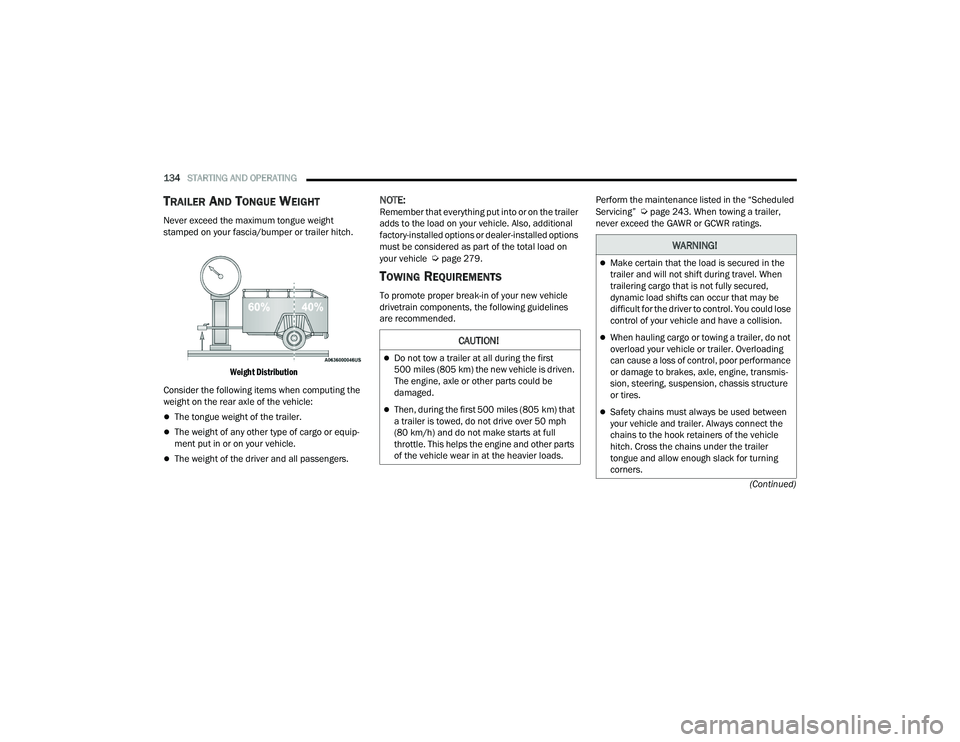
Never exceed the maximum tongue weight
stamped on your fascia/bumper or trailer hitch.
Weight Distribution
Consider the following items when computing the
weight on the rear axle of the vehicle:
The tongue weight of the trailer.
The weight of any other type of cargo or equip -
ment put in or on your vehicle.
The weight of the driver and all passengers.
NOTE:Remember that everything put into or on the trailer
adds to the load on your vehicle. Also, additional
factory-installed options or dealer-installed options
must be considered as part of the total load on
your vehicle
Úpage 279.
TOWING REQUIREMENTS
To promote proper break-in of your new vehicle
drivetrain components, the following guidelines
are recommended. Perform the maintenance listed in the “Scheduled
Servicing”
Úpage 243. When towing a trailer,
never exceed the GAWR or GCWR ratings.
CAUTION!
Do not tow a trailer at all during the first
500 miles (805 km) the new vehicle is driven.
The engine, axle or other parts could be
damaged.
Then, during the first 500 miles (805 km) that
a trailer is towed, do not drive over 50 mph
(80 km/h) and do not make starts at full
throttle. This helps the engine and other parts
of the vehicle wear in at the heavier loads.
WARNING!
Make certain that the load is secured in the
trailer and will not shift during travel. When
trailering cargo that is not fully secured,
dynamic load shifts can occur that may be
difficult for the driver to control. You could lose
control of your vehicle and have a collision.
When hauling cargo or towing a trailer, do not
overload your vehicle or trailer. Overloading
can cause a loss of control, poor performance
or damage to brakes, axle, engine, transmis -
sion, steering, suspension, chassis structure
or tires.
Safety chains must always be used between
your vehicle and trailer. Always connect the
chains to the hook retainers of the vehicle
hitch. Cross the chains under the trailer
tongue and allow enough slack for turning
corners.
22_RUVG_OM_EN_USC_t.book Page 134
Page 174 of 316
172SAFETY
NOTE:
The TPMS is not intended to replace normal tire
care and maintenance, or to provide warning of
a tire failure or condition.
The TPMS should not be used as a tire pressure
gauge while adjusting your tire pressure.
Driving on a significantly underinflated tire
causes the tire to overheat and can lead to tire
failure. Underinflation also reduces fuel effi -
ciency and tire tread life, and may affect the
vehicle’s handling and stopping ability.
The TPMS is not a substitute for proper tire
maintenance, and it is the driver’s responsibility
to maintain correct tire pressure using an accu -
rate tire pressure gauge, even if underinflation
has not reached the level to trigger illumination
of the TPMS Warning Light.
Seasonal temperature changes will affect tire
pressure, and the TPMS will monitor the actual
tire pressure in the tire.
Premium System
The Tire Pressure Monitoring System (TPMS) uses
wireless technology with wheel rim mounted
electronic sensors to monitor tire pressure levels.
Sensors, mounted to each wheel as part of the
valve stem, transmit tire pressure readings to the
receiver module.
NOTE:It is particularly important for you to check the tire
pressure in all of the tires on your vehicle monthly
and to maintain the proper pressure.
The TPMS consists of the following components:
Receiver module
Four Tire Pressure Monitoring System sensors
Various Tire Pressure Monitoring System
messages, which display in the instrument
cluster
Tire Pressure Monitoring System Warning Light
SERVICE TPMS WARNING
When a system fault is detected, the Tire Pressure
Monitoring System (TPMS) Warning Light will flash
on and off for 75 seconds and then remain on
solid. The system fault will also sound a chime. In
addition, the instrument cluster will display a
"SERVICE TPM SYSTEM" message for a minimum
of five seconds and then display dashes (--) in
place of the pressure value to indicate which
sensor is not being received.
CAUTION!
The TPMS has been optimized for the original
equipment tires and wheels. TPMS pressures
and warning have been established for the tire
size equipped on your vehicle. Undesirable
system operation or sensor damage may
result when using replacement equipment
that is not of the same size, type, and/or style.
The TPMS sensor is not designed for use on
aftermarket wheels and may contribute to a
poor overall system performance or sensor
damage. Customers are encouraged to use
OEM wheels to ensure proper TPMS feature
operation.
Using aftermarket tire sealants may cause the
Tire Pressure Monitoring System (TPMS)
sensor to become inoperable. After using an
aftermarket tire sealant it is recommended
that you take your vehicle to an authorized
dealer to have your sensor function checked.
After inspecting or adjusting the tire pressure
always reinstall the valve stem cap. This will
prevent moisture and dirt from entering the
valve stem, which could damage the TPMS
sensor.
22_RUVG_OM_EN_USC_t.book Page 172