light CITROEN AMI 2022 User Guide
[x] Cancel search | Manufacturer: CITROEN, Model Year: 2022, Model line: AMI, Model: CITROEN AMI 2022Pages: 44, PDF Size: 1.45 MB
Page 24 of 44
22
Practical information
Important recommendations
Power socket
Have a professional check that the
electrical system to be used complies with
applicable standards and is compatible with
the vehicle.
Always use a correctly earthed power socket,
protected by a 30
mA
residual current device.
Always use a power socket that is protected
by a circuit-breaker appropriate for the
electrical circuit’s current rating.
Charging cable
Incorrect use of this charging cable may
result in fire, property damage and serious
injury or death by electrocution!
Never use the charging cable if it is defective
or damaged in any way (corrosion, cuts).
Never attempt to repair or open the charging
cable.
If the charging cable is defective, consult
a dealer or qualified workshop to obtain a
replacement.
Never use the charging cable with an
extension cable, a multi-plug socket, a
conversion adaptor or in a damaged power
socket.
Never immerse the charging cable in water.
Never attempt to move the vehicle using the
charging cable.
Plugging in/Unplugging
Never plug the cable into the wall socket
(or unplug it) with wet hands.
Immediately stop charging if the charging
cable or wall socket become too hot to touch.
Do not expose it to flammable vapours - Risk
of electrical arcing or sparks!
After connecting the charging cable, check
that the instrument panel switches on,
otherwise disconnect and reconnect the
charging cable.
Charging will not start if the parking brake is
not applied.
Connection
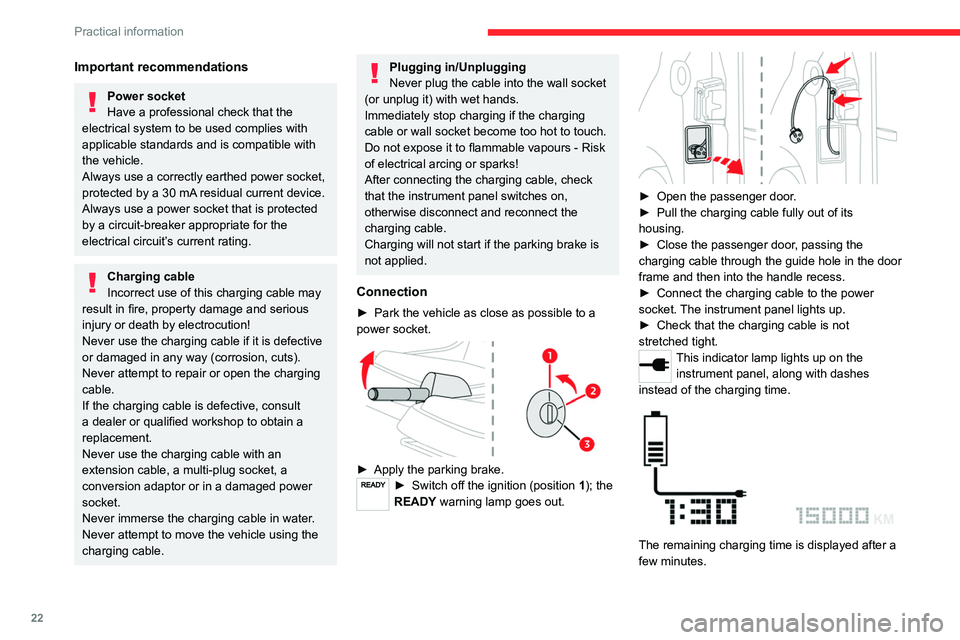
► Park the vehicle as close as possible to a
power socket.
► Apply the parking brake.► Switch off the ignition (position 1); the
READY warning lamp goes out.
► Open the passenger door.
► Pull the charging cable fully out of its
housing.
►
Close the passenger door, passing the
charging
cable through the guide hole in the door
frame and then into the handle recess.
►
Connect the charging cable to the power
socket. The instrument panel lights up.
►
Check that the charging cable is not
stretched tight.
This indicator lamp lights up on the instrument panel, along with dashes
instead of the charging time.
The remaining charging time is displayed after a
few minutes.
Page 28 of 44

26
Practical information
areas) and mud (in wet or cold areas). These
substances can be highly corrosive.
Contact a dealer or qualified workshop for
advice on removing stubborn stains requiring
special products (such as tar or insect
removers).
General information - Interior
When cleaning your vehicle, never clean
the interior with a jet of water.
Any liquids carried inside the vehicle in mugs
or other open containers can spill, presenting
a risk of damage if they come into contact
with the controls on the dashboard. Be alert!
Bodywork
Do not use abrasive products or
solvents, petrol or oil to clean the
bodywork.
Never use an abrasive sponge to clean
stubborn stains. Risk of scratching the
paintwork!
Do not apply polish.
Decals
(Depending on version)
Do not use a high-pressure washer to
clean the vehicle - risk of damaging or
detaching the decals!
Use a high-flow hose (temperature
between 25°C and 40°C).
Place the jet of water perpendicular to the
surface to be cleaned.
Rinse the vehicle with demineralised water.
Textile - Maintenance
Do not use aggressive cleaning products
(e.g. alcohol, solvent or ammonia).
Do not use steam-cleaning systems - Risk of
affecting the adhesion of the fabrics!
Remove dust from the textile parts
regularly with a dry cloth, soft brush or
vacuum cleaner.
Rub down the
textile parts once per year with
a clean, damp cloth.
After leaving overnight to
dry, brush with a soft-bristled brush.
Textile - Stain removal
Do not rub the stain or it may spread or
you may cause the substance to
penetrate the surface.
Act quickly by reducing the stain from its edges inwards.
Remove as much substance or solids as
possible using a spoon or spatula, and
remove
as much liquid as possible using
absorbent paper
.
Product/Procedure to use depending
on the type of stain:
–
Grease, oil and ink: clean with a pH-neutral
detergent.
–
Vomit: clean with sparkling mineral water
.
–
Blood: spread flour over the stain and allow
to dry; remove with a slightly damp cloth.
–
Mud: allow to dry and then remove with a
slightly damp cloth.
–
Cake, chocolate, ice cream: clean with
lukewarm water.
–
Sugary and/or alcoholic drinks: clean with
lukewarm water, or lemon juice if the stain is
persistent.
–
Hair gel, coffee, tomato sauce, vinegar:
clean with lukewarm water and lemon juice.
For solid substances, then use a soft brush or
vacuum cleaner.
For liquid substances, then use a damp
microfibre cloth and then dry with another
cloth.
Page 29 of 44
27
In the event of a breakdown
8Changing a wheel
The vehicle is not equipped with on-board tools,
such as a jack or wheel brace.
In the event of a flat tyre, call a dealer or
qualified workshop.
To have winter tyres fitted or the wheels
changed, consult a dealer or qualified workshop.
Changing a bulb
Cleaning
The headlamps have polycarbonate
lenses with a protective coating:
–
Do not clean them with a dry or abrasive
cloth, nor with detergent or solvent
products.
–
Use a sponge and soapy water or a pH
neutral product.
–
When using a jet of water to clean off
persistent marks, do not keep the jet directed
towards the headlamps, lamps or their
edges for too long, so as not to damage their
protective coating and seals.
Light-emitting diodes (LEDs)
Do not touch LED headlamps/lamps.
To replace this type of bulb, you must consult
a dealer or qualified workshop.
Direction indicators
Rapid flashing of the indicator lamp for a
direction indicator
(left or right) indicates that
one of the bulbs on the corresponding side
has failed.
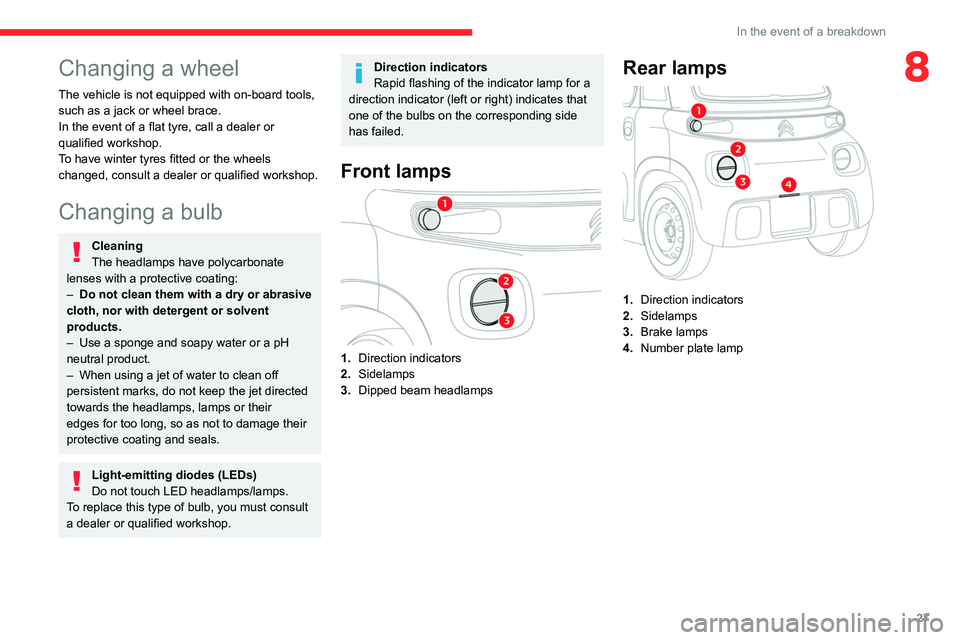
Front lamps
1. Direction indicators
2. Sidelamps
3. Dipped beam headlamps
Rear lamps
1.Direction indicators
2. Sidelamps
3. Brake lamps
4. Number plate lamp
Page 31 of 44

29
In the event of a breakdown
8Fuse table - Box 1
Fuse N° Rating(Amps)Functions
F1 2 ABrake switch
(+Battery)
F2 2 AMain computer
(+Battery)
F3 7.5 AFan
F4 3 AInstrument panel
F5 2 ABattery computer
F6 7.5 AHorn
F7 50 ABattery drive train/
DC/DC converter
Fuse table - Box 2
Fuse N° Rating
(Amps)Functions
F1 2 ASteering mounted
control (left)
F2 4 AMain computer
(+After ignition)
F3 15 AScreenwash pump
F5 2 AInstrument panel
warning lamps
F7 2 AMotor computer
F8 2 ABrake switch (+After
ignition)
F9 3 AUSB socket
- Lighting for
ventilation/heating/
demisting buttons,
drive selector
Fuse N° Rating
(Amps)Functions
F 11 7.5 ADiagnostic socket
F12 15 AWiper motor
(+Battery)
F13 2 ARear left wheel
speed sensor
F14 3 ASidelamps front
left and rear right -
Number plate lamp
F15 2 ASidelamps rear left
and front right
F16 3 ARight-hand dipped
beam headlamp
F17 3 ALeft-hand dipped
beam headlamp
F18 15 AWiper motor (+After
ignition)
12 V battery
Lead-acid starter batteries
These batteries contain harmful
substances (sulphuric acid and lead).
They must be disposed of in accordance
with regulations and must never under any
circumstances be discarded with household
waste.
Page 33 of 44
31
In the event of a breakdown
8Removing the battery
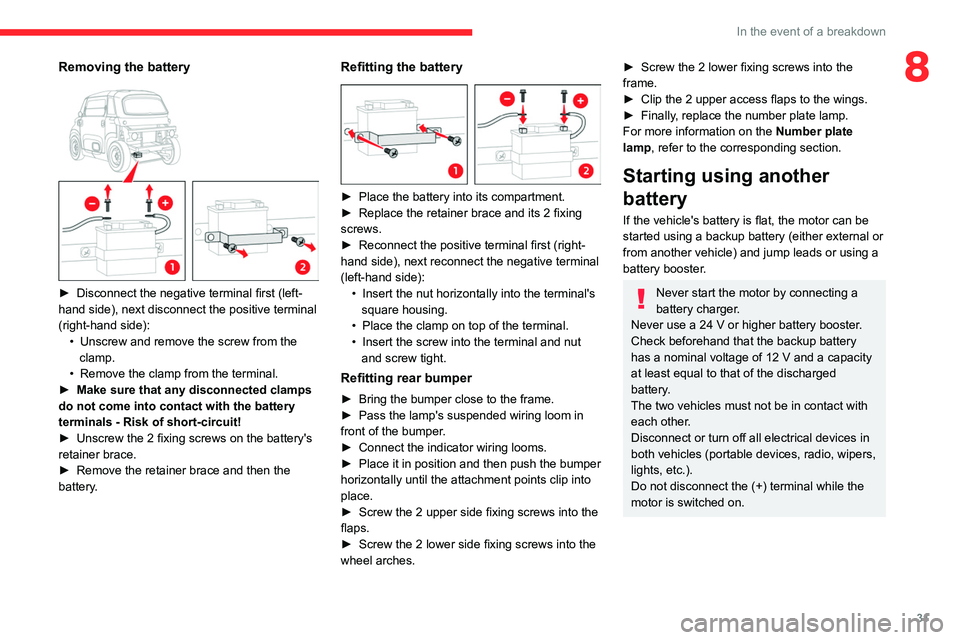
► Disconnect the negative terminal first (left-
hand side), next disconnect the positive terminal
(right-hand side): •
Unscrew and remove the screw from the
clamp.
•
Remove the clamp from the terminal.
► Make sure that any disconnected clamps
do not come into contact with the battery
terminals - Risk of short-circuit!
►
Unscrew the 2 fixing screws on the battery's
retainer brace.
►
Remove the retainer brace and then the
battery.
Refitting the battery
► Place the battery into its compartment.
► Replace the retainer brace and its 2 fixing
screws.
►
Reconnect the positive terminal first (right-
hand side), next reconnect the negative terminal
(left-hand side): •
Insert the nut horizontally into the terminal's
square housing.
•
Place the clamp on top of the terminal.
• Insert the screw into the terminal and nut
and screw tight.
Refitting rear bumper
► Bring the bumper close to the frame.
► Pass the lamp's suspended wiring loom in
front of the bumper.
►
Connect the indicator wiring looms.
► Place it in position and then push the bumper
horizontally until the attachment points clip into
place.
►
Screw the 2 upper side fixing screws into the
flaps.
►
Screw the 2 lower side fixing screws into the
wheel arches.
► Screw the 2 lower fixing screws into the
frame.
►
Clip the 2 upper access flaps to the wings.
► Finally, replace the number plate lamp.
For more information on the Number plate
lamp
, refer to the corresponding section.
Starting using another
battery
If the vehicle's battery is flat, the motor can be
started using a backup battery (either external or
from another vehicle) and jump leads or using a
battery booster.
Never start the motor by connecting a
battery charger.
Never use a 24
V or higher battery booster
.
Check beforehand that the backup battery
has a nominal voltage of 12
V and a capacity
at least equal to that of the discharged
battery
.
The two vehicles must not be in contact with
each other.
Disconnect or turn off all electrical devices in
both vehicles (portable devices, radio, wipers,
lights, etc.).
Do not disconnect the (+) terminal while the
motor is switched on.
Page 34 of 44

32
In the event of a breakdown
► Connect the red cable to the (+) terminal of
the flat battery A , then to the (+) terminal of the
backup battery B, or booster.
►
Connect one end of the green or black cable
to the (-) terminal of the backup battery B
or of
the booster (or to an earth point on the assisting
vehicle).
►
Connect the other end of the green or black
cable to the negative (-) terminal of flat battery A.
►
Start the engine/switch on the motor on the
assisting vehicle and leave it running for a few
minutes.
►
Turn the ignition key to start the disabled
vehicle.
The traction battery takes over the supply to the
12
V circuit.
► Wait for the assisting vehicle to return to idle.
► Disconnect the jump leads in reverse
order.
► Leave the vehicle switched on for at least 30
minutes to allow the traction battery to recharge
the 12
V battery
.
If the battery charge level in the traction battery
is too low, connect the vehicle's charging cable.
Charging the battery using a
battery charger
For optimum service life of the battery, it is
essential to maintain an adequate level of
charge.
In some circumstances, it may be necessary to
charge the battery:
–
When using the vehicle mainly for short
journeys.
–
If the vehicle is to be taken off the road for
several weeks.
To recharge the vehicle's battery yourself:
–
Only use a charger compatible with lead-
acid batteries and with a nominal voltage of
12
V
.
–
Follow the instructions provided by the
manufacturer of the charger.
–
Never reverse polarities.
– Disconnect the 12 V battery
.
Make sure the vehicle's charging cable is not
connected at the same time.
► Switch the ignition off.
► Disconnect or turn off all electrical devices
(portable devices, wipers, lights, etc.).
►
Switch off charger B before connecting
the cables to the battery
, so as to avoid any
dangerous sparks.
►
Ensure that the charger cables are in good
condition.
►
Connect the cables from charger B as
follows: •
Positive (+) red cable to the (+) terminal on
battery A
.
•
Negative (-) black cable to the (-) terminal on
battery A
.
►
At the end of the charging operation, switch
off charger B before disconnecting the cables
from battery
A.
Page 38 of 44
36
Alphabetical index
A
Accessories 12, 15
Adjusting seat 10
Advice on care and maintenance 25
Advice on driving 18
Audible warning 15
B
Battery, 12 V 24, 29
Bodywork 25
Brake discs
24
Bulbs (changing) 27
C
Changing a bulb 27
Changing a fuse 28
Changing a wheel 27
Changing a wiper blade 14
Changing to free-wheeling 25
Charge level indicator 7
Charging cable 22
Checking the levels 23
Checks
24–25
Checks, routine 24
Children 15–17
Child seats 16–17
Cleaning (advice) 26
Closing the doors 9
Closing the windows 9
Controls, at steering 13, 15
D
Dashboard 4
Demisting 10
Dimensions 34
Direction indicators 13
Display screen 6
Distance recorder 7
Domestic charging 21–22, 34
Doors
9
Driver's seat
10
E
Eco-driving (advice) 5
Electric motor 3, 19, 23, 34
Emergency warning lamps 15
Energy recovery 19
Exterior lighting 13
F
Fittings, interior 11
Fitting the battery 30
Flashing indicators 13
Fluid, brake
23
Fuses
28
H
Hazard warning lamps 15
Heating 10
I
Ignition switch 19
Indicators, direction 13
Instrument panel 6
Instruments and controls
4
K
Key 3, 19
L
Labels, identification 35
Lamps, front 27
Lamps, rear
27–28
LED lamps
13
LEDs - Light-emitting diodes 27
Level, brake fluid 23
Levels and checks 23
Level, screenwash fluid 24
Light-emitting diodes - LEDs 27
Loading 11
Loading space 11