warning CITROEN AMI 2022 User Guide
[x] Cancel search | Manufacturer: CITROEN, Model Year: 2022, Model line: AMI, Model: CITROEN AMI 2022Pages: 44, PDF Size: 1.45 MB
Page 24 of 44
22
Practical information
Important recommendations
Power socket
Have a professional check that the
electrical system to be used complies with
applicable standards and is compatible with
the vehicle.
Always use a correctly earthed power socket,
protected by a 30
mA
residual current device.
Always use a power socket that is protected
by a circuit-breaker appropriate for the
electrical circuit’s current rating.
Charging cable
Incorrect use of this charging cable may
result in fire, property damage and serious
injury or death by electrocution!
Never use the charging cable if it is defective
or damaged in any way (corrosion, cuts).
Never attempt to repair or open the charging
cable.
If the charging cable is defective, consult
a dealer or qualified workshop to obtain a
replacement.
Never use the charging cable with an
extension cable, a multi-plug socket, a
conversion adaptor or in a damaged power
socket.
Never immerse the charging cable in water.
Never attempt to move the vehicle using the
charging cable.
Plugging in/Unplugging
Never plug the cable into the wall socket
(or unplug it) with wet hands.
Immediately stop charging if the charging
cable or wall socket become too hot to touch.
Do not expose it to flammable vapours - Risk
of electrical arcing or sparks!
After connecting the charging cable, check
that the instrument panel switches on,
otherwise disconnect and reconnect the
charging cable.
Charging will not start if the parking brake is
not applied.
Connection
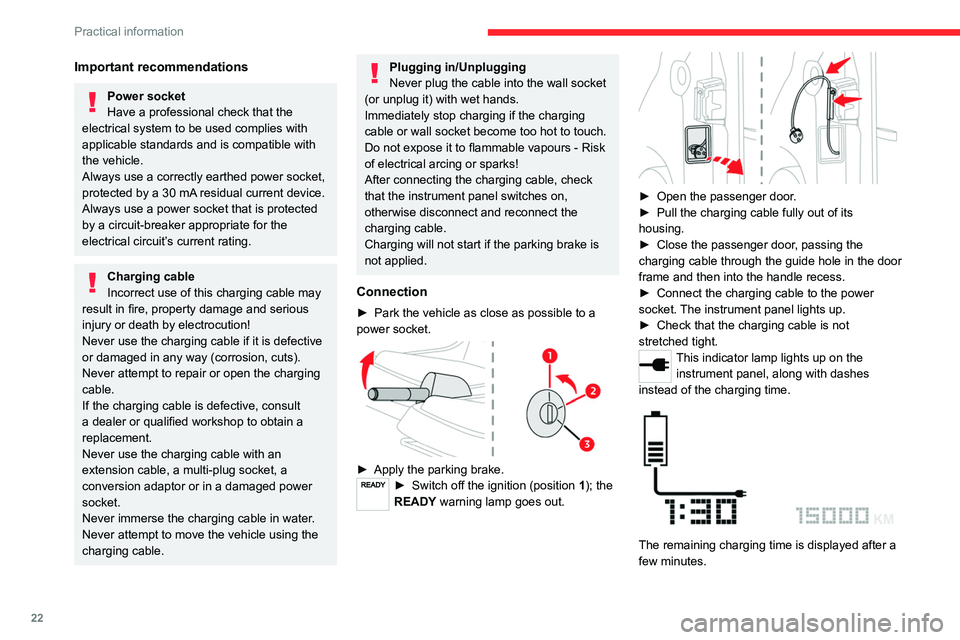
► Park the vehicle as close as possible to a
power socket.
► Apply the parking brake.► Switch off the ignition (position 1); the
READY warning lamp goes out.
► Open the passenger door.
► Pull the charging cable fully out of its
housing.
►
Close the passenger door, passing the
charging
cable through the guide hole in the door
frame and then into the handle recess.
►
Connect the charging cable to the power
socket. The instrument panel lights up.
►
Check that the charging cable is not
stretched tight.
This indicator lamp lights up on the instrument panel, along with dashes
instead of the charging time.
The remaining charging time is displayed after a
few minutes.
Page 31 of 44

29
In the event of a breakdown
8Fuse table - Box 1
Fuse N° Rating(Amps)Functions
F1 2 ABrake switch
(+Battery)
F2 2 AMain computer
(+Battery)
F3 7.5 AFan
F4 3 AInstrument panel
F5 2 ABattery computer
F6 7.5 AHorn
F7 50 ABattery drive train/
DC/DC converter
Fuse table - Box 2
Fuse N° Rating
(Amps)Functions
F1 2 ASteering mounted
control (left)
F2 4 AMain computer
(+After ignition)
F3 15 AScreenwash pump
F5 2 AInstrument panel
warning lamps
F7 2 AMotor computer
F8 2 ABrake switch (+After
ignition)
F9 3 AUSB socket
- Lighting for
ventilation/heating/
demisting buttons,
drive selector
Fuse N° Rating
(Amps)Functions
F 11 7.5 ADiagnostic socket
F12 15 AWiper motor
(+Battery)
F13 2 ARear left wheel
speed sensor
F14 3 ASidelamps front
left and rear right -
Number plate lamp
F15 2 ASidelamps rear left
and front right
F16 3 ARight-hand dipped
beam headlamp
F17 3 ALeft-hand dipped
beam headlamp
F18 15 AWiper motor (+After
ignition)
12 V battery
Lead-acid starter batteries
These batteries contain harmful
substances (sulphuric acid and lead).
They must be disposed of in accordance
with regulations and must never under any
circumstances be discarded with household
waste.
Page 38 of 44
36
Alphabetical index
A
Accessories 12, 15
Adjusting seat 10
Advice on care and maintenance 25
Advice on driving 18
Audible warning 15
B
Battery, 12 V 24, 29
Bodywork 25
Brake discs
24
Bulbs (changing) 27
C
Changing a bulb 27
Changing a fuse 28
Changing a wheel 27
Changing a wiper blade 14
Changing to free-wheeling 25
Charge level indicator 7
Charging cable 22
Checking the levels 23
Checks
24–25
Checks, routine 24
Children 15–17
Child seats 16–17
Cleaning (advice) 26
Closing the doors 9
Closing the windows 9
Controls, at steering 13, 15
D
Dashboard 4
Demisting 10
Dimensions 34
Direction indicators 13
Display screen 6
Distance recorder 7
Domestic charging 21–22, 34
Doors
9
Driver's seat
10
E
Eco-driving (advice) 5
Electric motor 3, 19, 23, 34
Emergency warning lamps 15
Energy recovery 19
Exterior lighting 13
F
Fittings, interior 11
Fitting the battery 30
Flashing indicators 13
Fluid, brake
23
Fuses
28
H
Hazard warning lamps 15
Heating 10
I
Ignition switch 19
Indicators, direction 13
Instrument panel 6
Instruments and controls
4
K
Key 3, 19
L
Labels, identification 35
Lamps, front 27
Lamps, rear
27–28
LED lamps
13
LEDs - Light-emitting diodes 27
Level, brake fluid 23
Levels and checks 23
Level, screenwash fluid 24
Light-emitting diodes - LEDs 27
Loading 11
Loading space 11
Page 39 of 44

37
Alphabetical index
M
Mains socket (domestic network) 22
Maintenance (advice) 25
Maintenance, routine 5, 15, 23–24
Markings, identification 35
Mirrors, door
10
Mobility
, electric
3, 18
Motor
, electric
23, 34
Multifunction control 13, 15
N
Number plate lamps 28
O
On-board tools 27
Opening the doors 9
Opening the windows 9
P
Pads, brake 24
Parking brake 18, 24
Port, USB
11
Pressures, tyres
25, 35
Protecting children 16–17
R
Range 5, 7
Recharging the battery 32
Recharging the traction battery 21–22
Recovery of the vehicle 33
Regenerative braking (deceleration
by engine braking)
19
Removing the battery 30
Removing the front bumper 23
Removing the rear bumper 30
Replacing bulbs 27
Replacing fuses 28
Reservoir
, screenwash
24
S
Safety (advice) 3, 15
Screen, monochrome 6
Screenwash 13
Screenwash fluid 24
Seat belts
15
Selector
, drive
19
Serial number
, vehicle
35
Servicing 15, 24–25
Smartphone 11
Starting/Stopping the vehicle 19
Starting using another battery 31
Stickers, customising ~ Stickers,
expressive
25–26
Storage
11
Suspension 25
T
Tables of fuses 28
T echnical data 34
Thermal comfort equipment 5
T
otal distance recorder
7
T
owing eye
33
T
raction battery
3, 21, 34
T
raction battery charge
7, 21–22
T
yres
25, 27, 35
V
Ventilation 10
W
Warning and indicator lamps 6
W arnings and indicators 6
W
ashing (advice)
26
W
eights
1
1, 34
Windows
9
Wiper blades (changing) 14
Wipers
13