Service Citroen BERLINGO 2013 2.G User Guide
[x] Cancel search | Manufacturer: CITROEN, Model Year: 2013, Model line: BERLINGO, Model: Citroen BERLINGO 2013 2.GPages: 236, PDF Size: 7.6 MB
Page 106 of 236
Equipment
104
Audio equipment, hands-free kit,
speakers, CD changer, satellite navigation
system, USB Box, Video kit, ...
Regardless of the audio and telematic
equipment offered on the market, the
technical constraints associated with the
fi tting of equipment of these families of
products mean that the special features of
the equipment and its compatibility with the
capacities of the your vehicle's standard
equipment must be taken into account.
Please contact a CITROËN dealer for more
information before fi tting such equipment.
To prevent the mat from becoming
caught under the pedals:
- ensure that the mat and its fi xings
are positioned correctly,
- never fi t one mat on top of another.
Maximum weights on bars
- Roof rack: 120 Kg.
- Transverse bars on roof: 100 Kg.
- Transverse bars on longitudinal
bars: 75 Kg.
Installation of radiocommunication
transmitters
Before installing accessory
radiocommunication transmitters with
an external aerial on your vehicle, you
are advised to contact a representative
of the CITROËN marque.
The CITROËN dealer network will
inform you of the specifi cations
(frequency band, maximum output
power, aerial position, specifi c
installation conditions) of the
transmitters which can be fi tted, in
accordance with the Motor Vehicle
Electromagnetic Compatibility Directive
(2004/104/CE).
Front mud fl aps, rear mud fl aps, 15/17
inch alloy wheels, wheelarch trim,
leather steering wheel, ....
Screenwash, interior and exterior
cleaning and maintenance products,
replacement bulbs, ...
The fi tting of electrical equipment
or accessories which are not
recommended by Automobiles
CITROËN may result in the failure
of your vehicle's electronic system.
Please note this specifi c warning. You
are advised to contact a representative
of the Marque to be shown the range
of recommended equipment and
accessories.
Depending on the country in which
the vehicle is sold or operated, it is
compulsory to have a high visibility
safety jacket, warning triangle and
replacement bulbs available in the
vehicle.
"Active Fleet Data" Telematic unit
Connected directly to the heart of
the vehicle ("Full CAN" multiplexed
network), as part of a comprehensive
service, the telematic unit allows the
sending in real time of information such
as:
- distance travelled,
- distance remaining before the next
service,
- warnings and faults (oil level,
coolant level, oil temperature,
coolant temperature, etc...).
This enables Fleet managers
to optimise the monitoring and
management of their business
vehicles.
Availability according to country;
contact a CITROËN dealer for more
information.
Page 107 of 236
105
CHECK
S
6
Partners in performance and
protecting the environment
Innovation in the search for
performance
For over 40 year, the TOTAL Research and
Development departments have developed
for CITROËN, lubricants to match the
latest technical innovations on CITROËN
vehicles, both for competition and for
everyday motoring.
For you, this is an assurance that you will
obtain of the best performance for your
engine.
Optimum protection for your
engine
By having your CITROËN
vehicle serviced with TOTAL
lubricants, you are contributing
towards improving the life and
performances of your engine,
while also protecting the
environment.
prefers
Page 112 of 236
Levels
11 0
Cooling system
Only use the fl uid recommended by the
manufacturer.
Otherwise, you risk seriously damaging
your engine.
When the engine is warm, the
temperature of the coolant is controlled
by the engine fan. As this fan can
operate with the ignition key removed
and because the cooling system is
pressurised, wait for at least one hour
after the engine has stopped before
carrying out any work.
Slacken the cap by 1/4 of a turn to
release the pressure to prevent any
risk of scalding. When the pressure
has dropped, remove the cap and top
up the level with coolant.
If fl uid has to be added frequently,
this indicates a fault which must be
checked by a CITROËN dealer as
soon as possible.
Power steering fluid level
The vehicle must be parked on level
ground with the engine cold. Unscrew
the cap integrated with the gauge and
check the level which must be between
the MIN and MAX marks. In order to regenerate the fi lter, you
are advised to drive at a speed higher
than 40 mph (60 km/h) for at least fi ve
minutes as soon as possible, when
traffi c conditions permit (until the
message disappears and the service
warning lamp goes off).
During regeneration of the particle
emission fi lter, the noise of a relay
operating may be heard under the
dashboard.
If the message is still displayed and
if the service warning lamp remains
on, consult a CITROËN dealer or a
qualifi ed workshop.
Topping up
The level must be between the MIN
and MAX marks on the expansion
bottle. If more than 1 litre of fl uid is
required to top up the level, have the
system checked by a CITROËN dealer
or a qualifi ed workshop.
Screenwash and headlamp
wash level
For best quality cleaning and for your
safety, we would advise that you use
products of the CITROËN range.
For optimum cleaning and to avoid
freezing, this fl uid must not be topped
up or replaced with plain water.
Capacity of the screenwash reservoir:
approximately 3 litres.
If your vehicle is fi tted with headlamp
washers, the capacity of the reservoir
is 6 litres.
Diesel additive level
(Diesel with particle
emission filter)
Topping up
This additive must be topped up by
a CITROËN dealer or a qualifi ed
workshop without delay.
Waste products
Avoid prolonged contact of used oil
with the skin.
Brake fl uid is harmful to health and
very corrosive.
Do not dispose of used oil, brake fl uid
or coolant into drains or into the ground
but into the containers dedicated to this
use at CITROËN dealer (France) or an
authorised waste disposal site. The minimum level of this additive
is indicated by lighting of the service
warning lamp, accompanied by an
audible signal and a message in the
screen.
When this occurs with the engine
running it is due to the start of
saturation of the particle emission fi lter
(exceptionally prolonged urban type
driving conditions: low speed, long
traffi c jams, ...).
Page 113 of 236
Checks
111
CHECK
S
6
CHECKS
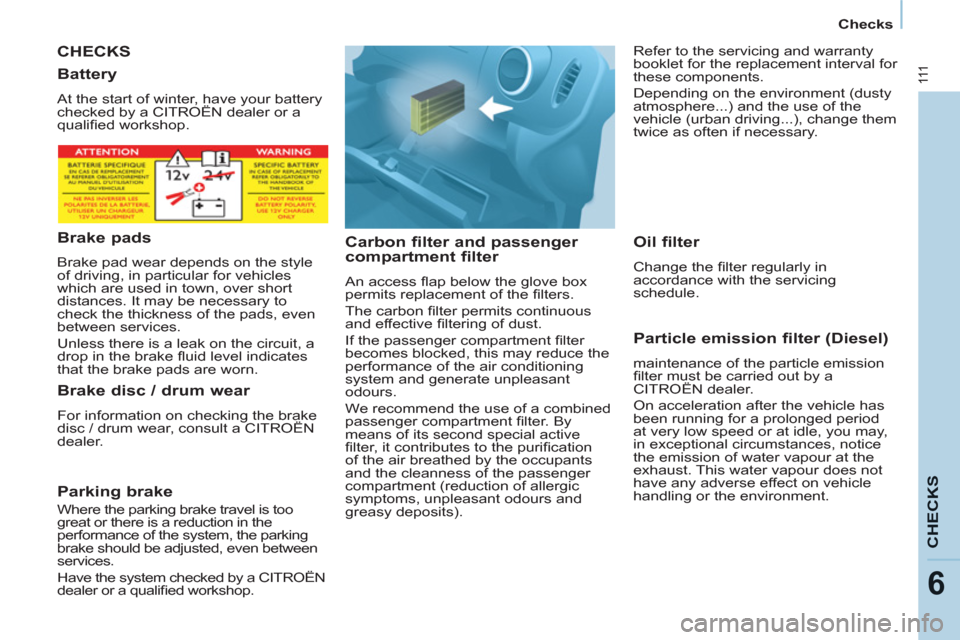
Carbon filter and passenger
compartment filter
An access fl ap below the glove box
permits replacement of the fi lters.
The carbon fi lter permits continuous
and effective fi ltering of dust.
If the passenger compartment fi lter
becomes blocked, this may reduce the
performance of the air conditioning
system and generate unpleasant
odours.
We recommend the use of a combined
passenger compartment fi lter. By
means of its second special active
fi lter, it contributes to the purifi cation
of the air breathed by the occupants
and the cleanness of the passenger
compartment (reduction of allergic
symptoms, unpleasant odours and
greasy deposits).
Particle emission filter (Diesel)
maintenance of the particle emission
fi lter must be carried out by a
CITROËN dealer.
On acceleration after the vehicle has
been running for a prolonged period
at very low speed or at idle, you may,
in exceptional circumstances, notice
the emission of water vapour at the
exhaust. This water vapour does not
have any adverse effect on vehicle
handling or the environment.
Battery
At the start of winter, have your battery
checked by a CITROËN dealer or a
qualifi ed workshop.
Brake pads
Brake pad wear depends on the style
of driving, in particular for vehicles
which are used in town, over short
distances. It may be necessary to
check the thickness of the pads, even
between services.
Unless there is a leak on the circuit, a
drop in the brake fl uid level indicates
that the brake pads are worn.
Brake disc / drum wear
For information on checking the brake
disc / drum wear, consult a CITROËN
dealer.
Parking brake
Where the parking brake travel is too
great or there is a reduction in the
performance of the system, the parking
brake should be adjusted, even between
services.
Have the system checked by a CITROËN
dealer or a qualifi ed workshop.
Oil filter
Change the fi lter regularly in
accordance with the servicing
schedule. Refer to the servicing and warranty
booklet for the replacement interval for
these components.
Depending on the environment (dusty
atmosphere...) and the use of the
vehicle (urban driving...), change them
twice as often if necessary.
Page 144 of 236
9.2
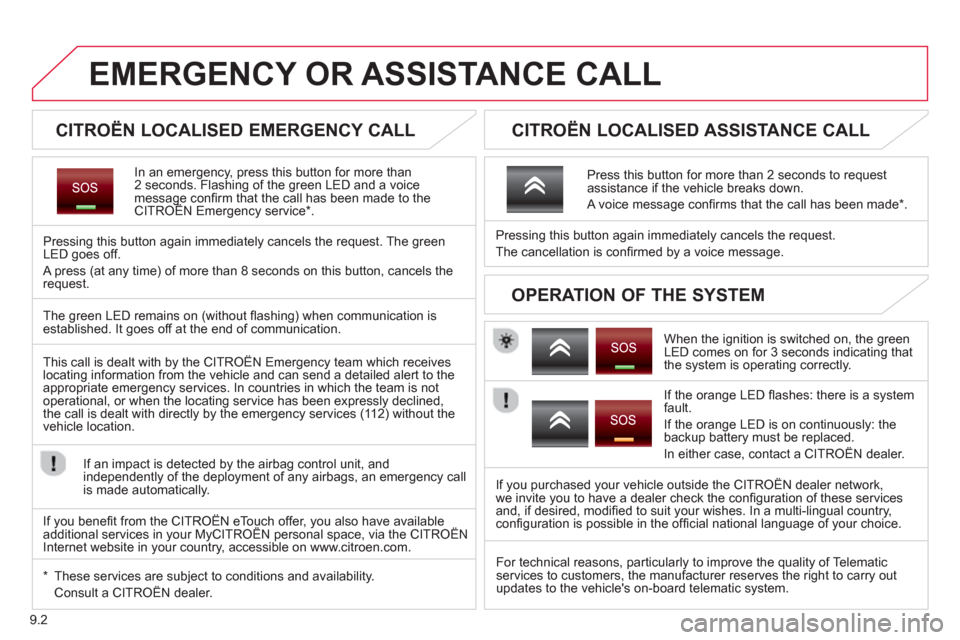
EMERGENCY OR ASSISTANCE CALL
CITROËN LOCALISED EMERGENCY CALL
In an emergency, press this button for more than2 seconds. Flashing of the green LED and a voice message confi rm that the call has been made to the CITROËN Emergency service * . gg
Pressing this button again immediately cancels the request. The green LED goes off.
A press
(at any time) of more than 8 seconds on this button, cancels the
request.
CITROËN LOCALISED ASSISTANCE CALL
When the ignition is switched on, the green
LED comes on for 3 seconds indicating that
the system is operating correctly.
If the oran
ge LED fl ashes: there is a system
fault.
If the oran
ge LED is on continuously: thebackup battery must be replaced.
In either case, contact a CITRO
ËN dealer. Pressin
g this button again immediately cancels the request.
The cancellation is confi rmed b
y a voice message.
Press this button for more than 2 seconds to request
assistance if the vehicle breaks down.
A voice message confi rms that the call has been made *
.
OPERATION OF THE SYSTEM
The green LED remains on (without fl ashing) when communication is established. It goes off at the end of communication.
This call is dealt with b
y the CITROËN Emergency team which receiveslocating information from the vehicle and can send a detailed alert to theappropriate emergency services. In countries in which the team is not
operational, or when the locating service has been expressly declined,
the call is dealt with directl
y by the emergency services (11 2) without the
vehicle location.
If an impact is detected b
y the airbag control unit, and
independently of the deployment of any airbags, an emergency callis made automatically.
* These services are sub
ject to conditions and availability.
Consult a CITROËN dealer.If you purchased your vehicle outside the CITROËN dealer network,
we invite
you to have a dealer check the confi guration of these servicesand, if desired, modifi ed to suit your wishes. In a multi-lingual country, confi guration is possible in the offi cial national language of your choice.
For technical reasons, particularl
y to improve the quality of Telematic services to customers, the manufacturer reserves the right to carry out
updates to the vehicle's on-board telematic system.
If you benefi t from the CITROËN eTouch offer, you also have availableadditional services in your MyCITROËN personal space, via the CITROËN y,y
Internet website in your country, accessible on www.citroen.com.
Page 156 of 236
9.14
05
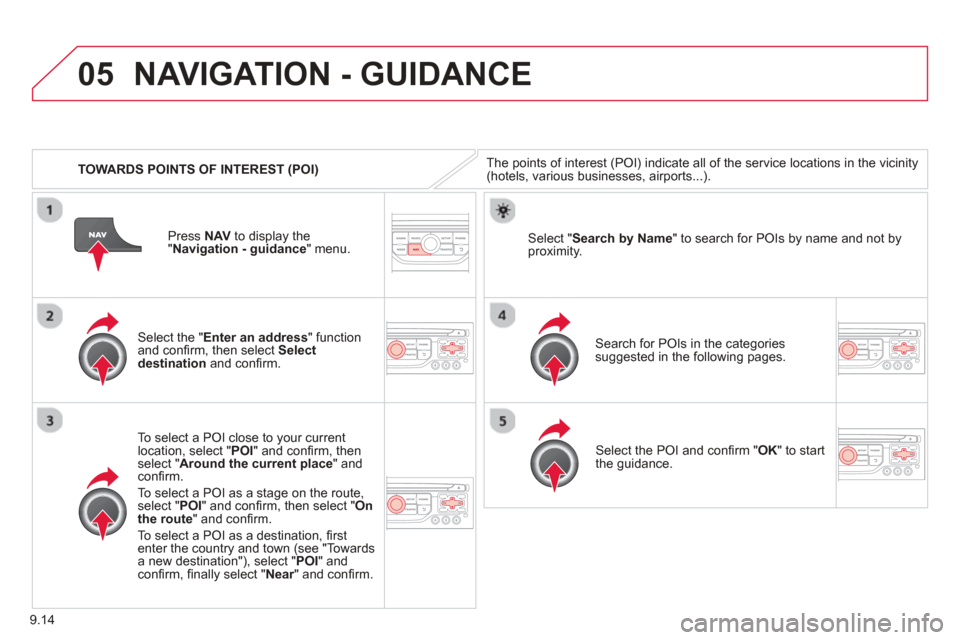
TOWARDS POINTS OF INTEREST (POI)
NAVIGATION - GUIDANCE
The points of interest (POI) indicate all of the service locations in the vicinity(hotels, various businesses, airports...).
Select the " Enter an address " function
and confi rm, then select Select
destinationand confi rm.
To select a P
OI close to your currentlocation, select "POI" and confi rm, thenselect " Around the current place " and confi rm.
To select a P
OI as a stage on the route,select " POI" and confi rm, then select " On
the route" and confi rm.
To select a P
OI as a destination, fi rst enter the country and town (see "Towards
a new destination"), select "POI" andconfi rm, fi nally select "Near" and confi rm.r
Search for POIs in the categories
suggested in the following pages.
Select "
Search by Name " to search for POIs by name and not byproximity.
Select the POI and confi rm " OK" to start
the guidance.
Pr
ess
NAV to display the
"Navigation - guidance" menu.
Page 171 of 236
9.29
07
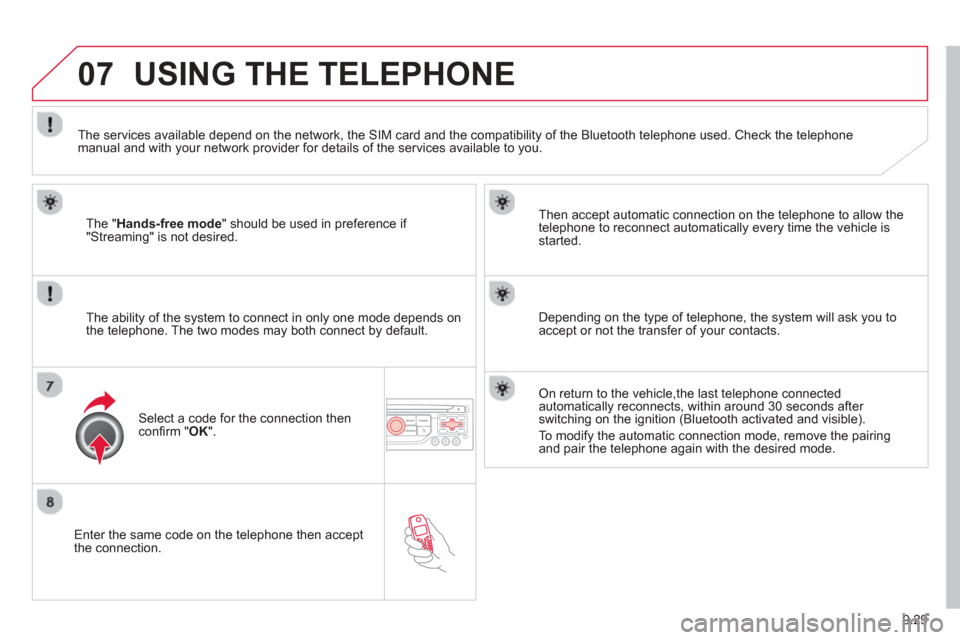
Enter the same code on the telephone then accept
the connection. Then accept automatic connection on the telephone to allow the
te
lephone to reconnect automatically every time the vehicle is started.
The abilit
y of the system to connect in only one mode depends on
the telephone. The two modes may both connect by default.
USING THE TELEPHONE
The "Hands-free mode " should be used in preference if "Streaming" is not desired.
The services available depend on the network, the
SIM card and the compatibility of the Bluetooth telephone used. Check the telephone manual and with your network provider for details of the services available to you.
Select a code for the connection thenconfi
rm "OK".
Depending on the type of telephone, the system will ask you to
accept or not the transfer of your contacts.
On return to the vehicle,the last telephone connected
automatically reconnects, within around 30 seconds after switching on the ignition (Bluetooth activated and visible).
To modif
y the automatic connection mode, remove the pairingand pair the telephone again with the desired mode.
Page 177 of 236
9.35
07USING THE TELEPHONE
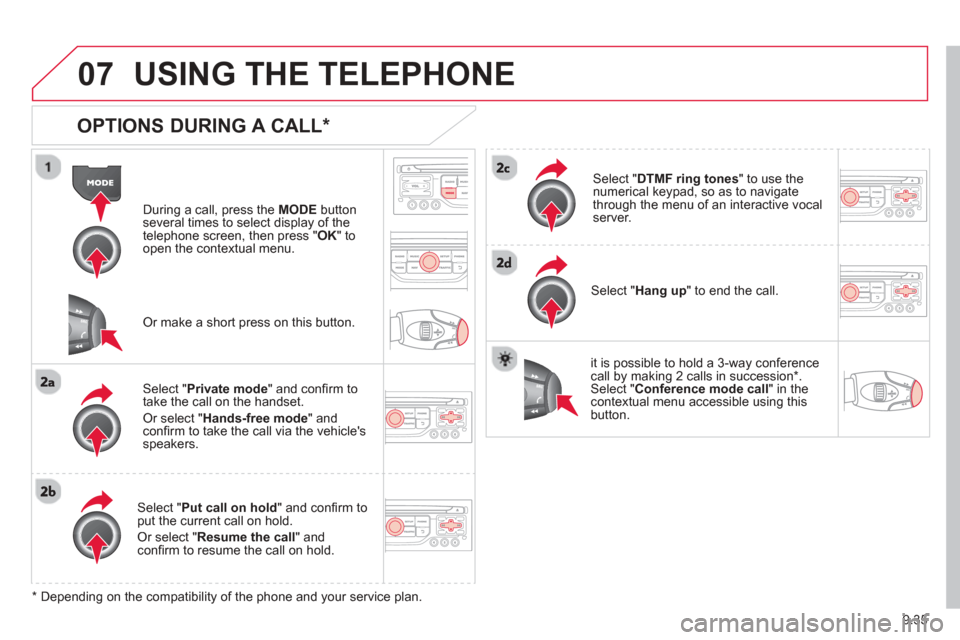
OPTIONS DURING A CALL *
During a call, press the MODE button
several times to select display of the
telephone screen, then press "
OK " to
open the contextual menu.
Select " Private mode " and confi rm totake the call on the handset.
Or select " Hands-free mode" andconfi rm to take the call via the vehicle's
speakers.
Select " Put call on hold " and confi rm to put the current call on hold.
Or select " Resume the call" andconfi rm to resume the call on hold.
Select " DTMF ring tones " to use thenumerical keypad, so as to navigate
through the menu of an interactive vocal server.
Select " Hang up " to end the call.
* Depending on the compatibility of the phone and your service plan. it is possible to hold a 3-wa
y conferencecall by making 2 calls in succession*. Select "Conferencemode call" in the contextual menu accessible using thisbutton.
Or make a short press on this button.
Page 215 of 236
9.73
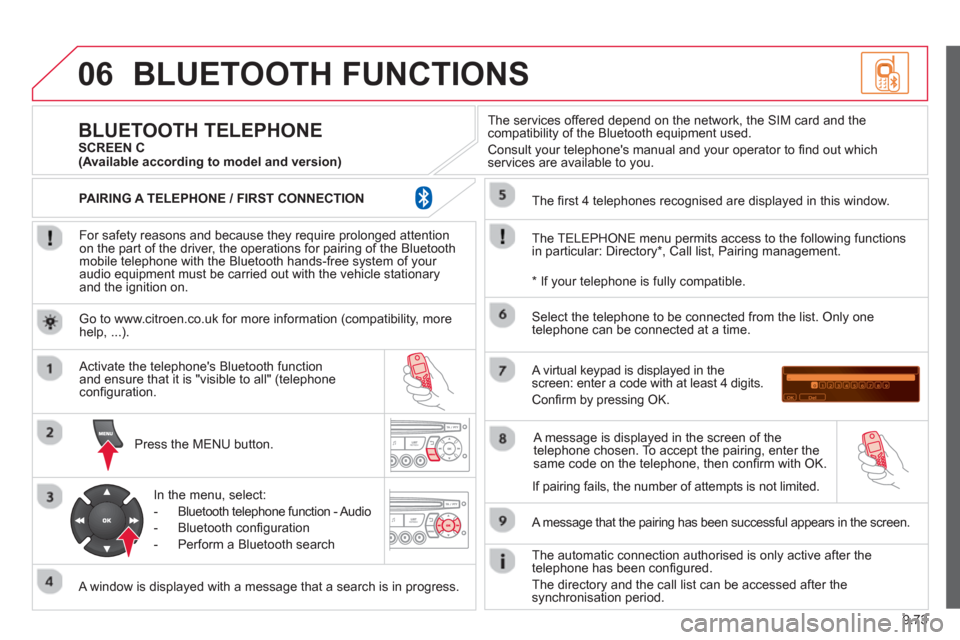
06BLUETOOTH FUNCTIONS
For safety reasons and because they require prolonged attentionon the part of the driver, the operations for pairing of the Bluetooth mobile telephone with the Bluetooth hands-free system of your
audio equipment must be carried out with the vehicle stationary
and the ignition on.
Pr
ess the MENU button.
A window is displayed with a message that a search is in progress.
Activate the telephone's Bluetooth
function
and ensure that it is "visible to all" (telephone confi guration.
In the menu, select:
- Bluetooth telephone
function - Audio
- Bluetooth con
fi guration
- P
erform a Bluetooth search
The services o
ffered depend on the network, the SIM card and thecompatibility of the Bluetooth equipment used.
Consult your telephone's manual and your operator to fi nd out which
services are available to you.
BLUETOOTH TELEPHONE SCREEN C
The TELEPH
ONE menu permits access to the following functions
in particular: Directory * , Call list, Pairing management.
The
fi rst 4 telephones recognised are displayed in this window.
A virtual ke
ypad is displayed in thescreen: enter a code with at least 4 digits.
Confi rm by pressing OK.
A messa
ge that the pairing has been successful appears in the screen.
Select the telephone to be connected from the list.
Only one
telephone can be connected at a time.
A messa
ge is displayed in the screen of the
telephone chosen. To accept the pairing, enter the same code on the telephone, then confi rm with OK.
The automatic connection authorised is onl
y active after the
telephone has been confi gured.
The directory and the call list can be accessed a
fter thesynchronisation period.
(Available according to model and version)
*
If your telephone is fully compatible.
I
f pairing fails, the number of attempts is not limited. Go to www.citroen.co.uk for more information
(compatibility, more help, ...).
PAIRING A TELEPHONE / FIR
ST CONNECTION