Add blu Citroen BERLINGO 2015 2.G User Guide
[x] Cancel search | Manufacturer: CITROEN, Model Year: 2015, Model line: BERLINGO, Model: Citroen BERLINGO 2015 2.GPages: 266, PDF Size: 10.47 MB
Page 140 of 266
138
Berlingo-2-VU_en_Chap07_Verification_ed01-2015Berlingo-2-VU_en_Chap07_Verification_ed01-2015
Refilling / Topping-up the
AdBlue® additive
Precautions to take
Use only AdBlue® additive that meets
the ISO 22241 standard.
The AdBlue
® additive is an urea-based
solution.
This liquid is non-flammable, colourless
and odourless.
To be kept in a cool area.
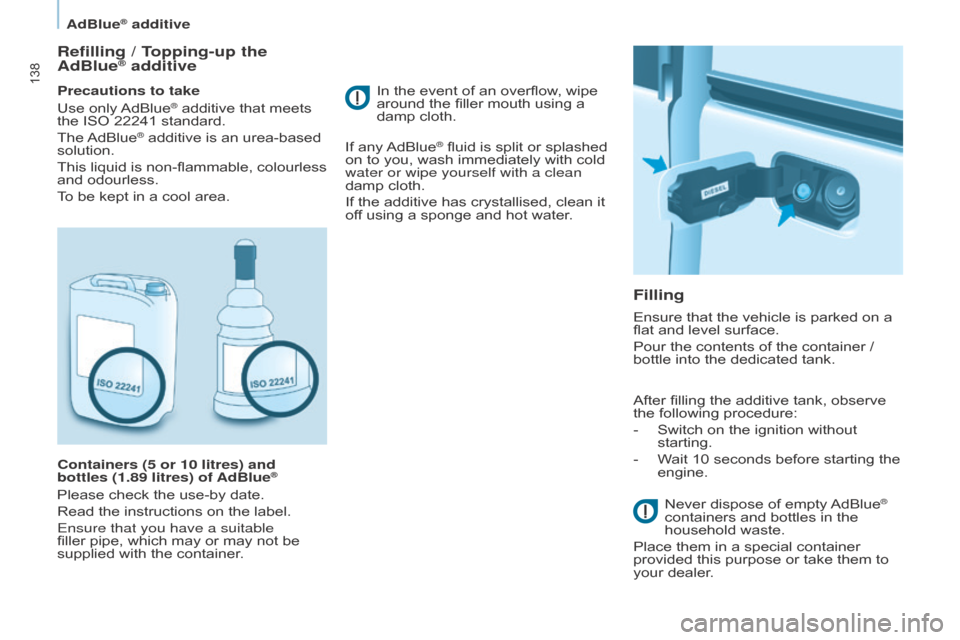
Containers (5 or 10 litres) and
bottles (1.89 litres) of AdBlue
®
Please check the use-by date.
Read the instructions on the label.
Ensure that you have a suitable
filler pipe, which may or may not be
supplied with the container.
Filling
In the event of an overflow, wipe
around the filler mouth using a
damp cloth.
If any AdBlue
® fluid is split or splashed
on to you, wash immediately with cold
water or wipe yourself with a clean
damp cloth.
If the additive has crystallised, clean it
off using a sponge and hot water.
Ensure that the vehicle is parked on a
flat and level surface.
Pour the contents of the container /
bottle into the dedicated tank.
After filling the additive tank, observe
the following procedure:
-
Switch on the ignition without
starting.
-
W
ait 10 seconds before starting the
engine.
Never dispose of empty AdBlue
®
containers and bottles in the
household waste.
Place them in a special container
provided this purpose or take them to
your dealer.
AdBlue® additive
Page 141 of 266
139
Berlingo-2-VU_en_Chap07_Verification_ed01-2015Berlingo-2-VU_en_Chap07_Verification_ed01-2015
Keep AdBlue® out of the reach
of children, in its original
container.
Never transfer AdBlue
® to another
container: it would loose its purity.
Never dilute the additive with water.
Never pour the additive into the Diesel
fuel tank.
Recommendations on storage
never store containers or bottles of
AdBlue® in your vehicle.
Freezing of the AdBlue
® additive
AdBlue® freezes at about -11°C
(12.2° F) and deteriorates above 25°C.
It is recommended that containers and
bottles be stored in a cool area and
protected from direct sunlight.
Under these conditions, the additive
can be kept for at least a year.
Additive has been frozen can be used
once it has thawed out in ambient air. The SCR system includes an
AdBlue
® tank heater that ensures
operation of the vehicle in normal
conditions.
In exceptional situations, such as when
the vehicle is kept at temperatures
below -15°C (5°F) for a long period, an
emission fault alert may be related to
freezing of the AdBlue
® additive.
Park the vehicle in an area at a more
moderate temperature for a few hours
until the additive becomes a liquid
again.
The emissions warning lamp does not
go off immediately, but will occur after
a few miles of driving.
CHECkS
7
adblue® additive
Page 173 of 266
171
Berlingo-2-VU_en_Chap10a_SMEGplus_ed01-2015
Volume adjustment (each source is
independent, including traffic announcements
(TA) and navigation instructions).Press Menu
to display the menu
carousel.
Increase volume.
Reduce volume.
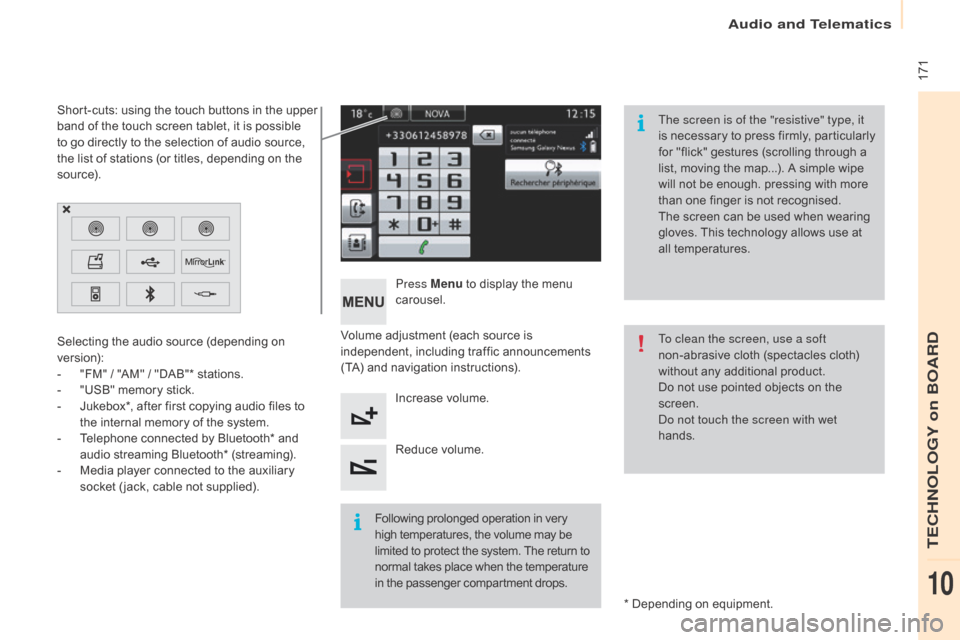
Selecting the audio source (depending on
version):
-
"
FM" / "AM" / "DAB"* stations.
-
"
USB" memory stick.
-
J
ukebox*, after first copying audio files to
the internal memory of the system.
-
T
elephone connected by Bluetooth* and
audio streaming Bluetooth* (streaming).
-
M
edia player connected to the auxiliary
socket ( jack, cable not supplied).
* Depending on equipment.
Short-cuts: using the touch buttons in the upper
band of the touch screen tablet, it is possible
to go directly to the selection of audio source,
the list of stations (or titles, depending on the
s o u r c e).
The screen is of the "resistive" type, it
is necessary to press firmly, particularly
for "flick" gestures (scrolling through a
list, moving the map...). A simple wipe
will not be enough. pressing with more
than one finger is not recognised.
The screen can be used when wearing
gloves. This technology allows use at
all temperatures.
Following prolonged operation in very
high temperatures, the volume may be
limited to protect the system. The return to
normal takes place when the temperature
in the passenger compartment drops. To clean the screen, use a soft
non-abrasive cloth (spectacles cloth)
without any additional product.
Do not use pointed objects on the
screen.
do n
ot touch the screen with wet
hands.
audio and Telematics
TECHnoLoGY on boaRd
10
Page 215 of 266
213
Berlingo-2-VU_en_Chap10a_SMEGplus_ed01-2015
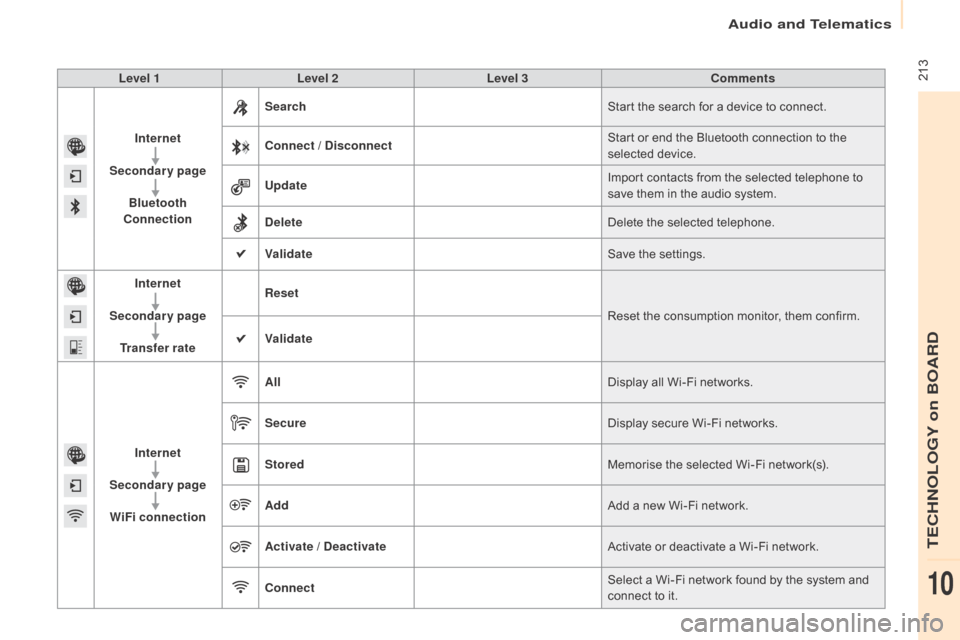
Level 1Level 2 Level 3 Comments
Internet
Secondary page Bluetooth
Connection Search
Start the search for a device to connect.
Connect / Disconnect Start or end the Bluetooth connection to the
selected device.
Update Import contacts from the selected telephone to
save them in the audio system.
Delete Delete the selected telephone.
Validate Save the settings.
Internet
Secondary page Transfer rate Reset
Reset the consumption monitor, them confirm.
Validate
Internet
Secondary page WiFi connection All
Display all Wi-Fi networks.
Secure Display secure Wi-Fi networks.
Stored Memorise the selected Wi-Fi network(s).
Add Add a new Wi-Fi network.
Activate / Deactivate Activate or deactivate a Wi-Fi network.
Connect Select a Wi-Fi network found by the system and
connect to it.
Audio and Telematics
TECHnOLOGY on BOARD
10
Page 223 of 266
221
Berlingo-2-VU_en_Chap10a_SMEGplus_ed01-2015
The services available depend on
the network, the SIM card and the
compatibility of the Bluetooth telephone
used. Check the telephone manual and
with your network provider for details of
the services available to you.
The ability of the system to connect
with only one profile depends on the
telephone. The two profiles may both
connect by default.
Visit www.citroen.co.uk for more information
(compatibility, additional help, ...).
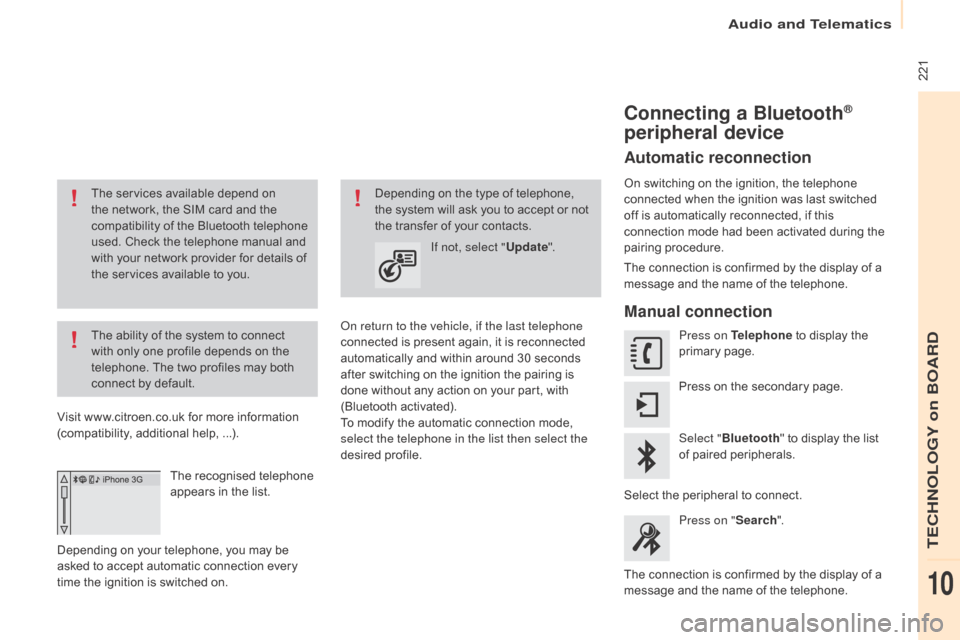
The recognised telephone
appears in the list.
Depending on your telephone, you may be
asked to accept automatic connection every
time the ignition is switched on.
on r
eturn to the vehicle, if the last telephone
connected is present again, it is reconnected
automatically and within around 30 seconds
after switching on the ignition the pairing is
done without any action on your part, with
(Bluetooth activated).
To modify the automatic connection mode,
select the telephone in the list then select the
desired profile. Depending on the type of telephone,
the system will ask you to accept or not
the transfer of your contacts.
If not, select " Update".
Connecting a Bluetooth®
peripheral device
Automatic reconnection
On switching on the ignition, the telephone
connected when the ignition was last switched
off is automatically reconnected, if this
connection mode had been activated during the
pairing procedure.
The connection is confirmed by the display of a
message and the name of the telephone.
Manual connection
Press on Telephone to display the
primary page.
Press on the secondary page.
Select " Bluetooth " to display the list
of paired peripherals.
Select the peripheral to connect. Press on " Search".
The connection is confirmed by the display of a
message and the name of the telephone.
audio and Telematics
TECHnoLoGY on boaRd
10
Page 262 of 266
1
1
1
2
3
4
5
6
7
8
9
10
11
Audio and Telematics 5
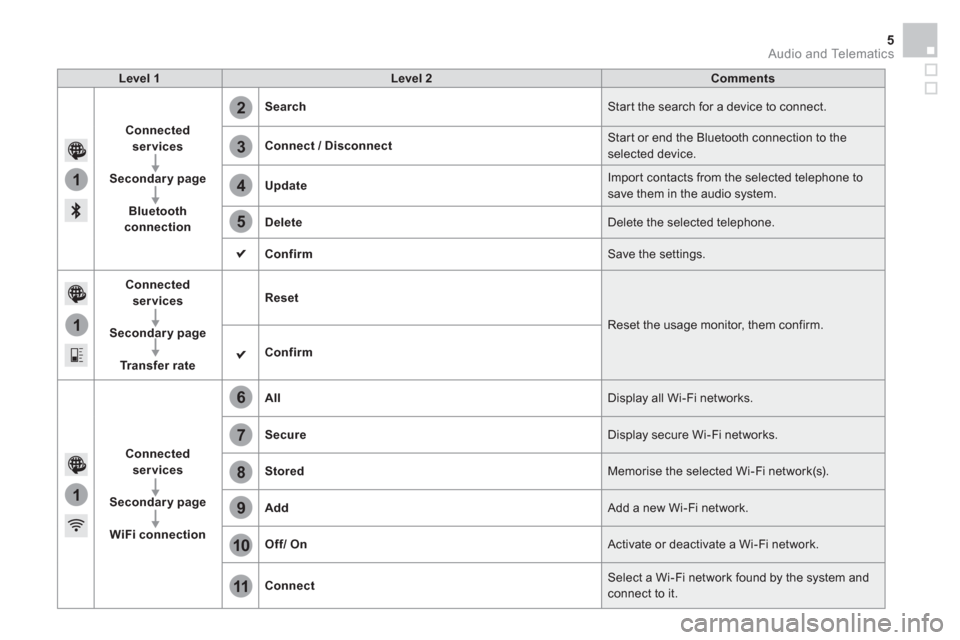
Level 1
Level 2
Comments
Connected
services
Secondary page
Bluetooth
connection
Search
Start the search for a device to connect.
Connect / Disconnect
Start or end the Bluetooth connection to the
selected device.
Update
Import contacts from the selected telephone to
save them in the audio system.
Delete
Delete the selected telephone.
Confirm
Save the settings.
Connected
services
Secondary page
Tr a n s f e r r a t e
Reset
Reset the usage monitor, them confirm.
Confirm
Connected
services
Secondary page
WiFi connection
All
Display all Wi-Fi networks.
Secure
Display secure Wi-Fi networks.
Stored
Memorise the selected Wi-Fi network(s).
Add
Add a new Wi-Fi network.
Off/
On
Activate or deactivate a Wi-Fi network.
Connect
Select a Wi-Fi network found by the system and
connect to it.