belt CITROEN BERLINGO VAN 2020 Owner's Guide
[x] Cancel search | Manufacturer: CITROEN, Model Year: 2020, Model line: BERLINGO VAN, Model: CITROEN BERLINGO VAN 2020Pages: 324, PDF Size: 9.41 MB
Page 217 of 324
215
In the event of a breakdown
8circumstances be discarded with household
waste.
Dispose of used batteries at a designated
collection point.
Protect your eyes and face before
handling the battery.
All operations on the battery must be carried
out in a well ventilated area and away from
naked flames and sources of sparks, to avoid
any risk of explosion or fire.
Wash your hands afterwards.
Electric motor
Flat accessory battery
It is no longer possible to start the motor
or recharge the traction battery.
Precautions before working on the
accessory battery
Select mode
P, switch off the ignition, check
that the instrument panel is off and that the
vehicle is not being charged.
Jump-starting another vehicle
Do not use the accessory battery to
jump-start another vehicle or to charge
another vehicle's battery.
Symbols
No sparks or naked flames, no smoking.
Always protect your eyes. Explosive gases can cause blindness and injury.
Keep the vehicle's battery out of the reach
of children.
The vehicle's battery contains sulphuric acid which can make you go blind or
cause severe burns.
For more information, refer to the
handbook.
Explosive gases can be present close to
the battery.
Access to the battery
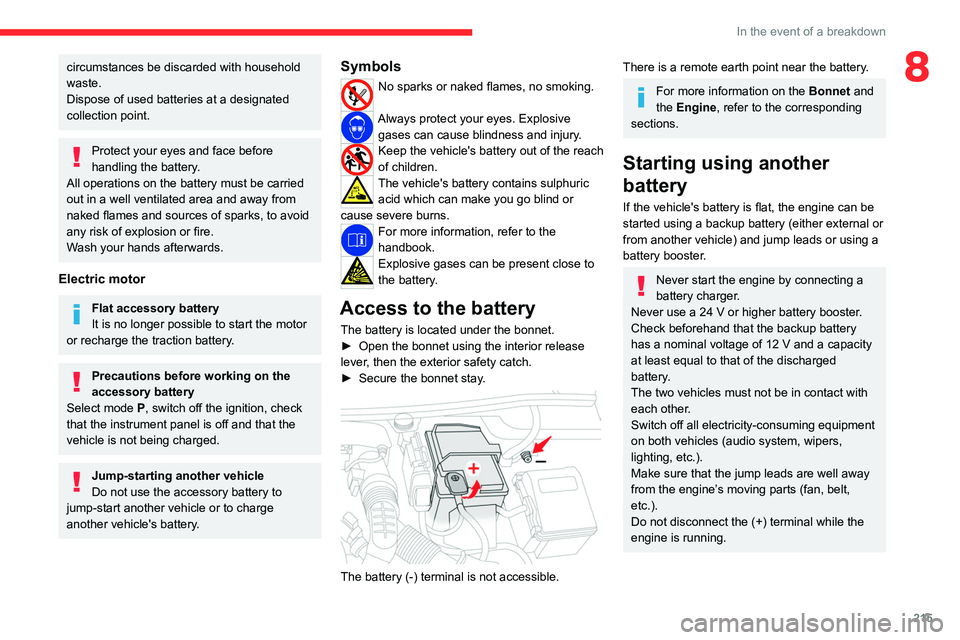
The battery is located under the bonnet.
► Open the bonnet using the interior release
lever
, then the exterior safety catch.
►
Secure the bonnet stay
.
The battery (-) terminal is not accessible.
There is a remote earth point near the battery.
For more information on the Bonnet and
the Engine , refer to the corresponding
sections.
Starting using another
battery
If the vehicle's battery is flat, the engine can be
started using a backup battery (either external or
from another vehicle) and jump leads or using a
battery booster.
Never start the engine by connecting a
battery charger.
Never use a 24
V or higher battery booster.
Check beforehand that the backup battery
has a nominal voltage of 12
V and a capacity
at least equal to that of the discharged
battery.
The two vehicles must not be in contact with
each other.
Switch off all electricity-consuming equipment
on both vehicles (audio system, wipers,
lighting, etc.).
Make sure that the jump leads are well away
from the engine’s moving parts (fan, belt,
etc.).
Do not disconnect the (+) terminal while the
engine is running.
Page 287 of 324

285
Event data recorders
13Event data recorders
Electronic control units are installed in your
vehicle. Control units process data which is
received by vehicle sensors, for example, or
which they generate themselves or exchange
amongst themselves. Some control units are
necessary for the safe functioning of your
vehicle, others assist you while you drive (driver
assistance systems), while others provide
comfort or infotainment functions.
The following contains general information about
data processing in the vehicle. You will find
additional information as to which specific data is
uploaded, stored and passed on to third parties
and for what purpose in your vehicle under
the key word Data Protection closely linked
to the references for the affected functional
characteristics in the relevant owner's manual
or in the general terms of sale. These are also
available online.
Vehicle operating data
The control units process the data used for the
operation of the vehicle.
This data includes, for example:
–
Information about the state of the vehicle
(e.g.
speed, travel time, lateral acceleration,
wheel rotation rate, fastened seat belts display).
–
Environmental conditions (e.g.
temperature,
rain sensor, distance sensor).
As a general rule, this data is temporary, is
not stored for longer than one operating cycle and is only used within the vehicle itself. The
control units often record this data (including the
vehicle's key). This function allows either the
temporary or permanent storage of information
about the state of the vehicle, stresses on
components, servicing requirements, as well as
events and technical errors.
Depending on the vehicle's equipment level, the
data stored is as follows:
–
Operating state of system components
(e.g.
filling level, tyre pressures, battery charge
status).
–
Faults and malfunctions in important system
components (e.g.
lamps, brakes).
–
System reactions in specific driving situations
(e.g.
deployment of an airbag, triggering of
stability control and braking systems).
–
Information about events which have
damaged the vehicle.
–
For electric and rechargeable hybrid vehicles,
the traction battery charge level and the
estimated driving range.
In particular circumstances (e.g.
if the vehicle
has detected a malfunction), it may be necessary
to record data which would otherwise simply not
be stored.
When taking your vehicle in for servicing
(e.g.
repairs, maintenance), the stored operating
data may be read along with the vehicle's
identification number and used if necessary.
The personnel working for the servicing network
(e.g.
garages, manufacturers) or third parties
(e.g.
roadside assistance agents) may read the vehicle's data. This also applies to work
carried out under warranty and quality assurance
measures.
This data is generally read via the OBD
(On-Board Diagnostics) port fitted by law to
the vehicle. It is used to report on the technical
state of the vehicle or its components and
facilitates the diagnosis of malfunctions, in
compliance with warranty obligations and for
quality improvement. This data, in particular the
information relating to stress on components,
technical events, operator errors and other
malfunctions, is sent to the Manufacturer, if
necessary, along with the vehicle's identification
number. The Manufacturer's liability may also be
engaged. The Manufacturer may also use the
operating data taken from the vehicle for product
recalls. This data may also be used to check the
customer's warranty and any claims made under
warranty.
Any malfunctions stored in the vehicle may be
reset by an after-sales service company during
servicing or repair work, or at your request.
Comfort and infotainment
functions
Comfort settings and personalised settings
may
be saved in the vehicle and modified or
reinitialised at any time.
Depending on the vehicle's equipment level,
this
may
include:
–
Seat and steering wheel position settings.
Page 294 of 324
292
Alphabetical index
N
Navigation 266–268
Navigation, connected
269–271
Net
65–66
Net, high load retaining
64
Number plate lamps
214
O
Obstacle detection 161
Oil change
193
Oil consumption
193
OIl, engine
193
On-board tools
202–203
Opening the bonnet
192
Opening the boot
32–33
Opening the doors
32–33
Overhead storage
60
P
Pads, brake 196
Paint
201, 236
Paint colour code
236
Park Assist
169
Parking brake
123, 196
Parking brake, electric
123–125, 197
Parking sensors, audible and visual
161
Parking sensors, front
162
Parking sensors, rear 161
Passenger compartment temperature pre-
conditioning (Electric)
81
Passenger's air bag
70
Pedestrian horn (Electric)
95, 118
Personalisation
12–13
Plates, identification
236
Player, Apple®
241, 253, 276
Player, USB
241, 252, 275
Port, USB
62, 241, 252–253, 271, 275
Power indicator (Electric)
9
Pressures, tyres
197, 206, 209, 236
Pre-tensioning seat belts
102
Priming pump
202
Priming the fuel system
202
Profiles
256, 280
Programmable cruise control
146
Protecting children
104, 106–108, 110, 114–116
Public fast charging station
179, 185
Puncture
204, 206
R
Radar (warnings) 139
Radio
239–241, 250–251, 274
Radio, digital (Digital Audio
Broadcasting - DAB)
240, 252, 275
Range, AdBlue®
195
RDS
240, 251, 274
Rear screen, demisting
78
Recharging the battery
216–217
Recharging the traction battery 180
Recharging the traction battery
(Electric)
176, 183, 185–186
Recirculation, air
75–76
Recovery
218
Recovery of the vehicle
218
Reduction of electrical load
188
Regeneration of the particle filter
196
Regenerative braking (deceleration by engine
braking)
132–133
Reinitialisation of the under-inflation
detection system
137
Reinitialising the remote control
41
Reminder, key in ignition
121
Reminder, lighting on
84
Remote control
32–35, 37–38, 119
Remotely operable functions (Electric)
81, 186
Removing a wheel
207–208
Removing the mat
60
Replacing bulbs
209–210
Replacing fuses
214
Replacing the air filter
196
Replacing the oil filter
196
Replacing the passenger compartment
filter
196
Reservoir, screenwash
195
Rev counter
10, 12
Reversing camera
139, 163, 166–167
Reversing lamps
213
Roof
60
Roof bars
191
Roof flap
44
Page 295 of 324
293
Alphabetical index
Running out of fuel (Diesel) 202
S
Safety, children 104, 106–108, 110, 114–116
Saturation of the particle filter (Diesel)
196
Screen, cold climate
188
Screen menu map
254
Screenwash
89
Screenwash, front
88
Screenwash, rear
89
SCR (Selective Catalytic Reduction)
197
Seat belts
99–102, 109
Seat, bench front, 2-seat
55–56, 100
Seat, rear bench
56, 58
Seats, front
50–52, 55–56
Seats, front bench
55–56
Seats, heated
52–53
Seats, Multiflex ~ Extenso Cab
68
Seats, rear
50, 55–58, 107
Selector, gear
130–132
Sensors (warnings)
140
Serial number, vehicle
236
Service indicator
20
Servicing
20, 195
Settings, equipment
29–30
Settings, system
244, 257, 280
Shield, snow
188
Sidelamps
83–85, 210–211
Side parking sensors
162
Side repeater
2 11
Silent vehicle warning sound (Electric)
95, 118
Sliding side door, electric 37, 44
Smartphone
62
Snow chains
137, 188
Snow screen
188
Socket, 12 V accessory
60–61
Socket, 220 V
62
Socket, auxiliary
241, 252, 275
Socket, Jack
275
Speed limiter
142–145, 152
Speed limit recognition
140, 142
Speedometer
10, 12, 140
Sport mode
134
Stability control (ESC)
95–98
Starting a Diesel engine
174
Starting the engine
119, 121
Starting the vehicle
120, 122, 127–129, 131
Starting using another battery
122, 215
Station, radio
239–240, 250–251, 274
Stay, bonnet
192
Steering mounted controls, audio
237–238, 248, 261
Steering wheel, adjustment
53
Stickers, customising ~ Stickers,
expressive
201
Stopping the vehicle
121–122,
127–129, 131–132
Stop & Start
28, 74, 78, 134–136, 174, 192, 195, 218
Storage
60
Storage boxes
63
Stowing rings
67
Sunshine sensor
73
Super-fast charging (Electric)
185–186, 236Surround Rear Vision 164
Switching off the engine
119, 121
Synchronising the remote control
41
T
Tables of engines 236
Tank, fuel
174–175
Technical data
227–231, 235, 236
Telephone
242–243, 255–256, 277–279
Time (setting)
244, 257, 281
TMC (Traffic info)
268
Tools
203
Topping-up AdBlue®
198
Touch screen
28–30, 81
Towbar
96, 189
Towed loads
227–231, 235, 236
Towing another vehicle
218–219
Towing eye
219
Traction battery charge
180
Traction battery (Electric)
30, 176–177, 236
Traction control (ASR)
96–98
Traffic information (TMC)
268
Trailer
96, 189
Trailer stability assist (TSA)
96
Trajectory control systems
95
Triangle, warning
67
Trip computer
27–28
Type of bulbs
210
Tyres
197, 236
Tyre under-inflation detection
136–137, 206
Page 296 of 324
294
Alphabetical index
U
Under-inflation (detection) 136
Unlocking
32–37
Unlocking from the inside
41–42
Unlocking, selective
34–35
Unlocking, total
34–35
Updating the date
258, 280
Updating the time
244, 257, 281
USB
241, 252–253, 271, 275
V
Vehicle data recording and privacy 285
Ventilation
73–75, 79–80
Video
276
Visiopark 1
166
Voice commands
263–266
W
Wallbox (Electric) 179
Warning and indicator lamps
13–14
Warning lamp, driver's seat belt
not fastened
101
Warning lamps
14
Warning lamp, seat belts
101
Warnings and indicators
13–14
Washer jets, heated
78
Washing
140
Washing (advice)
177, 200–201
Weights
227–231, 235, 236
Welcome lighting 33
Wheel, spare
137, 197, 202–203,
206–207, 209
Windows, rear doors
49
Windscreen, heated
78
Windscreen wipers
88, 90
Wiper blades (changing)
89–90
Wiper, rear
89
Wipers
88, 90
Wipers, automatic rain sensitive
90