audio Citroen C ZERO 2011 1.G Owner's Guide
[x] Cancel search | Manufacturer: CITROEN, Model Year: 2011, Model line: C ZERO, Model: Citroen C ZERO 2011 1.GPages: 164, PDF Size: 8.98 MB
Page 149 of 164

147
FREQUENTLY ASKED QUESTIONS
QUESTION
ANSWER
SOLUTION
There is a difference in
sound quality between
the different audio
sources (radio, CD...).
For optimum sound quality, the audio settings (volume, bass, treble,
ambience, loudness) can be adapted to the different sound sources, which
may result in audible differences when changing source (radio, CD...). Check that the audio settings (volume, bass,
treble, ambience, loudness) are adapted to the
sources listened to. It is advisable to adjust audio
settings (bass, treble, Front-Rear balance, Left-
Right balance) to the middle position, select the
musical ambience and set the loudness correction
to the "Active" position in CD mode or to the
"Inactive" position in radio mode.
When changing the
settings for treble and
bass, the ambience
setting is deselected.
When changing the
ambience setting, treble
and bass are reset to
zero. Choosing an ambience imposes settings for treble and bass. Modifying
one without the other is only possible with a personalised ambience. Modify the treble and bass settings or the
ambience setting to obtain the desired sound
quality.
When changing the
balance setting,
distribution is deselected. Choosing the "driver" distribution setting imposes a balance setting. Modify the balance setting or the distribution
setting to obtain the desired sound quality. The following tables contain answers to the most frequently asked questions.
Page 150 of 164

148
FREQUENTLY ASKED QUESTIONS
QUESTION
ANSWER
SOLUTION
The quality of reception
of the radio station
listened to gradually
deteriorates or the stored
stations do not function
(no sound, 87.5 MHz is
displayed...). The vehicle is too far from the transmitter used by the station listened
to or there is no transmitter in the geographical area through which the
vehicle is travelling. Activate the RDS function to enable the system
to check whether there is a more powerful
transmitter in the geographical area.
The environment (hills, buildings, tunnels, basement car parks...) block
reception, including in RDS mode. This phenomenon is normal and does not indicate
a failure of the audio equipment.
The aerial is absent or has been damaged (for example when going
through a car wash or into an underground car park). Have the aerial checked by a CITROËN dealer.
Sound cut-outs of 1 to
2 seconds in radio mode. During this brief sound cut-out, the RDS searches for any frequency
permitting better reception of the station. Deactivate the RDS function if the phenomenon is
too frequent and always on the same route.
Traffi c announcement
TA is displayed. I do
not receive any traffi c
information. The radio station does not broadcast traffi c information. Tune to a radio station which broadcasts traffi c
information.
The stored stations are
not found (no sound,
87.5 MHz is displayed...). An incorrect waveband is selected. Press the SRC/TEL button to return to the
waveband (FM1 or FM2) on which the stations are
stored.
Page 151 of 164

149
FREQUENTLY ASKED QUESTIONS
QUESTION
ANSWER
SOLUTION
The CD is ejected
automatically or is not
played by the player. The CD is inserted upside down, is unplayable, does not contain any
audio data or contains an audio format which the player cannot play.
The CD is protected by an anti-pirating protection system which is not
recognised by the audio equipment.
- Check that the CD is inserted in the player the
right way up.
- Check the condition of the CD: the CD cannot
be played if it is too damaged.
- Check the content in the case of a recorded
CD: consult the advice in the "Audio" section.
- The audio equipment's CD player does not
play DVDs.
- Due to their quality level, certain writeable
CDs will not be played by the audio system.
The CD player sound is
poor. The CD used is scratched or of poor quality. Insert good quality CDs and store them in suitable
conditions.
The audio settings (bass, treble, ambience) are unsuitable. Set the treble or bass level to 0, without selecting
an ambience.
The Bluetooth connection
is cut. The battery of the peripheral may not be suffi ciently charged. Recharge the battery of the peripheral device.
The message "USB
device error" is displayed
on the screen. The USB memory stick is not recognised.
The memory stick may be corrupt. Reformat the memory stick.
A telephone connects
automatically,
disconnecting another
telephone. Automatic connection overrides manual connection. Modify the telephone settings to remove automatic
connection.
Page 152 of 164

150
FREQUENTLY ASKED QUESTIONS
QUESTION
ANSWER
SOLUTION
An iPod is not recognised
when connecting to the
USB port. The iPod is of a generation that is not compatible with the USB.
The hard disk or device
is not recognised when
connecting to the USB
port. Some hard disks and devices need a power supply greater than is
provided by the audio system. Connect the device to the 230 V socket, the 12 V
socket or an external power supply.
Caution
: ensure that the device does not transmit
a voltage greater than 5 V (risk of destruction of
the system).
When streaming, the
sound cuts momentarily. Some telephones prioritise connection of the "hands-free" profi le. Delete the "hands-free" connection profi le to
improve streaming.
In "Random all" play,
not all of the tracks are
played. In "Random all" play, the system can only take into account up to
999 tracks.
With the engine off,
the audio system
switches off after a few
minutes of use. When the engine is switched off, the audio system operating time
depends on the battery charge.
The switch-off is normal: the audio system switches to economy mode
and switches off to prevent discharging the vehicle's battery. Start the vehicle's engine to increase the battery
charge.
The message "the audio
system is overheated"
appears on the display. In order to protect the installation if the surrounding temperature is too
high, the audio system switches to an automatic thermal protection mode
leading to a reduction of the volume or stopping of the playing of the CD. Switch the audio system off for a few minutes to
allow the system to cool.
Page 155 of 164
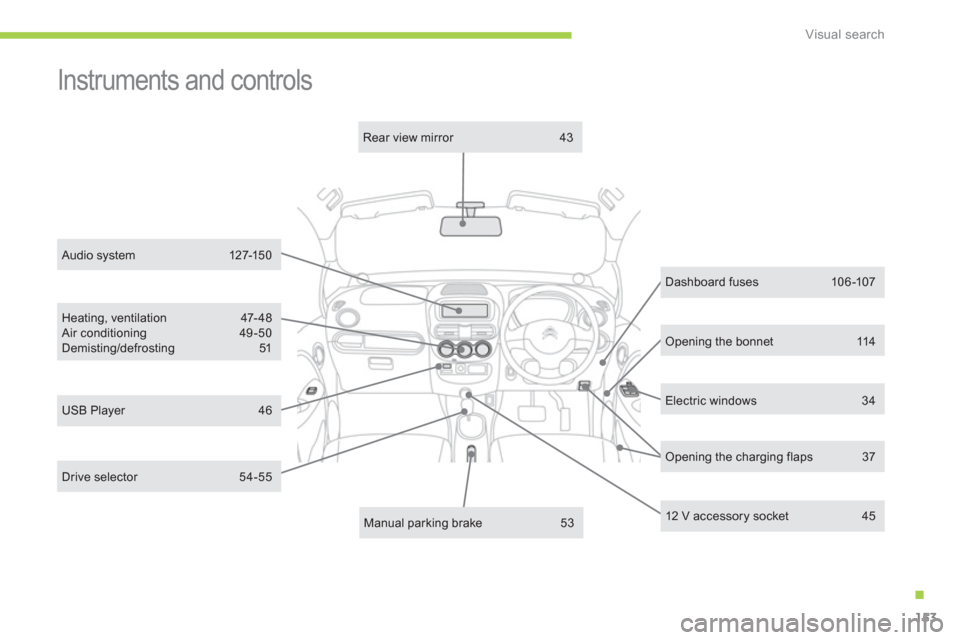
.
Visual search
153
Electric windows 34
Dashboard fuses 106 -107
Heating, ventilation 47- 48
Air conditioning 49 -50
Demisting/defrosting 51
12 V accessory socket 45
Manual parking brake 53
Rear view mirror 43
USB Player 46
Opening the bonnet 114
Instruments and controls
Opening the charging flaps 37
Audio system 127-150
Drive selector 54-55
Page 158 of 164

Alphabetical index
156
ABS ............................................................... 70
ABS and EBFD systems ............................... 70
Accessories ................................................ 111
Accessory socket, 12 V ..........................44, 45
Access to bulbs ............................................. 97
Adjusting headlamps .................................... 58
Adjusting head restraints .............................. 39
Airbags .......................................................... 76
Airbags, curtain ....................................... 78, 79
Airbags, front ........................................... 76, 79
Airbags, lateral ........................................ 78, 79
Air conditioning ....................................... 48 -50
Air vents ........................................................ 47
Anti-lock braking system (ABS) .................... 70
Assistance call ...................................... 70, 126
Audible warning ............................................ 69
Audio streaming (Bluetooth) ....................... 137
Automatic illumination of headlamps ............ 58
Automatic switching off of lighting ................ 58CD MP3 ................................................ 132-134
Changing a bulb ..................................... 97-104
Changing a fuse .......................................... 105
Changing a wiper blade .............................. 110
Charging flaps ............................................... 37
Charging the battery ..................................... 80
Checking levels .................................... 117, 118
Checks .................................................115, 119
Children ....................................... 61- 68, 75, 77
Child seats ............................................. 61, 64
Closing the boot ............................................ 36
Coolant level ............................................... 117
Cup holder ..................................................... 44
Daytime running lamps ................................. 58
Deactivating the passenger airbag ............... 77
Deactivating the rear windows...................... 34
Defrosting ...................................................... 51
Demisting ...................................................... 51
Dimensions ................................................. 122
Dipped beam ......................................... 97, 103
Direction indicators ......... 69, 97, 101, 102, 103
Display screen ........................................ 28, 29
Doors ............................................................. 35
Door trays ...................................................... 44
Drive selector ................................................ 54Electronic brake force distribution (EBFD) ... 70
Electronic engine immobiliser .................32, 33
Emergency braking system .......................... 71
Emergency call ..................................... 70, 126
Emergency warning lamps ........................... 69
Energy consumption/generation indicator .... 27
Environment ...................... 17, 48, 49, 118, 123
ESP/ASR ....................................................... 72
A
B
C
D
Battery, ancillaries ................................ 86, 117
Battery, main ................................................. 80
Bluetooth (hands-free) ................................ 138
Bonnet, front................................................ 114
Bonnet stay ................................................. 114
Brake discs .................................................. 119
Brake lamps ................................................ 102
Brake pads .................................................. 119
Brakes ......................................................... 119
Braking assistance system ........................... 70
Bulbs (changing, type) ........................... 97-104Fitting a wheel ............................................... 96
Fitting the mat ............................................... 45
Flashing indicators .......... 69, 97, 101, 102, 103
Foglamps ...................................... 57, 101, 104
Folding/unfolding the door mirrors................ 42
Front compar tment ..................................... 115
Front foglamps .................................57, 97, 101
Front seats .................................................... 38
Fuses ........................................................... 105
F
156
EBA (Emergency braking assistance) .... 70, 71
Electric motor .............................................. 120
E
Hands-free kit.............................................. 138
Hazard warning lamps .................................. 69
Headlamp adjustment ................................... 58
Head restraints ........................................ 38 - 40
Heating .......................................................... 49
Heating system fluid level ........................... 117
H