ignition Citroen C ZERO 2011 1.G Owner's Guide
[x] Cancel search | Manufacturer: CITROEN, Model Year: 2011, Model line: C ZERO, Model: Citroen C ZERO 2011 1.GPages: 164, PDF Size: 8.98 MB
Page 107 of 164

8
i
!
Practical information
105
Changing a fuse
The extraction tweezer is fitted to the back of
the fusebox cover in the dashboard (right hand
side).
For access:
)
Unclip the cover and remove it completely
by pulling it towards you.
)
Remove the tweezer.
Access to tools
Before changing a fuse, the cause of
the failure must be identified
and rectified.
)
Check that the ignition switch is in
the " LOCK
" position.
)
Identify the failed fuse by checking
the condition of its filament.
Changing a fuse
Good Failed
)
Use the special tweezer to extract the fuse
from its location.
)
Always replace the failed fuse with a fuse
of the same rating.
)
Check that the number marked on the box,
the rating marked on the top of the fuse
and the tables below all agree. CITROËN will not accept responsibility
for the cost incurred in repairing your
vehicle or for rectifying the malfunctions
resulting from the installation of
accessories not supplied and not
recommended by CITROËN and
not installed in accordance with its
instructions, in par ticular when the
consumption of all of the additional
equipment connected exceeds
10 milliamperes. Your vehicle’s electrical system is
designed to operate with standard or
optional equipment.
Before installing other electrical
equipment or accessories in your
vehicle, contact a CITROËN dealer or a
qualified workshop.
Page 128 of 164

126
EMERGENCY OR ASSISTANCE CALL
CITROËN LOCALISED EMERGENCY CALL
In an emergency, press this button for more than
2 seconds. Flashing of the green LED and a voice
message confi rm that the call has been made to the
CITROËN Emergency team * .
Pressing this button again immediately cancels the request. The green
LED goes off.
A press (at any time) of more than 8 seconds on this button, cancels the
request.
CITROËN LOCALISED ASSISTANCE CALL
When the ignition is switched on, the
green LED comes on for 3 seconds
indicating that the system is operating
correctly.
If the orange LED fl ashes: there is a
system fault.
If the orange LED is on continuously: the
backup battery must be replaced.
In either case, contact a CITROËN.
Pressing this button again immediately cancels the request.
The cancellation is confi rmed by a voice message.
Press this button for more than 2 seconds to request
assistance if the vehicle breaks down.
A voice message confi rms that the call has been made * .
OPERATION OF THE SYSTEM
The green LED remains on (without fl ashing) when communication is
established. It goes off at the end of communication.
This call is dealt with by the CITROËN Emergency team which receives
locating information from the vehicle and can send a detailed alert to the
appropriate emergency services. In countries in which the team is not
operational, or when the locating service has been expressly declined,
the call is dealt with directly by the emergency services (112) without the
vehicle location.
If an impact is detected by the airbag ECU, and independently
of the deployment of any airbags, an emergency call is made
automatically.
* These services are subject to conditions and availability.
Consult a CITROËN dealer.
If you purchased your vehicle outside the CITROËN dealer network,
we invite you to have a dealer check the confi guration of these services
and, if desired, modifi ed to suit your wishes. In a multi-lingual country,
confi guration is possible in the offi cial national language of your choice.
For technical reasons, particularly to improve the quality of Telematic
services to customers, the manufacturer reserves the right to carry out
updates to the vehicle's on-board telematic system.
If you benefi t from the CITROËN eTouch offer, you also have available
additional services in your MyCITROEN personal space, via the CITROËN
Internet website www.citroen.co.uk.
Page 136 of 164
03
1
3
2
4
134
CD, USB
AUDIO
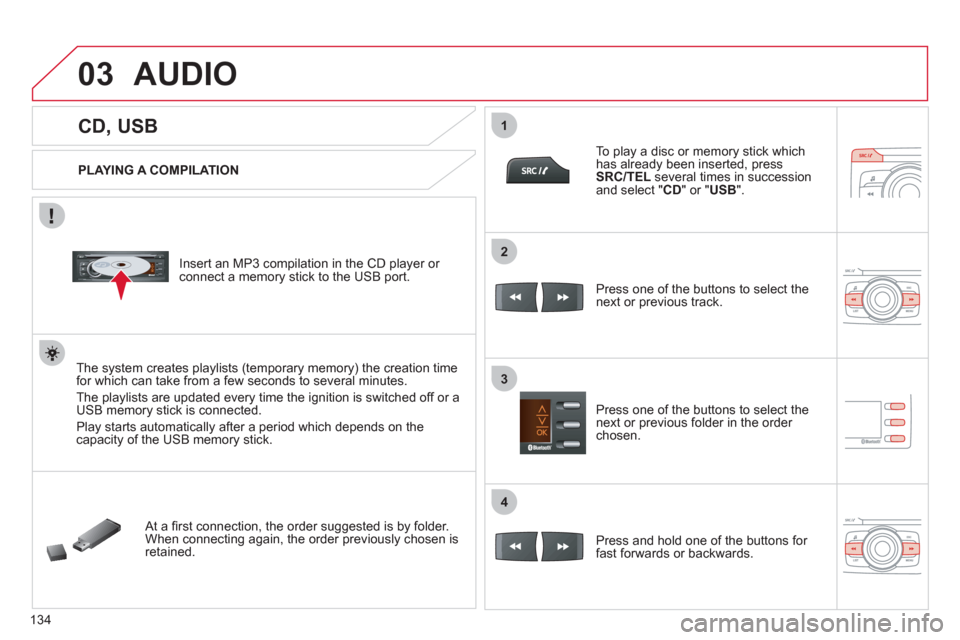
PLAYING A COMPILATION
Insert an MP3 compilation in the CD player or
connect a memory stick to the USB port.
The system creates playlists (temporary memory) the creation time
for which can take from a few seconds to several minutes.
The playlists are updated every time the ignition is switched off or a
USB memory stick is connected.
Play starts automatically after a period which depends on the
capacity of the USB memory stick.
At a fi rst connection, the order suggested is by folder.
When connecting again, the order previously chosen is
retained.
To play a disc or memory stick which
has already been inserted, press
SRC/TEL
several times in succession
and select " CD
" or " USB
".
Press one of the buttons to select the
next or previous track.
Press one of the buttons to select the
next or previous folder in the order
chosen.
Press and hold one of the buttons for
fast forwards or backwards.
Page 140 of 164

04
1
2
4
3
5
138
USING THE TELEPHONE
PAIRING A TELEPHONE/FIRST CONNECTION
The services offered depend on the network, the SIM card and the compatibility of the Bluetooth telephone used.
Consult your telephone's manual and your operator to fi nd out which services are available to you.
Activate the telephone's Bluetooth function and
ensure that it is set as visible to all (refer to the
telephone instructions).
Press MENU
then select "
Bluetooth
"
.
A window is displayed with " Searching device
".
Select the telephone to be paired from
the list and confi rm with "OK"
. Only
one telephone can be paired at a time.
Select " Search
".
For safety reasons and because they require prolonged attention on the part of the driver, the operations for pairing of the Bluetooth mobile
telephone with the Bluetooth hands-free system of your audio system must be carried out with the vehicle stationary and the ignition on.
It is not possible to pair more that 5 telephones. Press MENU
and
select "Bluetooth"
. Select "BT management"
. If 5 telephones are
already paired, select the telephone to be deleted by pressing "OK"
and select "Delete"
(refer to "Managing connections").
Visit www.citroen.co.uk for more information (compatibility, more help, ...).
Page 145 of 164
1a
1c
1b
04
143
USING THE TELEPHONE
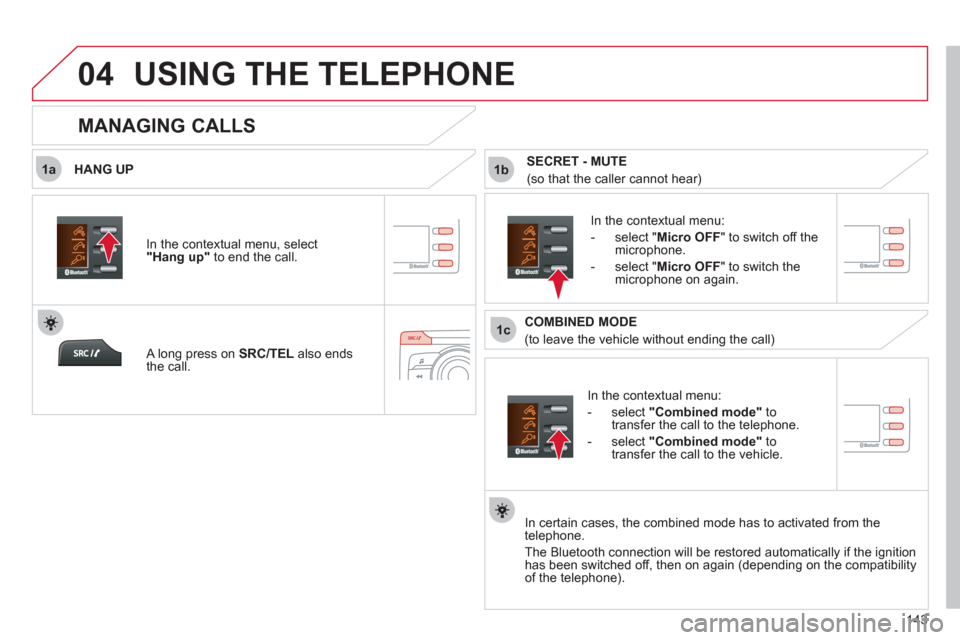
HANG UP
In the contextual menu:
- select "
Combined mode
"
to
transfer the call to the telephone.
- select "Combined mode"
to
transfer the call to the vehicle.
In the contextual menu:
- select " Micro OFF
" to switch off the
microphone.
- select " Micro OFF
" to switch the
microphone on again.
In certain cases, the combined mode has to activated from the
telephone.
The Bluetooth connection will be restored automatically if the ignition
has been switched off, then on again (depending on the compatibility
of the telephone).
MANAGING CALLS
A long press on SRC/TEL
also ends
the call. In the contextual menu, select
"
Hang up"
to end the call.
SECRET - MUTE
(so that the caller cannot hear)
COMBINED MODE
(to leave the vehicle without ending the call)
Page 156 of 164
Visual search
154
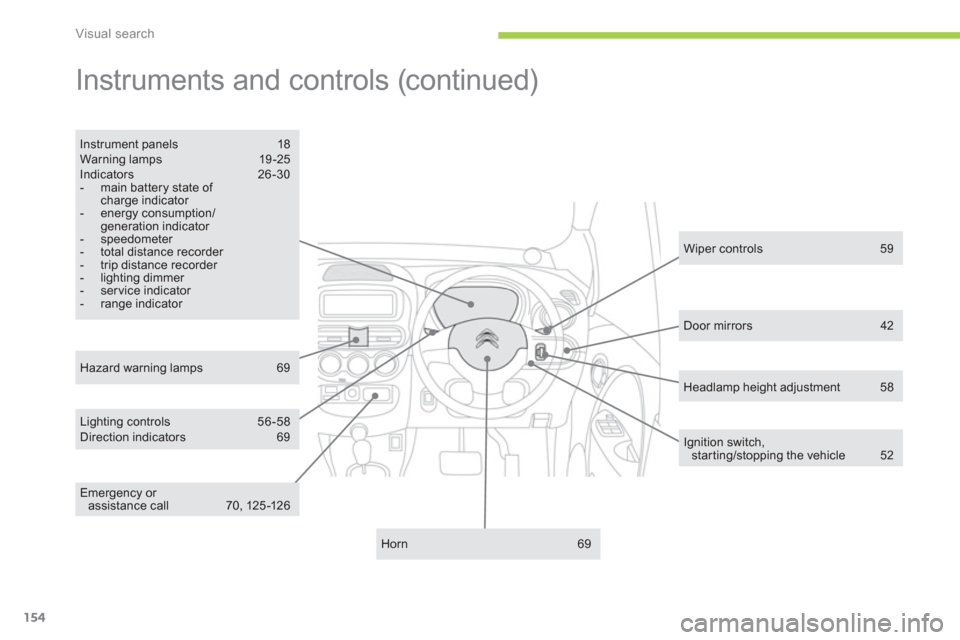
Instruments and controls (continued)
Lighting controls 56 -58
Direction indicators 69
Instrument panels 18
Warning lamps 19 -25
Indicators 26-30
- main battery state of
charge indicator
- energy consumption/
generation indicator
- speedometer
- total distance recorder
- trip distance recorder
- lighting dimmer
- ser vice indicator
- range indicator
Horn 69
Hazard warning lamps 69
Wiper controls 59
Ignition switch,
star ting/stopping the vehicle 52
Door mirrors 42
Emergency or
assistance call 70, 125 -126
Headlamp height adjustment 58